9.4 UNIQUE
UNIQUE list with totals with example — in 30 seconds
What: UNIQUE returns each value once. Put it inside SUMIFS and you get a small formula-based summary table.
Why: A city summary that grows by itself when a new city appears, without refreshing a pivot.
Tiny example: Ten rows have 6 different cities. The formula spills the cities with their totals.
UNIQUE list with totals with example — 30 सेकंदात
काय: UNIQUE प्रत्येक value एकदाच देतो. तो SUMIFS मध्ये टाकला की formula ने बनलेलं छोटं summary table मिळतं.
का: नवं शहर आलं की आपोआप वाढणारं city summary, pivot refresh न करता.
छोटं उदाहरण: दहा rows मध्ये 6 वेगवेगळी शहरं आहेत. Formula शहरं आणि त्यांचे totals spill करतो.
UNIQUE list with totals with example — 30 सेकंड में
क्या: UNIQUE हर value एक बार देता है. उसे SUMIFS में डालें तो formula से बनी छोटी summary table मिलती है.
क्यों: नया शहर आने पर अपने आप बढ़ने वाली city summary, बिना pivot refresh किए.
छोटा उदाहरण: दस rows में 6 अलग शहर हैं. Formula शहर और उनके totals spill करता है.
First look at the data (before → after):
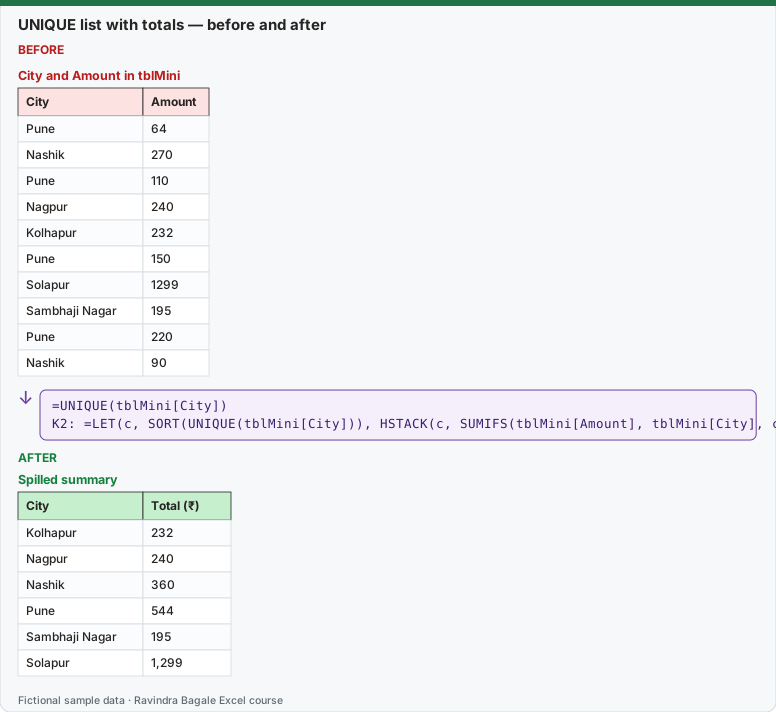
Expected result — Spilled summary
| City | Total (₹) |
|---|---|
| Kolhapur | 232 |
| Nagpur | 240 |
| Nashik | 360 |
| Pune | 544 |
| Sambhaji Nagar | 195 |
| Solapur | 1,299 |
About this data: Teaching sample for a fictional shop “Skyline Clinics”. Figures and names (e.g. Rohan Patil) are made up for this lesson on unique.
Before table and formula as text
Before — City and Amount in tblMini
| City | Amount |
|---|---|
| Pune | 64 |
| Nashik | 270 |
| Pune | 110 |
| Nagpur | 240 |
| Kolhapur | 232 |
| Pune | 150 |
| Solapur | 1299 |
| Sambhaji Nagar | 195 |
| Pune | 220 |
| Nashik | 90 |
About this data: Demo table only — not real customer or company data. Built to practise unique.
Formula / click path
=UNIQUE(tblMini[City])
K2: =LET(c, SORT(UNIQUE(tblMini[City])), HSTACK(c, SUMIFS(tblMini[Amount], tblMini[City], c)))
Do it step by step:
- Start simple: type
=UNIQUE(tblMini[City])and press Enter. - Wrap it in SORT:
=SORT(UNIQUE(tblMini[City])). - Now type the full formula in K2:
=LET(c, SORT(UNIQUE(tblMini[City])), HSTACK(c, SUMIFS(tblMini[Amount], tblMini[City], c))). - LET names the city list c, so it is calculated once and used twice.
- Check: the totals add up to 2,870.
स्टेप बाय स्टेप करून बघा:
- सोप्यापासून सुरू करा:
=UNIQUE(tblMini[City])type करा आणि Enter दाबा. - तो SORT मध्ये wrap करा:
=SORT(UNIQUE(tblMini[City])). - आता K2 मध्ये पूर्ण formula type करा:
=LET(c, SORT(UNIQUE(tblMini[City])), HSTACK(c, SUMIFS(tblMini[Amount], tblMini[City], c))). - LET city list ला c नाव देतो, म्हणजे ती एकदाच calculate होते आणि दोनदा वापरली जाते.
- Check करा: totals ची बेरीज 2,870 येते.
स्टेप बाय स्टेप करके देखें:
- आसान से शुरू करें:
=UNIQUE(tblMini[City])type करें और Enter दबाएँ. - उसे SORT में wrap करें:
=SORT(UNIQUE(tblMini[City])). - अब K2 में पूरा formula type करें:
=LET(c, SORT(UNIQUE(tblMini[City])), HSTACK(c, SUMIFS(tblMini[Amount], tblMini[City], c))). - LET city list को c नाम देता है, तो वह एक बार calculate होकर दो बार इस्तेमाल होती है.
- Check करें: totals का जोड़ 2,870 आता है.
=UNIQUE(array, [by_col], [exactly_once])
| Need | Formula | Result (mini data) |
|---|---|---|
| Distinct cities | =UNIQUE(tblMini[City]) |
6 cities |
| Distinct cities sorted | =SORT(UNIQUE(tblMini[City])) |
Kolhapur … Solapur |
| Count distinct | =COUNTA(UNIQUE(tblMini[City])) |
6 |
| Cities appearing exactly once | =UNIQUE(tblMini[City], , TRUE) |
Nagpur, Kolhapur, Solapur, Sambhaji Nagar |
| Distinct City–Platform pairs | =UNIQUE(tblMini[[City]:[Platform]]) |
7 pairs |
About this data: Made-up rows so you can copy the pattern for unique. Currencies may use ₹, £, € or $.
Worked example – a self-updating summary.
=LET(c, SORT(UNIQUE(tblMini[City])),
HSTACK(c, SUMIFS(tblMini[Amount], tblMini[City], c)))
| City | Sales |
|---|---|
| Kolhapur | 232 |
| Nagpur | 240 |
| Nashik | 360 |
| Pune | 544 |
| Sambhaji Nagar | 195 |
| Solapur | 1,299 |
About this data: Fictional worksheet used in class. Safe to edit; nothing here is live production data.
Ravindra Bagale's Tip
UNIQUE counts "pune" and "Pune " (with a space) as different – many students see 8 cities instead of 6. Clean the data before using UNIQUE (Module 5). And "exactly_once = TRUE" means items that appear only once, not distinct – this can be asked in an interview.
Ravindra Bagale's Tip – मराठी
UNIQUE "pune" आणि "Pune " (space सोबत) वेगळे मोजतो – बऱ्याच students ना 6 ऐवजी 8 cities दिसतात. UNIQUE लावण्याआधी data clean करा (Module 5). आणि "exactly_once = TRUE" म्हणजे एकदाच आलेले, distinct नाही – हे interview मध्ये विचारलं जाऊ शकतं.
Ravindra Bagale's Tip – हिंदी
UNIQUE "pune" और "Pune " (space के साथ) को अलग गिनता है – बहुत से students को 6 की जगह 8 cities दिखती हैं. UNIQUE लगाने से पहले data clean करो (Module 5). और "exactly_once = TRUE" का मतलब है सिर्फ़ एक बार आने वाले, distinct नहीं – यह interview में पूछा जा सकता है.
Practice task
Build a self-updating city summary with UNIQUE + SUMIFS + COUNTIFS (sales and orders), sorted by sales descending.
Loading practice tasks...
- Different airlines (spill) (Easy): UNIQUE of D2:D8.
- Starting cities (spill) (Easy): UNIQUE of B2:B8.
- End cities (spill) (Easy): UNIQUE of C2:C8.
- How many airlines? (Easy): Count different airlines.
- Unique routes (spill) (Medium): UNIQUE of B2:C8.
- Sorted airlines (spill) (Medium): Sorted list of airlines.
- Airlines seen once (spill) (Medium): Airlines that appear exactly once in D2:D8.
- How many routes? (Medium): Count different routes in B2:C8.
- Cities going to Rome (spill) (Hard): Different starting cities for flights to Rome.
- Routes flown once (spill) (Hard): Routes in B2:C8 that appear exactly once.
- Passengers per airline (spill) (Hard): For each airline (no repeats) in D2 to D8, add up E2 to E8.
Quick revision cards
Three standalone cards. Each one explains the idea with its own example. Scan the QR to open this lesson.