Inventory and Warehouse Management System in Excel: Stock In, Stock Out, Days of Cover, Reorder, ABC and Challan
Salman Distributors in Nagpur stocks 10 fast-moving items for shops across Maharashtra. Salman knew his stock only after a monthly count, and twice this year a shop order went short because shampoo ran out. This page builds a 9-sheet Excel system: every receipt and dispatch is one row, closing stock and days of cover update on their own, the Stock sheet says what to order and how much, and a delivery challan prints from a challan number.
What you'll learn on this page
- Keep an item master with bin, cost, reorder level and lead time
- Log goods received and dispatches as plain rows
- Work out closing stock with SUMIFS and never type it
- Turn movement into daily use and days of cover
- Flag items to order and suggest an order quantity
- Classify items A, B and C by use value
- Print a delivery challan from a challan number
Download the template: inventory-warehouse-management-system-template.xlsx: a 9-sheet system with example data and real formulas (Read me, Setup, Items, Stock in, Stock out, Stock, Delivery challan, Report, Dashboard). Yellow cells are inputs you can type over; green cells hold formulas; blue rows are headers and totals. Replace the example data with your own and every report and the dashboard recalculate.
Made-up data: every name, amount, business and date on this page is made up for practice. Cities are used only to make the examples feel real.
1. The business story
Salman Distributors, Nagpur, 1 to 17 October 2026 (made-up data). 10 SKUs in four categories, 7 goods received notes (GRNs) and 8 delivery challans.
| Question | Where the system answers it |
|---|---|
| What is in the warehouse right now? | Stock, Closing, worth ₹1,20,970 at cost |
| What runs out first? | Shampoo carton: 8 left, 6.2 days of cover against a 12-day lead time |
| What should I order today? | 2 items: Soap carton 42 and Shampoo carton 27 |
| Which items matter most? | ABC: 4 A items make about 60% of use value |
1,069 units went out on 8 challans. The one-sheet idea is in 21.3 inventory reorder sheet; days of cover at company scale is in the supply chain project. A shop with a billing counter should use the shop billing and inventory system.
Figure 1. Items is the master; Stock in and Stock out are the logs; Stock works out closing, cover and reorder; Challan, Report and Dashboard read.
2. Build it sheet by sheet
Step 1. Setup and Items
- On Setup type the as-of date in B3, the period start in B4 and safety days in B6 (15). B5 counts days in the period:
=B3-B4+1(17). - On Items row 4: SKU, Item, Category, Bin, Unit cost, Opening stock, Reorder level, Lead time (days). Category has a drop-down from Setup.
- Lead time is how many days the supplier takes. It decides when to order more than the reorder level does.
Step 2. Stock in and Stock out: the two logs
- Stock in: Date, GRN no, SKU, Item, Qty, Value, Supplier. D5 finds the item name
=XLOOKUP(C5,Items!$A$5:$A$14,Items!$B$5:$B$14,"Check SKU"); F5 value = qty × cost. - Stock out: Date, Challan no, Customer, SKU, Item, Qty, Value at cost, Key. One row per SKU per challan.
- H5 numbers the lines of each challan:
=B5&"-"&COUNTIF($B$5:B5,B5)gives DC-107-1, DC-107-2 and so on.
Step 3. Stock: closing, cover and reorder
- Row 4 headers as in the picture. D5 in
=SUMIFS('Stock in'!$E$5:$E$500,'Stock in'!$C$5:$C$500,A5), E5 out the same way on Stock out (SUMIFS), F5 closing=C5+D5-E5. - H5 daily use
=E5/Setup!$B$5and I5 days of cover=IFERROR(F5/H5,999). 999 means "not moving". - K5 order now:
=IF(OR(F5<=Items!G5,I5<=J5),"Yes","No"). Shampoo has 6.2 days of cover but a 12-day lead time, so it is Yes even though 8 is under the reorder level anyway. - L5 suggested order
=IF(K5="Yes",MAX(0,ROUNDUP(H5*(J5+Setup!$B$6)-F5,0)),0): enough for the lead time plus 15 safety days.
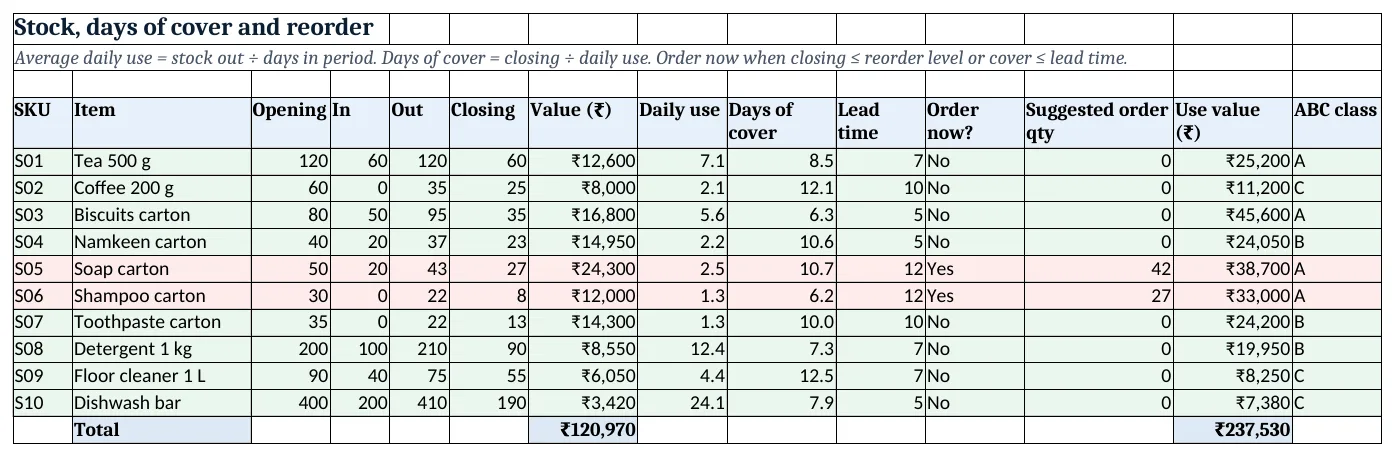
Figure 2. Stock: closing, days of cover, reorder flag, suggested quantity and ABC class
Step 4. ABC class
- M5 use value
=E5*Items!E5(units out × cost). - N5 class:
=IF(SUMIF($M$5:$M$14,">="&M5)/SUM($M$5:$M$14)<=0.7,"A",IF(…<=0.9,"B","C")). SUMIF with ">=" adds this item and every bigger one, which is the running share without sorting. - A items (Biscuits, Soap, Shampoo, Tea here) get a weekly count; C items once a month.
Step 5. Delivery challan
- Type a challan number in B4. B5 and D5 pull the date and customer with XLOOKUP.
- Rows 8 to 15: B8
=XLOOKUP($B$4&"-"&A8,'Stock out'!$H$5:$H$500,'Stock out'!$D$5:$D$500,"")returns line 1's SKU; the bin comes from Items so the picker knows where to go. - E17 totals the quantity. Print A1:E20 (print area).
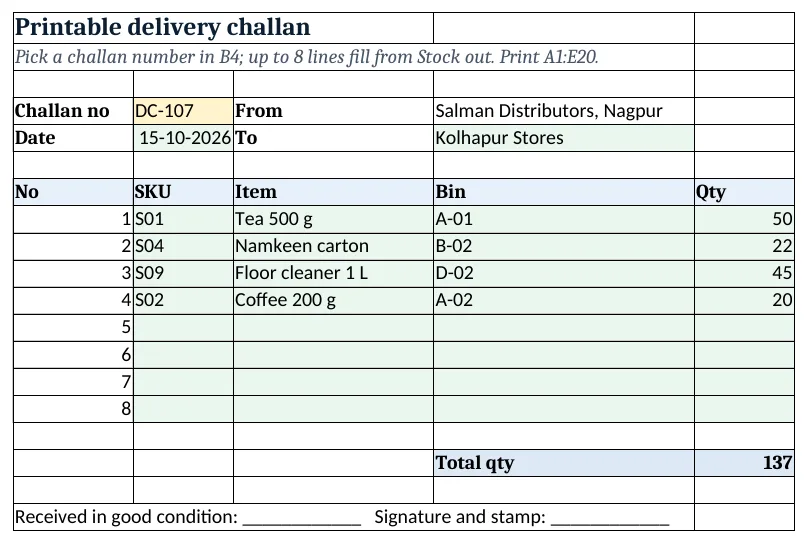
Figure 3. Delivery challan DC-107 filled from the Stock out log
Step 6. Report and dashboard
- Report rows 5 to 8 by category: SKUs, stock value, use value (SUMIFS) and items to order (COUNTIFS). Rows 11 to 13 count A, B and C items.
- Dashboard cards: stock value, items to order, lowest cover
=MIN(Stock!I5:I14), the item with lowest cover via INDEX and MATCH, units dispatched and number of challans. - Chart 1 at A8: days of cover by item. Chart 2 at A25: stock value by category.
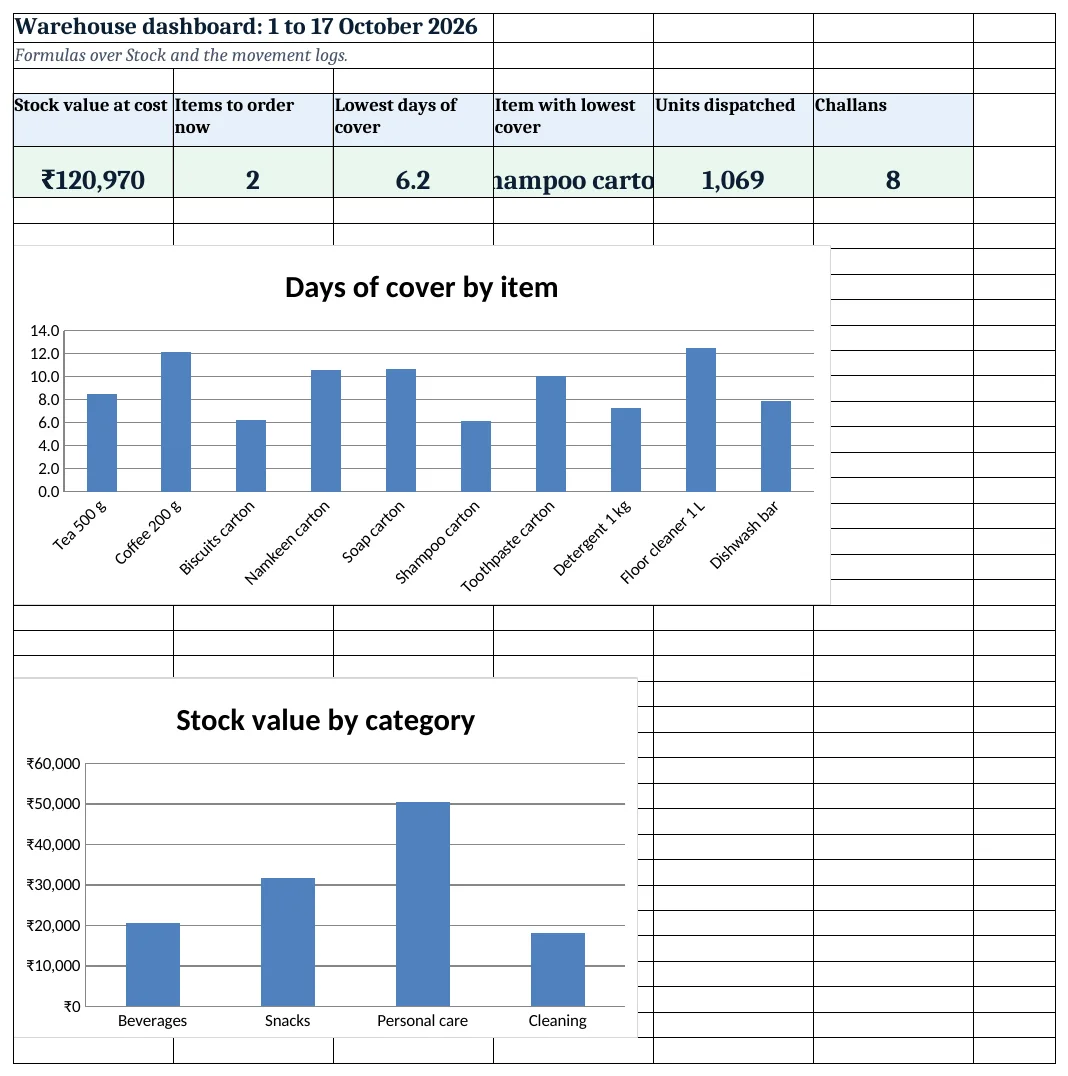
Figure 4. Warehouse dashboard: KPI cards and charts
Ravindra Bagale's Tip
Put the bin code on the challan. Pickers waste more time searching than picking, and the bin column costs nothing.
Ravindra Bagale's Tip – मराठी
Challan वर bin code छापा. Pickers ना शोधायला जास्त वेळ लागतो, आणि bin column ला काहीच खर्च नाही.
Ravindra Bagale's Tip – हिंदी
Challan पर bin code छापो. Pickers ढूँढने में ज़्यादा समय लगाते हैं, और bin column का कोई खर्च नहीं.
3. Formulas used
| Cell | Formula | What it does |
|---|---|---|
| Setup!B5 | =B3-B4+1 |
Days in the period |
| Stock in!D5 | =XLOOKUP(C5,Items!$A$5:$A$14,Items!$B$5:$B$14,"Check SKU") |
Item name from SKU |
| Stock out!H5 | =B5&"-"&COUNTIF($B$5:B5,B5) |
Line key per challan |
| Stock!D5 | =SUMIFS('Stock in'!$E$5:$E$500,'Stock in'!$C$5:$C$500,A5) |
Units received |
| Stock!F5 | =C5+D5-E5 |
Closing stock |
| Stock!H5 | =E5/Setup!$B$5 |
Average daily use |
| Stock!I5 | =IFERROR(F5/H5,999) |
Days of cover |
| Stock!K5 | =IF(OR(F5<=Items!G5,I5<=J5),"Yes","No") |
Order now? |
| Stock!L5 | =IF(K5="Yes",MAX(0,ROUNDUP(H5*(J5+Setup!$B$6)-F5,0)),0) |
Suggested order quantity |
| Stock!N5 | =IF(SUMIF($M$5:$M$14,">="&M5)/SUM($M$5:$M$14)<=0.7,"A",IF(SUMIF($M$5:$M$14,">="&M5)/SUM($M$5:$M$14)<=0.9,"B","C")) |
ABC class |
| Delivery challan!B8 | =XLOOKUP($B$4&"-"&A8,'Stock out'!$H$5:$H$500,'Stock out'!$D$5:$D$500,"") |
SKU on line 1 of the challan |
| Delivery challan!D8 | =IF(B8="","",XLOOKUP(B8,Items!$A$5:$A$14,Items!$D$5:$D$14)) |
Bin to pick from |
| Report!E5 | =COUNTIFS(Items!$C$5:$C$14,A5,Stock!$K$5:$K$14,"Yes") |
Items to order in the category |
| Dashboard!D5 | =INDEX(Stock!B5:B14,MATCH(MIN(Stock!I5:I14),Stock!I5:I14,0)) |
Item with the lowest cover |
| Dashboard!F5 | =SUMPRODUCT(('Stock out'!$B$5:$B$500<>"")/COUNTIF('Stock out'!$B$5:$B$500,'Stock out'!$B$5:$B$500&"")) |
Number of distinct challans |
Every formula above is written in the template, so you can click a cell and see it in the formula bar. All values on this page were recalculated in LibreOffice with zero errors.
4. Common mistakes
- Typing closing stock. The moment someone types a number in Closing, the logs and stock stop agreeing. Fix the log instead.
- Ordering only at the reorder level. A supplier with a long lead time needs an earlier order. Compare days of cover with lead time too.
- One row per challan with many items. SUMIFS needs one SKU per row. A challan with 4 items is 4 rows.
- Mixing units. If Items says carton, every log row must be cartons, not pieces.
- Never counting. Do a cycle count of a few bins every day; adjust with a log row marked "count difference".
Ravindra Bagale's Tip
Count your A items every week and C items once a month. Four items carry most of the money; that is where a counting error hurts.
Ravindra Bagale's Tip – मराठी
A items दर आठवड्याला आणि C items महिन्यातून एकदा मोजा. पैसा चार items मध्ये अडकलेला असतो; मोजणीतली चूक तिथेच महाग पडते.
Ravindra Bagale's Tip – हिंदी
A items हर हफ्ते और C items महीने में एक बार गिनो. पैसा चार items में है; गिनती की गलती वहीं महँगी पड़ती है.
5. More real examples
Example 1: Spare parts store in a factory. Stock out becomes issue to machine. Add a Machine column and a cost report by machine with SUMIFS.
Example 2: Pharma distributor. Add lot number and expiry columns on Stock in and a near-expiry flag, like the pharma project.
Example 3: Two warehouses. Add a Location column on both logs and closing stock per location with SUMIFS on SKU and location.
Quick revision cards
Quick revision
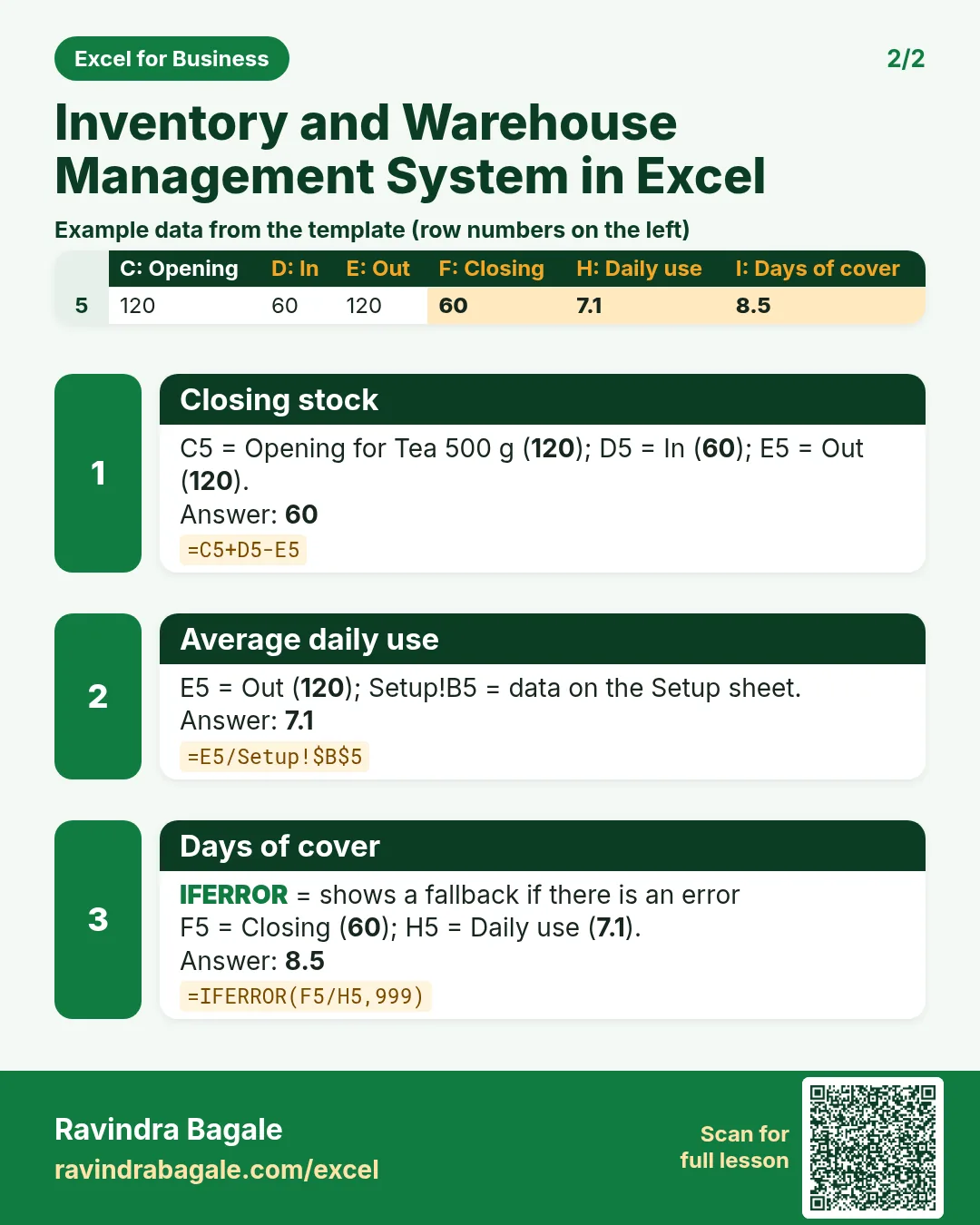
Each card shows formulas from this page, each with an example and its answer from the template. Scan the QR code on a card to open this lesson. All names and numbers are made up for practice.
झटपट उजळणी
प्रत्येक card वर या page मधले formulas, त्यांचं example आणि template मधलं उत्तर आहे. Card वरचा QR code scan केला की हा lesson उघडतो. सगळी नावं आणि आकडे सरावासाठी काल्पनिक आहेत.
झटपट दोहराई
हर card पर इस page के formulas, उनका example और template का उत्तर है. Card का QR code scan करें तो यह lesson खुलेगा. सभी नाम और आंकड़े अभ्यास के लिए काल्पनिक हैं.
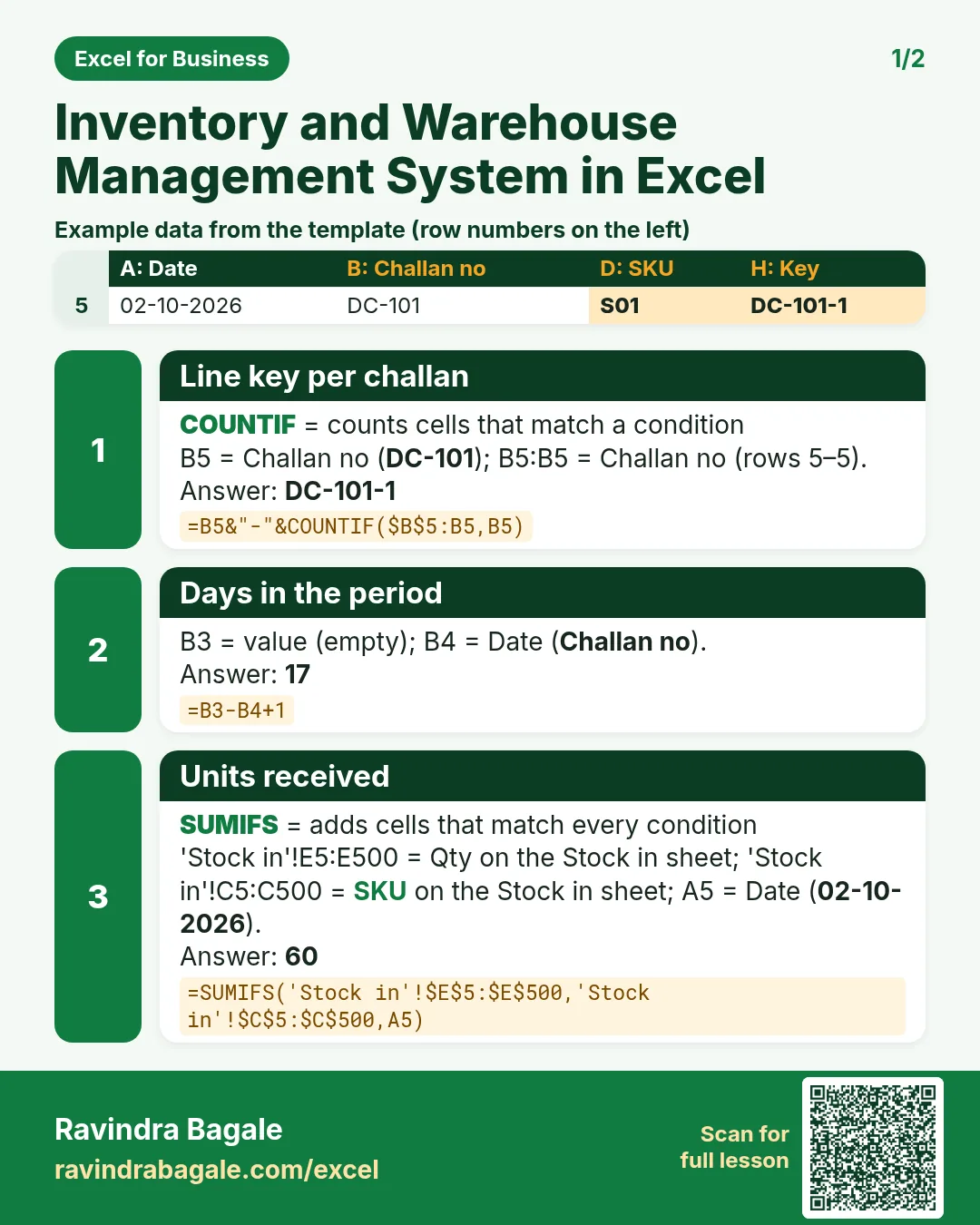


More cards: Ravi Sir's Cards.
6. Frequently asked questions
How do I calculate closing stock in Excel?
Opening + SUMIFS of stock in − SUMIFS of stock out for that SKU: =C5+D5-E5. Never type it.
What is days of cover?
Closing stock ÷ average daily use. 60 units with 7 a day used is about 8.5 days before you run out.
How much should I reorder?
One simple rule: daily use × (lead time + safety days) − closing stock, rounded up. The safety days are your choice; 15 is an example.
How do I do ABC analysis without sorting?
Use value = units out × cost. SUMIF(range,">="&M5)/SUM(range) gives the running share; up to 70% is A, up to 90% B, the rest C.
Can I print a delivery challan?
Yes. Type the challan number on the Delivery challan sheet; the line key fills up to 8 lines.
7. Quick quiz
Ten questions on this page. Sign in to save your score.
Loading practice tasks...
- Total clicks (Easy): Add up Clicks in D2:D11. (sheet "Data")
- Average spend (Easy): Average of E2:E11, rounded to 2 decimals. (sheet "Data")
- Rows in Google (Easy): How many rows have Platform "Google"? (sheet "Data")
- Largest clicks (Easy): The largest value in D2:D11. (sheet "Data")
- Days taken (Easy): C2 minus B2. (sheet "Dates")
- Start year (Easy): Year of B3. (sheet "Dates")
- Due month (Easy): Month number of C3. (sheet "Dates")
- Earliest start (Easy): Earliest date in B2:B9 (as a date number). (sheet "Dates")
- Clicks for Google (Medium): Total of D2:D11 where B is "Google". (sheet "Data")
- Google in Milan (Medium): Total of D2:D11 where B is "Google" and C is "Milan". (sheet "Data")
- Working days (Medium): Working days from B2 to C2. (sheet "Dates")
- Weekday of due (Medium): Weekday number of C4 (Sunday = 1). (sheet "Dates")