Expense Reimbursement System in Excel: Claims, Km Rates, Category Limits, Bill Check, Approval and Payment Status
Ravina Consultants in Kolhapur has five people who travel to clients, stay in hotels and buy small supplies. Claims arrived on slips of paper, some above policy, some without bills, and the accountant paid whatever was approved. This page builds a 7-sheet Excel system: travel is priced by km, other claims are capped at the category limit, bills are checked, and each claim shows whether it is awaiting approval, to pay, on hold or paid.
What you'll learn on this page
- Set rates per km, category limits and the bill rule
- Price travel by km and cap other claims at the limit
- Check that a bill is attached above the amount set
- Make a claim payable only when approved and the bill check is OK
- Show Awaiting approval, To pay, Hold, Paid or Rejected
- Summarise claimed, payable, paid and to pay by employee
- Print a claim voucher and show claims on a dashboard
Download the template: expense-reimbursement-system-template.xlsx: a 7-sheet system with example data and real formulas (Read me, Setup, Employees, Claims, Summary, Claim form, Dashboard). Yellow cells are inputs you can type over; green cells hold formulas; blue rows are headers and totals. Replace the example data with your own and every report and the dashboard recalculate.
Made-up data: every name, amount, business and date on this page is made up for practice. Cities are used only to make the examples feel real.
1. The business story
Ravina Consultants, Kolhapur, September and October 2026 (made-up data). Car ₹9 a km, bike ₹4; meals ₹600 a claim, hotel ₹3,500 a night claim; bill needed above ₹300 (company policy).
| Question | Where the system answers it |
|---|---|
| How much was cut by limits? | ₹4,450 of ₹23,030 claimed |
| What do we pay this week? | ₹2,780: Zoya's client meeting ₹2,500 and Rani's taxi ₹280 |
| What waits for approval? | 3 claims, including Raja's Nashik hotel |
| Why was one claim rejected? | EX-005, a ₹640 taxi with no bill |
Every claim follows the same rules, so nobody argues about whose claim was paid in full.
Figure 1. Setup holds rates and limits; Employees and Claims are the entry sheets; Summary, Claim form and Dashboard read from them.
2. Build it sheet by sheet
Step 1. Setup: rates and limits
- B4 car rate per km (₹9), B5 bike rate (₹4), B6 bill needed above (₹300).
- Categories with limits in A9:B15; 0 means priced by km.
Step 2. Claims: amount and limit
- A5
="EX-"&TEXT(ROW()-4,"000"). Type date, employee, category and purpose from drop-downs. - Travel: type km and H5 works out
=G5*IF(E5="Car travel",Setup!$B$4,Setup!$B$5). Other categories: type the amount. - J5 allowed:
=IF(XLOOKUP(E5,Setup!$A$9:$A$15,Setup!$B$9:$B$15,0)=0,H5,MIN(H5,XLOOKUP(E5,Setup!$A$9:$A$15,Setup!$B$9:$B$15,0))).
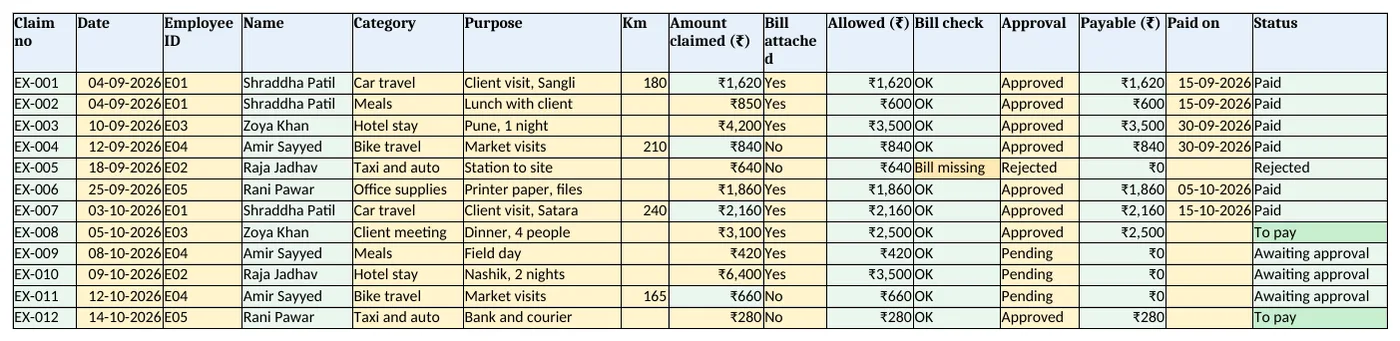
Figure 2. Claims: amount, allowed, bill check, approval, payable and status
Step 3. Claims: approval and status
- K5 bill check:
=IF(AND(I5="No",H5>Setup!$B$6,XLOOKUP(…)>0),"Bill missing","OK")(AND). - M5 payable
=IF(AND(L5="Approved",K5="OK"),J5,0). - O5: Rejected, Paid, Awaiting approval, Hold: bill missing, or To pay, with nested IF.
Step 4. Summary
- By employee: claims, claimed, payable, paid and to pay with SUMIFS; awaiting approval with COUNTIFS.
- By category: claimed and allowed, to see where limits bite.
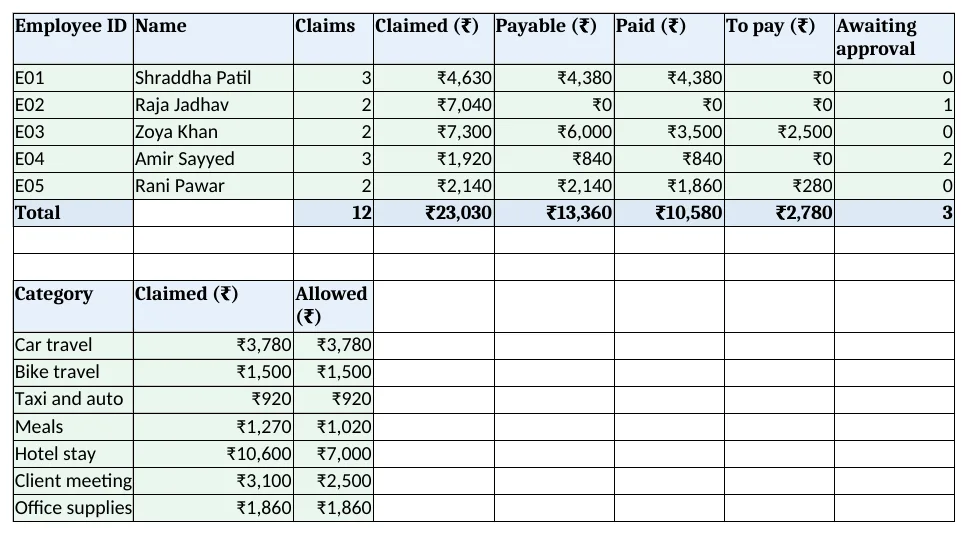
Figure 3. Summary: claims, claimed, payable, paid and to pay by employee; claimed and allowed by category
Step 5. Claim form and Dashboard
- Claim form: type a claim no in B4; print and attach the bill. Set the print area.
- KPI cards: claims, claimed, cut by limits, paid, to pay now and awaiting approval. Charts: claimed and allowed by category, claimed by employee.
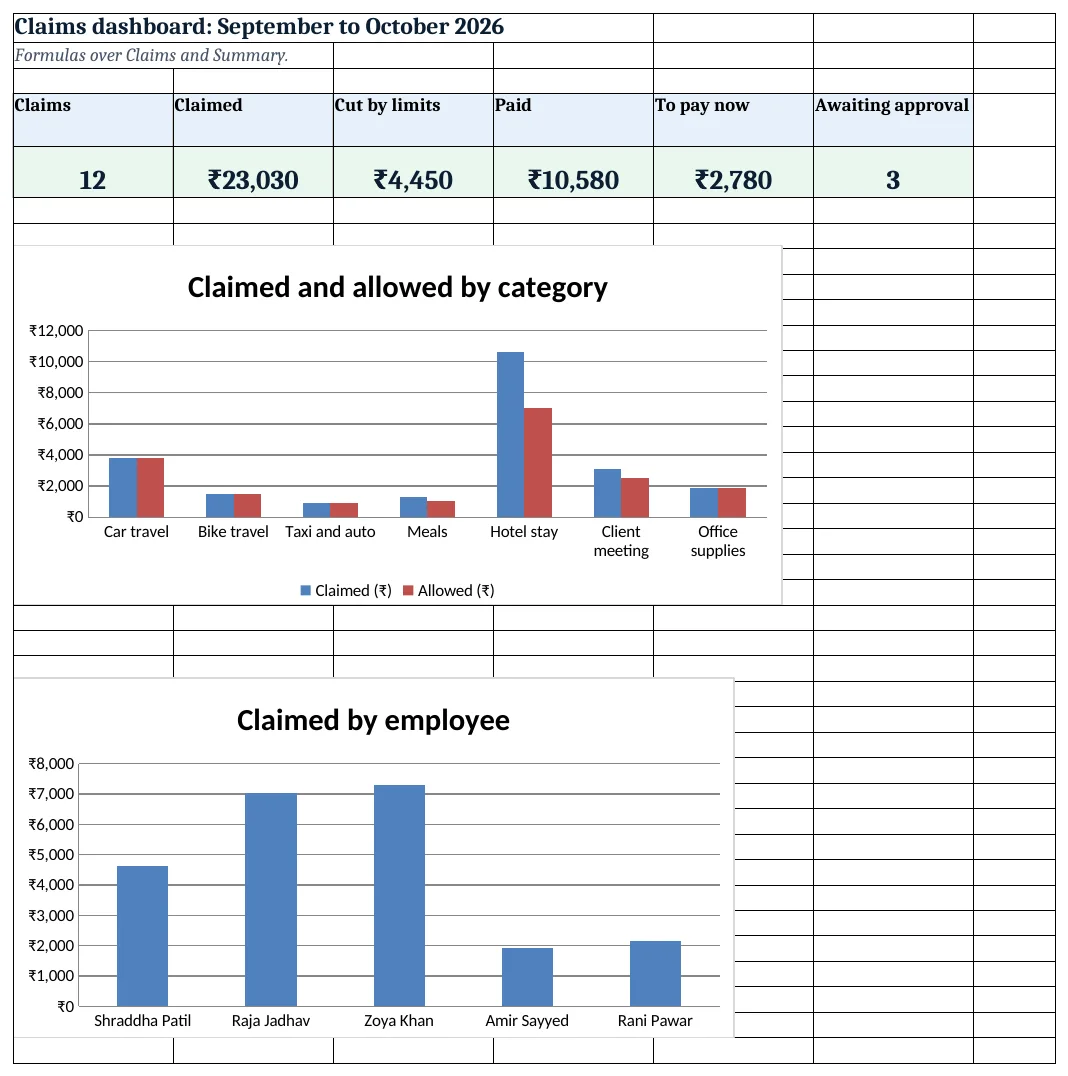
Figure 4. Claims dashboard: claims, claimed, cut by limits, paid, to pay now and awaiting approval
Ravindra Bagale's Tip
Pay approved claims on one fixed day each week. People stop chasing when they know the day.
Ravindra Bagale's Tip – मराठी
मंजूर claims आठवड्याच्या एका ठरलेल्या दिवशी द्या. दिवस माहीत असला की कोणी मागे लागत नाही.
Ravindra Bagale's Tip – हिंदी
मंजूर claims हफ्ते के एक तय दिन दें. दिन पता हो तो कोई पीछे नहीं पड़ता.
3. Formulas used
| Cell | Formula | What it does |
|---|---|---|
| Claims!A5 | ="EX-"&TEXT(ROW()-4,"000") |
Claim number |
| Claims!D5 | =XLOOKUP(C5,Employees!$A$5:$A$200,Employees!$B$5:$B$200,"Check ID") |
Employee name |
| Claims!H5 | =G5*IF(E5="Car travel",Setup!$B$4,Setup!$B$5) |
Travel amount by km |
| Claims!J5 | =IF(XLOOKUP(E5,Setup!$A$9:$A$15,Setup!$B$9:$B$15,0)=0,H5,MIN(H5,XLOOKUP(E5,Setup!$A$9:$A$15,Setup!$B$9:$B$15,0))) |
Allowed amount |
| Claims!K5 | =IF(AND(I5="No",H5>Setup!$B$6,XLOOKUP(E5,Setup!$A$9:$A$15,Setup!$B$9:$B$15,0)>0),"Bill missing","OK") |
Bill check |
| Claims!M5 | =IF(AND(L5="Approved",K5="OK"),J5,0) |
Payable |
| Claims!O5 | =IF(L5="Rejected","Rejected",IF(N5<>"","Paid",IF(L5="Pending","Awaiting approval",IF(K5<>"OK","Hold: bill missing","To pay")))) |
Claim status |
| Summary!D5 | =SUMIFS(Claims!$H$5:$H$3000,Claims!$C$5:$C$3000,A5) |
Claimed per employee |
| Summary!F5 | =SUMIFS(Claims!$M$5:$M$3000,Claims!$C$5:$C$3000,A5,Claims!$O$5:$O$3000,"Paid") |
Paid per employee |
| Summary!G5 | =E5-F5 |
To pay |
| Summary!C14 | =SUMIFS(Claims!$J$5:$J$3000,Claims!$E$5:$E$3000,A14) |
Allowed per category |
| Claim form!B13 | =XLOOKUP($B$4,Claims!$A$5:$A$3000,Claims!$M$5:$M$3000,"Not found") |
Payable on the voucher |
| Dashboard!C5 | =SUM(Claims!$H$5:$H$3000)-SUM(Claims!$J$5:$J$3000) |
Cut by limits |
Every formula above is written in the template, so you can click a cell and see it in the formula bar. All values on this page were recalculated in LibreOffice with zero errors.
4. Common mistakes
- Typing travel amounts. Type km; the rate on Setup prices it the same for everyone.
- Paying the claimed amount. Pay the allowed amount; the limit is already applied.
- Approving claims with no bill. The bill check holds them until the bill is attached.
- Paid date left blank. Without it the claim stays To pay and may be paid twice.
- Changing a limit mid-month. Change it on Setup from a date and note it; old claims keep old rules on paper.
Ravindra Bagale's Tip
Send the claim voucher back with the reason when you cut a claim. Clear rules beat quiet cuts.
Ravindra Bagale's Tip – मराठी
claim कमी केल्यास कारणासह voucher परत द्या. स्पष्ट नियम गुपचूप कपातीपेक्षा चांगले.
Ravindra Bagale's Tip – हिंदी
claim कम करें तो कारण के साथ voucher लौटाएं. साफ नियम चुपचाप कटौती से बेहतर हैं.
5. More real examples
Example 1: Field sales team. Add a daily allowance per city and customer visits per day.
Example 2: Site engineers. Claims per project with a project column, beside the construction site system.
Example 3: Travel advances. Add an advance column; payable = allowed − advance.
Quick revision cards
Quick revision
Each card shows formulas from this page, each with an example and its answer from the template. Scan the QR code on a card to open this lesson. All names and numbers are made up for practice.
झटपट उजळणी
प्रत्येक card वर या page मधले formulas, त्यांचं example आणि template मधलं उत्तर आहे. Card वरचा QR code scan केला की हा lesson उघडतो. सगळी नावं आणि आकडे सरावासाठी काल्पनिक आहेत.
झटपट दोहराई
हर card पर इस page के formulas, उनका example और template का उत्तर है. Card का QR code scan करें तो यह lesson खुलेगा. सभी नाम और आंकड़े अभ्यास के लिए काल्पनिक हैं.
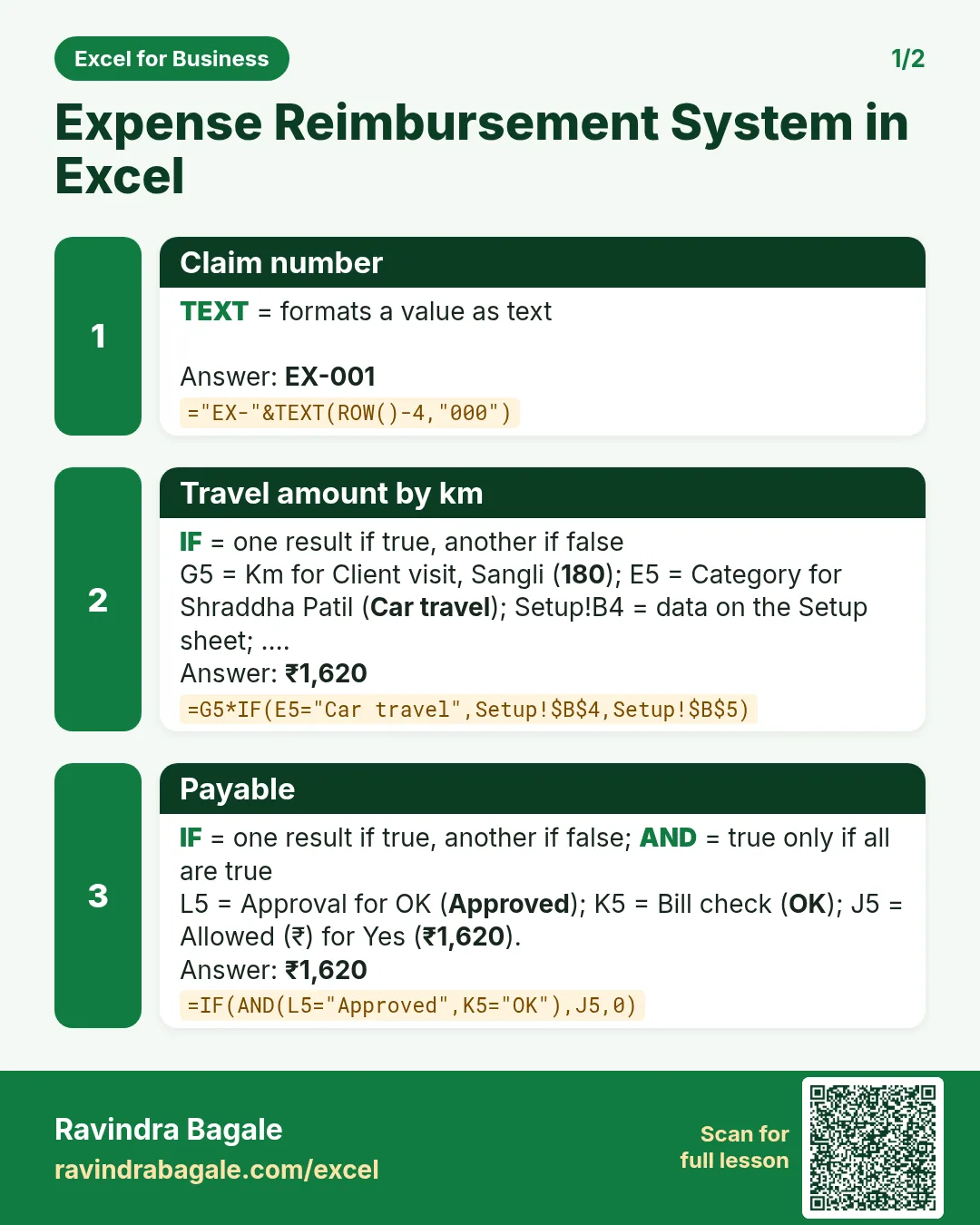

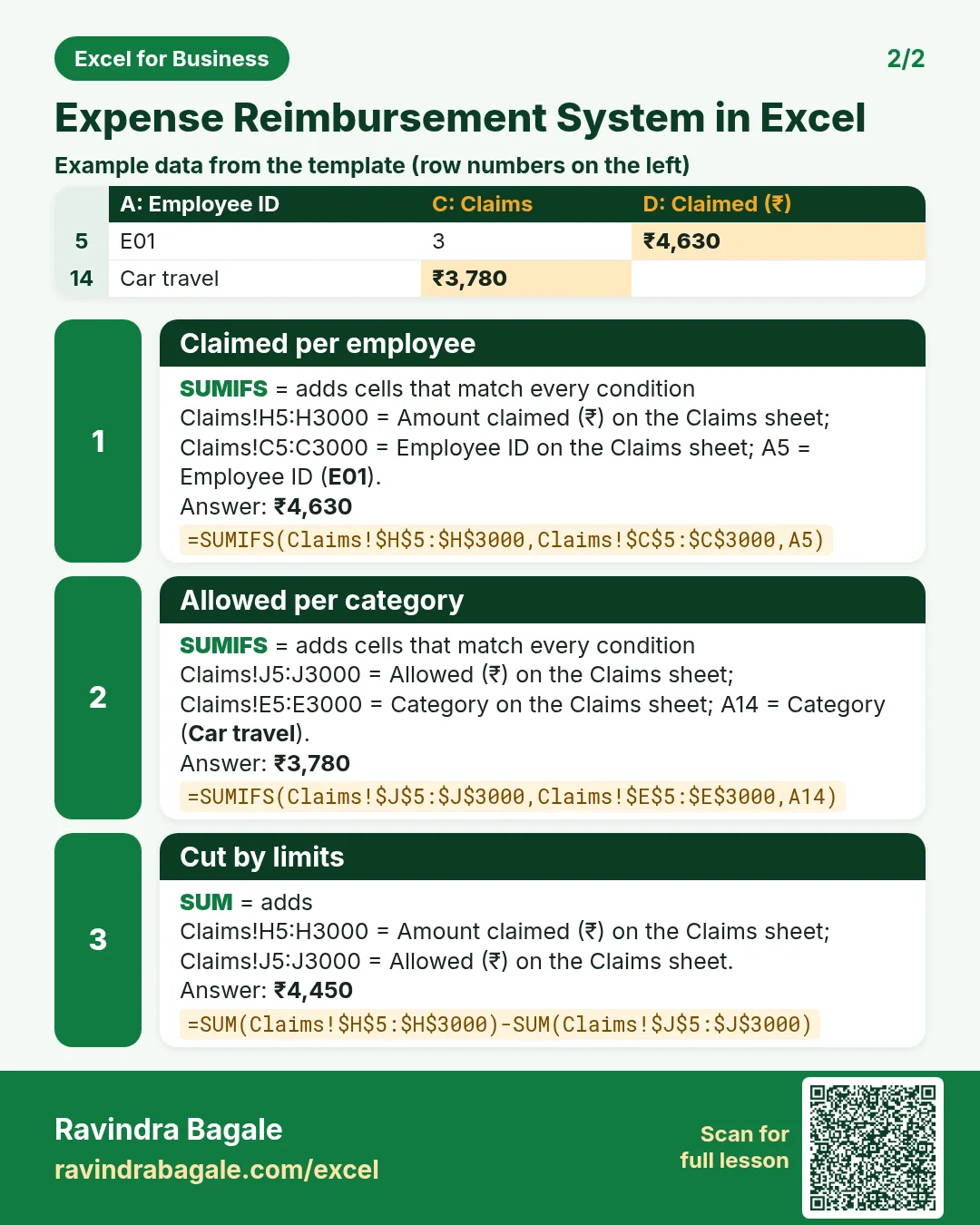

More cards: Ravi Sir's Cards.
6. Frequently asked questions
How do I cap a claim at a limit in Excel?
=MIN(amount, limit), with the limit looked up from Setup.
How do I price travel by km?
Km × rate per km; keep the rate on Setup.
How do I hold claims without a bill?
Payable only when approved and the bill check is OK: =IF(AND(L5="Approved",K5="OK"),J5,0).
How do I see what to pay this week?
Filter Status for To pay, or use SUMIFS on payable where status is To pay.
Are reimbursements taxable salary?
Actual business expenses reimbursed against bills are generally not salary. Check your case with your accountant.
7. Quick quiz
Ten questions on this page. Sign in to save your score.
Loading practice tasks...
- Pass or fail (Easy): "Pass" if B2 is at least 40, else "Fail".
- Total (Easy): B2 plus C2.
- Passed score 1 (Easy): How many in B2:B11 are 40 or more?
- Passed both (Medium): TRUE if B3 and C3 are both at least 40.
- Passed either (Medium): TRUE if B4 or C4 is at least 75.
- Grade (Medium): Grade for the average of B2:C2: "A" 75+, "B" 60+, "C" 40+, else "F".
- Eligible (Medium): "Eligible" if D5 is at least 75 and B5 at least 40, else "Not eligible".
- Count passed both (Hard): How many have both scores at least 40?
- Pass percentage (Hard): Share passing score 1, rounded to 2 decimals.
- Nested IF band (Hard): "High" if C6 ≥ 75, "Mid" if ≥ 50, else "Low", using nested IF.
- Top scorer (Hard): Name with the highest score 1.