What Is Data Analytics? The 5 Steps Explained with Instagram and Flipkart Examples
Every time you open Instagram, order on Flipkart or play a song on Spotify, you create data. Companies collect lakhs and crores of such records and study them to decide what to sell, what to show you and what to change. That study is data analytics. In this chapter we start from one app you use every day, Instagram, see exactly what data it keeps and how it stores it in tables, and then walk through the five steps every data analyst follows: collect, clean, transform, analyse and conclude.
What you'll learn in this chapter
- What data analytics is, and why every business needs it
- What data Instagram keeps: user, profile and reel data
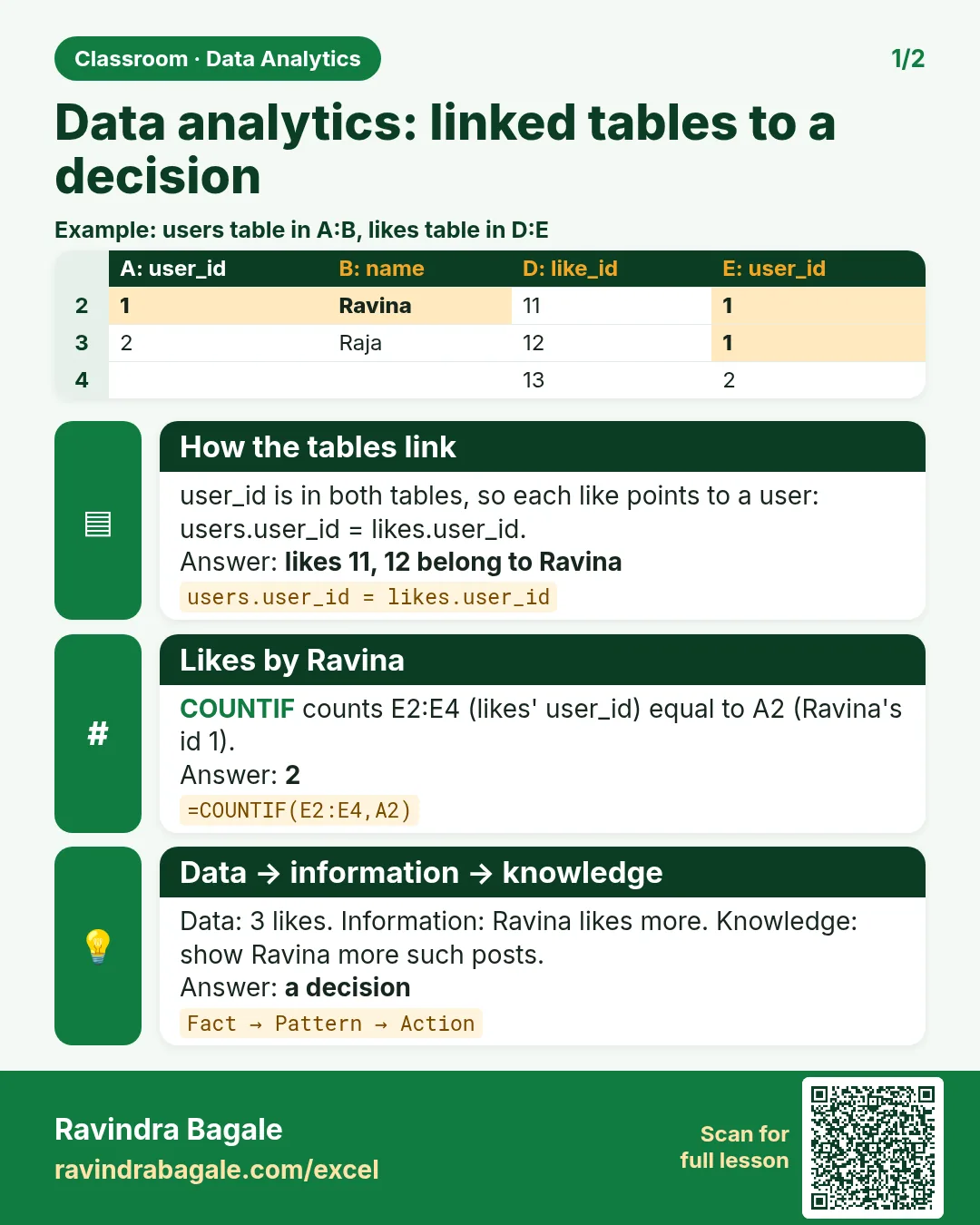
- Tables, rows, columns and records, and the likes table
- Data vs information vs knowledge
- Where data is stored: Excel, Google Sheets, cloud drives, SQL, data lakes and warehouses
- Excel, SQL, Power BI, Tableau and Python: what each one does
- Import vs DirectQuery, and choosing a tool by data size
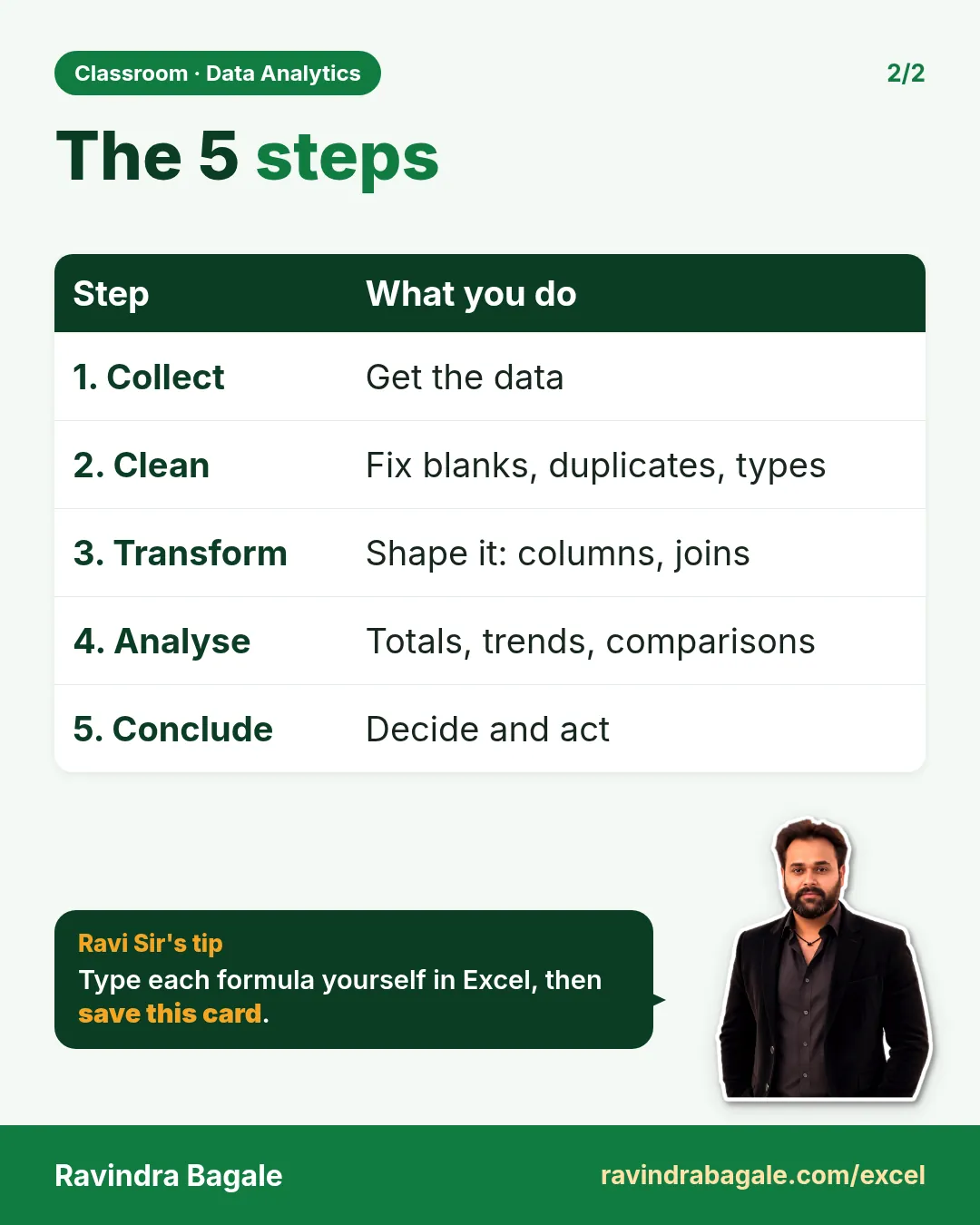
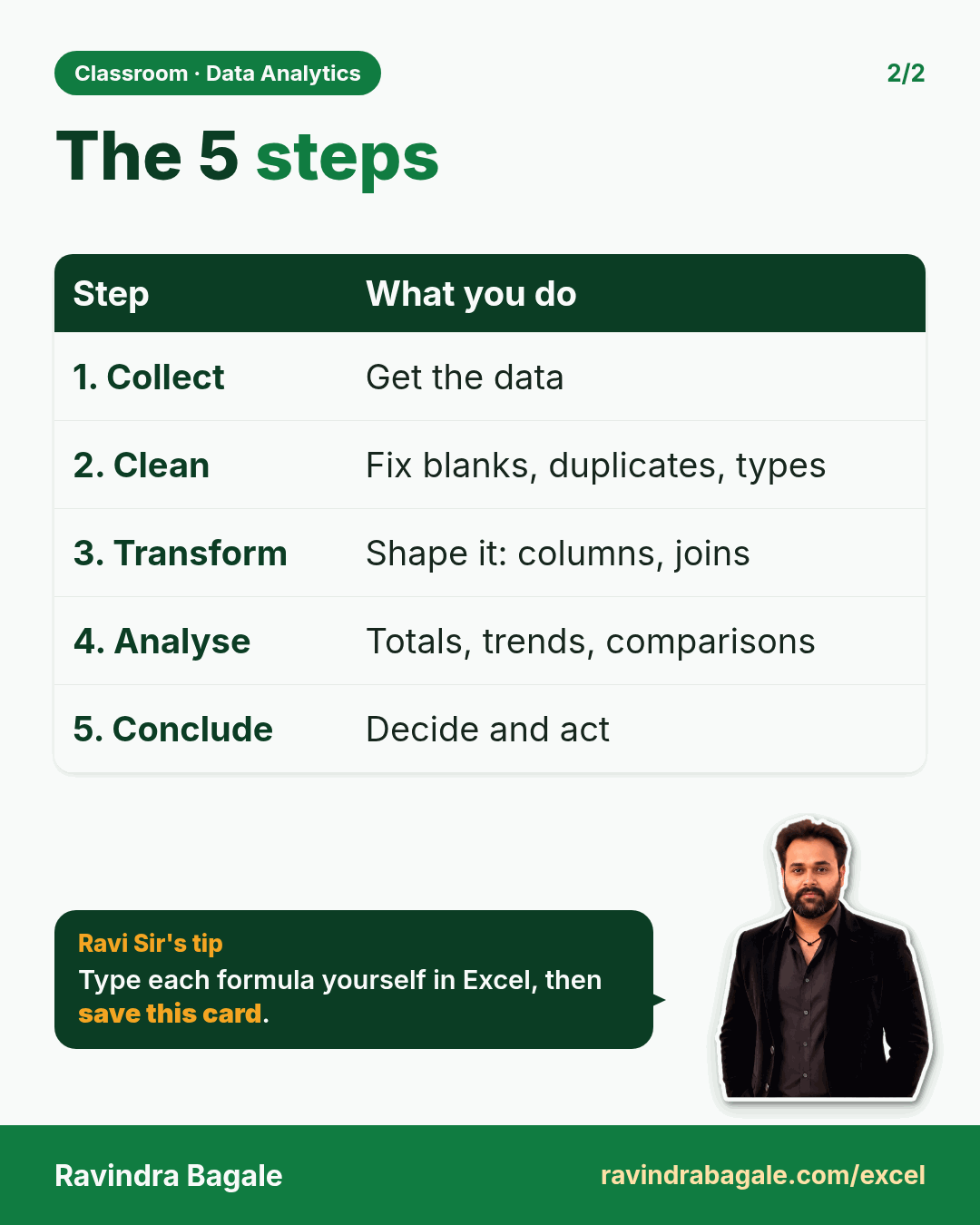
- The 5 steps: collect, clean, transform, analyse, conclude
1. What is data analytics?
Why: a business makes hundreds of decisions every month. How much stock to buy, which product to discount, which city to open a new shop in. Guessing is risky. Looking at the data is safer.
What: data analytics means taking a large amount of data (often lakhs or crores of rows), cleaning it, studying it, and turning it into a decision the business can act on.
Data is everywhere around you:
- Shopping apps such as Flipkart, Amazon, Blinkit and Zepto keep every search, cart, order and delivery.
- Music apps such as Spotify keep which songs you play, skip and repeat.
- Stock-market apps such as Zerodha and Groww keep every buy and sell order.
- Hotels keep room bookings, check-in dates and bills.
- IT companies keep employee attendance, projects and timesheets.
How: a data analyst does not start with a tool. They start with a question ("Which product sells most on weekends?"), collect the data that can answer it, and then pick the right tool. You will learn those tools in this course, starting with Excel.
2. What data does Instagram collect?
Suppose we are Instagram. Crores of people sign up, upload reels and like each other's posts. Let's list the data we need to keep.
2.1 User data: what you give at sign-up
When you create an account, Instagram asks for:
- Name
- Email ID or phone number (one of them is enough to sign up)
- Password (stored in scrambled form, never as plain text)
- Date of birth
- Gender
Instagram then creates a user ID for you.
There are two kinds of ID here, and the difference is important:
- The username (also called the handle) is the name in your profile link. In
instagram.com/ravindrabagale, the handle isravindrabagale. Handles are first come, first served: if someone already tookrani, you cannot have it. - You can change your handle later, for example to follow a trend or after marriage.
- So Instagram also keeps a hidden, permanent number for every account, for example
1001001. The handle can change many times; the number never changes. - Every reel, like and comment is linked to that permanent number, not to the handle. That is why your old reels still belong to you after you change your username.
Figure 1. User data is collected once at sign-up; profile data changes often. The handle can change, but it is always linked to the same permanent internal ID.
Ravindra Bagale's Tip
When you build your own tables, never use a name or a username to link two tables. Names repeat and usernames change. Always give every row a permanent ID (1001, 1002, 1003 …) and link tables using that ID.
Ravindra Bagale's Tip – मराठी
स्वतःचे tables बनवताना दोन tables link करायला कधीही name किंवा username वापरू नका. Names repeat होतात आणि usernames बदलतात. प्रत्येक row ला एक permanent ID द्या (1001, 1002, 1003 …) आणि तोच ID वापरून tables link करा.
Ravindra Bagale's Tip – हिंदी
अपने tables बनाते समय दो tables link करने के लिए कभी भी name या username इस्तेमाल मत करो. Names repeat होते हैं और usernames बदलते हैं. हर row को एक permanent ID दो (1001, 1002, 1003 …) और उसी ID से tables link करो.
2.2 Profile data: what changes often
Your profile holds data that you keep changing:
- Username (handle)
- Profile picture
- Bio (the "about" text)
- Followers and following
- Posts, reels and highlights (stories you choose to keep on your profile permanently)
- Account type: public or private
- Account status: active or deactivated
Even who you follow is useful data. If you follow five cricketers, Instagram learns that you like cricket and suggests more cricket reels and accounts. Business and creator accounts also get Insights: how many people saw a post, liked it and visited the profile.
2.3 Reel data
Every reel you upload creates one record with these values:
- Reel ID: created automatically (1, 2, 3 …)
- User ID: who uploaded it (this also proves the reel is genuinely yours)
- Caption
- Video and audio
- Hashtags: keywords that help people discover the reel, such as
#dubai - Tags and collaborators
- Cover image (thumbnail)
- Location
A post can hold several photos (square, portrait or landscape). A reel is one vertical video.
Classroom line
A filter is not data; it is a feature (functionality) of the app.
Class मधलं वाक्य
"Filter ha data nahiye, ti functionality jhali."
Filter हा data नाहीये, ती functionality झाली.
Classroom line
A filter is not data; it is a feature (functionality) of the app.
The beauty filter you choose is not stored as a value in the reel table. It is something the app does to your video. Data is a value we store; functionality is a feature that works on the data.
3. Data is stored in tables
Instagram, Flipkart and your bank all store data in tables, exactly like an Excel sheet:
- A column holds one kind of value, and its header says what it is:
id,userid,caption,location. - A row holds everything about one thing: one user, one reel, one order. One row is also called one record.
- Each cell holds one value only.
Here is the reels table with two reels:
Figure 2. The reels table: one row per reel. The big video and audio files are kept in object storage (for example Amazon S3); the table keeps only their links.
Notice the video_url and audio_url columns. A video can be 50 MB. Putting crores of such files inside a table would make it huge and slow. So the files go into object storage (for example Amazon S3), and the table stores only the link (URL) to each file.
Ravindra Bagale's Tip
One column = one value. Never type "Pune, 24, female" into one cell. Make three columns: city, age and gender. Then you can filter, sort and count each one separately. This single habit will save you hours of cleaning later.
Ravindra Bagale's Tip – मराठी
एक column = एक value. एकाच cell मध्ये "Pune, 24, female" असं कधीही type करू नका. तीन columns बनवा: city, age आणि gender. मग प्रत्येकावर वेगळं filter, sort आणि count करता येतं. ही एक सवय तुमचे पुढचे cleaning चे कित्येक तास वाचवेल.
Ravindra Bagale's Tip – हिंदी
एक column = एक value. एक ही cell में "Pune, 24, female" कभी type मत करो. तीन columns बनाओ: city, age और gender. फिर हर एक पर अलग से filter, sort और count कर सकते हो. ये एक आदत आगे cleaning के कई घंटे बचाएगी.
4. The likes table: why one number is not enough
A popular reel can get 300 to 400 likes every second. Suppose we keep a single likes number in the reel row and keep adding 1 to it.
Classroom line
300 to 400 likes can come in a single second. So how will you store them?
Class मधलं वाक्य
"Ekach second madhe 300-400 likes yeu shaktat. Kasa store karnaar mag tumhi?"
एकाच second मध्ये 300-400 likes येऊ शकतात. कसं store करणार मग तुम्ही?
Classroom line
300 to 400 likes can come in a single second. So how will you store them?
Two problems appear:
- Hundreds of updates hit the same cell every second.
- A number tells you how many liked it, but not who liked it. Without "who", Instagram cannot stop you from liking twice, and cannot show the list of people who liked.
The solution is a separate Likes table. Every like becomes a new row with three values: id, reelid and userid.
Worked example:
- User 10 likes reel 1001: row
1 | 1001 | 10. - User 11 likes reel 1001: row
2 | 1001 | 11. - User 12 likes reel 1001: row
3 | 1001 | 12. - User 13 likes reel 1001: row
4 | 1001 | 13. - To show the like count, count the rows where
reelid = 1001. The answer is 4 likes. - To show who liked it, list the
useridvalues of those rows: 10, 11, 12 and 13.
Figure 3. Every like is one row. Counting the rows for reel 1001 gives 4 likes, and the userid column tells us who liked it.
Comments get their own table for the same reason. A comment also has replies, and replies need their own rows too.
5. Data vs information vs knowledge
These three words sound similar, but an analyst must know the difference.
- Data is a raw fact. On its own, it doesn't tell you what to do.
- Information is data with meaning: a pattern you notice.
- Knowledge is what you decide to do because of that information.
Example 1, the weather:
- Data: it is raining, and many people on the road are carrying umbrellas.
- Information: when it rains, people need umbrellas.
- Knowledge: a shopkeeper should keep umbrellas in stock and display them on rainy days.
Example 2, the fruit seller:
- Data: today he sold 25 apples and 15 mangoes.
- Information: apples sold 10 more than mangoes (25 − 15 = 10), so apples are more popular.
- Knowledge: order more apples for tomorrow.
Figure 4. Data is the raw fact, information is the pattern, knowledge is the action.
Data analytics is exactly this journey, done on lakhs of rows instead of one fruit cart.
6. Where is data stored?
6.1 Excel (offline) and Google Sheets (online)
Excel is installed on your laptop and works offline. It is perfect when one person keeps the data on one computer.
Suppose a small hotel has 20 staff: chefs, waiters, a cashier and cleaners. The owner can keep all of this in one Excel file:
- Staff names and monthly salary
- Daily attendance: present or absent, and working days in the month
- Salary paid or pending
- Stock: 10 kg paneer, 5 kg tomatoes, 20 kg potatoes
- Month-end sales, expenses and profit
A vada pav shop does the same: attendance, salaries, and daily sales of vada pav, samosa and water bottles.
Classroom line
If you only need the data offline and only one person will use it, use Excel offline.
Class मधलं वाक्य
जर data फक्त offline लागणार असेल आणि तो एकच माणूस वापरणार असेल, तर Excel offline वापरा.
Classroom line – हिंदी
"Agar aapko data offline hi lagne wala hai, us data ko agar akela banda use karne wala hai, toh aap Excel offline mein use karo."
Google Sheets works in the browser and the file lives online. Suppose one teammate sits in the Pune office and another in Mumbai. Both open the same sheet at the same time. Whatever the Mumbai person types, the Pune person can see immediately. Excel can do this too when the file is kept on OneDrive (Excel for the web).
Ravindra Bagale's Tip
If two or more people update the same data, don't email Excel files back and forth. You will end up with "sales_final.xlsx", "sales_final2.xlsx" and "sales_final_new.xlsx", and nobody knows which one is correct. Keep one shared file on Google Drive or OneDrive instead.
Ravindra Bagale's Tip – मराठी
दोन किंवा जास्त लोक एकच data update करत असतील तर Excel files email ने इकडून तिकडे पाठवू नका. शेवटी "sales_final.xlsx", "sales_final2.xlsx" आणि "sales_final_new.xlsx" तयार होतात आणि कुठली बरोबर ते कोणालाच कळत नाही. त्याऐवजी Google Drive किंवा OneDrive वर एकच shared file ठेवा.
Ravindra Bagale's Tip – हिंदी
अगर दो या ज़्यादा लोग एक ही data update कर रहे हैं, तो Excel files email से इधर-उधर मत भेजो. आखिर में "sales_final.xlsx", "sales_final2.xlsx" और "sales_final_new.xlsx" बन जाते हैं और किसी को पता नहीं चलता कि सही कौन सी है. इसके बजाय Google Drive या OneDrive पर एक ही shared file रखो.
6.2 Cloud drives
Google Drive, OneDrive, iCloud and Dropbox are cloud drives. You upload files; the company (Google, Microsoft, Apple, Dropbox) looks after the hardware, backups and security. You don't manage any server yourself.
6.3 Servers, the cloud and SQL databases
When you open Instagram:
- The app sends a request to Instagram's server.
- The server looks in its database, which holds crores of reels.
- It sends a few reels back to your screen.
A server has the same kind of parts as your laptop: RAM, storage (SSD) and a CPU. The difference is the job. A laptop serves you; a server serves requests from thousands of users at the same time, 24×7. That is why servers usually have much more RAM and CPU and have backup parts, so one failure doesn't stop the service.
Big companies rarely buy their own servers today. They rent them from a public cloud: AWS (Amazon), Azure (Microsoft) or GCP (Google). A cloud provider runs huge data centres, full of racks of servers. Anyone can rent a server there and pay only for what they use.
Some data is too sensitive for a shared public cloud setup. Aadhaar records or bank data must follow strict government and RBI rules, for example keeping the data inside India. Such organisations often use their own private data centres.
On a rented server you choose the RAM and CPU, install a database such as MySQL, PostgreSQL, SQL Server, Oracle or MariaDB, and create tables. Every Instagram sign-up and every Flipkart order lands in such a SQL database through the app or website.
WhatsApp is a good example of a server in the middle:
- You send "Hi". The message goes to WhatsApp's server.
- The server passes it to your friend's phone.
- Once it is delivered, the server does not keep it.
- If your friend's phone is off, the server holds the message and tries again. An undelivered message is deleted from the server after 30 days.
6.4 IoT sensors
Factories that make cars and bikes have sensors on their machines. Each sensor sends a reading, for example the machine's temperature, every few seconds. Over a year that becomes millions of rows that engineers analyse to catch a machine before it breaks down.
6.5 Database, data lake and data warehouse
- Database: stores the live data of one app, such as orders or users. One database server commonly holds gigabytes to a few terabytes.
- Data lake: a big, cheap store where raw data of every kind is dumped as it is: files, logs, images, sensor readings.
- Data warehouse: cleaned, organised data from many sources, kept ready for analysis and reports. Snowflake is a popular cloud data warehouse, and Databricks is a popular platform for data lakes. AWS, Azure and GCP each offer their own too. A service such as AWS Glue is used to move and prepare data between these stores (ETL: extract, transform, load).
Sizes: 1 byte = 8 bits. Then come KB, MB, GB, TB, PB and EB. Each step is about 1,000 times bigger (exactly 1,024 in computer terms). A song is a few MB, a laptop disk is about 1 TB, and big companies keep petabytes.
Collect = bring the scattered data into one place. Data sits in Excel files, shared sheets, SQL databases and sensors. Before analysis, an analyst first brings the needed part of it together.
Figure 5. Data lives in many places. Analysis tools connect to these sources.
7. The tools: Excel, SQL, Power BI, Tableau and Python
Interviewers often ask: "Which tool do you prefer?" First know what each tool really does.
| Tool | Stores data? | Analyses data? | What you get |
|---|---|---|---|
| Excel | Yes (in the file) | Yes | Tables, charts and simple dashboards |
| SQL (database) | Yes | Yes, with queries | Results as tables (no charts) |
| Power BI | No, it connects to sources | Yes | Interactive dashboards |
| Tableau | No, it connects to sources | Yes | Interactive dashboards |
| Python | No, it reads from sources | Yes, with code | Anything you code: numbers, charts, models |
- Excel and SQL can both store data and analyse it.
- Power BI (Microsoft) and Tableau (a different company, now part of Salesforce) are built for dashboards: pie charts, line charts, and a search or slicer box that filters everything on the page. They connect to sources such as Excel files, SQL databases and warehouses.
- Python analyses data with code. It is the most flexible, but you need to learn programming.
- Power BI looks familiar to Excel users because both come from Microsoft.
7.1 Import vs DirectQuery
Suppose the sales data sits in a SQL database on a server, 5 lakh order rows. Power BI can use it in two ways:
- Import: Power BI copies all 5 lakh rows into the report file on your laptop.
- Analysis is fast, and it works even without internet.
- But a full copy of the company's data now sits on a laptop. If the laptop is lost, the data can leak.
- To see new orders, you must refresh (copy again).
- DirectQuery: the data stays on the server.
- Power BI sends a question, for example "What are the total sales?"
- The server works it out and sends back only the answer, for example ₹1 crore.
- Safer and always up to date, but every chart waits for the server, so it is slower.
Figure 6. Import copies the rows to your laptop; DirectQuery leaves the data on the server and gets back only the answers.
Excel can also bring data in from a database or a file with Get Data (Power Query). It imports a copy, like Power BI's Import mode.
7.2 Choosing a tool by data size
A rough guide:
- Thousands to a few lakh rows: Excel. One sheet can hold at most 1,048,576 rows. Long before that, a few lakh rows with formulas can make Excel slow on a laptop with little RAM.
- Lakhs to crores of rows (gigabytes): a SQL database with Power BI on top. In Power BI Pro, an imported dataset can be up to 1 GB; bigger data uses DirectQuery or a Premium (Fabric) capacity.
- Terabytes and more: the data lives in a warehouse or lake. Power BI or Tableau connect to it, and Python or Spark is used for code-based analysis.
Figure 7. A rough guide to picking a tool by data size.
Ravindra Bagale's Tip
In an interview, don't just say "I like Power BI". Say "It depends on the data size and the users: Excel for small data and quick work, SQL to pull and join data from databases, Power BI for dashboards that managers open every day". That one answer shows you understand all the tools.
Ravindra Bagale's Tip – मराठी
Interview मध्ये फक्त "मला Power BI आवडतं" असं म्हणू नका. असं सांगा: "Data size आणि users वर अवलंबून आहे: छोट्या data आणि झटपट कामासाठी Excel, databases मधून data काढायला आणि join करायला SQL, आणि managers रोज बघतात त्या dashboards साठी Power BI". या एका उत्तरातून दिसतं की तुम्हाला सगळे tools समजले आहेत.
Ravindra Bagale's Tip – हिंदी
Interview में सिर्फ "मुझे Power BI पसंद है" मत बोलो. ऐसे बोलो: "Data size और users पर depend करता है: छोटे data और जल्दी काम के लिए Excel, databases से data निकालने और join करने के लिए SQL, और managers रोज़ देखते हैं उन dashboards के लिए Power BI". इस एक जवाब से दिखता है कि आपको सारे tools समझ आए हैं.
8. The 5 steps of data analytics
Figure 8. Collect, clean, transform, analyse, conclude: the same five steps whatever tool you use.
Step 1: Collect
Why: you can't analyse data you don't have. The data you need is usually scattered.
Flipkart example:
- Flipkart collects data from its app (what buyers search, view, add to cart and buy).
- It also collects data from its seller website (stock, prices, new products).
- Search data is gold. Suppose lakhs of people search for a ₹60,000 phone but very few buy it. That tells Flipkart that people want it but the price feels high. So Flipkart offers EMI or a discount on that phone.
Why do shops give discounts? The data tells them when:
- Expiry: stock that expires on 31 Dec 2026 must be sold before then, so it goes on sale from 1 Nov.
- New version: when a new phone model launches, the old model is discounted to clear the stock.
- Dead stock: a product nobody buys gets a "buy 1 get 1 free" offer.
All of this data is collected into Excel files and SQL databases before the next steps.
Step 2: Clean
Why: real data is messy. If you calculate on messy data, the answer is wrong, even if your formula is perfect.
1. Missing values. Suppose 100 users signed up, and 50 of them left the city empty.
- If city doesn't matter for your question, you may keep the rows and ignore the column.
- If it matters, either remove those 50 rows or fill a default value such as "Unknown".
- Write down which one you chose, so others know what you did.
2. Different units. Suppose three heights were collected as 5 feet, 68 inch and 200 cm.
Classroom line
You can't add all three and divide by three. The units are different.
Class मधलं वाक्य
"Tiganche addition karun tin ne divide nahi karu shakat. Units vegvegle ahet."
तिघांचं addition करून तीनने divide नाही करू शकत. Units वेगवेगळे आहेत.
Classroom line
You can't add all three and divide by three. The units are different.
- Convert everything to one unit, cm: 5 feet = 152.4 cm, 68 inch = 172.7 cm, 200 cm stays 200 cm.
- Now add: 152.4 + 172.7 + 200 = 525.1 cm.
- Divide by 3: the average height is 175.0 cm.
Another example from a market yard: 1 ton of onions, 5 quintal of potatoes and 1,000 kg of chillies arrived today.
- 1 ton = 1,000 kg.
- 5 quintal = 500 kg (1 quintal = 100 kg).
- Chillies are already 1,000 kg.
- Total arrival = 1,000 + 500 + 1,000 = 2,500 kg.
3. Phone formats. The same number arrives as 9049012345, +919049012345, 919049012345 and (+91) 9049012345. Pick one format, for example the 10 digits, and convert all of them to it. Otherwise one customer looks like four different customers.
4. Spelling and case. "Mumbai", "mumbai" and "MUMBAI" are the same city. Some tools treat them as different values when grouping, so a city-wise report may show Mumbai three times. Convert them all to one form, "Mumbai", and remove extra spaces.
Figure 9. Cleaning means making every value follow one rule: one unit, one phone format, one spelling.
Ravindra Bagale's Tip
Put the unit in the column header (height_cm, weight_kg, amount_rs), and keep only numbers in the cells. Then nobody types "5 feet" into that column again, and your averages and totals are always correct.
Ravindra Bagale's Tip – मराठी
Unit column च्या header मध्येच लिहा (height_cm, weight_kg, amount_rs) आणि cells मध्ये फक्त numbers ठेवा. मग त्या column मध्ये कोणी परत "5 feet" type करत नाही, आणि तुमचे averages आणि totals नेहमी बरोबर येतात.
Ravindra Bagale's Tip – हिंदी
Unit column के header में ही लिखो (height_cm, weight_kg, amount_rs) और cells में सिर्फ numbers रखो. फिर उस column में कोई दोबारा "5 feet" type नहीं करेगा, और आपके averages और totals हमेशा सही आएंगे.
Step 3: Transform
Why: the raw data often doesn't have the column your question needs. You create it from the columns you have.
Example: we have an order date and want to know whether weekends, seasons or festivals sell more.
| Order date | Day | Weekday/Weekend | Season | Festival |
|---|---|---|---|---|
| 10-05-2026 | Sunday | Weekend | Summer | – |
| 07-08-2026 | Friday | Weekday | Monsoon | – |
| 08-08-2026 | Saturday | Weekend | Monsoon | – |
| 25-12-2026 | Friday | Weekday | Winter | Christmas |
- Date → day → weekday or weekend. If weekend sales are higher, keep more stock ready before Saturday.
- Date → season. Cold drinks sell in summer, umbrellas in the monsoon, sweaters in winter.
- Date → festival period. Sweets, clothes and lights sell much more around Diwali and Navratri.
- Address → city and state. "Flat 4, Kothrud, Pune, Maharashtra" becomes separate
city= Pune andstate= Maharashtra columns, so you can compare sales city by city.
Step 4: Analyse
Why: nobody can read 1 lakh rows. The analysis turns them into a few numbers that answer the question.
Example: a shop's 1 lakh sales rows for one year become:
- Total sales: ₹12,40,000
- Total expenses: ₹9,10,000
- Profit: 12,40,000 − 9,10,000 = ₹3,30,000
- Weekend sales: ₹5,20,000 from 104 weekend days = ₹5,000 per day.
- Weekday sales: ₹7,20,000 from 261 weekdays ≈ ₹2,759 per day.
The weekend earns almost twice as much per day as a weekday.
Step 5: Conclusion and visualise
Why: a manager wants a decision, not a spreadsheet.
- Show the result as a chart: a bar chart of weekday vs weekend sales, a pie chart of sales by city, a line chart of sales by month.
- Put the charts together in a dashboard with a slicer, so the manager can pick a city or a month.
- Write the conclusion in one line: "Weekend sales per day are almost double, so increase stock and staff on Saturdays and Sundays."
That one line is the knowledge. Everything before it was the journey from data to information.
9. The whole chapter on one page
- Data analytics = turning lakhs of rows into a business decision.
- Instagram keeps user data (sign-up), profile data (changes often) and reel data. The handle can change; the internal ID is permanent.
- Data is kept in tables: a column per kind of value, a row per record, one value per cell.
- Likes go in their own table: count the rows for a reel to get its likes, and you also know who liked it.
- Data → information → knowledge: fact → pattern → action.
- Excel works offline for one person; Google Sheets and OneDrive let a team share one file; apps keep data in SQL databases on servers, often rented from AWS, Azure or GCP.
- Database, data lake and data warehouse hold bigger and bigger data.
- Excel and SQL store and analyse; Power BI, Tableau and Python connect to sources and analyse.
- Import copies the data in (fast); DirectQuery leaves it on the server (secure, current, slower).
- Pick the tool by data size: Excel up to its 1,048,576-row sheet limit and usually much less, SQL and Power BI for GBs, warehouses for TBs.
- The 5 steps: collect, clean, transform, analyse, conclude.
10. Try at home
Try at home
Task 1: list an app's data
- Pick an app you use daily: Zomato, Swiggy, YouTube or Spotify.
- Write down its user data, profile data and one more kind of data (orders, videos or songs).
- For that last kind, draw a table with 5 to 7 column headers and fill two sample rows.
Task 2: data, information, knowledge
- Write one example from your own home or street, like the umbrella or fruit-seller example.
- Write the data, the information and the knowledge on three separate lines.
Task 3: clean these values on paper
- Heights: 5.5 feet, 160 cm, 64 inch. Convert to cm and find the average.
- Phones:
+91 98220 12345,9822012345,(+91)9822012345. Write them in one format. - Cities:
pune,PUNE,Pune. Write the clean value.
Task 4: transform
- Take five dates from this month.
- Next to each, write the day name, weekday or weekend, and the season.
Recap
In short
- Data analytics turns large data into business decisions.
- Apps keep user, profile and activity data in tables; IDs link the tables.
- One column = one value; likes and comments get their own tables.
- Data (fact) → information (pattern) → knowledge (action).
- Data lives in Excel files, shared sheets, cloud drives, SQL databases, lakes and warehouses.
- Excel and SQL store and analyse; Power BI, Tableau and Python connect and analyse.
- Import = fast copy; DirectQuery = data stays on the server.
- Collect → clean → transform → analyse → conclude.
Quick revision cards
Quick revision
Revise this chapter in two minutes. Save the cards on your phone or download them as PNG files. All names and numbers are made up for practice.
झटपट उजळणी
हा chapter दोन मिनिटांत revise करा. Cards phone वर save करा किंवा PNG म्हणून download करा. सगळी नावं आणि आकडे सरावासाठी काल्पनिक आहेत.
झटपट दोहराई
यह chapter दो मिनट में revise करें. Cards phone पर save करें या PNG के रूप में download करें. सभी नाम और आंकड़े अभ्यास के लिए काल्पनिक हैं.

More cards for every chapter: Ravi Sir's Cards.