Library Management System in Excel: Books, Members, Issue and Return, Due Dates, Late Fines and Availability
Ruhi Reading Room in Pune lends novels, Marathi and Hindi literature, exam books and children's books to about a hundred members. The issue register was a notebook, so nobody could say which copies were out or who owed a fine. This page builds an 8-sheet Excel system: every issue gets a due date, returns update status and fine on their own, and the Books sheet shows how many copies are on the shelf.
What you'll learn on this page
- Set loan days, fine per day and a book limit
- Keep books with copies, out and available
- Issue books with an automatic due date
- Work out days late and fine to the return date or today
- Show Issued, Overdue and Returned status
- Report copies and issues by category
- Print an issue slip and show the library on a dashboard
Download the template: library-management-system-template.xlsx: a 8-sheet system with example data and real formulas (Read me, Setup, Books, Members, Issues, Report, Issue slip, Dashboard). Yellow cells are inputs you can type over; green cells hold formulas; blue rows are headers and totals. Replace the example data with your own and every report and the dashboard recalculate.
Made-up data: every name, amount, business and date on this page is made up for practice. Cities are used only to make the examples feel real.
1. The business story
Ruhi Reading Room, Pune, as of 17 October 2026 (made-up data). Loan 14 days; fine ₹2 a day late; up to 3 books per member.
| Question | Where the system answers it |
|---|---|
| Which books are overdue? | IS-006, General Knowledge 2026 with Rani Pawar, 8 days late, ₹16 |
| How many books are out? | 9 copies |
| Which shelf is most used? | Competitive exams: 5 issues, 3 of 7 copies out |
| What fines are on the books? | ₹48 across all issues |
The librarian looks at one sheet to see who to remind today.
Figure 1. Setup holds the rules; Books, Members and Issues are the entry sheets; Report, Issue slip and Dashboard read from them.
2. Build it sheet by sheet
Step 1. Setup: rules
- B4 loan days (14), B5 fine per day (₹2), B6 max books per member (3). Categories in D4:D9.
Step 2. Issues: due date and fine
- A5
="IS-"&TEXT(ROW()-4,"000"). Type issue date, member ID and book ID from drop-downs. - F5 due
=B5+Setup!$B$4. - J5 days late
=MAX(0,IF(G5="",Setup!$B$3,G5)-F5)and H5 fine=J5*Setup!$B$5. - I5:
=IF(G5<>"","Returned",IF(Setup!$B$3>F5,"Overdue","Issued")), red when Overdue (conditional formatting).
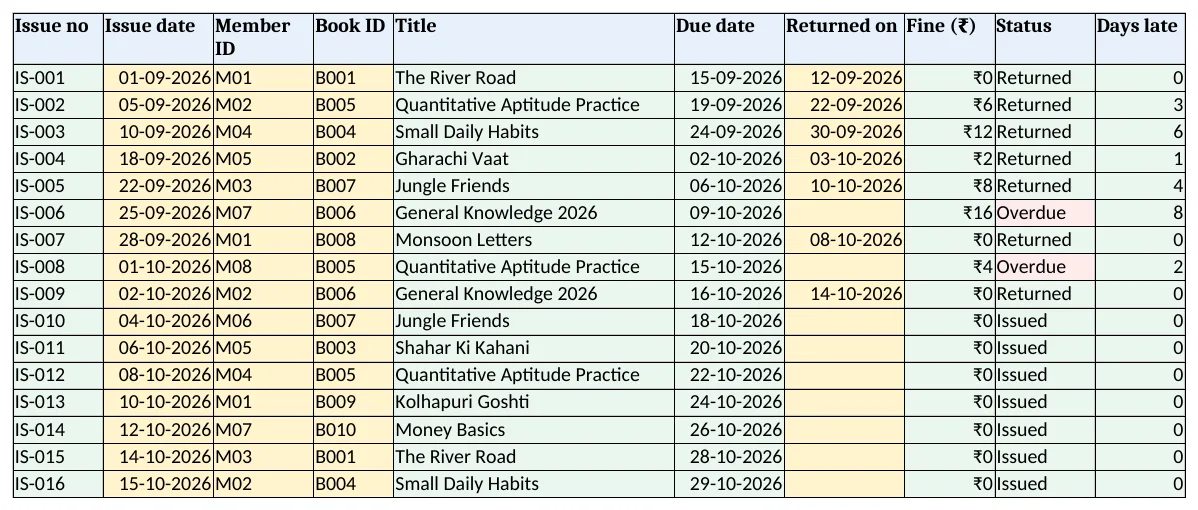
Figure 2. Issues: due date, return date, fine, status and days late for each issue
Step 3. Books and Members
- Books E5 out
=COUNTIFS(Issues!$D$5:$D$3000,A5,Issues!$I$5:$I$3000,"<>Returned")(COUNTIFS), F5 available=D5-E5. - Members D5 books out the same way, E5 can take more
=MAX(0,Setup!$B$6-D5), F5 fines with SUMIFS.
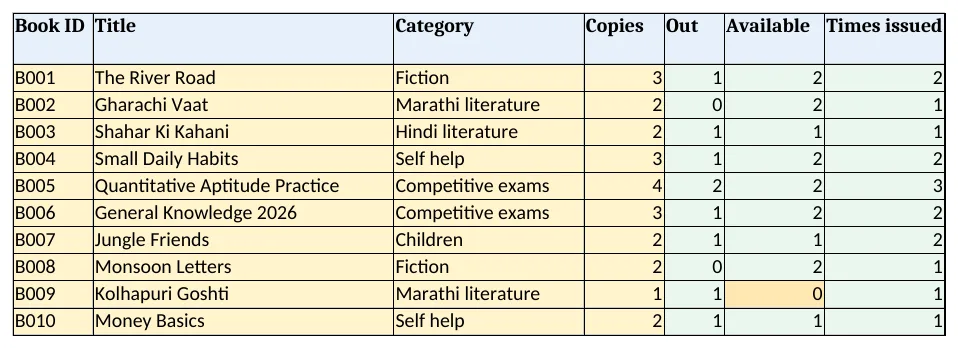
Figure 3. Books: copies, out, available and times issued for each title
Step 4. Report and Issue slip
- Report per category: titles, copies, out and issues.
- Issue slip: type an issue no in B4; rows 6 to 12 bring the book, due date and member. Set the print area.
Step 5. Dashboard
- KPI cards: titles, copies, books out, overdue, fines due and active members.
- Charts: issues by category and fines by member.
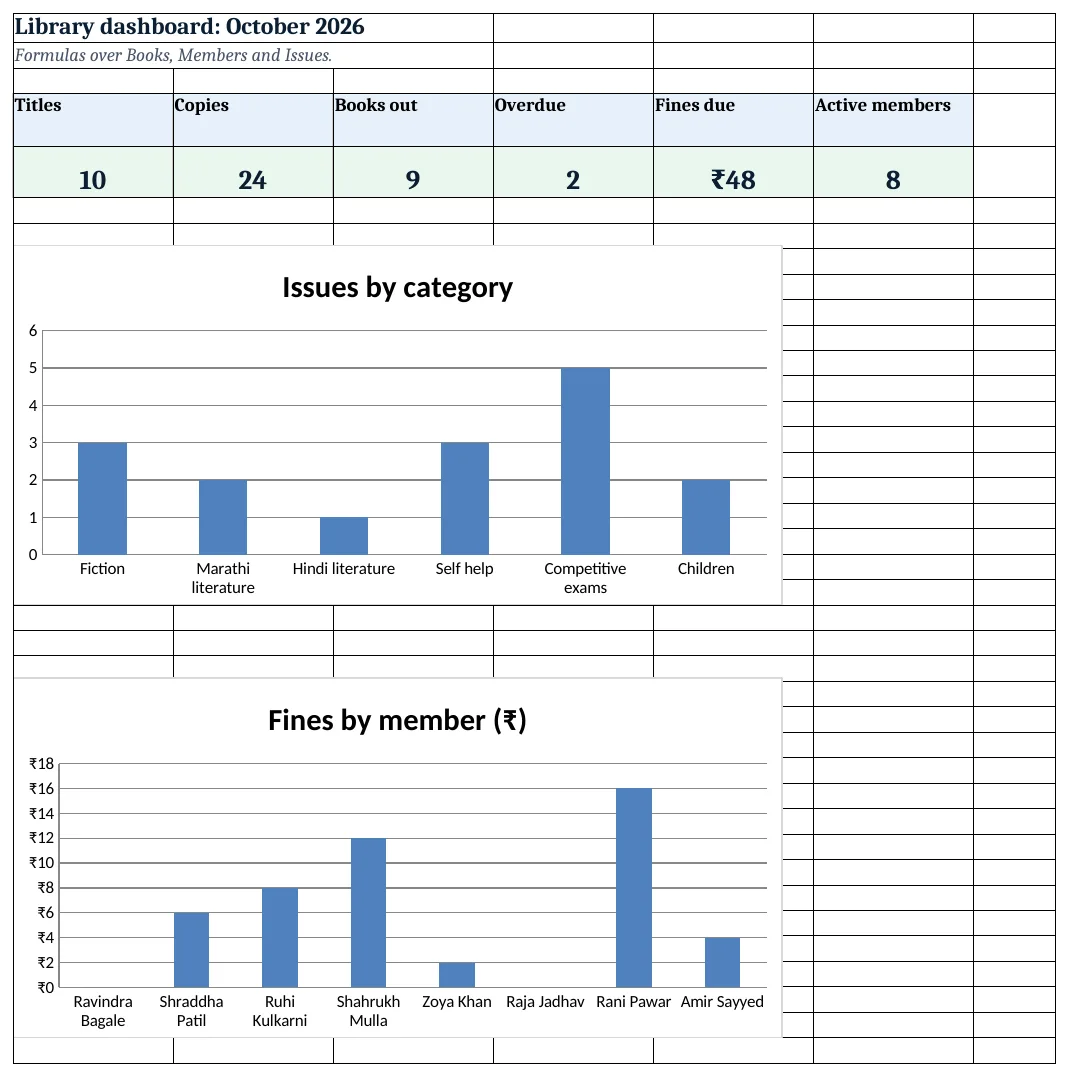
Figure 4. Library dashboard: titles, copies, books out, overdue, fines and active members
Ravindra Bagale's Tip
Send reminders the day after the due date, not after a month. Small fines get paid; big ones become lost books.
Ravindra Bagale's Tip – मराठी
मुदत संपल्यानंतर दुसऱ्या दिवशी आठवण करा, महिनाभराने नाही. छोटा दंड भरला जातो; मोठा दंड म्हणजे हरवलेले पुस्तक.
Ravindra Bagale's Tip – हिंदी
तारीख निकलने के अगले दिन याद दिलाएं, महीने बाद नहीं. छोटा जुर्माना भर दिया जाता है; बड़ा जुर्माना यानी खोई किताब.
3. Formulas used
| Cell | Formula | What it does |
|---|---|---|
| Issues!A5 | ="IS-"&TEXT(ROW()-4,"000") |
Issue number |
| Issues!E5 | =XLOOKUP(D5,Books!$A$5:$A$1000,Books!$B$5:$B$1000,"Check ID") |
Book title |
| Issues!F5 | =B5+Setup!$B$4 |
Due date |
| Issues!J5 | =MAX(0,IF(G5="",Setup!$B$3,G5)-F5) |
Days late |
| Issues!H5 | =J5*Setup!$B$5 |
Fine |
| Issues!I5 | =IF(G5<>"","Returned",IF(Setup!$B$3>F5,"Overdue","Issued")) |
Status |
| Books!E5 | =COUNTIFS(Issues!$D$5:$D$3000,A5,Issues!$I$5:$I$3000,"<>Returned") |
Copies out |
| Books!F5 | =D5-E5 |
Copies available |
| Books!G5 | =COUNTIFS(Issues!$D$5:$D$3000,A5) |
Times issued |
| Members!D5 | =COUNTIFS(Issues!$C$5:$C$3000,A5,Issues!$I$5:$I$3000,"<>Returned") |
Books out per member |
| Members!E5 | =MAX(0,Setup!$B$6-D5) |
Can take more |
| Report!C5 | =SUMIFS(Books!$D$5:$D$1000,Books!$C$5:$C$1000,A5) |
Copies per category |
| Dashboard!D5 | =COUNTIF(Issues!I5:I3000,"Overdue") |
Overdue issues |
Every formula above is written in the template, so you can click a cell and see it in the formula bar. All values on this page were recalculated in LibreOffice with zero errors.
4. Common mistakes
- Fine counted only on return. Count days late to today too, so overdue books show what they will cost.
- One row per title with several copies issued. Each issue is its own row; copies out are counted from Issues.
- Deleting returned rows. Keep them: times issued and fines need the history.
- Typing the due date by hand. Due = issue date + loan days. Change loan days on Setup, not in each row.
- Issuing past the limit. Check Members column E before issuing a fourth book.
Ravindra Bagale's Tip
Buy more copies of titles with zero available most weeks. The Books sheet shows the demand.
Ravindra Bagale's Tip – मराठी
ज्या पुस्तकांच्या उपलब्ध प्रती बहुतेक वेळा शून्य असतात, त्यांच्या जास्त प्रती घ्या. Books sheet मागणी दाखवते.
Ravindra Bagale's Tip – हिंदी
जिन किताबों की उपलब्ध प्रतियां अक्सर शून्य रहती हैं, उनकी और प्रतियां लें. Books sheet मांग दिखाती है.
5. More real examples
Example 1: Office document room. Files instead of books, issued to staff with a return date.
Example 2: Toy library. Toys with deposit and condition on return.
Example 3: Equipment lending. Cameras, tools or projectors with a daily fee, like the photography studio system.
Quick revision cards
Quick revision
Each card shows formulas from this page, each with an example and its answer from the template. Scan the QR code on a card to open this lesson. All names and numbers are made up for practice.
झटपट उजळणी
प्रत्येक card वर या page मधले formulas, त्यांचं example आणि template मधलं उत्तर आहे. Card वरचा QR code scan केला की हा lesson उघडतो. सगळी नावं आणि आकडे सरावासाठी काल्पनिक आहेत.
झटपट दोहराई
हर card पर इस page के formulas, उनका example और template का उत्तर है. Card का QR code scan करें तो यह lesson खुलेगा. सभी नाम और आंकड़े अभ्यास के लिए काल्पनिक हैं.
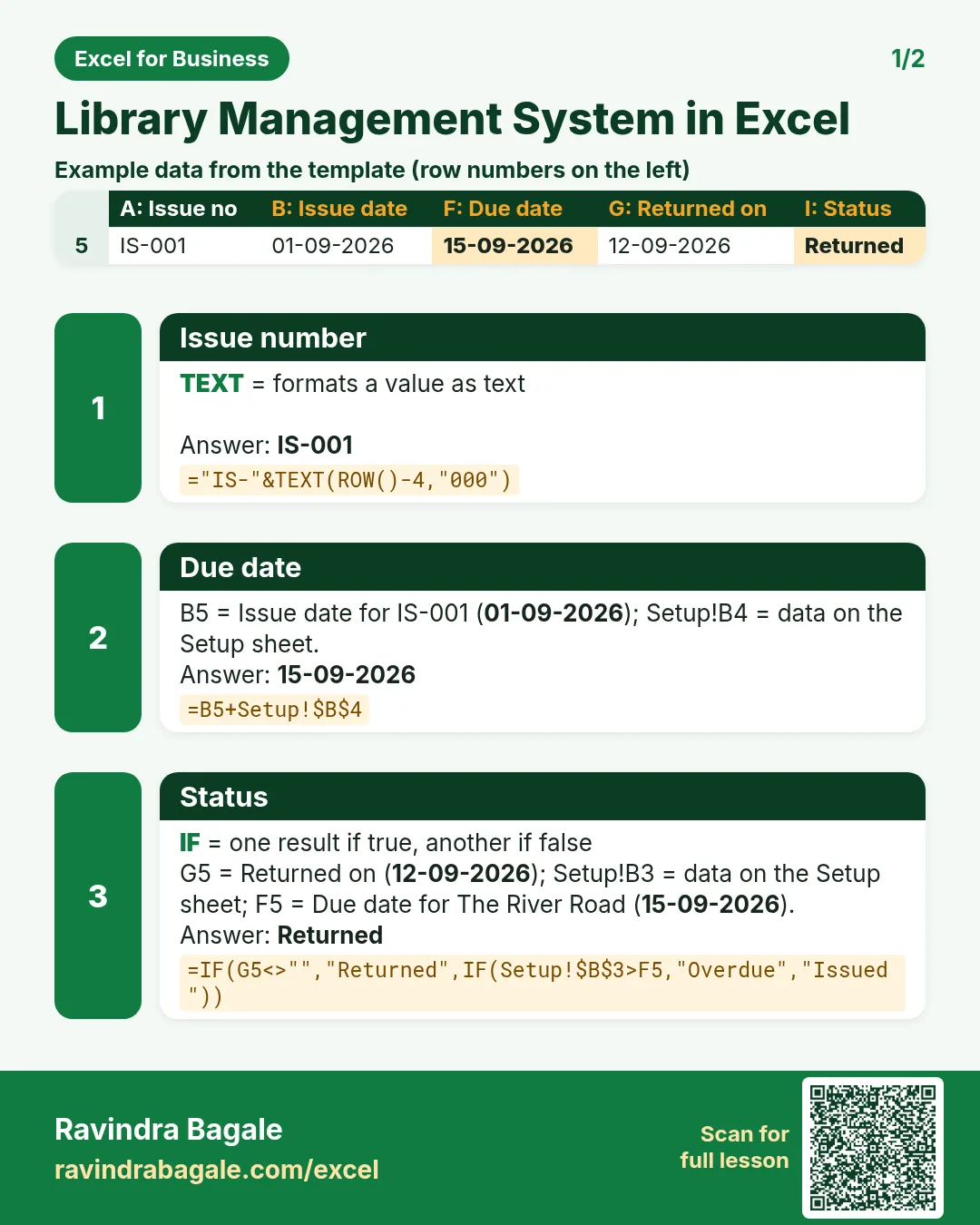

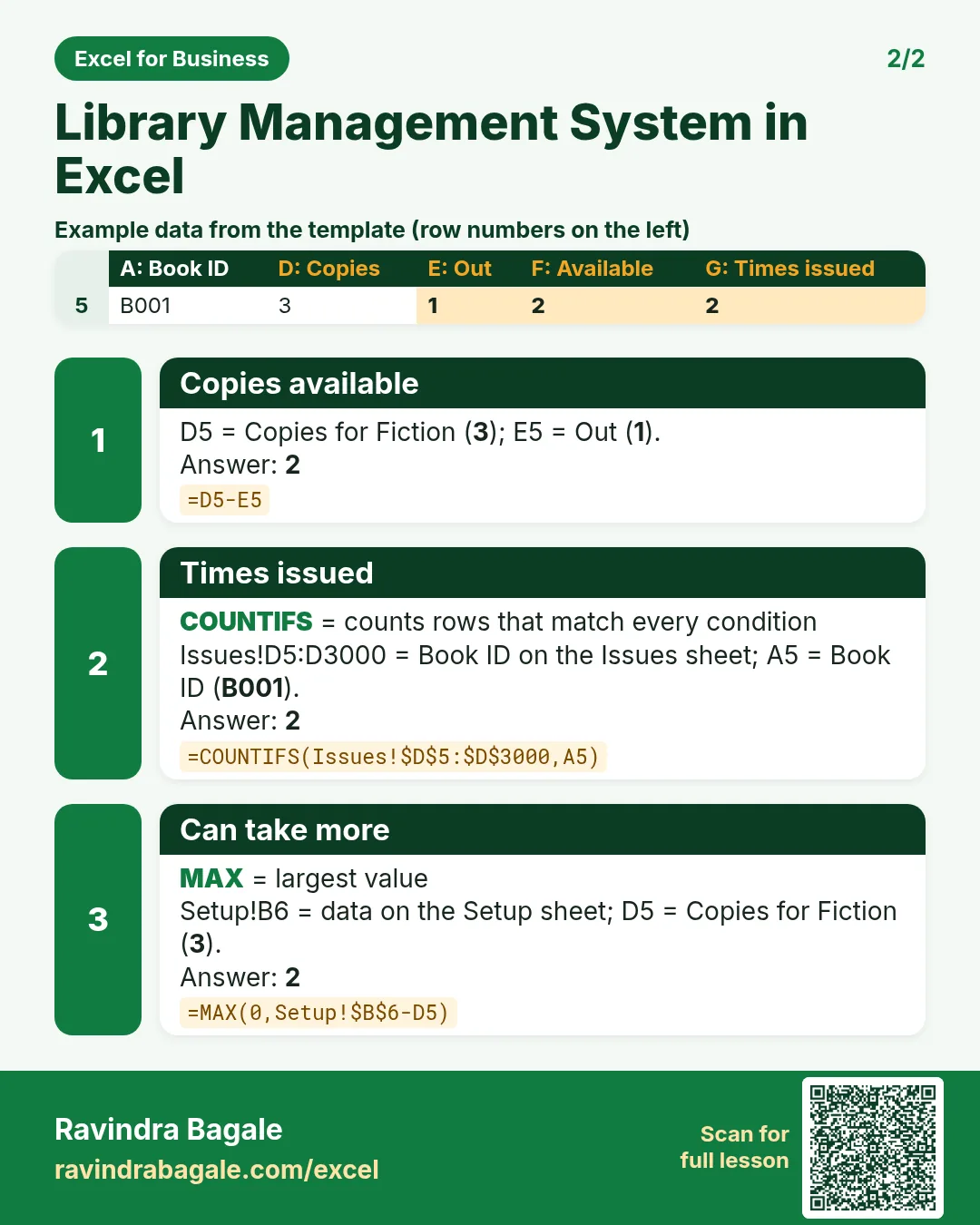

More cards: Ravi Sir's Cards.
6. Frequently asked questions
How do I calculate a due date in Excel?
Issue date + loan days, as in Issues F5.
How do I calculate a library fine?
Days late × fine per day; days late = MAX(0, return date or today − due date).
How do I count copies available?
Copies − COUNTIFS of issues for that book whose status is not Returned.
How do I stop a member taking too many books?
Count their books out with COUNTIFS and compare with the limit on Setup.
How do I see overdue books?
Filter Issues column I for Overdue; it compares the due date with today.
7. Quick quiz
Ten questions on this page. Sign in to save your score.
Loading practice tasks...
- Total covers (Easy): Add up Covers in D2:D11. (sheet "Data")
- Average bill amount (Easy): Average of E2:E11, rounded to 2 decimals. (sheet "Data")
- Rows in Downtown (Easy): How many rows have Outlet "Downtown"? (sheet "Data")
- Largest covers (Easy): The largest value in D2:D11. (sheet "Data")
- Days taken (Easy): C2 minus B2. (sheet "Dates")
- Start year (Easy): Year of B3. (sheet "Dates")
- Due month (Easy): Month number of C3. (sheet "Dates")
- Earliest start (Easy): Earliest date in B2:B9 (as a date number). (sheet "Dates")
- Covers for Downtown (Medium): Total of D2:D11 where B is "Downtown". (sheet "Data")
- Downtown in Boston (Medium): Total of D2:D11 where B is "Downtown" and C is "Boston". (sheet "Data")
- Working days (Medium): Working days from B2 to C2. (sheet "Dates")
- Weekday of due (Medium): Weekday number of C4 (Sunday = 1). (sheet "Dates")