How to Calculate Home Loan EMI in Excel with PMT (and Make a Month-by-Month Repayment Schedule)
Amir is buying a flat in Nagpur. The bank offers a ₹25 lakh loan at 8.5% for 20 years. He wants three answers before he signs: the monthly EMI, the total interest he will pay, and how the EMI changes if the rate goes up. One function, PMT, gives the EMI. Two more, IPMT and PPMT, split every EMI into interest and principal.
What you'll learn on this page
- What PMT, IPMT and PPMT do (a short intro)
- EMI for ₹25,00,000 at 8.5% for 20 years
- Total paid and total interest
- What a 0.5% rate rise does to the EMI
- A 240-row repayment schedule
- A year-wise interest vs principal chart
Download the template: home-loan-emi-calculator-amortization-template.xlsx: example data with real formulas. Yellow cells are inputs you can type over; green cells hold formulas; blue rows are headers and totals. Replace the example data with your own and everything recalculates.
Made-up data: every name, amount, shop and date on this page is made up for practice. Cities are used only to make the examples feel real.
1. The example
New functions in one line each:
PMT(rate, nper, pv)gives the fixed payment for each period of a loan.IPMT(rate, per, nper, pv)gives the interest part of payment number per.PPMT(rate, per, nper, pv)gives the principal part of payment number per. IPMT + PPMT = PMT.
Use the monthly rate (yearly rate / 12) and the number of months.
Amir's loan (made-up): ₹25,00,000, 8.5% a year, 20 years.
- Monthly rate = 8.5% / 12 = 0.7083%; months = 20 × 12 = 240.
- EMI = ₹21,695.58.
- Total paid = 21,695.58 × 240 = ₹52,06,939, so the total interest is ₹27,06,939, more than the loan itself.
- EMI 1: interest = 25,00,000 × 0.7083% = ₹17,708.33; principal = 21,695.58 − 17,708.33 = ₹3,987.25.
- From EMI number 143 (year 12) the principal part becomes bigger than the interest part.
- At 9.0% instead of 8.5% the EMI becomes ₹22,493.15: ₹797.57 more every month.
Figure 1. PMT turns loan, rate and tenure into the EMI. Every EMI is split by IPMT (interest) and PPMT (principal). Month 1: ₹17,708.33 + ₹3,987.25 = ₹21,695.58.
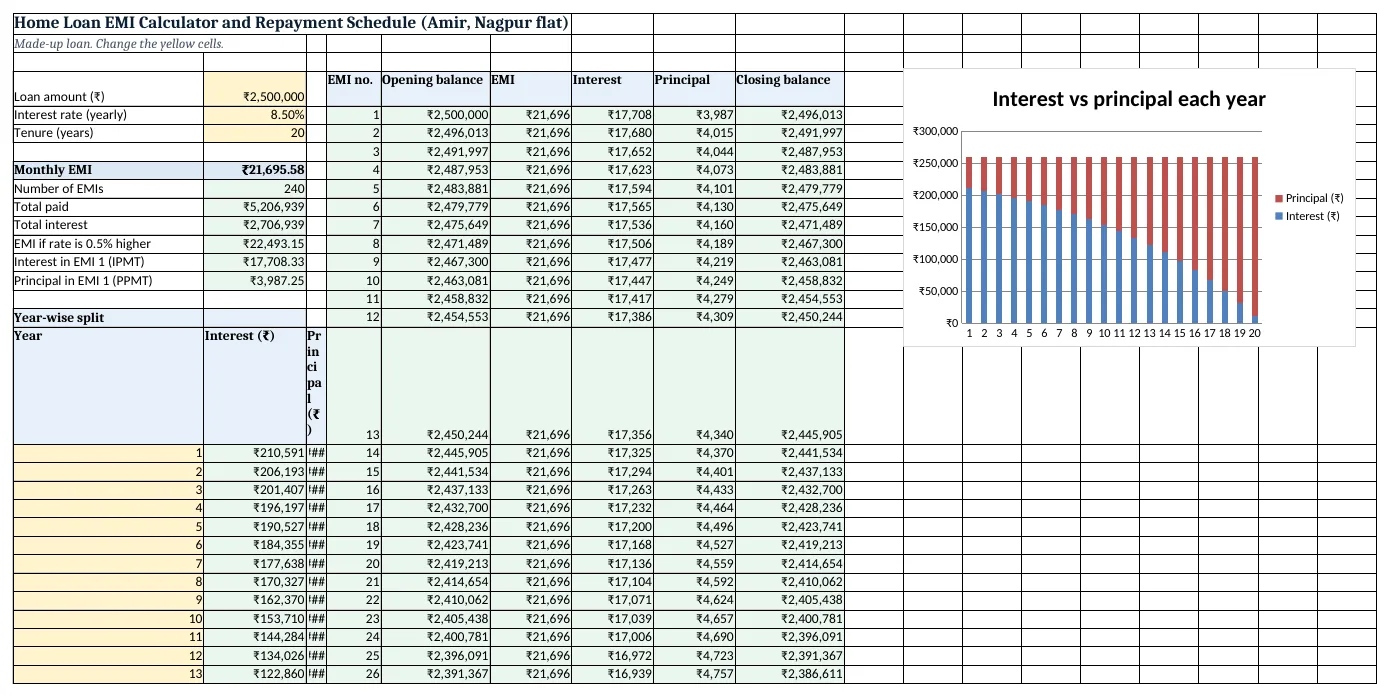
Figure 2. The template sheet, recalculated with its example data. Download it above and replace the yellow cells with your own numbers.
2. Build it step by step
Step 1. Type the loan details
- In A4:A6 type Loan amount (₹), Interest rate (yearly), Tenure (years).
- In B4 type 2500000, in B5 8.5% and in B6 20 (yellow input cells).
Step 2. EMI with PMT
- In B8 type
=PMT(B5/12,B6*12,-B4): ₹21,695.58. - The minus before B4 makes the answer positive. Without it Excel shows −21,695.58, because money you pay out is negative.
Step 3. Totals
- In B9 type
=B6*12: 240 EMIs. - In B10 type
=B8*B9: total paid ₹52,06,939. - In B11 type
=B10-B4: total interest ₹27,06,939. - In B12 type
=PMT((B5+0.5%)/12,B6*12,-B4): ₹22,493.15 if the rate rises by 0.5%.
Step 4. Interest and principal of one EMI
- In B13 type
=IPMT(B5/12,1,B6*12,-B4): ₹17,708.33 interest in EMI 1. - In B14 type
=PPMT(B5/12,1,B6*12,-B4): ₹3,987.25 principal in EMI 1.
Step 5. The schedule (columns D to I)
- In D4:I4 type EMI no., Opening balance, EMI, Interest, Principal, Closing balance.
- In D5 type 1 and in D6
=D5+1. - In E5 type
=$B$4; in E6=I5(last month's closing balance). - In F5 type
=$B$8. - In G5 type
=IPMT($B$5/12,D5,$B$9,-$B$4)and in H5=PPMT($B$5/12,D5,$B$9,-$B$4). - In I5 type
=E5-H5. - Copy row 6 down to row 244. The closing balance in I244 is ₹0 (absolute references keep $B$5 fixed).
Step 6. Year-wise split and chart
- In A18:A37 type years 1 to 20.
- In B18 type
=SUMIFS($G$5:$G$244,$D$5:$D$244,">"&(A18-1)*12,$D$5:$D$244,"<="&A18*12)for interest, and the same on column H in C18 for principal. Copy down. - Year 1: interest ₹2,10,591, principal ₹49,756. Year 20: interest ₹11,601, principal ₹2,48,746.
- Select A17:C37 > Insert > Stacked Column chart (column charts).
Step 7. Afford-check with Goal Seek
- To find the loan for an EMI of ₹20,000: Data > What-If Analysis > Goal Seek, Set cell B8, To value 20000, By changing B4 (Goal Seek).
- Undo (Ctrl+Z) to go back to ₹25 lakh.
Ravindra Bagale's Tip
In the first years most of the EMI is interest: here ₹17,708 of ₹21,696 in month 1. That is why a part-prepayment early in the loan saves far more than the same amount near the end.
Ravindra Bagale's Tip – मराठी
सुरुवातीच्या वर्षांत EMI चा मोठा भाग interest असतो: इथे पहिल्या महिन्यात ₹21,696 पैकी ₹17,708. म्हणून loan च्या सुरुवातीला केलेलं part-prepayment शेवटी केलेल्यापेक्षा खूप जास्त वाचवतं.
Ravindra Bagale's Tip – हिंदी
शुरुआती सालों में EMI का बड़ा हिस्सा interest होता है: यहाँ पहले महीने में ₹21,696 में से ₹17,708. इसलिए loan की शुरुआत में किया part-prepayment आखिर में किए से कहीं ज़्यादा बचाता है.
3. Formulas used
| Cell | Formula | What it does |
|---|---|---|
| B8 | =PMT(B5/12,B6*12,-B4) |
Monthly EMI |
| B10 | =B8*B9 |
Total of all EMIs |
| B11 | =B10-B4 |
Total interest |
| B12 | =PMT((B5+0.5%)/12,B6*12,-B4) |
EMI if the rate rises 0.5% |
| B13 | =IPMT(B5/12,1,B6*12,-B4) |
Interest in EMI 1 |
| B14 | =PPMT(B5/12,1,B6*12,-B4) |
Principal in EMI 1 |
| E6 | =I5 |
Opening balance = last closing balance |
| G5 | =IPMT($B$5/12,D5,$B$9,-$B$4) |
Interest part of this EMI |
| H5 | =PPMT($B$5/12,D5,$B$9,-$B$4) |
Principal part of this EMI |
| I5 | =E5-H5 |
Closing balance |
| B18 | =SUMIFS($G$5:$G$244,$D$5:$D$244,">"&(A18-1)*12,$D$5:$D$244,"<="&A18*12) |
Interest paid in year 1 |
Every formula above is written in the template, so you can click a cell and see it in the formula bar. All values on this page were recalculated in the file.
4. Common mistakes
- Using the yearly rate.
=PMT(8.5%,240,-2500000)treats 8.5% as a monthly rate and gives a huge EMI. Always divide the rate by 12. - Using years instead of months. nper must be 240 for 20 years of monthly EMIs, not 20.
- Getting a negative EMI. PMT returns money going out as negative. Put a minus before the loan amount (
-B4), or before PMT. - Forgetting $ in the schedule. Without
$B$5the rate cell moves as you copy down and later rows break. - Comparing with the bank to the rupee. Banks may round, charge from the disbursement date or add fees. The sheet gives the standard reducing-balance EMI; use it to compare offers.
Ravindra Bagale's Tip
Before choosing an offer, compare total interest (B11), not only the EMI. A longer tenure lowers the EMI but raises the total you pay.
Ravindra Bagale's Tip – मराठी
Offer निवडण्याआधी फक्त EMI नाही, total interest (B11) बघा. Tenure वाढवला की EMI कमी होतो पण एकूण भरलेले पैसे वाढतात.
Ravindra Bagale's Tip – हिंदी
Offer चुनने से पहले सिर्फ EMI नहीं, total interest (B11) देखो. Tenure बढ़ाने से EMI कम होती है पर कुल भुगतान बढ़ जाता है.
5. More real examples
Example 1: Car loan. ₹8,00,000 at 9.5% for 5 years: change B4:B6 to 800000, 9.5%, 5. The schedule after row 64 can be cleared.
Example 2: Personal loan comparison. Copy B4:B8 for two offers side by side (two rates, two tenures) and compare total interest in B11.
Example 3: Prepayment idea. After a bonus, lower the loan amount in a copy of the sheet to see how the interest drops. Banks may reduce the tenure instead of the EMI, so ask them.
Quick revision cards
Quick revision
Each card shows formulas from this page, each with an example and its answer from the template. Scan the QR code on a card to open this lesson. All names and numbers are made up for practice.
झटपट उजळणी
प्रत्येक card वर या page मधले formulas, त्यांचं example आणि template मधलं उत्तर आहे. Card वरचा QR code scan केला की हा lesson उघडतो. सगळी नावं आणि आकडे सरावासाठी काल्पनिक आहेत.
झटपट दोहराई
हर card पर इस page के formulas, उनका example और template का उत्तर है. Card का QR code scan करें तो यह lesson खुलेगा. सभी नाम और आंकड़े अभ्यास के लिए काल्पनिक हैं.
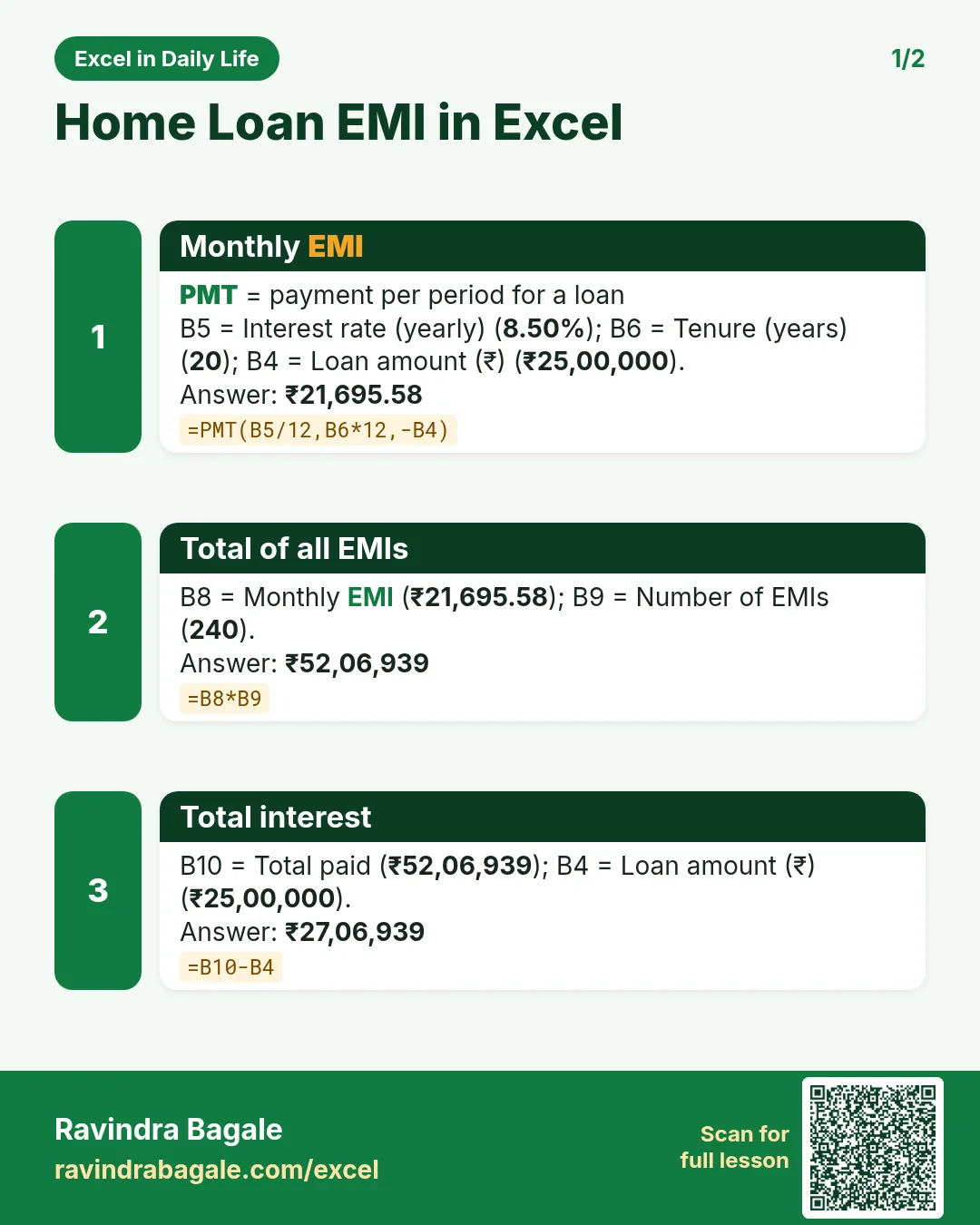

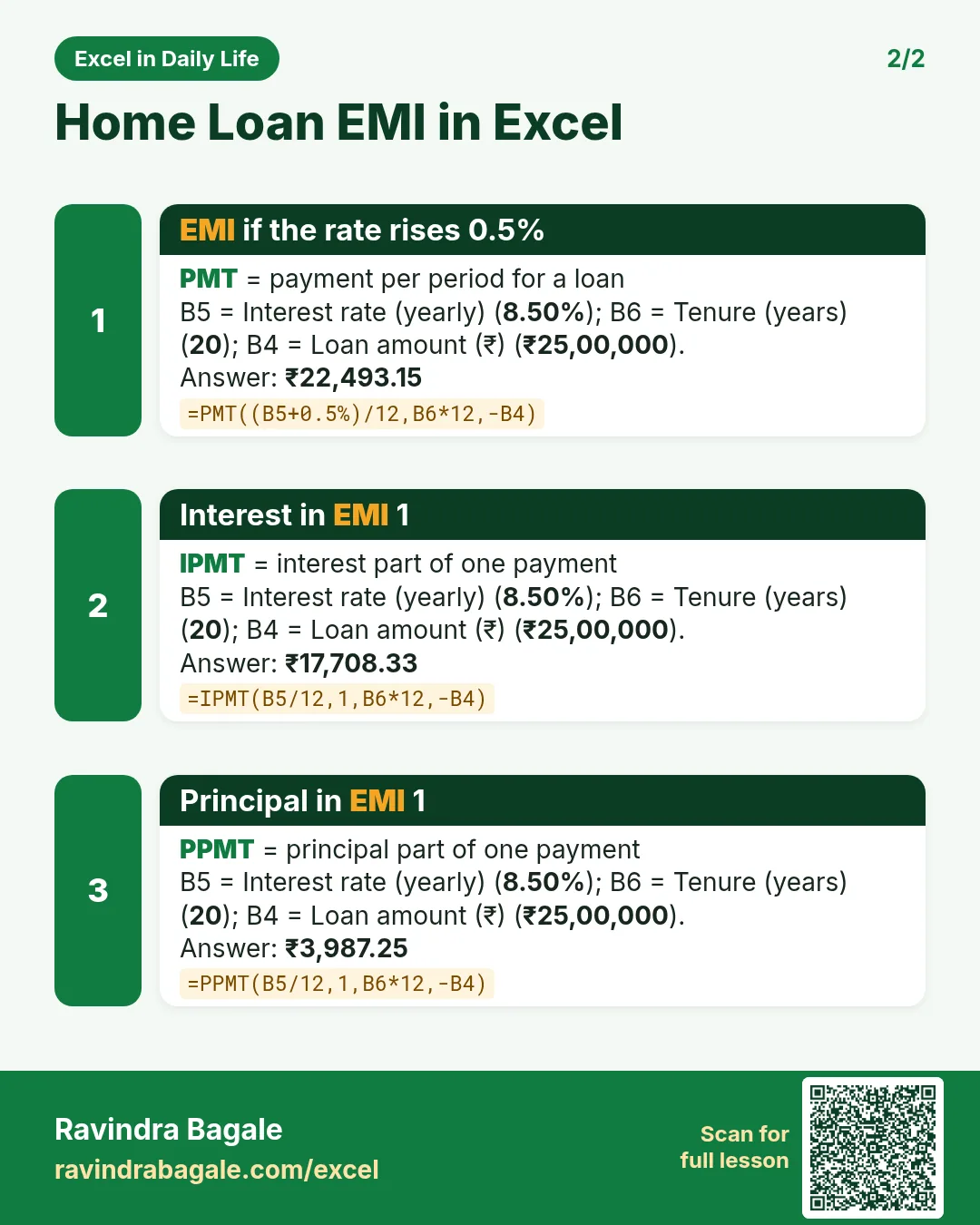

More cards: Ravi Sir's Cards.
6. Frequently asked questions
What is the Excel formula for EMI?
=PMT(rate/12, years*12, -loan). For ₹25 lakh at 8.5% for 20 years: =PMT(8.5%/12,240,-2500000) = ₹21,695.58.
Why does PMT show a negative number?
Excel shows money you pay as negative. Use -loan inside PMT, or write =-PMT(...).
How do I see interest and principal for each month?
IPMT gives the interest part and PPMT the principal part of a chosen EMI number; together they equal the EMI.
Does this work for a car or personal loan?
Yes. Any loan with a fixed rate and equal monthly EMIs works the same way.
How much EMI is safe?
Many lenders look at what share of take-home pay goes to EMIs. Keep space in your home budget for savings too.
7. Quick quiz
Ten questions on this page. Sign in to save your score.
Loading practice tasks...
- Monthly rate (Easy): Yearly rate B3 divided by 12.
- Months (Easy): B4 times 12.
- Monthly EMI (Easy): EMI on amount B2 at B3 for B4 years, as a positive number, rounded to 2 decimals.
- Total repaid (Medium): Total paid over the loan, rounded to 0 decimals.
- Total interest (Medium): Total paid minus B2, rounded to 0 decimals.
- Processing fee (Medium): B2 times B6.
- Savings value (Medium): Value after B4 years of saving B5 each month at B3, positive, rounded to 0 decimals.
- Interest earned (Hard): Savings value minus B5 times months, rounded to 0 decimals.
- Months to repay at double EMI (Hard): Months to clear B2 at B3 paying twice the EMI, rounded up.
- Loan you can afford (Hard): Loan size for an EMI equal to B5 over B4 years at B3, positive, rounded to 0 decimals.
- Interest share (Hard): Total interest ÷ total paid, rounded to 3 decimals.