Hostel and PG Management System in Excel: Rooms, Residents, Rent, Late Fee, Occupancy and Dashboard
Raja PG Stay in Pune has 12 beds in six rooms. Raja collected rent on UPI, in cash and by bank transfer, and on the 10th of every month he could not say who had paid, who had paid half and who owed a late fee. This page builds an 8-sheet Excel system: rooms and rents are typed once, every payment is one row, and the Rent ledger works out the month's balance and late fee for each resident.
What you'll learn on this page
- Keep room types, rent, deposit and rooms on Setup
- Pick up each resident's rent and deposit from the room with XLOOKUP
- Record payments against a rent month
- Find the first payment date with MINIFS and count days late
- Charge a late fee per day with a cap using MIN
- Count occupied and vacant beds with COUNTIFS
- Print a rent receipt and track the month on a dashboard
Download the template: hostel-pg-management-system-template.xlsx: a 8-sheet system with example data and real formulas (Read me, Setup, Residents, Payments, Rent ledger, Occupancy, Receipt, Dashboard). Yellow cells are inputs you can type over; green cells hold formulas; blue rows are headers and totals. Replace the example data with your own and every report and the dashboard recalculate.
Made-up data: every name, amount, business and date on this page is made up for practice. Cities are used only to make the examples feel real.
1. The business story
Raja PG Stay, Pune, rent month October 2026, as of 17 October (made-up data). Rent is due by the 5th; late fee ₹50 a day, capped at ₹500.
| Question | Where the system answers it |
|---|---|
| Who has not paid at all? | Rent ledger: Rani Pawar and Shahrukh Mulla, ₹5,500 each with the full late fee |
| Who paid late? | Ruhi Jadhav (3 days, ₹150) and Salman Shaikh (7 days, ₹350) |
| How full are we? | Occupancy: 10 of 12 beds, 83.3% |
| What are empty beds costing? | ₹14,000 a month of rent not earned |
Rent for the month is ₹60,000; ₹49,000 is in and ₹12,550 is still due, late fees included. For flatmates splitting a home, see the flatmate expense split; for plain rent from tenants, the rent collection tracker.
Figure 1. Setup holds rents and rooms; Residents and Payments are the entry sheets; the ledger, occupancy, receipt and dashboard read from them.
2. Build it sheet by sheet
Step 1. Setup: rent month, late fee and rooms
- Type the as-of date in B3, the rent month in B4 (01-10-2026), the due day in B5 (5), the late fee per day in B6 (₹50) and the cap in B7 (₹500).
- B8 works out the due date:
=B4+B5-1, which gives 5 October. - Room types in A11:C13 (Single ₹9,000, Double ₹6,500, Triple ₹5,000 per bed, with deposits) and rooms in E11:G16 with type and beds.
Step 2. Residents: rent comes from the room
- Headers: Resident ID, Name, Room, Room type, Rent, Deposit due, Deposit paid, Deposit balance, Joined, Status.
- D5 finds the type:
=XLOOKUP(C5,Setup!$E$11:$E$16,Setup!$F$11:$F$16,"Check room")and E5 the rent from the type (XLOOKUP). - H5 deposit balance
=F5-G5. Shahrukh Mulla still owes ₹5,000 of his deposit. - Pick the room and status from drop-downs. When someone moves out, set Status to Left and keep the row.
Step 3. Payments and the Rent ledger
- Payments: Receipt no, Date, Resident ID, Name, Rent month, Amount, Mode. A5
="RC-"&TEXT(ROW()-4,"000"). - Rent ledger D5 paid this month:
=SUMIFS(Payments!$F$5:$F$2000,Payments!$C$5:$C$2000,A5,Payments!$E$5:$E$2000,Setup!$B$4)(SUMIFS). - E5 first paid on:
=IF(COUNTIFS(…)=0,"",MINIFS(Payments!$B$5:$B$2000,Payments!$C$5:$C$2000,A5,Payments!$E$5:$E$2000,Setup!$B$4))(MINIFS). - F5 days late counts to the first payment, or to today if nothing is paid; G5 late fee
=MIN(Setup!$B$7,F5*Setup!$B$6)and H5 balance=C5+G5-D5. - I5 status:
=IF(H5<=0,"Paid",IF(D5>0,"Part paid","Unpaid")), coloured with conditional formatting.
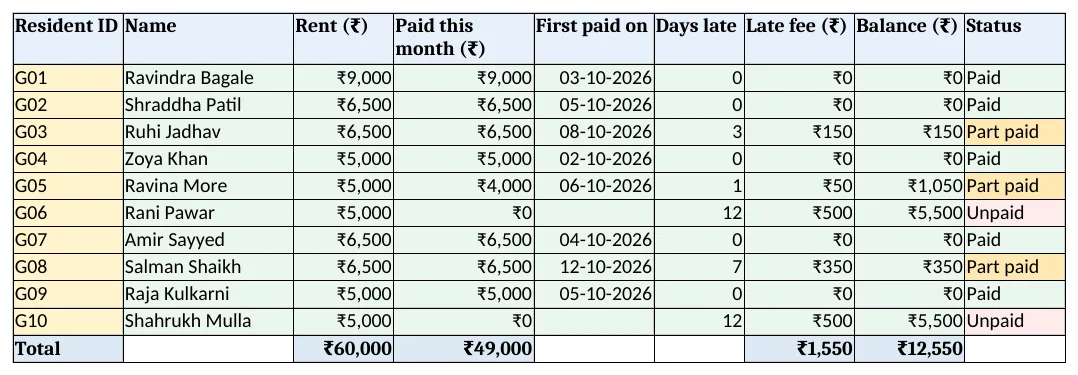
Figure 2. Rent ledger: paid this month, first paid on, days late, late fee, balance and status
Step 4. Occupancy and Receipt
- Occupancy D5:
=COUNTIFS(Residents!$C$5:$C$200,A5,Residents!$J$5:$J$200,"Active"), E5 vacant=C5-D5, F5 rent lost on vacant beds. - Receipt: type a receipt no in B4; B6 onwards look up date, resident, month, amount and mode. RC-012 shows Salman Shaikh's ₹6,500 with ₹350 late fee still due. Set the print area.
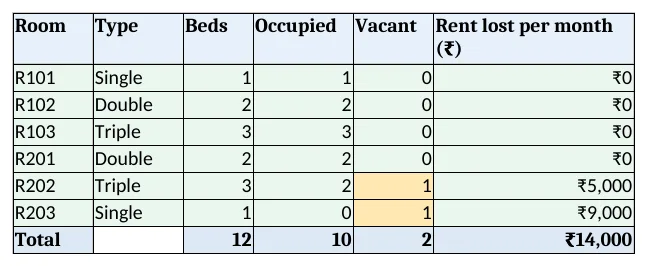
Figure 3. Occupancy: beds, occupied, vacant and rent lost per room
Step 5. Dashboard
- KPI cards: active residents, beds occupied
=Occupancy!D11/Occupancy!C11, rent this month, collected, balance with late fee and unpaid residents. - Charts: occupied and vacant beds by room, and balance by resident (dashboard charts).
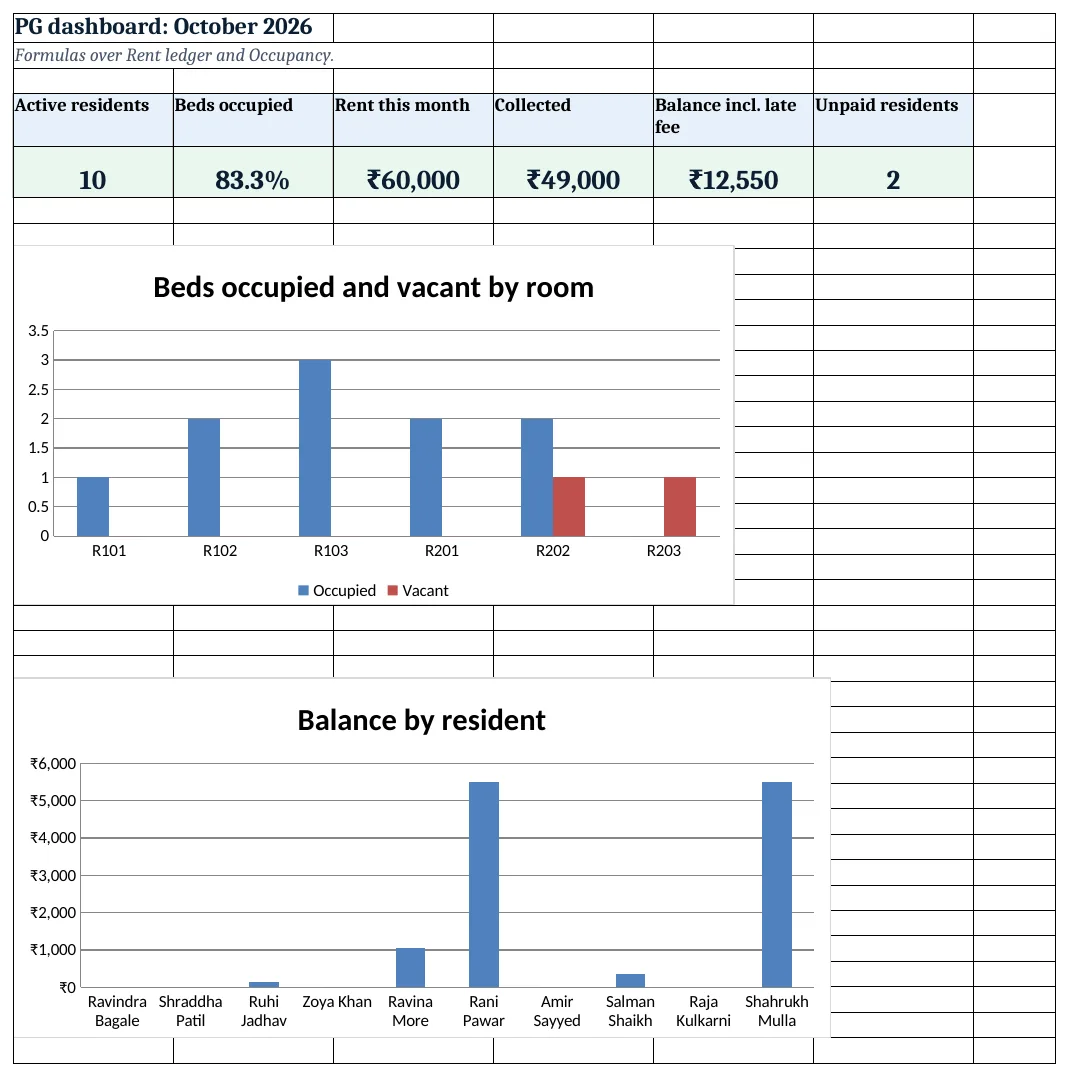
Figure 4. PG dashboard: residents, beds occupied, rent, collected, balance and unpaid
Ravindra Bagale's Tip
Send a reminder on the 4th to everyone not yet Paid. One message before the due day saves most late fees and arguments.
Ravindra Bagale's Tip – मराठी
4 तारखेला Paid नसलेल्या सर्वांना आठवण पाठवा. due day आधीचा एक मेसेज बहुतेक late fee आणि वाद टाळतो.
Ravindra Bagale's Tip – हिंदी
4 तारीख को Paid न हुए सबको याद दिलाएं. due day से पहले का एक मैसेज ज़्यादातर late fee और बहस बचाता है.
3. Formulas used
| Cell | Formula | What it does |
|---|---|---|
| Setup!B8 | =B4+B5-1 |
Rent due date |
| Residents!D5 | =XLOOKUP(C5,Setup!$E$11:$E$16,Setup!$F$11:$F$16,"Check room") |
Room type from the room |
| Residents!E5 | =XLOOKUP(D5,Setup!$A$11:$A$13,Setup!$B$11:$B$13,0) |
Rent per bed |
| Residents!H5 | =F5-G5 |
Deposit still to collect |
| Payments!A5 | ="RC-"&TEXT(ROW()-4,"000") |
Receipt number |
| Rent ledger!D5 | =SUMIFS(Payments!$F$5:$F$2000,Payments!$C$5:$C$2000,A5,Payments!$E$5:$E$2000,Setup!$B$4) |
Paid for this rent month |
| Rent ledger!E5 | =IF(COUNTIFS(Payments!$C$5:$C$2000,A5,Payments!$E$5:$E$2000,Setup!$B$4)=0,"",MINIFS(Payments!$B$5:$B$2000,Payments!$C$5:$C$2000,A5,Payments!$E$5:$E$2000,Setup!$B$4)) |
First payment date |
| Rent ledger!F5 | =IF(E5="",MAX(0,Setup!$B$3-Setup!$B$8),MAX(0,E5-Setup!$B$8)) |
Days late |
| Rent ledger!G5 | =MIN(Setup!$B$7,F5*Setup!$B$6) |
Late fee with cap |
| Rent ledger!H5 | =C5+G5-D5 |
Balance |
| Rent ledger!I5 | =IF(H5<=0,"Paid",IF(D5>0,"Part paid","Unpaid")) |
Paid, Part paid or Unpaid |
| Occupancy!D5 | =COUNTIFS(Residents!$C$5:$C$200,A5,Residents!$J$5:$J$200,"Active") |
Beds occupied |
| Occupancy!F5 | =E5*XLOOKUP(B5,Setup!$A$11:$A$13,Setup!$B$11:$B$13,0) |
Rent lost on vacant beds |
| Dashboard!B5 | =Occupancy!D11/Occupancy!C11 |
Share of beds occupied |
Every formula above is written in the template, so you can click a cell and see it in the formula bar. All values on this page were recalculated in LibreOffice with zero errors.
4. Common mistakes
- Typing the month as text. Rent month must be a real date (the 1st). "Oct" typed as text never matches Setup B4, so SUMIFS returns 0.
- Deleting residents who leave. Set Status to Left. The history stays and the occupancy count drops on its own.
- Late fee without a cap. A forgotten resident can run up a huge fee. MIN with the cap keeps it fair and agreed.
- Counting days late from the last payment. Use the FIRST payment of the month. MINIFS finds it.
- Not changing the rent month. On the 1st, change Setup B4. Otherwise the ledger keeps showing last month.
Ravindra Bagale's Tip
Watch the Rent lost column. One empty single room costs ₹9,000 a month; a small discount to fill it quickly is often worth it.
Ravindra Bagale's Tip – मराठी
Rent lost column पहा. एक रिकामी single room महिन्याला ₹9,000 घालवते; ती लवकर भरण्यासाठी थोडी सूट देणे फायद्याचे.
Ravindra Bagale's Tip – हिंदी
Rent lost column देखें. एक खाली single room महीने का ₹9,000 गंवाता है; जल्दी भरने को थोड़ी छूट अक्सर फायदेमंद है.
5. More real examples
Example 1: Working women's hostel. Add a Meals column with a monthly mess charge looked up from Setup and add it to rent.
Example 2: Service apartment. Rent per room per night instead of per bed per month; days stayed × rate.
Example 3: Staff quarters. Deduct rent from salary: link the ledger to the payroll calculator by employee ID.
Quick revision cards
Quick revision
Each card shows formulas from this page, each with an example and its answer from the template. Scan the QR code on a card to open this lesson. All names and numbers are made up for practice.
झटपट उजळणी
प्रत्येक card वर या page मधले formulas, त्यांचं example आणि template मधलं उत्तर आहे. Card वरचा QR code scan केला की हा lesson उघडतो. सगळी नावं आणि आकडे सरावासाठी काल्पनिक आहेत.
झटपट दोहराई
हर card पर इस page के formulas, उनका example और template का उत्तर है. Card का QR code scan करें तो यह lesson खुलेगा. सभी नाम और आंकड़े अभ्यास के लिए काल्पनिक हैं.
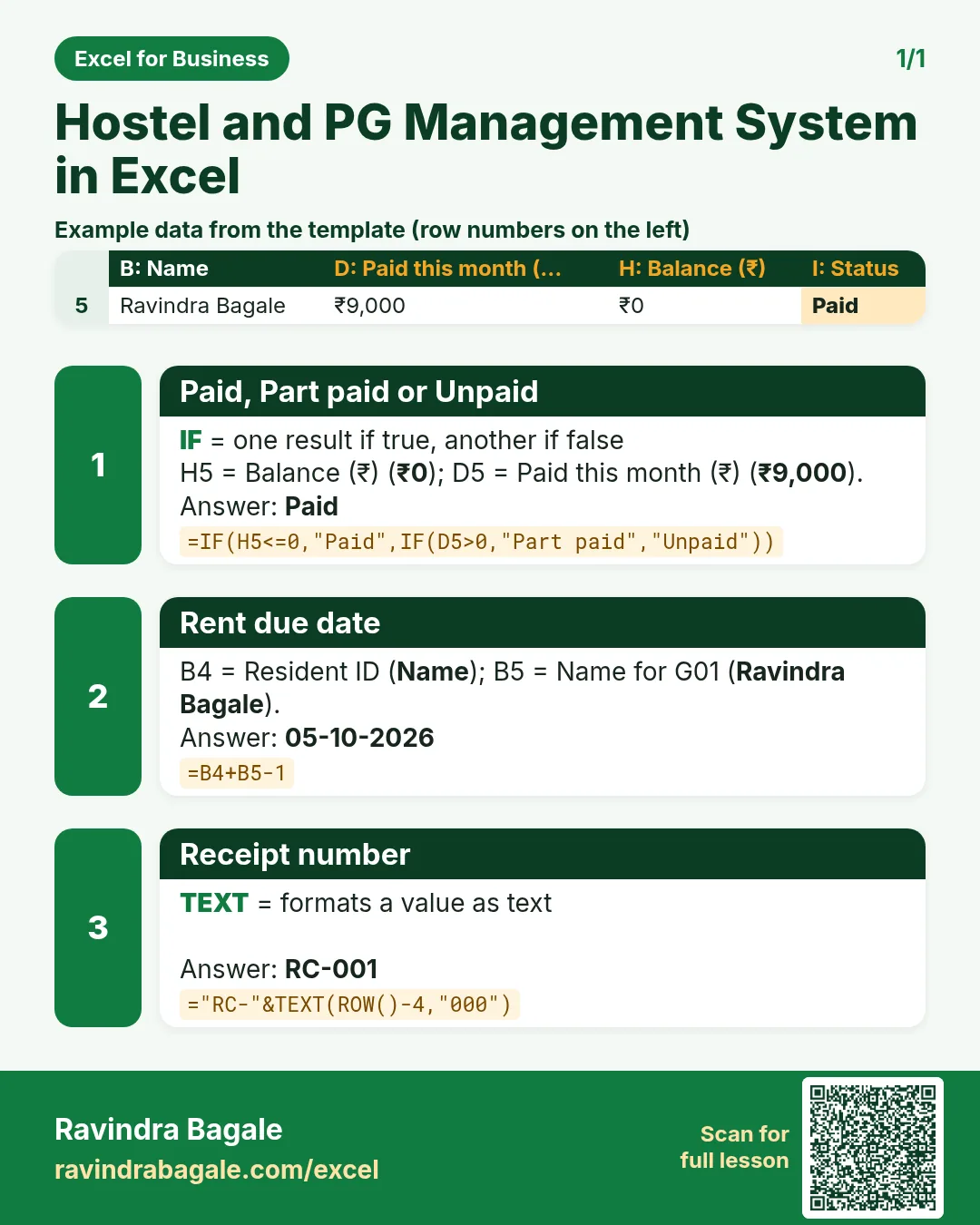

More cards: Ravi Sir's Cards.
6. Frequently asked questions
How do I calculate a late fee with a maximum in Excel?
=MIN(cap, days_late*fee_per_day), as in Rent ledger G5.
How do I find the first payment date for a resident?
MINIFS on the date column with the resident ID and rent month as conditions.
How do I count occupied beds?
COUNTIFS on the room and Status = "Active", then vacant = beds − occupied.
Can a resident pay in two parts?
Yes. Add two payment rows for the same month; the ledger adds them and shows Part paid until the balance is 0.
Is GST charged on PG rent?
It depends on the facts and current notifications. Check with your accountant before adding a tax column.
7. Quick quiz
Ten questions on this page. Sign in to save your score.
Loading practice tasks...
- Total nights (Easy): Add up Nights in D2:D11.
- Average rate per night (Easy): Average of E2:E11, rounded to 2 decimals.
- Rows in Standard (Easy): How many rows have Room type "Standard"?
- Largest nights (Easy): The largest value in D2:D11.
- Nights for Standard (Medium): Total of D2:D11 where B is "Standard".
- Standard in Leeds (Medium): Total of D2:D11 where B is "Standard" and C is "Leeds".
- Best in Standard (Medium): Largest E2:E11 value where B is "Standard".
- Value of row 2 (Medium): D2 times E2.
- Look up Arjun Mehta (Medium): The Nights for "Arjun Mehta" (use a lookup on column A).
- Total value (Hard): Sum of D times E for all rows.
- Share of Standard (Hard): Share of D2:D11 that is "Standard", rounded to 3 decimals.
- Rank of row 2 (Hard): Rank of D2 among D2:D11 (largest = 1).
- Above average? (Hard): "Above" if E2 is above the average of E2:E11, else "Below".