Day-care Management System in Excel: Children, Daily Attendance, Late Pickup Charges, Monthly Fees and Fee Bill
Rani Day Care in Nagpur looks after eight children on half-day and full-day plans. Late pickups were forgiven or forgotten, and fee follow-ups were awkward because nobody had the numbers. This page builds an 8-sheet Excel system: arrival and pickup times are typed each day, late minutes become a charge on their own, and the Fees sheet adds the monthly fee and late charges against payments.
What you'll learn on this page
- Set plans, fees, closing time and the late pickup charge
- Keep a child list with plan and guardian
- Record daily in and out times
- Work out late minutes and charge per started 15 minutes with CEILING
- Count days present with COUNTIFS
- Build monthly fee status from fee, late charges and payments
- Print a fee bill and show the centre on a dashboard
Download the template: day-care-management-system-template.xlsx: a 8-sheet system with example data and real formulas (Read me, Setup, Children, Attendance, Payments, Fees, Fee bill, Dashboard). Yellow cells are inputs you can type over; green cells hold formulas; blue rows are headers and totals. Replace the example data with your own and every report and the dashboard recalculate.
Made-up data: every name, amount, business and date on this page is made up for practice. Cities are used only to make the examples feel real.
1. The business story
Rani Day Care, Nagpur, October 2026 as of 17 October (made-up data). Closing 7:00 pm; late pickup ₹100 per started 15 minutes; fee due by the 7th.
| Question | Where the system answers it |
|---|---|
| Who was picked up late? | 5 late pickups; Siya Jadhav twice, 20 and 35 minutes: ₹500 |
| What is still unpaid? | ₹13,600 of ₹59,600 due |
| Whose fee is overdue? | Pari Pawar ₹9,000 and Siya Jadhav ₹4,000, among others |
| How many came on 16 October? | 8 children |
One fee bill per child, with late charges listed, avoids awkward conversations at the gate.
Figure 1. Setup holds plans and rules; Children, Attendance and Payments are the entry sheets; Fees, Fee bill and Dashboard read from them.
2. Build it sheet by sheet
Step 1. Setup: plans and rules
- B4 fee month, B5 closing time (19:00), B6 late charge per 15 minutes (₹100), B7 fee due by day (7).
- B8 due date
=B4+B7-1. Plans with fees in A11:B13.
Step 2. Children
- One row per child: Child ID, Name, Age group, Plan, Guardian. Plan from a drop-down.
- F5 fee
=XLOOKUP(D5,Setup!$A$11:$A$13,Setup!$B$11:$B$13,0)and G5 days present=COUNTIFS(Attendance!$B$5:$B$5000,A5).
Step 3. Attendance and late pickup
- One row per child per day: Date, Child ID, In, Out (time calculations).
- F5 late minutes
=MAX(0,ROUND((E5-Setup!$B$5)*1440,0)): times are fractions of a day, so × 1440 gives minutes. - G5 charge
=CEILING(F5/15,1)*Setup!$B$6: 20 minutes counts as two started 15-minute blocks.
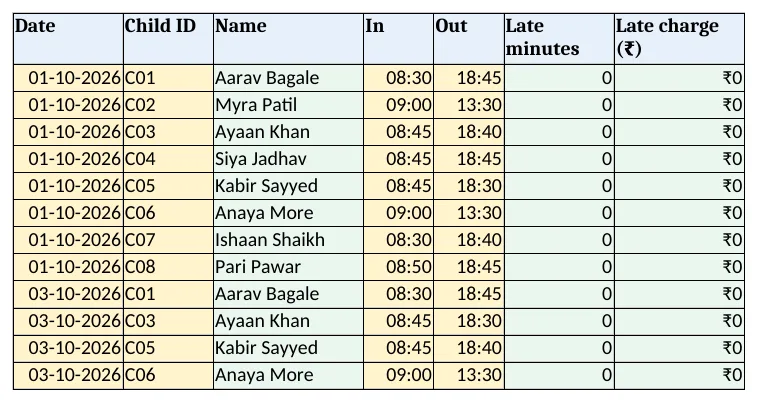
Figure 2. Attendance: in and out times, late minutes and late pickup charge
Step 4. Payments and Fees
- Payments: Date, Child ID, Amount, Mode.
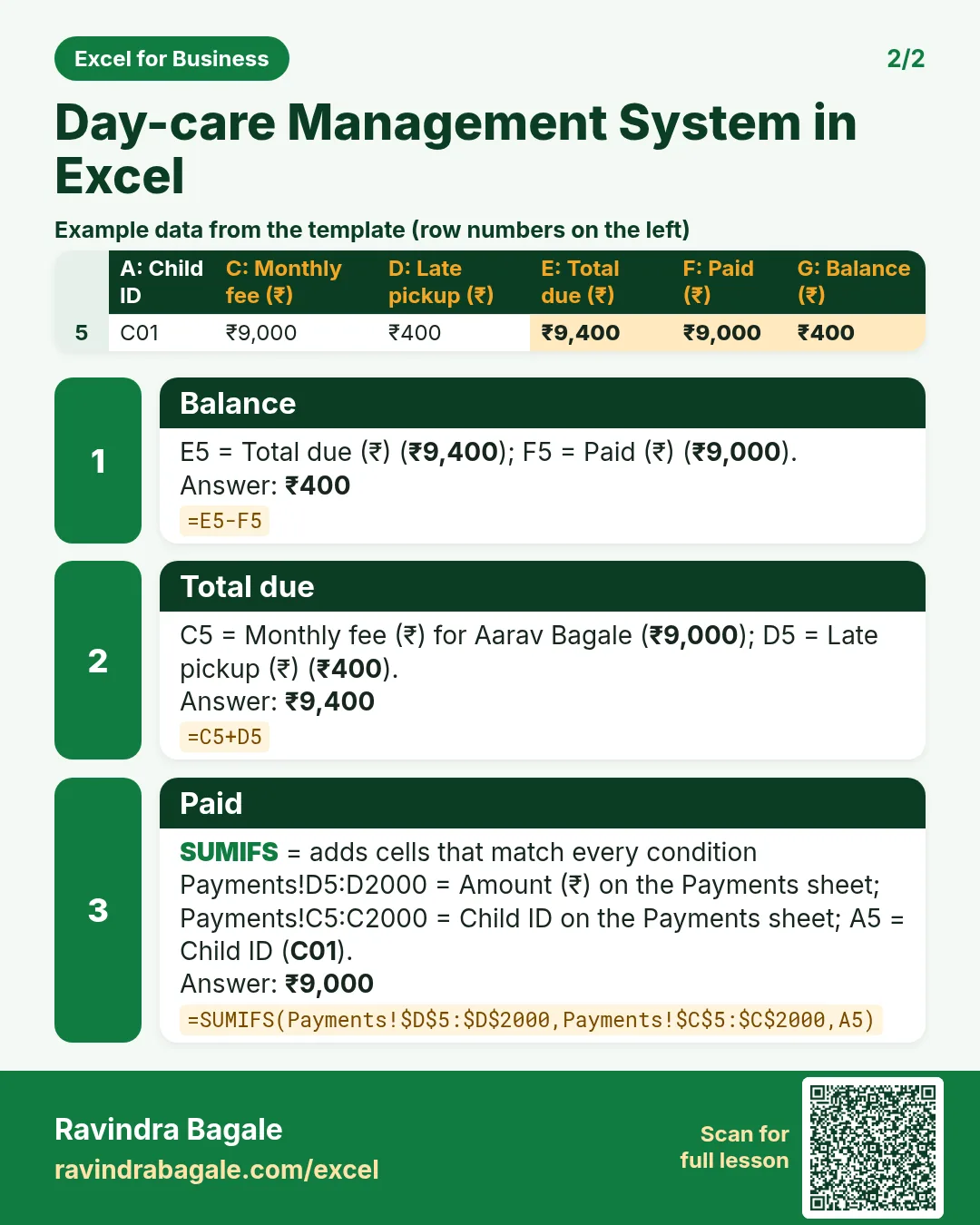
- Fees D5 late pickup and F5 paid with SUMIFS, E5 total due
=C5+D5, G5 balance=E5-F5. - H5:
=IF(G5<=0,"Paid",IF(Setup!$B$3>Setup!$B$8,"Overdue","Due")).
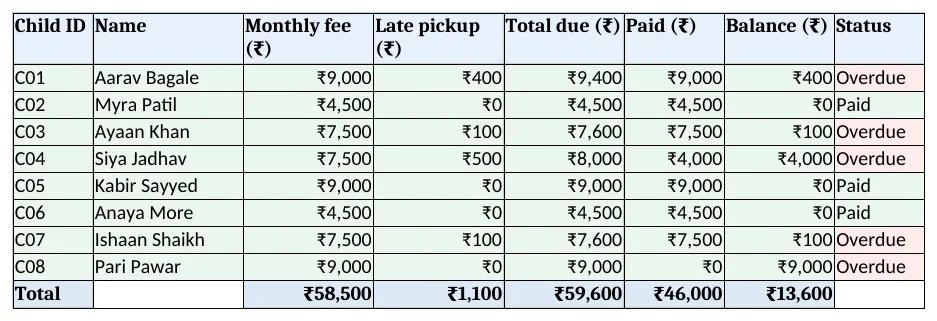
Figure 3. Fees: monthly fee, late pickup, total due, paid, balance and status per child
Step 5. Fee bill and Dashboard
- Fee bill: type a child ID in B4; rows 6 to 12 bring fee, late charges, paid and balance. Set the print area.
- KPI cards: children enrolled, present on 16 October, fees due, collected, balance and late pickups. Charts: days present and balance by child.
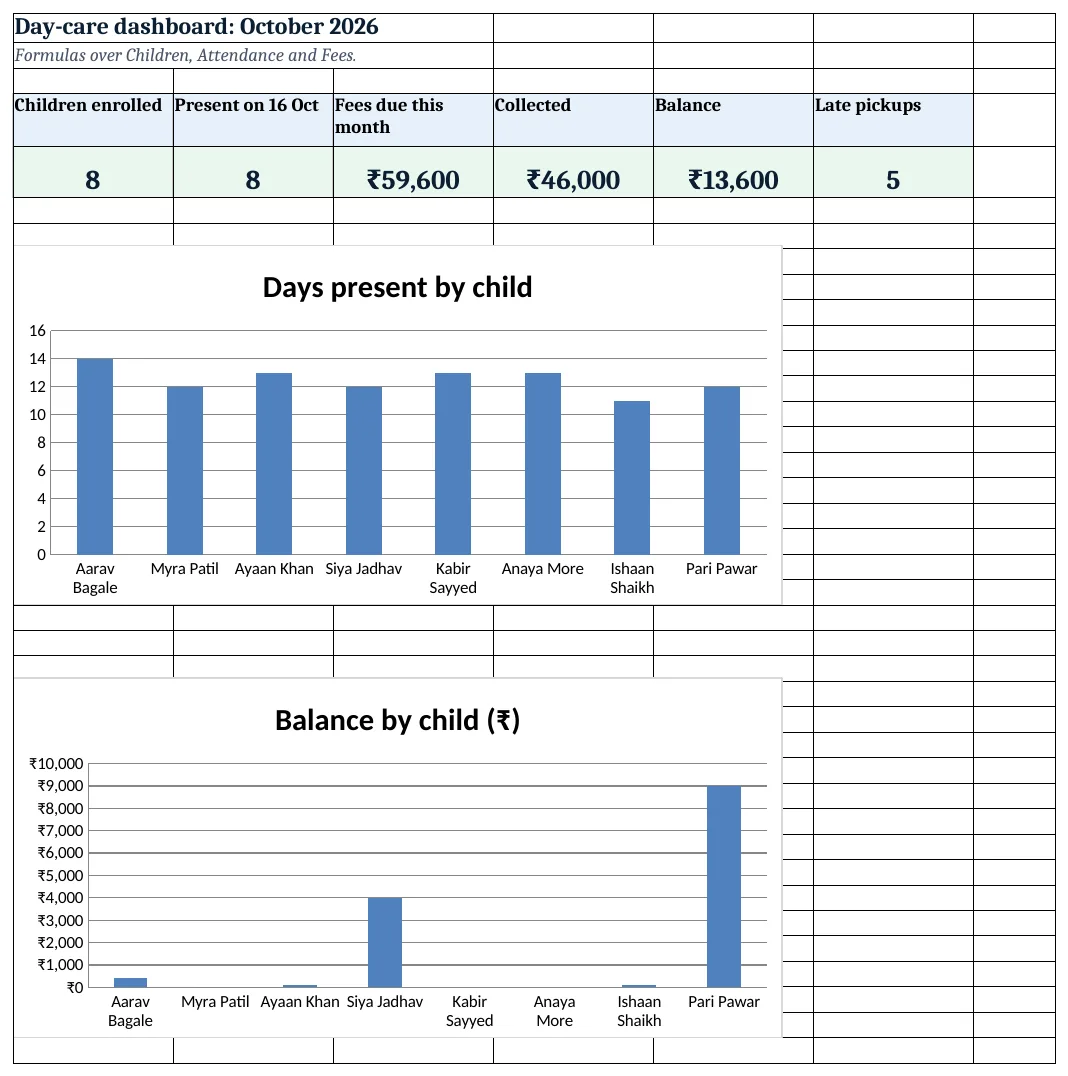
Figure 4. Day-care dashboard: children, present today, fees due, collected, balance and late pickups
Ravindra Bagale's Tip
Show the late charge on the bill from day one. Guardians notice when rules are applied to everyone.
Ravindra Bagale's Tip – मराठी
पहिल्या दिवसापासून late charge बिलावर दाखवा. नियम सगळ्यांना सारखा लागला की सगळे पाळतात.
Ravindra Bagale's Tip – हिंदी
पहले दिन से late charge बिल पर दिखाएं. नियम सब पर बराबर लगे तो सब मानते हैं.
3. Formulas used
| Cell | Formula | What it does |
|---|---|---|
| Setup!B8 | =B4+B7-1 |
Fee due date |
| Children!F5 | =XLOOKUP(D5,Setup!$A$11:$A$13,Setup!$B$11:$B$13,0) |
Monthly fee |
| Children!G5 | =COUNTIFS(Attendance!$B$5:$B$5000,A5) |
Days present |
| Attendance!C5 | =XLOOKUP(B5,Children!$A$5:$A$200,Children!$B$5:$B$200,"Check ID") |
Child name |
| Attendance!F5 | =MAX(0,ROUND((E5-Setup!$B$5)*1440,0)) |
Late minutes |
| Attendance!G5 | =CEILING(F5/15,1)*Setup!$B$6 |
Late charge |
| Fees!D5 | =SUMIFS(Attendance!$G$5:$G$5000,Attendance!$B$5:$B$5000,A5) |
Late pickup total |
| Fees!E5 | =C5+D5 |
Total due |
| Fees!F5 | =SUMIFS(Payments!$D$5:$D$2000,Payments!$C$5:$C$2000,A5) |
Paid |
| Fees!G5 | =E5-F5 |
Balance |
| Fees!H5 | =IF(G5<=0,"Paid",IF(Setup!$B$3>Setup!$B$8,"Overdue","Due")) |
Fee status |
| Fee bill!B9 | =XLOOKUP($B$4,Fees!$A$5:$A$12,Fees!$E$5:$E$12,"Not found") |
Total due on the bill |
| Dashboard!F5 | =COUNTIF(Attendance!F5:F5000,">0") |
Late pickups |
Every formula above is written in the template, so you can click a cell and see it in the formula bar. All values on this page were recalculated in LibreOffice with zero errors.
4. Common mistakes
- Typing 7.20 for 7:20 pm. Type times as 19:20. A decimal is not a time and the late minutes go wrong.
- ROUNDUP of minutes instead of blocks. CEILING(minutes ÷ 15, 1) counts started blocks; 16 minutes is two blocks.
- Late charge in a separate notebook. Keep it in Attendance so it lands on the fee bill.
- Fee month not changed. Change the fee month on Setup on the 1st, or the due date stays old.
- No guardian details. Keep who can pick up each child; never hand over to anyone else.
Ravindra Bagale's Tip
Type pickup time when the child leaves, not at night. Memory always rounds down.
Ravindra Bagale's Tip – मराठी
मूल घरी जाताना वेळ लिहा, रात्री नाही. आठवणीत वेळ नेहमी कमी होतो.
Ravindra Bagale's Tip – हिंदी
बच्चा जाते समय ही समय लिखें, रात को नहीं. याद में समय हमेशा कम होता है.
5. More real examples
Example 1: Hobby or activity centre. Sessions instead of days, with a fee per session.
Example 2: Elder day-care. Same attendance and pickup, with meal and medicine notes.
Example 3: Hostel mess. Meals per day with monthly billing, like the hostel and PG system.
Quick revision cards
Quick revision
Each card shows formulas from this page, each with an example and its answer from the template. Scan the QR code on a card to open this lesson. All names and numbers are made up for practice.
झटपट उजळणी
प्रत्येक card वर या page मधले formulas, त्यांचं example आणि template मधलं उत्तर आहे. Card वरचा QR code scan केला की हा lesson उघडतो. सगळी नावं आणि आकडे सरावासाठी काल्पनिक आहेत.
झटपट दोहराई
हर card पर इस page के formulas, उनका example और template का उत्तर है. Card का QR code scan करें तो यह lesson खुलेगा. सभी नाम और आंकड़े अभ्यास के लिए काल्पनिक हैं.
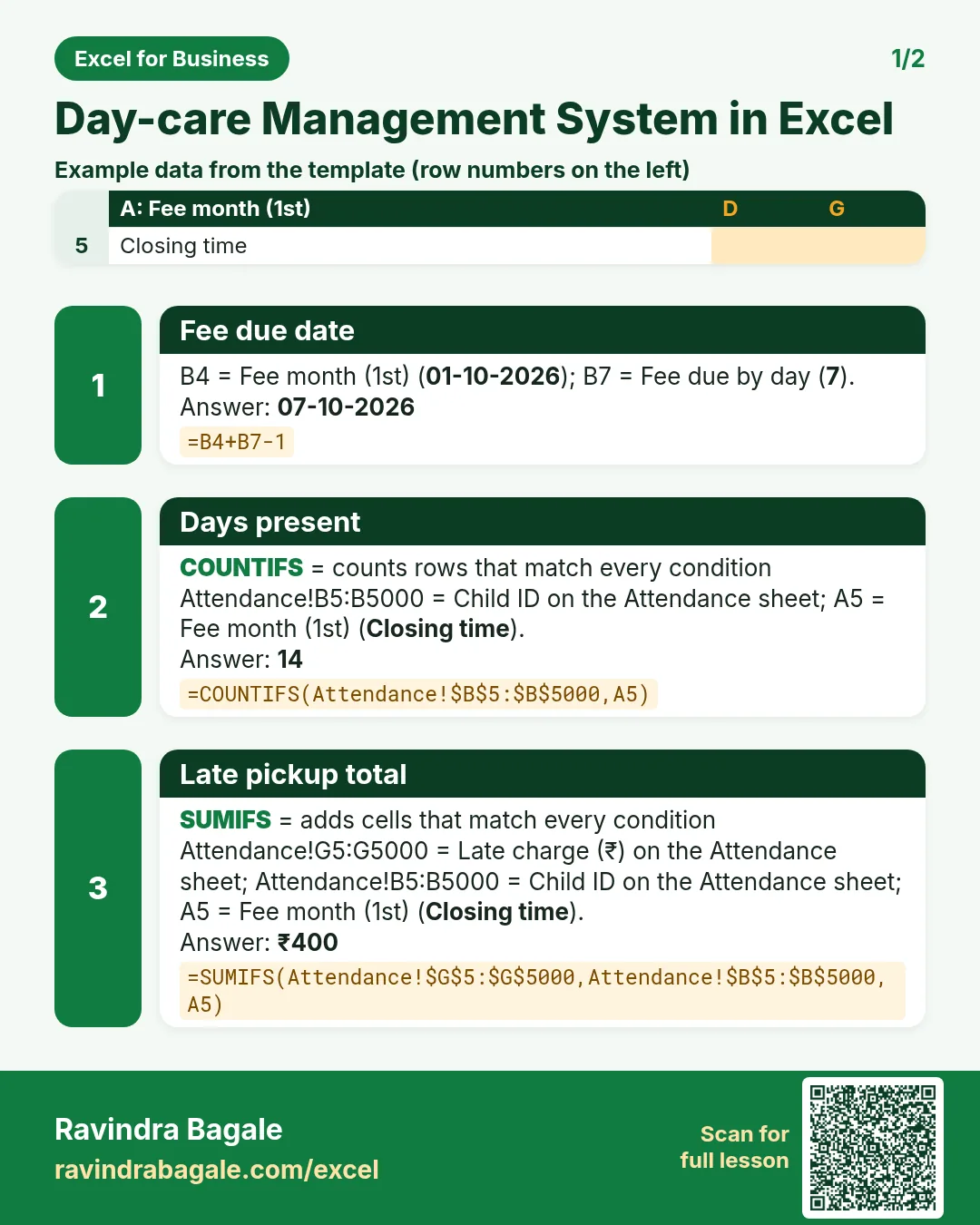


More cards: Ravi Sir's Cards.
6. Frequently asked questions
How do I calculate late minutes in Excel?
=MAX(0,ROUND((out − closing)*1440,0)). Times are fractions of a day.
How do I charge per started 15 minutes?
=CEILING(minutes/15,1)*rate. 1 to 15 minutes is one block, 16 to 30 two.
How do I count days present?
COUNTIFS on the child ID in the attendance sheet.
How do I show overdue fees?
Balance above zero and today after the due date shows Overdue.
Can I have different plans?
Yes. Add plans and fees on Setup; the child's fee is looked up from the plan.
7. Quick quiz
Ten questions on this page. Sign in to save your score.
Loading practice tasks...
- Total leave days (Easy): Add up Leave days in D2:D11. (sheet "Data")
- Average salary (Easy): Average of E2:E11, rounded to 2 decimals. (sheet "Data")
- Rows in Sales (Easy): How many rows have Department "Sales"? (sheet "Data")
- Largest leave days (Easy): The largest value in D2:D11. (sheet "Data")
- Days taken (Easy): C2 minus B2. (sheet "Dates")
- Start year (Easy): Year of B3. (sheet "Dates")
- Due month (Easy): Month number of C3. (sheet "Dates")
- Earliest start (Easy): Earliest date in B2:B9 (as a date number). (sheet "Dates")
- Leave days for Sales (Medium): Total of D2:D11 where B is "Sales". (sheet "Data")
- Sales in Chicago (Medium): Total of D2:D11 where B is "Sales" and C is "Chicago". (sheet "Data")
- Working days (Medium): Working days from B2 to C2. (sheet "Dates")
- Weekday of due (Medium): Weekday number of C4 (Sunday = 1). (sheet "Dates")