Mobile Repair Job Card System in Excel: Jobs, Parts Stock, Status Flags, Warranty and Dashboard
Salman Mobile Care in Pune repairs phones and tablets with two technicians. Phones sat on the shelf for days after repair because nobody called the owner, and parts ran out in the middle of a job. This page builds a 7-sheet Excel system: each phone gets a job card row with its part, charge, promised date and warranty, the parts sheet counts what is used, and the dashboard shows what is late or waiting to be collected.
What you'll learn on this page
- Number job cards automatically
- Price the part with a mark-up on cost
- Work out balance, promised date and warranty date
- Flag Overdue and Ready, not collected jobs
- Count parts used and flag reorder
- Report jobs, average days and part profit per technician
- Print a job receipt for the customer
Download the template: mobile-repair-job-card-system-template.xlsx: a 7-sheet system with example data and real formulas (Read me, Setup, Parts, Jobs, Report, Job receipt, Dashboard). Yellow cells are inputs you can type over; green cells hold formulas; blue rows are headers and totals. Replace the example data with your own and every report and the dashboard recalculate.
Made-up data: every name, amount, business and date on this page is made up for practice. Cities are used only to make the examples feel real.
1. The business story
Salman Mobile Care, Pune, 1 to 17 October 2026 (made-up data). 30% mark-up on part cost, 2-day standard promise, 30-day repair warranty. Technicians Salman and Amir.
| Question | Where the system answers it |
|---|---|
| Which phone is late? | J-010, Raja Kale, waiting for a screen since 14 October |
| Which phone is ready but not picked up? | J-009, Ruhi Pawar, ₹1,095 to collect |
| How fast are we? | Dashboard: 1.7 days on average for delivered jobs |
| Which part to order? | Parts: Screen 6.5 in, 1 left against a level of 2 |
13 jobs brought ₹14,339; 9 are delivered. Amir handled 7 jobs, Salman 6.
Figure 1. Setup and Parts hold rules and stock; Jobs is the only entry sheet; the rest reads from it.
2. Build it sheet by sheet
Step 1. Setup and Parts
- Setup B4 mark-up (30%), B5 standard promise (2 days), B6 warranty (30 days); lists of technicians and statuses in D and E.
- Parts: Code, Part, Cost, Opening, Reorder level. Code P00 means no part (software work, checks).
Step 2. Jobs: charges and dates
- A5
="J-"&TEXT(ROW()-4,"000"). Type date, customer, device, fault and pick a part code. - G5 part charge
=ROUND(XLOOKUP(F5,Parts!$A$5:$A$10,Parts!$C$5:$C$10,0)*(1+Setup!$B$4),0): a ₹1,800 screen is charged ₹2,340. - I5 total
=G5+H5, K5 balance=IF(O5<>"",0,I5-J5), N5 promised=B5+Setup!$B$5. - R5 warranty till
=IF(O5<>"",O5+Setup!$B$6,""), counted from the delivery date.
Step 3. Jobs: flags
- P5:
=IF(O5<>"","Delivered",IF(M5="Ready","Ready, not collected",IF(N5<Setup!$B$3,"Overdue","On track"))). - Q5 days taken for delivered jobs
=IF(O5<>"",O5-B5,""). - Colour Overdue red and Ready, not collected amber with conditional formatting; call those customers first.
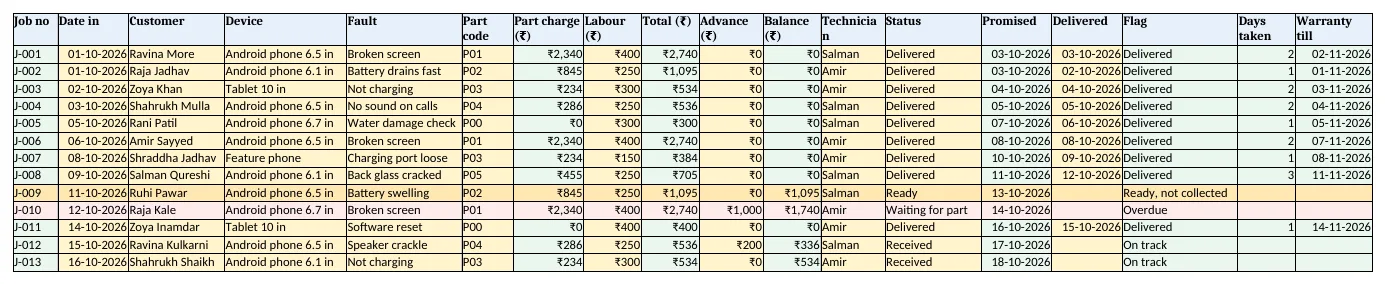
Figure 2. Jobs: charges, balance, promised date, flag, days taken and warranty
Step 4. Parts stock and Report
- Parts F5 used
=COUNTIF(Jobs!$F$5:$F$500,A5), G5 closing=D5-F5, H5 order=IF(A5="P00","-",IF(G5<=E5,"Yes","No")). - Report B5 jobs per technician, C5 delivered with COUNTIFS, E5 average days with AVERAGEIFS and F5 revenue.
- G5 profit on parts: part charges minus part cost for that technician's jobs.
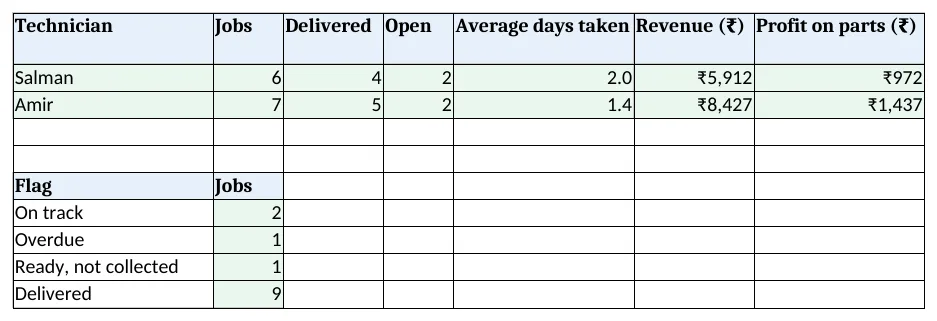
Figure 3. Report: jobs, delivered, average days and part profit per technician, and jobs by flag
Step 5. Job receipt and Dashboard
- Job receipt: type a job no in B4; rows 6 to 14 bring customer, device, fault, total, advance, balance, promised date and status. The footer reminds the customer to back up data.
- KPI cards: jobs, open, overdue, average days
=AVERAGE(Jobs!$Q$5:$Q$500), revenue and parts to order. Charts: jobs by flag and revenue by technician.
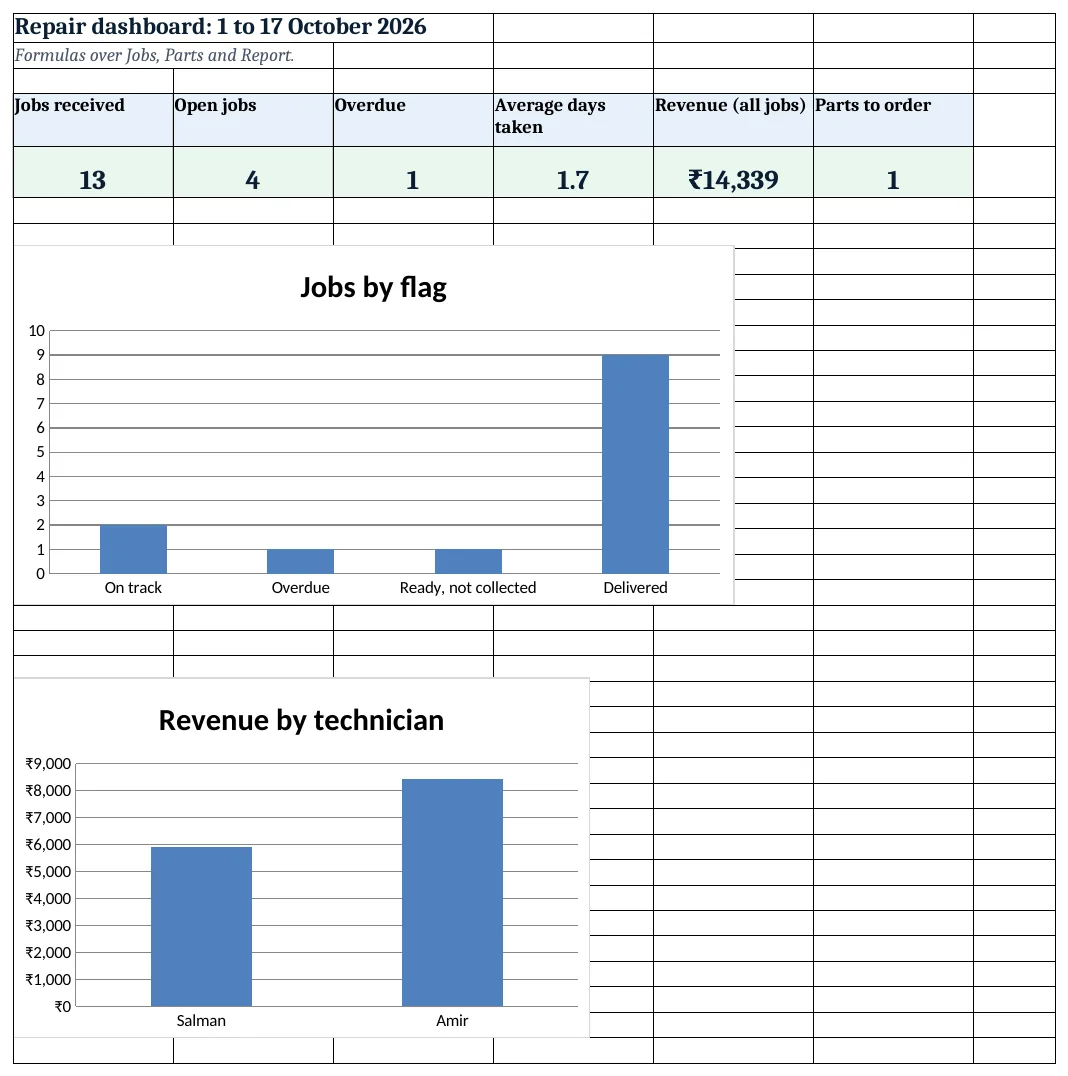
Figure 4. Mobile repair dashboard: jobs, open, overdue, average days, revenue and parts to order
Ravindra Bagale's Tip
Phone every Ready, not collected customer the same evening. A repaired phone on the shelf is money you have earned but not received.
Ravindra Bagale's Tip – मराठी
Ready, not collected ग्राहकांना त्याच संध्याकाळी फोन करा. shelf वरचा दुरुस्त फोन म्हणजे कमावलेले पण न मिळालेले पैसे.
Ravindra Bagale's Tip – हिंदी
Ready, not collected ग्राहकों को उसी शाम फोन करें. shelf पर रखा ठीक हुआ फोन कमाया पर न मिला पैसा है.
3. Formulas used
| Cell | Formula | What it does |
|---|---|---|
| Jobs!A5 | ="J-"&TEXT(ROW()-4,"000") |
Automatic job number |
| Jobs!G5 | =ROUND(XLOOKUP(F5,Parts!$A$5:$A$10,Parts!$C$5:$C$10,0)*(1+Setup!$B$4),0) |
Part charge with mark-up |
| Jobs!I5 | =G5+H5 |
Job total |
| Jobs!K5 | =IF(O5<>"",0,I5-J5) |
Balance to collect |
| Jobs!N5 | =B5+Setup!$B$5 |
Promised date |
| Jobs!P5 | =IF(O5<>"","Delivered",IF(M5="Ready","Ready, not collected",IF(N5<Setup!$B$3,"Overdue","On track"))) |
Status flag |
| Jobs!Q5 | =IF(O5<>"",O5-B5,"") |
Days taken |
| Jobs!R5 | =IF(O5<>"",O5+Setup!$B$6,"") |
Warranty till |
| Parts!F5 | =COUNTIF(Jobs!$F$5:$F$500,A5) |
Parts used |
| Parts!H5 | =IF(A5="P00","-",IF(G5<=E5,"Yes","No")) |
Order this part? |
| Report!E5 | =IFERROR(AVERAGEIFS(Jobs!$Q$5:$Q$500,Jobs!$L$5:$L$500,A5,Jobs!$P$5:$P$500,"Delivered"),0) |
Average days per technician |
| Job receipt!B6 | =XLOOKUP($B$4,Jobs!$A$5:$A$500,Jobs!$B$5:$B$500,"Not found") |
Date the phone came in |
| Dashboard!D5 | =AVERAGE(Jobs!$Q$5:$Q$500) |
Average days taken |
Every formula above is written in the template, so you can click a cell and see it in the formula bar. All values on this page were recalculated in LibreOffice with zero errors.
4. Common mistakes
- Warranty from the date in. Count warranty from the delivery date, or the customer loses days the phone sat in the shop.
- No row for checks and software work. Use part code P00 so the job, labour and technician still count.
- Status left at Received. Change it to Waiting for part or Ready as soon as it changes; the flags depend on it.
- Balance kept after delivery. K5 drops to 0 on delivery, so collect before typing the delivered date.
- Mark-up typed into each charge. Keep the mark-up on Setup; changing one cell then reprices new jobs consistently.
Ravindra Bagale's Tip
Take an advance when a part has to be ordered. J-010 had ₹1,000 advance, so the shop is covered if the customer changes their mind.
Ravindra Bagale's Tip – मराठी
part मागवावा लागणार असेल तर advance घ्या. J-010 वर ₹1,000 advance होता, त्यामुळे ग्राहकाने विचार बदलला तरी दुकान सुरक्षित.
Ravindra Bagale's Tip – हिंदी
part मंगाना हो तो advance लें. J-010 पर ₹1,000 advance था, ग्राहक मन बदले तो भी दुकान सुरक्षित.
5. More real examples
Example 1: Laptop repair. Add a Serial no column and a longer standard promise (5 days).
Example 2: Electronics service centre. Add an In warranty? column and charge ₹0 when the date is within the maker's warranty.
Example 3: Watch and clock repair. Same layout with batteries, straps and glass as parts.
Quick revision cards
Quick revision
Each card shows formulas from this page, each with an example and its answer from the template. Scan the QR code on a card to open this lesson. All names and numbers are made up for practice.
झटपट उजळणी
प्रत्येक card वर या page मधले formulas, त्यांचं example आणि template मधलं उत्तर आहे. Card वरचा QR code scan केला की हा lesson उघडतो. सगळी नावं आणि आकडे सरावासाठी काल्पनिक आहेत.
झटपट दोहराई
हर card पर इस page के formulas, उनका example और template का उत्तर है. Card का QR code scan करें तो यह lesson खुलेगा. सभी नाम और आंकड़े अभ्यास के लिए काल्पनिक हैं.
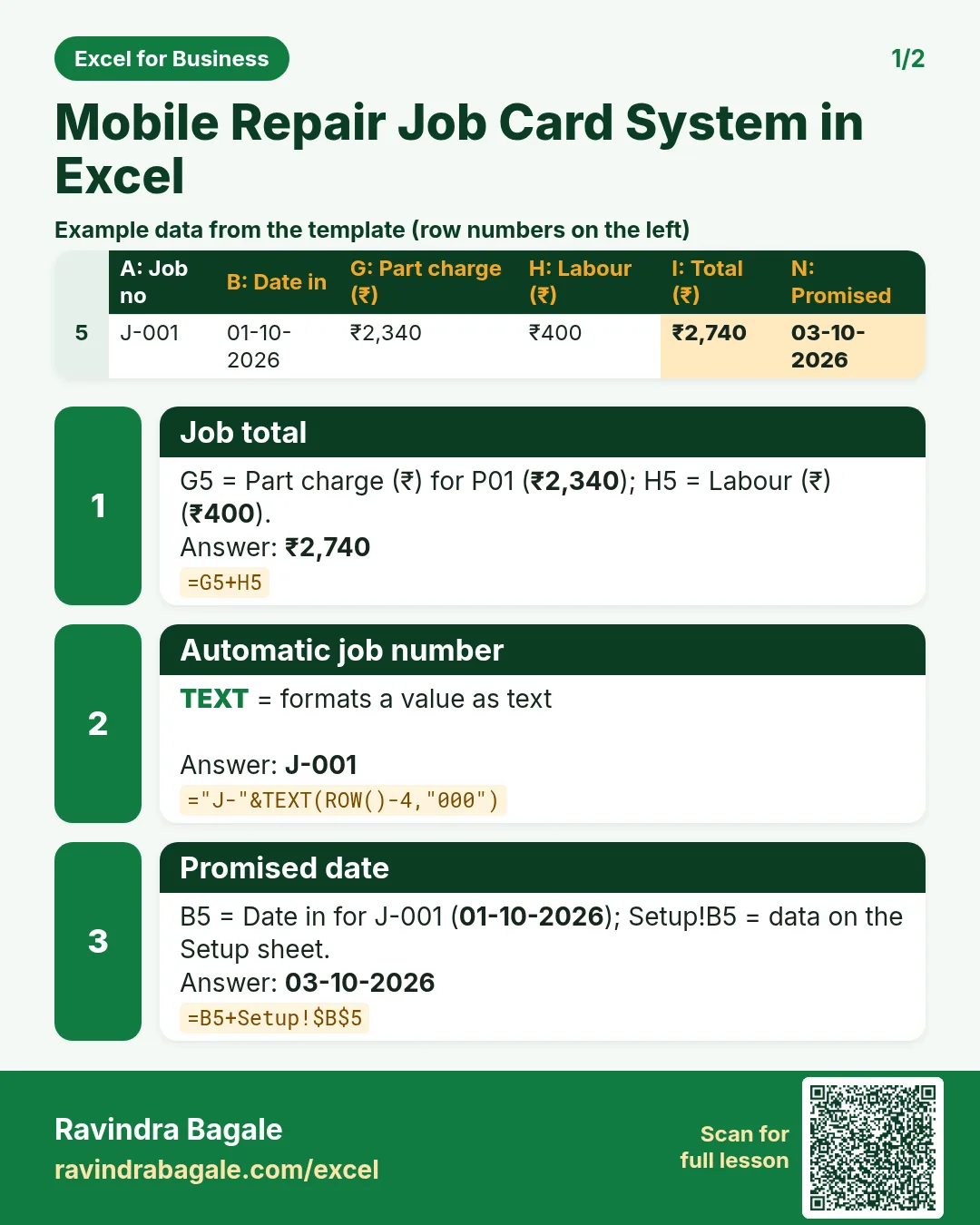

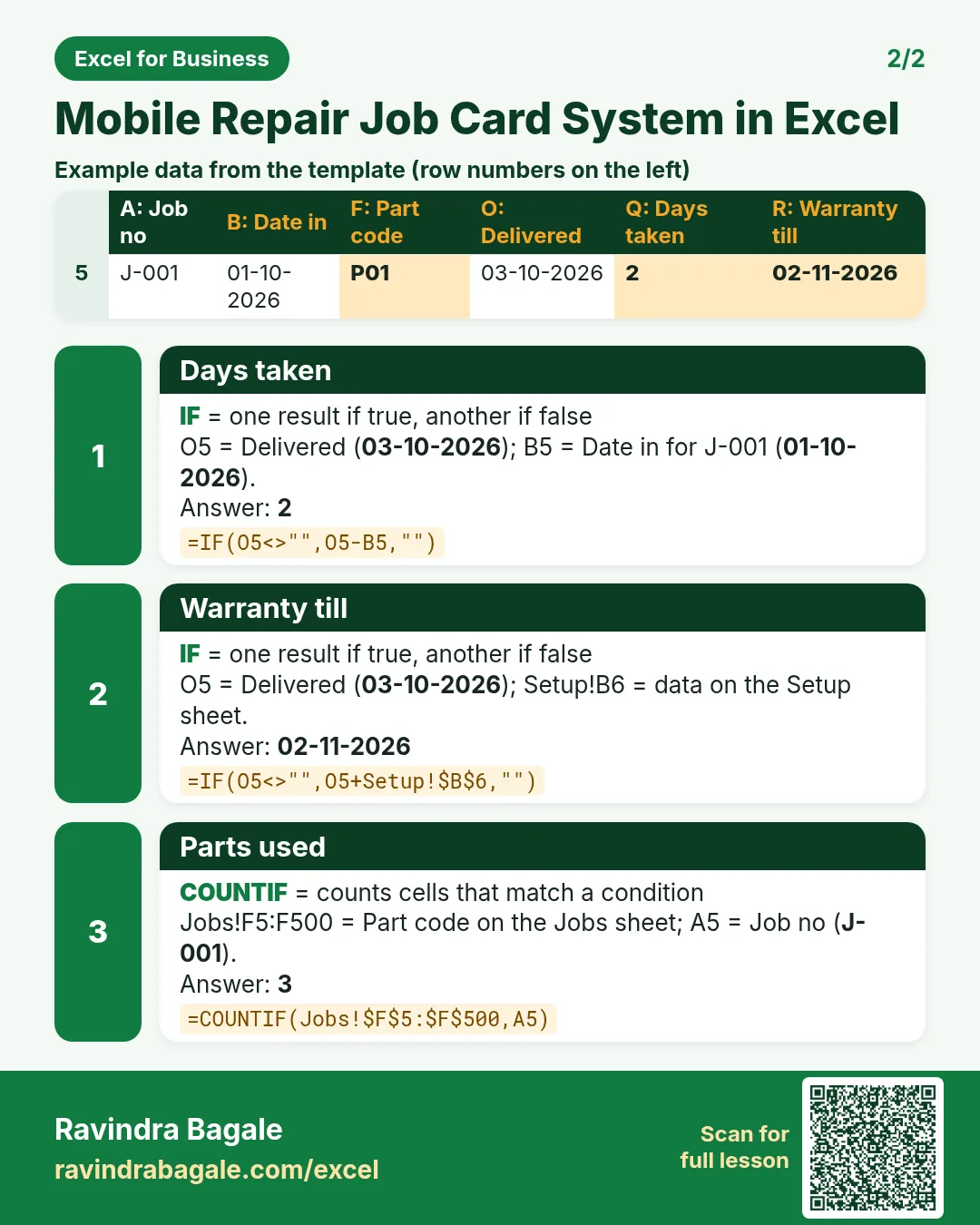

More cards: Ravi Sir's Cards.
6. Frequently asked questions
How do I make a job card number in Excel?
="J-"&TEXT(ROW()-4,"000") in row 5 gives J-001 and counts up row by row.
How do I add a mark-up to a part cost?
Cost × (1 + mark-up), rounded: =ROUND(cost*(1+Setup!$B$4),0).
How do I show phones ready but not collected?
Check the status first: if it is Ready and no delivery date is typed, show "Ready, not collected".
How do I work out a warranty end date?
Delivery date + warranty days, as in Jobs R5.
How do I find average repair time per technician?
AVERAGEIFS on the days-taken column with the technician and Delivered as conditions.
7. Quick quiz
Ten questions on this page. Sign in to save your score.
Loading practice tasks...
- Pass or fail (Easy): "Pass" if B2 is at least 40, else "Fail". (sheet "Scores")
- Total (Easy): B2 plus C2. (sheet "Scores")
- Passed score 1 (Easy): How many in B2:B11 are 40 or more? (sheet "Scores")
- Days taken (Easy): C2 minus B2. (sheet "Dates")
- Start year (Easy): Year of B3. (sheet "Dates")
- Due month (Easy): Month number of C3. (sheet "Dates")
- Earliest start (Easy): Earliest date in B2:B9 (as a date number). (sheet "Dates")
- Passed both (Medium): TRUE if B3 and C3 are both at least 40. (sheet "Scores")
- Passed either (Medium): TRUE if B4 or C4 is at least 75. (sheet "Scores")
- Grade (Medium): Grade for the average of B2:C2: "A" 75+, "B" 60+, "C" 40+, else "F". (sheet "Scores")
- Working days (Medium): Working days from B2 to C2. (sheet "Dates")
- Weekday of due (Medium): Weekday number of C4 (Sunday = 1). (sheet "Dates")