3.4 AVERAGE, AVERAGEIF(S), MINIFS and MAXIFS
AVERAGEIF, MAXIFS and MINIFS with example — in 30 seconds
What: AVERAGEIF averages only matching rows. MAXIFS and MINIFS find the biggest and smallest value among matching rows.
Why: "Average delivery time in Pune" and "slowest Pune order" are the two questions a city manager asks every week.
Tiny example: Pune delivery minutes are 9, 14, 8 and 13. Average = 11 minutes, slowest = 14 minutes.
AVERAGEIF, MAXIFS and MINIFS with example — 30 सेकंदात
काय: AVERAGEIF फक्त जुळणाऱ्या rows ची सरासरी काढतो. MAXIFS आणि MINIFS जुळणाऱ्या rows मधली सगळ्यात मोठी आणि लहान value शोधतात.
का: "Pune मध्ये सरासरी delivery time" आणि "सगळ्यात slow Pune order" हे दोन प्रश्न city manager दर आठवड्याला विचारतो.
छोटं उदाहरण: Pune चे delivery minutes 9, 14, 8 आणि 13 आहेत. सरासरी = 11 मिनिटं, सगळ्यात slow = 14 मिनिटं.
AVERAGEIF, MAXIFS and MINIFS with example — 30 सेकंड में
क्या: AVERAGEIF सिर्फ़ मेल खाने वाली rows का average निकालता है. MAXIFS और MINIFS मेल खाने वाली rows में सबसे बड़ी और सबसे छोटी value ढूँढते हैं.
क्यों: "Pune में average delivery time" और "सबसे slow Pune order" ये दो सवाल city manager हर हफ़्ते पूछता है.
छोटा उदाहरण: Pune के delivery minutes 9, 14, 8 और 13 हैं. Average = 11 मिनट, सबसे slow = 14 मिनट.
First look at the data (before → after):
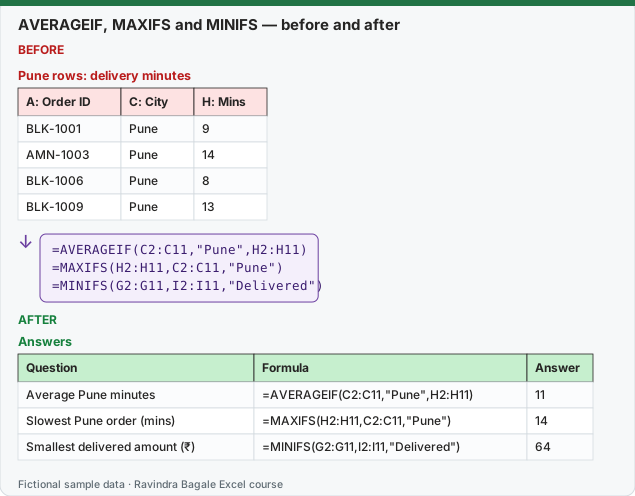
Expected result — Answers
| Question | Formula | Answer |
|---|---|---|
| Average Pune minutes | =AVERAGEIF(C2:C11,"Pune",H2:H11) | 11 |
| Slowest Pune order (mins) | =MAXIFS(H2:H11,C2:C11,"Pune") | 14 |
| Smallest delivered amount (₹) | =MINIFS(G2:G11,I2:I11,"Delivered") | 64 |
About this data: Teaching sample for a fictional shop “Orbit Logistics”. Figures and names (e.g. Neha Shah) are made up for this lesson on average averageif s minifs and maxifs.
Before table and formula as text
Before — Pune rows: delivery minutes
| A: Order ID | C: City | H: Mins |
|---|---|---|
| BLK-1001 | Pune | 9 |
| AMN-1003 | Pune | 14 |
| BLK-1006 | Pune | 8 |
| BLK-1009 | Pune | 13 |
About this data: Demo table only — not real customer or company data. Built to practise average averageif s minifs and maxifs.
Formula / click path
=AVERAGEIF(C2:C11,"Pune",H2:H11)
=MAXIFS(H2:H11,C2:C11,"Pune")
=MINIFS(G2:G11,I2:I11,"Delivered")
Do it step by step:
- Click an empty cell and type
=AVERAGEIF(C2:C11,"Pune",H2:H11). - Note the order: condition range, condition, then the numbers to average.
- Type
=MAXIFS(H2:H11,C2:C11,"Pune"). Here the numbers come first. - Type
=MINIFS(G2:G11,I2:I11,"Delivered"). - Check: 11, 14 and 64.
स्टेप बाय स्टेप करून बघा:
- एका रिकाम्या cell वर click करा आणि
=AVERAGEIF(C2:C11,"Pune",H2:H11)type करा. - क्रम लक्षात ठेवा: condition range, condition, मग सरासरी काढायचे numbers.
=MAXIFS(H2:H11,C2:C11,"Pune")type करा. इथे numbers आधी येतात.=MINIFS(G2:G11,I2:I11,"Delivered")type करा.- Check करा: 11, 14 आणि 64.
स्टेप बाय स्टेप करके देखें:
- किसी खाली cell पर click करें और
=AVERAGEIF(C2:C11,"Pune",H2:H11)type करें. - क्रम याद रखें: condition range, condition, फिर average वाले numbers.
=MAXIFS(H2:H11,C2:C11,"Pune")type करें. यहाँ numbers पहले आते हैं.=MINIFS(G2:G11,I2:I11,"Delivered")type करें.- Check करें: 11, 14 और 64.
| Function | Syntax | Example | Result |
|---|---|---|---|
| AVERAGE | =AVERAGE(range) |
=AVERAGE(H2:H11) |
12.8 mins |
| AVERAGEIF | =AVERAGEIF(range, criteria, [average_range]) |
=AVERAGEIF(C2:C11,"Pune",H2:H11) |
11 mins |
| AVERAGEIFS | =AVERAGEIFS(avg_range, crit_range1, crit1, …) |
=AVERAGEIFS(G2:G11,D2:D11,"FreshGo") |
333.29 |
| MINIFS (Excel 2019+) | =MINIFS(min_range, crit_range1, crit1, …) |
=MINIFS(H2:H11,I2:I11,"Delivered") |
8 mins |
| MAXIFS (Excel 2019+) | =MAXIFS(max_range, crit_range1, crit1, …) |
=MAXIFS(G2:G11,E2:E11,"Fruits") |
270 |
About this data: Made-up rows so you can copy the pattern for average averageif s minifs and maxifs. Currencies may use ₹, £, € or $.
Other useful statistics: MEDIAN, MODE.SNGL, STDEV.S, LARGE(range,k), SMALL(range,k). Example: second-highest order =LARGE(G2:G11,2) → 270.
Worked example – AOV (Average Order Value) for delivered orders: =AVERAGEIFS(G2:G11,I2:I11,"Delivered") → 2,215 ÷ 7 = ₹316.43.
Ravindra Bagale's Tip
Many students don't understand the difference between blank and zero in an average – AVERAGE skips blank cells but counts 0. If you enter 0 as the amount of a cancelled order, the AOV drops. Before calculating an average, decide exactly which data should be included, and put the condition (Delivered) in AVERAGEIFS.
Ravindra Bagale's Tip – मराठी
Average मध्ये blank आणि zero यातला फरक बऱ्याच students ना कळत नाही – AVERAGE blank cells सोडतो पण 0 मोजतो. Cancelled order चा amount 0 टाकला तर AOV खाली येतो. Average काढताना नेमका कोणता data घेतला पाहिजे ते आधी ठरवा, आणि condition (Delivered) AVERAGEIFS मध्ये टाका.
Ravindra Bagale's Tip – हिंदी
Average में blank और zero का फ़र्क बहुत से students नहीं समझते – AVERAGE blank cells छोड़ देता है पर 0 गिनता है. Cancelled order का amount 0 डाल दिया तो AOV नीचे आ जाता है. Average निकालने से पहले तय करो कि ठीक-ठीक कौन सा data लेना है, और condition (Delivered) AVERAGEIFS में डालो.
Practice task
Find the average delivery time for each city, the fastest delivered order in Nashik (MINIFS), and the third-largest order value (LARGE).
Loading practice tasks...
- Average delivery time (Easy): Find the average of Mins in H2:H11.
- School: average marks (Easy): Find the average of School!D2:D7.
- Average time in Pune (Medium): Find the average Mins for Pune orders.
- Slowest Pune order (Medium): Find the highest Mins for Pune orders.
- Smallest delivered order (Medium): Find the smallest amount among Delivered orders.
- School: class 10A average (Medium): Find the average marks of class "10A".
- School: top Maths mark (Medium): Find the highest Maths mark.
- School: lowest in 10B (Medium): Find the lowest mark in class "10B".
- Biggest MarketRush order (Hard): Find the highest amount for MarketRush (column D).
- Pune delivered average time (Hard): Find the average Mins for Pune orders that are Delivered.
Quick revision cards
Three standalone cards. Each one explains the idea with its own example. Scan the QR to open this lesson.