Manufacturing Production Planning System in Excel: Machine Hours, Planned Finish Date, Progress, Rejects and Machine Load
Salman Engineering Works in Sambhaji Nagar machines flanges, bushes and shafts on two CNC lathes and presses brackets and plates on one power press. Salman promised dates by feel, and some orders went out late while the press was overloaded. This page builds a 7-sheet Excel system: each order works out the machine hours it needs, the days that takes and a planned finish date that skips Sundays, while the production log tracks progress and rejects.
What you'll learn on this page
- Set machines with hours per day from shift and efficiency
- Keep products with machine, cycle time and steel per unit
- Work out hours and days needed for each order
- Find the planned finish with WORKDAY.INTL, skipping Sundays
- Check the plan against the due date
- Track good pieces, rejects and progress from a production log
- Show machine load and reject % on a report and dashboard
Download the template: manufacturing-production-planning-system-template.xlsx: a 7-sheet system with example data and real formulas (Read me, Setup, Orders, Production log, Report, Job order, Dashboard). Yellow cells are inputs you can type over; green cells hold formulas; blue rows are headers and totals. Replace the example data with your own and every report and the dashboard recalculate.
Made-up data: every name, amount, business and date on this page is made up for practice. Cities are used only to make the examples feel real.
1. The business story
Salman Engineering Works, Sambhaji Nagar, as of 17 October 2026 (made-up data). 8-hour shift at 85% efficiency: two CNC lathes give 13.6 hours a day, the power press 6.8. Sunday is the weekly off.
| Question | Where the system answers it |
|---|---|
| Can we deliver 2,000 bushes by 30 October? | SO-107: 100 hours, 8 days, finish 4 November, Late |
| Is any machine overloaded? | Report: power press at 107% of the next 20 days |
| Which product has quality trouble? | Bracket K10, 3.9% rejects against a 3% alert |
| How much steel do open orders need? | 7,400 kg |
6 of 8 orders are still open; 2 of them are late on plan.
Figure 1. Setup holds machines and products; Orders and the Production log are the entry sheets; Report, Job order and Dashboard read from them.
2. Build it sheet by sheet
Step 1. Setup: machines and products
- B4 shift hours (8), B5 efficiency (85%), B6 steel rate per kg, B7 reject alert (3%).
- Machines in A10:B11; C10 hours per day
=B10*$B$4*$B$5: 2 lathes × 8 × 0.85 = 13.6. - Products in A14:D18: Product, Machine, Cycle time (min), Steel per unit (kg).
Step 2. Orders: hours, days and finish date
- A5
="SO-"&(100+ROW()-4). Type customer, product, qty, due date and planned start. - H5 hours
=ROUND(D5*XLOOKUP(C5,Setup!$A$14:$A$18,Setup!$C$14:$C$18,0)/60,1)and I5 days=ROUNDUP(H5/XLOOKUP(G5,Setup!$A$10:$A$11,Setup!$C$10:$C$11,1),0). - J5 planned finish
=WORKDAY.INTL(F5,I5-1,11). Weekend code 11 means Sunday only. - K5
=IF(J5<=E5,"On time","Late"), red when Late (conditional formatting).
Step 3. Production log and progress
- Production log: Date, Order no, Good, Rejects each shift.
- Orders N5 good made and O5 rejects with SUMIFS, P5 balance, Q5 progress
=MIN(1,N5/D5)with a data bar. - R5 status: Completed, In progress or Not started.

Figure 2. Orders: hours, days, planned finish, plan check, steel, progress and status
Step 4. Report: load and quality
- B5 open hours
=SUMIFS(Orders!$H$5:$H$500,Orders!$G$5:$G$500,A5,Orders!$R$5:$R$500,"<>Completed"), C5 hours in 20 days, D5 load %. - Rows 10 to 14: good, rejects, reject %
=IFERROR(C10/(B10+C10),0)and an alert. Compare with the manufacturing rejects project.
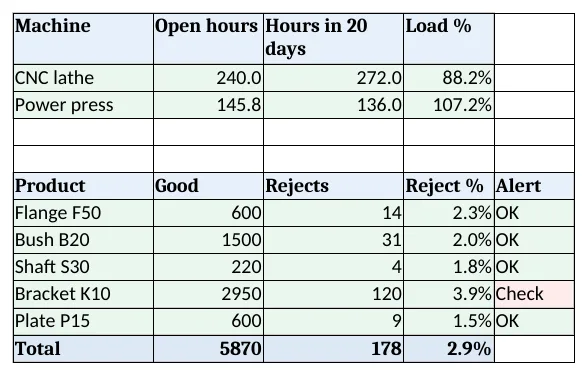
Figure 3. Report: machine load for the next 20 working days and reject % by product
Step 5. Job order and Dashboard
- Job order: type an order no in B4; rows 6 to 14 give the shop floor the product, qty, machine, hours, dates and steel to issue. Set the print area.
- KPI cards: open orders, late on plan, CNC and press load, reject % and steel for open orders. Charts: open hours by machine and reject % by product.
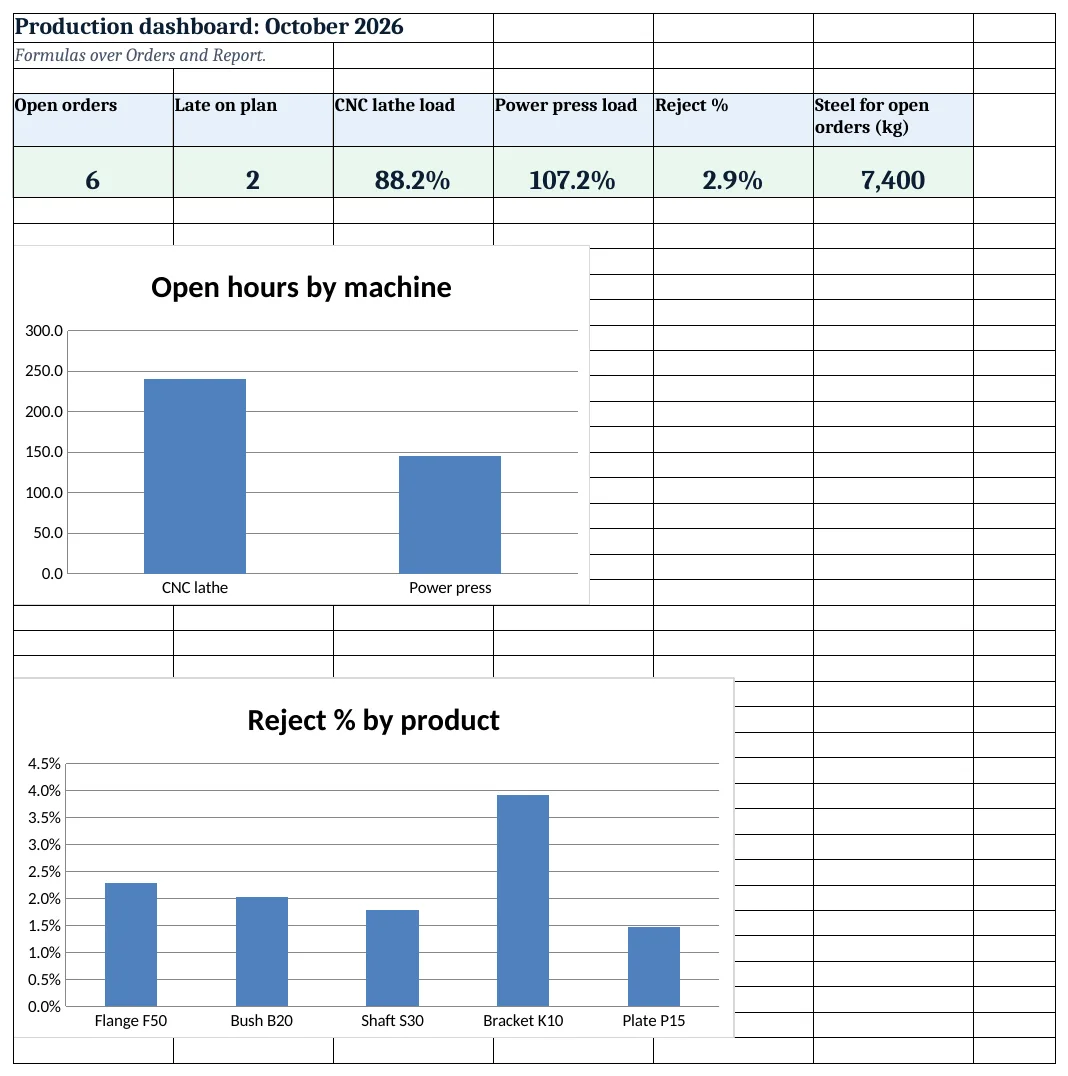
Figure 4. Production dashboard: open orders, late on plan, machine load, reject % and steel needed
Ravindra Bagale's Tip
Check the press load before accepting a new bracket order. At 107% the next order will be late unless you add a shift.
Ravindra Bagale's Tip – मराठी
नवीन bracket order घेण्याआधी press load पहा. 107% वर पुढची order shift वाढवल्याशिवाय उशिरा जाईल.
Ravindra Bagale's Tip – हिंदी
नया bracket order लेने से पहले press load देखें. 107% पर अगला order shift बढ़ाए बिना देर से जाएगा.
3. Formulas used
| Cell | Formula | What it does |
|---|---|---|
| Setup!C10 | =B10*$B$4*$B$5 |
Machine hours per day |
| Orders!A5 | ="SO-"&(100+ROW()-4) |
Order number |
| Orders!G5 | =XLOOKUP(C5,Setup!$A$14:$A$18,Setup!$B$14:$B$18,"Check product") |
Machine for the product |
| Orders!H5 | =ROUND(D5*XLOOKUP(C5,Setup!$A$14:$A$18,Setup!$C$14:$C$18,0)/60,1) |
Hours needed |
| Orders!I5 | =ROUNDUP(H5/XLOOKUP(G5,Setup!$A$10:$A$11,Setup!$C$10:$C$11,1),0) |
Days needed |
| Orders!J5 | =WORKDAY.INTL(F5,I5-1,11) |
Planned finish date |
| Orders!K5 | =IF(J5<=E5,"On time","Late") |
Plan check |
| Orders!L5 | =D5*XLOOKUP(C5,Setup!$A$14:$A$18,Setup!$D$14:$D$18,0) |
Steel needed |
| Orders!N5 | =SUMIFS('Production log'!$C$5:$C$3000,'Production log'!$B$5:$B$3000,A5) |
Good pieces made |
| Orders!Q5 | =MIN(1,N5/D5) |
Progress |
| Orders!R5 | =IF(N5>=D5,"Completed",IF(N5>0,"In progress","Not started")) |
Order status |
| Report!B5 | =SUMIFS(Orders!$H$5:$H$500,Orders!$G$5:$G$500,A5,Orders!$R$5:$R$500,"<>Completed") |
Open hours per machine |
| Report!D5 | =B5/C5 |
Machine load % |
| Dashboard!E5 | =Report!D15 |
Reject % overall |
Every formula above is written in the template, so you can click a cell and see it in the formula bar. All values on this page were recalculated in LibreOffice with zero errors.
4. Common mistakes
- Ignoring efficiency. 8 hours on the clock is not 8 hours of cutting. Setups and breaks are why efficiency is on Setup.
- WORKDAY when Saturday is a working day. Plain WORKDAY skips Saturday and Sunday. WORKDAY.INTL with code 11 skips only Sunday.
- Counting from start + days. A 5-day job starting Monday ends Friday: finish = WORKDAY.INTL(start, days − 1, 11).
- Rejects not logged. Without rejects, quality problems show up only as short orders.
- Planning each order alone. Orders on the same machine queue up. Check machine load before promising a date.
Ravindra Bagale's Tip
Log good pieces and rejects at the end of every shift, not once a week. Small reject trends are easier to fix early.
Ravindra Bagale's Tip – मराठी
प्रत्येक shift च्या शेवटी good आणि rejects नोंदवा, आठवड्यातून एकदा नाही. लहान बदल लवकर सुधारता येतात.
Ravindra Bagale's Tip – हिंदी
हर shift के अंत में good और rejects दर्ज करें, हफ्ते में एक बार नहीं. छोटे बदलाव जल्दी सुधरते हैं.
5. More real examples
Example 1: Garment unit. Machines become sewing lines; cycle time is minutes per garment from the line's standard.
Example 2: Food processing. Lots per shift instead of pieces, with yield % instead of rejects.
Example 3: Printing and packaging. Machines are presses and cutters; link quotes to the printing press system.
Quick revision cards
Quick revision
Each card shows formulas from this page, each with an example and its answer from the template. Scan the QR code on a card to open this lesson. All names and numbers are made up for practice.
झटपट उजळणी
प्रत्येक card वर या page मधले formulas, त्यांचं example आणि template मधलं उत्तर आहे. Card वरचा QR code scan केला की हा lesson उघडतो. सगळी नावं आणि आकडे सरावासाठी काल्पनिक आहेत.
झटपट दोहराई
हर card पर इस page के formulas, उनका example और template का उत्तर है. Card का QR code scan करें तो यह lesson खुलेगा. सभी नाम और आंकड़े अभ्यास के लिए काल्पनिक हैं.
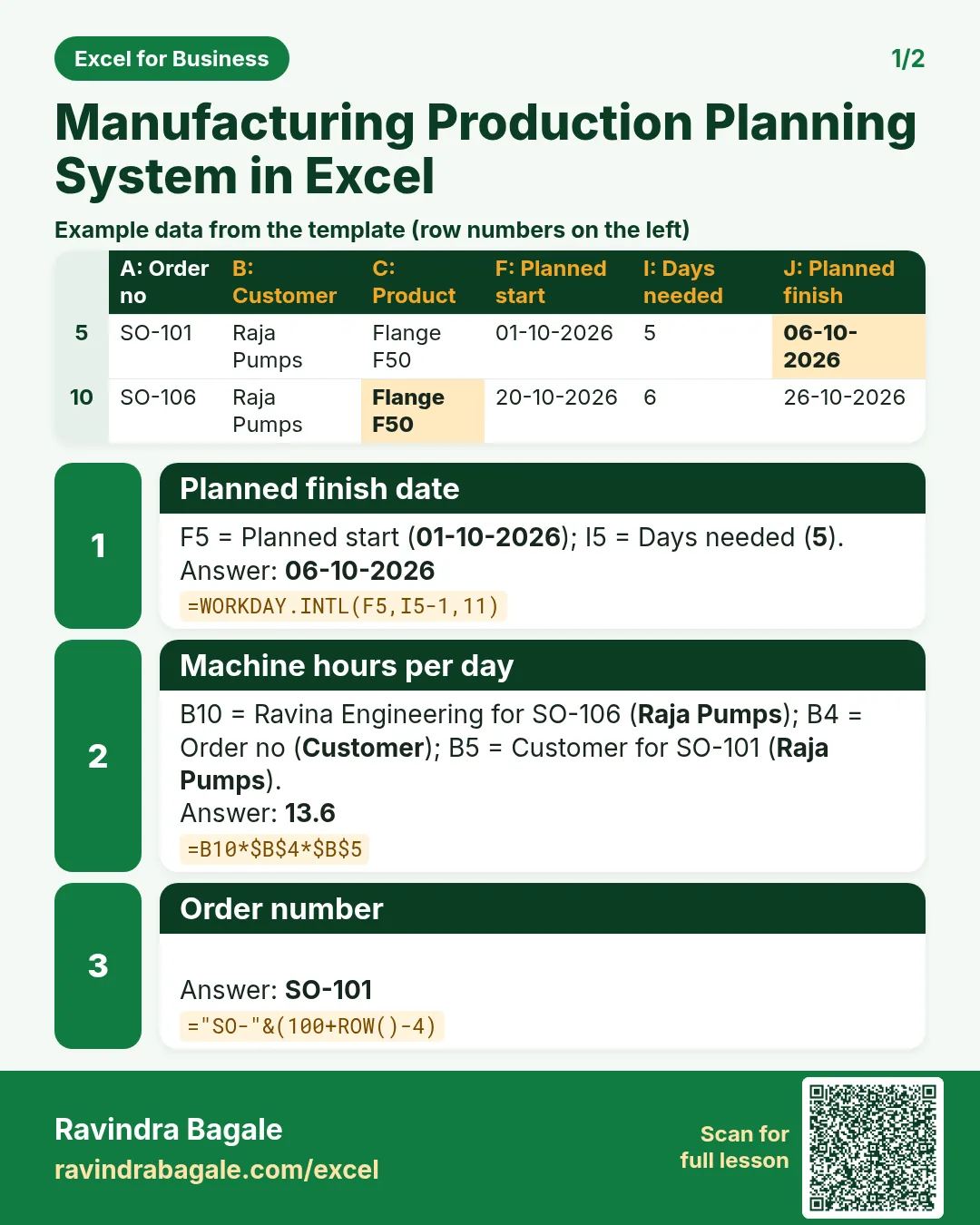

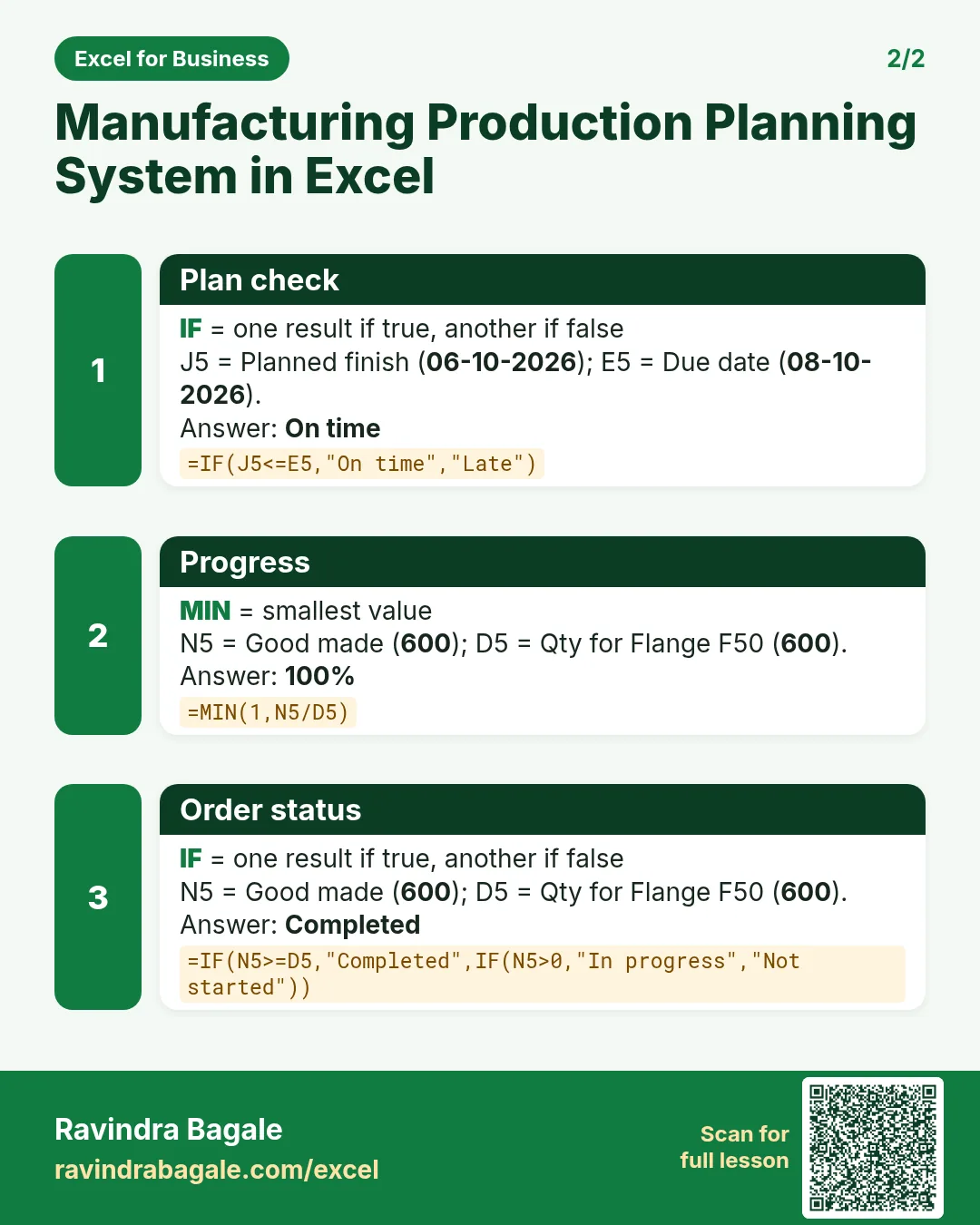

More cards: Ravi Sir's Cards.
6. Frequently asked questions
How do I calculate production hours in Excel?
Qty × cycle time in minutes ÷ 60, as in Orders H5.
How do I find a finish date skipping Sundays?
=WORKDAY.INTL(start, days-1, 11). Code 11 treats only Sunday as the weekend; add a holiday range as the fourth argument.
How do I work out machine load?
Open hours on the machine ÷ hours per day × working days ahead.
How do I calculate reject %?
Rejects ÷ (good + rejects), as in Report D10.
How do I plan raw material?
Qty × steel per unit gives kg; add the orders not completed for the steel to buy.
7. Quick quiz
Ten questions on this page. Sign in to save your score.
Loading practice tasks...
- Total units made (Easy): Add up Units made in D2:D11. (sheet "Data")
- Average rejects (Easy): Average of E2:E11, rounded to 2 decimals. (sheet "Data")
- Rows in Line A (Easy): How many rows have Line "Line A"? (sheet "Data")
- Largest units made (Easy): The largest value in D2:D11. (sheet "Data")
- Days taken (Easy): C2 minus B2. (sheet "Dates")
- Start year (Easy): Year of B3. (sheet "Dates")
- Due month (Easy): Month number of C3. (sheet "Dates")
- Earliest start (Easy): Earliest date in B2:B9 (as a date number). (sheet "Dates")
- Units made for Line A (Medium): Total of D2:D11 where B is "Line A". (sheet "Data")
- Line A in Mumbai (Medium): Total of D2:D11 where B is "Line A" and C is "Mumbai". (sheet "Data")
- Working days (Medium): Working days from B2 to C2. (sheet "Dates")
- Weekday of due (Medium): Weekday number of C4 (Sunday = 1). (sheet "Dates")