Trip Budget in Excel: Plan vs Actual, Expense Log and Split Costs Among Friends (Who Owes Whom)
Shahrukh, Amir, Salman and Zoya drove from Pune to Kolhapur for three days. Amir paid for fuel, Shahrukh paid for the hotel, Zoya and Salman paid for food and tickets. Zoya skipped the palace and Shahrukh skipped the boating. On the drive back everyone asked the same thing: who owes whom? This sheet logs every expense once and gives each person one number.
What you'll learn on this page
- A trip budget by category: planned vs actual
- An expense log with who paid and a Y/N for who shares
- Equal shares with COUNTIF
- Paid, Share and Net per person with SUMIF
- Gets back / Pays messages
- Settling up with the fewest payments
Download the template: trip-budget-split-expenses-template.xlsx: example data with real formulas. Yellow cells are inputs you can type over; green cells hold formulas; blue rows are headers and totals. Replace the example data with your own and everything recalculates.
Made-up data: every name, amount, shop and date on this page is made up for practice. Cities are used only to make the examples feel real.
1. The example
The trip (made-up) has 10 expenses totalling ₹19,960. Eight of them (₹18,960) are shared by all four: ₹4,740 each. The palace tickets (₹400) are shared by 3 (not Zoya): ₹133.33 each. Boating (₹600) is shared by 3 (not Shahrukh): ₹200 each.
| Person | Paid | Share | Net |
|---|---|---|---|
| Shahrukh | ₹9,360 | ₹4,873.33 | +₹4,486.67 |
| Amir | ₹6,480 | ₹5,073.33 | +₹1,406.67 |
| Salman | ₹1,220 | ₹5,073.33 | −₹3,853.33 |
| Zoya | ₹2,900 | ₹4,940.00 | −₹2,040.00 |
The nets add up to 0. Plus means the group owes that person, minus means that person owes the group. Settle up in three payments:
- Salman pays Shahrukh ₹3,853.33.
- Zoya pays Amir ₹1,406.67.
- Zoya pays Shahrukh ₹633.33 (₹2,040 − ₹1,406.67).
Shahrukh then has 3,853.33 + 633.33 = ₹4,486.66 back (the 1 paisa is rounding). Against the budget of ₹20,500 the trip came in ₹540 under, although travel went ₹480 over (₹6,480 vs ₹6,000).
Figure 1. Each expense is logged once with who paid and who shares it. SUMIF gives Paid, the share columns give Share, and Net = Paid − Share: Shahrukh +₹4,486.67, Amir +₹1,406.67, Salman −₹3,853.33, Zoya −₹2,040.
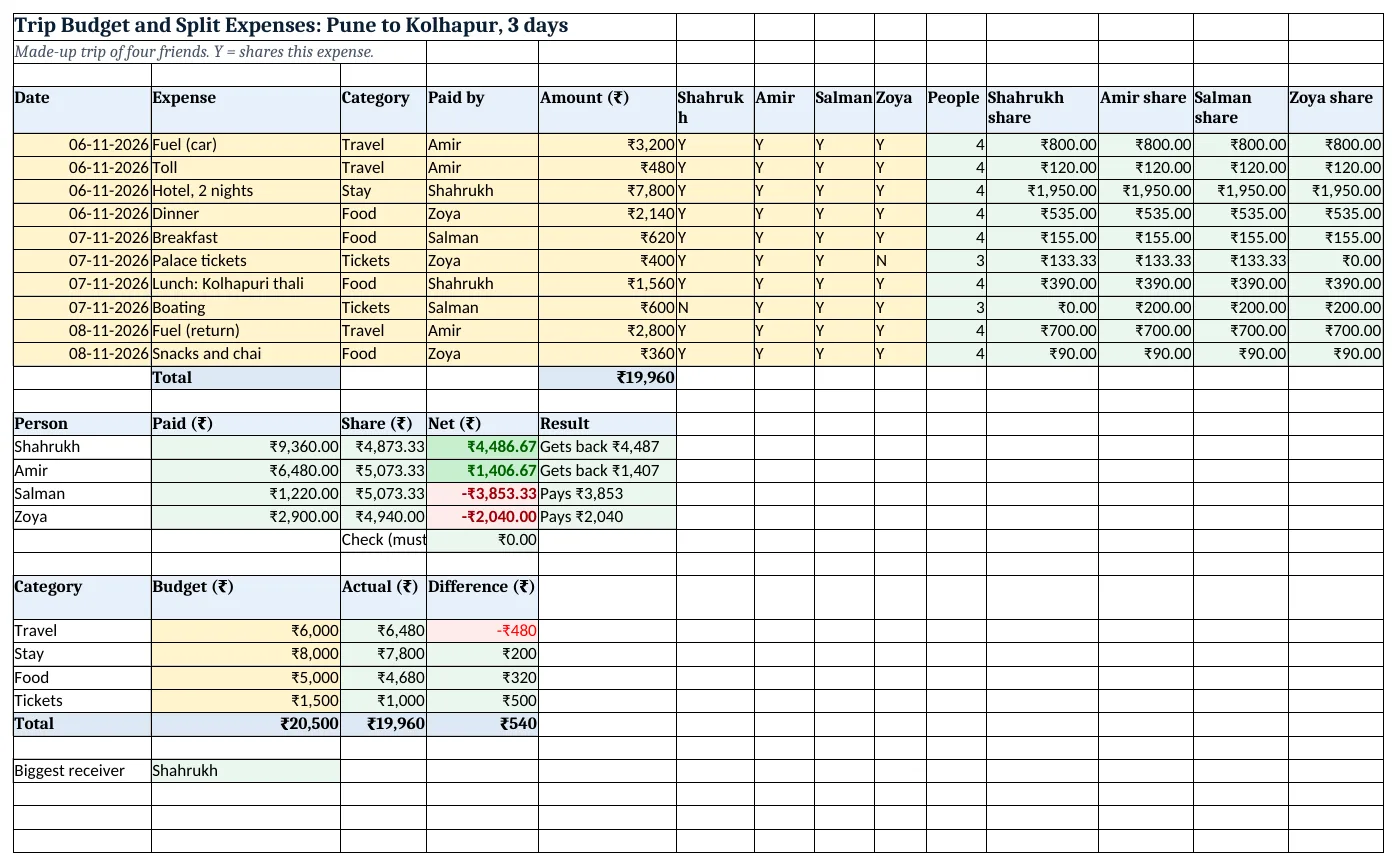
Figure 2. The template sheet, recalculated with its example data. Download it above and replace the yellow cells with your own numbers.
2. Build it step by step
Step 1. Expense log
- In A4:E4 type Date, Expense, Category, Paid by, Amount (₹); in F4:I4 the four names; in J4 People; in K4:N4 each name with share.
- Type each expense from row 5. Paid by, Category and F:I (Y/N) get drop-downs from Data > Data Validation > List (drop-down lists).
Step 2. Who shares and the share
- Type Y under everyone who shares the expense, N for anyone who skipped it.
- In J5 type
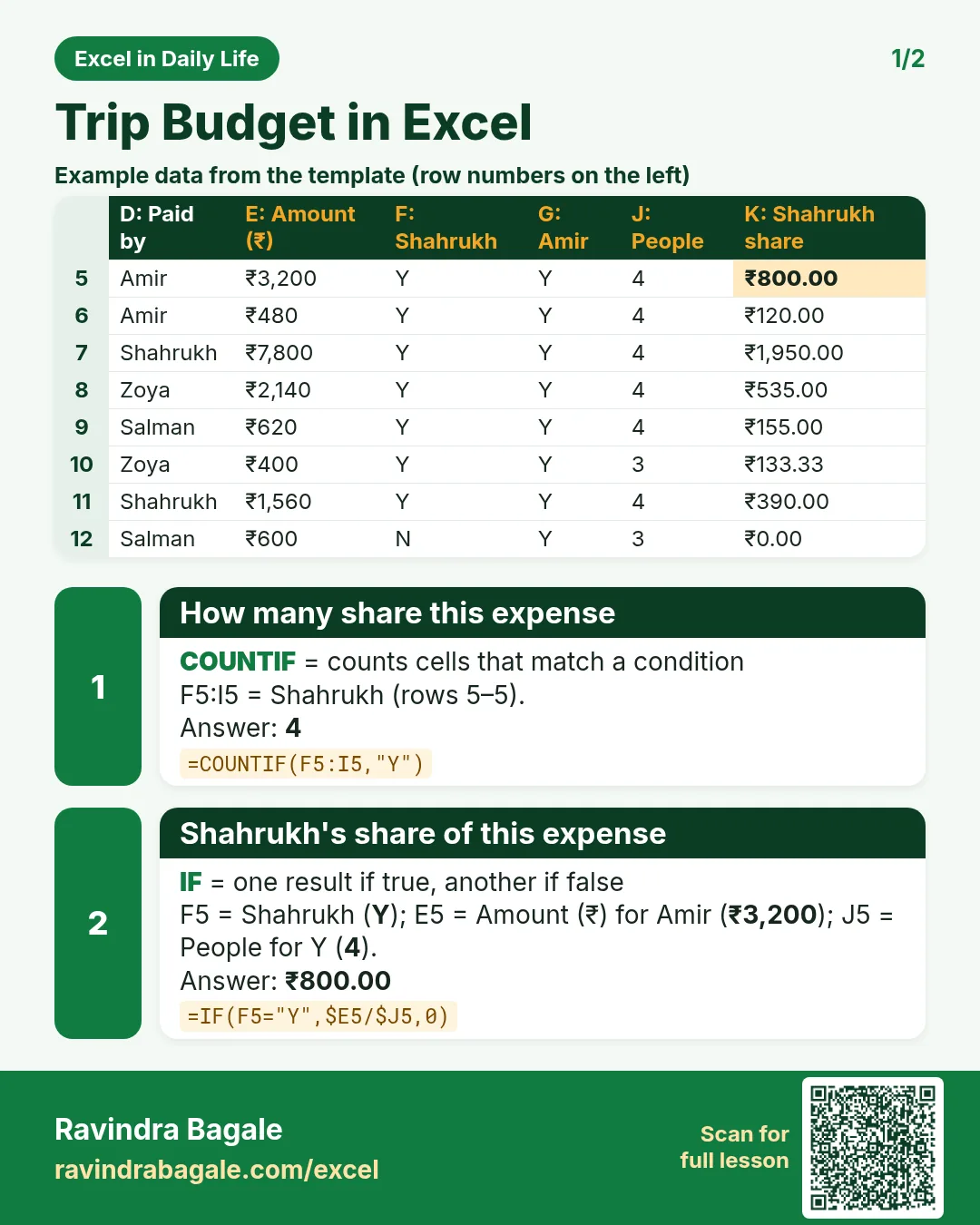
=COUNTIF(F5:I5,"Y"): 4. - In K5 type
=IF(F5="Y",$E5/$J5,0)and copy right to N5, then down to row 14. Fuel ₹3,200 / 4 = ₹800 each.
Step 3. Total
- In E15 type
=SUM(E5:E14): ₹19,960.
Step 4. Paid, Share, Net
- In A17:E17 type Person, Paid, Share, Net, Result and the names in A18:A21.
- In B18 type
=SUMIF($D$5:$D$14,A18,$E$5:$E$14): Shahrukh paid ₹9,360 (SUMIF). - In C18 type
=SUM(K5:K14)(Shahrukh's share column; Amir uses L, Salman M, Zoya N). - In D18 type
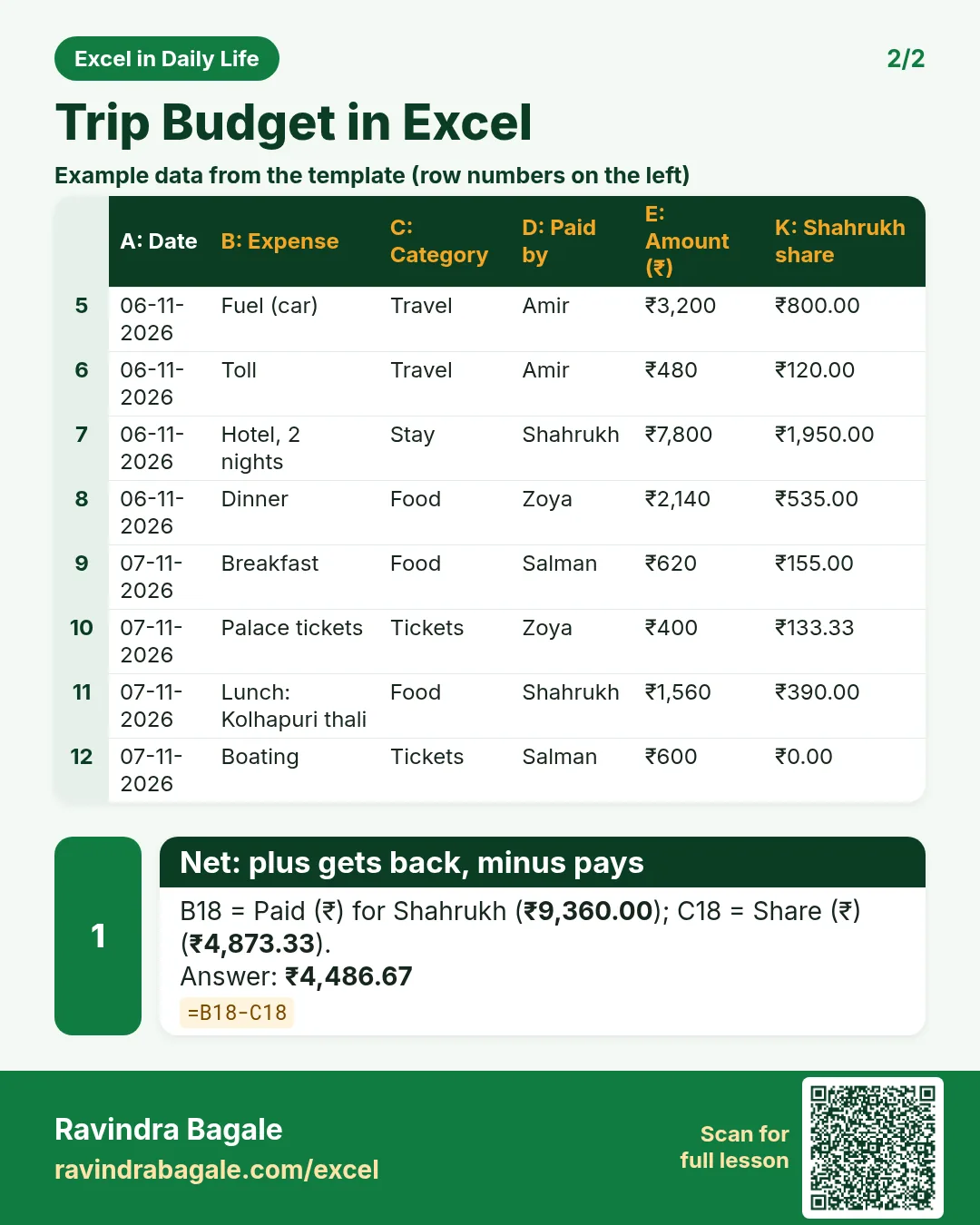
=B18-C18: +₹4,486.67. - In D22 type
=ROUND(SUM(D18:D21),2): it must be 0.
Step 5. Result message
- In E18 type
=IF(ROUND(D18,0)>0,"Gets back ₹"&TEXT(D18,"#,##0"),IF(ROUND(D18,0)<0,"Pays ₹"&TEXT(-D18,"#,##0"),"Settled"))and copy down. - Rules on D18:D21: green above 0.5, red below −0.5.
Step 6. Budget vs actual
- In A24:D24 type Category, Budget, Actual, Difference; categories in A25:A28.
- In C25 type
=SUMIF($C$5:$C$14,A25,$E$5:$E$14)and in D25=B25-C25. Travel shows −₹480.
Step 7. Settle up
- Sort the people by Net. The biggest minus pays the biggest plus first, then repeat until every Net is 0.
- B31 shows the biggest receiver:
=INDEX(A18:A21,MATCH(MAX(D18:D21),D18:D21,0))= Shahrukh.
Ravindra Bagale's Tip
Choose one person to log every bill the same evening, with a photo of the receipt in the group chat. Logging three days later always forgets the chai and the toll.
Ravindra Bagale's Tip – मराठी
एकाने रोज संध्याकाळी सगळी bills log करायची, receipt चा photo group मध्ये टाकायचा. तीन दिवसांनी लिहायला बसलं की चहा आणि toll हमखास विसरतात.
Ravindra Bagale's Tip – हिंदी
एक इंसान हर शाम सारे bills log करे, receipt की photo group में डाले. तीन दिन बाद लिखने बैठो तो चाय और toll ज़रूर छूट जाते हैं.
3. Formulas used
| Cell | Formula | What it does |
|---|---|---|
| J5 | =COUNTIF(F5:I5,"Y") |
How many share this expense |
| K5 | =IF(F5="Y",$E5/$J5,0) |
Shahrukh's share of this expense |
| E15 | =SUM(E5:E14) |
Trip total |
| B18 | =SUMIF($D$5:$D$14,A18,$E$5:$E$14) |
What Shahrukh paid |
| C18 | =SUM(K5:K14) |
Shahrukh's total share |
| D18 | =B18-C18 |
Net: plus gets back, minus pays |
| E18 | =IF(ROUND(D18,0)>0,"Gets back ₹"&TEXT(D18,"#,##0"),IF(ROUND(D18,0)<0,"Pays ₹"&TEXT(-D18,"#,##0"),"Settled")) |
Gets back / Pays message |
| D22 | =ROUND(SUM(D18:D21),2) |
Check: nets add to 0 |
| C25 | =SUMIF($C$5:$C$14,A25,$E$5:$E$14) |
Actual spent on a category |
| B31 | =INDEX(A18:A21,MATCH(MAX(D18:D21),D18:D21,0)) |
Biggest receiver |
Every formula above is written in the template, so you can click a cell and see it in the formula bar. All values on this page were recalculated in the file.
4. Common mistakes
- Splitting everything by 4. If someone skipped an activity, mark N. COUNTIF then divides by 3 for that row only.
- Spelling a name two ways. "Shahrukh" and "Sharukh" are two people for SUMIF. Use the drop-down.
- Settling each bill separately. Ten bills could mean twenty payments. Settle the nets once at the end.
- Nets not adding to 0. A row with no Y gives #DIV/0!, or an amount is missing. The check cell D22 shows this.
- Counting a settle-up payment as an expense. Paying back a friend is not trip spending. Keep it out of the log.
Ravindra Bagale's Tip
Share the sheet before the trip with the budget filled in, so everyone agrees on the stay and travel limits first.
Ravindra Bagale's Tip – मराठी
Trip च्या आधीच budget भरून sheet सगळ्यांना पाठवा, म्हणजे stay आणि travel ची limit आधीच ठरते.
Ravindra Bagale's Tip – हिंदी
Trip से पहले ही budget भरकर sheet सबको भेजो, ताकि stay और travel की limit पहले तय हो जाए.
5. More real examples
Example 1: Flatmates sharing rent and bills. Every month is a "trip": rent, electricity, internet and groceries with Y/N for who shares.
Example 2: Office lunch group. One person pays each day; the log shows who owes after a month.
Example 3: Puja or wedding costs. Brothers and sisters sharing the costs of a function at home; share by Y/N or by a ratio typed in place of the formula.
Quick revision cards
Quick revision
Each card shows formulas from this page, each with an example and its answer from the template. Scan the QR code on a card to open this lesson. All names and numbers are made up for practice.
झटपट उजळणी
प्रत्येक card वर या page मधले formulas, त्यांचं example आणि template मधलं उत्तर आहे. Card वरचा QR code scan केला की हा lesson उघडतो. सगळी नावं आणि आकडे सरावासाठी काल्पनिक आहेत.
झटपट दोहराई
हर card पर इस page के formulas, उनका example और template का उत्तर है. Card का QR code scan करें तो यह lesson खुलेगा. सभी नाम और आंकड़े अभ्यास के लिए काल्पनिक हैं.


More cards: Ravi Sir's Cards.
6. Frequently asked questions
How do I split expenses between friends in Excel?
Log each expense with who paid, mark who shares it, divide by the number of sharers, then Net = Paid − Share for each person.
How do I know who owes whom?
Plus Net means the group owes that person; minus Net means that person owes. Biggest debtor pays biggest creditor first.
What if someone did not join one activity?
Put N under their name for that row; the share is split among the rest.
Can I split unequally, like 60:40?
Yes: type the amounts in that row's share cells instead of the formula, making sure they add up to the amount.
Is this better than a bill-splitting app?
An app logs things the moment you pay. A sheet is free, private and easy to change; many groups use one for one trip.
7. Quick quiz
Ten questions on this page. Sign in to save your score.
Loading practice tasks...
- Total times (Easy): Add up Times in D2:D11. (sheet "Data")
- Average amount (Easy): Average of E2:E11, rounded to 2 decimals. (sheet "Data")
- Rows in Food (Easy): How many rows have Category "Food"? (sheet "Data")
- Largest times (Easy): The largest value in D2:D11. (sheet "Data")
- Clean name (Easy): Trim A2. (sheet "Text")
- Proper case (Easy): A2 trimmed and in proper case. (sheet "Text")
- Code prefix (Easy): First 3 characters of B2. (sheet "Text")
- Code number (Easy): Last 4 characters of B3. (sheet "Text")
- Times for Food (Medium): Total of D2:D11 where B is "Food". (sheet "Data")
- Food in Bengaluru (Medium): Total of D2:D11 where B is "Food" and C is "Bengaluru". (sheet "Data")
- City part (Medium): Characters 5 to 7 of B4. (sheet "Text")
- Name length (Medium): Length of A3. (sheet "Text")