26. Excel Tricks Every Analyst Should Know
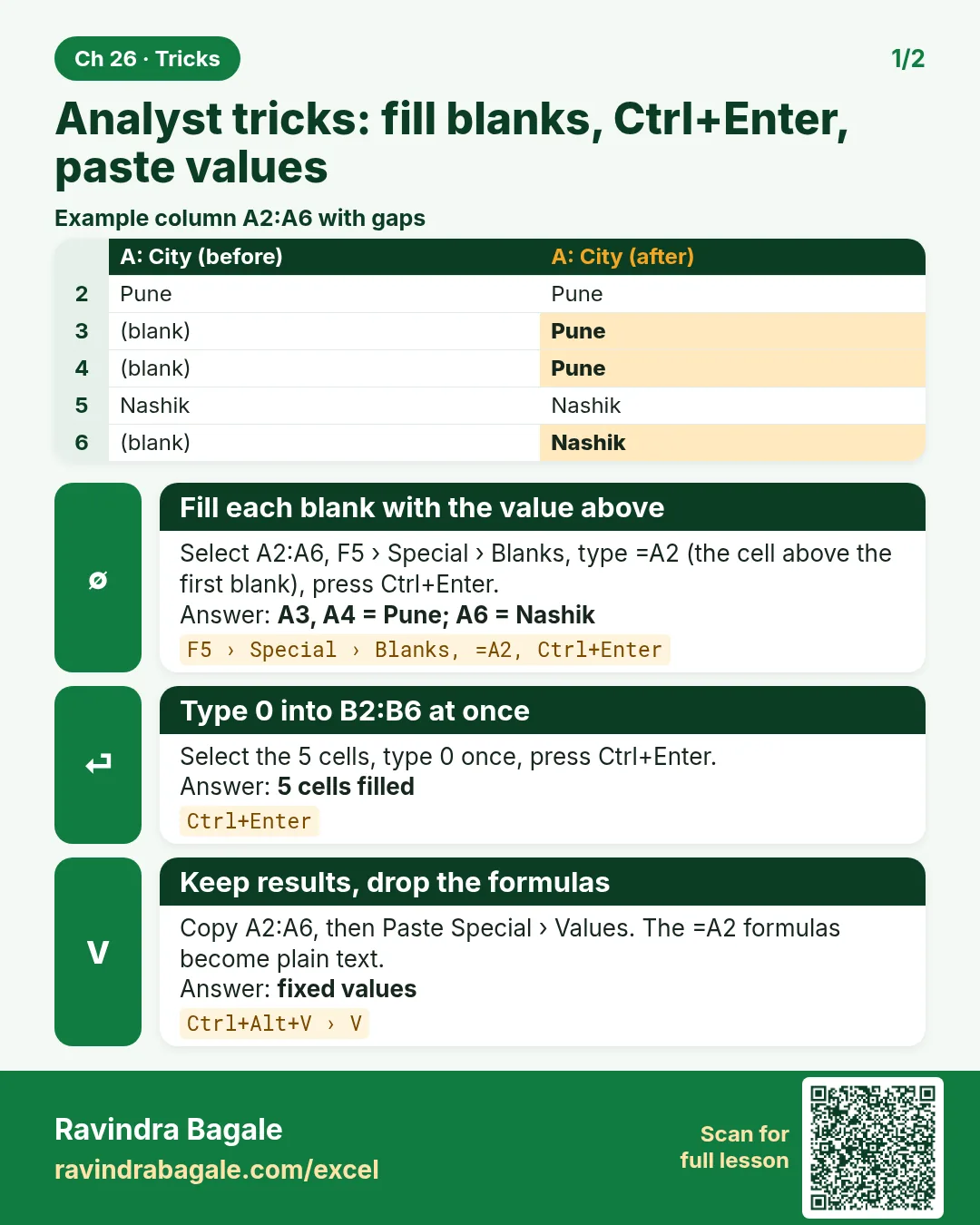
Friends, these are the small moves that experienced analysts make without thinking: fill blanks in one go, clean text, lock a rate, flag duplicates, highlight rows, show shares in a PivotTable, and send values instead of formulas. Thirty-two tricks, each with a tiny before and after.
मित्रांनो, या त्या छोट्या हालचाली आहेत ज्या अनुभवी analysts विचार न करता करतात: एकदम blanks भरणं, text साफ करणं, rate lock करणं, duplicates flag करणं, rows highlight करणं, PivotTable मध्ये shares दाखवणं, आणि formulas ऐवजी values पाठवणं. बत्तीस tricks, प्रत्येक छोट्या before आणि after सह.
दोस्तों, ये वे छोटी चालें हैं जो अनुभवी analysts बिना सोचे करते हैं: एक साथ blanks भरना, text साफ़ करना, rate lock करना, duplicates flag करना, rows highlight करना, PivotTable में shares दिखाना, और formulas की जगह values भेजना. बत्तीस tricks, हर एक छोटे before और after के साथ.
What you will learn in this module
- Enter and fill data faster (Ctrl+Enter, fill blanks, Flash Fill, weekday series)
- Clean imported data (TRIM, VALUE, Remove Duplicates, Text to Columns)
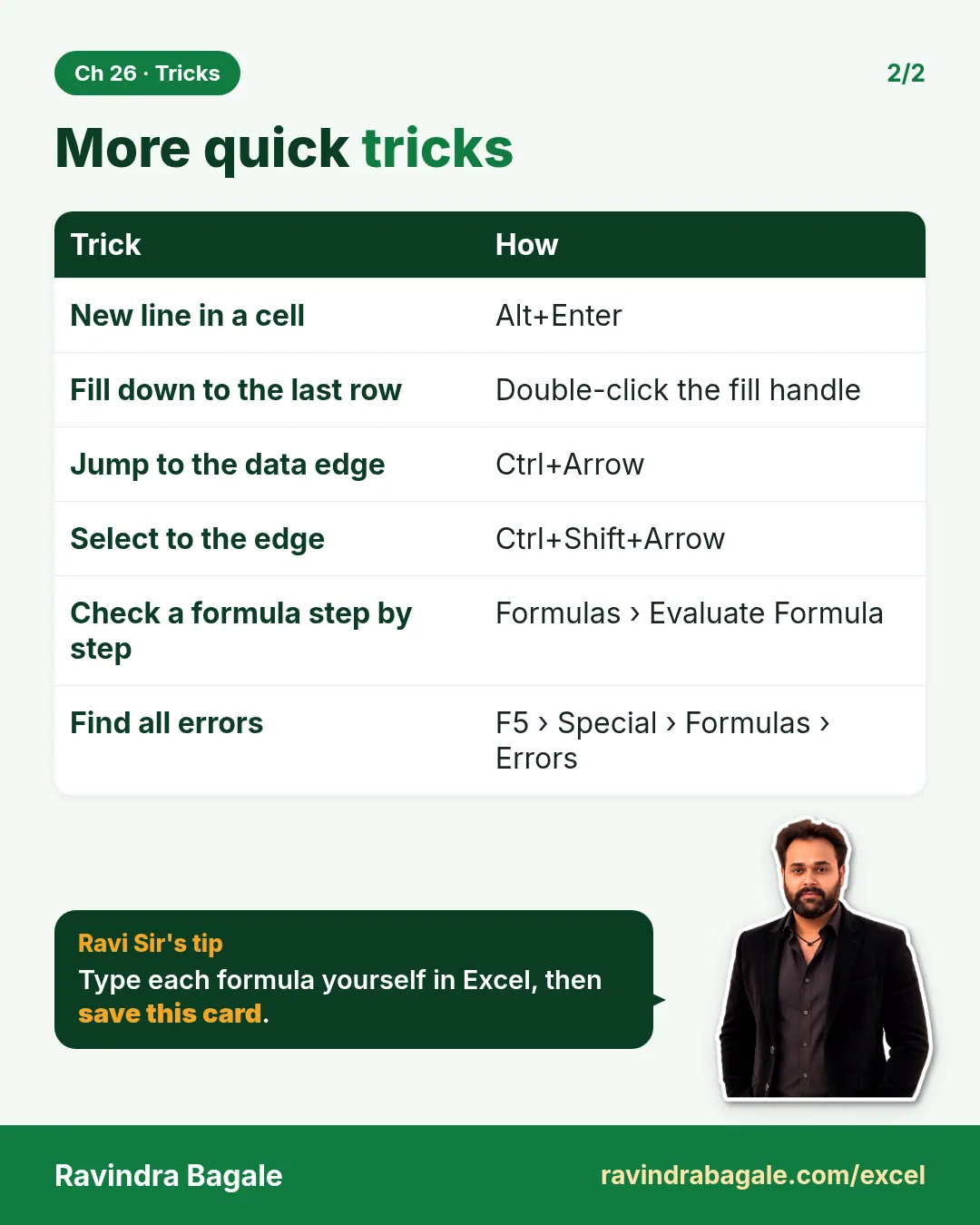
- Select, find and freeze without dragging
- Write safer formulas (F4, Evaluate Formula, IFERROR, XLOOKUP messages)
- Format for reading (row highlights, Center Across Selection, lakh format)
- Summarise and share (Total Row, custom sort, % of total, Paste Values, Transpose)
Live story: Thirty minutes saved every day
Suppose Zoya spends forty minutes every morning cleaning the Blinkit export before she can start her report. After learning eight of these tricks she does the same cleaning in ten minutes, and the numbers match better because nothing is retyped.
All numbers in this story are fictional practice data.
Live story: रोज तीस मिनिटं वाचली
समजा Zoya रोज सकाळी report सुरू करण्याआधी Blinkit export साफ करण्यात चाळीस मिनिटं घालवते. यातल्या आठ tricks शिकल्यावर तेच cleaning ती दहा मिनिटांत करते, आणि काहीही पुन्हा type होत नसल्याने आकडे जास्त अचूक जुळतात.
या story मधले सगळे आकडे काल्पनिक practice data आहेत.
Live story: रोज़ तीस मिनट बचे
मान लीजिए Zoya हर सुबह report शुरू करने से पहले Blinkit export साफ़ करने में चालीस मिनट लगाती है. इनमें से आठ tricks सीखने के बाद वही cleaning वह दस मिनट में करती है, और कुछ भी दोबारा type न होने से आँकड़े बेहतर मिलते हैं.
इस story के सारे आँकड़े काल्पनिक practice data हैं.
Fictional practice data
Every name, number and company detail in this module is made up for class. It is not the data of Blinkit, Amazon or any real firm.
Concepts in this chapter
- 26.1Fast Data Entry Tricks
- 26.2Data Cleaning Tricks
- 26.3Selecting and Navigating Tricks
- 26.4Formula Tricks
- 26.5Lookup and Logic Tricks
- 26.6Formatting Tricks
- 26.7Table, Sorting and PivotTable Tricks
- 26.8Checking and Sharing Tricks
Review and practice
The chapter recap is at the end of the last concept page.
Quick revision cards
Quick revision
Revise this chapter in two minutes. Save the cards on your phone or download them as PNG files. All names and numbers are made up for practice.
झटपट उजळणी
हा chapter दोन मिनिटांत revise करा. Cards phone वर save करा किंवा PNG म्हणून download करा. सगळी नावं आणि आकडे सरावासाठी काल्पनिक आहेत.
झटपट दोहराई
यह chapter दो मिनट में revise करें. Cards phone पर save करें या PNG के रूप में download करें. सभी नाम और आंकड़े अभ्यास के लिए काल्पनिक हैं.

More cards for every chapter: Ravi Sir's Cards.