Weight Loss and Fitness Tracker in Excel: BMI Formula, Progress % and a Line Chart with a Goal Line
Ravina in Nagpur weighs herself every Sunday morning. Some weeks the scale goes up by 200 grams and she feels like giving up. A tracker shows the bigger picture: twelve weeks of numbers, the total lost, her BMI and a line chart heading towards a goal line. One bad week becomes a small bump on a falling line.
What you'll learn on this page
- A weekly weigh-in table
- Change vs last week and total change
- The metric BMI formula: kg / (height in m)²
- % of goal reached
- The latest weight with INDEX and COUNT
- A line chart with a flat goal line
Download the template: weight-loss-bmi-tracker-template.xlsx: example data with real formulas. Yellow cells are inputs you can type over; green cells hold formulas; blue rows are headers and totals. Replace the example data with your own and everything recalculates.
Made-up data: every name, amount, shop and date on this page is made up for practice. Cities are used only to make the examples feel real.
1. The example
Ravina (made-up): height 162 cm, start 68.4 kg on 26-07-2026, goal 60 kg. After 12 weekly weigh-ins she is at 64.7 kg.
- Lost so far: 68.4 − 64.7 = 3.7 kg; still to lose: 64.7 − 60 = 4.7 kg.
- % of goal reached: 3.7 / (68.4 − 60) = 3.7 / 8.4 = 44%.
- BMI = weight / (height in metres)². Start: 68.4 / 1.62² = 68.4 / 2.6244 = 26.1. Now: 64.7 / 2.6244 = 24.7.
- Average loss: 3.7 kg over 11 weeks = 0.34 kg a week.
- Three weeks went up (+0.2, +0.1, +0.2), yet the line still falls.
BMI is a rough screening number for adults. It does not measure muscle or fat, so it is not medical advice.
Figure 1. Weekly weights go in; formulas give the weekly change, total change and BMI (68.4 / 1.62² = 26.1 at the start, 24.7 now); the goal column draws a flat line at 60 kg.
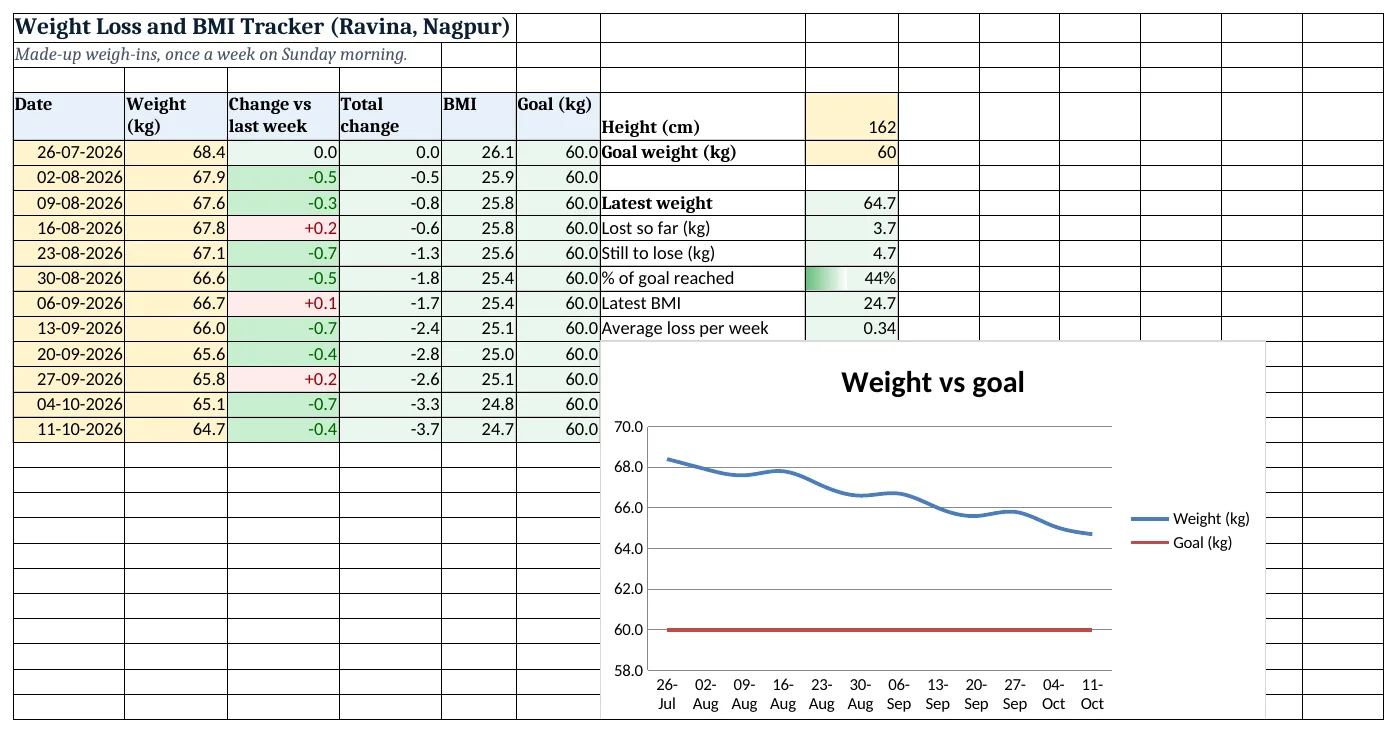
Figure 2. The template sheet, recalculated with its example data. Download it above and replace the yellow cells with your own numbers.
2. Build it step by step
Step 1. Height and goal
- In G4 type Height (cm) and in H4 162; in G5 Goal weight (kg) and in H5 60.
Step 2. Weigh-in table
- In A4:F4 type Date, Weight (kg), Change vs last week, Total change, BMI, Goal (kg).
- Type dates and weights from row 5 (yellow cells).
Step 3. Changes
- In C5 type
=0; in C6 type=B6-B5and copy down. - In D5 type
=B5-$B$5and copy down (absolute references). - Number format
+0.0;-0.0;0.0shows the plus sign.
Step 4. BMI and goal column
- In E5 type
=B5/($H$4/100)^2: 26.1. Dividing by 100 turns cm into metres; ^2 squares it. - In F5 type
=$H$5and copy down. This column draws the goal line.
Step 5. Summary
- In H7 type
=INDEX(B5:B200,COUNT(B5:B200)): 64.7, the last weight typed (INDEX). - In H8 type
=B5-H7(3.7) and in H9=H7-H5(4.7). - In H10 type
=(B5-H7)/(B5-H5): 44%. - In H11 type
=H7/(H4/100)^2(24.7) and in H12=H8/(COUNT(B5:B200)-1)(0.34).
Step 6. Colours
- Select C6:C200 > Highlight Cells Rules > Less Than 0, green; Greater Than 0, light red.
- Add Data Bars on H10.
Step 7. Line chart with a goal line
- Select A4:B16, hold Ctrl and select F4:F16 > Insert > Line (line charts).
- The Goal series is flat at 60: the finish line.
- Right-click the vertical axis > Format Axis: minimum 58, maximum 70 so the changes are visible.
Ravindra Bagale's Tip
Look at the 4-week trend, not one Sunday. Water, salt and sleep can move the scale by half a kilo in a day.
Ravindra Bagale's Tip – मराठी
एका रविवारचा नाही, 4 आठवड्यांचा trend बघा. पाणी, मीठ आणि झोप यामुळे एका दिवसात वजन अर्धा किलो पुढे-मागे होतं.
Ravindra Bagale's Tip – हिंदी
एक रविवार नहीं, 4 हफ्तों का trend देखो. पानी, नमक और नींद से एक दिन में वज़न आधा किलो ऊपर-नीचे हो जाता है.
3. Formulas used
| Cell | Formula | What it does |
|---|---|---|
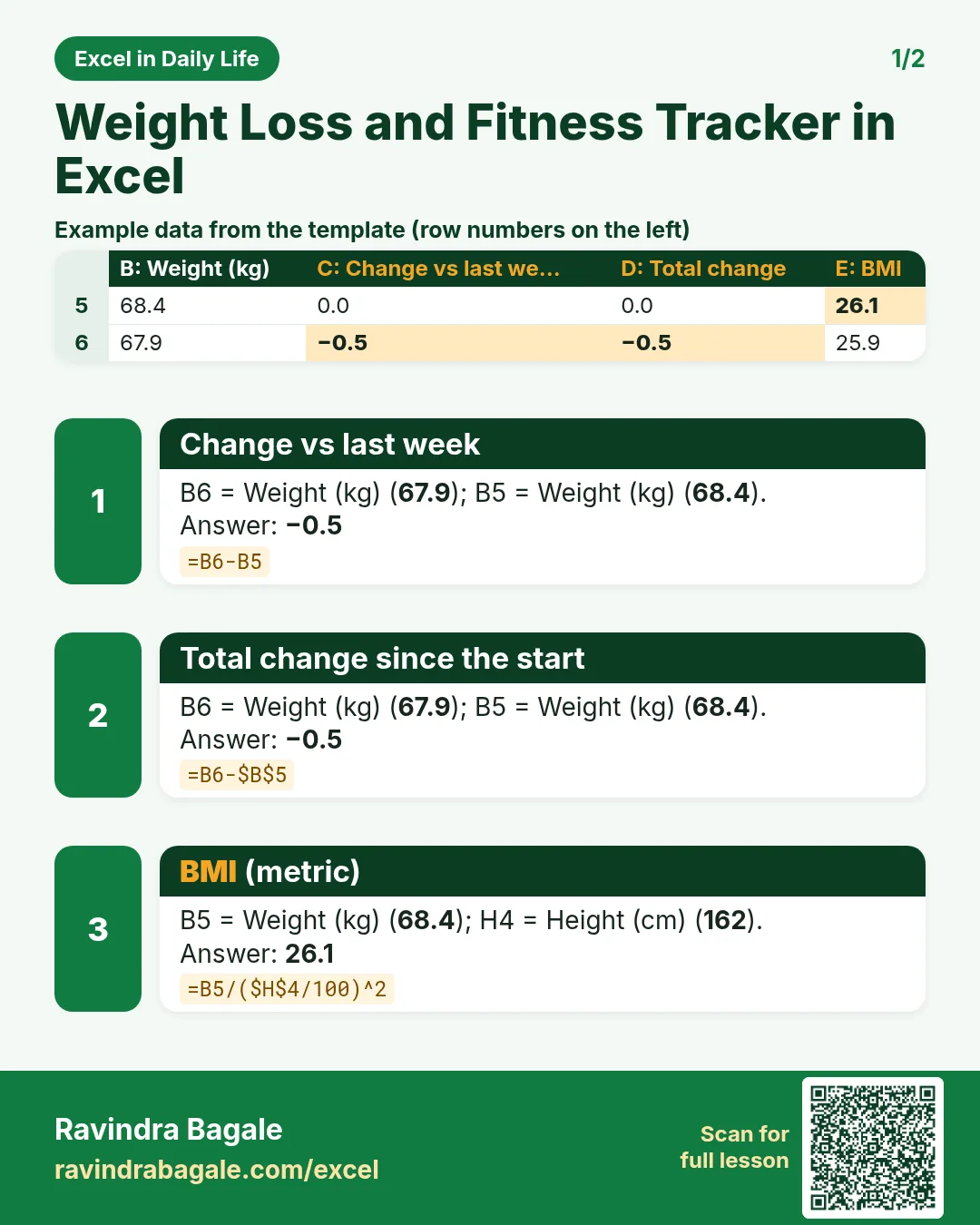
| C6 | =B6-B5 |
Change vs last week |
| D6 | =B6-$B$5 |
Total change since the start |
| E5 | =B5/($H$4/100)^2 |
BMI (metric) |
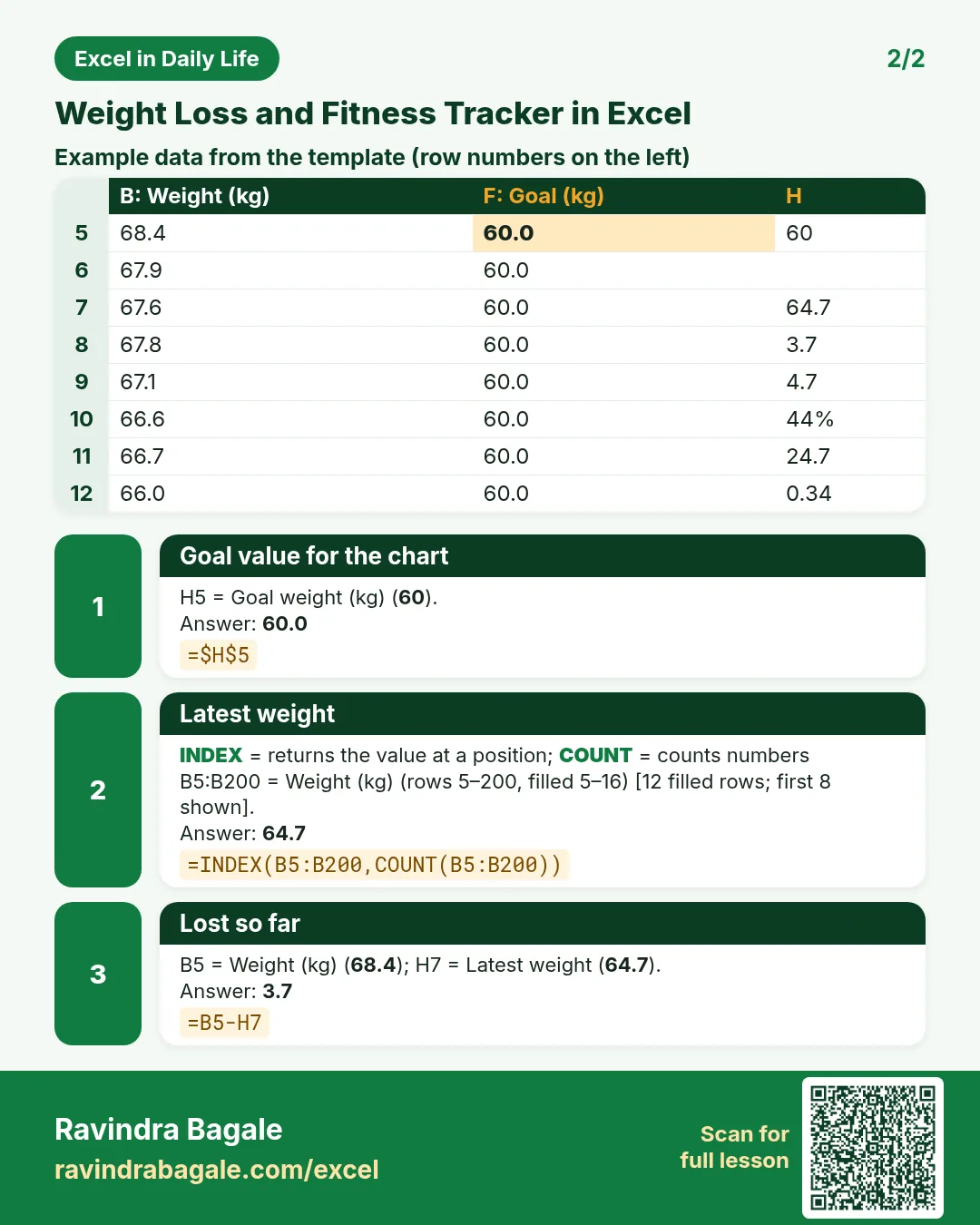
| F5 | =$H$5 |
Goal value for the chart |
| H7 | =INDEX(B5:B200,COUNT(B5:B200)) |
Latest weight |
| H8 | =B5-H7 |
Lost so far |
| H10 | =(B5-H7)/(B5-H5) |
% of goal reached |
| H11 | =H7/(H4/100)^2 |
Latest BMI |
| H12 | =H8/(COUNT(B5:B200)-1) |
Average loss per week |
Every formula above is written in the template, so you can click a cell and see it in the formula bar. All values on this page were recalculated in the file.
4. Common mistakes
- Height in cm inside the BMI formula. 68.4 / 162² gives 0.0026. Convert to metres first:
$H$4/100. - No $ on the start weight.
=B6-B5is right for the weekly change, but total change needs$B$5, otherwise every row compares with the row above. - Weighing at different times. Morning vs evening can differ by a kilo. Weigh at the same time and day.
- Axis starting at 0. From 0 to 70 a 4 kg loss looks flat. Set the axis minimum near the goal.
- Typing the latest weight by hand. INDEX with COUNT finds it, so the summary never goes stale.
Ravindra Bagale's Tip
Write a short note when a week goes up, like "wedding" or "missed walks". After two months the notes show you the pattern.
Ravindra Bagale's Tip – मराठी
ज्या आठवड्यात वजन वाढलं तिथे छोटी note लिहा, "लग्न" किंवा "walk चुकले" अशी. दोन महिन्यांनी notes मधून pattern दिसतो.
Ravindra Bagale's Tip – हिंदी
जिस हफ्ते वज़न बढ़े वहाँ छोटा note लिखो, जैसे "शादी" या "walk छूटे". दो महीने बाद notes से pattern दिख जाता है.
5. More real examples
Example 1: Waist and step tracker. Add columns for waist (cm) and average daily steps; chart them on a secondary axis.
Example 2: Weight gain goal. For gaining weight the same formulas work; the % of goal turns positive as weight goes up.
Example 3: Child growth log. Height and weight every month; compare with the doctor's chart, not with BMI targets for adults.
Quick revision cards
Quick revision
Each card shows formulas from this page, each with an example and its answer from the template. Scan the QR code on a card to open this lesson. All names and numbers are made up for practice.
झटपट उजळणी
प्रत्येक card वर या page मधले formulas, त्यांचं example आणि template मधलं उत्तर आहे. Card वरचा QR code scan केला की हा lesson उघडतो. सगळी नावं आणि आकडे सरावासाठी काल्पनिक आहेत.
झटपट दोहराई
हर card पर इस page के formulas, उनका example और template का उत्तर है. Card का QR code scan करें तो यह lesson खुलेगा. सभी नाम और आंकड़े अभ्यास के लिए काल्पनिक हैं.


More cards: Ravi Sir's Cards.
6. Frequently asked questions
What is the BMI formula in Excel?
=weight/(height_in_cm/100)^2, for example =B5/($H$4/100)^2. In pounds and inches use =weight/height^2*703.
How do I add a goal line to a chart?
Add a column that repeats the goal (=$H$5) on every row and include it in the line chart; it draws a flat line.
How do I get the latest entry in a column?
=INDEX(B5:B200,COUNT(B5:B200)) returns the last number when there are no gaps.
How do I show % of goal reached?
=(start − latest) / (start − goal).
Is BMI enough to judge fitness?
No. It ignores muscle and body shape. Use it as one number among others, and talk to a doctor for health advice.
7. Quick quiz
Ten questions on this page. Sign in to save your score.