Courier Management System in Excel: Zone Rate Chart, Weight Slabs, Fuel Surcharge, Delivery Status and Dashboard
Amir Express Courier in Sambhaji Nagar books parcels for shops and walk-in customers. Charges were worked out from a printed chart, and nobody noticed parcels that were late until a customer phoned. This page builds a 7-sheet Excel system: the rate chart sits on Setup, every shipment rounds its weight up to the slab and prices itself, and the status shows what is late or still on the way.
What you'll learn on this page
- Set a zone rate chart with a first slab and each extra slab
- Round weight up to the 500 g slab with ROUNDUP
- Work out freight, fuel surcharge and GST
- Set a promised date by zone and show delivery status
- Bill each account for the month with SUMIFS
- Report on-time % by zone with COUNTIFS
- Print a consignment note from an AWB number
Download the template: courier-management-system-template.xlsx: a 7-sheet system with example data and real formulas (Read me, Setup, Shipments, Account bill, Report, Consignment note, Dashboard). Yellow cells are inputs you can type over; green cells hold formulas; blue rows are headers and totals. Replace the example data with your own and every report and the dashboard recalculate.
Made-up data: every name, amount, business and date on this page is made up for practice. Cities are used only to make the examples feel real.
1. The business story
Amir Express Courier, Sambhaji Nagar, 1 to 17 October 2026 (made-up data). Local ₹40 for the first 500 g and ₹20 for each extra 500 g; within state ₹60 + ₹30; national ₹90 + ₹50. Fuel surcharge 10%, GST 18% (an input; confirm with your accountant).
| Question | Where the system answers it |
|---|---|
| What does a 1.2 kg parcel within the state cost? | 1.5 kg chargeable: ₹60 + 2 × ₹30 = ₹120 freight, ₹155.76 with fuel and GST |
| How reliable are we? | Report: 20 of 21 delivered parcels on time (95.2%) |
| What needs chasing? | 1 Delayed and 6 In transit |
| Who sends the most? | Account bill: walk-in customers, ₹1,479.72 |
28 shipments, 41.5 kg chargeable and ₹3,564 of freight and fuel before GST.
Figure 1. Setup holds the rate chart; Shipments is the only entry sheet; bills, report and note read from it.
2. Build it sheet by sheet
Step 1. Setup: rate chart
- B4 fuel surcharge (10%), B5 GST, B6 weight slab (0.5 kg).
- Zones in A9:D11: Zone, First slab, Each extra slab, Promised days. Accounts in F9:F12.
Step 2. Shipments: weight and charges
- A5 AWB
="AE"&TEXT(ROW()-4,"00000"). Type date, account, zone and actual weight. - F5 chargeable weight
=ROUNDUP(E5/Setup!$B$6,0)*Setup!$B$6: 1.2 kg becomes 1.5 kg (ROUNDUP). - G5 freight:
=XLOOKUP(D5,Setup!$A$9:$A$11,Setup!$B$9:$B$11,0)+(F5/Setup!$B$6-1)*XLOOKUP(D5,Setup!$A$9:$A$11,Setup!$C$9:$C$11,0). - H5 fuel
=ROUND(G5*Setup!$B$4,2), I5 GST on freight plus fuel, J5 total.
Step 3. Shipments: promised date and status
- K5 promised
=B5+XLOOKUP(D5,Setup!$A$9:$A$11,Setup!$D$9:$D$11,0). - M5:
=IF(L5<>"",IF(L5<=K5,"On time","Late"),IF(K5<Setup!$B$3,"Delayed","In transit")). - Colour Delayed red and Late amber with conditional formatting.
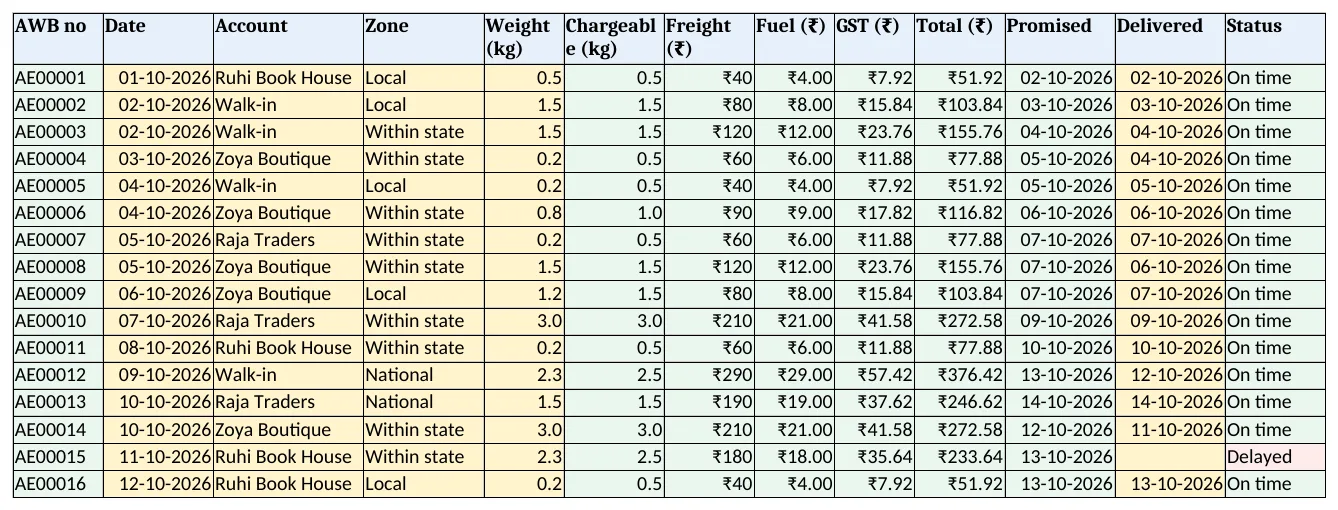
Figure 2. Shipments: chargeable weight, freight, fuel, GST, promised date and status
Step 4. Account bill and Report
- Account bill: B5 shipments with COUNTIF and C5:G5 kg, freight, fuel, GST and total with SUMIFS.
- Report C5 delivered
=COUNTIFS(Shipments!$D$5:$D$5000,A5,Shipments!$L$5:$L$5000,"<>"), D5 on time and E5 on-time % (COUNTIFS).
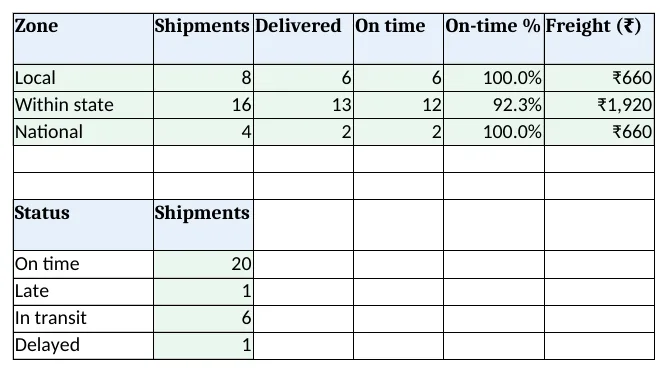
Figure 3. Report: shipments, delivered, on time and freight by zone, and shipments by status
Step 5. Consignment note and Dashboard
- Type an AWB in B4 of the Consignment note; rows 6 to 15 bring date, account, weights, charges and promised date. Set the print area.
- KPI cards: shipments, chargeable kg, freight + fuel, on-time %, delayed and in transit. Charts: shipments by zone and billing by account.
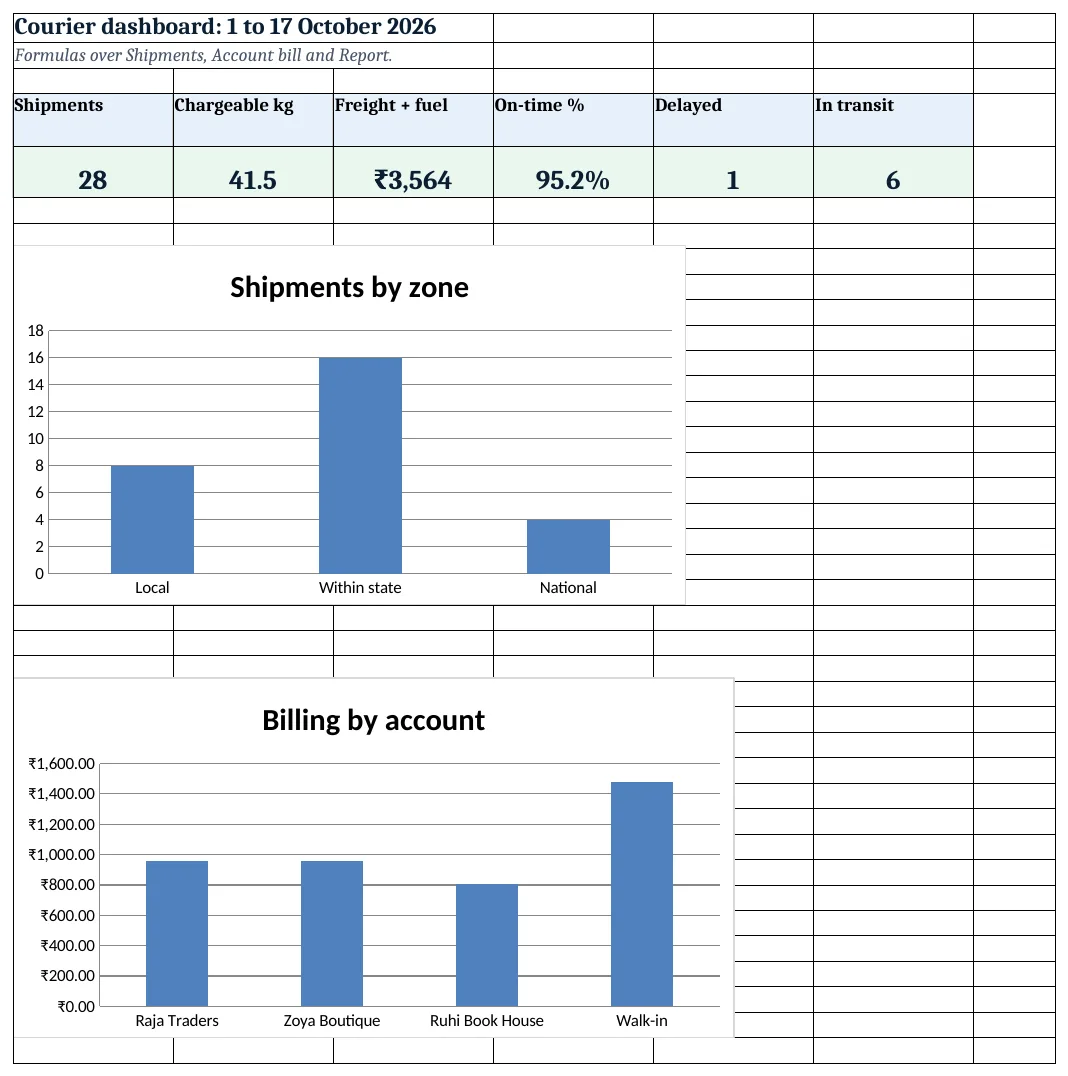
Figure 4. Courier dashboard: shipments, kg, revenue, on-time %, delayed and in transit
Ravindra Bagale's Tip
Weigh every parcel at the counter, in front of the customer. Disputes about charges almost always start with a guessed weight.
Ravindra Bagale's Tip – मराठी
प्रत्येक पार्सल ग्राहकासमोर counter वर वजन करा. शुल्कावरचे वाद बहुतेक अंदाजाच्या वजनाने सुरू होतात.
Ravindra Bagale's Tip – हिंदी
हर पार्सल ग्राहक के सामने counter पर तौलें. शुल्क के झगड़े ज़्यादातर अंदाज़े के वज़न से शुरू होते हैं.
3. Formulas used
| Cell | Formula | What it does |
|---|---|---|
| Shipments!A5 | ="AE"&TEXT(ROW()-4,"00000") |
AWB number |
| Shipments!F5 | =ROUNDUP(E5/Setup!$B$6,0)*Setup!$B$6 |
Chargeable weight |
| Shipments!G5 | =XLOOKUP(D5,Setup!$A$9:$A$11,Setup!$B$9:$B$11,0)+(F5/Setup!$B$6-1)*XLOOKUP(D5,Setup!$A$9:$A$11,Setup!$C$9:$C$11,0) |
Freight from the rate chart |
| Shipments!H5 | =ROUND(G5*Setup!$B$4,2) |
Fuel surcharge |
| Shipments!I5 | =ROUND((G5+H5)*Setup!$B$5,2) |
GST |
| Shipments!K5 | =B5+XLOOKUP(D5,Setup!$A$9:$A$11,Setup!$D$9:$D$11,0) |
Promised date |
| Shipments!M5 | =IF(L5<>"",IF(L5<=K5,"On time","Late"),IF(K5<Setup!$B$3,"Delayed","In transit")) |
Delivery status |
| Account bill!B5 | =COUNTIF(Shipments!$C$5:$C$5000,A5) |
Shipments per account |
| Account bill!G5 | =SUMIFS(Shipments!$J$5:$J$5000,Shipments!$C$5:$C$5000,A5) |
Account total |
| Report!C5 | =COUNTIFS(Shipments!$D$5:$D$5000,A5,Shipments!$L$5:$L$5000,"<>") |
Delivered per zone |
| Report!E5 | =IFERROR(D5/C5,0) |
On-time % |
| Consignment note!B6 | =XLOOKUP($B$4,Shipments!$A$5:$A$5000,Shipments!$B$5:$B$5000,"Not found") |
Booking date |
| Dashboard!D5 | =COUNTIF(Shipments!$M$5:$M$5000,"On time")/COUNTA(Shipments!$L$5:$L$5000) |
On-time % overall |
Every formula above is written in the template, so you can click a cell and see it in the formula bar. All values on this page were recalculated in LibreOffice with zero errors.
4. Common mistakes
- ROUND instead of ROUNDUP. 0.6 kg must be charged as 1 kg (two slabs). ROUND would charge one slab.
- Charging every slab at the first-slab rate. Only the first 500 g has the higher rate; extra slabs use the lower rate.
- Fuel surcharge after GST. GST is charged on freight plus fuel, so work out fuel first.
- Delivered date left blank. A delivered parcel without a date turns Delayed. Type it from the proof of delivery.
- On-time % over all shipments. Parcels in transit are not yet on time or late. Divide by delivered only.
Ravindra Bagale's Tip
Check the Delayed list before noon and call the delivery hub. A call the same day often saves the customer.
Ravindra Bagale's Tip – मराठी
दुपारपूर्वी Delayed यादी पहा आणि hub ला फोन करा. त्याच दिवशीचा फोन ग्राहक टिकवतो.
Ravindra Bagale's Tip – हिंदी
दोपहर से पहले Delayed सूची देखें और hub को फोन करें. उसी दिन का फोन ग्राहक बचाता है.
5. More real examples
Example 1: Volumetric weight. Add L, W, H columns and use the larger of actual weight and L × W × H ÷ 5,000.
Example 2: Cash on delivery. Add a COD amount column and a remittance report per account.
Example 3: Local delivery runs. Use only the Local zone and add a Rider column with a rider report, like the fleet system.
Quick revision cards
Quick revision
Each card shows formulas from this page, each with an example and its answer from the template. Scan the QR code on a card to open this lesson. All names and numbers are made up for practice.
झटपट उजळणी
प्रत्येक card वर या page मधले formulas, त्यांचं example आणि template मधलं उत्तर आहे. Card वरचा QR code scan केला की हा lesson उघडतो. सगळी नावं आणि आकडे सरावासाठी काल्पनिक आहेत.
झटपट दोहराई
हर card पर इस page के formulas, उनका example और template का उत्तर है. Card का QR code scan करें तो यह lesson खुलेगा. सभी नाम और आंकड़े अभ्यास के लिए काल्पनिक हैं.
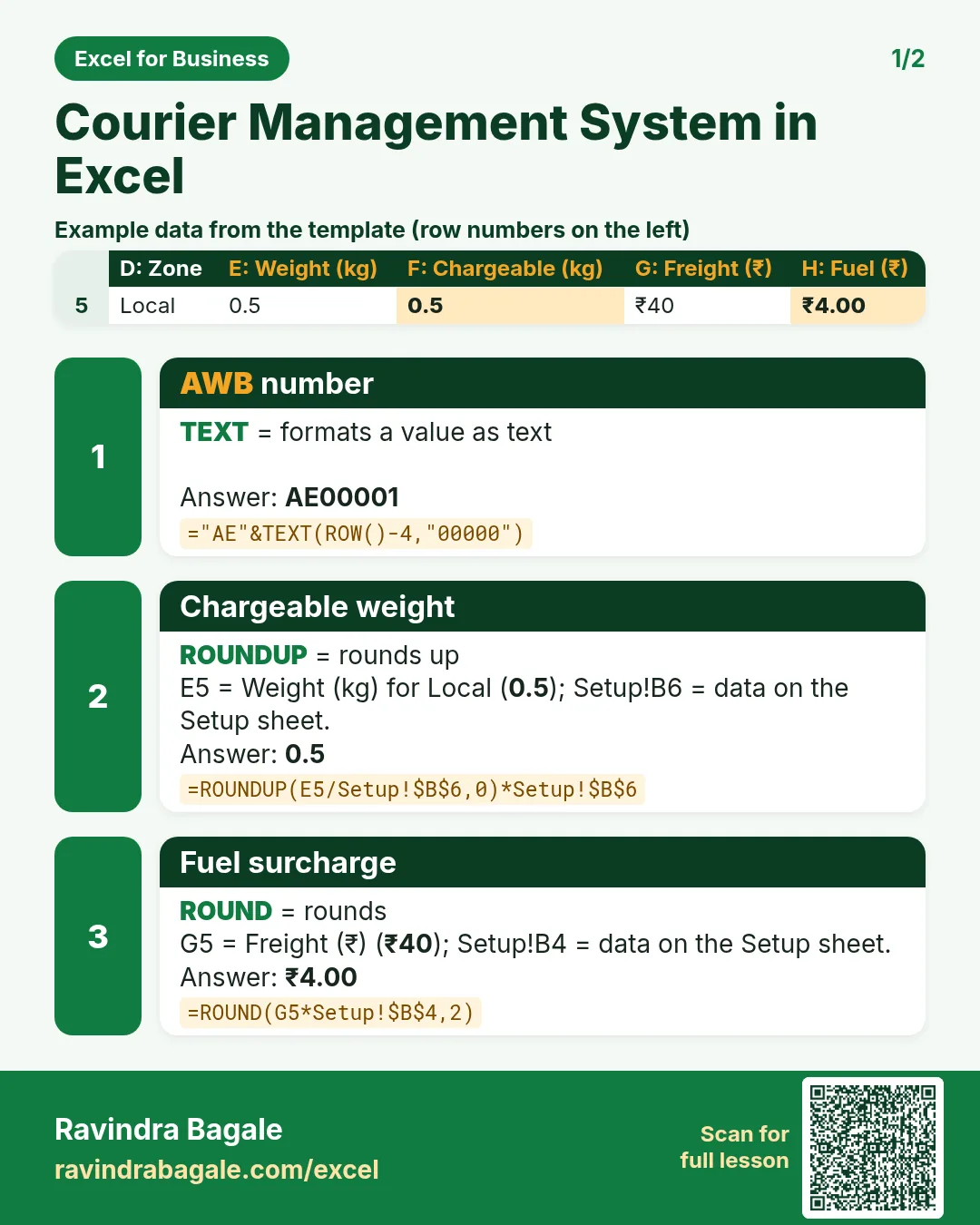

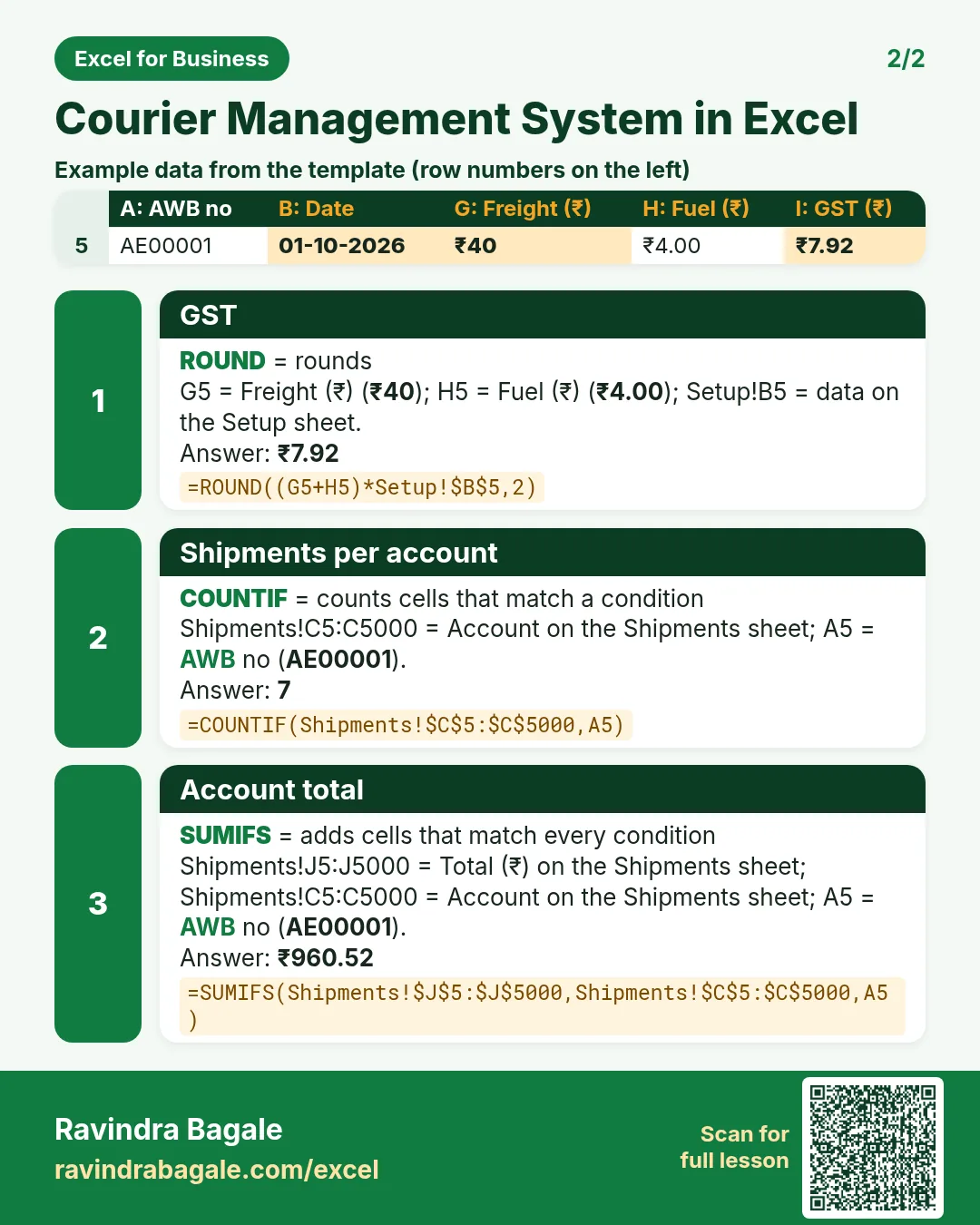

More cards: Ravi Sir's Cards.
6. Frequently asked questions
How do I round weight up to 500 g in Excel?
=ROUNDUP(weight/0.5,0)*0.5. Any part of a slab counts as a full slab.
How do I calculate courier charges by weight slab?
First slab rate + (number of slabs − 1) × extra slab rate, looked up by zone.
How do I show delayed parcels?
No delivered date and the promised date is before today: Delayed.
What GST applies to courier services?
Courier services are generally taxed at 18%. Keep the rate as an input and confirm with your accountant.
How do I bill each shop for the month?
SUMIFS the freight, fuel, GST and total columns by account, as on Account bill.
7. Quick quiz
Ten questions on this page. Sign in to save your score.