Medicine Refill Reminder in Excel: Tablets Left, Days of Stock and Refill-by Dates
Rani, who is 64, takes five different tablets, and twice this year one of them ran out on a Sunday night. Her son Ravindra made a small sheet: count the tablets once a week, and Excel works out how many days each one will last, the date to buy more and how many strips to buy. This sheet only counts tablets. The prescription and doses always come from the doctor.
What you'll learn on this page
- Doses per week (daily, twice daily, weekly)
- Days left from tablets in stock with INT
- Runs-out and refill-by dates
- Refill now / Soon / OK alerts
- Packs to buy for the next 30 days with ROUNDUP and MAX
- Monthly medicine cost
Download the template: medicine-stock-refill-tracker-template.xlsx: example data with real formulas. Yellow cells are inputs you can type over; green cells hold formulas; blue rows are headers and totals. Replace the example data with your own and everything recalculates.
Made-up data: every name, amount, shop and date on this page is made up for practice. Cities are used only to make the examples feel real.
1. The example
As of 17-10-2026 (made-up medicines, packs and prices; a 5-day refill buffer):
| Medicine | Per week | In stock | Days left | Refill by | Status |
|---|---|---|---|---|---|
| Thyroid tablet | 7 | 6 | 6 | 18-10-2026 | Refill now |
| BP tablet | 7 | 9 | 9 | 21-10-2026 | Soon |
| Vitamin D (weekly) | 1 | 3 | 21 | 02-11-2026 | OK |
| Sugar tablet | 14 | 50 | 25 | 06-11-2026 | OK |
The thyroid tablet runs out first: refill by tomorrow. To cover the next 30 days she needs 2 strips of the BP tablet and 1 of each of the others, a refill of ₹840. Her medicines cost about ₹941 a month in total.
Figure 1. Tablets in stock × 7 ÷ doses per week gives days left; today + days left − buffer gives the refill-by date; ROUNDUP gives strips to buy (₹840 now, about ₹941 a month).
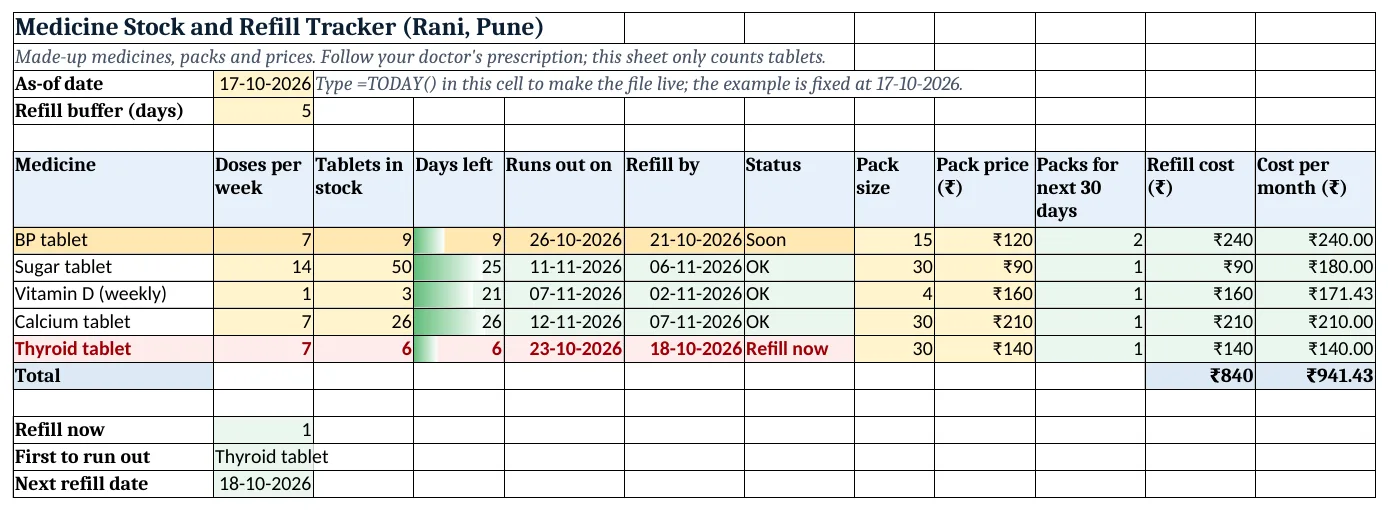
Figure 2. The template sheet, recalculated with its example data. Download it above and replace the yellow cells with your own numbers.
2. Build it step by step
Step 1. As-of date and buffer
- In B3 type
=TODAY()(the template has 17-10-2026 typed). In B4 type how many days early you want to buy (5).
Step 2. Medicine list
- In A6:L6 type the headers. Type each medicine, doses per week (once a day = 7, twice a day = 14, once a week = 1) and tablets counted today (yellow).
- Select B7:B50 > Data Validation > List:
1,7,14,21(data validation).
Step 3. Days left and dates
- In D7 type
=INT(C7*7/B7): tablets × 7 ÷ doses per week = full days of stock. INT drops the part day. - In E7 type
=$B$3+D7: the date it runs out. In F7 type=E7-$B$4: refill by (date maths). - In G7 type
=IF(D7<=7,"Refill now",IF(D7<=14,"Soon","OK")).
Step 4. What to buy
- Type the pack size and price in H7:I7.
- In J7 type
=MAX(0,ROUNDUP((30*B7/7-C7)/H7,0)): tablets needed for 30 days minus stock, divided by the pack size, rounded up, never below 0 (ROUNDUP). - In K7 type
=J7*I7and in L7=30*B7/7/H7*I7(cost per month).
Step 5. Summary
- In K12 and L12 type the SUMs: ₹840 to buy now, ₹941.43 a month.
- In B15 type
=INDEX(A7:A11,MATCH(MIN(D7:D11),D7:D11,0)): Thyroid tablet. In B16=MIN(F7:F11): 18-10-2026.
Step 6. Colours
- Select A7:G50 > New Rule > Use a formula:
=$G7="Refill now"red (Stop If True), then=$G7="Soon"amber (formula rules). - Add Data Bars on D7:D50 with maximum 30.
Ravindra Bagale's Tip
Count tablets on the same day every week, Sunday morning works well, and update column C right away.
Ravindra Bagale's Tip – मराठी
दर आठवड्याला एकाच दिवशी, रविवार सकाळी छान, गोळ्या मोजा आणि लगेच column C अपडेट करा.
Ravindra Bagale's Tip – हिंदी
हर हफ्ते एक ही दिन, रविवार सुबह ठीक है, गोलियां गिनो और तुरंत column C अपडेट करो.
3. Formulas used
| Cell | Formula | What it does |
|---|---|---|
| D7 | =INT(C7*7/B7) |
Full days of stock left |
| E7 | =$B$3+D7 |
Date it runs out |
| F7 | =E7-$B$4 |
Refill-by date |
| G7 | =IF(D7<=7,"Refill now",IF(D7<=14,"Soon","OK")) |
Refill now / Soon / OK |
| J7 | =MAX(0,ROUNDUP((30*B7/7-C7)/H7,0)) |
Packs to buy for the next 30 days |
| K7 | =J7*I7 |
Refill cost |
| L7 | =30*B7/7/H7*I7 |
Cost per month |
| B15 | =INDEX(A7:A11,MATCH(MIN(D7:D11),D7:D11,0)) |
Medicine that runs out first |
| B16 | =MIN(F7:F11) |
Earliest refill-by date |
Every formula above is written in the template, so you can click a cell and see it in the formula bar. All values on this page were recalculated in the file.
4. Common mistakes
- Doses per day instead of per week. A weekly vitamin is 1 per week; per day it would be 0.14, which is easy to get wrong. Per week keeps all numbers whole.
- Forgetting to recount. Update column C every week. Old counts make the dates wrong.
- ROUND instead of ROUNDUP for packs. 1.4 strips means buying 2. ROUND would give 1 and you would run short.
- Negative packs. If you have more than 30 days of stock, the formula would go below 0; MAX(0, …) stops that.
- Treating the sheet as advice. The sheet only counts. Doses, changes and new medicines come from the doctor.
Ravindra Bagale's Tip
Buy all the Soon medicines in the same trip as the Refill now one. One chemist visit instead of three.
Ravindra Bagale's Tip – मराठी
Refill now वाल्या गोळीसोबत Soon वाल्याही त्याच वेळी घ्या. तीन वेळा ऐवजी एकदाच chemist कडे.
Ravindra Bagale's Tip – हिंदी
Refill now वाली दवा के साथ Soon वाली भी उसी बार ले लो. तीन बार की जगह एक बार chemist के पास.
5. More real examples
Example 1: Two people at home. Add a For column (Rani, Ravindra) and filter, or keep one sheet per person.
Example 2: Pet medicines. The same columns work for a pet's monthly tablets.
Example 3: Travel check. Before a 10-day trip, change 30 to 10 in column J to see what to buy before leaving.
Quick revision cards
Quick revision
Each card shows formulas from this page, each with an example and its answer from the template. Scan the QR code on a card to open this lesson. All names and numbers are made up for practice.
झटपट उजळणी
प्रत्येक card वर या page मधले formulas, त्यांचं example आणि template मधलं उत्तर आहे. Card वरचा QR code scan केला की हा lesson उघडतो. सगळी नावं आणि आकडे सरावासाठी काल्पनिक आहेत.
झटपट दोहराई
हर card पर इस page के formulas, उनका example और template का उत्तर है. Card का QR code scan करें तो यह lesson खुलेगा. सभी नाम और आंकड़े अभ्यास के लिए काल्पनिक हैं.
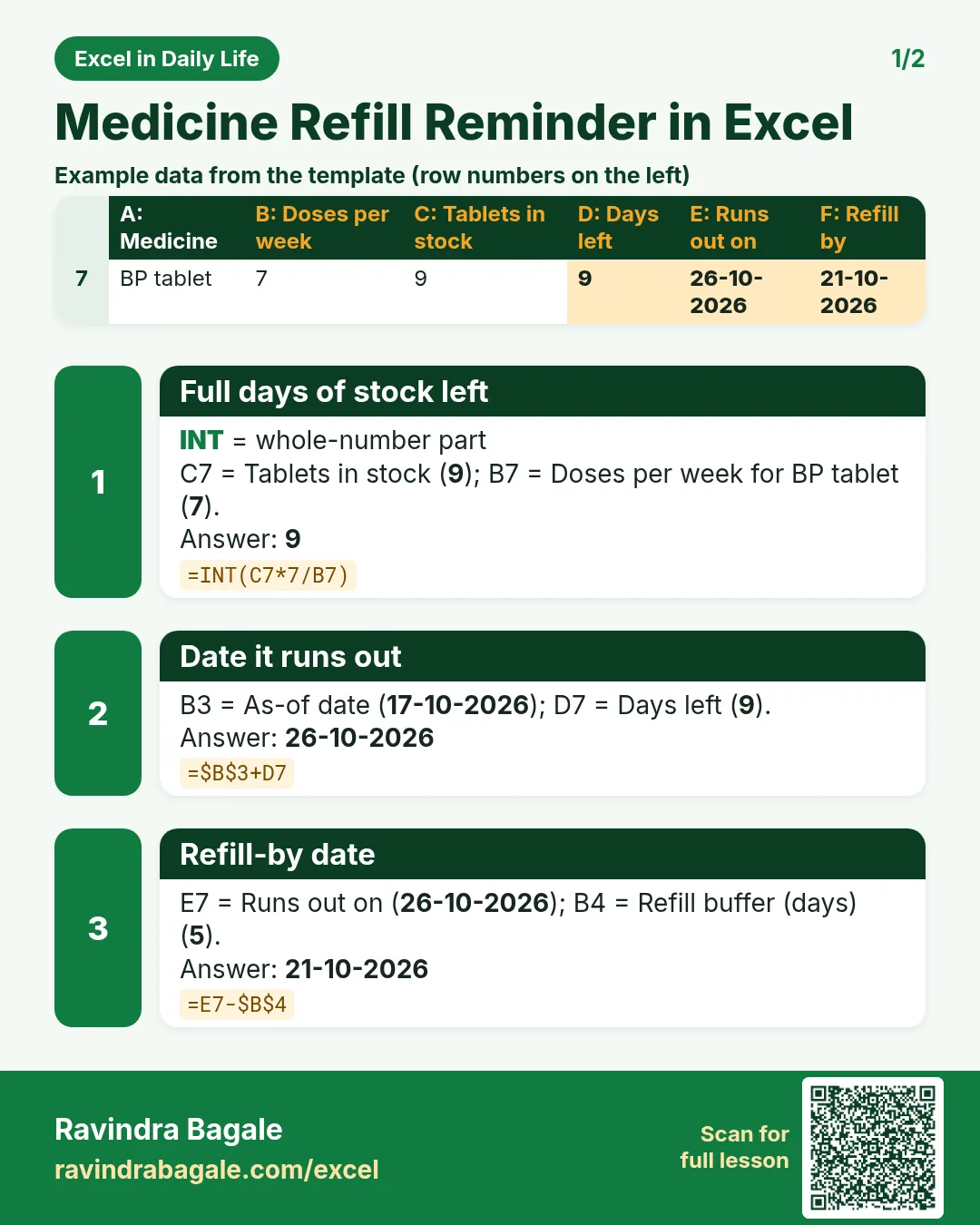

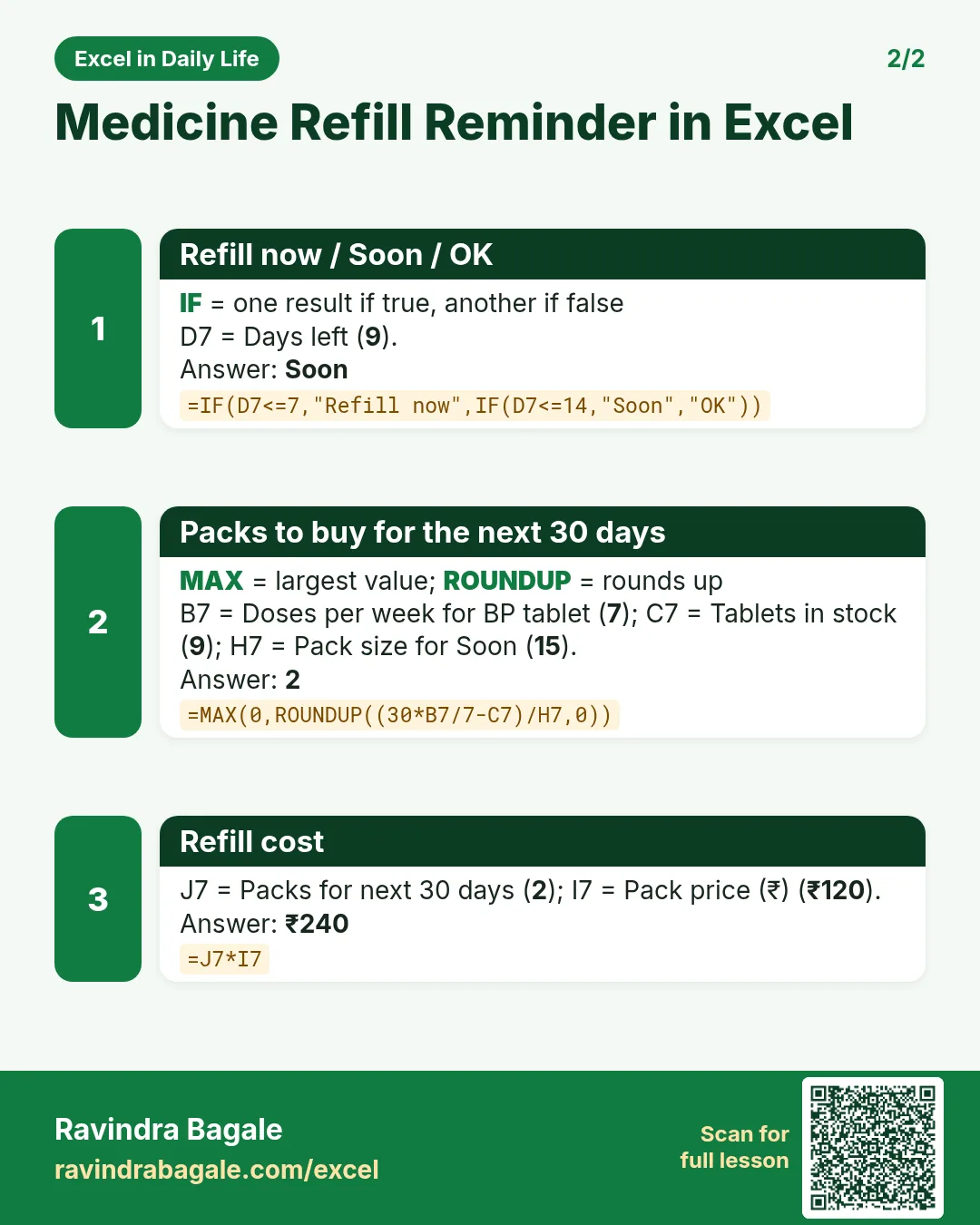

More cards: Ravi Sir's Cards.
6. Frequently asked questions
How do I calculate how many days my tablets will last?
Days left = tablets ÷ tablets per day. With doses per week: =INT(C7*7/B7).
How do I get a refill reminder date?
Runs out = today + days left; refill by = runs out − a few days of buffer.
How many strips should I buy for a month?
=MAX(0,ROUNDUP((30*doses per day − stock)/strip size,0)).
Can I track weekly medicines?
Yes. Doses per week = 1; the formulas stay the same.
Is this medical advice?
No. It only counts tablets and dates. Always follow the doctor and the prescription.
7. Quick quiz
Ten questions on this page. Sign in to save your score.
Loading practice tasks...
- Monthly rate (Easy): Yearly rate B3 divided by 12. (sheet "Plan")
- Months (Easy): B4 times 12. (sheet "Plan")
- Monthly EMI (Easy): EMI on amount B2 at B3 for B4 years, as a positive number, rounded to 2 decimals. (sheet "Plan")
- Clean name (Easy): Trim A2. (sheet "Text")
- Proper case (Easy): A2 trimmed and in proper case. (sheet "Text")
- Code prefix (Easy): First 3 characters of B2. (sheet "Text")
- Code number (Easy): Last 4 characters of B3. (sheet "Text")
- Total repaid (Medium): Total paid over the loan, rounded to 0 decimals. (sheet "Plan")
- Total interest (Medium): Total paid minus B2, rounded to 0 decimals. (sheet "Plan")
- Processing fee (Medium): B2 times B6. (sheet "Plan")
- City part (Medium): Characters 5 to 7 of B4. (sheet "Text")
- Name length (Medium): Length of A3. (sheet "Text")