Printing Press Management System in Excel: Job Estimator, Paper and Plates, Quotation, Delivery Status and Dashboard
Shahrukh Printers in Nashik prints visiting cards, pamphlets, brochures, wedding cards and books. Every quotation was worked out on paper, and two quotes for similar jobs often came out different. This page builds a 6-sheet Excel system where each job row is an estimate: sheets with wastage, paper, plates, printing and finishing, then margin and GST, a quotation that prints in one click, and a report of profit per job type.
What you'll learn on this page
- Keep paper rates, plate and printing costs on Setup
- Work out sheets needed from quantity, ups and wastage with ROUNDUP
- Cost paper, plates, printing and finishing for each job
- Add a margin and GST to get the quotation
- Show Delivered, Overdue or In press
- Print a quotation with price per piece
- Report jobs, profit and open jobs per job type
Download the template: printing-press-management-system-template.xlsx: a 6-sheet system with example data and real formulas (Read me, Setup, Jobs, Quotation, Report, Dashboard). Yellow cells are inputs you can type over; green cells hold formulas; blue rows are headers and totals. Replace the example data with your own and every report and the dashboard recalculate.
Made-up data: every name, amount, business and date on this page is made up for practice. Cities are used only to make the examples feel real.
1. The business story
Shahrukh Printers, Nashik, October 2026 (made-up data). Plate ₹350 per colour per side, printing ₹300 per 1,000 impressions, wastage 5%, margin 25% on cost. GST on print work is an input (18% here; confirm it for your work).
| Question | Where the system answers it |
|---|---|
| What do 2,000 brochures cost? | P-004: cost ₹14,425, quote ₹18,031 + GST = ₹21,277 |
| How many sheets for 1,000 visiting cards? | 12 ups: 84 sheets + 5% wastage = 89 sheets |
| Which jobs are late? | P-005 (books) and P-007 (visiting cards) |
| Where does the cost go? | Report: paper 32.2% of all costs |
Eight jobs quoted at ₹76,851 before GST against a cost of ₹61,480.10: ₹15,370.90 profit. ₹18,515 is still to collect on open jobs.
Figure 1. Setup holds rates; Jobs is the estimator and the job log in one; Quotation, Report and Dashboard read from it.
2. Build it sheet by sheet
Step 1. Setup: rates
- B4 plate cost per colour per side (₹350), B5 printing per 1,000 impressions (₹300), B6 wastage (5%), B7 lamination per sheet, B8 binding per copy, B9 margin (25%), B10 GST.
- Paper rates per sheet in A13:B15 and job types in D13:D17.
Step 2. Jobs: sheets and costs
- Type customer, job type, qty, ups per sheet, colours, sides, paper, lamination and binding. A5 numbers the job
="P-"&TEXT(ROW()-4,"000"). - N5 sheets:
=ROUNDUP(ROUNDUP(E5/F5,0)*(1+Setup!$B$6),0)(ROUNDUP). 1,000 cards at 12 ups need 84 sheets, plus 5% = 89. - O5 paper
=ROUND(N5*XLOOKUP(I5,Setup!$A$13:$A$15,Setup!$B$13:$B$15,0),2), P5 plates=G5*H5*Setup!$B$4. - Q5 printing
=ROUNDUP(MAX(1000,N5)/1000,0)*G5*H5*Setup!$B$5charges at least 1,000 impressions per colour per side; R5 finishing for lamination and binding.
Step 3. Jobs: quote, status and profit
- S5 cost
=O5+P5+Q5+R5, T5 quote before GST=ROUND(S5*(1+Setup!$B$9),0)and U5 with GST=ROUND(T5*(1+Setup!$B$10),0). - X5 status:
=IF(W5<>"","Delivered",IF(M5<Setup!$B$3,"Overdue","In press"))with M5 due=B5+L5. - Y5 profit
=T5-S5. Colour Overdue red with conditional formatting.

Figure 2. Jobs: the estimate for each job from sheets to quote with GST, with status and profit
Step 4. Quotation
- Type a job no in B4; B6
=XLOOKUP($B$4,Jobs!$A$5:$A$500,Jobs!$C$5:$C$500,"Not found")and the rows below bring job, qty, paper, colours, sides, lamination, prices and delivery date. - P-004 for Shraddha Tuition Centre: 2,000 brochures at ₹18,031 before GST, ₹9.02 a piece. Set the print area to A1:B18.
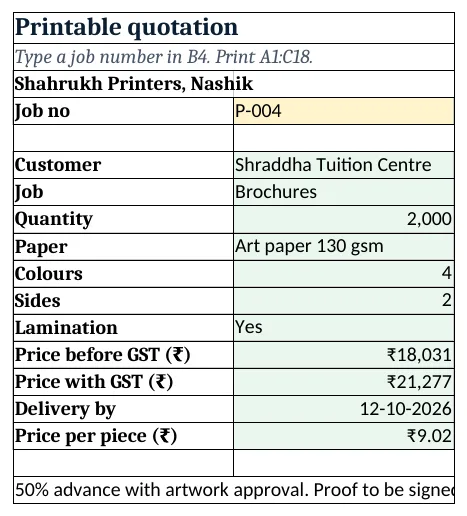
Figure 3. Quotation: one job with price before and with GST and price per piece
Step 5. Report and Dashboard
- Report per job type: B5 jobs, C5 quoted, D5 cost and E5 profit with SUMIFS, F5 open jobs with COUNTIFS; rows 13 to 16 split costs into paper, plates, printing and finishing.
- KPI cards: jobs, quoted value, profit, overdue, balance on open jobs and paper share
=Report!B13/Report!D10. Charts: profit by job type and cost split.
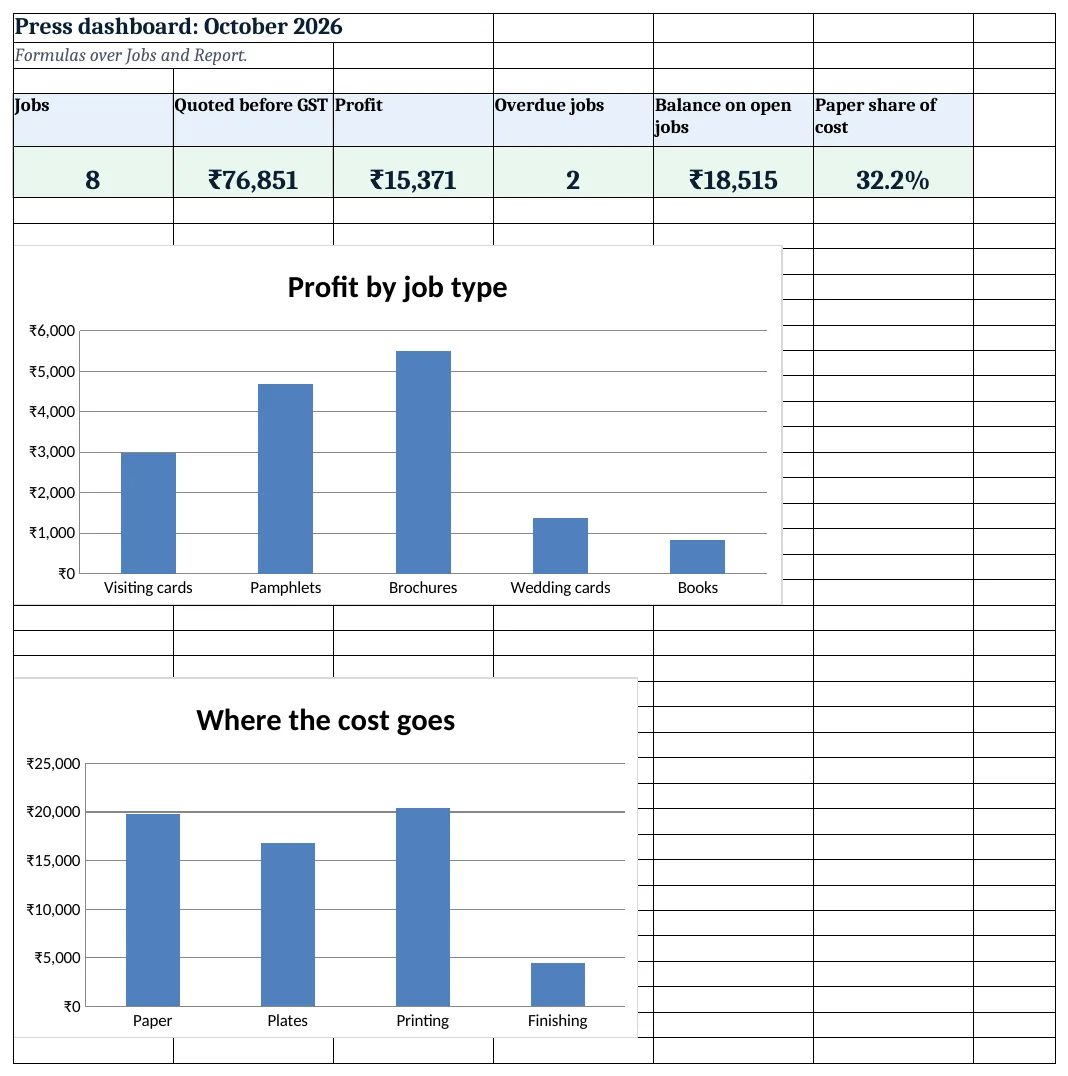
Figure 4. Printing press dashboard: jobs, quoted value, profit, overdue and balance
Ravindra Bagale's Tip
Save every quotation as a job row even if the customer does not confirm. Next time a similar job comes in, the old row is your starting point.
Ravindra Bagale's Tip – मराठी
ग्राहकाने confirm केले नाही तरी प्रत्येक quotation job row म्हणून ठेवा. पुढच्या वेळी तसेच काम आले की जुनी row उपयोगी येते.
Ravindra Bagale's Tip – हिंदी
ग्राहक confirm न करे तो भी हर quotation job row में रखें. अगली बार वैसा काम आए तो पुरानी row काम आती है.
3. Formulas used
| Cell | Formula | What it does |
|---|---|---|
| Jobs!A5 | ="P-"&TEXT(ROW()-4,"000") |
Automatic job number |
| Jobs!M5 | =B5+L5 |
Due date |
| Jobs!N5 | =ROUNDUP(ROUNDUP(E5/F5,0)*(1+Setup!$B$6),0) |
Sheets needed with wastage |
| Jobs!O5 | =ROUND(N5*XLOOKUP(I5,Setup!$A$13:$A$15,Setup!$B$13:$B$15,0),2) |
Paper cost |
| Jobs!P5 | =G5*H5*Setup!$B$4 |
Plate cost |
| Jobs!Q5 | =ROUNDUP(MAX(1000,N5)/1000,0)*G5*H5*Setup!$B$5 |
Printing cost |
| Jobs!S5 | =O5+P5+Q5+R5 |
Total cost |
| Jobs!T5 | =ROUND(S5*(1+Setup!$B$9),0) |
Quote before GST |
| Jobs!U5 | =ROUND(T5*(1+Setup!$B$10),0) |
Quote with GST |
| Jobs!X5 | =IF(W5<>"","Delivered",IF(M5<Setup!$B$3,"Overdue","In press")) |
Job status |
| Quotation!B6 | =XLOOKUP($B$4,Jobs!$A$5:$A$500,Jobs!$C$5:$C$500,"Not found") |
Customer on the quotation |
| Report!E5 | =C5-D5 |
Profit per job type |
| Dashboard!E5 | =SUMIFS(Jobs!$U$5:$U$500,Jobs!$X$5:$X$500,"<>Delivered",Jobs!$C$5:$C$500,"<>")-SUMIFS(Jobs!$V$5:$V$500,Jobs!$X$5:$X$500,"<>Delivered",Jobs!$C$5:$C$500,"<>") |
Balance on open jobs |
| Dashboard!F5 | =Report!B13/Report!D10 |
Paper share of cost |
Every formula above is written in the template, so you can click a cell and see it in the formula bar. All values on this page were recalculated in LibreOffice with zero errors.
4. Common mistakes
- ROUND instead of ROUNDUP for sheets. You cannot print on 83.3 sheets. ROUNDUP keeps the paper count whole and enough.
- No wastage allowance. Setting up colours spoils sheets. Leave B6 at 0 and every job runs short.
- Plates only for one side. A 4-colour job printed both sides needs 8 plates: colours × sides.
- Margin on the quote with GST. Add margin to cost first, then GST on that quote, as in T5 and U5.
- Quoting short runs per piece. Printing has a minimum of 1,000 impressions per plate; Q5 uses MAX(1000,…) for that.
Ravindra Bagale's Tip
Update paper rates on Setup the day your supplier changes them. Paper is about a third of the cost, so old rates eat the margin.
Ravindra Bagale's Tip – मराठी
supplier ने भाव बदलले त्याच दिवशी Setup वरचे paper rates बदला. paper साधारण एक तृतीयांश खर्च आहे, जुने भाव margin खातात.
Ravindra Bagale's Tip – हिंदी
supplier भाव बदले उसी दिन Setup पर paper rates बदलें. paper लगभग एक तिहाई खर्च है, पुराने भाव margin खा जाते हैं.
5. More real examples
Example 1: Screen printing on T-shirts. Replace plates with screens per colour and paper with blank shirts per piece.
Example 2: Flex and banner printing. Cost by square foot: width × height × rate, plus eyelets and frame as finishing.
Example 3: Stationery for offices. Add a Repeat job of column and reuse plates at no cost for reprints.
Quick revision cards
Quick revision
Each card shows formulas from this page, each with an example and its answer from the template. Scan the QR code on a card to open this lesson. All names and numbers are made up for practice.
झटपट उजळणी
प्रत्येक card वर या page मधले formulas, त्यांचं example आणि template मधलं उत्तर आहे. Card वरचा QR code scan केला की हा lesson उघडतो. सगळी नावं आणि आकडे सरावासाठी काल्पनिक आहेत.
झटपट दोहराई
हर card पर इस page के formulas, उनका example और template का उत्तर है. Card का QR code scan करें तो यह lesson खुलेगा. सभी नाम और आंकड़े अभ्यास के लिए काल्पनिक हैं.
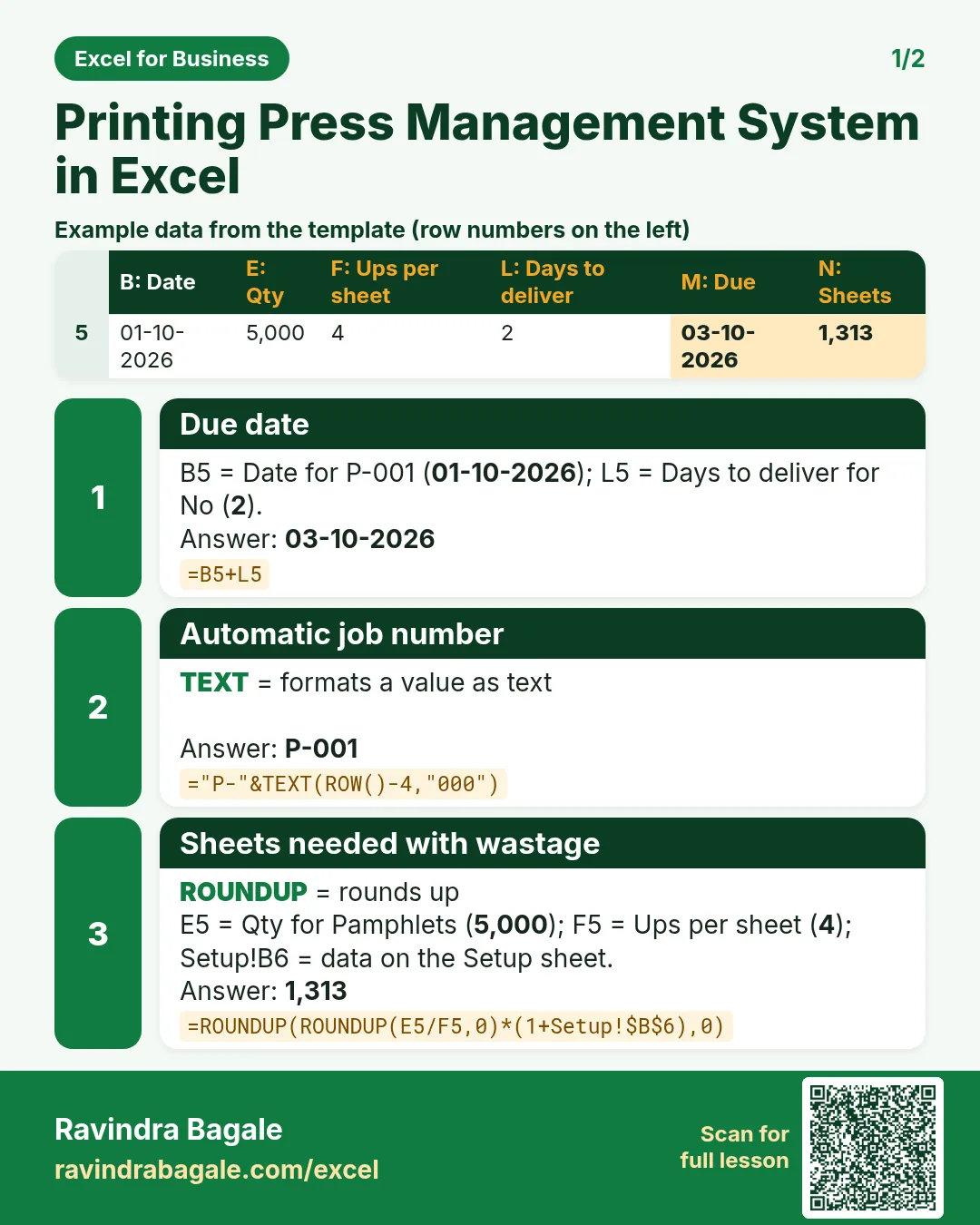

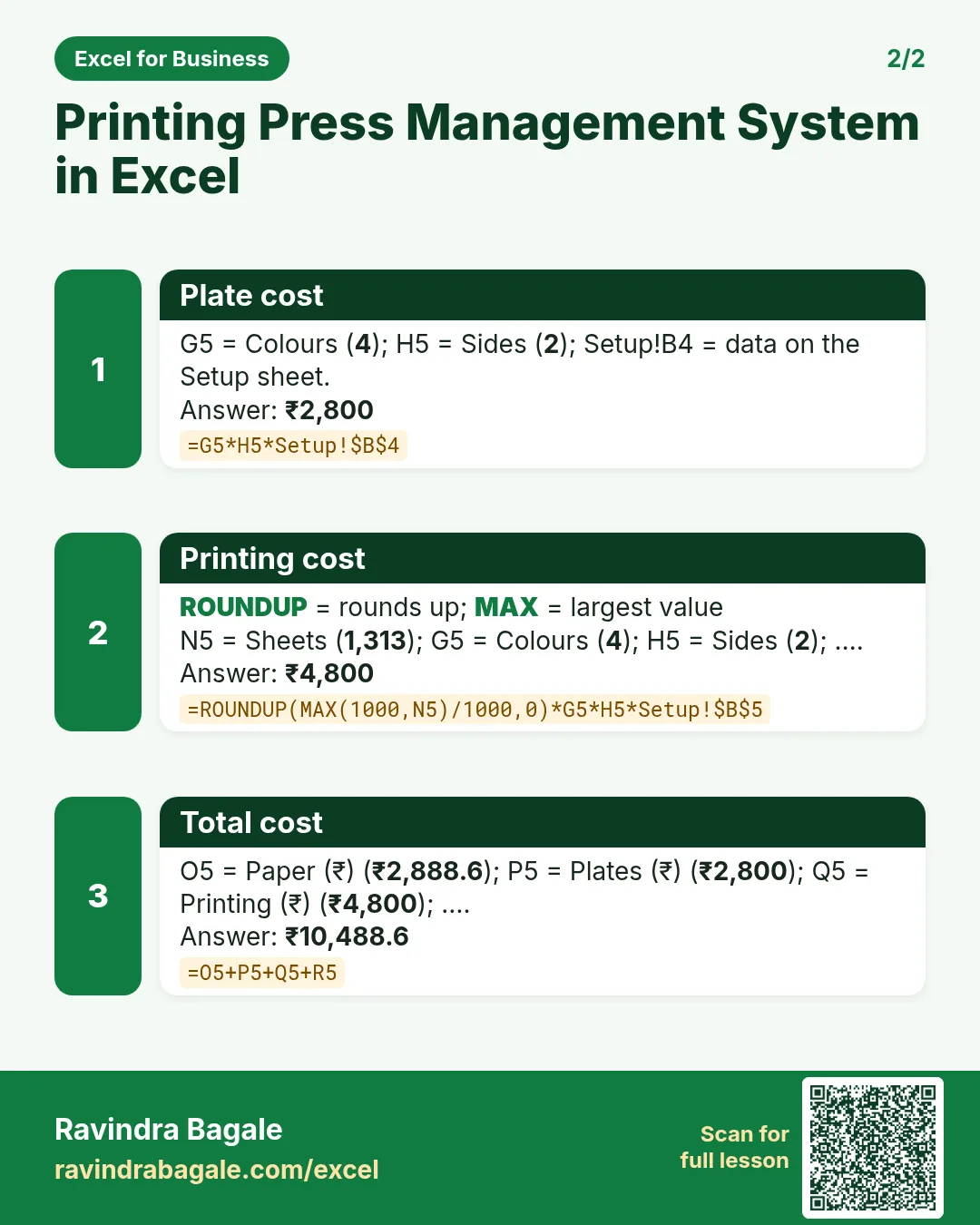

More cards: Ravi Sir's Cards.
6. Frequently asked questions
How do I calculate sheets needed for a print job?
Quantity ÷ ups per sheet, rounded up, then × (1 + wastage), rounded up again: =ROUNDUP(ROUNDUP(E5/F5,0)*(1+wastage),0).
How do I cost plates?
Colours × sides × plate cost. A 4-colour, two-sided job needs 8 plates.
How do I add margin and GST to a quotation?
Quote = cost × (1 + margin), rounded; with GST = quote × (1 + GST rate), rounded.
Is GST on printing always 18%?
Not always; it depends on the job and who supplies the content and paper. Confirm with your accountant and set Setup B10.
How do I show the price per piece?
Quote before GST ÷ quantity: ₹18,031 ÷ 2,000 = ₹9.02.
7. Quick quiz
Ten questions on this page. Sign in to save your score.