Gas Cylinder Tracker in Excel: How Many Days Each LPG Cylinder Lasts and When to Book the Next
In Shraddha Bagale's kitchen in Solapur the gas always seems to run out at the worst time: guests at home, or a Sunday morning. A cylinder lasts "about a month", but how long exactly? Write down the date each new cylinder is connected, and Excel works out how long each one lasted, when the current one will finish and the date to book the next.
What you'll learn on this page
- Days each cylinder lasted from connection dates
- Average, shortest and longest
- Expected run-out date for the cylinder in use
- A book-by date with a buffer and a Book now alert
- Cost per day and gas cost per month
- Counting cylinders this year with COUNTIFS
Download the template: lpg-cylinder-tracker-template.xlsx: example data with real formulas. Yellow cells are inputs you can type over; green cells hold formulas; blue rows are headers and totals. Replace the example data with your own and everything recalculates.
Made-up data: every name, amount, shop and date on this page is made up for practice. Cities are used only to make the examples feel real.
1. The example
Seven cylinders connected from 2 March to 27 September 2026 (made-up dates, ₹905 each), as of 17-10-2026:
| Value | |
|---|---|
| Days each lasted | 35, 33, 37, 35, 32, 37 |
| Average | 34.8 days |
| Current cylinder in use for | 20 days |
| Expected to run out | 01-11-2026 |
| Book the next one by | 29-10-2026 |
| Status | OK |
| Gas cost per month | ₹779 |
The shortest, 32 days, was the month with guests. Booking three days early means the new cylinder arrives before the old one is empty.
Figure 1. Connection dates give days per cylinder (average 34.8); the cylinder in use + 35 days runs out on 01-11-2026; minus a 3-day buffer, book by 29-10-2026.
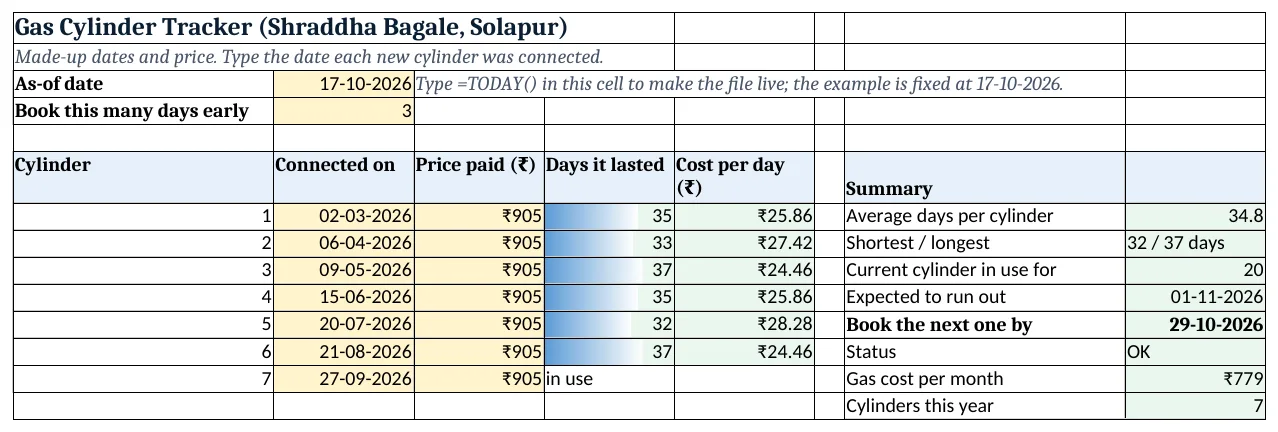
Figure 2. The template sheet, recalculated with its example data. Download it above and replace the yellow cells with your own numbers.
2. Build it step by step
Step 1. Settings
- In B3 type
=TODAY()(the template has 17-10-2026 typed). In B4 type how many days early you book (3).
Step 2. Connection dates
- In A6:E6 type Cylinder, Connected on, Price paid, Days it lasted, Cost per day.
- Type the date each cylinder was connected and its price (yellow). The last row is the cylinder in use.
Step 3. Days lasted and cost per day
- In D7 type
=B8-B7: 35 days (next connection minus this one) (date maths). - In E7 type
=C7/D7: ₹25.86 a day. Copy D7:E7 down to the second-last row.
Step 4. Summary
- In H7 type
=AVERAGE(D7:D12): 34.8 days. - In H8 type
=MIN(D7:D12)&" / "&MAX(D7:D12)&" days": 32 / 37 days. - In H9 type
=B3-B13: 20 days in use.
Step 5. Run-out and book-by
- In H10 type
=B13+ROUND(H7,0): 01-11-2026 (ROUND). - In H11 type
=H10-B4: 29-10-2026. - In H12 type
=IF(B3>=H11,"Book now","OK").
Step 6. Cost and count
- In H13 type
=AVERAGE(C7:C13)*30/H7: about ₹779 a month. - In H14 type
=COUNTIFS(B7:B13,">="&DATE(YEAR(B3),1,1)): 7 cylinders this year (COUNTIFS).
Step 7. Colours and chart
- Select H12 > Highlight Cells Rules > Equal To
Book now, red. - Select D7:D12 > Data Bars, and Insert > Column for a chart of days per cylinder (column charts).
Ravindra Bagale's Tip
Write the connection date on a small sticker on the cylinder too. If you forget to type it, the sticker remembers.
Ravindra Bagale's Tip – मराठी
Cylinder वर एका छोट्या sticker वर connection ची तारीख पण लिहा. Type करायला विसरलात तरी sticker लक्षात ठेवतो.
Ravindra Bagale's Tip – हिंदी
Cylinder पर एक छोटे sticker पर connection की तारीख भी लिख दो. Type करना भूल गए तो sticker याद रखेगा.
3. Formulas used
| Cell | Formula | What it does |
|---|---|---|
| D7 | =B8-B7 |
Days the cylinder lasted |
| E7 | =C7/D7 |
Cost per day |
| H7 | =AVERAGE(D7:D12) |
Average days per cylinder |
| H8 | =MIN(D7:D12)&" / "&MAX(D7:D12)&" days" |
Shortest / longest |
| H9 | =B3-B13 |
Days the current one has been in use |
| H10 | =B13+ROUND(H7,0) |
Expected run-out date |
| H11 | =H10-B4 |
Book-by date |
| H12 | =IF(B3>=H11,"Book now","OK") |
Book now or OK |
| H13 | =AVERAGE(C7:C13)*30/H7 |
Gas cost per month |
| H14 | =COUNTIFS(B7:B13,">="&DATE(YEAR(B3),1,1)) |
Cylinders connected this year |
Every formula above is written in the template, so you can click a cell and see it in the formula bar. All values on this page were recalculated in the file.
4. Common mistakes
- Typing the booking date instead of the connection date. Days lasted must be measured from connection to connection. The delivery date is close enough if you connect it the same day.
- Including the cylinder in use in the average. It has not finished yet. AVERAGE(D7:D12) stops at the last finished cylinder.
- Forgetting the buffer. Delivery can take a few days. B4 gives you that time.
- One price for every cylinder. Prices change. Type the price on each bill so cost per day stays right.
- Two cylinders at home. With a spare cylinder, note the date each one is connected, not the date it is delivered.
Ravindra Bagale's Tip
Before a festival or guests, look at the shortest number, not the average. Book early when the house will be full.
Ravindra Bagale's Tip – मराठी
सण किंवा पाहुणे येणार असतील तर average नाही, shortest आकडा बघा. घर भरणार असेल तेव्हा लवकर book करा.
Ravindra Bagale's Tip – हिंदी
त्योहार या मेहमान आने वाले हों तो average नहीं, shortest आंकड़ा देखो. घर भरा होगा तब जल्दी book करो.
5. More real examples
Example 1: Small family vs big family. A family of five may use a cylinder in 20 days; the same sheet shows it and the book-by date moves earlier.
Example 2: Commercial cylinder for a tiffin service. Add a column for meals cooked and divide to get gas cost per meal.
Example 3: Piped gas comparison. If you move to piped gas, compare its monthly bill with H13.
Quick revision cards
Quick revision
Each card shows formulas from this page, each with an example and its answer from the template. Scan the QR code on a card to open this lesson. All names and numbers are made up for practice.
झटपट उजळणी
प्रत्येक card वर या page मधले formulas, त्यांचं example आणि template मधलं उत्तर आहे. Card वरचा QR code scan केला की हा lesson उघडतो. सगळी नावं आणि आकडे सरावासाठी काल्पनिक आहेत.
झटपट दोहराई
हर card पर इस page के formulas, उनका example और template का उत्तर है. Card का QR code scan करें तो यह lesson खुलेगा. सभी नाम और आंकड़े अभ्यास के लिए काल्पनिक हैं.
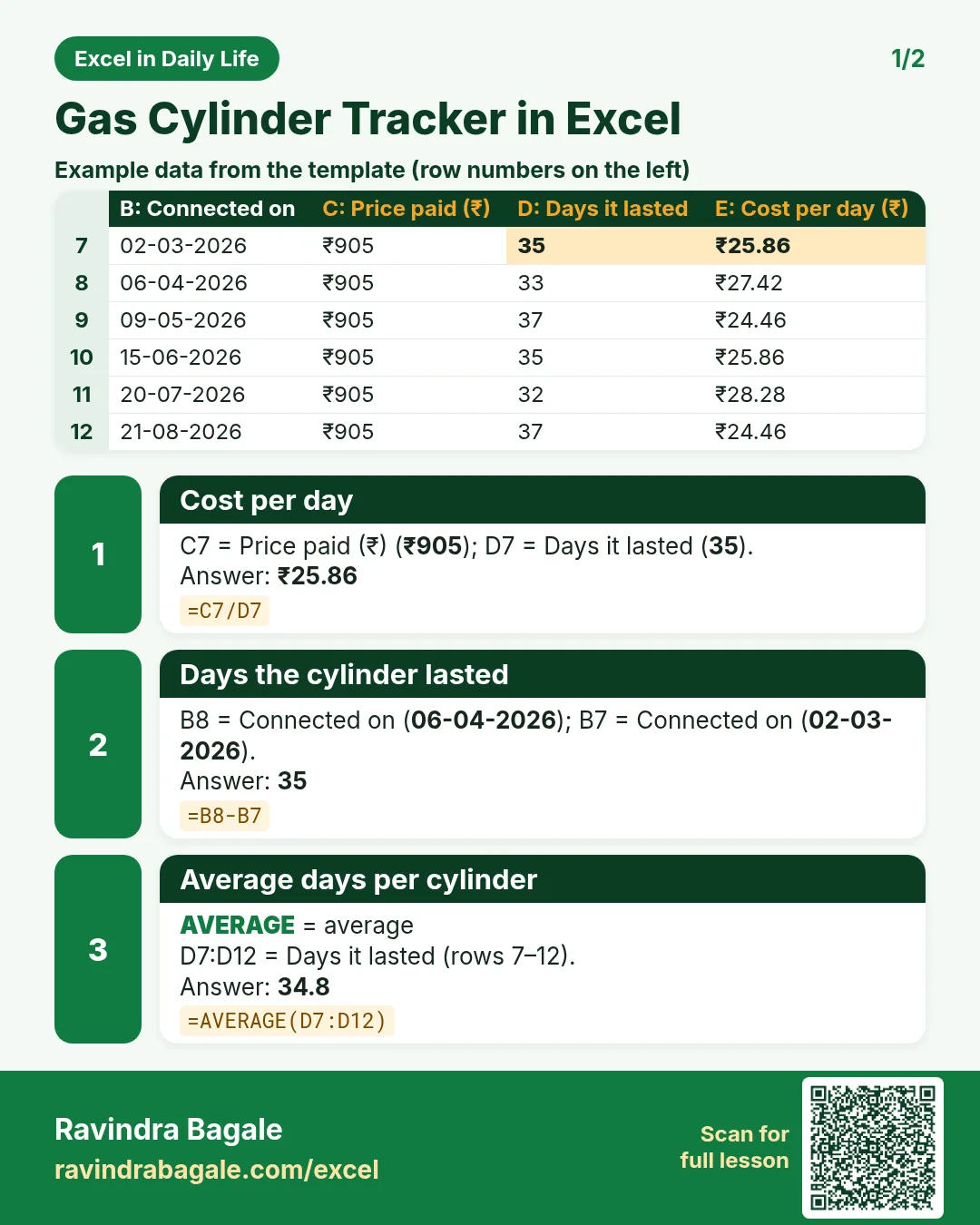

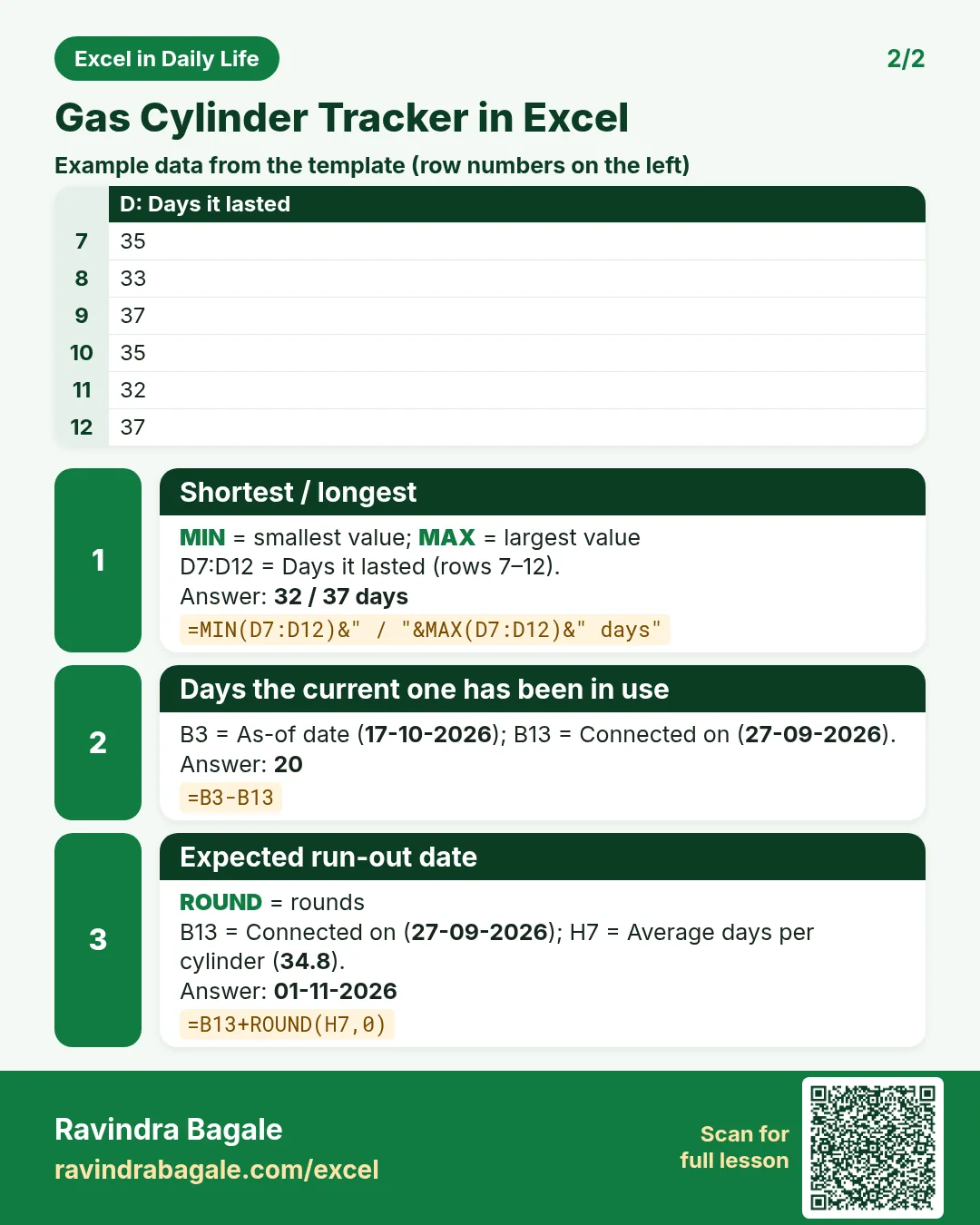

More cards: Ravi Sir's Cards.
6. Frequently asked questions
How do I calculate how many days a gas cylinder lasts?
Next connection date − this connection date. In Excel =B8-B7.
How do I predict when the cylinder will finish?
Date the current one was connected + average days: =B13+ROUND(H7,0).
When should I book the next cylinder?
A few days before the expected run-out date: =H10-B4.
How do I calculate gas cost per month?
Average price × 30 ÷ average days per cylinder.
Can I use it with two cylinders?
Yes. Track the date each one is connected; the spare is just stock.
7. Quick quiz
Ten questions on this page. Sign in to save your score.
Loading practice tasks...
- Total billable hours (Easy): Add up Billable hours in D2:D11. (sheet "Data")
- Average rate per hour (Easy): Average of E2:E11, rounded to 2 decimals. (sheet "Data")
- Rows in Cloud (Easy): How many rows have Practice "Cloud"? (sheet "Data")
- Largest billable hours (Easy): The largest value in D2:D11. (sheet "Data")
- Days taken (Easy): C2 minus B2. (sheet "Dates")
- Start year (Easy): Year of B3. (sheet "Dates")
- Due month (Easy): Month number of C3. (sheet "Dates")
- Earliest start (Easy): Earliest date in B2:B9 (as a date number). (sheet "Dates")
- Billable hours for Cloud (Medium): Total of D2:D11 where B is "Cloud". (sheet "Data")
- Cloud in Chicago (Medium): Total of D2:D11 where B is "Cloud" and C is "Chicago". (sheet "Data")
- Working days (Medium): Working days from B2 to C2. (sheet "Dates")
- Weekday of due (Medium): Weekday number of C4 (Sunday = 1). (sheet "Dates")