Net Worth Tracker in Excel: Assets, Liabilities and Monthly Net Worth (with a Chart)
Ravindra and Shraddha Bagale earn well, pay a home loan and invest every month, but they could not answer one simple question: "Are we actually getting richer?" Salary and spending do not tell you that. Net worth does: everything you own minus everything you owe. Track it once a month in Excel and the trend tells the real story.
What you'll learn on this page
- An assets list with a Type drop-down
- A loans list with outstanding amounts
- Net worth = total assets − total liabilities
- Debt ratio and liquid assets with SUMIF
- Net worth without the house you live in
- A monthly history table and line chart
Download the template: net-worth-tracker-template.xlsx: example data with real formulas. Yellow cells are inputs you can type over; green cells hold formulas; blue rows are headers and totals. Replace the example data with your own and everything recalculates.
Made-up data: every name, amount, shop and date on this page is made up for practice. Cities are used only to make the examples feel real.
1. The example
The Bagales in Pune on 17 October 2026 (made-up values):
| Amount | |
|---|---|
| Total assets (8 items) | ₹85,15,000 |
| Total liabilities (home loan, car loan, card dues) | ₹24,88,500 |
| Net worth | ₹60,26,500 |
| Debt ratio | 29.2% |
| Liquid assets (cash + investments) | ₹13,85,000 |
| Net worth without the flat | −₹4,73,500 |
The last line is the eye-opener: the flat (₹65,00,000) is 76.3% of everything they own. Take it out, and the rest of their assets do not yet cover the loans. The history table shows the good news: net worth grew from ₹57,60,000 in June to ₹60,26,500 in October, between ₹59,000 and ₹78,000 every month.
Figure 1. Net worth: assets (₹85,15,000) minus liabilities (₹24,88,500) gives ₹60,26,500; SUMIF splits liquid assets and property; a monthly row builds the trend.
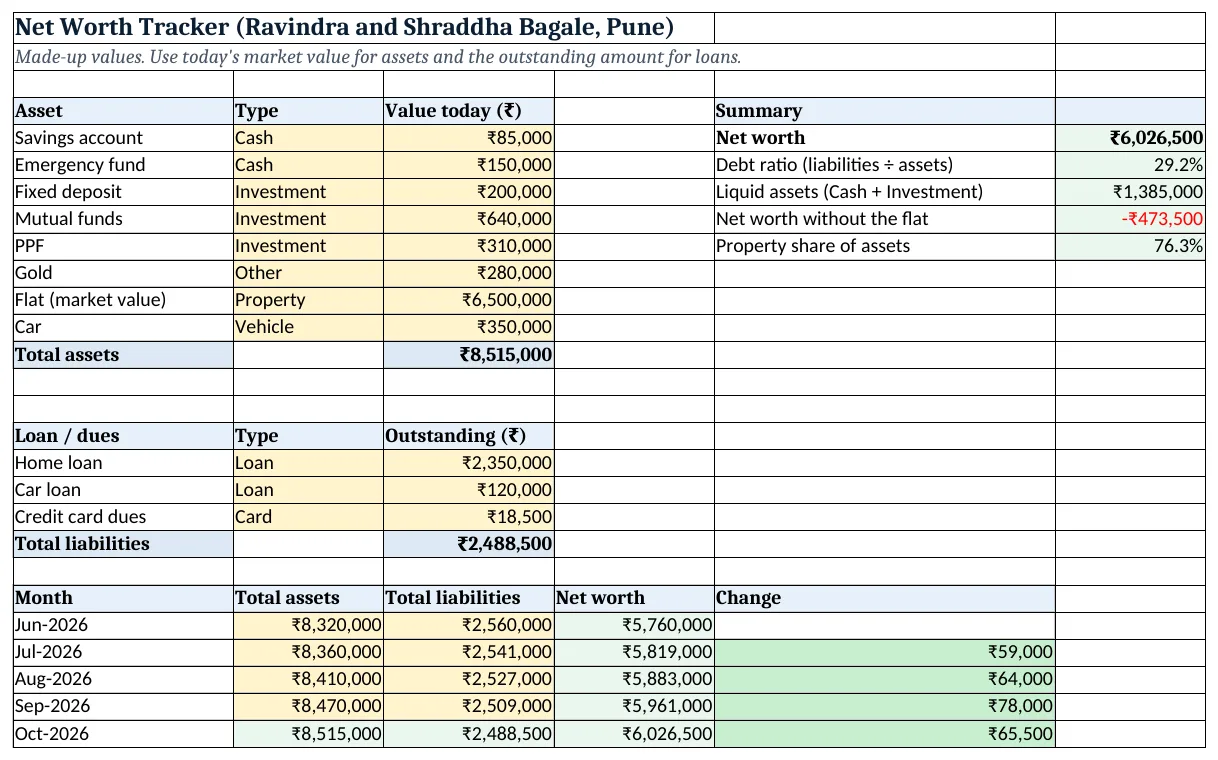
Figure 2. The template sheet, recalculated with its example data. Download it above and replace the yellow cells with your own numbers.
2. Build it step by step
Step 1. List the assets
- In A4:C4 type Asset, Type, Value today. List each asset in A5:A12 with today's value in C5:C12 (yellow).
- Select B5:B12 > Data > Data Validation > List:
Cash,Investment,Property,Vehicle,Other(drop-down lists). - In C13 type
=SUM(C5:C12): ₹85,15,000.
Step 2. List the loans
- In A16:C16 type Loan / dues, Type, Outstanding. Type the amount still owed (from the loan statement), not the original loan.
- In C20 type
=SUM(C17:C19): ₹24,88,500.
Step 3. Net worth and debt ratio
- In F5 type
=C13-C20: ₹60,26,500. - In F6 type
=C20/C13and format as %: 29.2% of what you own is borrowed.
Step 4. Liquid assets and the house effect
- In F7 type
=SUMIF(B5:B12,"Cash",C5:C12)+SUMIF(B5:B12,"Investment",C5:C12): ₹13,85,000 you could reach in an emergency (SUMIF). - In F8 type
=F5-SUMIF(B5:B12,"Property",C5:C12): −₹4,73,500. - In F9 type
=SUMIF(B5:B12,"Property",C5:C12)/C13: 76.3%.
Step 5. Monthly history
- In A22:E22 type Month, Total assets, Total liabilities, Net worth, Change.
- Type past months' totals in rows 23 to 26. In the current month row type
=C13and=C20so it follows today's lists. - In D23 type
=B23-C23and in E24=D24-D23. Copy down. - Next month, copy row 27, Paste Special > Values it as a fixed row, and add a new linked row.
Step 6. Colours and chart
- Select E24:E27 > Highlight Cells Rules > Greater Than 0 green, Less Than 0 red (highlight rules).
- Select A23:A27 and D23:D27 > Insert > Line (line charts).
Ravindra Bagale's Tip
Watch the trend line, not one month. Markets move, but a line that rises most months means your plan is working.
Ravindra Bagale's Tip – मराठी
एका महिन्याकडे नका बघू, trend line बघा. Market वर-खाली होतं, पण बहुतेक महिने line वर जात असेल तर plan बरोबर चाललाय.
Ravindra Bagale's Tip – हिंदी
एक महीने को नहीं, trend line को देखो. Market ऊपर-नीचे होता है, पर ज़्यादातर महीने line ऊपर जाए तो plan सही चल रहा है.
3. Formulas used
| Cell | Formula | What it does |
|---|---|---|
| C13 | =SUM(C5:C12) |
Total assets |
| C20 | =SUM(C17:C19) |
Total liabilities |
| F5 | =C13-C20 |
Net worth |
| F6 | =C20/C13 |
Debt ratio |
| F7 | =SUMIF(B5:B12,"Cash",C5:C12)+SUMIF(B5:B12,"Investment",C5:C12) |
Liquid assets |
| F8 | =F5-SUMIF(B5:B12,"Property",C5:C12) |
Net worth without the house |
| F9 | =SUMIF(B5:B12,"Property",C5:C12)/C13 |
House as a share of assets |
| D24 | =B24-C24 |
Net worth for the month |
| E24 | =D24-D23 |
Change from last month |
Every formula above is written in the template, so you can click a cell and see it in the formula bar. All values on this page were recalculated in the file.
4. Common mistakes
- Using the purchase price. A car bought for ₹6 lakh may be worth ₹3.5 lakh now. Use today's value for assets.
- Typing the original loan amount. Use the outstanding principal from the latest statement, not the amount you borrowed years ago.
- Counting the same money twice. If the emergency fund is inside the savings account, list it once.
- Leaving out small dues. Credit card balances and personal borrowings are liabilities too.
- Updating on random dates. Use the same date every month (say the 1st) so the change column is fair.
Ravindra Bagale's Tip
Keep the liquid assets line healthy. A big net worth locked in a flat does not help when you need money next week.
Ravindra Bagale's Tip – मराठी
Liquid assets कडे लक्ष ठेवा. Flat मध्ये अडकलेला मोठा net worth पुढच्या आठवड्यात पैसे लागले तर कामाला येत नाही.
Ravindra Bagale's Tip – हिंदी
Liquid assets पर नज़र रखो. Flat में फंसा बड़ा net worth अगले हफ्ते पैसे चाहिए तो काम नहीं आता.
5. More real examples
Example 1: Single earner in a rented flat. No property row at all: net worth is mostly savings and investments, and the debt ratio shows how much is borrowed.
Example 2: Couple tracking separately. Add an Owner column (Ravindra, Shraddha, Joint) and SUMIF by owner.
Example 3: Goal: net worth of ₹1 crore. Type the goal in a cell and show =F5/goal as a progress %; the monthly change tells you roughly how many months are left.
Quick revision cards
Quick revision
Each card shows formulas from this page, each with an example and its answer from the template. Scan the QR code on a card to open this lesson. All names and numbers are made up for practice.
झटपट उजळणी
प्रत्येक card वर या page मधले formulas, त्यांचं example आणि template मधलं उत्तर आहे. Card वरचा QR code scan केला की हा lesson उघडतो. सगळी नावं आणि आकडे सरावासाठी काल्पनिक आहेत.
झटपट दोहराई
हर card पर इस page के formulas, उनका example और template का उत्तर है. Card का QR code scan करें तो यह lesson खुलेगा. सभी नाम और आंकड़े अभ्यास के लिए काल्पनिक हैं.
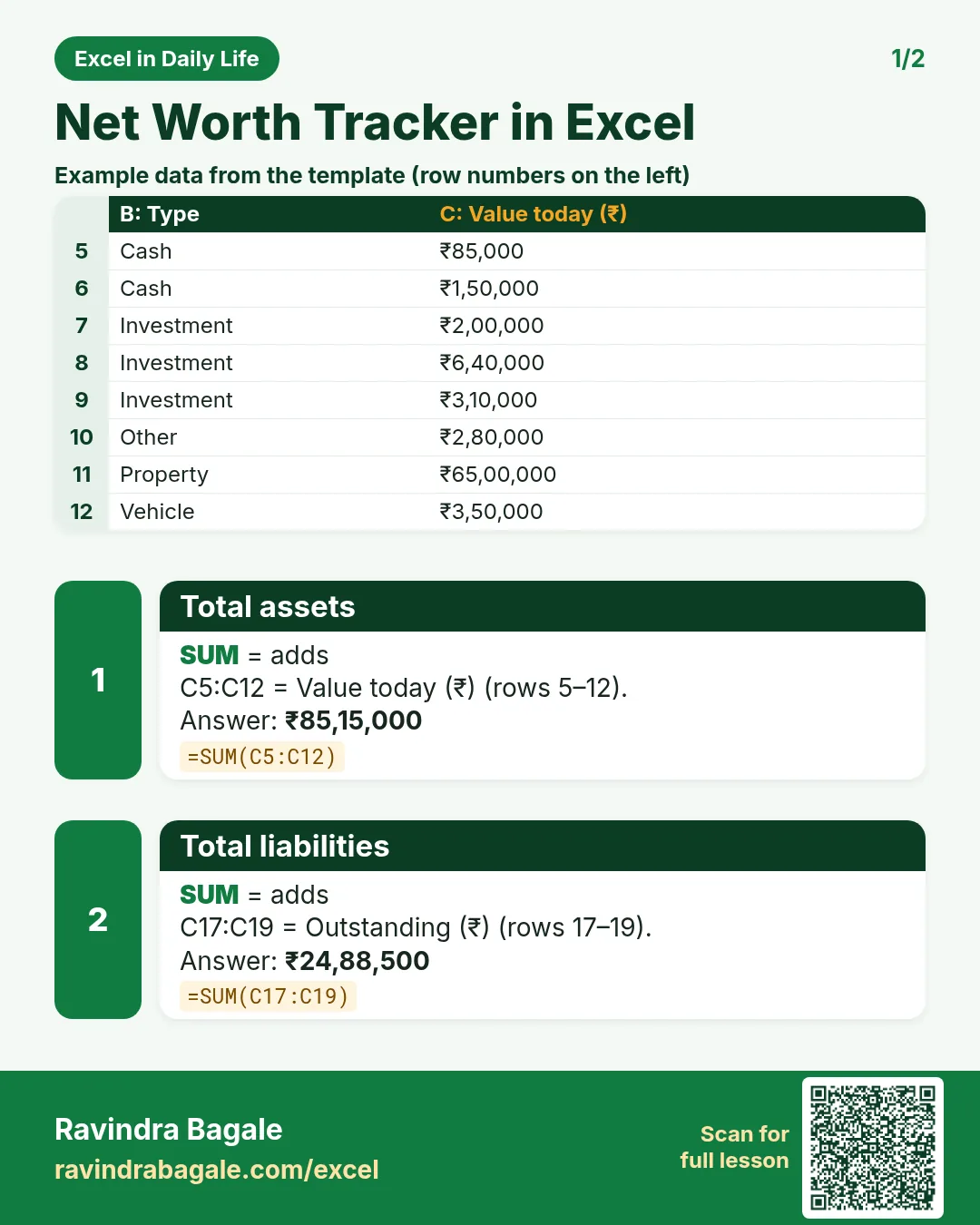

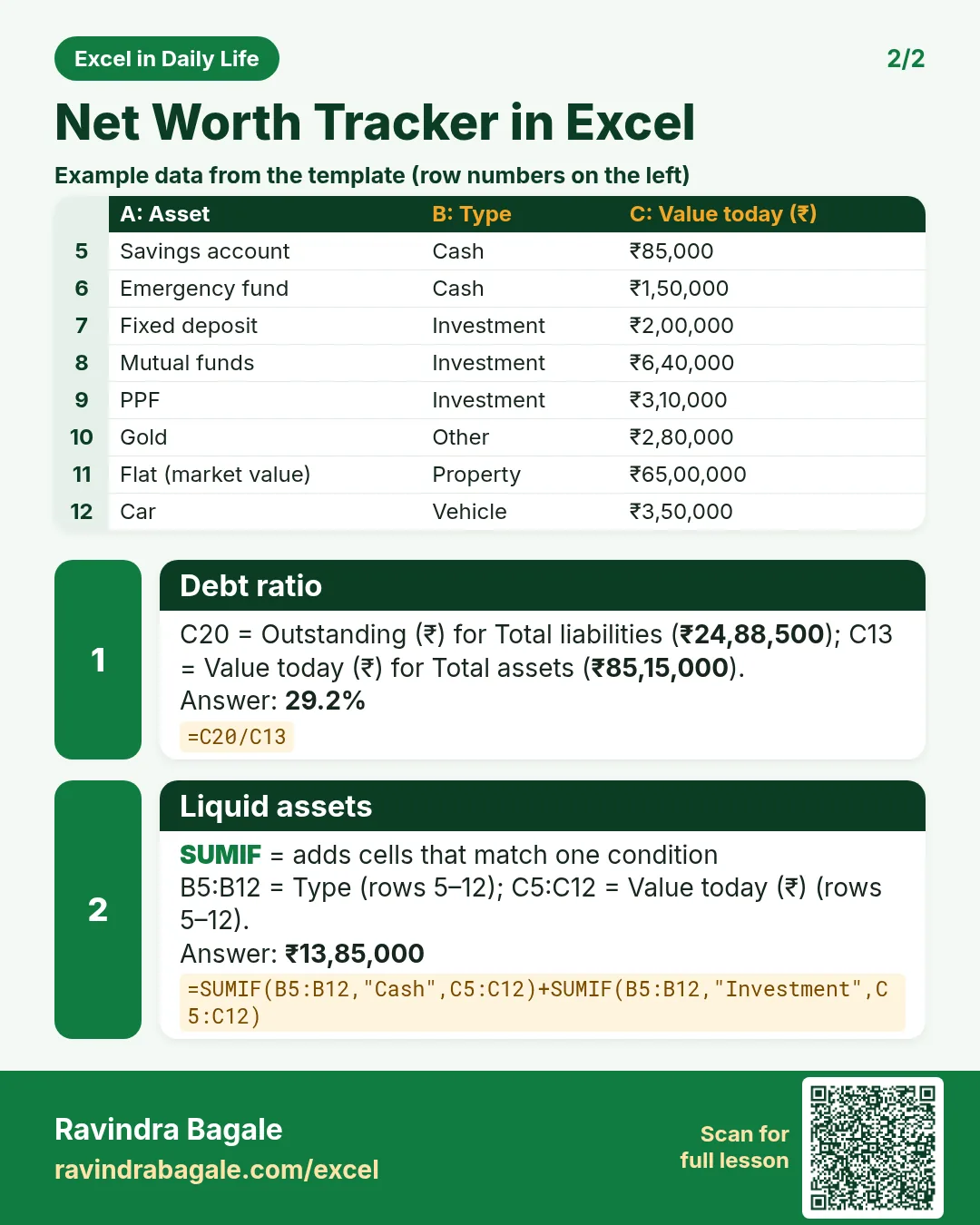

More cards: Ravi Sir's Cards.
6. Frequently asked questions
How do I calculate net worth in Excel?
Total assets − total liabilities. List assets and loans, SUM each list, and subtract: =C13-C20.
Should I include my house in net worth?
Yes, at today's market value. Also look at net worth without it, because you cannot spend the house you live in.
What is a debt ratio?
Liabilities ÷ assets. Here ₹24,88,500 ÷ ₹85,15,000 = 29.2%.
How often should I update net worth?
Once a month or once a quarter is enough. The trend matters more than any single number.
Can net worth be negative?
Yes, for example early in a big loan. The goal is a line that goes up over time.
7. Quick quiz
Ten questions on this page. Sign in to save your score.