Dairy Milk Collection System in Excel: Fat and SNF Rate Chart, Shift Entries, Farmer Bills and Dashboard
Raja Dairy runs a milk collection centre near Kolhapur with 8 farmers pouring milk morning and evening. The secretary wrote litres and fat in a register and worked out each 10-day bill on a calculator, which took a whole evening. This page builds a 9-sheet Excel system: the rate chart is typed once, each pouring is one row, and the Bill sheet works out litres, average fat, gross, deductions and net for every farmer.
What you'll learn on this page
- Set up a fat-based rate chart and look up the rate with XLOOKUP match mode −1
- Deduct a fixed amount when SNF is below the minimum
- Enter morning and evening collection one row per pouring
- Build a 10-day bill per farmer with SUMIFS between two dates
- Work out the weighted average fat with SUMPRODUCT
- Print a farmer slip with the period in words
- Show litres and amount per day on a report and dashboard
Download the template: dairy-milk-collection-system-template.xlsx: a 9-sheet system with example data and real formulas (Read me, Setup, Farmers, Collection, Deductions, Bill, Farmer slip, Report, Dashboard). Yellow cells are inputs you can type over; green cells hold formulas; blue rows are headers and totals. Replace the example data with your own and every report and the dashboard recalculate.
Made-up data: every name, amount, business and date on this page is made up for practice. Cities are used only to make the examples feel real.
1. The business story
Raja Dairy collection centre, Kolhapur, bill period 1 to 10 October 2026 (made-up data and an example rate chart; use your own dairy's chart).
| Question | Where the system answers it |
|---|---|
| What rate does 5.2% fat get? | Setup chart: the 5.0 row, ₹39 a litre |
| What if SNF is 8.3? | ₹1 a litre less, because it is below 8.5 |
| What do I pay Salman Shaikh? | Bill: 203.7 L, ₹9,473.30 gross, ₹2,000 advance, ₹7,473.30 net |
| How much milk came in? | Bill total: 908.9 L, average fat 5.06% |
Net payable for the period is ₹30,103.80 after ₹4,900 of advances and feed recoveries.
Figure 1. Setup holds the rate chart and the bill period; Collection and Deductions are the entry sheets.
2. Build it sheet by sheet
Step 1. Setup: bill period and rate chart
- Type the as-of date in B3 and the bill period in B4 (01-10-2026) and B5 (10-10-2026).
- In B6 the minimum SNF (8.5) and in B7 the deduction below it (₹1 a litre).
- Type the rate chart in A10:B17: Fat % from and Rate. Each row starts a band: 5.0 means 5.0 up to just under 5.5.
Step 2. Collection: one row per pouring
- Headers: Date, Shift, Farmer ID, Name, Litres, Fat %, SNF %, Rate, Amount. D5 fills the name with XLOOKUP.
- H5 finds the rate:
=XLOOKUP(F5,Setup!$A$10:$A$17,Setup!$B$10:$B$17,0,-1)-IF(G5<Setup!$B$6,Setup!$B$7,0). Match mode −1 takes the band at or below the fat reading (XLOOKUP). - I5 the amount
=ROUND(E5*H5,2). Shift comes from a drop-down. - In this data 72 of 260 pourings were below 8.5 SNF; colour G5:G264 red when below the minimum with conditional formatting.
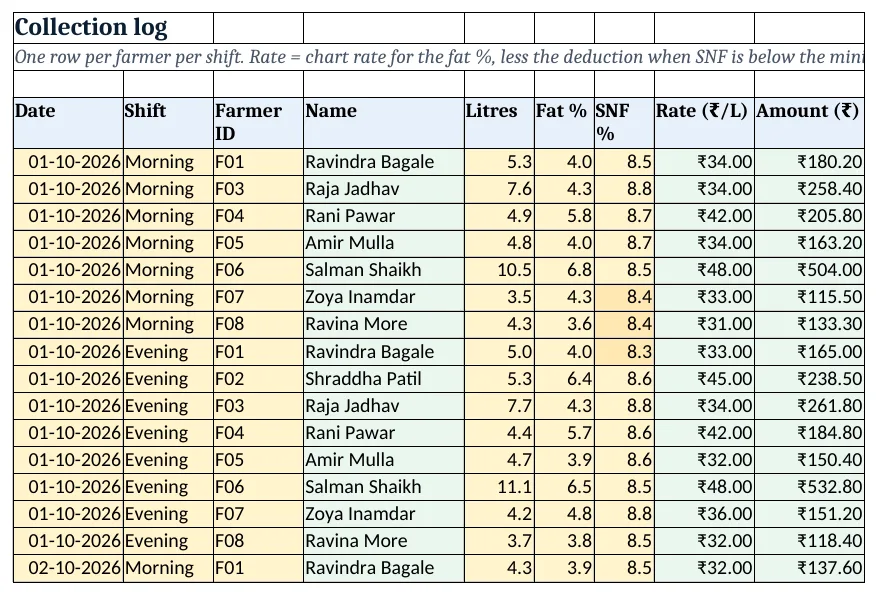
Figure 2. Collection: one row per pouring with rate looked up from the chart
Step 3. Deductions and Bill
- Deductions: Farmer ID, Amount, Reason (advance, cattle feed).
- Bill C5 litres in the period:
=SUMIFS(Collection!$E$5:$E$3000,Collection!$C$5:$C$3000,A5,Collection!$A$5:$A$3000,">="&Setup!$B$4,Collection!$A$5:$A$3000,"<="&Setup!$B$5)(SUMIFS). - D5 the average fat weighted by litres with SUMPRODUCT, E5 gross the same way as C5, F5 deductions and G5 net
=E5-F5.
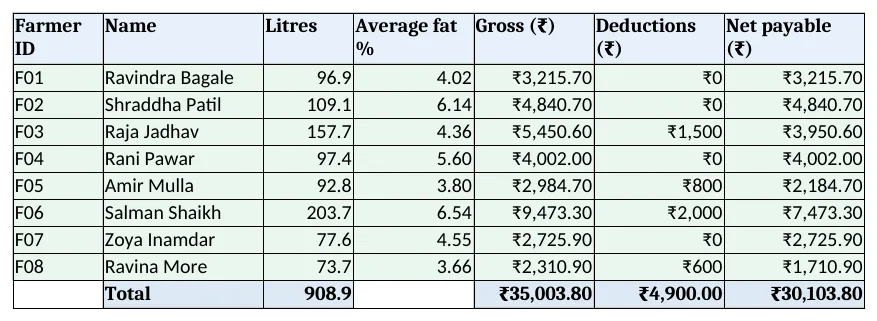
Figure 3. Bill: litres, average fat, gross, deductions and net for each farmer
Step 4. Farmer slip: print one farmer
- Type a farmer ID in B4. B5 writes the period:
=TEXT(Setup!B4,"dd-mm-yyyy")&" to "&TEXT(Setup!B5,"dd-mm-yyyy")(TEXT). - Rows 7 to 12 look up name, litres, fat, gross, deductions and net from Bill. Set the print area to A1:B14.
Step 5. Report and Dashboard
- Report rows 5 to 11: the last 7 days with litres, average fat and amount per day.
- KPI cards: litres, average fat
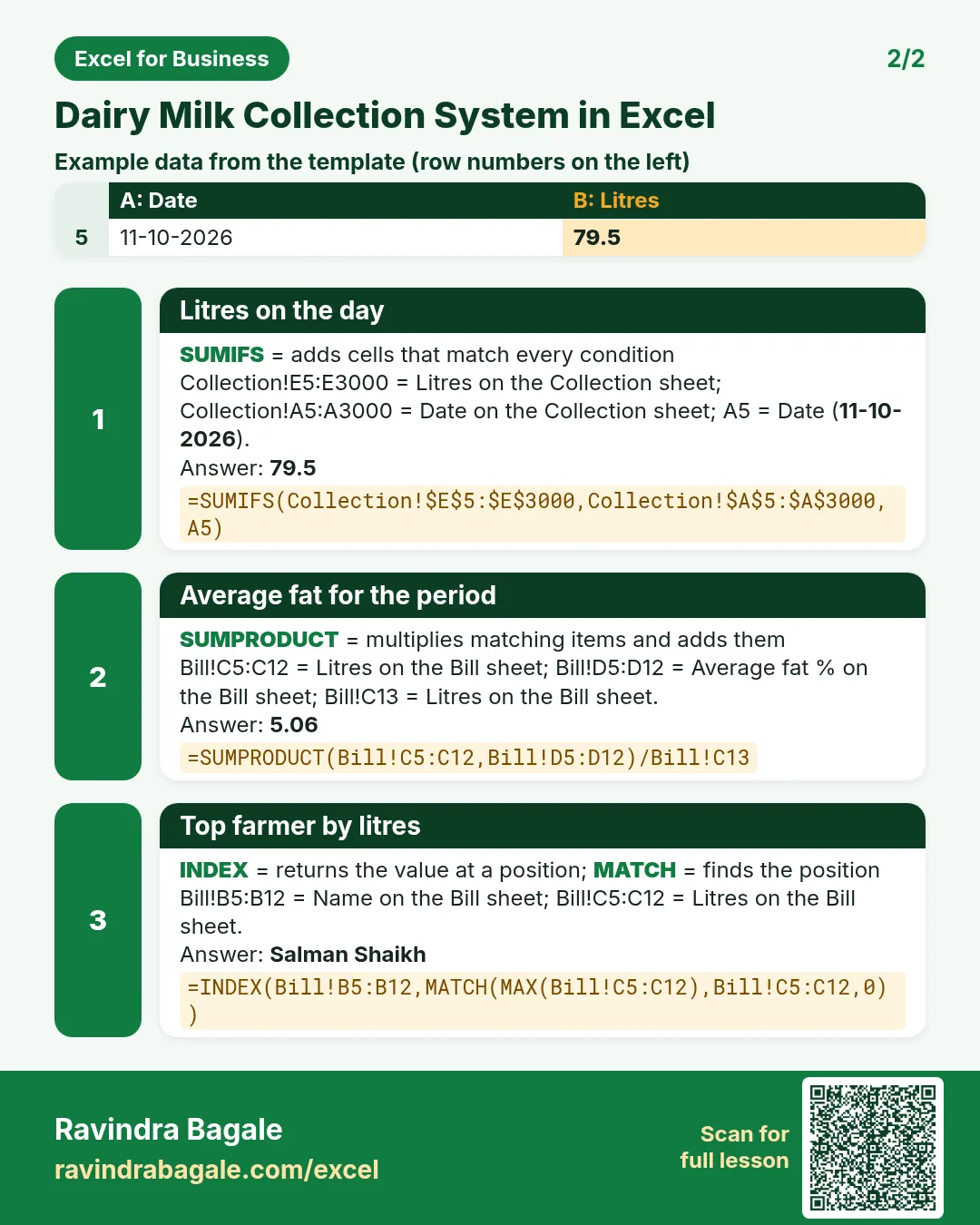
=SUMPRODUCT(Bill!C5:C12,Bill!D5:D12)/Bill!C13, gross, net, top farmer and litres today. - Charts: litres by farmer and litres over the last 7 days.
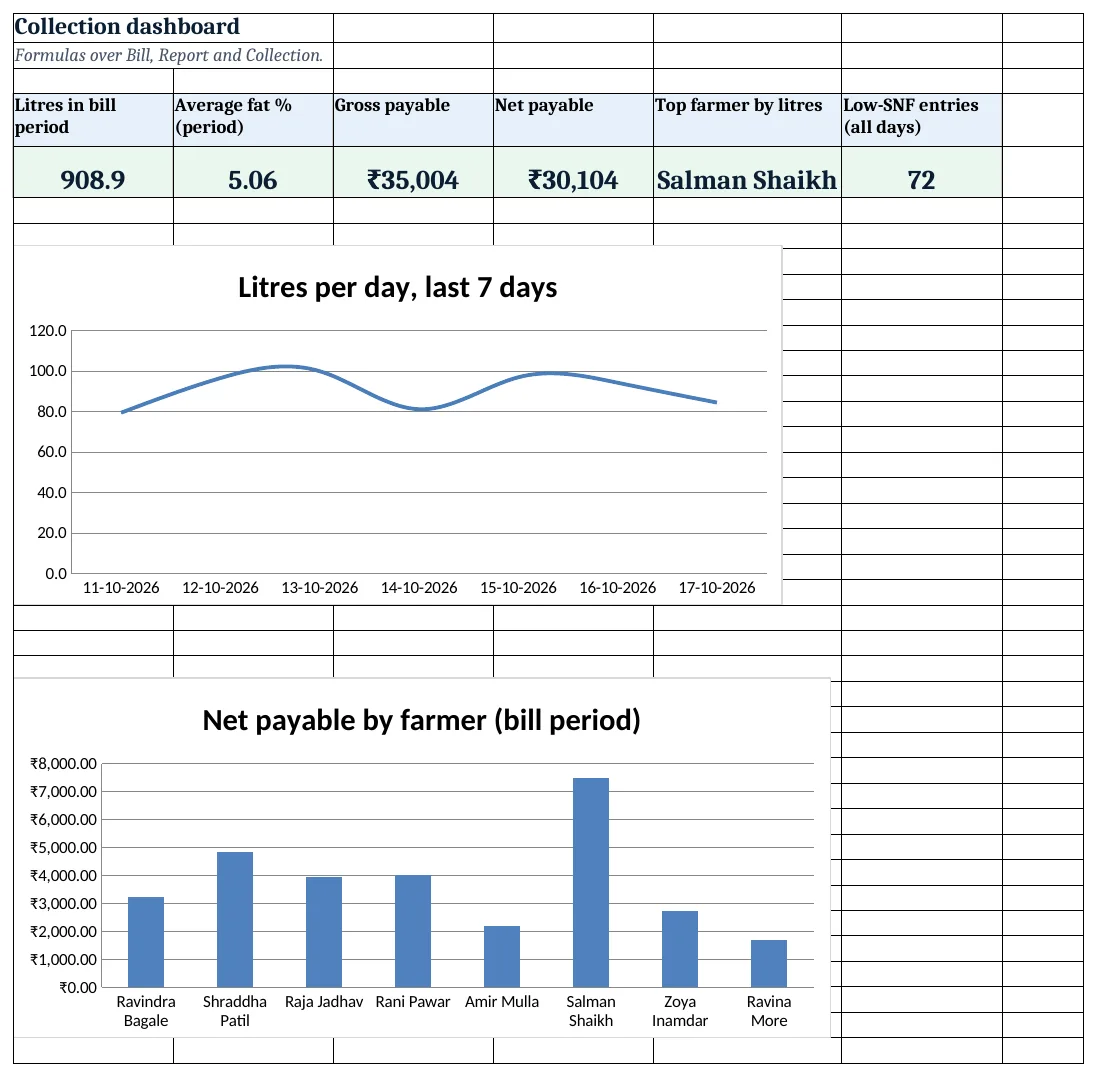
Figure 4. Dairy dashboard: litres, fat, amount and the top farmer
Ravindra Bagale's Tip
Type the new rate chart the day the dairy announces it, and note the date in the Read me. Bills before that date used the old rates.
Ravindra Bagale's Tip – मराठी
dairy नवीन rate chart जाहीर करेल त्याच दिवशी तो टाका आणि Read me मध्ये तारीख लिहा. आधीची bills जुन्या दराने होती.
Ravindra Bagale's Tip – हिंदी
dairy नया rate chart घोषित करे उसी दिन डालें और Read me में तारीख लिखें. पहले के bills पुराने रेट से थे.
3. Formulas used
| Cell | Formula | What it does |
|---|---|---|
| Collection!D5 | =XLOOKUP(C5,Farmers!$A$5:$A$12,Farmers!$B$5:$B$12,"Check ID") |
Farmer name from the ID |
| Collection!H5 | =XLOOKUP(F5,Setup!$A$10:$A$17,Setup!$B$10:$B$17,0,-1)-IF(G5<Setup!$B$6,Setup!$B$7,0) |
Rate from the fat chart, less the SNF deduction |
| Collection!I5 | =ROUND(E5*H5,2) |
Amount for the pouring |
| Bill!C5 | =SUMIFS(Collection!$E$5:$E$3000,Collection!$C$5:$C$3000,A5,Collection!$A$5:$A$3000,">="&Setup!$B$4,Collection!$A$5:$A$3000,"<="&Setup!$B$5) |
Litres in the bill period |
| Bill!D5 | =IFERROR(SUMPRODUCT((Collection!$C$5:$C$3000=A5)*(Collection!$A$5:$A$3000>=Setup!$B$4)*(Collection!$A$5:$A$3000<=Setup!$B$5)*Collection!$E$5:$E$3000*Collection!$F$5:$F$3000)/C5,0) |
Average fat weighted by litres |
| Bill!E5 | =SUMIFS(Collection!$I$5:$I$3000,Collection!$C$5:$C$3000,A5,Collection!$A$5:$A$3000,">="&Setup!$B$4,Collection!$A$5:$A$3000,"<="&Setup!$B$5) |
Gross amount in the period |
| Bill!F5 | =SUMIFS(Deductions!$B$5:$B$200,Deductions!$A$5:$A$200,A5) |
Advances and recoveries |
| Bill!G5 | =E5-F5 |
Net payable |
| Farmer slip!B5 | =TEXT(Setup!B4,"dd-mm-yyyy")&" to "&TEXT(Setup!B5,"dd-mm-yyyy") |
Bill period as text |
| Report!B5 | =SUMIFS(Collection!$E$5:$E$3000,Collection!$A$5:$A$3000,A5) |
Litres on the day |
| Dashboard!B5 | =SUMPRODUCT(Bill!C5:C12,Bill!D5:D12)/Bill!C13 |
Average fat for the period |
| Dashboard!E5 | =INDEX(Bill!B5:B12,MATCH(MAX(Bill!C5:C12),Bill!C5:C12,0)) |
Top farmer by litres |
Every formula above is written in the template, so you can click a cell and see it in the formula bar. All values on this page were recalculated in LibreOffice with zero errors.
4. Common mistakes
- Rate chart not sorted. Match mode −1 needs the fat bands in rising order. A jumbled chart returns the wrong rate.
- A simple average of fat. A farmer pouring 2 L at 6% and 20 L at 4% does not average 5%. Weight fat by litres with SUMPRODUCT.
- Changing dates without changing the period. The Bill reads Setup B4 and B5. Move both at the start of each 10-day cycle.
- Advances typed against the wrong period. Clear or move old deduction rows when a new period starts, or they are recovered twice.
- Typing the farmer name in Collection. Type the ID; names get misspelt and SUMIFS then misses entries.
Ravindra Bagale's Tip
Show each farmer the slip with litres and fat. Farmers trust a bill they can check line by line.
Ravindra Bagale's Tip – मराठी
प्रत्येक farmer ला litres आणि fat असलेली slip दाखवा. ओळीने तपासता येणारे bill शेतकऱ्यांना पटते.
Ravindra Bagale's Tip – हिंदी
हर farmer को litres और fat वाली slip दिखाएं. लाइन से जांच सकें ऐसा bill किसानों को भरोसा देता है.
5. More real examples
Example 1: Buffalo and cow milk. Add a Milk type column and two rate charts; pick the chart with IF on milk type.
Example 2: Fat and SNF rate matrix. Use a two-way chart (fat down, SNF across) and look it up with INDEX and MATCH.
Example 3: Monthly bills. Set the period to the whole month and add a cattle-feed sales sheet that feeds Deductions.
Quick revision cards
Quick revision
Each card shows formulas from this page, each with an example and its answer from the template. Scan the QR code on a card to open this lesson. All names and numbers are made up for practice.
झटपट उजळणी
प्रत्येक card वर या page मधले formulas, त्यांचं example आणि template मधलं उत्तर आहे. Card वरचा QR code scan केला की हा lesson उघडतो. सगळी नावं आणि आकडे सरावासाठी काल्पनिक आहेत.
झटपट दोहराई
हर card पर इस page के formulas, उनका example और template का उत्तर है. Card का QR code scan करें तो यह lesson खुलेगा. सभी नाम और आंकड़े अभ्यास के लिए काल्पनिक हैं.
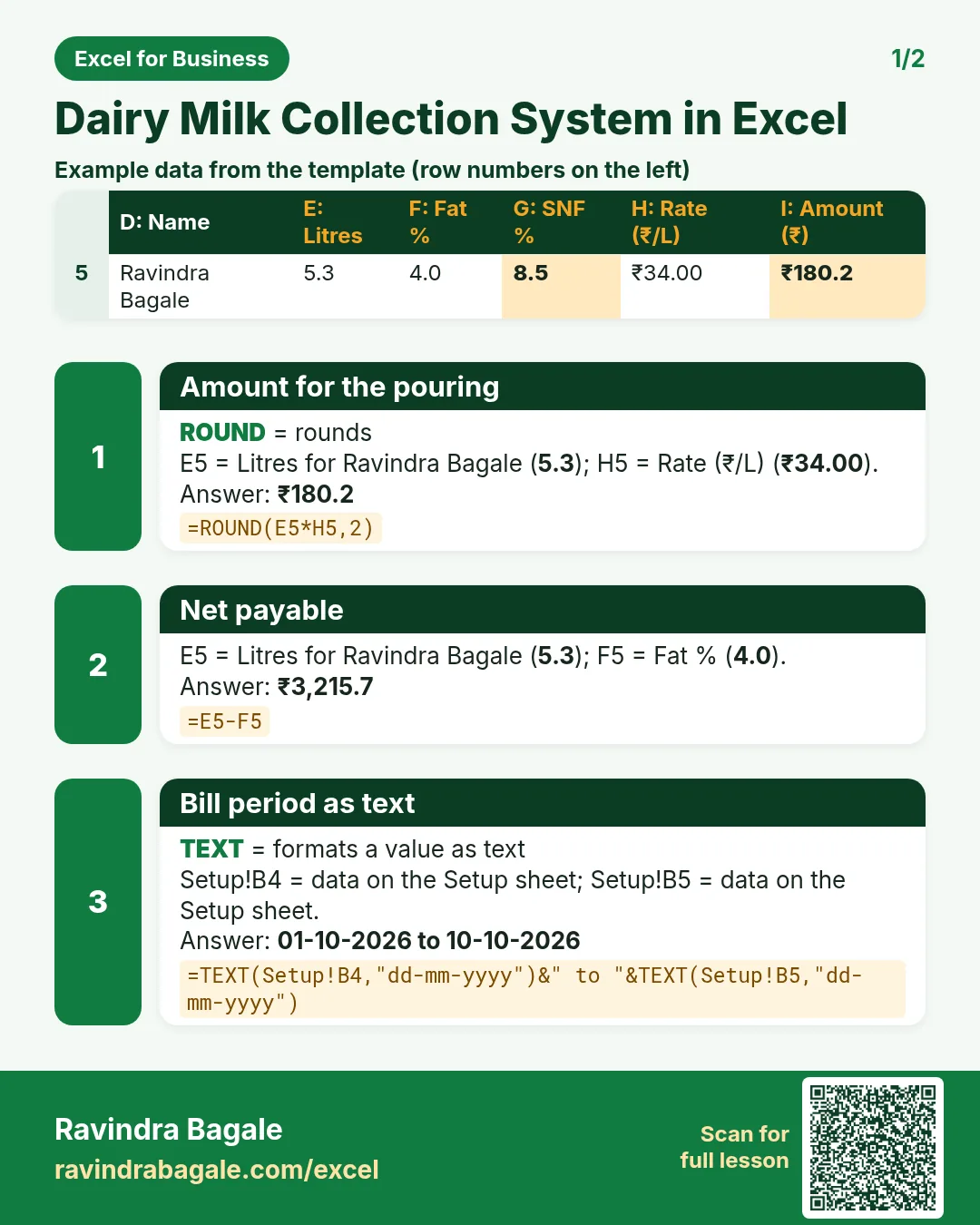


More cards: Ravi Sir's Cards.
6. Frequently asked questions
How do I look up a milk rate by fat in Excel?
Keep the chart sorted by fat and use XLOOKUP(fat, fat_from, rate, 0, -1). Match mode −1 returns the band at or below the reading.
How do I deduct for low SNF?
Subtract IF(SNF<minimum, deduction, 0) from the rate, as in Collection H5.
How do I make a 10-day bill?
SUMIFS with two date conditions: ">="&start and "<="&end, plus the farmer ID.
Is this rate chart official?
No. It is an example. Use the chart your dairy or union announces; only Setup needs to change.
How do I find the weighted average fat?
=SUMPRODUCT(litres, fat)/SUM(litres) for the farmer and period, as in Bill D5.
7. Quick quiz
Ten questions on this page. Sign in to save your score.