Beauty Parlour Management System in Excel: Packages, Sessions, Product Stock, Staff Incentive and Bills
Rani Beauty Parlour in Solapur sells facials, hair colour, waxing and hair spa, plus prepaid packages. Rani lost track of how many sessions each package had left, and hair colour ran out on a busy Saturday. This page builds a 9-sheet system: every service is one row, package sessions are counted against the package, products are used up automatically from the service menu, and staff incentive works itself out.
What you'll learn on this page
- Build a service menu with price and product used per service
- Log every service as a bill row, with package sessions at zero amount
- Count sessions used and remaining on each package
- Flag packages that are expiring or used up
- Use up product stock from the service log with SUMIFS
- Work out staff incentive on service value
- Print a bill from a bill number
Download the template: beauty-parlour-management-system-template.xlsx: a 9-sheet system with example data and real formulas (Read me, Setup, Services, Sessions, Packages, Stock, Staff incentive, Bill, Dashboard). Yellow cells are inputs you can type over; green cells hold formulas; blue rows are headers and totals. Replace the example data with your own and every report and the dashboard recalculate.
Made-up data: every name, amount, business and date on this page is made up for practice. Cities are used only to make the examples feel real.
1. The business story
Rani Beauty Parlour, Solapur, 1 to 17 October 2026 (made-up data). Six services, four products and three staff (Rani, Zoya and Ravina). Staff incentive is an example 10% of service value.
| Question | Where the system answers it |
|---|---|
| How much came in? | Dashboard: 56 services, ₹26,680 collected |
| Which packages need a call? | Packages: Rani Kulkarni's waxing package ends tomorrow with 2 sessions left |
| What must I buy? | Stock: hair colour is at 0 tubes, below its reorder level |
| What incentive do I pay? | Staff incentive: ₹3,428 in all (Ravina ₹1,292, Rani ₹1,128, Zoya ₹1,008) |
10 of the 56 services were package sessions, billed at ₹0 because the package was paid in advance. For appointments and stylist commission in a larger salon, see the salon management system; this page adds packages and product stock.
Figure 1. Services links each service to a product; Sessions is the log; Packages, Stock and Staff incentive count from it; Bill and Dashboard read.
2. Build it sheet by sheet
Step 1. Setup and Services
- Setup: B3 as-of date, B4 incentive % (10%, your choice), B5 package expiry warning (15 days). Staff in D3:D5, payment types in E3:E6 including Package.
- Services row 4: Service, Price, Product used, Product qty per service. A facial uses 1 facial kit; waxing uses a quarter jar.
Step 2. Sessions: one row per service
- Row 4: Date, Client, Service, Staff, Payment, Package ID, Amount, Service value, Product, Product qty, Bill no.
- G5
=IF(E5="Package",0,XLOOKUP(C5,Services!$A$5:$A$10,Services!$B$5:$B$10,0)): a package session is already paid. - H5 service value at menu price (for incentive), I5 and J5 look up the product and quantity, K5
="B-"&TEXT(ROW()-4,"000").
Step 3. Packages
- Row 4: Package ID, Client, Service, Sessions bought, Price paid, Start, Validity, Used (Oct log), Used before Oct, Remaining, Expiry, Days left, Flag.
- H5
=COUNTIF(Sessions!$F$5:$F$1000,A5), J5=D5-H5-I5, K5=F5+G5, L5=K5-Setup!$B$3. - M5
=IF(L5<0,"Expired",IF(J5<=0,"Used up",IF(L5<=Setup!$B$5,"Expiring","Active"))). Expiring rows go amber: call those clients first.
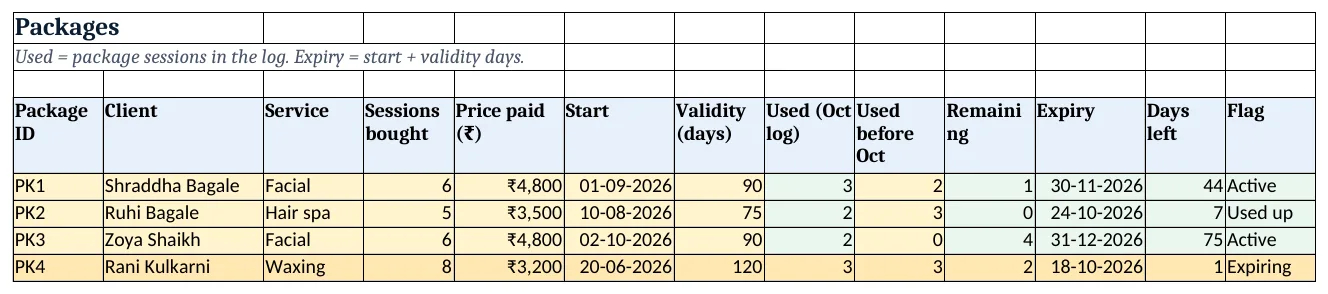
Figure 2. Packages: sessions used, remaining, expiry and flag
Step 4. Stock: products used by services
- Row 4: Product ID, Product, Unit, Cost, Opening, Reorder level, Used, Closing, Order?, Product cost used.
- G5
=SUMIFS(Sessions!$J$5:$J$1000,Sessions!$I$5:$I$1000,A5)adds the product quantity of every service that used it (SUMIFS). - H5
=E5-G5, I5=IF(H5<=F5,"Yes","No")in red, J5 cost of product used.
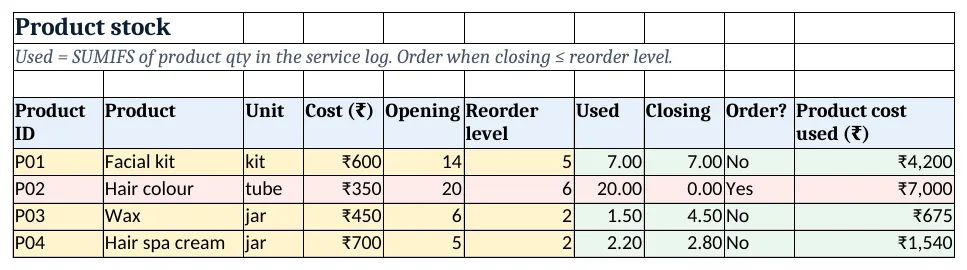
Figure 3. Product stock used from the service log, closing and order flag
Step 5. Staff incentive and bill
- Staff incentive rows 5 to 7: services (COUNTIF), service value and cash (SUMIFS), incentive
=ROUND(C5*Setup!$B$4,0). Rows 11 to 16 count services and cash per service. - Bill: type a bill number in B4; rows 6 to 11 pull date, client, service, staff, payment and amount with XLOOKUP. Print A1:C14.
Step 6. Dashboard
- Cards: services done, cash collected, package sessions, packages expiring, products to order and incentive payable.
- Chart 1 at A8: cash by service. Chart 2 at A25: service value by staff.
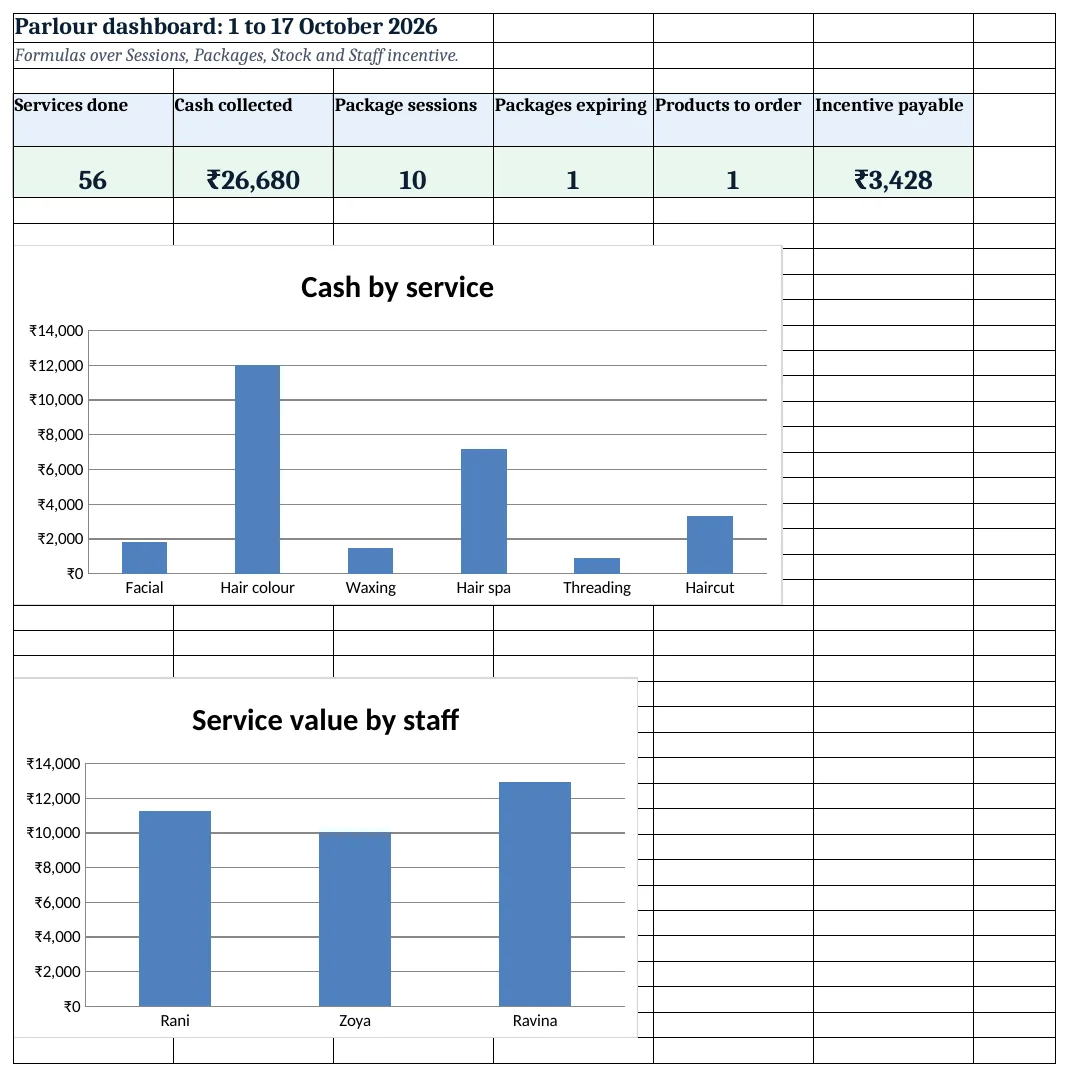
Figure 4. Parlour dashboard: KPI cards and charts
Ravindra Bagale's Tip
Call clients whose package is expiring with sessions left. A booked session today is better than an unhappy client who lost two paid sessions.
Ravindra Bagale's Tip – मराठी
Package expire होत असेल आणि sessions बाकी असतील तर client ला फोन करा. दोन paid sessions गमावलेल्या नाराज client पेक्षा आज booked session चांगले.
Ravindra Bagale's Tip – हिंदी
Package expire हो रहा हो और sessions बचे हों तो client को फोन करो. दो paid sessions खोने वाले नाराज़ client से आज booked session बेहतर है.
3. Formulas used
| Cell | Formula | What it does |
|---|---|---|
| Sessions!G5 | =IF(E5="Package",0,XLOOKUP(C5,Services!$A$5:$A$10,Services!$B$5:$B$10,0)) |
Amount: 0 for package sessions |
| Sessions!H5 | =XLOOKUP(C5,Services!$A$5:$A$10,Services!$B$5:$B$10,0) |
Service value at menu price |
| Sessions!I5 | =XLOOKUP(C5,Services!$A$5:$A$10,Services!$C$5:$C$10,"") |
Product the service uses |
| Sessions!J5 | =XLOOKUP(C5,Services!$A$5:$A$10,Services!$D$5:$D$10,0) |
Product quantity used |
| Sessions!K5 | ="B-"&TEXT(ROW()-4,"000") |
Bill number |
| Packages!H5 | =COUNTIF(Sessions!$F$5:$F$1000,A5) |
Package sessions in the log |
| Packages!J5 | =D5-H5-I5 |
Sessions remaining |
| Packages!K5 | =F5+G5 |
Expiry date |
| Packages!M5 | =IF(L5<0,"Expired",IF(J5<=0,"Used up",IF(L5<=Setup!$B$5,"Expiring","Active"))) |
Package flag |
| Stock!G5 | =SUMIFS(Sessions!$J$5:$J$1000,Sessions!$I$5:$I$1000,A5) |
Product used by services |
| Stock!H5 | =E5-G5 |
Closing stock |
| Stock!I5 | =IF(H5<=F5,"Yes","No") |
Order? |
| Staff incentive!E5 | =ROUND(C5*Setup!$B$4,0) |
Incentive for the staff member |
| Staff incentive!C11 | =SUMIFS(Sessions!$G$5:$G$1000,Sessions!$C$5:$C$1000,A11) |
Cash from the service |
| Dashboard!D5 | =COUNTIF(Packages!M5:M8,"Expiring") |
Packages expiring |
Every formula above is written in the template, so you can click a cell and see it in the formula bar. All values on this page were recalculated in LibreOffice with zero errors.
4. Common mistakes
- Charging a package session again. Pick Package as payment and type the package ID; the amount becomes 0 and the session counts against the package.
- Paying incentive only on cash. Package sessions are work too. Incentive on service value at menu price is fairer.
- Counting product stock by eye. Product used per service in the menu does the counting. Check it against a real count once a week.
- No expiry on packages. A package without validity is an open promise. Keep a validity in days and flag it.
- Typing client names differently. Pick one spelling, or add a client ID, so package and visit history stay together.
Ravindra Bagale's Tip
Order products when the Stock sheet says Yes, not when the tube is empty. A busy Saturday without hair colour loses more than one bill.
Ravindra Bagale's Tip – मराठी
Tube रिकामी झाल्यावर नाही, Stock sheet Yes दाखवेल तेव्हा products मागवा. hair colour शिवाय गर्दीचा शनिवार एका bill पेक्षा जास्त नुकसान करतो.
Ravindra Bagale's Tip – हिंदी
Tube खाली होने पर नहीं, Stock sheet Yes दिखाए तब products मँगाओ. hair colour के बिना भीड़ वाला शनिवार एक bill से ज़्यादा नुकसान करता है.
5. More real examples
Example 1: Bridal packages. A bridal package has several services. Add one row per service in a package-items sheet and count each with COUNTIFS on package ID and service.
Example 2: Home-service beautician. Add a Travel charge column on Sessions and a km column; incentive stays on service value.
Example 3: Nail studio. Products become gel colours and tips; product qty per service works the same way.
Quick revision cards
Quick revision
Each card shows formulas from this page, each with an example and its answer from the template. Scan the QR code on a card to open this lesson. All names and numbers are made up for practice.
झटपट उजळणी
प्रत्येक card वर या page मधले formulas, त्यांचं example आणि template मधलं उत्तर आहे. Card वरचा QR code scan केला की हा lesson उघडतो. सगळी नावं आणि आकडे सरावासाठी काल्पनिक आहेत.
झटपट दोहराई
हर card पर इस page के formulas, उनका example और template का उत्तर है. Card का QR code scan करें तो यह lesson खुलेगा. सभी नाम और आंकड़े अभ्यास के लिए काल्पनिक हैं.
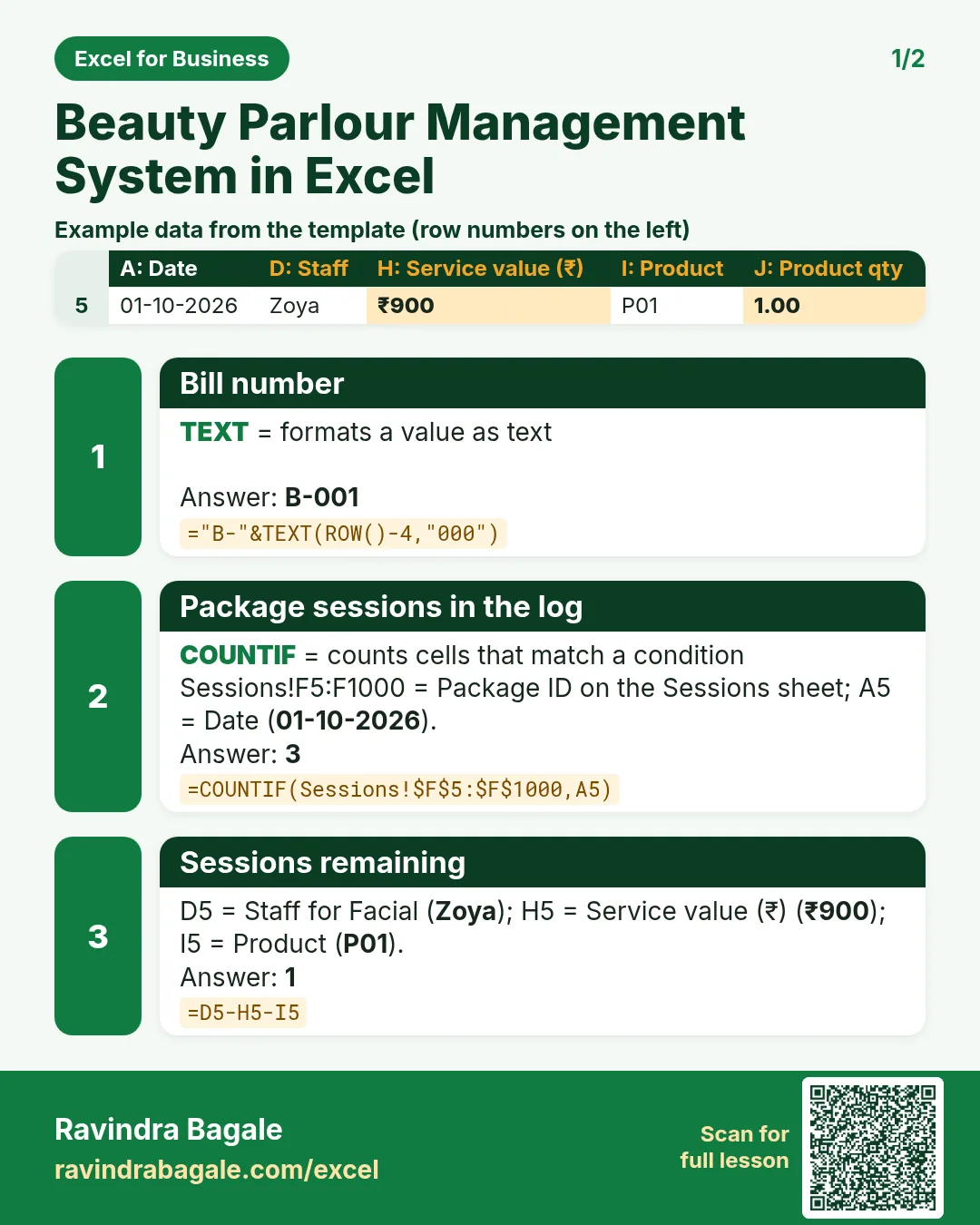

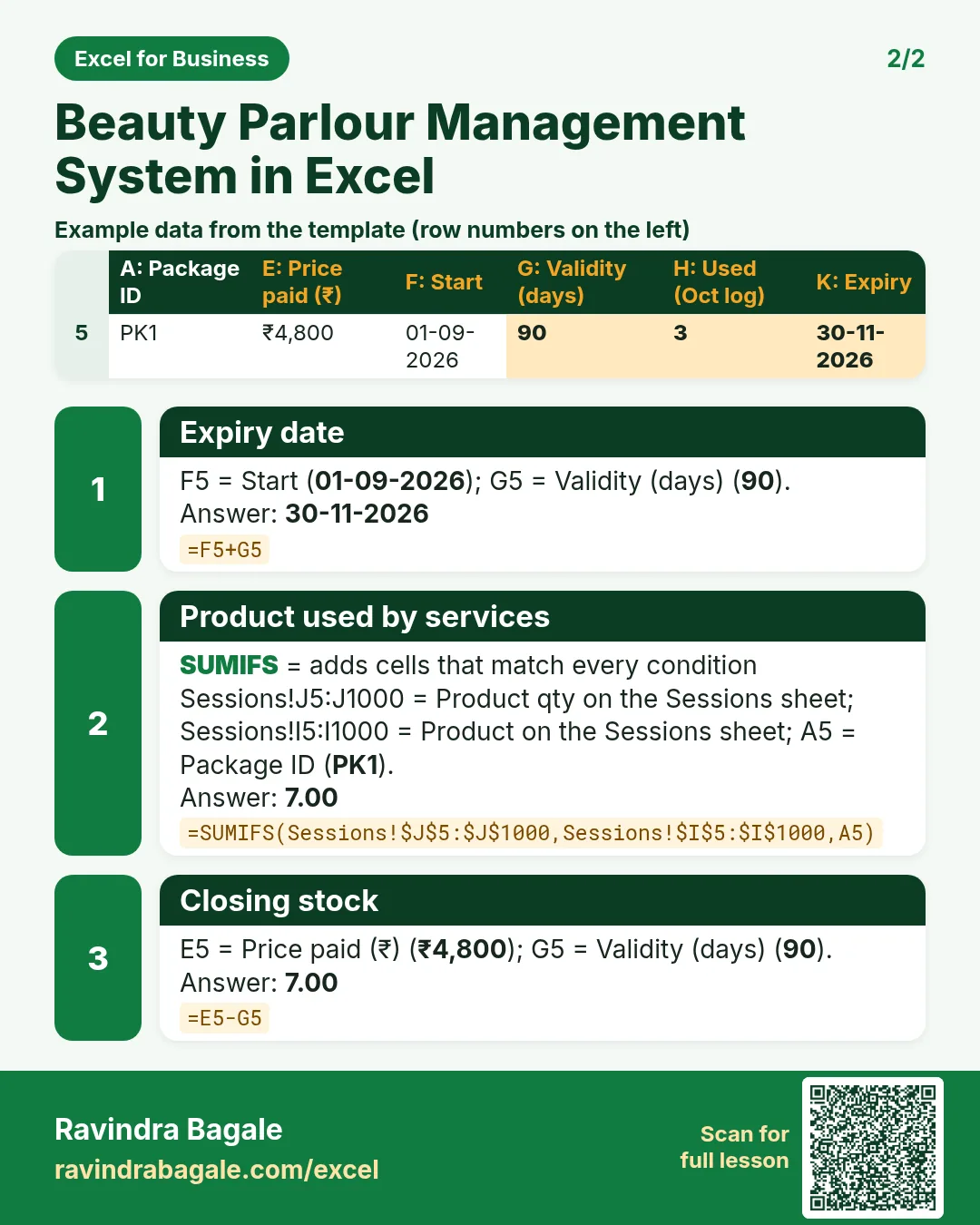

More cards: Ravi Sir's Cards.
6. Frequently asked questions
How do I track package sessions in Excel?
Log package sessions with the package ID; =COUNTIF(Sessions!F:F,A5) counts them and remaining = bought − used.
How do I reduce product stock automatically per service?
Give each service a product and quantity in the menu, look them up on every session row and total by product with SUMIFS.
How do I calculate staff incentive?
Total service value per staff with SUMIFS and multiply by the incentive %: =ROUND(C5*Setup!$B$4,0).
Should GST be added to the bill?
That depends on your registration and the rate for your service. The template shows amounts as charged; check with your accountant before adding a GST column.
How do I flag packages about to expire?
Days left = start + validity − today; show Expiring within 15 days, and Used up when no sessions remain.
7. Quick quiz
Ten questions on this page. Sign in to save your score.
Loading practice tasks...
- Total units sold (Easy): Add up Units sold in D2:D11.
- Average price (Easy): Average of E2:E11, rounded to 2 decimals.
- Rows in Snacks (Easy): How many rows have Category "Snacks"?
- Largest units sold (Easy): The largest value in D2:D11.
- Units sold for Snacks (Medium): Total of D2:D11 where B is "Snacks".
- Snacks in Bengaluru (Medium): Total of D2:D11 where B is "Snacks" and C is "Bengaluru".
- Best in Snacks (Medium): Largest E2:E11 value where B is "Snacks".
- Value of row 2 (Medium): D2 times E2.
- Look up Neha Gupta (Medium): The Units sold for "Neha Gupta" (use a lookup on column A).
- Total value (Hard): Sum of D times E for all rows.
- Share of Snacks (Hard): Share of D2:D11 that is "Snacks", rounded to 3 decimals.
- Rank of row 2 (Hard): Rank of D2 among D2:D11 (largest = 1).
- Above average? (Hard): "Above" if E2 is above the average of E2:E11, else "Below".