Sales CRM System in Excel: Leads, Stages, Weighted Pipeline, Follow-up Reminders, Win Rate by Source and Dashboard
Shahrukh Solar Solutions in Pune sells rooftop solar to homes, shops and factories with three salespeople. Leads came from the website, referrals and exhibitions, and follow-ups depended on memory, so good leads went cold. This page builds a 7-sheet Excel CRM: every lead has a stage, a value and a next follow-up date, the weighted pipeline shows what is likely to close, and overdue follow-ups turn red.
What you'll learn on this page
- Set stages with a chance of winning, sources and owners
- Keep leads with deal value, stage and weighted value
- Show follow-up status: Overdue, Today, Upcoming or Closed
- Log calls, visits and quotations
- Report pipeline by stage and owner
- Work out win rate by source
- Print a lead card and track the monthly target on a dashboard
Download the template: sales-crm-lead-pipeline-system-template.xlsx: a 7-sheet system with example data and real formulas (Read me, Setup, Leads, Activities, Pipeline, Lead card, Dashboard). Yellow cells are inputs you can type over; green cells hold formulas; blue rows are headers and totals. Replace the example data with your own and every report and the dashboard recalculate.
Made-up data: every name, amount, business and date on this page is made up for practice. Cities are used only to make the examples feel real.
1. The business story
Shahrukh Solar Solutions, Pune, as of 17 October 2026 (made-up data). Target ₹15,00,000 a month.
| Question | Where the system answers it |
|---|---|
| What is in the pipeline? | 10 open leads worth ₹69,50,000; weighted ₹25,86,000 |
| Whom do we call today? | 5 follow-ups overdue, 1 due today (Shaikh Garments) |
| How is October going? | ₹3,30,000 won, 22% of target |
| Who has the biggest open pipeline? | Shahrukh: weighted ₹11,42,000 |
The morning starts with a filter on Follow-up status, not with a guess.
Figure 1. Setup holds stages and lists; Leads and Activities are the entry sheets; Pipeline, Lead card and Dashboard read from them.
2. Build it sheet by sheet
Step 1. Setup: stages
- Stages with chance of winning in A7:B12: New 10%, Contacted 25%, Site visit 50%, Quotation sent 70%, Won 100%, Lost 0%.
- Sources in D7:D11, owners in F7:F9, B4 monthly target.
Step 2. Leads
- A5
="LD-"&TEXT(ROW()-4,"000"). Type company, source, owner, value and stage from drop-downs. - H5 chance with XLOOKUP and I5 weighted
=F5*H5. - L5:
=IF(OR(G5="Won",G5="Lost"),"Closed",IF(J5="","No date",IF(J5<Setup!$B$3,"Overdue",IF(J5=Setup!$B$3,"Today","Upcoming"))))(IF with OR). - M5 days open
=IF(K5="",Setup!$B$3,K5)-B5.
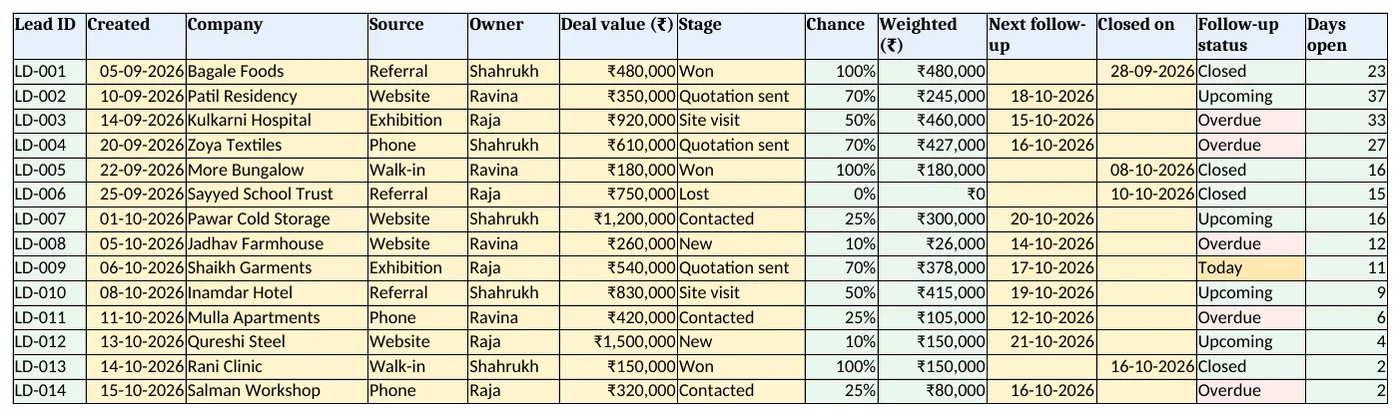
Figure 2. Leads: deal value, stage, chance, weighted value, next follow-up and status
Step 3. Activities
- One row per call, visit, meeting or quotation, with the lead ID. C5 company with XLOOKUP.
Step 4. Pipeline report
- By stage: leads, value and weighted value with COUNTIFS and SUMIFS.
- By owner: open leads, open weighted, won and overdue follow-ups.
- By source: E20 win rate
=IFERROR(C20/(C20+D20),0).
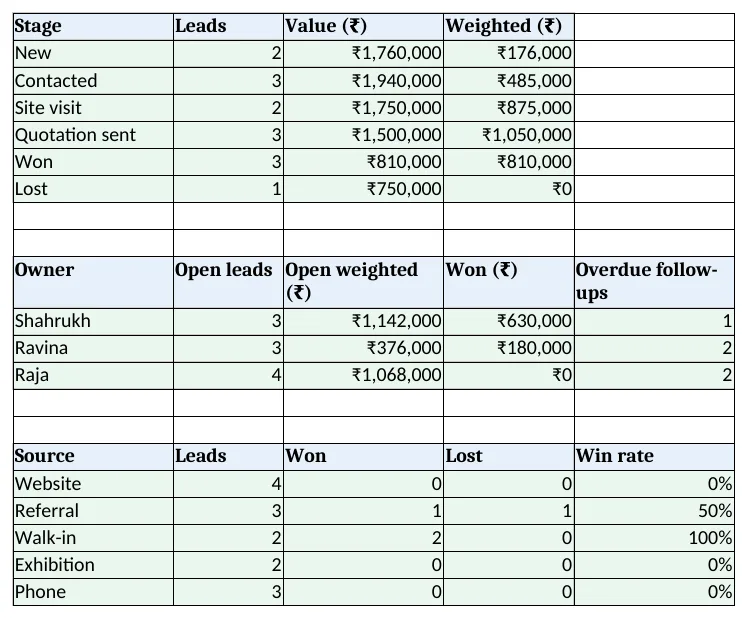
Figure 3. Pipeline: by stage, by owner and win rate by source
Step 5. Lead card and Dashboard
- Lead card: type a lead ID in B4. Set the print area.
- KPI cards: open leads, open pipeline, weighted pipeline, won in October, target achieved and overdue follow-ups. Charts: value by stage and open weighted by owner.
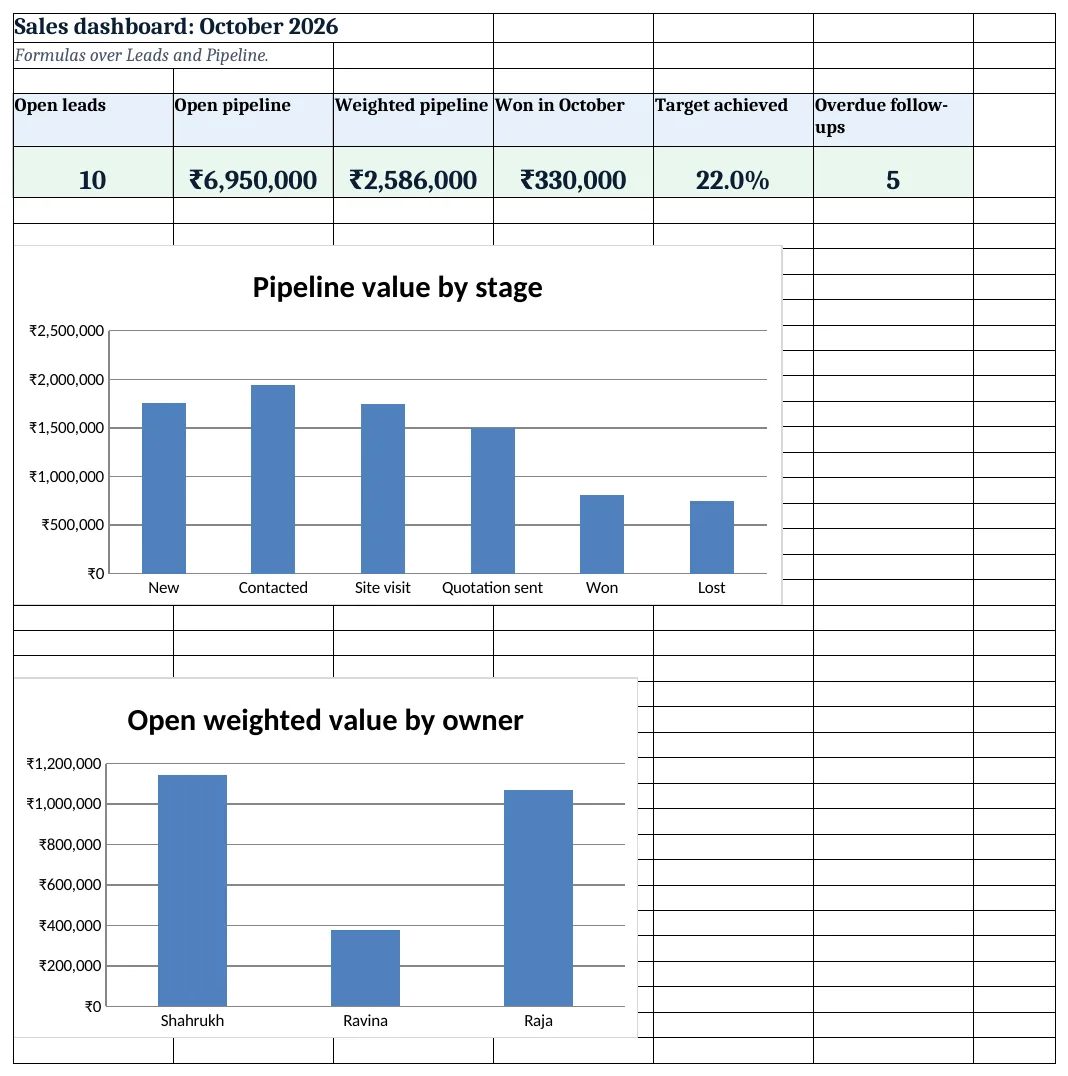
Figure 4. Sales dashboard: open leads, pipeline, weighted value, won this month, target and overdue follow-ups
Ravindra Bagale's Tip
Filter Leads for Overdue and Today before you open email each morning. Calls made early get answered.
Ravindra Bagale's Tip – मराठी
रोज सकाळी email उघडण्याआधी Overdue आणि Today leads filter करा. लवकर केलेले फोन उचलले जातात.
Ravindra Bagale's Tip – हिंदी
हर सुबह email खोलने से पहले Overdue और Today leads filter करें. जल्दी किए फोन उठाए जाते हैं.
3. Formulas used
| Cell | Formula | What it does |
|---|---|---|
| Leads!A5 | ="LD-"&TEXT(ROW()-4,"000") |
Lead ID |
| Leads!H5 | =XLOOKUP(G5,Setup!$A$7:$A$12,Setup!$B$7:$B$12,0) |
Chance of the stage |
| Leads!I5 | =F5*H5 |
Weighted value |
| Leads!L5 | =IF(OR(G5="Won",G5="Lost"),"Closed",IF(J5="","No date",IF(J5<Setup!$B$3,"Overdue",IF(J5=Setup!$B$3,"Today","Upcoming")))) |
Follow-up status |
| Leads!M5 | =IF(K5="",Setup!$B$3,K5)-B5 |
Days open |
| Activities!C5 | =XLOOKUP(B5,Leads!$A$5:$A$1000,Leads!$C$5:$C$1000,"Check ID") |
Company |
| Pipeline!B5 | =COUNTIFS(Leads!$G$5:$G$1000,A5) |
Leads per stage |
| Pipeline!D5 | =SUMIFS(Leads!$I$5:$I$1000,Leads!$G$5:$G$1000,A5) |
Weighted per stage |
| Pipeline!C14 | =SUMIFS(Leads!$I$5:$I$1000,Leads!$E$5:$E$1000,A14,Leads!$L$5:$L$1000,"<>Closed") |
Open weighted per owner |
| Pipeline!E20 | =IFERROR(C20/(C20+D20),0) |
Win rate by source |
| Lead card!B14 | =COUNTIFS(Activities!$B$5:$B$3000,$B$4) |
Activities logged |
| Dashboard!D5 | =SUMIFS(Leads!$F$5:$F$1000,Leads!$G$5:$G$1000,"Won",Leads!$K$5:$K$1000,">="&DATE(2026,10,1)) |
Won in October |
| Dashboard!E5 | =D5/Setup!B4 |
Target achieved |
Every formula above is written in the template, so you can click a cell and see it in the formula bar. All values on this page were recalculated in LibreOffice with zero errors.
4. Common mistakes
- Open leads with no follow-up date. No date means no call. The status shows No date so you can fix it.
- Counting the full pipeline as sales. Use the weighted value to plan; a new lead is not money yet.
- Stages not updated. Change the stage the day it changes, or weighted value lies.
- Deleting lost leads. Keep them as Lost; win rate by source needs them.
- Chance set per lead by feel. Keep chance per stage on Setup so everyone uses the same scale.
Ravindra Bagale's Tip
Note why every lost deal was lost. After a month the Activities sheet shows what to fix.
Ravindra Bagale's Tip – मराठी
प्रत्येक हरवलेल्या deal चे कारण लिहा. महिन्याभरात Activities sheet काय सुधारायचे ते दाखवते.
Ravindra Bagale's Tip – हिंदी
हर हारे हुए deal का कारण लिखें. महीने भर में Activities sheet दिखाती है क्या सुधारना है.
5. More real examples
Example 1: Real estate. Stages become enquiry, site visit, token, agreement; value is the flat price.
Example 2: B2B supplies. Add a product column and expected order date per lead.
Example 3: Interior studio. Leads turn into estimates like the interior design costing system.
Quick revision cards
Quick revision
Each card shows formulas from this page, each with an example and its answer from the template. Scan the QR code on a card to open this lesson. All names and numbers are made up for practice.
झटपट उजळणी
प्रत्येक card वर या page मधले formulas, त्यांचं example आणि template मधलं उत्तर आहे. Card वरचा QR code scan केला की हा lesson उघडतो. सगळी नावं आणि आकडे सरावासाठी काल्पनिक आहेत.
झटपट दोहराई
हर card पर इस page के formulas, उनका example और template का उत्तर है. Card का QR code scan करें तो यह lesson खुलेगा. सभी नाम और आंकड़े अभ्यास के लिए काल्पनिक हैं.
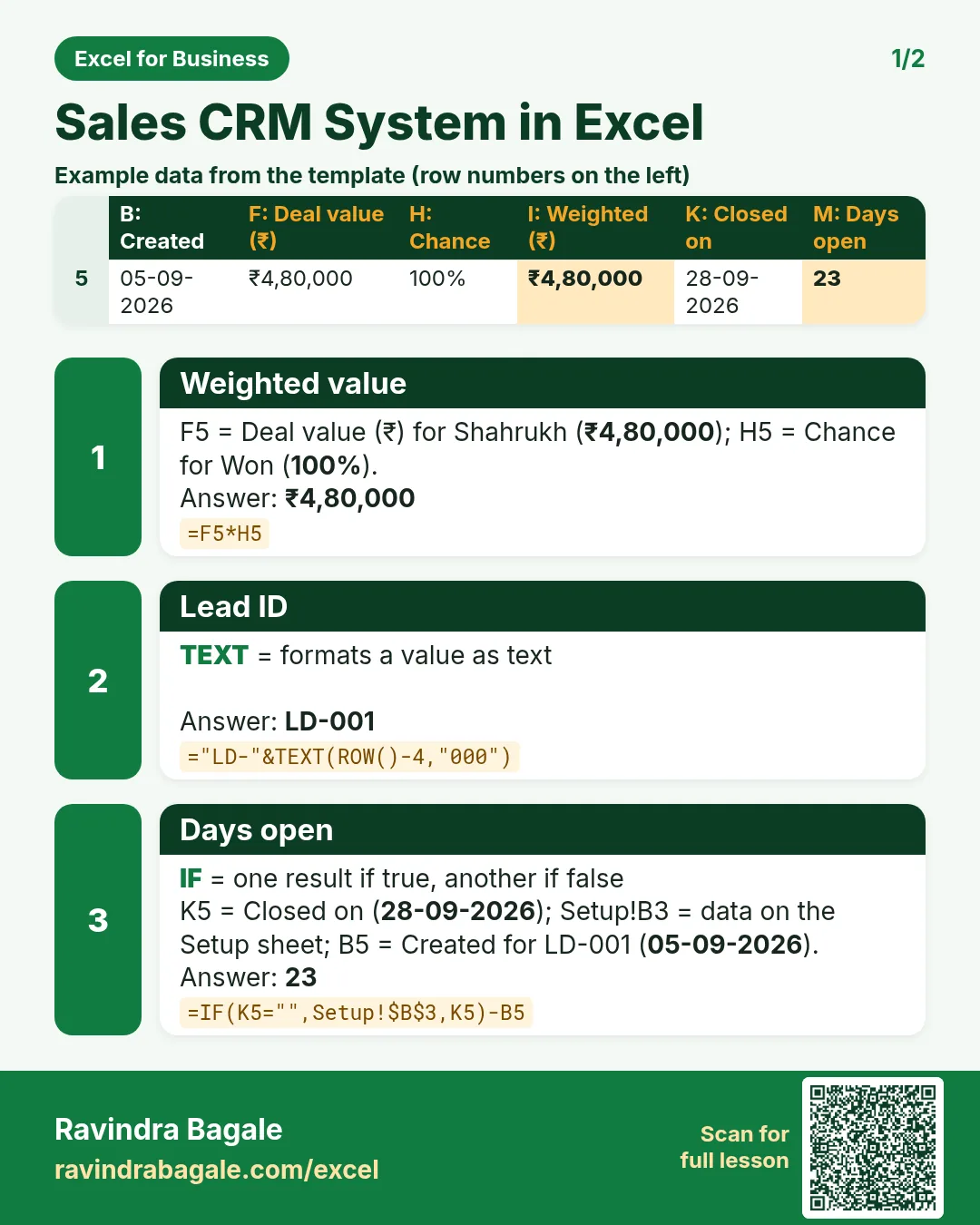

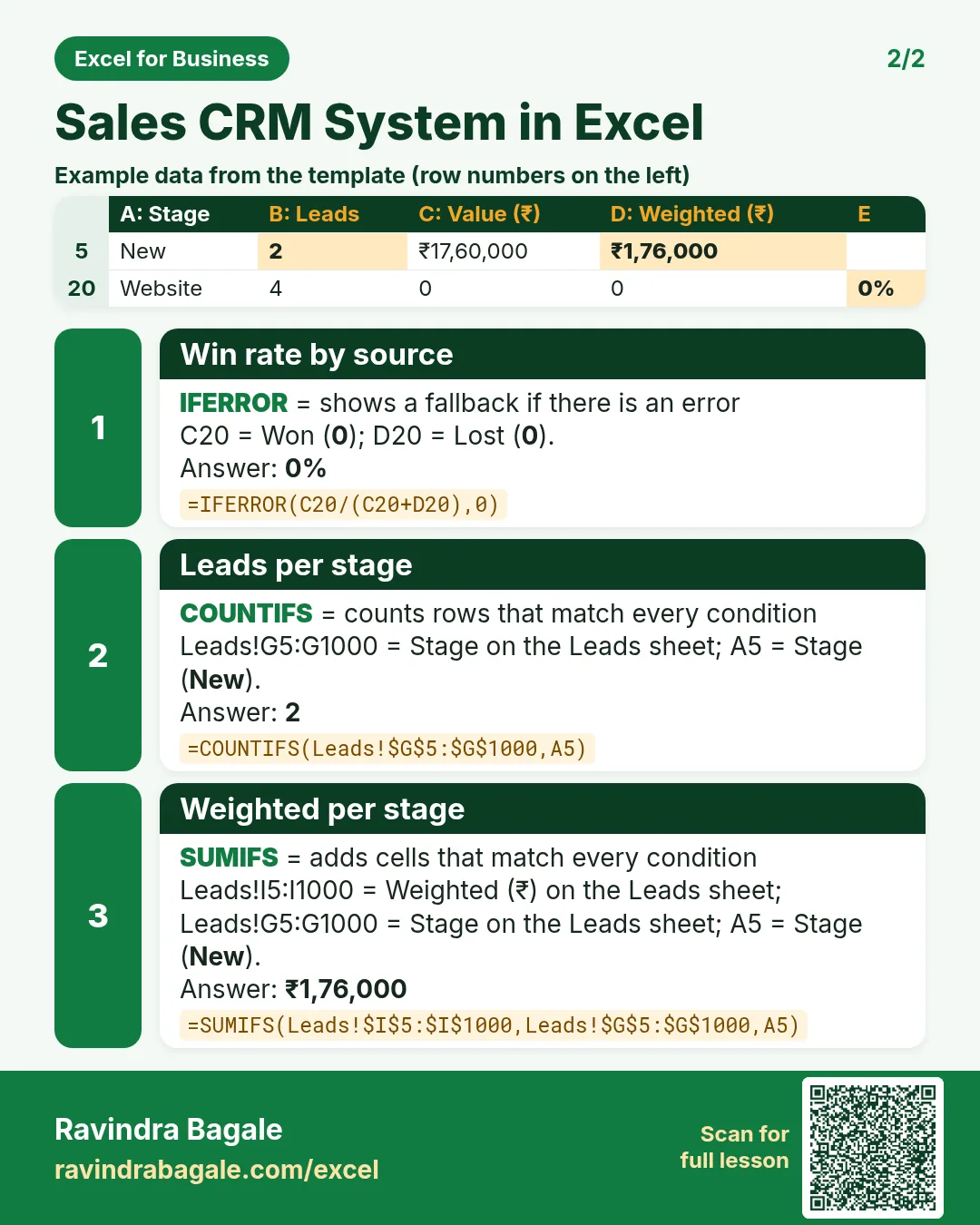

More cards: Ravi Sir's Cards.
6. Frequently asked questions
How do I make a simple CRM in Excel?
One row per lead with stage, value and next follow-up; a Setup sheet for stages and a report with COUNTIFS and SUMIFS.
What is a weighted pipeline?
Deal value × chance of the stage, added over open leads.
How do I show overdue follow-ups?
Compare the next follow-up date with today: before today is Overdue, equal is Today.
How do I calculate win rate?
Won ÷ (won + lost). Leads still open are left out.
How do I track the monthly target?
SUMIFS deal value where stage is Won and closed date is in the month, ÷ target.
7. Quick quiz
Ten questions on this page. Sign in to save your score.
Loading practice tasks...
- Monthly rate (Easy): Yearly rate B3 divided by 12. (sheet "Plan")
- Months (Easy): B4 times 12. (sheet "Plan")
- Monthly EMI (Easy): EMI on amount B2 at B3 for B4 years, as a positive number, rounded to 2 decimals. (sheet "Plan")
- Days taken (Easy): C2 minus B2. (sheet "Dates")
- Start year (Easy): Year of B3. (sheet "Dates")
- Due month (Easy): Month number of C3. (sheet "Dates")
- Earliest start (Easy): Earliest date in B2:B9 (as a date number). (sheet "Dates")
- Total repaid (Medium): Total paid over the loan, rounded to 0 decimals. (sheet "Plan")
- Total interest (Medium): Total paid minus B2, rounded to 0 decimals. (sheet "Plan")
- Processing fee (Medium): B2 times B6. (sheet "Plan")
- Working days (Medium): Working days from B2 to C2. (sheet "Dates")
- Weekday of due (Medium): Weekday number of C4 (Sunday = 1). (sheet "Dates")