Laundry Management System in Excel: Price List, Order Lines, Express Surcharge, Due Dates, Receipts and Dashboard
Ruhi Laundry in Nagpur washes, irons and dry-cleans clothes for homes nearby. Slips got lost, prices were worked out in the head, and customers came back to find their clothes not ready. This page builds an 8-sheet Excel system: the price list covers every item and service, each order line prices itself, express orders get a surcharge and an earlier due date, and the dashboard shows what is due today.
What you'll learn on this page
- Build a price list keyed on item and service
- Price order lines with a two-key XLOOKUP
- Add pieces and amounts per order with SUMIFS
- Apply an express surcharge and an earlier due date
- Show Delivered, Overdue, Due today or In process
- Print a receipt with all lines
- Report pieces and amount per service
Download the template: laundry-management-system-template.xlsx: a 8-sheet system with example data and real formulas (Read me, Setup, Price list, Order lines, Orders, Report, Receipt, Dashboard). Yellow cells are inputs you can type over; green cells hold formulas; blue rows are headers and totals. Replace the example data with your own and every report and the dashboard recalculate.
Made-up data: every name, amount, business and date on this page is made up for practice. Cities are used only to make the examples feel real.
1. The business story
Ruhi Laundry, Nagpur, 1 to 17 October 2026 (made-up data). Three services: Wash and iron, Dry clean, Iron only. Standard 3 days; express 1 day with a 50% surcharge.
| Question | Where the system answers it |
|---|---|
| What is due today? | Orders: 4 orders, ₹1,589 to collect |
| What is late? | 3 orders overdue with ₹1,403 balance |
| Which service brings the most? | Report: Dry clean, ₹11,070 from 88 pieces |
| How much is unpaid? | Dashboard: ₹3,568 across open orders |
35 orders, 237 pieces and ₹17,836 of billing. 25 orders are already delivered.
Figure 1. Setup and Price list hold rates; Order lines and Orders are the entry sheets; Receipt, Report and Dashboard read from them.
2. Build it sheet by sheet
Step 1. Setup and Price list
- Setup B4 express surcharge (50%), B5 standard days (3), B6 express days (1), and the services in D3:D5.
- Price list: Item, Service, Rate. D5 joins the two into a key:
=A5&"|"&B5gives "Shirt|Dry clean" (joining text).
Step 2. Order lines: one row per item
- Headers: Order no, Item, Service, Qty, Rate, Amount, Key. Item and service come from drop-downs.
- E5 rate:
=XLOOKUP(B5&"|"&C5,'Price list'!$D$5:$D$21,'Price list'!$C$5:$C$21,0). One lookup with two conditions. - F5 amount
=D5*E5and G5 key=A5&"-"&COUNTIF($A$5:A5,A5)for the receipt.
Step 3. Orders: totals, due date and status
- E5 pieces
=SUMIFS('Order lines'!$D$5:$D$3000,'Order lines'!$A$5:$A$3000,A5). - F5 amount:
=ROUND(SUMIFS('Order lines'!$F$5:$F$3000,'Order lines'!$A$5:$A$3000,A5)*IF(D5="Yes",1+Setup!$B$4,1),0). - H5 balance
=F5-G5, I5 due=B5+IF(D5="Yes",Setup!$B$6,Setup!$B$5). - K5:
=IF(J5<>"","Delivered",IF(I5<Setup!$B$3,"Overdue",IF(I5=Setup!$B$3,"Due today","In process"))). Colour it with conditional formatting.
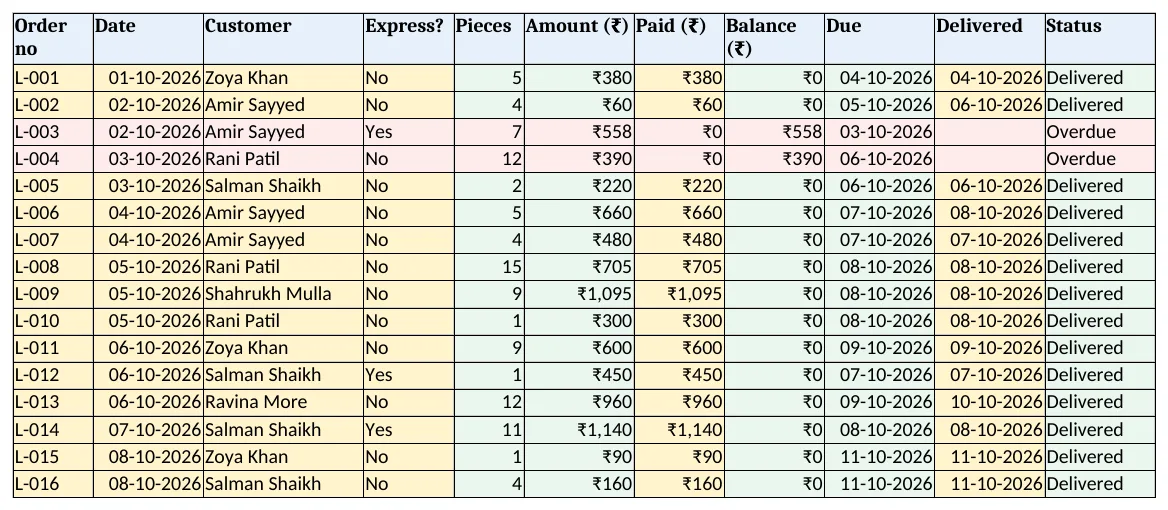
Figure 2. Orders: pieces, amount with express, balance, due date and status
Step 4. Receipt
- Type an order no in B4; D4 finds the customer, B5 the due date and C8 each line's service:
=XLOOKUP($B$4&"-"&A8,'Order lines'!$G$5:$G$3000,'Order lines'!$C$5:$C$3000,""). - L-033 for Amir Sayyed: one trouser for dry clean, ₹90 with ₹45 balance, due 19 October. Set the print area to A1:E14.
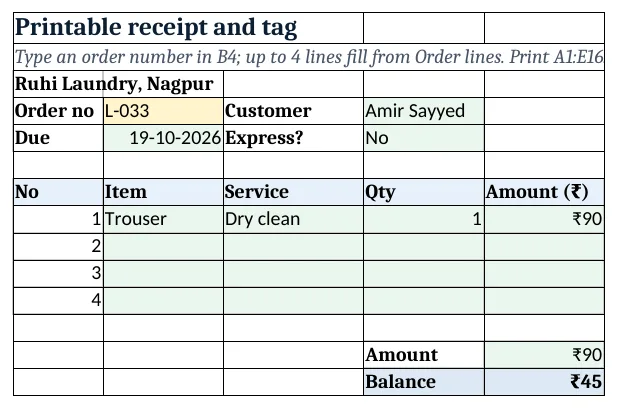
Figure 3. Receipt: one order with its lines and balance
Step 5. Report and Dashboard
- Report B5 pieces and C5 amount per service with SUMIFS; rows 10 to 13 orders and balance by status; rows 16 to 22 orders in per day.
- KPI cards: orders, pieces, billing, balance, overdue and express share. Charts: amount by service and orders in per day.
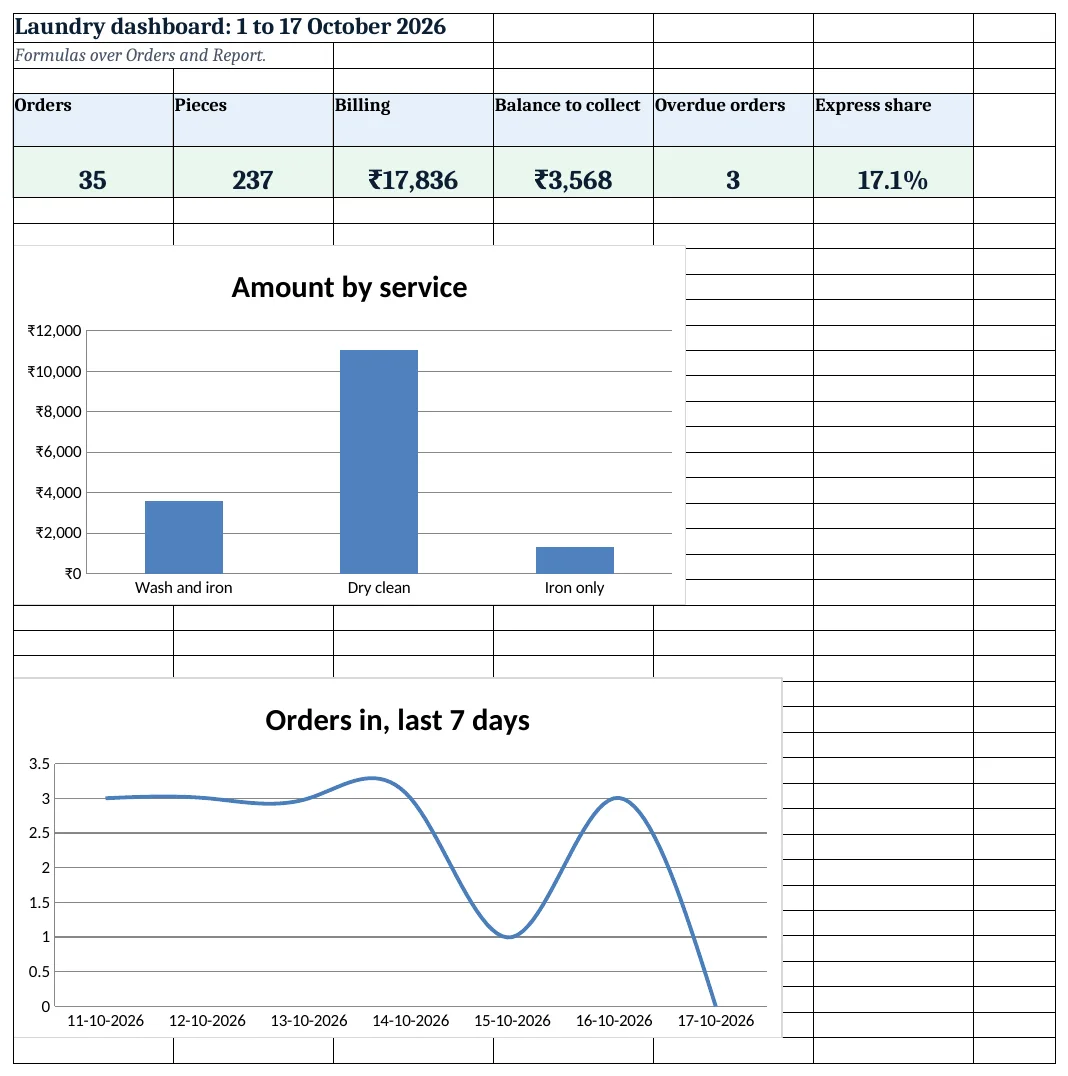
Figure 4. Laundry dashboard: orders, pieces, billing, balance and overdue
Ravindra Bagale's Tip
Start each morning with the Due today list and keep those bags at the front. Customers who find clothes ready come back.
Ravindra Bagale's Tip – मराठी
रोज सकाळी Due today यादीने सुरुवात करा आणि त्या पिशव्या पुढे ठेवा. कपडे तयार मिळणारे ग्राहक पुन्हा येतात.
Ravindra Bagale's Tip – हिंदी
हर सुबह Due today सूची से शुरू करें और वे थैले आगे रखें. कपड़े तैयार मिलें तो ग्राहक लौटते हैं.
3. Formulas used
| Cell | Formula | What it does |
|---|---|---|
| Price list!D5 | =A5&"|"&B5 |
Item and service key |
| Order lines!E5 | =XLOOKUP(B5&"|"&C5,'Price list'!$D$5:$D$21,'Price list'!$C$5:$C$21,0) |
Rate for item and service |
| Order lines!F5 | =D5*E5 |
Line amount |
| Order lines!G5 | =A5&"-"&COUNTIF($A$5:A5,A5) |
Line key for the receipt |
| Orders!E5 | =SUMIFS('Order lines'!$D$5:$D$3000,'Order lines'!$A$5:$A$3000,A5) |
Pieces in the order |
| Orders!F5 | =ROUND(SUMIFS('Order lines'!$F$5:$F$3000,'Order lines'!$A$5:$A$3000,A5)*IF(D5="Yes",1+Setup!$B$4,1),0) |
Order amount with express surcharge |
| Orders!H5 | =F5-G5 |
Balance |
| Orders!I5 | =B5+IF(D5="Yes",Setup!$B$6,Setup!$B$5) |
Due date |
| Orders!K5 | =IF(J5<>"","Delivered",IF(I5<Setup!$B$3,"Overdue",IF(I5=Setup!$B$3,"Due today","In process"))) |
Order status |
| Report!C5 | =SUMIFS('Order lines'!$F$5:$F$3000,'Order lines'!$C$5:$C$3000,A5) |
Amount per service |
| Receipt!C8 | =XLOOKUP($B$4&"-"&A8,'Order lines'!$G$5:$G$3000,'Order lines'!$C$5:$C$3000,"") |
Service on the first line |
| Dashboard!F5 | =COUNTIF(Orders!$D$5:$D$2000,"Yes")/COUNTA(Orders!$A$5:$A$2000) |
Share of express orders |
Every formula above is written in the template, so you can click a cell and see it in the formula bar. All values on this page were recalculated in LibreOffice with zero errors.
4. Common mistakes
- Two lookups for two conditions. A key of item|service needs one XLOOKUP. Separate lookups on item and service can return the wrong row.
- Surcharge on each line. Apply express once at order level, as in Orders F5, so the receipt and report agree.
- Status with only Overdue and Delivered. Due today is the list to work from in the morning; it needs its own test.
- Missing items in the price list. A line that does not match shows a rate of 0. Add the item and service before taking the order.
- Typing the order total. SUMIFS adds the lines; typed totals go wrong when a piece is added.
Ravindra Bagale's Tip
Take part payment on dry-clean orders. The Balance column shows the money still at the counter.
Ravindra Bagale's Tip – मराठी
dry-clean orders वर काही रक्कम आधी घ्या. Balance column counter वर अजून येणे असलेली रक्कम दाखवतो.
Ravindra Bagale's Tip – हिंदी
dry-clean orders पर कुछ रकम पहले लें. Balance column काउंटर पर बाकी रकम दिखाता है.
5. More real examples
Example 1: Dry-cleaning only. Drop the other services and add a Stain treatment extra on Order lines.
Example 2: Hostel laundry. Bill per kg per resident each month with a monthly plan in the price list.
Example 3: Ironing stall. Use only Iron only and a same-day due date with standard days set to 0.
Quick revision cards
Quick revision
Each card shows formulas from this page, each with an example and its answer from the template. Scan the QR code on a card to open this lesson. All names and numbers are made up for practice.
झटपट उजळणी
प्रत्येक card वर या page मधले formulas, त्यांचं example आणि template मधलं उत्तर आहे. Card वरचा QR code scan केला की हा lesson उघडतो. सगळी नावं आणि आकडे सरावासाठी काल्पनिक आहेत.
झटपट दोहराई
हर card पर इस page के formulas, उनका example और template का उत्तर है. Card का QR code scan करें तो यह lesson खुलेगा. सभी नाम और आंकड़े अभ्यास के लिए काल्पनिक हैं.
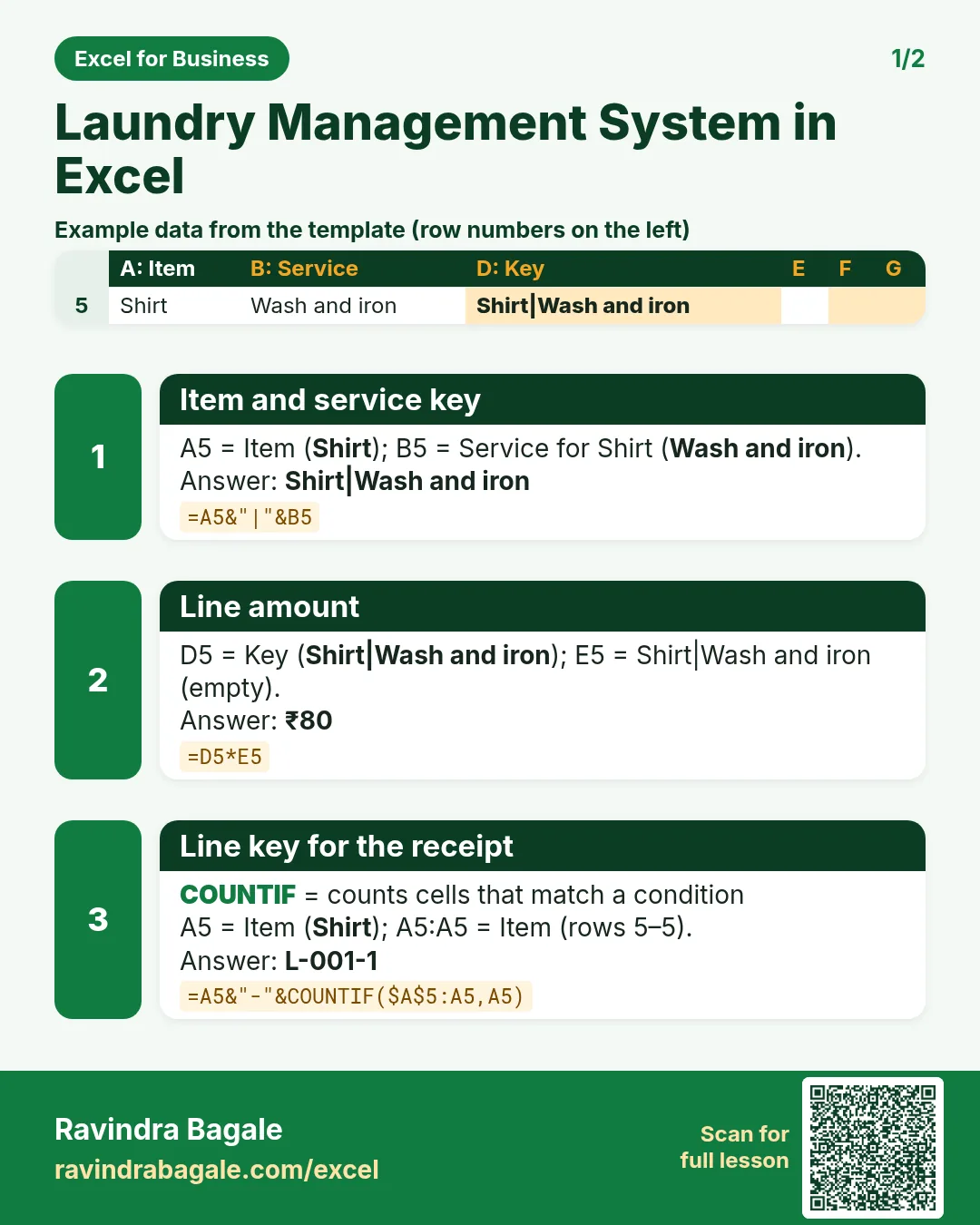

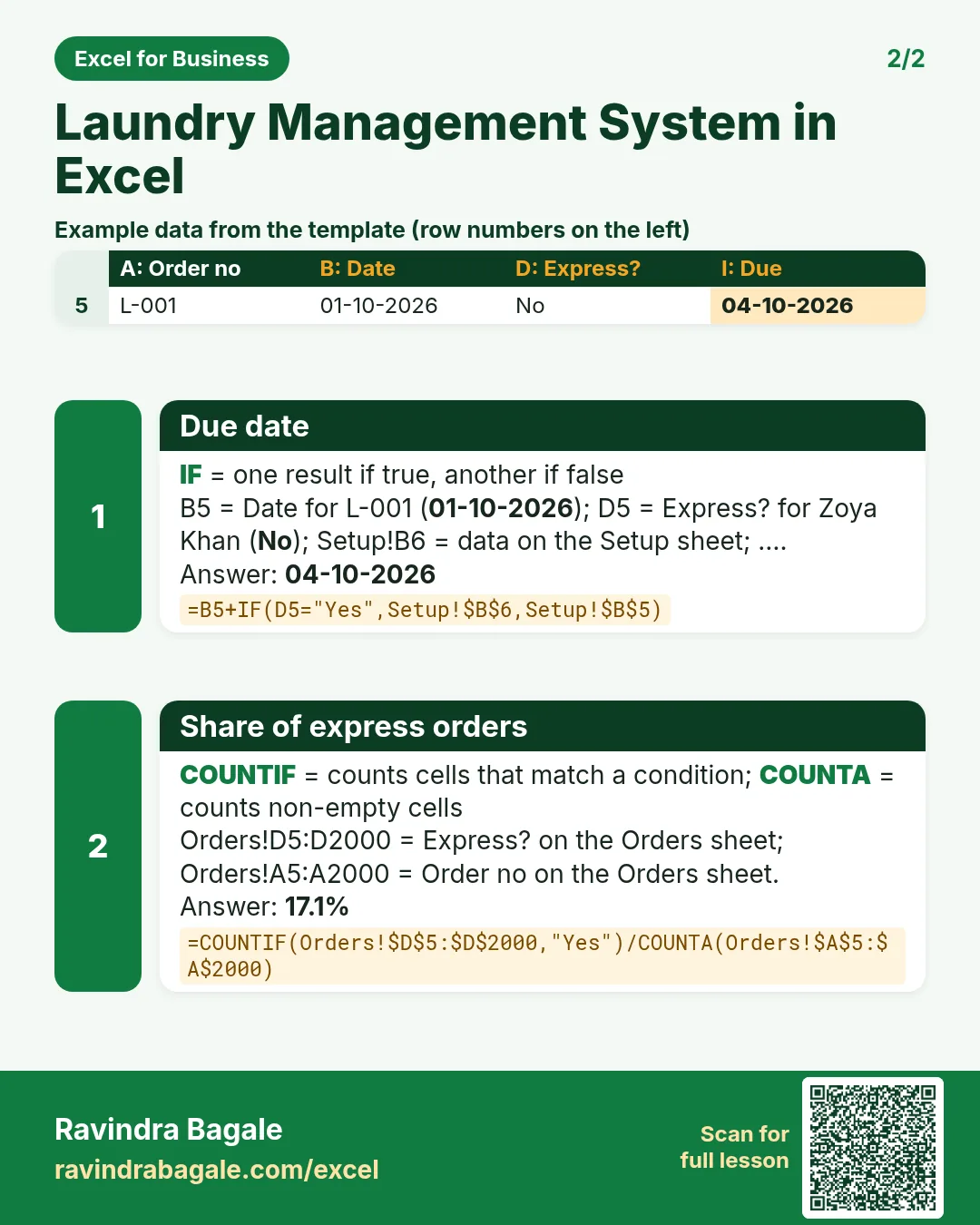

More cards: Ravi Sir's Cards.
6. Frequently asked questions
How do I look up a price with two conditions in Excel?
Join the two into a key on the price list (=A5&"|"&B5) and look up the same join: XLOOKUP(B5&"|"&C5,keys,rates,0).
How do I add an express surcharge?
Multiply the order amount by (1 + surcharge) when Express is Yes.
How do I show orders due today?
Compare the due date with the as-of date: equal is Due today, earlier is Overdue.
How do I print a receipt with several lines?
Give each line a key of order no and line number and XLOOKUP "L-033-1", "L-033-2" on the receipt.
Should I add GST?
That depends on your registration and turnover. The template shows charges as quoted; confirm with your accountant.
7. Quick quiz
Ten questions on this page. Sign in to save your score.
Loading practice tasks...
- VLOOKUP name (Easy): Name for ID "M103" with VLOOKUP. (sheet "Lookup")
- XLOOKUP value (Easy): The Unit cost for ID "M103". (sheet "Lookup")
- Position (Easy): Position of "James Carter" in B2:B9. (sheet "Lookup")
- Days taken (Easy): C2 minus B2. (sheet "Dates")
- Start year (Easy): Year of B3. (sheet "Dates")
- Due month (Easy): Month number of C3. (sheet "Dates")
- Earliest start (Easy): Earliest date in B2:B9 (as a date number). (sheet "Dates")
- INDEX and MATCH (Medium): ID for name "James Carter" using INDEX and MATCH. (sheet "Lookup")
- Not found message (Medium): Stock units for ID "Z999", or "Not found". (sheet "Lookup")
- IFNA with VLOOKUP (Medium): VLOOKUP of "Z999" in A2:E9 column 4, or "Missing". (sheet "Lookup")
- Working days (Medium): Working days from B2 to C2. (sheet "Dates")
- Weekday of due (Medium): Weekday number of C4 (Sunday = 1). (sheet "Dates")