Shop Billing and Inventory System in Excel: Items, Purchases, Sales, Stock Reorder, Profit and Daily Cash Book
Rani Kirana Stores in Solapur sells rice, dal, oil, milk and everyday items. Rani knows the shop well, but not three things: what is about to run out, which items actually make money, and why the cash drawer never matches. This 7-sheet system keeps an item master, logs purchases and sales, calculates closing stock with reorder flags, shows profit by item, and keeps a daily cash book that separates cash from UPI.
What you'll learn on this page
- Keep items with buy price, sell price and reorder level
- Log purchases and sales as simple rows with lookups
- Calculate closing stock = opening + purchased − sold with SUMIFS
- Flag items at or below reorder level
- Find profit and margin by item
- Keep a daily cash book with opening, cash sales, UPI and spending
Download the template: shop-billing-inventory-management-system-template.xlsx: a 7-sheet system with example data and real formulas (Read me, Items, Purchases, Sales, Stock, Cash book, Dashboard). Yellow cells are inputs you can type over; green cells hold formulas; blue rows are headers and totals. Replace the example data with your own and every report and the dashboard recalculate.
Made-up data: every name, amount, business and date on this page is made up for practice. Cities are used only to make the examples feel real.
1. The business story
Rani Kirana Stores, 1 to 17 October 2026 (made-up items and prices).
| What | Value |
|---|---|
| Sales | ₹30,811 |
| Gross profit | ₹3,932 (margin 12.8%) |
| Items to reorder | 3: Toor dal (8 left), Groundnut oil (6), Tea powder (8) |
| Most profitable item | Wheat atta (5 kg), ₹630 |
| Stock value at cost | ₹15,559 |
| Cash in drawer, 17 Oct close | ₹5,400 |
Milk sells the most (₹5,250) but wheat atta earns the most profit, because margins differ. For customers who buy on credit, add the khata book; the one-sheet version of reorder levels is the brief 21.3 inventory reorder sheet.
Figure 1. The Items master feeds lookups in Purchases and Sales; Stock and Cash book total them; the Dashboard reads Stock and Cash book.
2. Build it sheet by sheet
Step 1. Items: the master
- On Items, type the as-of date in B3. From row 6: Item code, Item, Unit, Buy price, Sell price, Opening stock (1 Oct), Reorder level.
- Margin H6:
=(E6-D6)/E6; colour it red below 10% so thin-margin items stand out.
Step 2. Purchases and Sales
- On Purchases, type date, item code and qty. Item C5:
=XLOOKUP(B5,Items!$A$6:$A$15,Items!$B$6:$B$15,"Check code"); rate E5 from the buy price; amount F5=D5*E5(XLOOKUP). - On Sales, the same with the sell price. Amount F5
=D5*E5, cost G5=D5*XLOOKUP(B5,Items!$A$6:$A$15,Items!$D$6:$D$15,0), profit H5=F5-G5, and the payment (Cash or UPI) from a drop-down (drop-down lists).
Step 3. Stock: closing and reorder
- On Stock, per item: opening
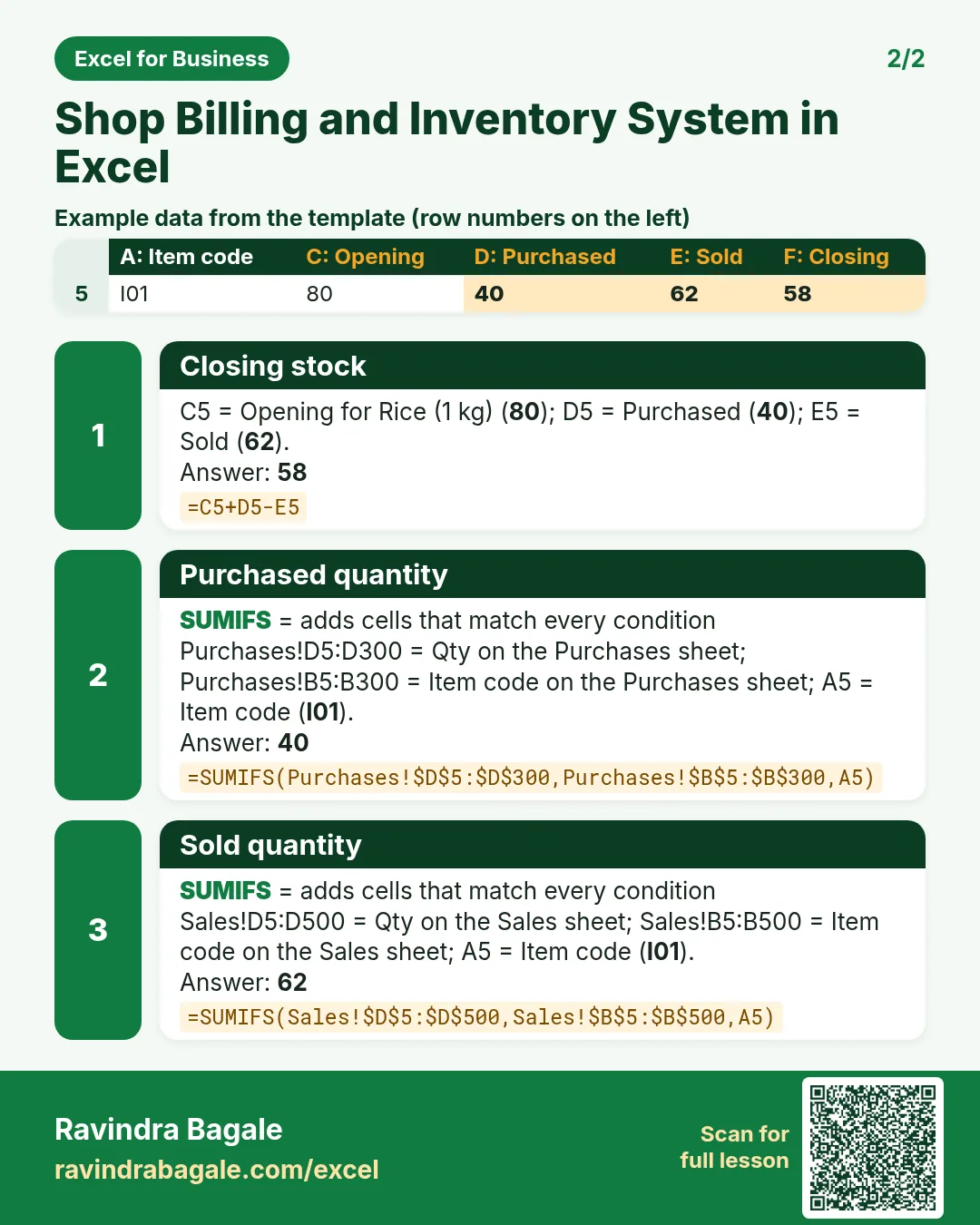
=Items!F6, purchased D5=SUMIFS(Purchases!$D$5:$D$300,Purchases!$B$5:$B$300,A5)and sold E5=SUMIFS(Sales!$D$5:$D$500,Sales!$B$5:$B$500,A5)(SUMIFS). - Closing F5
=C5+D5-E5; stock value H5=F5*Items!D6; reorder I5=IF(F5<=G5,"Yes","No"). - Highlight the whole row with a formula rule
=$I5="Yes"(formula rules). Toor dal: 40 + 0 − 32 = 8, reorder level 10: Yes. - Sales J5 and profit K5 per item with SUMIFS; totals in row 15.
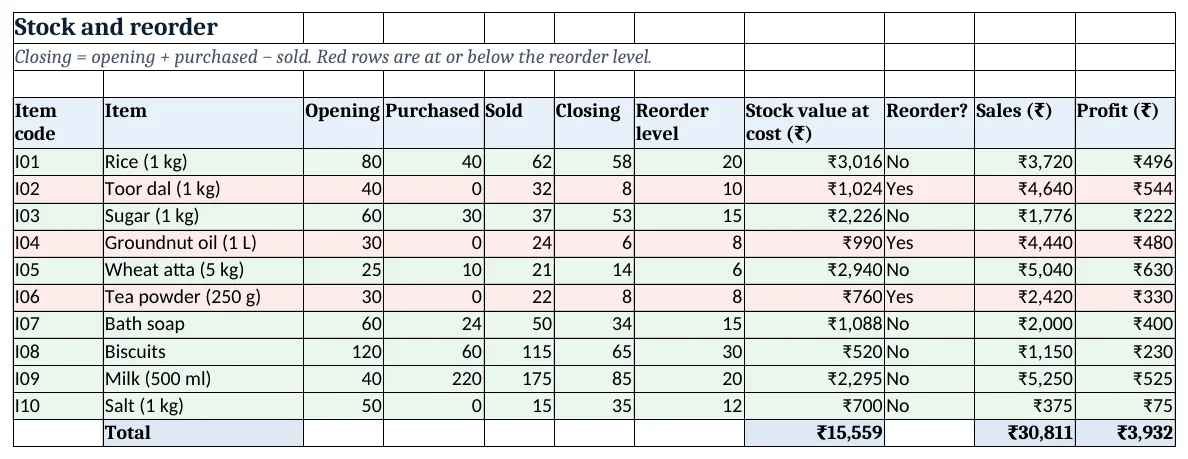
Figure 2. The Stock sheet: closing stock, reorder flag (red rows), stock value, sales and profit by item
Step 4. Cash book
- On Cash book, type the cash in the drawer on the first morning in B3.
- Opening B6
=B3, then B7=F6: today opens with yesterday's close. Cash sales C6:=SUMIFS(Sales!$F$5:$F$500,Sales!$A$5:$A$500,A6,Sales!$I$5:$I$500,"Cash"); UPI D6 the same with "UPI". - Type cash spent in E6; closing F6
=B6+C6-E6. UPI goes to the bank, so it is shown but not added to the drawer.
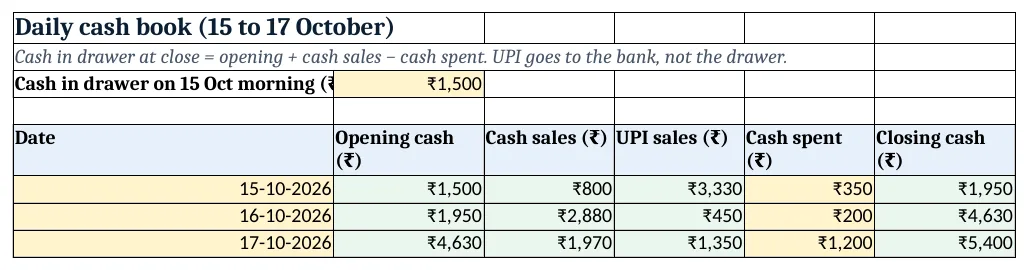
Figure 3. The daily cash book: opening cash, cash sales, UPI sales, cash spent and closing cash
Step 5. Dashboard
- KPI cards: sales
=Stock!J15, gross profit=Stock!K15, margin=B5/A5, items to reorder=COUNTIF(Stock!I5:I14,"Yes"), stock value and the latest cash=INDEX('Cash book'!F6:F8,COUNT('Cash book'!F6:F8))(KPI cards). - Most profitable item:
=INDEX(Stock!B5:B14,MATCH(MAX(Stock!K5:K14),Stock!K5:K14,0))(INDEX and MATCH). Charts: profit by item and closing stock.
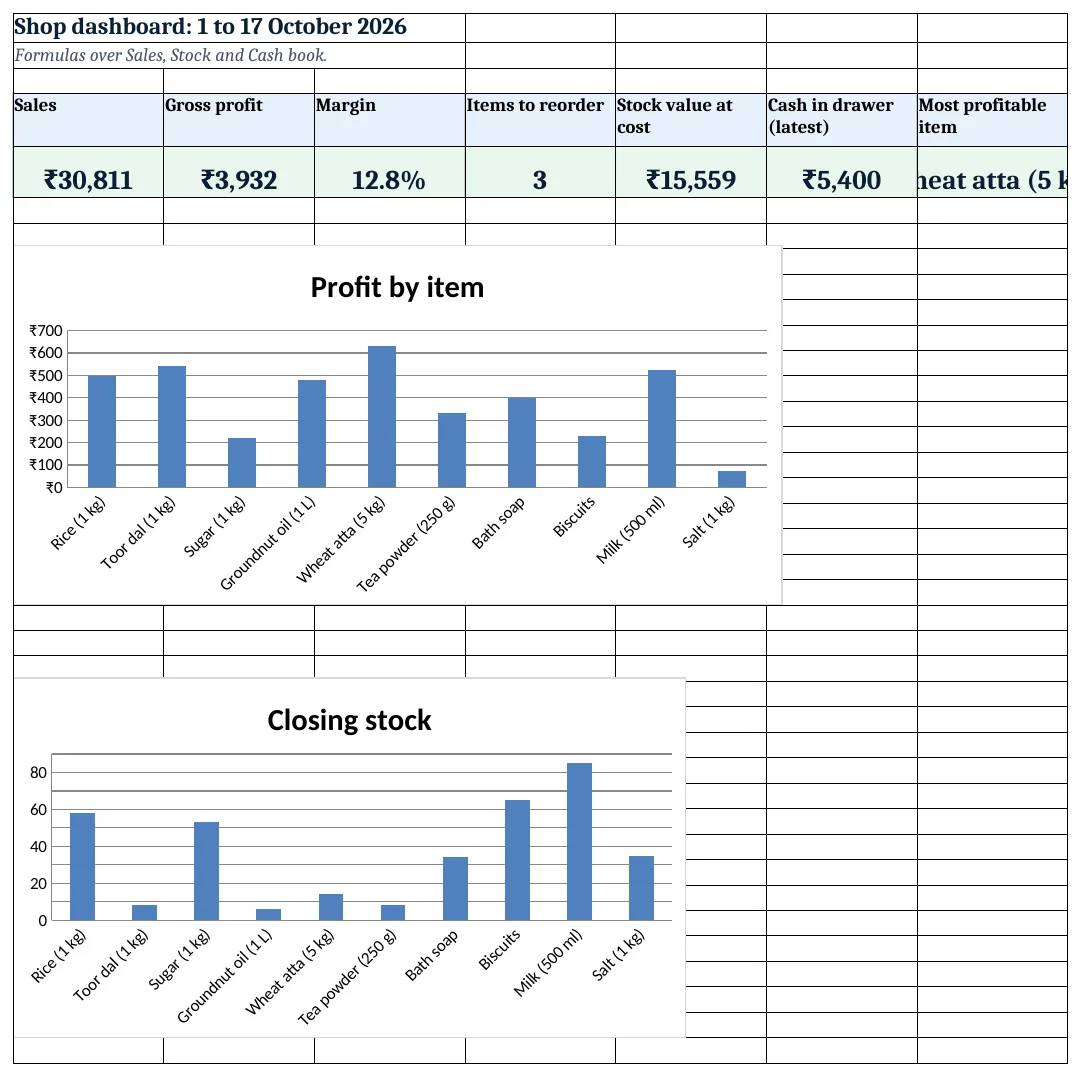
Figure 4. The shop dashboard with sales, profit, margin, reorder count, stock value and cash
Ravindra Bagale's Tip
Count the cash drawer every night and compare with Cash book closing. Small daily differences are easy to explain; a month of them is not.
Ravindra Bagale's Tip – मराठी
दररोज रात्री drawer मधील cash मोजा आणि Cash book closing शी जुळवा. रोजचे छोटे फरक समजावता येतात; महिनाभराचे नाही.
Ravindra Bagale's Tip – हिंदी
हर रात drawer का cash गिनो और Cash book closing से मिलाओ. रोज़ के छोटे फर्क समझाए जा सकते हैं; महीने भर के नहीं.
3. Formulas used
| Cell | Formula | What it does |
|---|---|---|
| Items!H6 | =(E6-D6)/E6 |
Margin % of the item |
| Purchases!C5 | =XLOOKUP(B5,Items!$A$6:$A$15,Items!$B$6:$B$15,"Check code") |
Item name from the code |
| Purchases!F5 | =D5*E5 |
Purchase amount |
| Sales!E5 | =XLOOKUP(B5,Items!$A$6:$A$15,Items!$E$6:$E$15,0) |
Sell price from the master |
| Sales!G5 | =D5*XLOOKUP(B5,Items!$A$6:$A$15,Items!$D$6:$D$15,0) |
Cost of the sale |
| Sales!H5 | =F5-G5 |
Profit of the sale |
| Stock!D5 | =SUMIFS(Purchases!$D$5:$D$300,Purchases!$B$5:$B$300,A5) |
Purchased quantity |
| Stock!E5 | =SUMIFS(Sales!$D$5:$D$500,Sales!$B$5:$B$500,A5) |
Sold quantity |
| Stock!F5 | =C5+D5-E5 |
Closing stock |
| Stock!H5 | =F5*Items!D6 |
Stock value at cost |
| Stock!I5 | =IF(F5<=G5,"Yes","No") |
Reorder flag |
| Stock!K5 | =SUMIFS(Sales!$H$5:$H$500,Sales!$B$5:$B$500,A5) |
Profit by item |
| Cash book!C6 | =SUMIFS(Sales!$F$5:$F$500,Sales!$A$5:$A$500,A6,Sales!$I$5:$I$500,"Cash") |
Cash sales of the day |
| Cash book!B7 | =F6 |
Opening = yesterday's closing |
| Cash book!F6 | =B6+C6-E6 |
Closing cash |
| Dashboard!F5 | =INDEX('Cash book'!F6:F8,COUNT('Cash book'!F6:F8)) |
Latest closing cash |
| Dashboard!G5 | =INDEX(Stock!B5:B14,MATCH(MAX(Stock!K5:K14),Stock!K5:K14,0)) |
Most profitable item |
Every formula above is written in the template, so you can click a cell and see it in the formula bar. All values on this page were recalculated in LibreOffice with zero errors.
4. Common mistakes
- Typing closing stock by hand. Closing stock must come from opening + purchased − sold. Count the shelf monthly and compare; a difference means a missed entry or loss.
- Judging items by sales alone. Milk sells the most but earns less than wheat atta. Look at the Profit column before deciding what to push.
- Adding UPI to the cash drawer. UPI money goes to the bank. Only cash sales minus cash spent change the drawer.
- Using today's buy price for old stock value. Fine for a small shop, but if prices jump, note that stock value is at the current buy price in Items.
- No reorder level for items that sell rarely. Every item needs a reorder level, even salt. Without it, the flag can never turn on.
Ravindra Bagale's Tip
Filter Stock on Reorder = Yes before calling the supplier. Order from the list, not from memory.
Ravindra Bagale's Tip – मराठी
Supplier ला फोन करण्याआधी Stock वर Reorder = Yes filter करा. आठवणीवरून नाही, list वरून order द्या.
Ravindra Bagale's Tip – हिंदी
Supplier को फ़ोन करने से पहले Stock पर Reorder = Yes filter करो. याद से नहीं, list से order दो.
5. More real examples
Example 1: Medical store. Add Lot no and Expiry to Purchases and a near-expiry flag; see the medicine stock reminder for the home version.
Example 2: Stationery shop at exam time. Raise reorder levels for the season in Items; the flags update at once.
Example 3: Vegetable stall. Use kg with two decimals and a daily Wastage column in Stock that is subtracted from closing.
Quick revision cards
Quick revision
Each card shows formulas from this page, each with an example and its answer from the template. Scan the QR code on a card to open this lesson. All names and numbers are made up for practice.
झटपट उजळणी
प्रत्येक card वर या page मधले formulas, त्यांचं example आणि template मधलं उत्तर आहे. Card वरचा QR code scan केला की हा lesson उघडतो. सगळी नावं आणि आकडे सरावासाठी काल्पनिक आहेत.
झटपट दोहराई
हर card पर इस page के formulas, उनका example और template का उत्तर है. Card का QR code scan करें तो यह lesson खुलेगा. सभी नाम और आंकड़े अभ्यास के लिए काल्पनिक हैं.
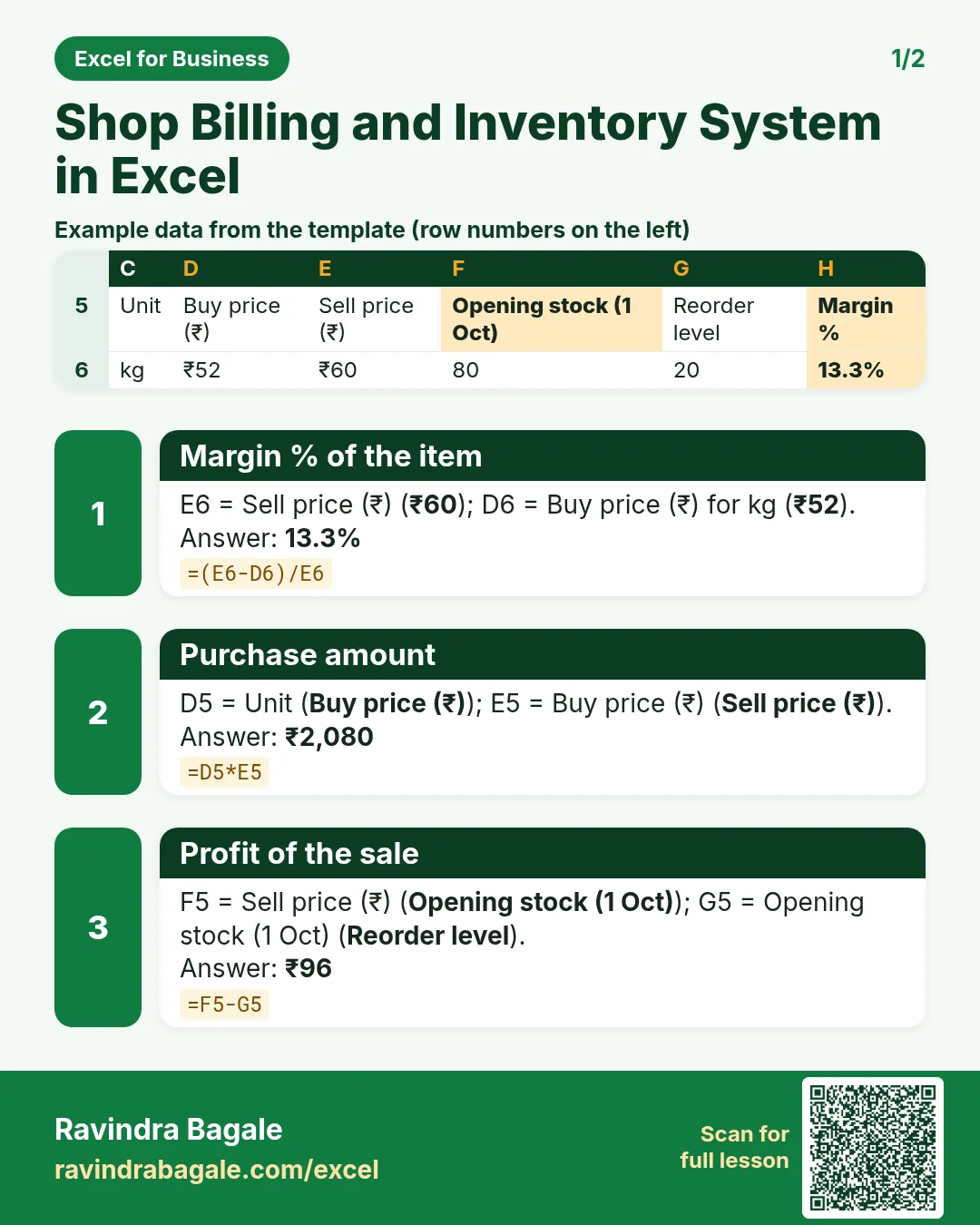


More cards: Ravi Sir's Cards.
6. Frequently asked questions
How do I make an inventory sheet in Excel?
Keep an item master, log purchases and sales as rows, and compute closing stock = opening + SUMIFS(purchased) − SUMIFS(sold) for each item.
How do I flag items to reorder?
=IF(closing<=reorder level,"Yes","No") with a conditional formatting rule that colours the whole row.
How do I calculate profit per item?
Profit on each sale = qty × (sell price − buy price); total it per item with SUMIFS.
How do I keep a cash book in Excel?
Each day: opening cash (yesterday's closing) + cash sales − cash spent = closing cash. Keep UPI separate.
Can I print a bill for a customer?
Yes: add a bill number to Sales and a print sheet like the one in the restaurant system.
7. Quick quiz
Ten questions on this page. Sign in to save your score.
Loading practice tasks...
- Total deals won (Easy): Add up Deals won in D2:D11.
- Average avg deal value (Easy): Average of E2:E11, rounded to 2 decimals.
- Rows in North (Easy): How many rows have Region "North"?
- Largest deals won (Easy): The largest value in D2:D11.
- Deals won for North (Medium): Total of D2:D11 where B is "North".
- North in Bristol (Medium): Total of D2:D11 where B is "North" and C is "Bristol".
- Best in North (Medium): Largest E2:E11 value where B is "North".
- Value of row 2 (Medium): D2 times E2.
- Look up Olivia Brown (Medium): The Deals won for "Olivia Brown" (use a lookup on column A).
- Total value (Hard): Sum of D times E for all rows.
- Share of North (Hard): Share of D2:D11 that is "North", rounded to 3 decimals.
- Rank of row 2 (Hard): Rank of D2 among D2:D11 (largest = 1).
- Above average? (Hard): "Above" if E2 is above the average of E2:E11, else "Below".