School Fee Management System in Excel: Fee Structure, Instalments, Overdue List, Receipts and Dashboard
Bagale English School in Solapur has learners in Grades 1 to 5 who pay the year's fee in four instalments. The office kept receipts in a book and found out who was behind only when a guardian asked. This page builds an 8-sheet Excel system: the fee structure is typed once, every receipt is one row, and the Fee ledger works out what each learner should have paid by today, what they did pay and what is overdue.
What you'll learn on this page
- Set up a grade-wise fee structure with a transport add-on
- Apply a concession and get the net fee per learner
- Count instalments already due with COUNTIF on the due dates
- Work out due till date, paid and overdue for each learner
- Print a fee receipt from a receipt number
- Report collection by grade and payment mode
- Track collection % on a dashboard
Download the template: school-fee-management-system-template.xlsx: a 8-sheet system with example data and real formulas (Read me, Setup, Learners, Receipts, Fee ledger, Fee receipt, Report, Dashboard). Yellow cells are inputs you can type over; green cells hold formulas; blue rows are headers and totals. Replace the example data with your own and every report and the dashboard recalculate.
Made-up data: every name, amount, business and date on this page is made up for practice. Cities are used only to make the examples feel real.
1. The business story
Bagale English School, Solapur, academic year 2026-27, as of 17 October 2026 (made-up data). Fees are paid in 4 equal instalments due on 15 June, 15 August, 15 October and 15 December, so 3 instalments are due by today. Transport is ₹9,000 a year for those who use the bus.
| Question | Where the system answers it |
|---|---|
| What is the whole year's fee after concessions? | Dashboard: ₹3,94,600 |
| How much should have come in by today? | Fee ledger, Due till date: ₹2,95,951 in total |
| How much has come in? | ₹2,42,500, which is 81.9% of what is due |
| Who is behind, and by how much? | Fee ledger: 7 learners overdue, ₹63,701 in all |
October receipts alone were ₹38,250. The grade-wise view is like the education project, but here the numbers are money, not marks.
Figure 1. Setup holds fees and due dates; Learners and Receipts are typed; the Fee ledger works out what is due and overdue.
2. Build it sheet by sheet
Step 1. Setup: fee structure and due dates
- In B3 type the as-of date and in B5 the academic year.
- In A8:C12 type each grade with its tuition and term fee a year; D8 adds them
=B8+C8. - In B14 type the transport fee (9,000). In A17:C20 list the 4 instalments with due dates and share (25% each).
Step 2. Learners: net fee for the year
- Headers in row 4: Learner ID, Name, Grade, Transport?, Concession %, Annual fee, Concession, Net fee.
- In F5 add transport only when needed:
=XLOOKUP(C5,Setup!$A$8:$A$12,Setup!$D$8:$D$12,0)+IF(D5="Yes",Setup!$B$14,0). - In G5 the concession
=ROUND(F5*E5,0)and in H5 the net fee=F5-G5. The concession % is a management decision; type it, don't guess it.
Step 3. Receipts: one row per payment
- Headers: Receipt no, Date, Learner ID, Name, Grade, Amount, Mode. D5 and E5 look up the name and grade from the ID with XLOOKUP.
- Never type a total here. If a guardian pays two instalments at once, it is one row with the full amount.
Step 4. Fee ledger: due, paid and overdue
- In B3 count instalments already due:
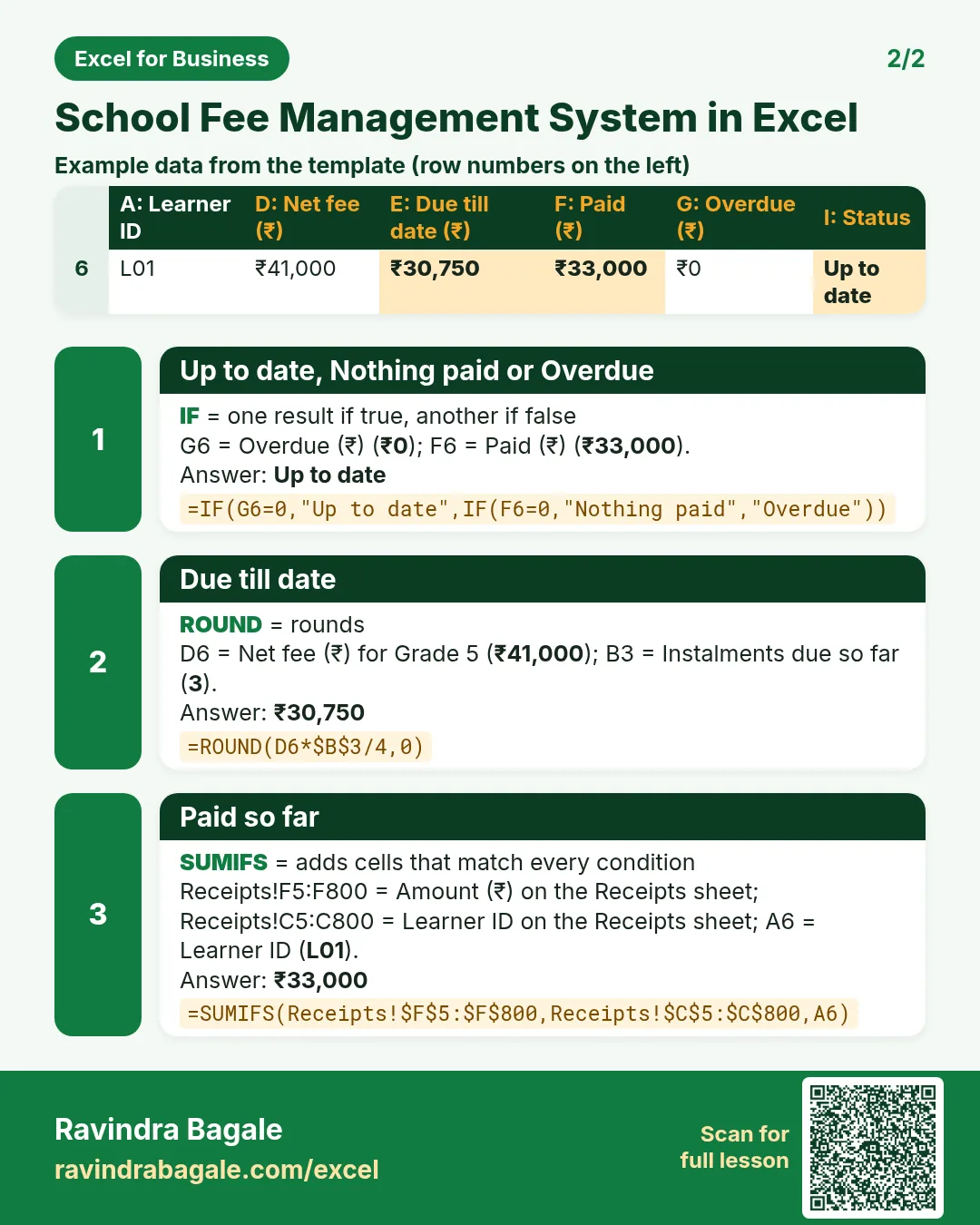
=COUNTIF(Setup!$B$17:$B$20,"<="&Setup!$B$3). On 17 October that is 3. - From row 6 pull the ID, name, grade and net fee from Learners. E6 due till date:
=ROUND(D6*$B$3/4,0). - F6 paid
=SUMIFS(Receipts!$F$5:$F$800,Receipts!$C$5:$C$800,A6)(SUMIFS), G6 overdue=MAX(0,E6-F6)and H6 balance for the year=D6-F6. - I6 status:
=IF(G6=0,"Up to date",IF(F6=0,"Nothing paid","Overdue")); J6 last payment date with MAXIFS (MAXIFS). Colour Overdue rows red.
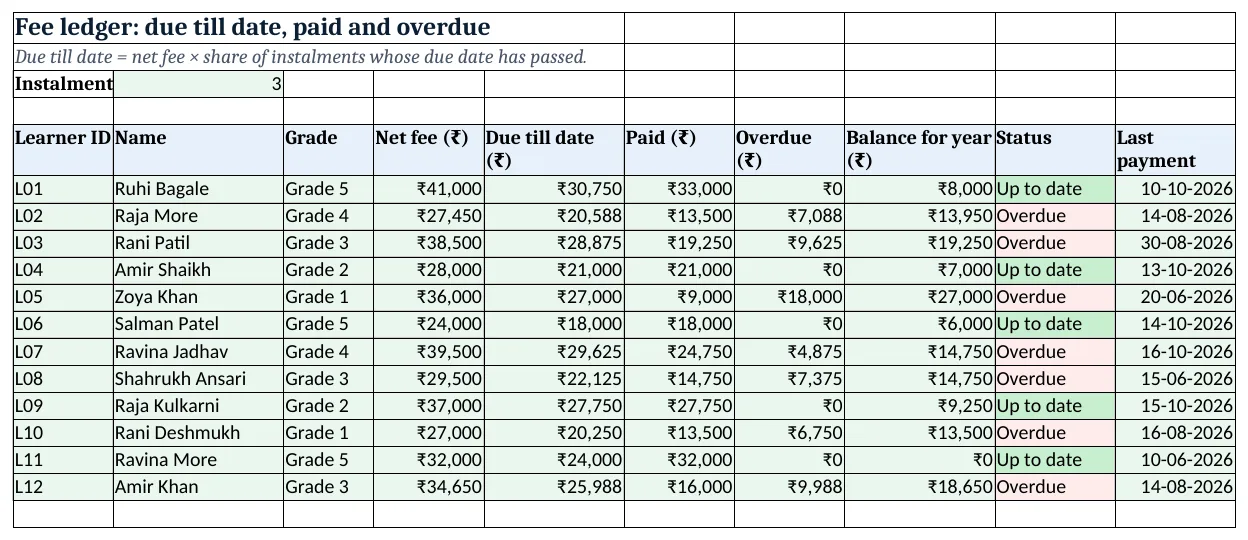
Figure 2. Fee ledger: due till date, paid, overdue and status for every learner
Step 5. Fee receipt: print one payment
- On Fee receipt type a receipt number in B4 (R-026). Rows 6 to 11 pull date, learner, name, grade, amount and mode with XLOOKUP on Receipts.
- Rows 12 to 14 add the learner's net fee, paid so far and balance from the Fee ledger, so the guardian sees the full picture. Print A1:D17.
Step 6. Report and dashboard
- On Report, B5 counts learners per grade with COUNTIF; C5 to E5 add net fee, collected and overdue with SUMIFS; F5 counts learners overdue with COUNTIFS; G5 is collected ÷ due till date.
- Rows 13 onwards split collection by mode.
- On Dashboard the six KPI cards show net fee, collected, collected % of due, overdue, learners overdue and October collection
=SUMIFS(Receipts!$F$5:$F$800,Receipts!$B$5:$B$800,">="&DATE(2026,10,1),Receipts!$B$5:$B$800,"<="&Setup!$B$3).
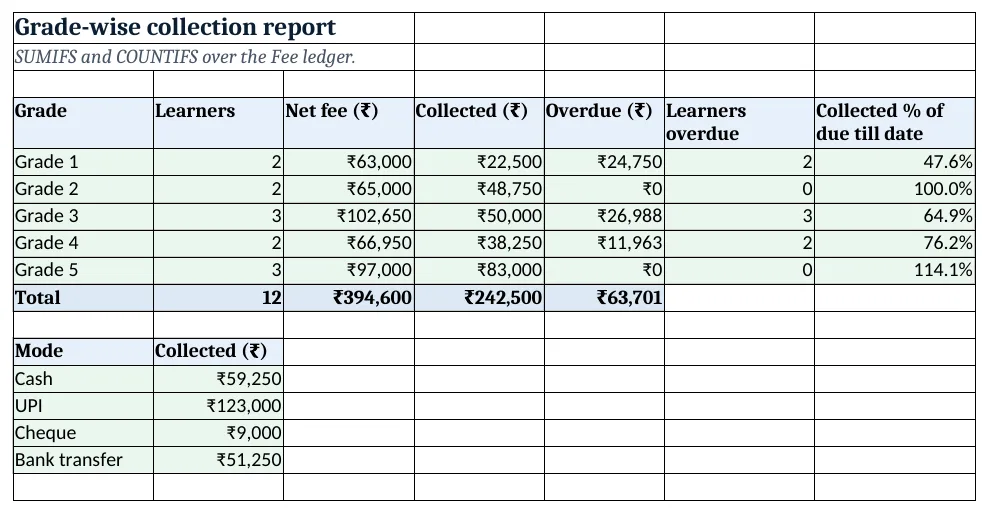
Figure 3. Report: grade-wise net fee, collection, overdue and collection by mode
Step 7. Charts
- Chart 1 at A8: overdue by grade. Chart 2 at A25: collected by grade. Both read the Report, so they move as receipts are added.
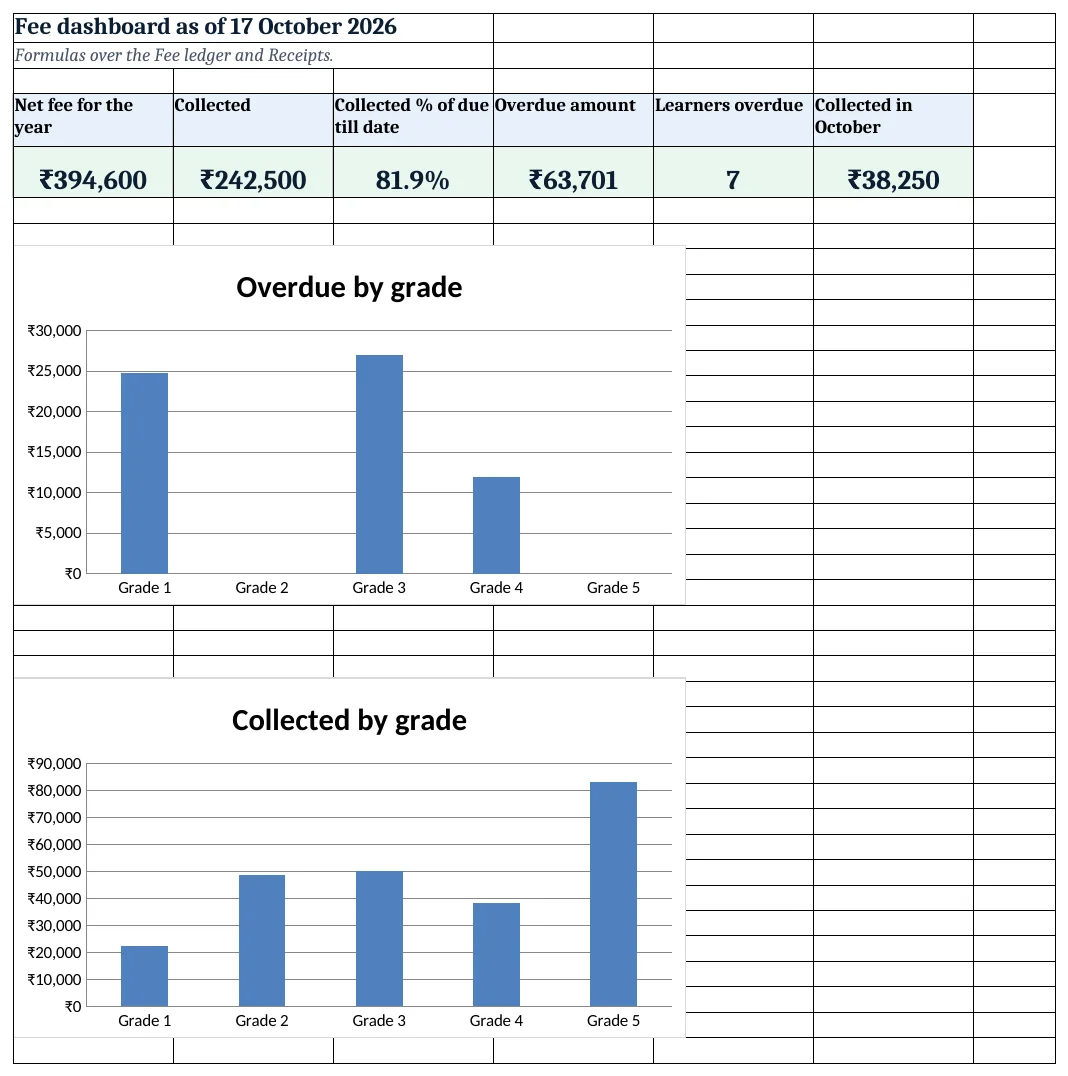
Figure 4. Fee dashboard: KPI cards and charts
Ravindra Bagale's Tip
Send the overdue list to guardians a few days after each due date, not at the year end. Small amounts are paid easily; one big pending amount in March is not.
Ravindra Bagale's Tip – मराठी
प्रत्येक due date नंतर काही दिवसांत overdue यादी पालकांना पाठवा, वर्षाच्या शेवटी नाही. छोटी रक्कम सहज भरली जाते; मार्चमधील मोठी थकबाकी नाही.
Ravindra Bagale's Tip – हिंदी
हर due date के कुछ दिन बाद overdue सूची guardians को भेजो, साल के अंत में नहीं. छोटी रकम आसानी से आती है; मार्च में बड़ी बकाया नहीं.
3. Formulas used
| Cell | Formula | What it does |
|---|---|---|
| Setup!D8 | =B8+C8 |
Total fee of the grade |
| Learners!F5 | =XLOOKUP(C5,Setup!$A$8:$A$12,Setup!$D$8:$D$12,0)+IF(D5="Yes",Setup!$B$14,0) |
Grade fee plus transport if Yes |
| Learners!G5 | =ROUND(F5*E5,0) |
Concession amount |
| Learners!H5 | =F5-G5 |
Net fee for the year |
| Receipts!D5 | =XLOOKUP(C5,Learners!$A$5:$A$200,Learners!$B$5:$B$200,"Check ID") |
Name from the learner ID |
| Fee ledger!B3 | =COUNTIF(Setup!$B$17:$B$20,"<="&Setup!$B$3) |
Instalments due by the as-of date |
| Fee ledger!E6 | =ROUND(D6*$B$3/4,0) |
Due till date |
| Fee ledger!F6 | =SUMIFS(Receipts!$F$5:$F$800,Receipts!$C$5:$C$800,A6) |
Paid so far |
| Fee ledger!G6 | =MAX(0,E6-F6) |
Overdue amount |
| Fee ledger!I6 | =IF(G6=0,"Up to date",IF(F6=0,"Nothing paid","Overdue")) |
Up to date, Nothing paid or Overdue |
| Fee ledger!J6 | =MAXIFS(Receipts!$B$5:$B$800,Receipts!$C$5:$C$800,A6) |
Last payment date |
| Fee receipt!B12 | =XLOOKUP(B7,'Fee ledger'!$A$6:$A$200,'Fee ledger'!$D$6:$D$200) |
Net fee of the learner on the receipt |
| Report!F5 | =COUNTIFS('Fee ledger'!$C$6:$C$200,A5,'Fee ledger'!$G$6:$G$200,">0") |
Learners overdue in the grade |
| Report!G5 | =IFERROR(D5/SUMIFS('Fee ledger'!$E$6:$E$200,'Fee ledger'!$C$6:$C$200,A5),0) |
Collected % of due |
| Dashboard!C5 | =B5/SUM('Fee ledger'!$E$6:$E$200) |
Collected % of due for the school |
| Dashboard!F5 | =SUMIFS(Receipts!$F$5:$F$800,Receipts!$B$5:$B$800,">="&DATE(2026,10,1),Receipts!$B$5:$B$800,"<="&Setup!$B$3) |
October collection |
Every formula above is written in the template, so you can click a cell and see it in the formula bar. All values on this page were recalculated in LibreOffice with zero errors.
4. Common mistakes
- Comparing paid with the full year's fee. In October nobody owes the December instalment yet. Compare with due till date, or everyone looks behind.
- Typing the learner name on receipts. Use the ID. Two learners named Rani in different grades will mix up otherwise.
- Giving concessions by editing the fee. Keep the grade fee as it is and type the concession % per learner, so the report shows the concession given.
- Showing negative overdue. A learner who paid ahead would show −₹5,000 and reduce the total. MAX(0, …) keeps overdue at zero.
- Deleting a wrong receipt. Add a reversing row with a minus amount and a note. Receipt numbers must never have gaps.
Ravindra Bagale's Tip
Give every receipt a running number and never reuse one. If a receipt was wrong, cancel it with a minus row so the audit trail stays clean.
Ravindra Bagale's Tip – मराठी
प्रत्येक receipt ला क्रमांक द्या आणि तो पुन्हा वापरू नका. चूक झाली तर minus row ने रद्द करा म्हणजे हिशोब स्वच्छ राहतो.
Ravindra Bagale's Tip – हिंदी
हर receipt को चलता नंबर दो और दोबारा मत लो. गलती हो तो minus row से रद्द करो ताकि हिसाब साफ रहे.
5. More real examples
Example 1: Pre-primary with monthly fees. Use 12 due dates in Setup instead of 4; the COUNTIF in B3 and the ÷4 become ÷12.
Example 2: Late fee. Add Late fee = overdue learners × a fixed amount decided by the management, as a separate column so the base fee stays clean.
Example 3: Sibling concession. Add a Guardian ID column and give 10% off the second learner with COUNTIF on that code.
Quick revision cards
Quick revision
Each card shows formulas from this page, each with an example and its answer from the template. Scan the QR code on a card to open this lesson. All names and numbers are made up for practice.
झटपट उजळणी
प्रत्येक card वर या page मधले formulas, त्यांचं example आणि template मधलं उत्तर आहे. Card वरचा QR code scan केला की हा lesson उघडतो. सगळी नावं आणि आकडे सरावासाठी काल्पनिक आहेत.
झटपट दोहराई
हर card पर इस page के formulas, उनका example और template का उत्तर है. Card का QR code scan करें तो यह lesson खुलेगा. सभी नाम और आंकड़े अभ्यास के लिए काल्पनिक हैं.
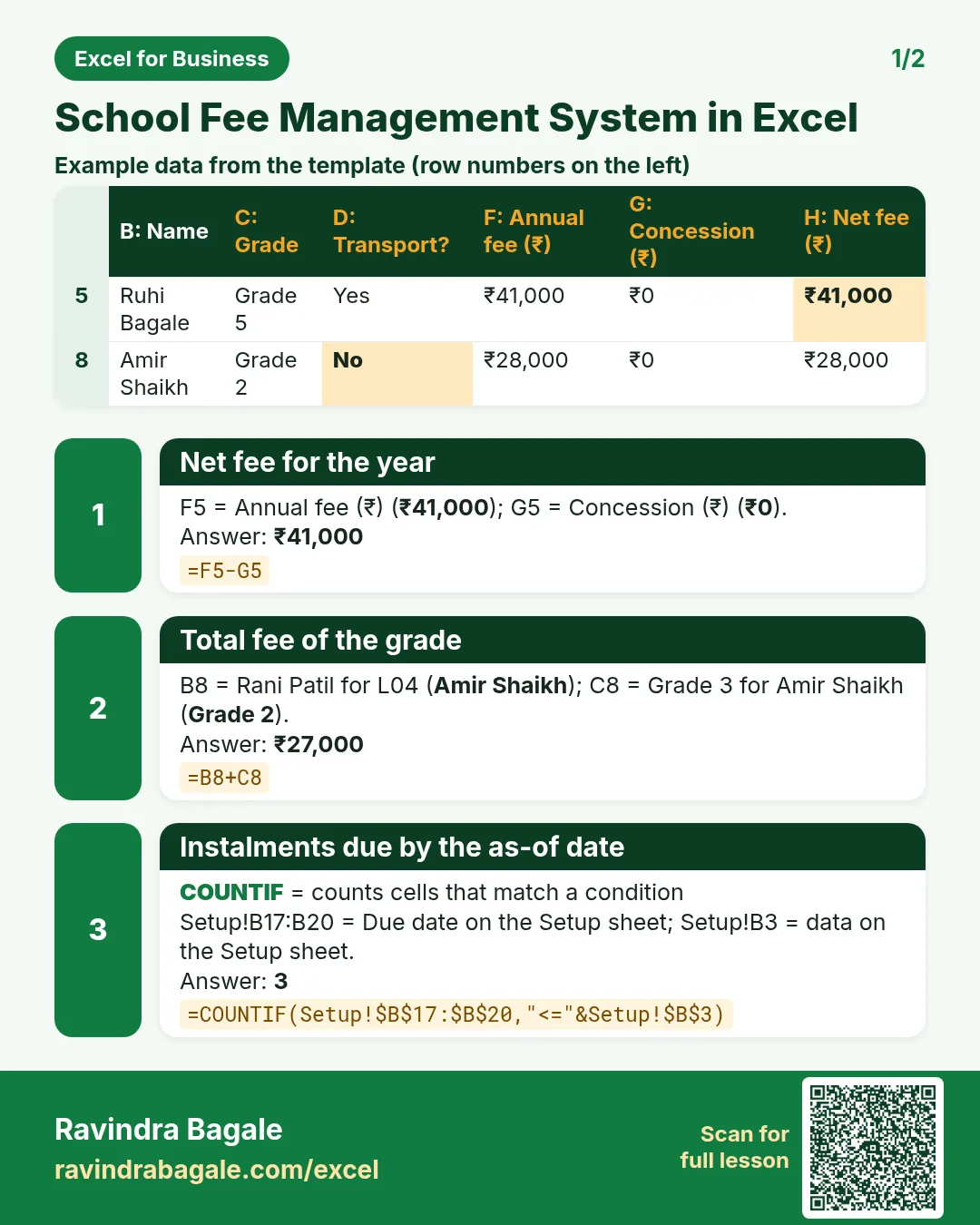


More cards: Ravi Sir's Cards.
6. Frequently asked questions
How do I calculate fees due till date in Excel?
Count the instalment dates that have passed with =COUNTIF(due_dates,"<="&as_of) and multiply the net fee by that share: =ROUND(D6*$B$3/4,0).
How do I find learners with overdue fees?
Overdue = MAX(0, due till date − paid). Filter or colour rows where it is above 0; the Report counts them with COUNTIFS.
Can I print a fee receipt from Excel?
Yes. Type the receipt number on the Fee receipt sheet; XLOOKUP fills the details and the print area is set to A1:D17.
How do I add transport only for some learners?
Add a Yes/No column and +IF(D5="Yes",Setup!$B$14,0) in the fee formula.
What about a new academic year?
Copy the file, change the due dates and as-of date in Setup, clear Receipts and update grades on Learners.
7. Quick quiz
Ten questions on this page. Sign in to save your score.
Loading practice tasks...
- Total marks (Easy): Add up Marks in D2:D11. (sheet "Data")
- Average fees paid (Easy): Average of E2:E11, rounded to 2 decimals. (sheet "Data")
- Rows in A (Easy): How many rows have Section "A"? (sheet "Data")
- Largest marks (Easy): The largest value in D2:D11. (sheet "Data")
- Days taken (Easy): C2 minus B2. (sheet "Dates")
- Start year (Easy): Year of B3. (sheet "Dates")
- Due month (Easy): Month number of C3. (sheet "Dates")
- Earliest start (Easy): Earliest date in B2:B9 (as a date number). (sheet "Dates")
- Marks for A (Medium): Total of D2:D11 where B is "A". (sheet "Data")
- A in Chennai (Medium): Total of D2:D11 where B is "A" and C is "Chennai". (sheet "Data")
- Working days (Medium): Working days from B2 to C2. (sheet "Dates")
- Weekday of due (Medium): Weekday number of C4 (Sunday = 1). (sheet "Dates")