19. Keyboard Shortcuts and Function Cheat Sheet
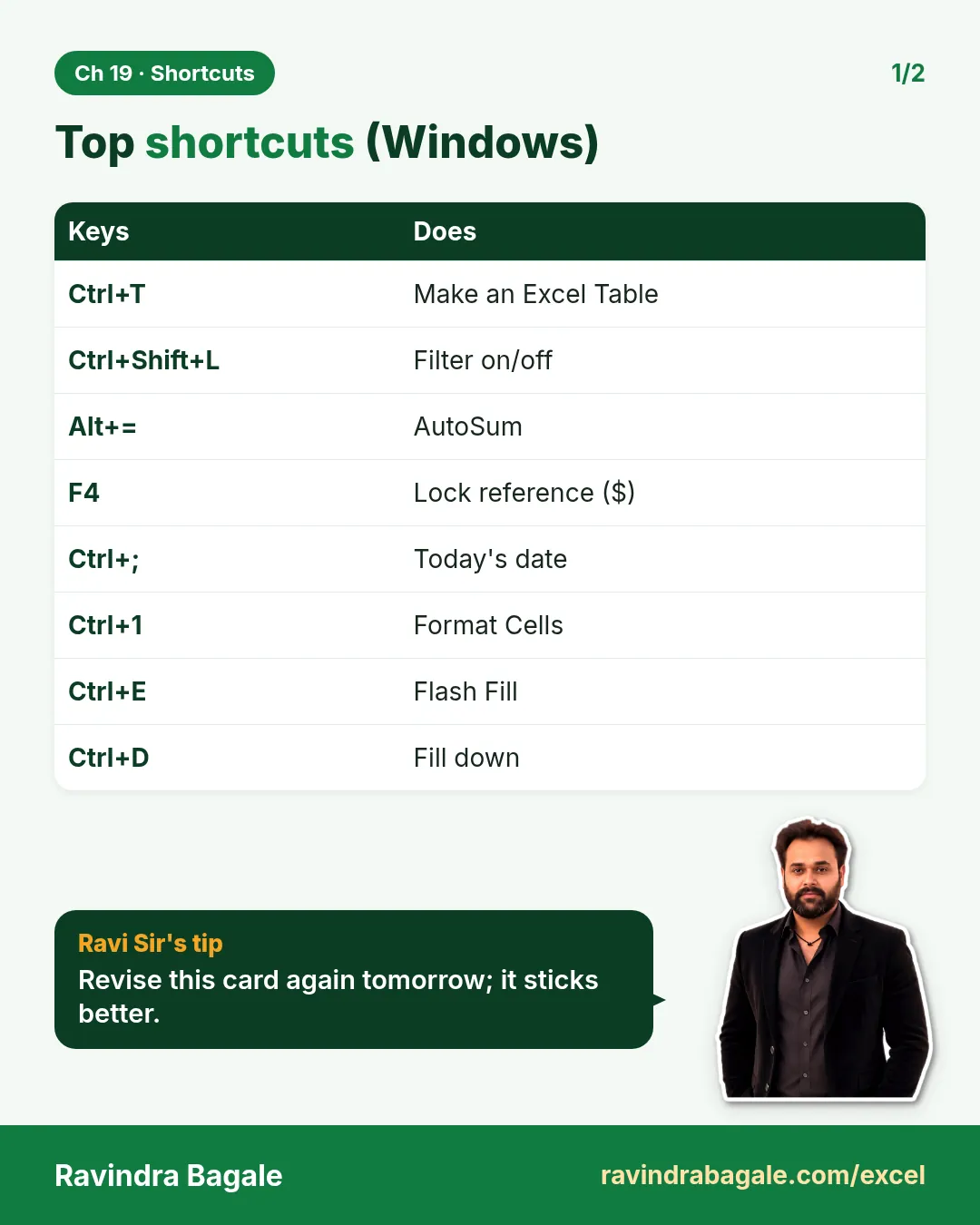
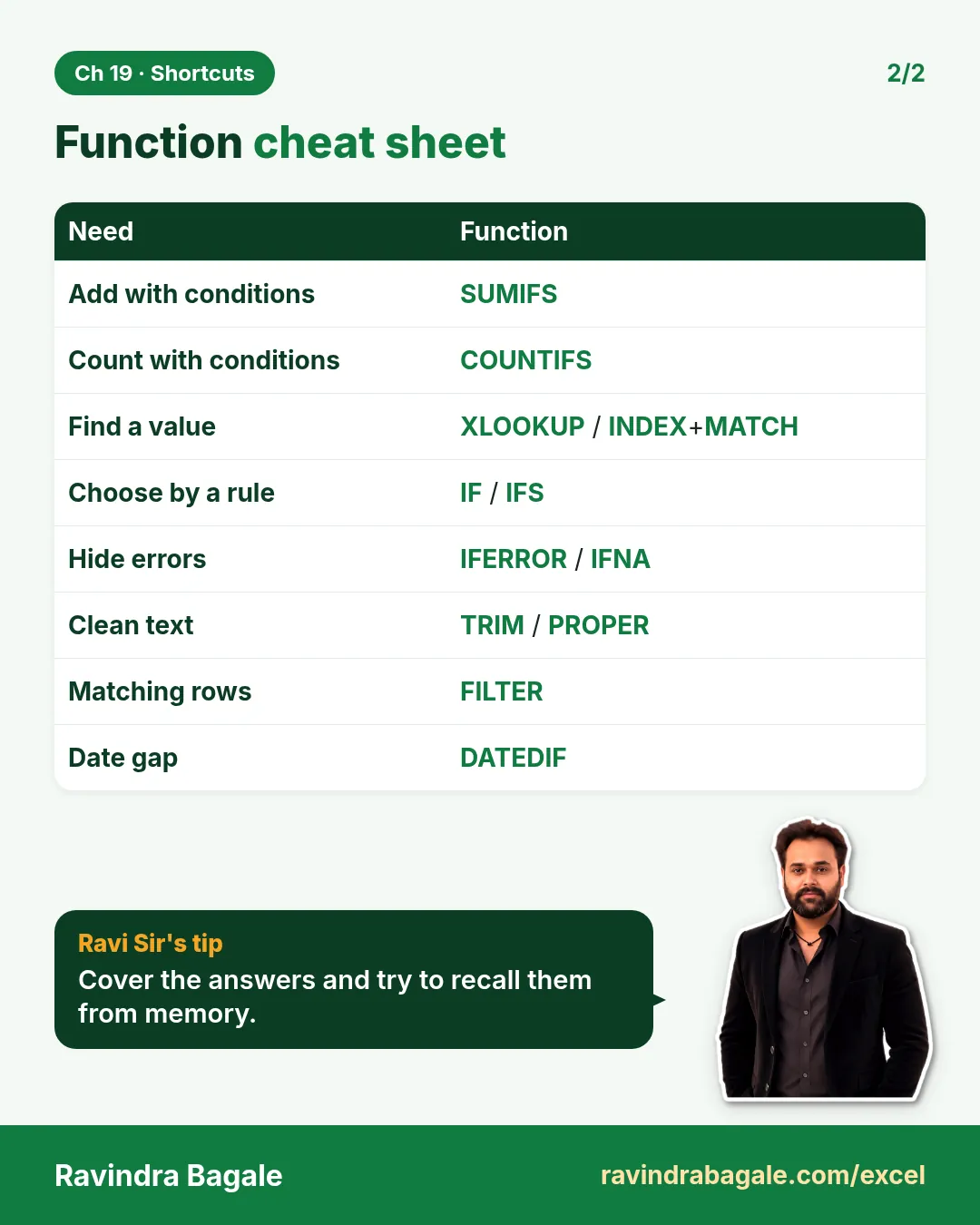
Friends, there is a big speed difference between someone who works with the mouse and someone who works with the keyboard. This module puts the important Windows Excel shortcuts and all the important functions in one place. Use 3–4 new shortcuts every day – in one month your hands will move on their own.
मित्रांनो, mouse ने काम करणारा आणि keyboard ने काम करणारा – दोघांच्या speed मध्ये खूप फरक असतो. या module मध्ये Windows Excel चे महत्त्वाचे shortcuts आणि सगळे महत्त्वाचे functions एकाच जागी दिलेत. रोज 3–4 नवीन shortcuts वापरा – एका महिन्यात हात आपोआप चालतील.
दोस्तों, mouse से काम करने वाले और keyboard से काम करने वाले – दोनों की speed में बहुत फ़र्क होता है. इस module में Windows Excel के ज़रूरी shortcuts और सारे ज़रूरी functions एक ही जगह दिए हैं. रोज़ 3–4 नए shortcuts इस्तेमाल कीजिए – एक महीने में हाथ अपने-आप चलेंगे.
Live story: Saving ten minutes a day
Suppose Shahrukh builds the daily Blinkit sheet with the mouse: right-click, Copy, scroll, right-click, Paste Values – about ten extra minutes every day. Ctrl + Shift + Down Arrow, Ctrl + T and Alt + = do the same work in seconds. This chapter lists the Windows shortcuts and a one-page function cheat sheet to keep next to you.
All numbers in this story are fictional practice data.
Live story: रोजची दहा मिनिटं वाचवणं
समजा Shahrukh रोजची Blinkit sheet mouse ने बनवतो: right-click, Copy, scroll, right-click, Paste Values – रोज साधारण दहा मिनिटं जास्त. Ctrl + Shift + Down Arrow, Ctrl + T आणि Alt + = तेच काम काही सेकंदात करतात. हा chapter Windows shortcuts आणि शेजारी ठेवायला एका page ची function cheat sheet देतो.
या story मधले सगळे आकडे काल्पनिक practice data आहेत.
Live story: रोज़ के दस मिनट बचाना
मान लीजिए Shahrukh रोज़ की Blinkit sheet mouse से बनाता है: right-click, Copy, scroll, right-click, Paste Values – रोज़ लगभग दस मिनट ज़्यादा. Ctrl + Shift + Down Arrow, Ctrl + T और Alt + = वही काम कुछ सेकंड में करते हैं. यह chapter Windows shortcuts और पास रखने के लिए एक page की function cheat sheet देता है.
इस story के सारे आँकड़े काल्पनिक practice data हैं.
Full shortcut chapter. This page is a quick cheat sheet for Excel for Windows. For a much larger set of shortcuts in categorised tables for both Windows and Mac, checked against Microsoft's official keyboard shortcut pages, see Module 25: All Excel Keyboard Shortcuts (Windows and Mac). For 32 small time-savers, see Module 26: Excel Tricks Every Analyst Should Know.
Concepts in this chapter
The chapter recap is at the end of the last concept page.
Quick revision cards
Quick revision
Revise this chapter in two minutes. Save the cards on your phone or download them as PNG files. All names and numbers are made up for practice.
झटपट उजळणी
हा chapter दोन मिनिटांत revise करा. Cards phone वर save करा किंवा PNG म्हणून download करा. सगळी नावं आणि आकडे सरावासाठी काल्पनिक आहेत.
झटपट दोहराई
यह chapter दो मिनट में revise करें. Cards phone पर save करें या PNG के रूप में download करें. सभी नाम और आंकड़े अभ्यास के लिए काल्पनिक हैं.
More cards for every chapter: Ravi Sir's Cards.