Screen Time Tracker in Excel: Daily Leisure Limit, Weekday vs Weekend and Stacked Chart
Ravina in Solapur set herself a limit of 3 hours of leisure screen time a day. Her phone shows a daily total, but it mixes work calls and learning videos with social media and games. Copying the category minutes into Excel each night separates the two, and the weekly picture is clear: weekdays are fine, weekends are not.
What you'll learn on this page
- Minutes per category per day
- A leisure total that leaves out work and learning
- An Over / OK flag against your limit
- Weekday vs weekend averages
- Share of each category
- Minutes above the limit with SUMPRODUCT, and a stacked column chart
Download the template: screen-time-tracker-template.xlsx: example data with real formulas. Yellow cells are inputs you can type over; green cells hold formulas; blue rows are headers and totals. Replace the example data with your own and everything recalculates.
Made-up data: every name, amount, shop and date on this page is made up for practice. Cities are used only to make the examples feel real.
1. The example
Ravina's week from 5 to 11 October 2026 (made-up minutes; limit 180 a day):
| Value | |
|---|---|
| Average leisure per day | 187 min |
| Weekday average | 139 min |
| Weekend average | 308 min |
| Days over the limit | 2 (Sat, Sun) |
| Heaviest day | Sat (330 min) |
| Biggest category | Social (580 min, 44.3%) |
| Leisure hours this week | 21.8 |
| Minutes above the limit | 255 |
The weekly average (187) is just over the limit, but weekdays are well under. Fixing two weekend days would bring the whole week under.
Figure 1. Category minutes per day; leisure = social + video + games; IF compares with the limit; weekday and weekend averages and SUMPRODUCT show where and how much the limit is broken.
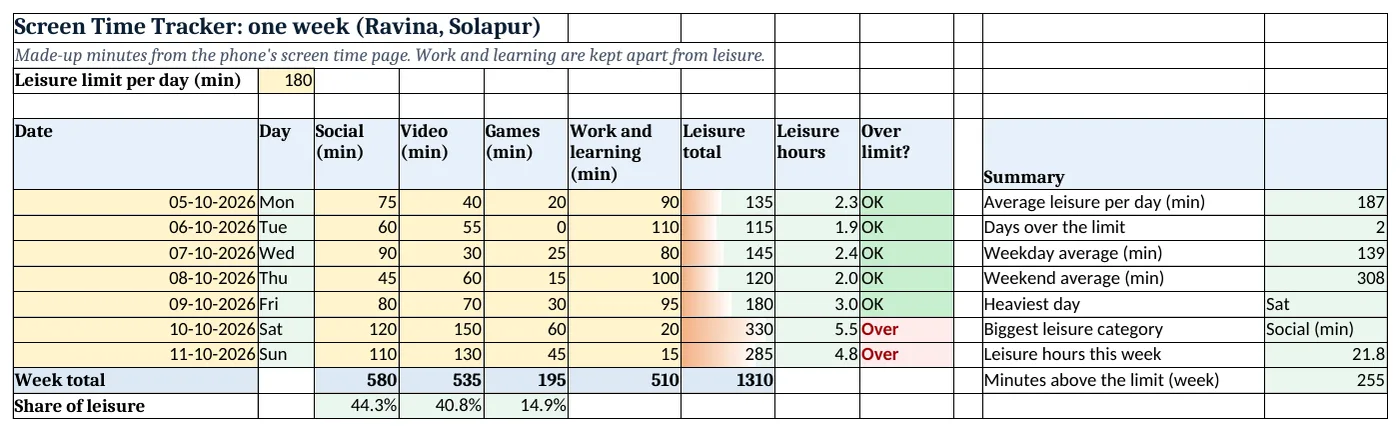
Figure 2. The template sheet, recalculated with its example data. Download it above and replace the yellow cells with your own numbers.
2. Build it step by step
Step 1. Limit and categories
- In B3 type your daily leisure limit in minutes (180).
- In A5:I5 type Date, Day, Social, Video, Games, Work and learning, Leisure total, Leisure hours, Over limit?.
Step 2. Leisure total
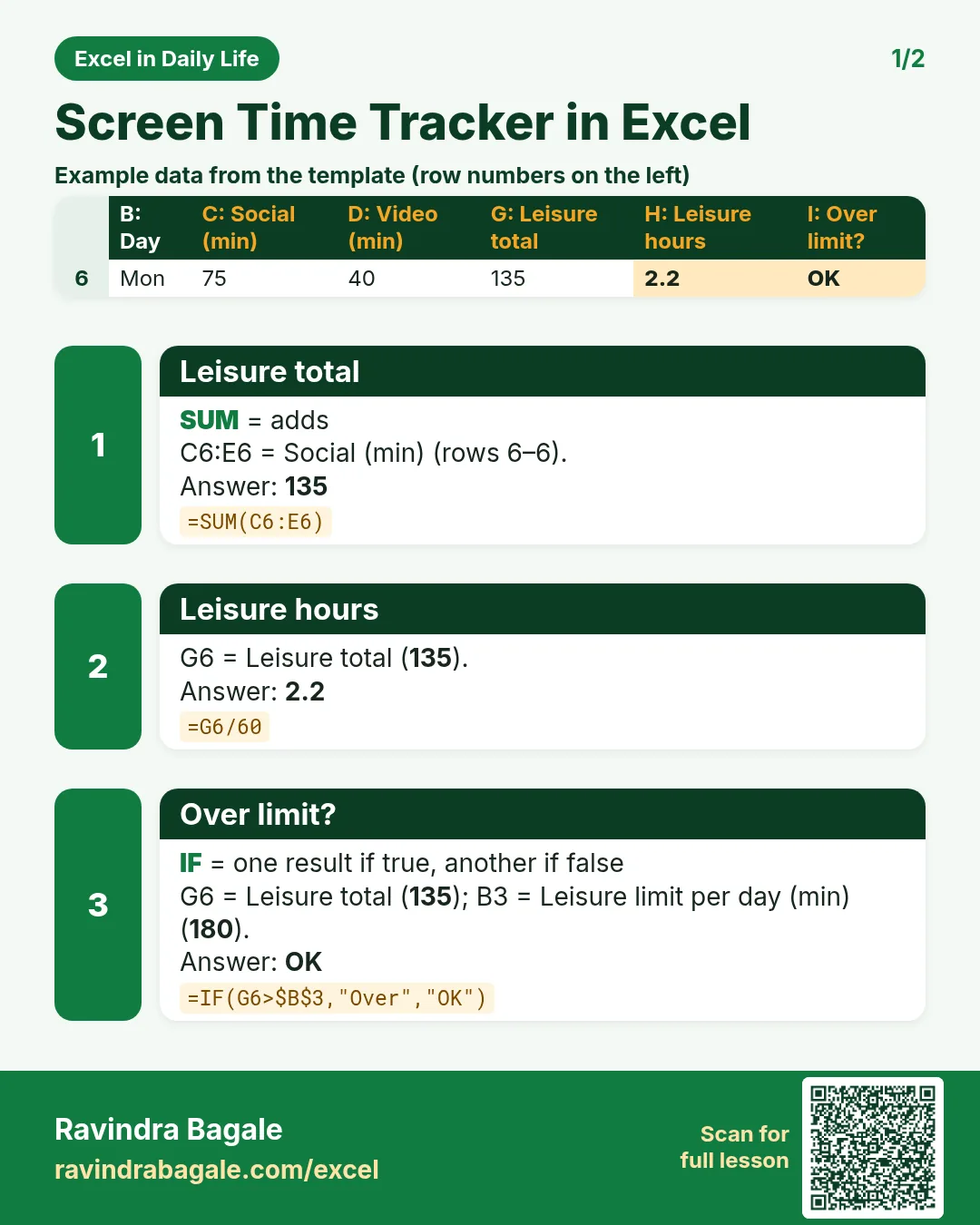
- In G6 type
=SUM(C6:E6): only social, video and games. Work and learning (column F) is tracked but not counted. - In H6 type
=G6/60for hours and in I6=IF(G6>$B$3,"Over","OK"). Copy down.
Step 3. Week totals and shares
- In C13 type
=SUM(C6:C12)and copy to G13. - In C14 type
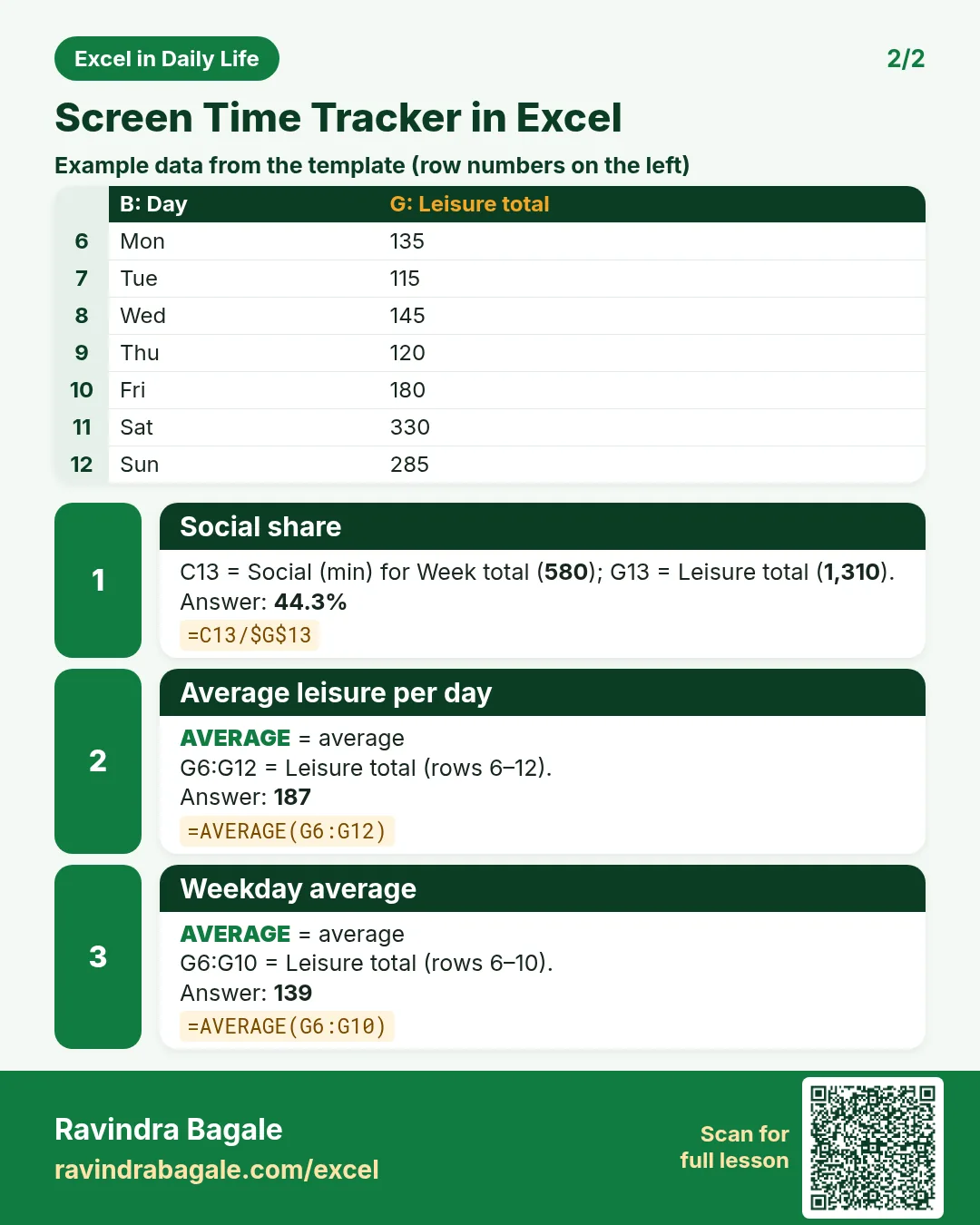
=C13/$G$13as %: Social is 44.3% of leisure.
Step 4. Weekday vs weekend
- In L8 type
=AVERAGE(G6:G10)(Mon-Fri) and in L9=AVERAGE(G11:G12)(Sat-Sun). - In L7 type
=COUNTIF(I6:I12,"Over"): 2 days.
Step 5. Heaviest day and category
- In L10 type
=INDEX(B6:B12,MATCH(MAX(G6:G12),G6:G12,0)): Sat. - In L11 type
=INDEX(C5:E5,MATCH(MAX(C13:E13),C13:E13,0)): INDEX and MATCH work across a row too (INDEX and MATCH). - In L13 type
=SUMPRODUCT((G6:G12>B3)*(G6:G12-B3)): 255 minutes above the limit (SUMPRODUCT).
Step 6. Colours and chart
- Select I6:I12 > Highlight Cells Rules > Equal To "Over" red, "OK" green (highlight rules).
- Select B5:E12 > Insert > Stacked Column to see each day's mix (column charts).
Ravindra Bagale's Tip
Pick one change for the weekend only, like no video after 10 pm. One rule you keep beats five you forget.
Ravindra Bagale's Tip – मराठी
फक्त weekend साठी एकच बदल ठरवा, जसं रात्री 10 नंतर video नाही. पाळलेला एक नियम विसरलेल्या पाच नियमांपेक्षा बरा.
Ravindra Bagale's Tip – हिंदी
सिर्फ़ weekend के लिए एक बदलाव तय करो, जैसे रात 10 के बाद video नहीं. निभाया एक नियम भूले पांच नियमों से बेहतर.
3. Formulas used
| Cell | Formula | What it does |
|---|---|---|
| G6 | =SUM(C6:E6) |
Leisure total |
| H6 | =G6/60 |
Leisure hours |
| I6 | =IF(G6>$B$3,"Over","OK") |
Over limit? |
| C14 | =C13/$G$13 |
Social share |
| L6 | =AVERAGE(G6:G12) |
Average leisure per day |
| L8 | =AVERAGE(G6:G10) |
Weekday average |
| L9 | =AVERAGE(G11:G12) |
Weekend average |
| L11 | =INDEX(C5:E5,MATCH(MAX(C13:E13),C13:E13,0)) |
Biggest leisure category |
| L13 | =SUMPRODUCT((G6:G12>B3)*(G6:G12-B3)) |
Minutes above the limit |
Every formula above is written in the template, so you can click a cell and see it in the formula bar. All values on this page were recalculated in the file.
4. Common mistakes
- Counting work time as leisure. A long work call is not leisure. Keep work and learning in its own column.
- Typing hours in some cells and minutes in others. Use minutes everywhere; convert to hours only in the result.
- Using >= instead of >. With >=, a day of exactly 180 minutes counts as Over. Choose what you mean.
- Looking only at the weekly average. 187 looks almost fine; the weekday/weekend split shows where the problem is.
- Forgetting a day. A blank day lowers the average. Type every day, even a low one.
Ravindra Bagale's Tip
Look at the sheet every Sunday night and set next week's limit from this week's average.
Ravindra Bagale's Tip – मराठी
दर रविवारी रात्री sheet बघा आणि या आठवड्याच्या average वरून पुढच्या आठवड्याचं limit ठरवा.
Ravindra Bagale's Tip – हिंदी
हर रविवार रात sheet देखो और इस हफ्ते के average से अगले हफ्ते का limit तय करो.
5. More real examples
Example 1: Ruhi's tablet time. Use the same sheet with a lower limit and only the categories that matter for her.
Example 2: Work-from-home focus. Track meetings, focused work and breaks in minutes and see how much focused time you get.
Example 3: TV hours at home. Columns for news, shows and sports, with one limit for the whole home.
Quick revision cards
Quick revision
Each card shows formulas from this page, each with an example and its answer from the template. Scan the QR code on a card to open this lesson. All names and numbers are made up for practice.
झटपट उजळणी
प्रत्येक card वर या page मधले formulas, त्यांचं example आणि template मधलं उत्तर आहे. Card वरचा QR code scan केला की हा lesson उघडतो. सगळी नावं आणि आकडे सरावासाठी काल्पनिक आहेत.
झटपट दोहराई
हर card पर इस page के formulas, उनका example और template का उत्तर है. Card का QR code scan करें तो यह lesson खुलेगा. सभी नाम और आंकड़े अभ्यास के लिए काल्पनिक हैं.


More cards: Ravi Sir's Cards.
6. Frequently asked questions
How do I track screen time in Excel?
Copy each category's minutes from your phone's screen time page into one row per day and SUM the leisure columns.
How do I flag days over a limit?
=IF(G6>$B$3,"Over","OK") with the limit in B3.
How do I compare weekdays and weekends?
Average the weekday rows and the weekend rows separately.
How do I add only the minutes above the limit?
=SUMPRODUCT((G6:G12>B3)*(G6:G12-B3)) adds the extra minutes only on days over the limit.
Which chart shows the mix best?
A stacked column chart shows each day's total and how it splits by category.
7. Quick quiz
Ten questions on this page. Sign in to save your score.