23. Formulas Across Sheets and Workbooks
Friends, real Excel work is never one sheet. Data sits on one sheet, the report on another, and last month in another file. This module teaches you to connect them safely: sheet references, Tables across sheets, 3D sums, INDIRECT, links between files and Consolidate.
मित्रांनो, खरं Excel काम कधीच एका sheet वर नसतं. Data एका sheet वर, report दुसऱ्या sheet वर, आणि मागचा महिना दुसऱ्या file मध्ये. हा module त्यांना सुरक्षितपणे जोडायला शिकवतो: sheet references, sheets पलीकडच्या Tables, 3D sums, INDIRECT, files मधल्या links आणि Consolidate.
दोस्तों, असली Excel काम कभी एक sheet पर नहीं होता. Data एक sheet पर, report दूसरी sheet पर, और पिछला महीना दूसरी file में. यह module उन्हें सुरक्षित तरीके से जोड़ना सिखाता है: sheet references, sheets के पार Tables, 3D sums, INDIRECT, files के बीच links और Consolidate.
What you will learn in this module
- Reference cells, ranges and Tables on other sheets
- Add the same cell across many sheets with a 3D reference
- Switch a report between sheets with INDIRECT, and know its pitfalls
- Link to other workbooks, then change, refresh, break and repair those links
- Combine sheets with different layouts using Data › Consolidate
Live story: Twelve sheets and one question
Suppose Ravindra Bagale asks for the first-quarter total of four Blinkit outlets. The data is in three monthly sheets, a separate orders sheet and three files from city leads. Copy-paste would take an hour and break next month. A few cross-sheet formulas take five minutes and update themselves.
All numbers in this story are fictional practice data.
Live story: बारा sheets आणि एक प्रश्न
समजा Ravindra Bagale चार Blinkit outlets चा पहिल्या quarter चा total मागतात. Data तीन monthly sheets, एक वेगळी orders sheet आणि city leads च्या तीन files मध्ये आहे. Copy-paste ला एक तास लागेल आणि पुढच्या महिन्यात तुटेल. काही cross-sheet formulas ना पाच मिनिटं लागतात आणि ते स्वतः update होतात.
या story मधले सगळे आकडे काल्पनिक practice data आहेत.
Live story: बारह sheets और एक सवाल
मान लीजिए Ravindra Bagale चार Blinkit outlets का पहले quarter का total माँगते हैं. Data तीन monthly sheets, एक अलग orders sheet और city leads की तीन files में है. Copy-paste में एक घंटा लगेगा और अगले महीने टूट जाएगा. कुछ cross-sheet formulas में पाँच मिनट लगते हैं और वे खुद update होते हैं.
इस story के सारे आँकड़े काल्पनिक practice data हैं.
Fictional practice data
Every name, number and company detail in this module is made up for class. It is not the data of Blinkit, Amazon or any real firm.
Concepts in this chapter
- 23.1Referencing Another Sheet
- 23.2Referencing a Normal Range on Another Sheet
- 23.3Referencing an Excel Table on Another Sheet
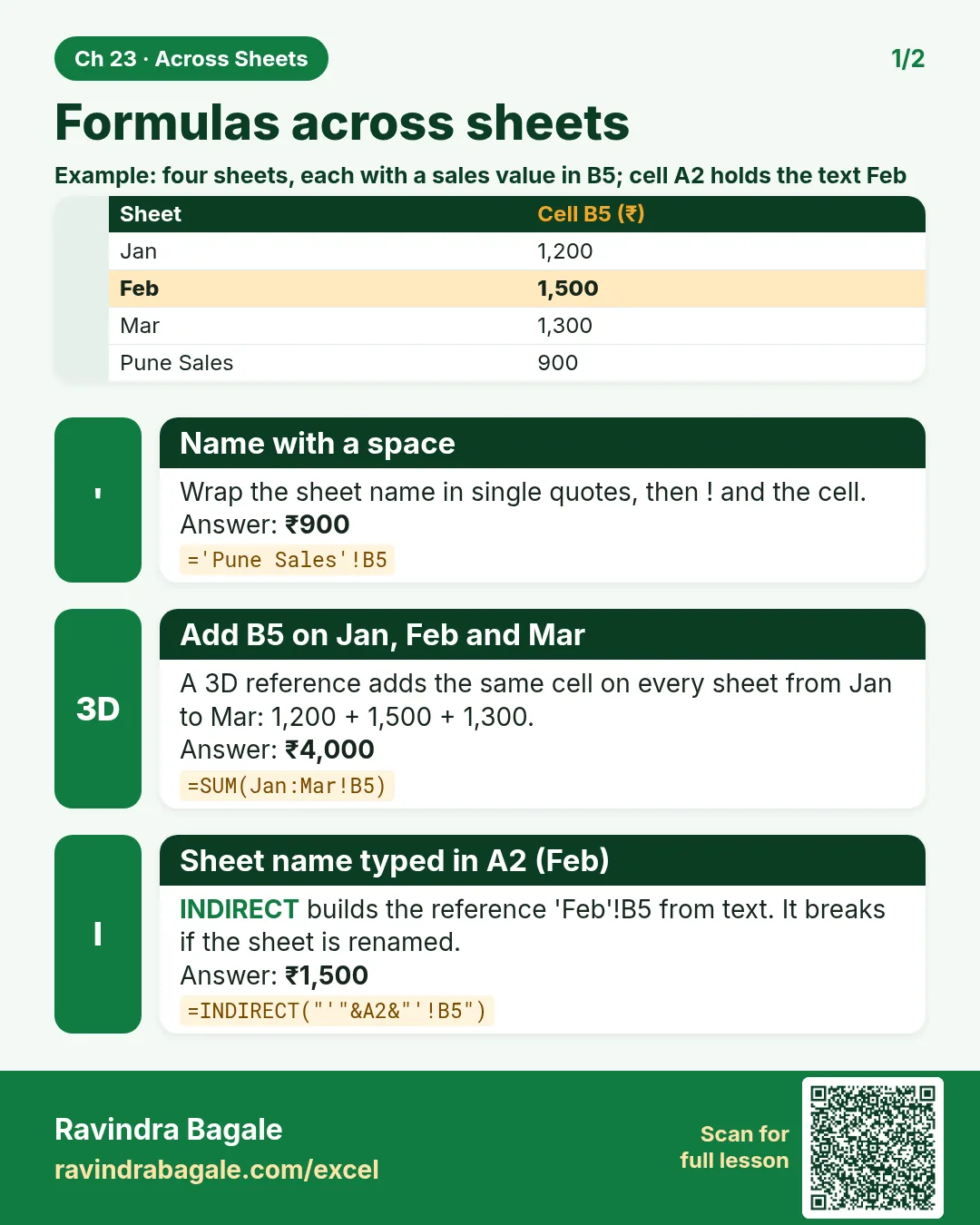
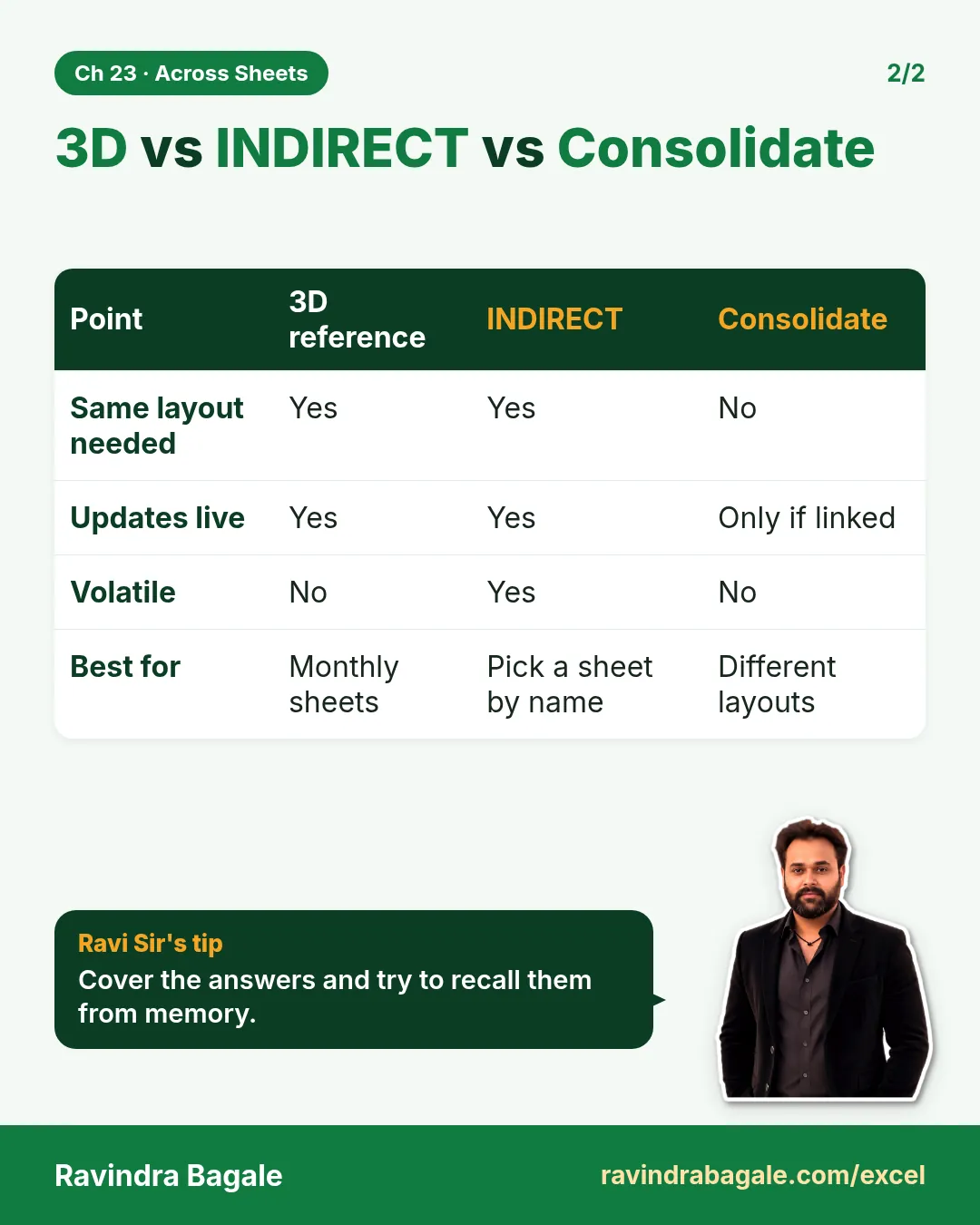
- 23.43D References: One Formula Across Many Sheets
- 23.5INDIRECT for Sheet Names (and Its Pitfalls)
- 23.6Links to Another Workbook (External References)
- 23.7Workbook Links: Change Source, Break Links and Fix Broken Links
- 23.8Consolidate: Combine Sheets with Different Layouts
Review and practice
The chapter recap is at the end of the last concept page.
Quick revision cards
Quick revision
Revise this chapter in two minutes. Save the cards on your phone or download them as PNG files. All names and numbers are made up for practice.
झटपट उजळणी
हा chapter दोन मिनिटांत revise करा. Cards phone वर save करा किंवा PNG म्हणून download करा. सगळी नावं आणि आकडे सरावासाठी काल्पनिक आहेत.
झटपट दोहराई
यह chapter दो मिनट में revise करें. Cards phone पर save करें या PNG के रूप में download करें. सभी नाम और आंकड़े अभ्यास के लिए काल्पनिक हैं.

More cards for every chapter: Ravi Sir's Cards.