Travel Agency Management System in Excel: Tour Packages, Bookings, Payments, Balance Due and Dashboard
Ravina Holidays in Nashik sells Goa, Kerala, Kashmir, Rajasthan and Konkan packages. Ravina tracked bookings in a diary and found out a group had not paid the balance only a few days before departure. This page builds a 7-sheet Excel system: packages are priced once, each booking works out its price, GST, paid amount and days to travel, and the status tells you whom to call for the balance.
What you'll learn on this page
- Keep packages with cost and price per adult on Setup
- Price a booking for adults and children with a child share
- Add GST and collect payments by booking ID with SUMIFS
- Count days to travel and flag Collect balance
- Report bookings, travellers and margin per package
- Print an invoice with the balance due date
- Build KPI cards and charts for sales and margin
Download the template: travel-agency-management-system-template.xlsx: a 7-sheet system with example data and real formulas (Read me, Setup, Bookings, Payments, Report, Invoice, Dashboard). Yellow cells are inputs you can type over; green cells hold formulas; blue rows are headers and totals. Replace the example data with your own and every report and the dashboard recalculate.
Made-up data: every name, amount, business and date on this page is made up for practice. Cities are used only to make the examples feel real.
1. The business story
Ravina Holidays, Nashik, as of 17 October 2026 (made-up data). Children pay 50% of the adult price; the balance is due 15 days before travel; GST 5% (the rate generally used for tour operator packages without input tax credit; confirm with your accountant).
| Question | Where the system answers it |
|---|---|
| Whom should I call today? | Status Collect balance: 4 bookings with ₹1,21,200 due |
| What does the Kerala family owe? | Invoice TR-012: ₹77,175, ₹30,000 paid, ₹47,175 due by 17 October |
| Which package earns most? | Report: Kashmir 6 nights, ₹45,500 margin |
| How big is the season? | 12 bookings, 42 travellers, ₹7,36,000 before GST |
The margin across all packages is ₹1,73,000 (23.5%). For friends splitting a trip, see the trip budget split.
Figure 1. Setup holds packages; Bookings and Payments are the entry sheets; Report, Invoice and Dashboard read from them.
2. Build it sheet by sheet
Step 1. Setup: packages and rules
- B4 GST on tour package, B5 days before travel to collect the balance (15), B6 child price as a share of adult (50%).
- Packages in A9:D13: Package, Nights, Cost per adult, Price per adult; E9 margin
=D9-C9.
Step 2. Bookings: price and payments
- A5
="TR-"&TEXT(ROW()-4,"000"). Type customer, package, adults, children and travel date. - H5 price:
=ROUND((E5+F5*Setup!$B$6)*XLOOKUP(D5,Setup!$A$9:$A$13,Setup!$D$9:$D$13,0),0). Two adults and two children pay for 3 adults. - I5 cost the same way from column C, J5 GST
=ROUND(H5*Setup!$B$4,0), K5 total. - L5 paid:
=SUMIFS(Payments!$C$5:$C$2000,Payments!$B$5:$B$2000,A5)(SUMIFS) and M5 balance=K5-L5.
Step 3. Bookings: days to travel and status
- N5 days to travel
=G5-Setup!$B$3(dates). - O5:
=IF(G5<Setup!$B$3,"Completed",IF(M5<=0,"Fully paid",IF(N5<=Setup!$B$5,"Collect balance","Advance paid")))(nested IF). - Colour Collect balance red and Completed grey with conditional formatting.
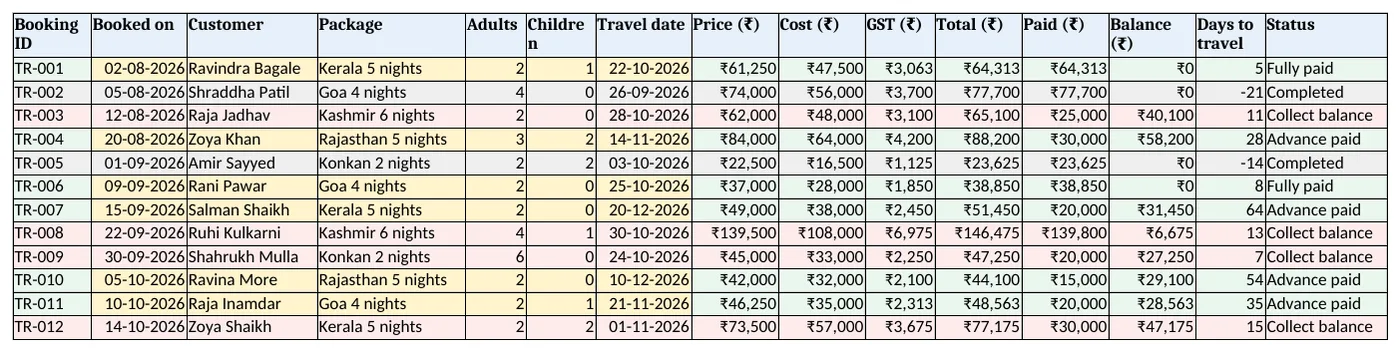
Figure 2. Bookings: price, cost, GST, paid, balance, days to travel and status
Step 4. Report and Invoice
- Report B5 bookings with COUNTIF, C5 travellers (adults + children), D5 sales, E5 cost, F5 margin and G5 margin %.
- Rows 13 to 16 count bookings and balance by status.
- Invoice: type a booking ID in B4; rows 6 to 15 look up the details and B17 the balance due date
=B10-Setup!B5. Set the print area.
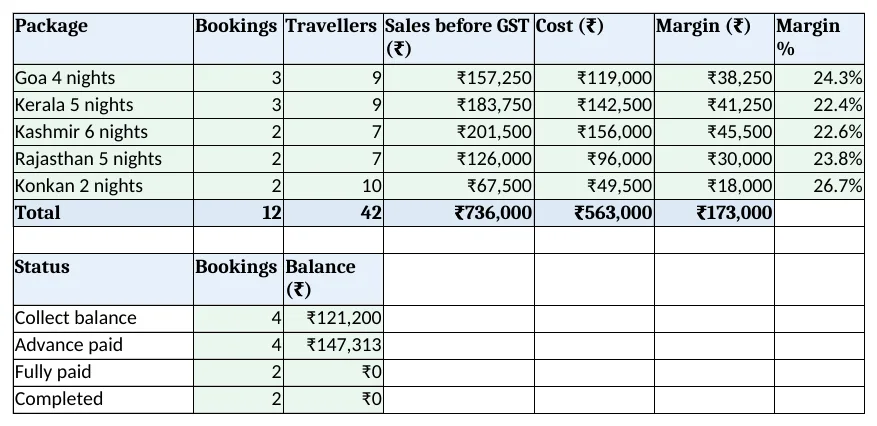
Figure 3. Report: bookings, travellers, sales and margin by package, and balance by status
Step 5. Dashboard
- KPI cards: bookings, travellers, sales before GST, margin, balance to collect and collect-now count.
- Charts: margin by package and travellers by package.
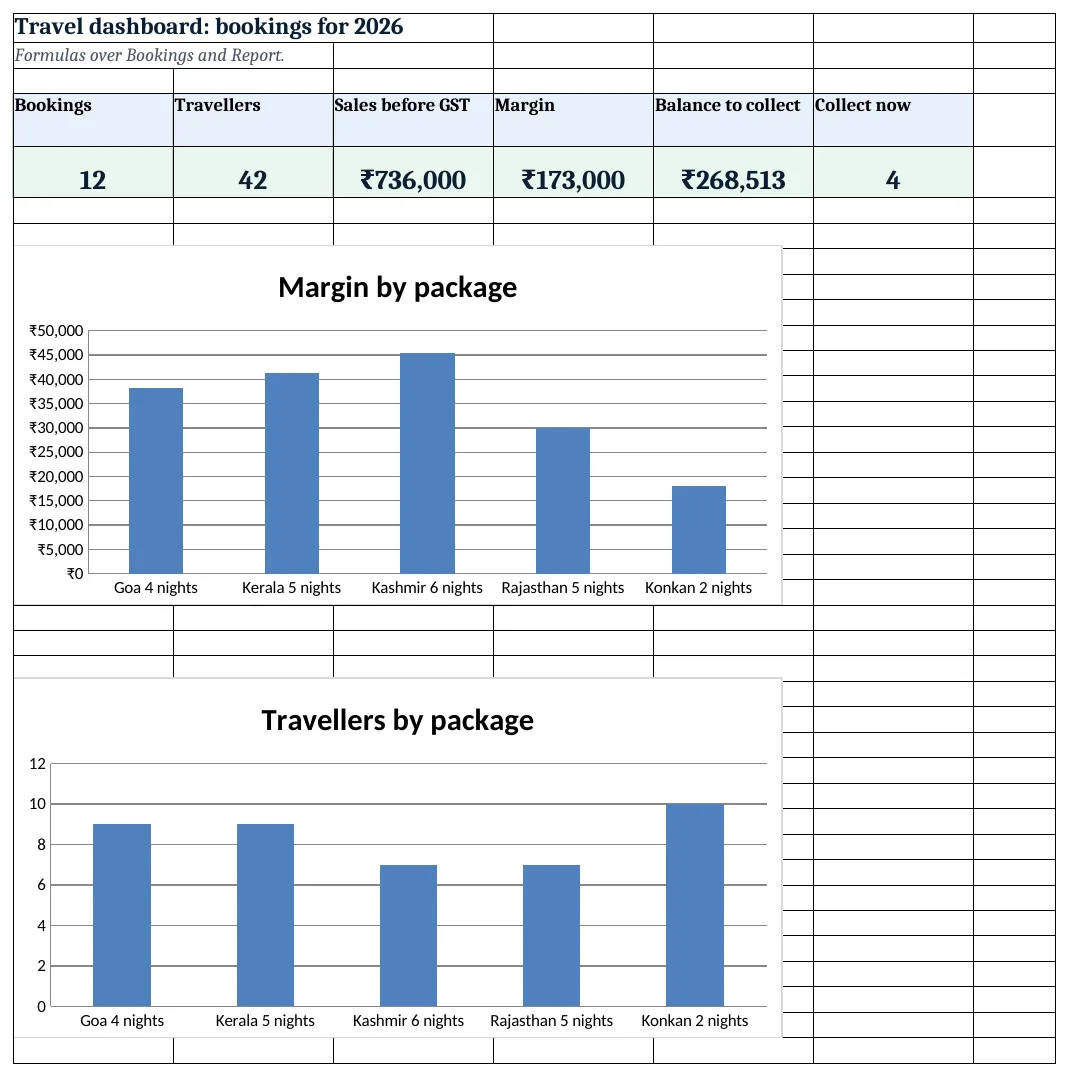
Figure 4. Travel dashboard: bookings, travellers, sales, margin, balance and collect-now count
Ravindra Bagale's Tip
Call the Collect balance list every morning. A balance chased 15 days early is easy; one chased 2 days early is a fight.
Ravindra Bagale's Tip – मराठी
Collect balance यादीला रोज सकाळी फोन करा. 15 दिवस आधी मागितलेली रक्कम सहज मिळते; 2 दिवस आधी मागितली की वाद होतो.
Ravindra Bagale's Tip – हिंदी
Collect balance सूची को हर सुबह फोन करें. 15 दिन पहले मांगी रकम आसानी से मिलती है; 2 दिन पहले मांगी तो बहस होती है.
3. Formulas used
| Cell | Formula | What it does |
|---|---|---|
| Setup!E9 | =D9-C9 |
Margin per adult |
| Bookings!A5 | ="TR-"&TEXT(ROW()-4,"000") |
Booking ID |
| Bookings!H5 | =ROUND((E5+F5*Setup!$B$6)*XLOOKUP(D5,Setup!$A$9:$A$13,Setup!$D$9:$D$13,0),0) |
Price for adults and children |
| Bookings!I5 | =(E5+F5*Setup!$B$6)*XLOOKUP(D5,Setup!$A$9:$A$13,Setup!$C$9:$C$13,0) |
Cost of the booking |
| Bookings!J5 | =ROUND(H5*Setup!$B$4,0) |
GST |
| Bookings!L5 | =SUMIFS(Payments!$C$5:$C$2000,Payments!$B$5:$B$2000,A5) |
Paid so far |
| Bookings!M5 | =K5-L5 |
Balance |
| Bookings!N5 | =G5-Setup!$B$3 |
Days to travel |
| Bookings!O5 | =IF(G5<Setup!$B$3,"Completed",IF(M5<=0,"Fully paid",IF(N5<=Setup!$B$5,"Collect balance","Advance paid"))) |
Booking status |
| Report!C5 | =SUMIFS(Bookings!$E$5:$E$2000,Bookings!$D$5:$D$2000,A5)+SUMIFS(Bookings!$F$5:$F$2000,Bookings!$D$5:$D$2000,A5) |
Travellers per package |
| Report!F5 | =D5-E5 |
Margin per package |
| Invoice!B6 | =XLOOKUP($B$4,Bookings!$A$5:$A$2000,Bookings!$C$5:$C$2000,"Not found") |
Customer on the invoice |
| Dashboard!E5 | =SUM(Bookings!$M$5:$M$2000) |
Balance to collect |
Every formula above is written in the template, so you can click a cell and see it in the formula bar. All values on this page were recalculated in LibreOffice with zero errors.
4. Common mistakes
- Pricing children as adults. Use the child share from Setup. Families compare quotes closely.
- Typing paid amounts on Bookings. Payments come in parts. One Payments row per receipt lets SUMIFS add them.
- Margin after GST. GST is not the agency's income. Compare price and cost before GST.
- No balance rule. Without the 15-day rule nobody calls until the day before. The status makes the call list.
- Package names typed differently. "Goa 4N" and "Goa 4 nights" are two packages to COUNTIF. Use the drop-down.
Ravindra Bagale's Tip
Update package costs when hotels change rates. An old cost on Setup makes every new booking look more profitable than it is.
Ravindra Bagale's Tip – मराठी
हॉटेलचे दर बदलले की package cost बदला. Setup वरची जुनी cost प्रत्येक booking जास्त फायद्याची दाखवते.
Ravindra Bagale's Tip – हिंदी
होटल रेट बदलें तो package cost बदलें. Setup पर पुरानी cost हर booking को ज़्यादा फायदेमंद दिखाती है.
5. More real examples
Example 1: Pilgrimage tours. Add a Seat no column for coach tours and count seats sold per departure date.
Example 2: Air ticket desk. Track service fee per ticket as the margin, with fare as cost passed through.
Example 3: Corporate offsites. Add a Company column and a company-wise outstanding report like the khata book.
Quick revision cards
Quick revision
Each card shows formulas from this page, each with an example and its answer from the template. Scan the QR code on a card to open this lesson. All names and numbers are made up for practice.
झटपट उजळणी
प्रत्येक card वर या page मधले formulas, त्यांचं example आणि template मधलं उत्तर आहे. Card वरचा QR code scan केला की हा lesson उघडतो. सगळी नावं आणि आकडे सरावासाठी काल्पनिक आहेत.
झटपट दोहराई
हर card पर इस page के formulas, उनका example और template का उत्तर है. Card का QR code scan करें तो यह lesson खुलेगा. सभी नाम और आंकड़े अभ्यास के लिए काल्पनिक हैं.
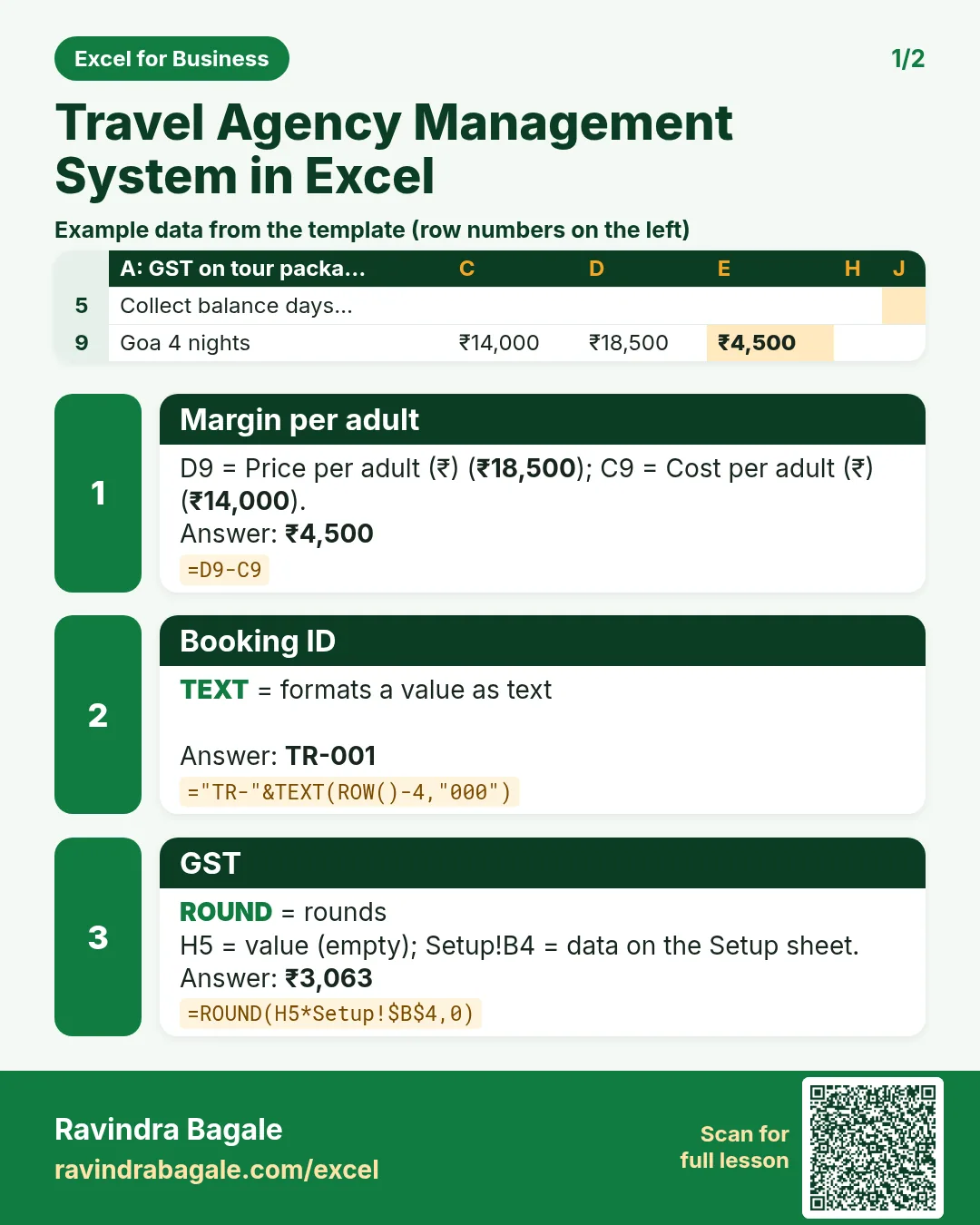

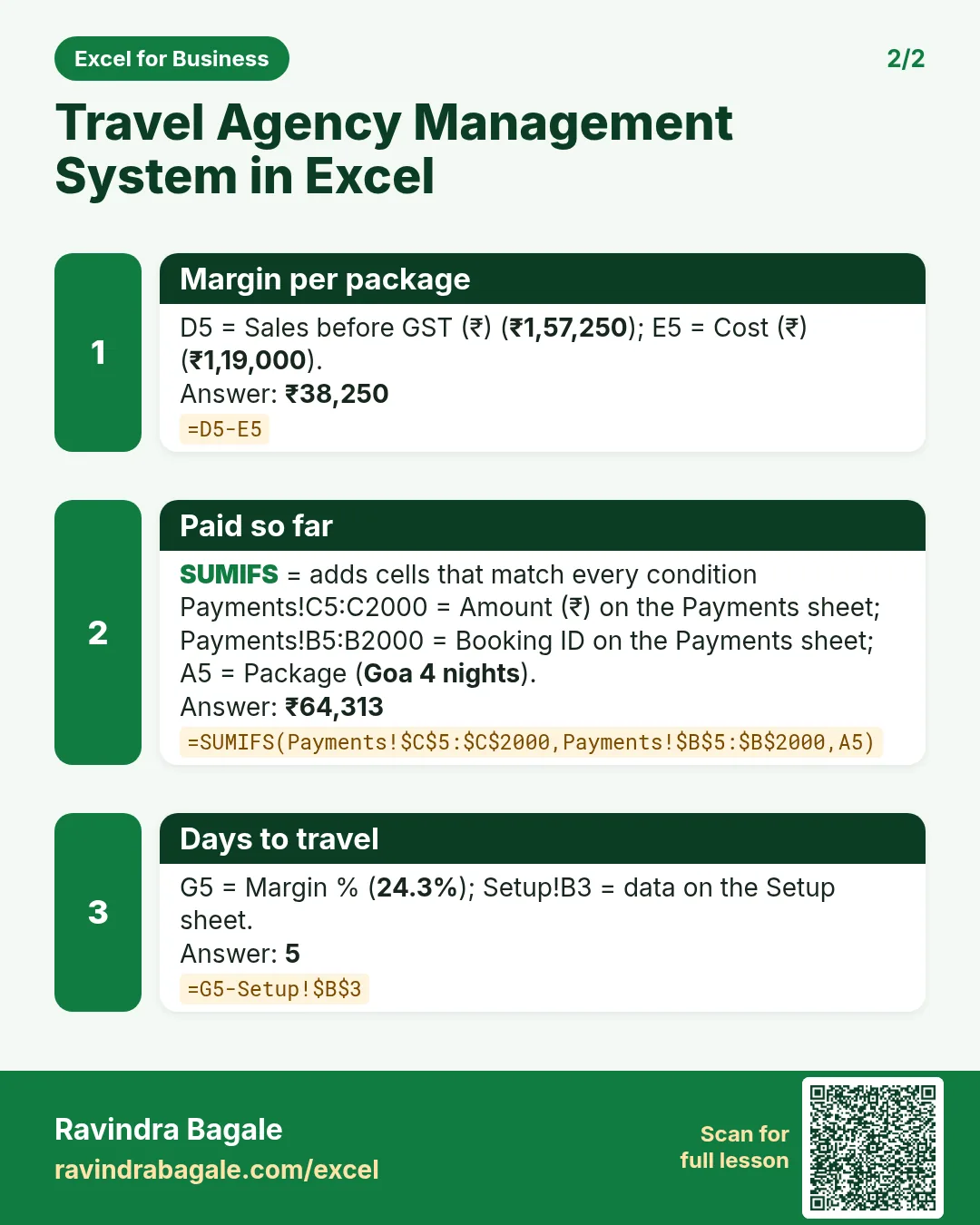

More cards: Ravi Sir's Cards.
6. Frequently asked questions
How do I price a tour for adults and children in Excel?
(adults + children × child share) × price per adult, rounded: as in Bookings H5.
How do I flag bookings whose balance is due?
Days to travel = travel date − today; show Collect balance when the balance is above 0 and days to travel ≤ 15.
What GST applies to tour packages?
Tour operator services are generally taxed at 5% without input tax credit, or 18% with it. Confirm which applies to you with your accountant.
How do I add part payments?
Record each payment with the booking ID and let SUMIFS add them in Bookings L5.
How do I find the most profitable package?
Report column F: margin by package with SUMIFS on price and cost.
7. Quick quiz
Ten questions on this page. Sign in to save your score.
Loading practice tasks...
- Total deals won (Easy): Add up Deals won in D2:D11. (sheet "Data")
- Average avg deal value (Easy): Average of E2:E11, rounded to 2 decimals. (sheet "Data")
- Rows in North (Easy): How many rows have Region "North"? (sheet "Data")
- Largest deals won (Easy): The largest value in D2:D11. (sheet "Data")
- Days taken (Easy): C2 minus B2. (sheet "Dates")
- Start year (Easy): Year of B3. (sheet "Dates")
- Due month (Easy): Month number of C3. (sheet "Dates")
- Earliest start (Easy): Earliest date in B2:B9 (as a date number). (sheet "Dates")
- Deals won for North (Medium): Total of D2:D11 where B is "North". (sheet "Data")
- North in Manchester (Medium): Total of D2:D11 where B is "North" and C is "Manchester". (sheet "Data")
- Working days (Medium): Working days from B2 to C2. (sheet "Dates")
- Weekday of due (Medium): Weekday number of C4 (Sunday = 1). (sheet "Dates")