25. All Excel Keyboard Shortcuts (Windows and Mac)
Friends, shortcuts are not tricks for showing off. They keep your hands on the data, so you work faster and make fewer selection mistakes. This module lists the shortcuts Microsoft documents for Excel, by category, with Windows and Mac side by side, and a small drill for each group.
मित्रांनो, shortcuts म्हणजे दाखवायच्या tricks नाहीत. त्यामुळे हात data वर राहतात, काम जलद होतं आणि selection च्या चुका कमी होतात. हा module Microsoft ने Excel साठी दिलेले shortcuts category प्रमाणे, Windows आणि Mac शेजारी शेजारी, आणि प्रत्येक गटासाठी छोट्या drill सह देतो.
दोस्तों, shortcuts दिखावे की tricks नहीं हैं. इनसे हाथ data पर रहते हैं, काम तेज़ होता है और selection की गलतियाँ कम होती हैं. यह module Microsoft के बताए Excel shortcuts category के हिसाब से, Windows और Mac साथ-साथ, और हर group के लिए छोटे drill के साथ देता है.
What you will learn in this module
- Move and select anywhere in a sheet without the mouse
- Enter, edit and format data with the keyboard
- Write and check formulas with AutoSum, F4 and Show Formulas
- Work with Tables, filters, charts and PivotTables from the keyboard
- Use ribbon KeyTips on Windows, the Ctrl+Shift family and the function keys
- Know the Mac equivalent of each shortcut, or the menu path when there is none
Live story: One report, no mouse
Suppose the mouse of Ravindra Bagale's laptop stops working ten minutes before a review. The orders sheet still needs a total, a Pune filter, a percentage and a chart. With about fifteen shortcuts he finishes in five minutes, and decides to keep working that way.
All numbers in this story are fictional practice data.
Live story: एक report, mouse शिवाय
समजा review च्या दहा मिनिटं आधी Ravindra Bagale यांच्या laptop चा mouse बंद पडतो. Orders sheet ला अजून total, Pune filter, percentage आणि chart हवा आहे. सुमारे पंधरा shortcuts वापरून ते पाच मिनिटांत काम पूर्ण करतात, आणि पुढे असंच काम करायचं ठरवतात.
या story मधले सगळे आकडे काल्पनिक practice data आहेत.
Live story: एक report, mouse के बिना
मान लीजिए review से दस मिनट पहले Ravindra Bagale के laptop का mouse बंद हो जाता है. Orders sheet में अभी total, Pune filter, percentage और chart चाहिए. लगभग पंद्रह shortcuts से वे पाँच मिनट में काम पूरा कर लेते हैं, और आगे ऐसे ही काम करने का फ़ैसला करते हैं.
इस story के सारे आँकड़े काल्पनिक practice data हैं.
Source of every shortcut
Each shortcut here appears on Microsoft's official support pages for Excel: Keyboard shortcuts in Excel (Windows and macOS tabs) and the Find and Replace, Sort and Filter and Go To Special pages. Where Microsoft lists no shortcut for a platform, the table shows the menu path in italics. Keys can differ with keyboard layout, Excel version and system settings. A shorter one-page list is in Module 19.
Fictional practice data
Every name, number and company detail in this module is made up for class. It is not the data of Blinkit, Amazon or any real firm.
Concepts in this chapter
- 25.1Navigation Shortcuts
- 25.2Selection Shortcuts
- 25.3Data Entry and Editing Shortcuts
- 25.4Formatting Shortcuts
- 25.5Formula Shortcuts
- 25.6Tables, Filter and Data Shortcuts
- 25.7Charts and PivotTable Shortcuts
- 25.8Ribbon KeyTips: the Alt Keys (Windows)
- 25.9Ctrl+Shift Combinations
- 25.10Function Keys F1 to F12
Review and practice
The chapter recap is at the end of the last concept page.
Quick revision cards
Quick revision
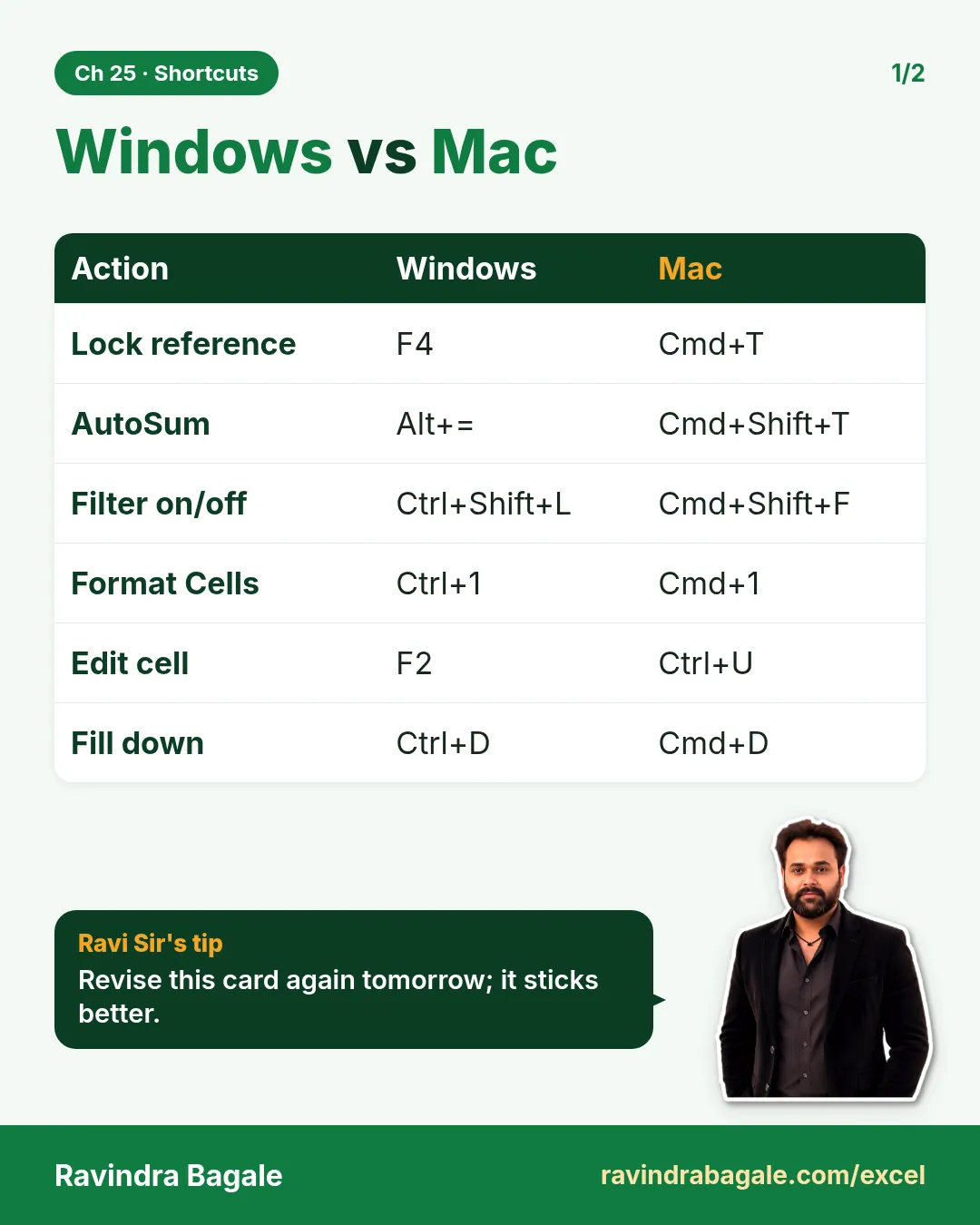
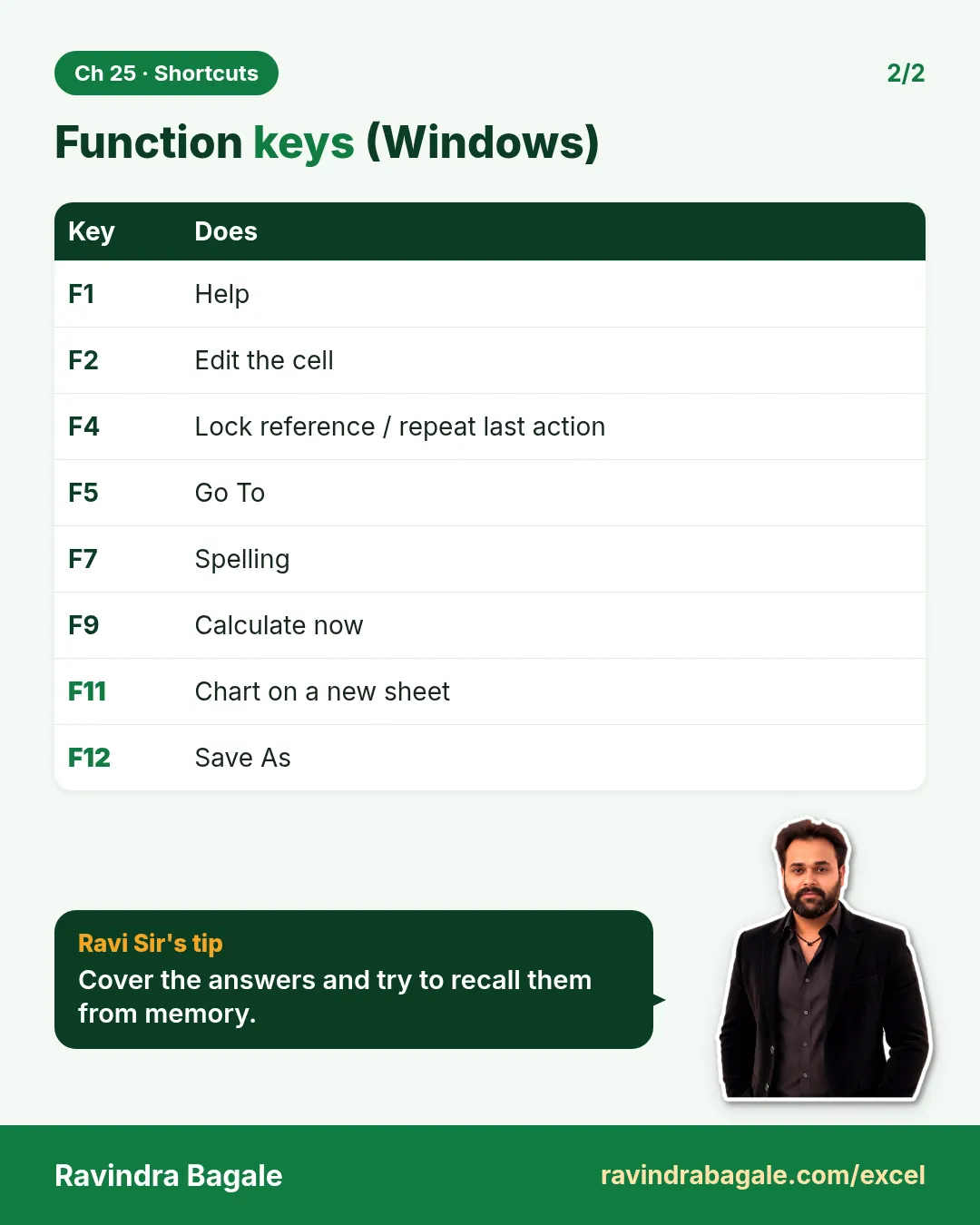
Revise this chapter in two minutes. Save the cards on your phone or download them as PNG files. All names and numbers are made up for practice.
झटपट उजळणी
हा chapter दोन मिनिटांत revise करा. Cards phone वर save करा किंवा PNG म्हणून download करा. सगळी नावं आणि आकडे सरावासाठी काल्पनिक आहेत.
झटपट दोहराई
यह chapter दो मिनट में revise करें. Cards phone पर save करें या PNG के रूप में download करें. सभी नाम और आंकड़े अभ्यास के लिए काल्पनिक हैं.
More cards for every chapter: Ravi Sir's Cards.