25. All Excel Keyboard Shortcuts (Windows and Mac)
25.5 Formula Shortcuts
Example first. Amir needs a total under the Amount column and a commission formula that always points to the rate in H1. He clicks G12, presses Alt+= (Mac: Shift+Cmd+T) and Excel writes =SUM(G2:G11), which shows 2,870. In the commission formula he presses F4 on H1 to make it $H$1.
Formula shortcuts — in 30 seconds
What: Formula shortcuts insert AutoSum, switch references between relative and absolute, show all formulas at once and recalculate.
Why: They make formulas faster to write and easier to check: F4 avoids the most common copy-down mistake, and showing formulas lets you audit a sheet in one look.
Tiny example: Alt+= in G12 writes =SUM(G2:G11) = 2,870. Typing =G2*H1 and pressing F4 on H1 cycles H1 → $H$1 → H$1 → $H1 → H1.
Formula shortcuts — 30 सेकंदात
काय: Formula shortcuts AutoSum टाकतात, references relative आणि absolute मध्ये बदलतात, सगळे formulas एकदम दाखवतात आणि पुन्हा calculate करतात.
का: त्यामुळे formulas लिहायला जलद आणि तपासायला सोपे होतात: F4 खाली copy करतानाची सगळ्यात common चूक टाळतो, आणि formulas दाखवल्याने एका नजरेत sheet audit होते.
छोटं उदाहरण: G12 मध्ये Alt+= दाबल्यावर =SUM(G2:G11) = 2,870 येतं. =G2*H1 type करून H1 वर F4 दाबल्यावर H1 → $H$1 → H$1 → $H1 → H1 असं फिरतं.
Formula shortcuts — 30 सेकंड में
क्या: Formula shortcuts AutoSum डालते हैं, references को relative और absolute में बदलते हैं, सारे formulas एक साथ दिखाते हैं और फिर से calculate करते हैं.
क्यों: इनसे formulas लिखना तेज़ और जाँचना आसान होता है: F4 नीचे copy करने की सबसे आम गलती रोकता है, और formulas दिखाने से एक नज़र में sheet audit हो जाती है.
छोटा उदाहरण: G12 में Alt+= दबाने पर =SUM(G2:G11) = 2,870 आता है. =G2*H1 type करके H1 पर F4 दबाने पर H1 → $H$1 → H$1 → $H1 → H1 घूमता है.
First look at the data (before → after):
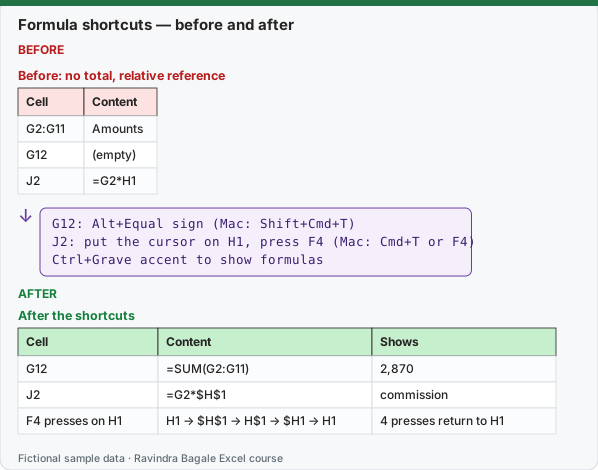
Expected result — After the shortcuts
| Cell | Content | Shows |
|---|---|---|
| G12 | =SUM(G2:G11) | 2,870 |
| J2 | =G2*$H$1 | commission |
| F4 presses on H1 | H1 → $H$1 → H$1 → $H1 → H1 | 4 presses return to H1 |
Before table and formula as text
Before — Before: no total, relative reference
| Cell | Content |
|---|---|
| G2:G11 | Amounts |
| G12 | (empty) |
| J2 | =G2*H1 |
Formula / click path
G12: Alt+Equal sign   (Mac: Shift+Cmd+T)
J2: put the cursor on H1, press F4   (Mac: Cmd+T or F4)
Ctrl+Grave accent to show formulas
Do it step by step:
- Click G12 and press Alt+= (Mac: Shift+Cmd+T). Check the range and press Enter.
- In J2 type
=G2*H1, put the cursor on H1 and press F4 (Mac: Cmd+T or F4) once:=G2*$H$1. - Fill J2 down; every row still uses H1.
- Press Ctrl+Grave accent (the key left of 1) to show all formulas; press it again to go back.
स्टेप बाय स्टेप करून बघा:
- G12 वर click करा आणि Alt+= (Mac: Shift+Cmd+T) दाबा. Range check करून Enter दाबा.
- J2 मध्ये
=G2*H1type करा, cursor H1 वर ठेवा आणि एकदा F4 (Mac: Cmd+T किंवा F4) दाबा:=G2*$H$1. - J2 खाली fill करा; प्रत्येक row अजूनही H1 च वापरते.
- सगळे formulas बघायला Ctrl+Grave accent (1 च्या डावीकडची key) दाबा; परत यायला पुन्हा दाबा.
स्टेप बाय स्टेप करके देखें:
- G12 पर click करें और Alt+= (Mac: Shift+Cmd+T) दबाएँ. Range check करके Enter दबाएँ.
- J2 में
=G2*H1type करें, cursor H1 पर रखें और एक बार F4 (Mac: Cmd+T या F4) दबाएँ:=G2*$H$1. - J2 को नीचे fill करें; हर row अब भी H1 ही इस्तेमाल करती है.
- सारे formulas देखने के लिए Ctrl+Grave accent (1 के बाईं ओर की key) दबाएँ; वापस आने के लिए फिर दबाएँ.
Formula shortcuts: Windows and Mac side by side
| To do this | Windows | Mac |
|---|---|---|
| Insert AutoSum | Alt+Equal sign (=) | Shift+Cmd+T |
| Cycle absolute / relative references | F4 | Cmd+T or F4 |
| Insert a function | Shift+F3 | Shift+F3 (Formula Builder) |
| Show formulas instead of values | Ctrl+Grave accent (key left of 1) | Ctrl+Grave accent (key left of 1) |
| Calculate all open workbooks | F9 | F9 or Cmd+Equal sign (=) |
| Calculate the active sheet | Shift+F9 | Shift+F9 |
| Function Arguments, after typing a function name | Ctrl+A | Ctrl+A |
| Insert argument names and brackets | Ctrl+Shift+A | (menu: Formula Builder) |
| Define a name | Alt+M, M, D | Cmd+F3 or Ctrl+L |
| Paste a defined name | F3 | (menu: Formulas › Use in Formula) |
| Expand or collapse the formula bar | Ctrl+Shift+U | Ctrl+Shift+U |
| Show the Error Checking menu | Alt+Shift+F10 | (menu: Click the error button next to the cell) |
| Select cells in a row that do not match the active cell | (menu: Home › Find & Select › Go To Special › Row differences) | Ctrl+Backslash () |
| Turn formula tooltips on or off | Ctrl+Alt+P | Ctrl+Option+P |
F4 has two jobs on Windows: while you edit a formula it cycles the $ signs; outside a formula it repeats your last action (for example, the last format you applied).
Practice task (try it before you open the answer):
- Insert a total under F2:F11 (Qty) with a shortcut.
- Turn =C2&D2 into =$C2&D2 with F4.
- Show all formulas, then switch back.
Answer
Alt+= (Mac: Shift+Cmd+T) gives =SUM(F2:F11) = 24. Put the cursor on C2 and press F4 three times: C2 → $C$2 → C$2 → $C2. Ctrl+Grave accent shows and hides formulas on both platforms.
Ravindra Bagale's Tip
Press Ctrl+Grave accent before you send any sheet. A typed number sitting among formulas stands out at once, and it is usually the cell someone overwrote by mistake.
Ravindra Bagale's Tip – मराठी
कोणतीही sheet पाठवण्याआधी Ctrl+Grave accent दाबा. Formulas मध्ये बसलेला type केलेला आकडा लगेच दिसतो, आणि बहुतेक वेळा तीच cell कोणीतरी चुकून overwrite केलेली असते.
Ravindra Bagale's Tip – हिंदी
कोई भी sheet भेजने से पहले Ctrl+Grave accent दबाएँ. Formulas के बीच type किया आँकड़ा तुरंत दिखता है, और अक्सर वही cell किसी ने गलती से overwrite की होती है.