25. All Excel Keyboard Shortcuts (Windows and Mac)
25.1 Navigation Shortcuts
Example first. The Orders sheet has 10 orders in A1:I11. With the mouse, Shraddha Bagale scrolls and clicks to reach the last order. With Ctrl+Down arrow (Mac: Cmd+Down arrow) she is on A11 in one key press, and Ctrl+Home brings her back to A1.
Navigation shortcuts — in 30 seconds
What: Navigation shortcuts move the active cell or the screen without the mouse: to the edge of the data, to A1, to the last used cell, to the next sheet.
Why: On a sheet with 50,000 rows, scrolling takes seconds every time; a shortcut takes one key press and always lands on the same edge.
Tiny example: From A1 press Ctrl+Down arrow: the active cell jumps to A11, the last order. Ctrl+End jumps to I11. Ctrl+Home goes back to A1.
Navigation shortcuts — 30 सेकंदात
काय: Navigation shortcuts mouse न वापरता active cell किंवा screen हलवतात: data च्या कडेला, A1 ला, शेवटच्या वापरलेल्या cell ला, पुढच्या sheet ला.
का: 50,000 rows च्या sheet वर scroll करायला प्रत्येक वेळी वेळ जातो; shortcut ला एक key press लागतो आणि तो नेहमी त्याच कडेला पोहोचतो.
छोटं उदाहरण: A1 वरून Ctrl+Down arrow दाबा: active cell A11 वर, म्हणजे शेवटच्या order वर जातो. Ctrl+End I11 वर नेतो. Ctrl+Home परत A1 वर आणतो.
Navigation shortcuts — 30 सेकंड में
क्या: Navigation shortcuts mouse के बिना active cell या screen हिलाते हैं: data के किनारे पर, A1 पर, आख़िरी इस्तेमाल हुई cell पर, अगली sheet पर.
क्यों: 50,000 rows वाली sheet पर scroll करने में हर बार समय जाता है; shortcut में एक key press लगता है और वह हमेशा उसी किनारे पर पहुँचता है.
छोटा उदाहरण: A1 से Ctrl+Down arrow दबाएँ: active cell A11 पर, यानी आख़िरी order पर जाता है. Ctrl+End I11 पर ले जाता है. Ctrl+Home वापस A1 पर लाता है.
First look at the data (before → after):
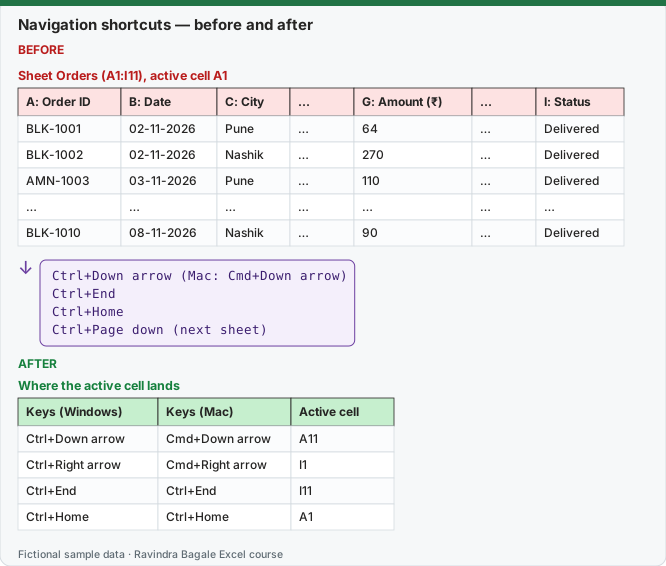
Expected result — Where the active cell lands
| Keys (Windows) | Keys (Mac) | Active cell |
|---|---|---|
| Ctrl+Down arrow | Cmd+Down arrow | A11 |
| Ctrl+Right arrow | Cmd+Right arrow | I1 |
| Ctrl+End | Ctrl+End | I11 |
| Ctrl+Home | Ctrl+Home | A1 |
Before table and formula as text
Before — Sheet Orders (A1:I11), active cell A1
| A: Order ID | B: Date | C: City | … | G: Amount (₹) | … | I: Status |
|---|---|---|---|---|---|---|
| BLK-1001 | 02-11-2026 | Pune | … | 64 | … | Delivered |
| BLK-1002 | 02-11-2026 | Nashik | … | 270 | … | Delivered |
| AMN-1003 | 03-11-2026 | Pune | … | 110 | … | Delivered |
| … | … | … | … | … | … | … |
| BLK-1010 | 08-11-2026 | Nashik | … | 90 | … | Delivered |
Formula / click path
Ctrl+Down arrow   (Mac: Cmd+Down arrow)
Ctrl+End
Ctrl+Home
Ctrl+Page down   (next sheet)
Do it step by step:
- Open the Orders sheet and click A1.
- Press Ctrl+Down arrow (Mac: Cmd+Down arrow) and read the Name Box: A11.
- Press Ctrl+Right arrow from A1 (Mac: Cmd+Right arrow): I1.
- Press Ctrl+End: I11, the last used cell.
- Press Ctrl+Home to return to A1, and Ctrl+Page down to go to the next sheet.
स्टेप बाय स्टेप करून बघा:
- Orders sheet उघडा आणि A1 वर click करा.
- Ctrl+Down arrow (Mac: Cmd+Down arrow) दाबा आणि Name Box वाचा: A11.
- A1 वरून Ctrl+Right arrow (Mac: Cmd+Right arrow) दाबा: I1.
- Ctrl+End दाबा: I11, शेवटची वापरलेली cell.
- A1 वर परत यायला Ctrl+Home, आणि पुढच्या sheet वर जायला Ctrl+Page down दाबा.
स्टेप बाय स्टेप करके देखें:
- Orders sheet खोलें और A1 पर click करें.
- Ctrl+Down arrow (Mac: Cmd+Down arrow) दबाएँ और Name Box पढ़ें: A11.
- A1 से Ctrl+Right arrow (Mac: Cmd+Right arrow) दबाएँ: I1.
- Ctrl+End दबाएँ: I11, आख़िरी इस्तेमाल हुई cell.
- A1 पर लौटने के लिए Ctrl+Home, और अगली sheet पर जाने के लिए Ctrl+Page down दबाएँ.
Navigation shortcuts: Windows and Mac side by side
| To do this | Windows | Mac |
|---|---|---|
| Move to the edge of the data region | Ctrl+Arrow key | Cmd+Arrow key |
| Move to the beginning of the sheet (A1) | Ctrl+Home | Ctrl+Home (MacBook: Ctrl+Fn+Left arrow) |
| Move to the last used cell | Ctrl+End | Ctrl+End (MacBook: Ctrl+Fn+Right arrow) |
| Move to the beginning of the row | Home | Home (MacBook: Fn+Left arrow) |
| Move one screen down / up | Page down / Page up | Page down / Page up (MacBook: Fn+Down / Fn+Up arrow) |
| Move one screen right / left | Alt+Page down / Alt+Page up | Option+Page down / Option+Page up |
| Move to the next sheet | Ctrl+Page down | Ctrl+Page down or Option+Right arrow |
| Move to the previous sheet | Ctrl+Page up | Option+Left arrow |
| Open the Go To dialog box | F5 or Ctrl+G | Ctrl+G or F5 |
| Open Find | Ctrl+F | Ctrl+F or Shift+F5 |
| Open Replace | Ctrl+H | Ctrl+H or Cmd+Shift+H |
| Move between unlocked cells on a protected sheet | Tab | Tab |
| Zoom in / zoom out | Ctrl+Alt+Equal sign / Ctrl+Alt+Minus sign | (menu: View › Zoom) |
Careful with blanks: Ctrl+Arrow stops at the first blank cell. If a column has a gap, press it again to jump over the gap.
Practice task (try it before you open the answer):
- From A1, use only the keyboard to reach the Amount of the last order.
- Go to the next sheet and back.
- Open Replace and close it with Esc.
Answer
Ctrl+Down arrow (Mac: Cmd+Down arrow) reaches A11; then press Right arrow six times to reach G11, which shows ₹90. Ctrl+Page down / Ctrl+Page up (Mac: Option+Right / Option+Left arrow). Ctrl+H opens Replace on both platforms.
Ravindra Bagale's Tip
Learn three keys this week: Ctrl+Arrow, Ctrl+Home and Ctrl+End. Use them every time you open a file, and the mouse will start to feel slow.
Ravindra Bagale's Tip – मराठी
या आठवड्यात तीन keys शिका: Ctrl+Arrow, Ctrl+Home आणि Ctrl+End. प्रत्येक file उघडताना त्या वापरा, मग mouse हळू वाटायला लागेल.
Ravindra Bagale's Tip – हिंदी
इस हफ़्ते तीन keys सीखें: Ctrl+Arrow, Ctrl+Home और Ctrl+End. हर file खोलते समय इन्हें इस्तेमाल करें, फिर mouse धीमा लगने लगेगा.