9. Dynamic Arrays
Come friends, today we learn the superpower of new Excel: dynamic arrays (one formula that returns a whole list of values). One formula gives a full list, a filter, a sort or the unique values – and it updates automatically! FILTER, SORT, UNIQUE, SEQUENCE, LET, LAMBDA, VSTACK… Remember, these functions are only in Microsoft 365 and newer Excel.
चला मित्रांनो, आज आपण नव्या Excel ची "superpower" शिकूया – dynamic arrays (एका formula मधून मिळणारी values ची पूर्ण list). एकाच formula ने पूर्ण list, filter, sort, unique values – आणि ते पण automatic update! FILTER, SORT, UNIQUE, SEQUENCE, LET, LAMBDA, VSTACK… हे functions फक्त Microsoft 365 / नव्या Excel मध्ये आहेत, हे लक्षात ठेवा.
चलो दोस्तों, आज हम नए Excel की "superpower" सीखते हैं – dynamic arrays (एक formula से मिलने वाली values की पूरी list). एक ही formula से पूरी list, filter, sort, unique values – और वो भी automatic update! FILTER, SORT, UNIQUE, SEQUENCE, LET, LAMBDA, VSTACK… ये functions सिर्फ़ Microsoft 365 / नए Excel में हैं, यह याद रखिए.
What you will learn in this module
- Spill ranges, the
#spill reference and #SPILL! errors - FILTER, SORT, SORTBY and UNIQUE
- SEQUENCE and RANDARRAY
- LET for readable formulas and LAMBDA (brief) for your own functions
- VSTACK/HSTACK, CHOOSECOLS, TAKE and DROP
Live story: The list that builds itself
Suppose the Nashik manager wants a live list of only Nashik's late orders, sorted by amount, on a separate sheet. Last month Zoya copied and filtered it by hand every morning. In Microsoft 365 one FILTER formula spills the whole list, and SORT and UNIQUE keep it tidy when new rows arrive. This chapter covers FILTER, SORT, UNIQUE, SEQUENCE, LET, LAMBDA and the stack functions.
All numbers in this story are fictional practice data.
Live story: आपोआप तयार होणारी list
समजा Nashik manager ना वेगळ्या sheet वर फक्त Nashik च्या late orders ची live list हवीय, amount नुसार sort केलेली. मागच्या महिन्यात Zoya रोज सकाळी ती हाताने copy आणि filter करायची. Microsoft 365 मध्ये एकच FILTER formula पूर्ण list spill करतो, आणि नवीन rows आल्या की SORT आणि UNIQUE ती नीट ठेवतात. हा chapter FILTER, SORT, UNIQUE, SEQUENCE, LET, LAMBDA आणि stack functions शिकवतो.
या story मधले सगळे आकडे काल्पनिक practice data आहेत.
Live story: अपने-आप बनने वाली list
मान लीजिए Nashik manager को अलग sheet पर सिर्फ़ Nashik के late orders की live list चाहिए, amount के हिसाब से sort की हुई. पिछले महीने Zoya हर सुबह उसे हाथ से copy और filter करती थी. Microsoft 365 में एक ही FILTER formula पूरी list spill करता है, और नई rows आने पर SORT और UNIQUE उसे साफ़ रखते हैं. यह chapter FILTER, SORT, UNIQUE, SEQUENCE, LET, LAMBDA और stack functions सिखाता है.
इस story के सारे आँकड़े काल्पनिक practice data हैं.
Version availability
FILTER, SORT, SORTBY, UNIQUE, SEQUENCE, RANDARRAY and LET: Microsoft 365 / Excel 2021+. LAMBDA, VSTACK, HSTACK, CHOOSECOLS, TAKE and DROP: Microsoft 365 / Excel 2024. In Excel 2019 or older these return #NAME?.
Examples use the Module 3 mini dataset converted to a Table named tblMini (columns Order ID, Date, City, Platform, Category, Qty, Amount, Mins, Status).
Concepts in this chapter
- 9.1Spill Ranges and the # Operator
- 9.2FILTER
- 9.3SORT and SORTBY
- 9.4UNIQUE
- 9.5SEQUENCE and RANDARRAY
- 9.6LET
- 9.7LAMBDA (Brief)
- 9.8VSTACK and HSTACK
- 9.9CHOOSECOLS, TAKE and DROP
- 9.10GROUPBY: A Summary Table with One Formula
- 9.11PIVOTBY, and PIVOTBY vs PivotTable
- 9.12REGEXTEST, REGEXEXTRACT and REGEXREPLACE: Pattern Matching for Messy Text
- 9.13TOCOL and TOROW: Turn a Grid into One List
- 9.14WRAPROWS and WRAPCOLS: Turn One Long List into a Grid
- 9.15EXPAND: Make an Array a Fixed Size
- 9.16TRIMRANGE and the Trim Ref (Dot) Operator
- 9.17IMAGE: Pictures Inside Cells
- 9.18Named LAMBDA Functions in Name Manager, with Optional Arguments (ISOMITTED)
- 9.19MAP, REDUCE, SCAN, BYROW, BYCOL and MAKEARRAY with Real Examples
- 9.20Recursive LAMBDA and a Small Reusable Function Library
Review and practice
- ★Practice and Answer Key: New Dynamic Array and LAMBDA Functions
- ★Practice and Answer Key: FILTER, SORT and UNIQUE
The chapter recap is at the end of the last concept page.
Quick revision cards
Quick revision
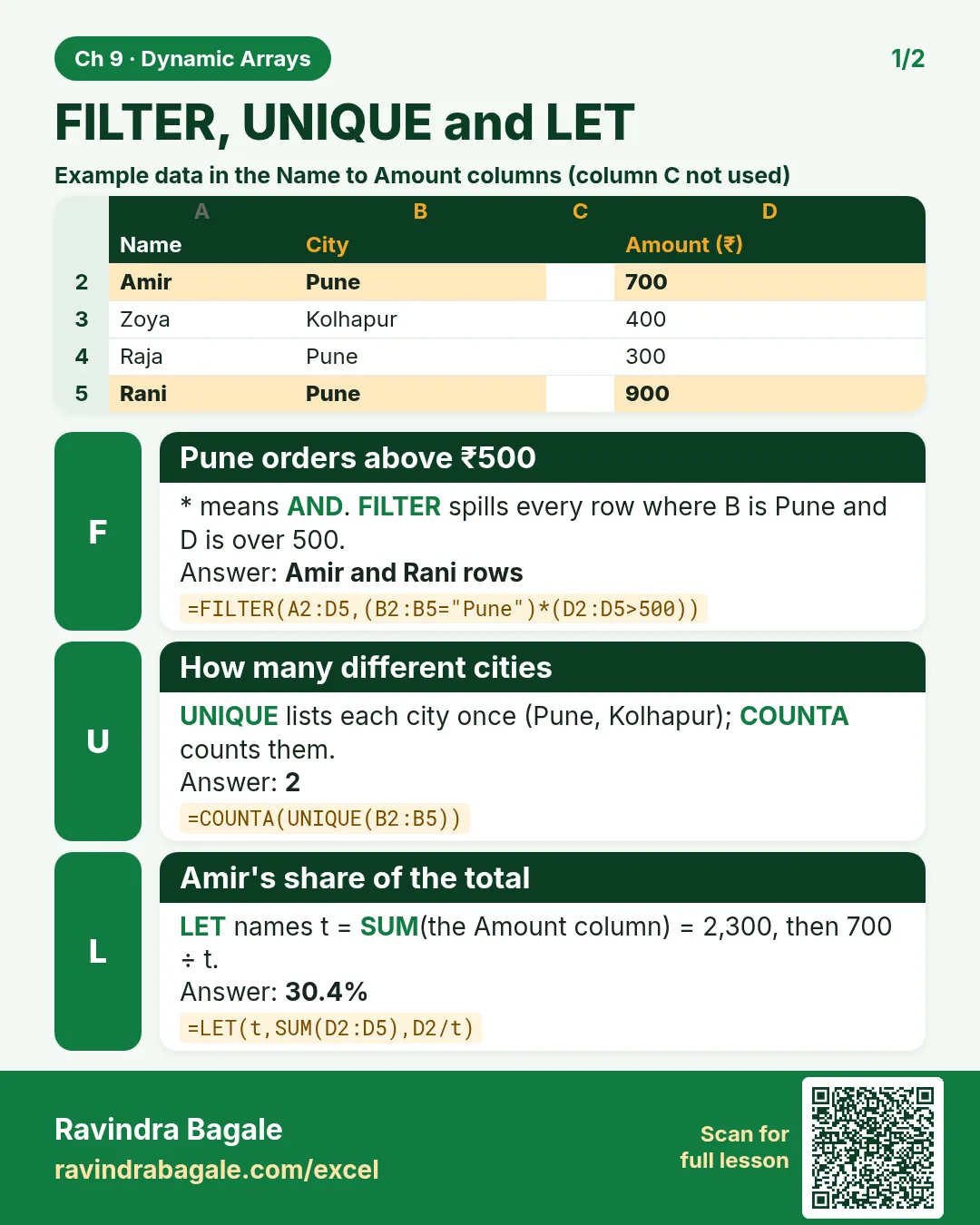
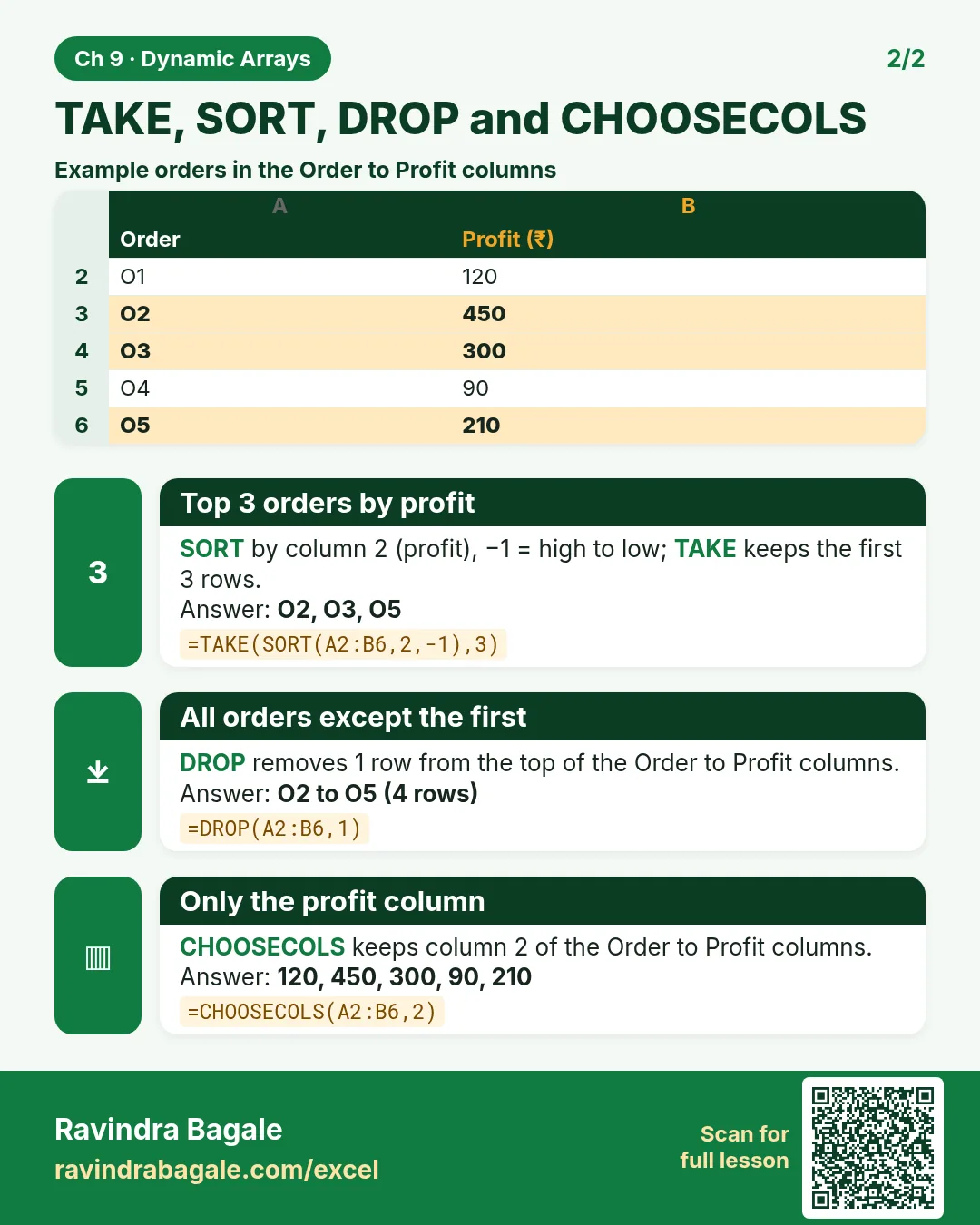
Revise this chapter in two minutes. Save the cards on your phone or download them as PNG files. All names and numbers are made up for practice.
झटपट उजळणी
हा chapter दोन मिनिटांत revise करा. Cards phone वर save करा किंवा PNG म्हणून download करा. सगळी नावं आणि आकडे सरावासाठी काल्पनिक आहेत.
झटपट दोहराई
यह chapter दो मिनट में revise करें. Cards phone पर save करें या PNG के रूप में download करें. सभी नाम और आंकड़े अभ्यास के लिए काल्पनिक हैं.


More cards for every chapter: Ravi Sir's Cards.