9.20 Recursive LAMBDA and a Small Reusable Function Library
Example first. Rani receives amounts typed in many styles: "Rs. 1,299/-", "Rs 64", "1,299/-". She wants one function that removes a list of unwanted characters, one character at a time, until nothing is left to remove. A function that calls itself with a smaller job each time is called recursive. In Excel, a LAMBDA can call itself only when it has a name in Name Manager. We will build STRIPCHARS, then collect the functions from this chapter into a small library workbook.
Recursive LAMBDA — in 30 seconds
What: A recursive LAMBDA is a named LAMBDA that calls itself. Each call does one small step and passes a smaller problem to the next call, until a stop condition is reached.
Why: Some jobs are naturally "repeat until done": remove characters one by one, grow a number week by week until it reaches a target. Recursion does this without VBA.
Tiny example: =STRIPCHARS("Rs. 1,299/-","Rs.,/- ") removes R, s, the dot, the comma, the slash, the dash and the space one by one and returns 1299.
Recursive LAMBDA — 30 सेकंदात
काय: Recursive LAMBDA म्हणजे स्वतःलाच call करणारा नाव दिलेला LAMBDA. प्रत्येक call एक छोटी step करतो आणि लहान झालेला प्रश्न पुढच्या call ला देतो, stop condition येईपर्यंत.
का: काही कामं "होईपर्यंत repeat करा" अशीच असतात: characters एक-एक करून काढणं, target गाठेपर्यंत आकडा आठवड्याला वाढवणं. Recursion हे VBA शिवाय करतं.
छोटं उदाहरण: =STRIPCHARS("Rs. 1,299/-","Rs.,/- ") R, s, dot, comma, slash, dash आणि space एक-एक करून काढतो आणि 1299 देतो.
Recursive LAMBDA — 30 सेकंड में
क्या: Recursive LAMBDA ऐसा नाम वाला LAMBDA है जो खुद को call करता है. हर call एक छोटी step करता है और छोटा हुआ सवाल अगले call को देता है, stop condition आने तक.
क्यों: कुछ काम "पूरा होने तक दोहराओ" वाले होते हैं: characters एक-एक करके हटाना, target तक पहुँचने तक आँकड़ा हर हफ्ते बढ़ाना. Recursion यह VBA के बिना करता है.
छोटा उदाहरण: =STRIPCHARS("Rs. 1,299/-","Rs.,/- ") R, s, dot, comma, slash, dash और space एक-एक करके हटाता है और 1299 देता है.
First look at the data (before → after):
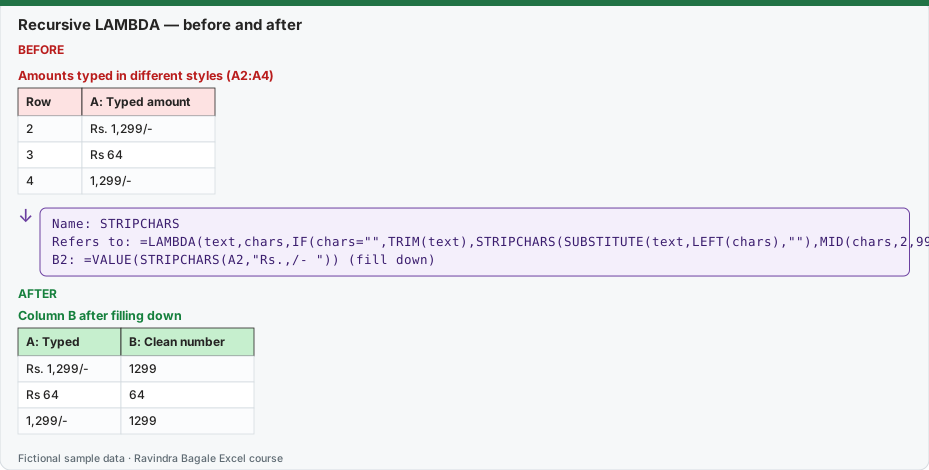
Expected result — Column B after filling down
| A: Typed | B: Clean number |
|---|---|
| Rs. 1,299/- | 1299 |
| Rs 64 | 64 |
| 1,299/- | 1299 |
Before table and formula as text
Before — Amounts typed in different styles (A2:A4)
| Row | A: Typed amount |
|---|---|
| 2 | Rs. 1,299/- |
| 3 | Rs 64 |
| 4 | 1,299/- |
Formula / click path
Name: STRIPCHARS
Refers to: =LAMBDA(text,chars,IF(chars="",TRIM(text),STRIPCHARS(SUBSTITUTE(text,LEFT(chars),""),MID(chars,2,999))))
B2: =VALUE(STRIPCHARS(A2,"Rs.,/- "))   (fill down)
Do it step by step:
- Open Formulas › Defined Names › Name Manager and click New….
- Type the name STRIPCHARS. Recursion needs the name, because the formula refers to STRIPCHARS inside itself.
- In Refers to paste
=LAMBDA(text,chars,IF(chars="",TRIM(text),STRIPCHARS(SUBSTITUTE(text,LEFT(chars),""),MID(chars,2,999))))and click OK. - In B2 type
=VALUE(STRIPCHARS(A2,"Rs.,/- "))and fill down to B4. - Read the stop condition: when chars becomes empty, the function stops calling itself and returns the trimmed text.
- Test a bad case on purpose: a function with no stop condition returns #NUM! because Excel limits how deep recursion can go.
स्टेप बाय स्टेप करून बघा:
- Formulas › Defined Names › Name Manager उघडा आणि New… वर click करा.
- नाव STRIPCHARS type करा. Recursion ला नाव लागतं, कारण formula स्वतःच्या आत STRIPCHARS वापरतो.
- Refers to मध्ये
=LAMBDA(text,chars,IF(chars="",TRIM(text),STRIPCHARS(SUBSTITUTE(text,LEFT(chars),""),MID(chars,2,999))))paste करून OK करा. - B2 मध्ये
=VALUE(STRIPCHARS(A2,"Rs.,/- "))type करून B4 पर्यंत fill करा. - Stop condition वाचा: chars रिकामं झालं की function स्वतःला call करणं थांबवतो आणि trimmed text देतो.
- मुद्दाम एक वाईट case test करा: stop condition नसलेलं function #NUM! देतं कारण recursion किती खोल जाऊ शकतं याला Excel मर्यादा घालतो.
स्टेप बाय स्टेप करके देखें:
- Formulas › Defined Names › Name Manager खोलें और New… पर click करें.
- नाम STRIPCHARS type करें. Recursion को नाम चाहिए, क्योंकि formula अपने अंदर STRIPCHARS इस्तेमाल करता है.
- Refers to में
=LAMBDA(text,chars,IF(chars="",TRIM(text),STRIPCHARS(SUBSTITUTE(text,LEFT(chars),""),MID(chars,2,999))))paste करके OK करें. - B2 में
=VALUE(STRIPCHARS(A2,"Rs.,/- "))type करके B4 तक fill करें. - Stop condition पढ़ें: chars खाली होते ही function खुद को call करना बंद करता है और trimmed text देता है.
- जानबूझकर एक खराब case test करें: बिना stop condition वाला function #NUM! देता है क्योंकि Excel recursion की गहराई सीमित रखता है.
Version note
Recursive LAMBDA needs a named LAMBDA (Excel for Microsoft 365 or Excel 2024). Microsoft's LAMBDA page says Excel returns #NUM! when there are too many recursive calls. It does not promise a fixed depth, so keep recursion for small jobs like these.
Tracing STRIPCHARS by hand (this is the best way to understand recursion)
| Call | text | chars | What happens |
|---|---|---|---|
| 1 | Rs. 1,299/- | "Rs.,/- " | remove "R", call again with the rest of chars |
| 2 | s. 1,299/- | "s.,/- " | remove "s" |
| 3 | . 1,299/- | ".,/- " | remove "." |
| 4 | 1,299/- | ",/- " | remove "," |
| 5 | 1299/- | "/- " | remove "/" |
| 6 | 1299- | "- " | remove "-" |
| 7 | 1299 | " " | remove the space |
| 8 | 1299 | "" (empty) | stop: return TRIM(text) = 1299 |
Every recursive function needs two parts:
- A stop condition that returns an answer without calling itself:
IF(chars="",TRIM(text), …). - A smaller job passed to the next call:
MID(chars,2,999)is chars without its first character, so it gets shorter every time and the stop condition is sure to be reached.
Note: SUBSTITUTE is case-sensitive, so "R" removes only the capital R. Be careful with letters: removing "s" also removes every small s in the text. For text with words in it, the REDUCE method from lesson 9.19 or REGEXREPLACE from lesson 9.12 is often safer.
A second example: weeks to reach a target. Pune sells ₹520 thousand a week (fictional). If sales grow 5% a week, after how many weeks do they reach ₹700 thousand?
WEEKSTOTARGET = LAMBDA(sales,target,growth,IF(sales>=target,0,1+WEEKSTOTARGET(sales*(1+growth),target,growth)))
=WEEKSTOTARGET(520,700,5%) returns 7. The sales path is 520.0, 546.0, 573.3, 602.0, 632.1, 663.7, 696.8, 731.7. Check without recursion: =ROUNDUP(LN(700/520)/LN(1.05),0) also gives 7.
Your reusable function library
Make one workbook called My Functions.xlsx with these names (all from this chapter), a Tests sheet with the calls below, and a short note in each name's Comment box:
| Name | Refers to | Test call | Expected |
|---|---|---|---|
| LATEFLAG | =LAMBDA(mins,[limit],IF(mins>IF(ISOMITTED(limit),15,limit),"Late","On time")) |
=LATEFLAG(18) |
Late |
| WITHGST | =LAMBDA(amount,[rate],amount*(1+IF(ISOMITTED(rate),18%,rate))) |
=WITHGST(500) |
590 |
| PCTCHANGE | =LAMBDA(old,new,IF(old=0,"",(new-old)/old)) |
=PCTCHANGE(300,330) |
10% |
| CITYTOTAL | =LAMBDA(city,SUMIFS(tblOrders[Amount],tblOrders[City],city)) |
=CITYTOTAL("Pune") |
544 |
| RUNNINGTOTAL | =LAMBDA(values,SCAN(0,values,LAMBDA(acc,v,acc+v))) |
=RUNNINGTOTAL(G2:G4) |
64, 334, 444 |
| STRIPCHARS | =LAMBDA(text,chars,IF(chars="",TRIM(text),STRIPCHARS(SUBSTITUTE(text,LEFT(chars),""),MID(chars,2,999)))) |
=STRIPCHARS("Rs. 1,299/-","Rs.,/- ") |
1299 |
| WEEKSTOTARGET | =LAMBDA(sales,target,growth,IF(sales>=target,0,1+WEEKSTOTARGET(sales*(1+growth),target,growth))) |
=WEEKSTOTARGET(520,700,5%) |
7 |
CITYTOTAL uses a Table named tblOrders (chapter 6), so it keeps working when rows are added.
How to reuse the library in another workbook
- Open My Functions.xlsx and the target workbook.
- Right-click the Tests sheet tab › Move or Copy… › choose the target workbook › tick Create a copy › OK.
- The names used on that sheet come with it. Check Formulas › Name Manager in the target workbook.
- Delete the copied Tests sheet if you do not want it; the names stay.
(Microsoft also offers a free add-in called Excel Labs with an "Advanced formula environment" for writing and importing LAMBDA libraries. It is optional; everything above works with Name Manager alone.)
Common problems
| What you see | Why | Fix |
|---|---|---|
| #NAME? inside the recursive call | The LAMBDA was typed in a cell, not saved with a name. | Recursion only works for named LAMBDAs: save it in Name Manager. |
| #NUM! | Too many recursive calls (often a stop condition that is never reached). | Check that each call makes the job smaller. |
| Wrong letters removed | SUBSTITUTE removed every copy of a letter. | Remove only symbols, or use REGEXREPLACE with a precise pattern. |
How these results were checked: LAMBDA helper functions do not run in LibreOffice, so each expected value was computed in Python and the totals were cross-checked in LibreOffice with classic formulas (SUMIF, running SUM, SUMPRODUCT). Microsoft reference: LAMBDA function.
Practice task (try it before you open the answer):
- Create a recursive named LAMBDA REPEATTEXT(text,n) that returns the text n times joined with a space, stopping when n = 1 (for example "Pune Pune Pune").
- How many weeks does Nashik need to grow from 330 to 400 at 4% a week? Use WEEKSTOTARGET.
- Check your answer to step 2 with ROUNDUP and LN.
Answer
=LAMBDA(text,n,IF(n<=1,text,text&" "&REPEATTEXT(text,n-1)));=REPEATTEXT("Pune",3)returns Pune Pune Pune. (REPT does a similar job without recursion.)=WEEKSTOTARGET(330,400,4%)returns 5.=ROUNDUP(LN(400/330)/LN(1.04),0)returns 5.
Ravindra Bagale's Tip
Before you save a recursive LAMBDA, write down its stop condition in one sentence. If you cannot, the function will probably end in #NUM!.
Ravindra Bagale's Tip – मराठी
Recursive LAMBDA save करण्याआधी त्याची stop condition एका वाक्यात लिहा. लिहिता येत नसेल तर function बहुतेक #NUM! मध्ये संपेल.
Ravindra Bagale's Tip – हिंदी
Recursive LAMBDA save करने से पहले उसकी stop condition एक वाक्य में लिखें. न लिख पाएँ तो function शायद #NUM! पर खत्म होगा.