9.14 WRAPROWS and WRAPCOLS: Turn One Long List into a Grid
Example first. Amir copies an order list from an email. When he pastes it into Excel, everything lands in one column: Order ID, City, Amount, then the next Order ID, City, Amount, and so on. He wants a proper table with three columns. WRAPROWS cuts the long list every 3 values and stacks the pieces as rows. It is the opposite of TOCOL.
WRAPROWS and WRAPCOLS — in 30 seconds
What: WRAPROWS takes a single row or column of values and wraps it into rows of a fixed length. WRAPCOLS wraps it into columns of a fixed height.
Why: Pasted data from emails and web pages often arrives as one long column. WRAPROWS rebuilds the table in one formula instead of manual cut and paste.
Tiny example: =WRAPROWS(A2:A13,3) turns 12 pasted values into a 4 by 3 table: Order ID, City, Amount.
WRAPROWS and WRAPCOLS — 30 सेकंदात
काय: WRAPROWS एकाच row किंवा column मधल्या values घेतो आणि ठराविक लांबीच्या rows मध्ये wrap करतो. WRAPCOLS त्यांना ठराविक उंचीच्या columns मध्ये wrap करतो.
का: Emails आणि web pages मधून paste केलेला data अनेकदा एकाच लांब column मध्ये येतो. हाताने cut-paste करण्याऐवजी WRAPROWS एका formula मध्ये table परत बनवतो.
छोटं उदाहरण: =WRAPROWS(A2:A13,3) paste केलेल्या 12 values ना 4 by 3 table मध्ये बदलतो: Order ID, City, Amount.
WRAPROWS and WRAPCOLS — 30 सेकंड में
क्या: WRAPROWS एक row या column की values लेकर उन्हें तय लंबाई की rows में wrap करता है. WRAPCOLS उन्हें तय ऊँचाई के columns में wrap करता है.
क्यों: Emails और web pages से paste किया data अक्सर एक लंबे column में आता है. हाथ से cut-paste की जगह WRAPROWS एक formula में table दोबारा बना देता है.
छोटा उदाहरण: =WRAPROWS(A2:A13,3) paste की गई 12 values को 4 by 3 table में बदल देता है: Order ID, City, Amount.
First look at the data (before → after):
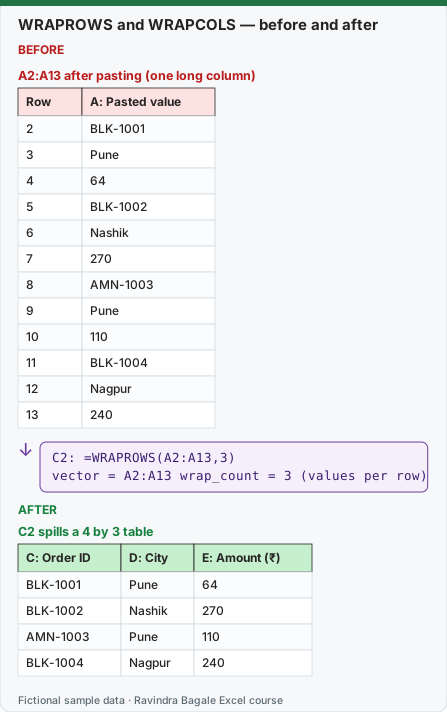
Expected result — C2 spills a 4 by 3 table
| C: Order ID | D: City | E: Amount (₹) |
|---|---|---|
| BLK-1001 | Pune | 64 |
| BLK-1002 | Nashik | 270 |
| AMN-1003 | Pune | 110 |
| BLK-1004 | Nagpur | 240 |
Before table and formula as text
Before — A2:A13 after pasting (one long column)
| Row | A: Pasted value |
|---|---|
| 2 | BLK-1001 |
| 3 | Pune |
| 4 | 64 |
| 5 | BLK-1002 |
| 6 | Nashik |
| 7 | 270 |
| 8 | AMN-1003 |
| 9 | Pune |
| 10 | 110 |
| 11 | BLK-1004 |
| 12 | Nagpur |
| 13 | 240 |
Formula / click path
C2: =WRAPROWS(A2:A13,3)
vector = A2:A13   wrap_count = 3 (values per row)
Do it step by step:
- Paste or type the 12 values in A2:A13, one under the other.
- Type headers Order ID, City, Amount in C1:E1.
- In C2 type
=WRAPROWS(A2:A13,3)and press Enter. You get 4 rows of 3. - Add a 13th value in A14 and change the formula to
=WRAPROWS(A2:A14,3). The last row is padded with #N/A. - Use the pad argument to show blanks instead:
=WRAPROWS(A2:A14,3,""). - To freeze the result as plain values, copy the spill and use Home › Paste › Paste Values.
स्टेप बाय स्टेप करून बघा:
- 12 values A2:A13 मध्ये एकाखाली एक paste किंवा type करा.
- C1:E1 मध्ये headers Order ID, City, Amount type करा.
- C2 मध्ये
=WRAPROWS(A2:A13,3)type करून Enter दाबा. 3 च्या 4 rows मिळतात. - A14 मध्ये 13 वी value टाका आणि formula
=WRAPROWS(A2:A14,3)करा. शेवटची row #N/A ने भरली जाते. - त्याऐवजी blanks दाखवायला pad argument वापरा:
=WRAPROWS(A2:A14,3,""). - Result साध्या values म्हणून ठेवायचा असेल तर spill copy करून Home › Paste › Paste Values वापरा.
स्टेप बाय स्टेप करके देखें:
- 12 values A2:A13 में एक के नीचे एक paste या type करें.
- C1:E1 में headers Order ID, City, Amount type करें.
- C2 में
=WRAPROWS(A2:A13,3)type करके Enter दबाएँ. 3 की 4 rows मिलती हैं. - A14 में 13वीं value डालें और formula
=WRAPROWS(A2:A14,3)करें. आखिरी row #N/A से भर जाती है. - इसकी जगह blanks दिखाने के लिए pad argument लें:
=WRAPROWS(A2:A14,3,""). - Result को सादी values बनाना हो तो spill copy करके Home › Paste › Paste Values करें.
Version note
WRAPROWS and WRAPCOLS are listed for Excel for Microsoft 365 (Windows and Mac) and Excel 2024 (Windows and Mac).
Syntax
WRAPROWS(vector, wrap_count, [pad_with]) and WRAPCOLS(vector, wrap_count, [pad_with])
- vector: one row or one column. A 2-D block gives #VALUE! (flatten it first with TOCOL).
- wrap_count: how many values per row (WRAPROWS) or per column (WRAPCOLS). Less than 1 gives #NUM!.
- pad_with: what to put in the empty spots of the last row or column. If you leave it out, Excel uses #N/A.
Example 2: print labels three per row. Our 10 Order IDs are in A2:A11. For a label sheet with 3 labels per row:
| Formula | Row 1 | Row 2 | Row 3 | Row 4 |
|---|---|---|---|---|
=WRAPROWS(A2:A11,3) |
BLK-1001 / BLK-1002 / AMN-1003 | BLK-1004 / AMN-1005 / BLK-1006 | BLK-1007 / AMN-1008 / BLK-1009 | BLK-1010 / #N/A / #N/A |
=WRAPROWS(A2:A11,3,"") |
BLK-1001 / BLK-1002 / AMN-1003 | BLK-1004 / AMN-1005 / BLK-1006 | BLK-1007 / AMN-1008 / BLK-1009 | BLK-1010 / (blank) / (blank) |
Example 3: fill down the columns instead. WRAPCOLS fills the first column top to bottom, then the next column:
=WRAPCOLS(A2:A11,4,"")
| Row | Column 1 | Column 2 | Column 3 |
|---|---|---|---|
| 1 | BLK-1001 | AMN-1005 | BLK-1009 |
| 2 | BLK-1002 | BLK-1006 | BLK-1010 |
| 3 | AMN-1003 | BLK-1007 | (blank) |
| 4 | BLK-1004 | AMN-1008 | (blank) |
Example 4: a round trip. =TOCOL(WRAPROWS(A2:A11,3,""),1) gives back the original 10 IDs, because TOCOL undoes WRAPROWS (and ignore = 1 drops the two padded blanks).
WRAPROWS or WRAPCOLS? Ask: "In my source list, which values belong together?" If each record is consecutive (ID, City, Amount, ID, City, Amount), use WRAPROWS. If the list is all IDs first, then all cities, then all amounts, use WRAPCOLS with wrap_count = number of records.
How these results were checked: this function is not available in LibreOffice, so every expected value on this page was computed in Python and cross-checked in LibreOffice with classic formulas that give the same numbers. The layout of the spill follows Microsoft's documentation. Microsoft reference: WRAPROWS function, WRAPCOLS function.
Practice task (try it before you open the answer):
- Type the 6 values Pune, 544, Nashik, 360, Solapur, 1299 in A2:A7.
- Make a 2-column table (City, Sales) with one formula.
- Now type the same data as Pune, Nashik, Solapur, 544, 360, 1299 and build the same table with WRAPCOLS.
Answer
=WRAPROWS(A2:A7,2)gives Pune / 544; Nashik / 360; Solapur / 1299.=WRAPCOLS(A2:A7,3)gives the same 3 rows: Pune / 544; Nashik / 360; Solapur / 1299.
Ravindra Bagale's Tip
When pasted data lands in one column, count how many lines make one record. That number is your wrap_count. Check the first and last rows of the spill before you trust it.
Ravindra Bagale's Tip – मराठी
Paste केलेला data एकाच column मध्ये आला तर एका record मध्ये किती lines आहेत ते मोजा. तोच तुमचा wrap_count. विश्वास ठेवण्याआधी spill ची पहिली आणि शेवटची row तपासा.
Ravindra Bagale's Tip – हिंदी
Paste किया data एक column में आए तो गिनें कि एक record में कितनी lines हैं. वही आपका wrap_count है. भरोसा करने से पहले spill की पहली और आखिरी row जाँचें.