9.13 TOCOL and TOROW: Turn a Grid into One List
Example first. Salman keeps a fictional rider roster for the Pune dark store as a grid: shifts down the side, days across the top, a rider name in each cell, and a few empty cells. He needs one simple list of every rider name, without the gaps, to count shifts and to build a drop-down. TOCOL flattens the grid into one column in a single step.
TOCOL and TOROW — in 30 seconds
What: TOCOL takes a block of cells (rows and columns) and returns all its values in one column. TOROW does the same into one row. You can skip blanks and errors.
Why: Many tools need a single list: UNIQUE, COUNTIF, charts, drop-downs, statistics. Copy-paste from a grid to a list is slow and breaks when the grid changes.
Tiny example: =TOCOL(B2:D4,1) turns the 3 by 3 roster into one list of 7 names (the 2 empty cells are skipped).
TOCOL and TOROW — 30 सेकंदात
काय: TOCOL cells चा block (rows आणि columns) घेतो आणि त्यातल्या सगळ्या values एका column मध्ये देतो. TOROW तेच एका row मध्ये करतो. Blanks आणि errors सोडून देता येतात.
का: UNIQUE, COUNTIF, charts, drop-downs, statistics अशा अनेक tools ना एकच list लागते. Grid मधून list मध्ये copy-paste करणं हळू असतं आणि grid बदलला की बिघडतं.
छोटं उदाहरण: =TOCOL(B2:D4,1) 3 by 3 roster ला 7 नावांच्या एका list मध्ये बदलतो (2 रिकाम्या cells सोडल्या जातात).
TOCOL and TOROW — 30 सेकंड में
क्या: TOCOL cells का block (rows और columns) लेता है और उसकी सारी values एक column में देता है. TOROW यही एक row में करता है. Blanks और errors छोड़े जा सकते हैं.
क्यों: UNIQUE, COUNTIF, charts, drop-downs, statistics जैसे कई tools को एक ही list चाहिए. Grid से list में copy-paste धीमा है और grid बदलते ही बिगड़ जाता है.
छोटा उदाहरण: =TOCOL(B2:D4,1) 3 by 3 roster को 7 नामों की एक list में बदल देता है (2 खाली cells छोड़ दी जाती हैं).
First look at the data (before → after):
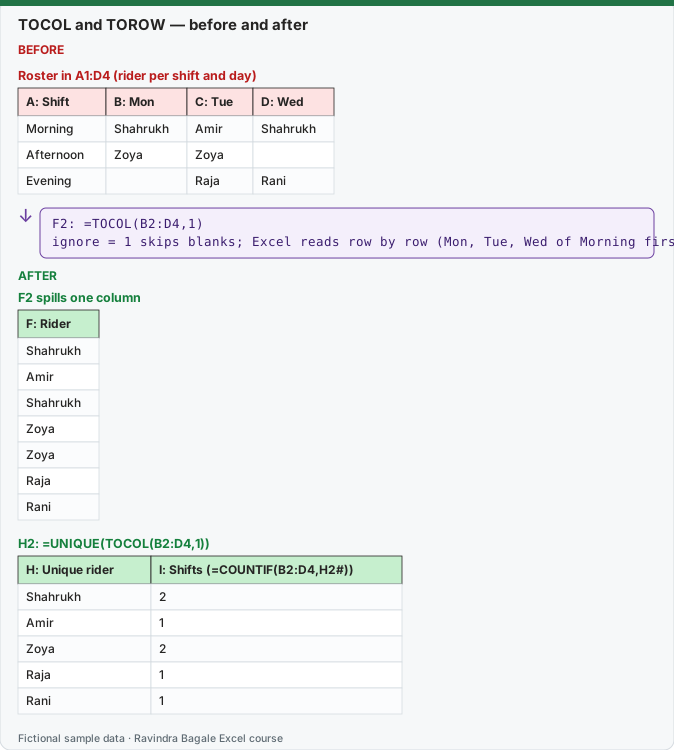
Expected result — F2 spills one column
| F: Rider |
|---|
| Shahrukh |
| Amir |
| Shahrukh |
| Zoya |
| Zoya |
| Raja |
| Rani |
Expected result — H2: =UNIQUE(TOCOL(B2:D4,1))
| H: Unique rider | I: Shifts (=COUNTIF(B2:D4,H2#)) |
|---|---|
| Shahrukh | 2 |
| Amir | 1 |
| Zoya | 2 |
| Raja | 1 |
| Rani | 1 |
Before table and formula as text
Before — Roster in A1:D4 (rider per shift and day)
| A: Shift | B: Mon | C: Tue | D: Wed |
|---|---|---|---|
| Morning | Shahrukh | Amir | Shahrukh |
| Afternoon | Zoya | Zoya | — |
| Evening | — | Raja | Rani |
Formula / click path
F2: =TOCOL(B2:D4,1)
ignore = 1 skips blanks; Excel reads row by row (Mon, Tue, Wed of Morning first)
Do it step by step:
- Type the roster in A1:D4: shifts in column A, days in B1:D1, names inside, two cells left empty.
- In F2 type
=TOCOL(B2:D4)and press Enter. Notice the two empty cells come back as 0. - Edit it to
=TOCOL(B2:D4,1). The zeros disappear; you get 7 names. - In H2 type
=UNIQUE(TOCOL(B2:D4,1))to get 5 different riders. - In I2 type
=COUNTIF(B2:D4,H2#)to count shifts per rider. - Try
=TOCOL(B2:D4,1,TRUE)to read the grid column by column (all of Monday first).
स्टेप बाय स्टेप करून बघा:
- Roster A1:D4 मध्ये type करा: column A मध्ये shifts, B1:D1 मध्ये days, आत नावं, दोन cells रिकाम्या.
- F2 मध्ये
=TOCOL(B2:D4)type करून Enter दाबा. दोन रिकाम्या cells 0 म्हणून येतात ते बघा. - तो बदलून
=TOCOL(B2:D4,1)करा. शून्य जातात; 7 नावं मिळतात. - H2 मध्ये
=UNIQUE(TOCOL(B2:D4,1))type करा, 5 वेगवेगळे riders मिळतात. - I2 मध्ये
=COUNTIF(B2:D4,H2#)type करून प्रत्येक rider चे shifts मोजा. - Grid column by column वाचण्यासाठी (आधी पूर्ण Monday)
=TOCOL(B2:D4,1,TRUE)करून बघा.
स्टेप बाय स्टेप करके देखें:
- Roster A1:D4 में type करें: column A में shifts, B1:D1 में days, अंदर नाम, दो cells खाली.
- F2 में
=TOCOL(B2:D4)type करके Enter दबाएँ. देखें कि दो खाली cells 0 बनकर आती हैं. - इसे बदलकर
=TOCOL(B2:D4,1)करें. शून्य हट जाते हैं; 7 नाम मिलते हैं. - H2 में
=UNIQUE(TOCOL(B2:D4,1))type करें, 5 अलग riders मिलते हैं. - I2 में
=COUNTIF(B2:D4,H2#)type करके हर rider के shifts गिनें. - Grid को column by column पढ़ने के लिए (पहले पूरा Monday)
=TOCOL(B2:D4,1,TRUE)आज़माएँ.
Version note
TOCOL and TOROW are listed for Excel for Microsoft 365 (Windows and Mac) and Excel 2024 (Windows and Mac). Excel 2021 and older show #NAME?.
Syntax
TOCOL(array, [ignore], [scan_by_column]) and TOROW(array, [ignore], [scan_by_column])
| Argument | Values |
|---|---|
| ignore | 0 = keep everything (default), 1 = skip blanks, 2 = skip errors, 3 = skip blanks and errors |
| scan_by_column | FALSE or left out = read row by row (default), TRUE = read column by column |
Row by row vs column by column on our roster
| Formula | Result (top to bottom) |
|---|---|
=TOCOL(B2:D4) |
Shahrukh, Amir, Shahrukh, Zoya, Zoya, 0, 0, Raja, Rani |
=TOCOL(B2:D4,1) |
Shahrukh, Amir, Shahrukh, Zoya, Zoya, Raja, Rani |
=TOCOL(B2:D4,1,TRUE) |
Shahrukh, Zoya, Amir, Zoya, Raja, Shahrukh, Rani |
=TOROW(B2:D4,1) |
the same 7 names as the second row, but spilled across one row |
Example 2: statistics on a weekly grid. Weekly sales (fictional, ₹ thousand) for three cities sit in B2:E4 (weeks W1 to W4 across). Functions like MEDIAN or LARGE already accept a grid, but UNIQUE, SORT on a single list, and charts need one column:
| City | W1 | W2 | W3 | W4 |
|---|---|---|---|---|
| Pune | 520 | 610 | 580 | 700 |
| Nashik | 300 | 280 | 350 | 330 |
| Nagpur | 410 | 390 | 450 | 470 |
| Goal | Formula | Result |
|---|---|---|
| All 12 numbers in one sorted column | =SORT(TOCOL(B2:E4)) |
280, 300, 330, 350, 390, 410, 450, 470, 520, 580, 610, 700 |
| Top 3 weeks of any city | =TAKE(SORT(TOCOL(B2:E4),,-1),3) |
700, 610, 580 |
| How many weeks were above 450? | =SUM(--(TOCOL(B2:E4)>450)) |
5 |
Example 3: skip errors. If a lookup grid has a few #N/A cells, =TOCOL(B2:D10,2) returns only the good values, and =TOCOL(B2:D10,3) drops blanks and errors together.
Example 4: one header row from two. =TOROW(A1:C2,1) turns a two-row header into one row. Useful before VSTACK (lesson 9.8).
Common problems
| What you see | Why | Fix |
|---|---|---|
| Zeros in the list | Empty cells are returned as 0 when ignore is 0. | Use ignore = 1 (or 3). |
| The order looks mixed up | TOCOL reads row by row by default. | Add TRUE as the 3rd argument to read column by column. |
| #SPILL! | Cells below the formula are not empty. | Clear the cells or move the formula. |
How these results were checked: this function is not available in LibreOffice, so every expected value on this page was computed in Python and cross-checked in LibreOffice with classic formulas that give the same numbers. The layout of the spill follows Microsoft's documentation. Microsoft reference: TOCOL function, TOROW function.
Practice task (try it before you open the answer):
- Using the weekly grid above, list all 12 numbers in one row with TOROW.
- Find the average of all 12 numbers with one formula that uses TOCOL.
- Return one column that lists W1 for all three cities, then W2 for all three cities, and so on.
Answer
=TOROW(B2:E4)gives 520, 610, 580, 700, 300, 280, 350, 330, 410, 390, 450, 470.=AVERAGE(TOCOL(B2:E4))gives 449.17 (AVERAGE(B2:E4) gives the same; TOCOL matters when you need the list itself).=TOCOL(B2:E4,,TRUE)gives 520, 300, 410, 610, 280, 390, 580, 350, 450, 700, 330, 470.
Ravindra Bagale's Tip
Whenever a grid must feed UNIQUE, SORT or a chart, put TOCOL in front of it. Keep the grid for people to read, and let TOCOL make the list for formulas.
Ravindra Bagale's Tip – मराठी
Grid मधून UNIQUE, SORT किंवा chart ला data द्यायचा असेल तर आधी TOCOL लावा. माणसांनी वाचायला grid ठेवा, आणि formulas साठी list TOCOL ला बनवू द्या.
Ravindra Bagale's Tip – हिंदी
Grid से UNIQUE, SORT या chart को data देना हो तो आगे TOCOL लगाएँ. लोगों के पढ़ने के लिए grid रखें, और formulas के लिए list TOCOL को बनाने दें.