Catering Management System in Excel: Packages, Events, Payments, Kitchen Quantities, Margin and Dashboard
Rani Caterers in Solapur caters weddings, birthdays, naming ceremonies and office lunches. Rani priced events from memory, bought rice and chicken by guesswork, and chased balances after the event was over. This page builds an 8-sheet Excel system: packages and per-plate quantities are typed once, each event works out its amount, food cost, margin and status, and the Requirement sheet prints the shopping list for any event.
What you'll learn on this page
- Keep packages with rate and food cost per plate
- Store raw quantity per plate for each package
- Price an event from guests, rate and extras with GST
- Collect payments and show Advance due, Confirmed, Collect balance or Done
- Work out margin after food cost and staff
- Print a kitchen requirement list with INDEX and MATCH
- Report events, guests and margin by event type
Download the template: catering-management-system-template.xlsx: a 8-sheet system with example data and real formulas (Read me, Setup, Quantities, Events, Payments, Requirement, Report, Dashboard). Yellow cells are inputs you can type over; green cells hold formulas; blue rows are headers and totals. Replace the example data with your own and every report and the dashboard recalculate.
Made-up data: every name, amount, business and date on this page is made up for practice. Cities are used only to make the examples feel real.
1. The business story
Rani Caterers, Solapur, as of 17 October 2026 (made-up data). Four packages from ₹350 to ₹650 a plate; 50% advance to confirm; 5% food buffer; GST on outdoor catering 5% (an input; confirm with your accountant).
| Question | Where the system answers it |
|---|---|
| What do I buy for Salman Shaikh's wedding? | Requirement EV-008, 800 guests: 210 kg chicken, 126 kg rice, 1,680 sweets |
| Whom do I chase? | 6 events: 4 to collect after the event, 2 with advance not yet in |
| What do weddings earn? | Report: ₹6,13,000 margin on ₹14,42,000 |
| What is still to come in? | ₹6,46,925 across all events |
10 events, 2,930 guests and ₹16,81,500 before GST with a 42.2% margin after food and staff. For a home function list, see the guest list and catering budget.
Figure 1. Setup and Quantities hold rates and per-plate amounts; Events and Payments are the entry sheets.
2. Build it sheet by sheet
Step 1. Setup and Quantities
- B4 GST, B5 advance needed to confirm (50%), B6 extra food buffer (5%).
- Packages in A9:C12 with rate and food cost per plate.
- Quantities: items down column A, packages across row 4, raw quantity for ONE plate in the grid.
Step 2. Events: amount, payments and margin
- A5
="EV-"&TEXT(ROW()-4,"000"). H5 rate from the package with XLOOKUP and J5 amount=G5*H5+I5. - K5 GST
=ROUND(J5*Setup!$B$4,0), L5 total, M5 paid with SUMIFS from Payments, N5 balance. - O5 food cost from guests × cost per plate, P5 staff and hire, Q5 margin
=J5-O5-P5.
Step 3. Events: status
- R5:
=IF(E5<Setup!$B$3,IF(N5<=0,"Done","Collect balance"),IF(M5>=L5*Setup!$B$5,"Confirmed","Advance due")). - Colour Collect balance and Advance due red with formula-based formatting.

Figure 2. Events: amount, GST, paid, balance, food cost, margin and status
Step 4. Requirement: the shopping list
- Type an event ID in B4; B5:B8 bring client, date, package and guests.
- B10 per plate:
=INDEX(Quantities!$B$5:$E$5,MATCH($B$7,Quantities!$B$4:$E$4,0))(INDEX and MATCH). - C10 to buy:
=ROUND($B$8*B10*(1+Setup!$B$6),1). Set the print area and hand it to the kitchen.
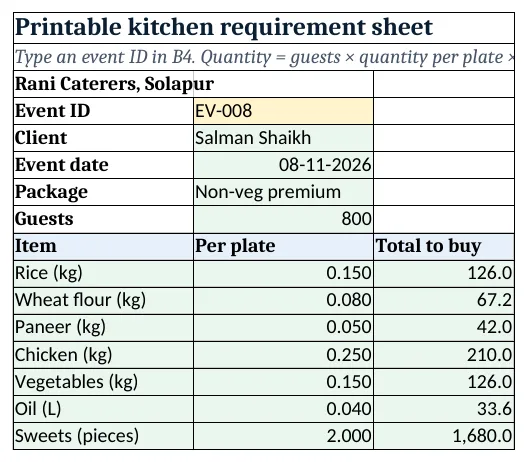
Figure 3. Requirement: quantity to buy for one event from guests and per-plate amounts
Step 5. Report and Dashboard
- Report by event type: events, guests, amount, margin and margin %; rows 12 to 15 plates and food cost by package.
- KPI cards: events, guests, amount, margin %, balance and events needing follow-up. Charts: margin by event type and plates by package.
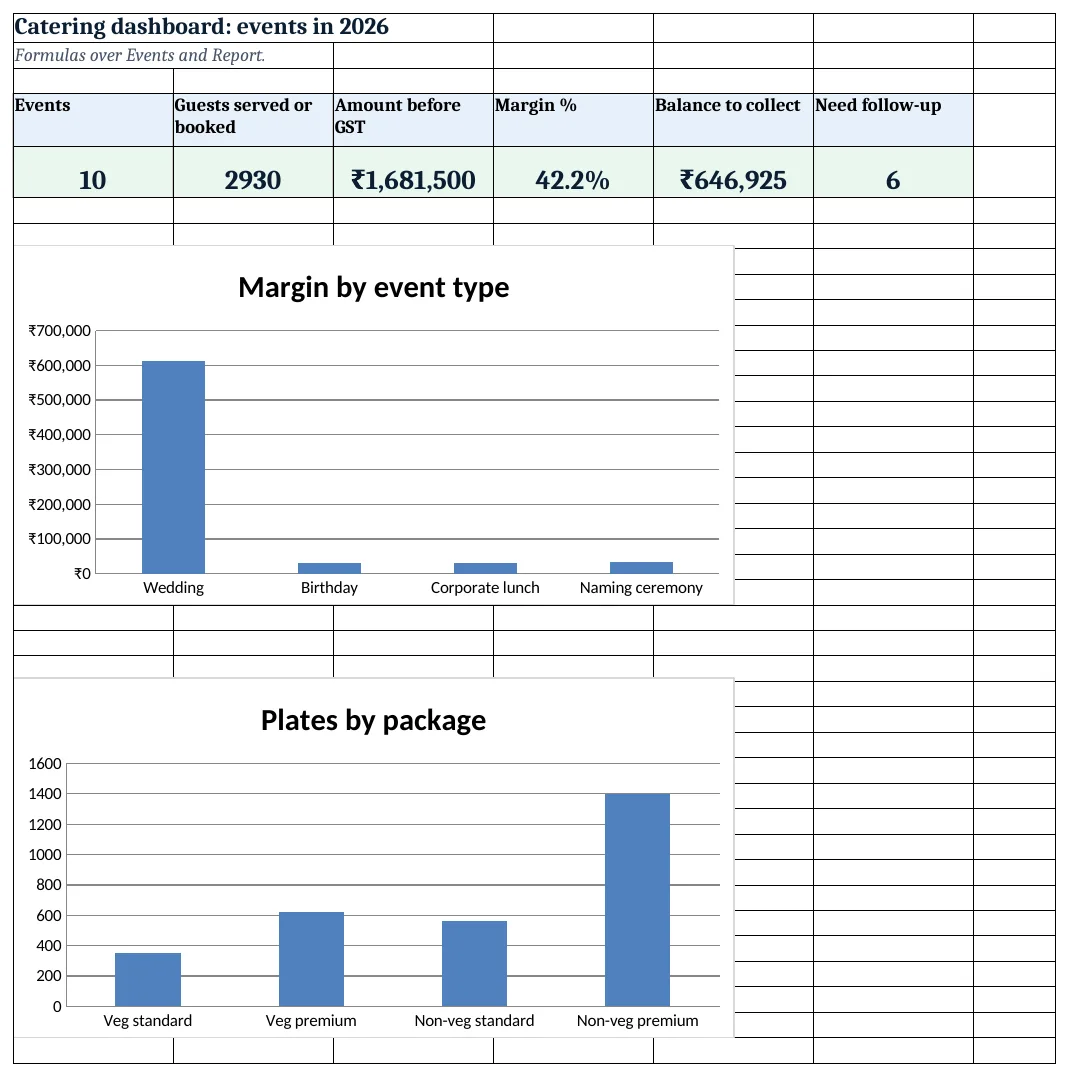
Figure 4. Catering dashboard: events, guests, amount, margin %, balance and follow-ups
Ravindra Bagale's Tip
Lock the guest count two days before and update the sheet. The shopping list changes the moment you do.
Ravindra Bagale's Tip – मराठी
दोन दिवस आधी पाहुण्यांची संख्या निश्चित करा आणि sheet बदला. shopping list लगेच बदलते.
Ravindra Bagale's Tip – हिंदी
दो दिन पहले मेहमानों की संख्या पक्की करें और sheet बदलें. shopping list तुरंत बदल जाती है.
3. Formulas used
| Cell | Formula | What it does |
|---|---|---|
| Events!A5 | ="EV-"&TEXT(ROW()-4,"000") |
Event ID |
| Events!H5 | =XLOOKUP(F5,Setup!$A$9:$A$12,Setup!$B$9:$B$12,0) |
Rate per plate |
| Events!J5 | =G5*H5+I5 |
Event amount |
| Events!K5 | =ROUND(J5*Setup!$B$4,0) |
GST |
| Events!M5 | =SUMIFS(Payments!$C$5:$C$2000,Payments!$B$5:$B$2000,A5) |
Paid so far |
| Events!N5 | =L5-M5 |
Balance |
| Events!O5 | =G5*XLOOKUP(F5,Setup!$A$9:$A$12,Setup!$C$9:$C$12,0) |
Food cost |
| Events!Q5 | =J5-O5-P5 |
Margin |
| Events!R5 | =IF(E5<Setup!$B$3,IF(N5<=0,"Done","Collect balance"),IF(M5>=L5*Setup!$B$5,"Confirmed","Advance due")) |
Event status |
| Requirement!B5 | =XLOOKUP($B$4,Events!$A$5:$A$2000,Events!$C$5:$C$2000,"Not found") |
Client of the event |
| Requirement!C10 | =ROUND($B$8*B10*(1+Setup!$B$6),1) |
Quantity to buy |
| Report!F5 | =IFERROR(E5/D5,0) |
Margin % by event type |
| Dashboard!D5 | =Report!E9/Report!D9 |
Margin % overall |
Every formula above is written in the template, so you can click a cell and see it in the formula bar. All values on this page were recalculated in LibreOffice with zero errors.
4. Common mistakes
- No buffer on quantities. Guests bring guests. A 5% buffer avoids running out of the main dish.
- Quantities for the whole event typed in. Type quantity per plate once; the Requirement sheet scales it for any guest count.
- Margin before staff cost. Cooks, servers and vessels can be 10% of the amount. Leave them out and margin looks too good.
- Final guest count not updated. Change Guests when the client confirms; amount, food cost and the shopping list all follow.
- Balance chased after the event. The status shows Advance due before the event; collect then.
Ravindra Bagale's Tip
Take the balance before serving starts at weddings. After the event, everyone is busy and payments get delayed.
Ravindra Bagale's Tip – मराठी
लग्नात जेवण सुरू होण्याआधी उरलेली रक्कम घ्या. कार्यक्रमानंतर सगळे गडबडीत असतात आणि पैसे उशिरा येतात.
Ravindra Bagale's Tip – हिंदी
शादी में खाना शुरू होने से पहले बाकी रकम लें. कार्यक्रम के बाद सब व्यस्त होते हैं और पैसे देर से आते हैं.
5. More real examples
Example 1: Tiffin service. One row per customer per month with plates and a monthly rate, like the cloud kitchen system.
Example 2: Corporate canteen. Daily plates per company with a monthly bill using SUMIFS by date.
Example 3: Sweet orders for festivals. Packages become boxes; quantities per box drive the purchase list.
Quick revision cards
Quick revision
Each card shows formulas from this page, each with an example and its answer from the template. Scan the QR code on a card to open this lesson. All names and numbers are made up for practice.
झटपट उजळणी
प्रत्येक card वर या page मधले formulas, त्यांचं example आणि template मधलं उत्तर आहे. Card वरचा QR code scan केला की हा lesson उघडतो. सगळी नावं आणि आकडे सरावासाठी काल्पनिक आहेत.
झटपट दोहराई
हर card पर इस page के formulas, उनका example और template का उत्तर है. Card का QR code scan करें तो यह lesson खुलेगा. सभी नाम और आंकड़े अभ्यास के लिए काल्पनिक हैं.
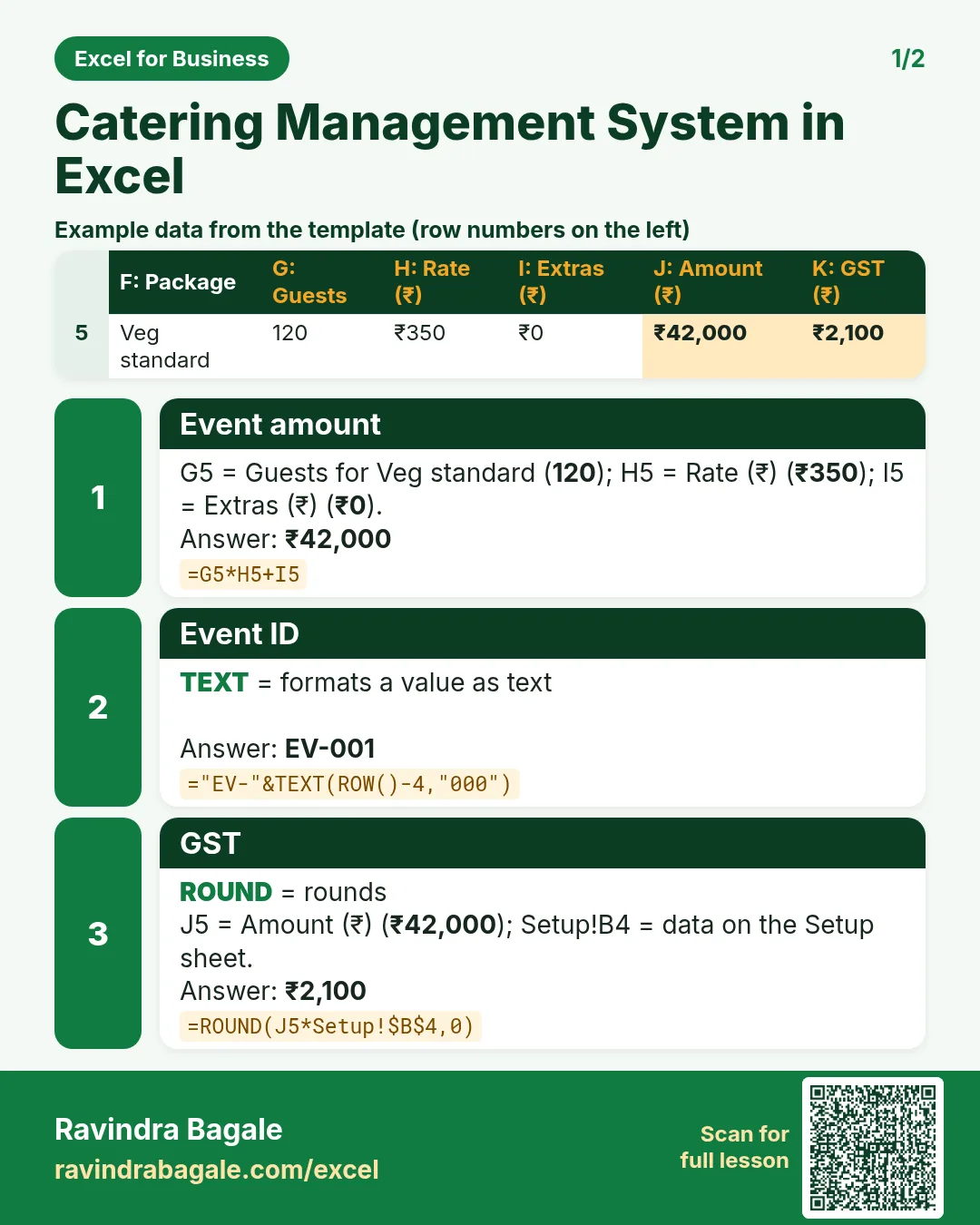

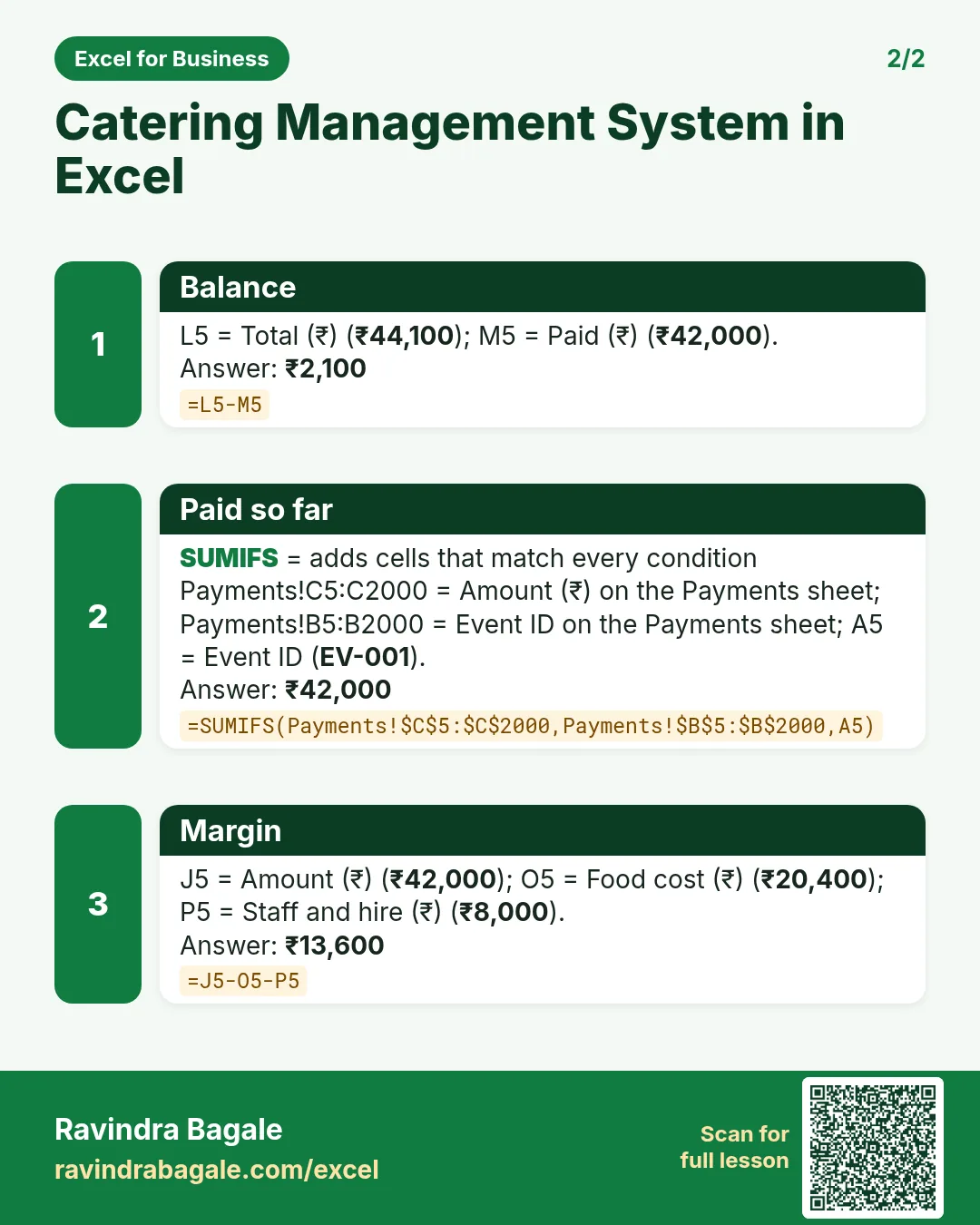

More cards: Ravi Sir's Cards.
6. Frequently asked questions
How do I calculate catering quantities per guest in Excel?
Keep the quantity per plate for each package and multiply by guests × (1 + buffer), as in Requirement C10.
How do I pick a package column with a formula?
INDEX the row of the item with MATCH on the package name in the header row.
What GST applies to outdoor catering?
Outdoor catering is generally taxed at 5% without input tax credit in many cases; rules depend on the premises. Confirm with your accountant.
How do I show events where the advance is not in?
Before the event, compare paid with total × advance %; below it shows Advance due.
How do I work out margin per event?
Amount before GST − food cost − staff and hire, as in Events Q5.
7. Quick quiz
Ten questions on this page. Sign in to save your score.
Loading practice tasks...
- Total covers (Easy): Add up Covers in D2:D11.
- Average bill amount (Easy): Average of E2:E11, rounded to 2 decimals.
- Rows in Downtown (Easy): How many rows have Outlet "Downtown"?
- Largest covers (Easy): The largest value in D2:D11.
- Covers for Downtown (Medium): Total of D2:D11 where B is "Downtown".
- Downtown in Denver (Medium): Total of D2:D11 where B is "Downtown" and C is "Denver".
- Best in Downtown (Medium): Largest E2:E11 value where B is "Downtown".
- Value of row 2 (Medium): D2 times E2.
- Look up Vikram Singh (Medium): The Covers for "Vikram Singh" (use a lookup on column A).
- Total value (Hard): Sum of D times E for all rows.
- Share of Downtown (Hard): Share of D2:D11 that is "Downtown", rounded to 3 decimals.
- Rank of row 2 (Hard): Rank of D2 among D2:D11 (largest = 1).
- Above average? (Hard): "Above" if E2 is above the average of E2:E11, else "Below".