Pharmacy Management System in Excel: Items, Sales Bills, Stock, Expiry Alerts and Dashboard
Ravina Medical in Nagpur stocks tablets, syrups, first-aid and wellness items. Ravina found expired syrup on the shelf only when a customer pointed at the date. This page builds an 8-sheet Excel system where every item has its lot no and expiry date, every sale is one row, and the Stock sheet shows what has expired, what expires within 90 days and what to order.
What you'll learn on this page
- Keep an item master with lot no, expiry, MRP, cost and reorder level
- Bill sales with a discount on MRP and XLOOKUP
- Work out closing stock from opening minus sold
- Flag Expired and Near expiry items from days to expiry
- List items to order with AND
- Print a bill from the bill number
- Report sales, cost and margin by category with SUMPRODUCT and SUMIFS
Download the template: pharmacy-medical-store-management-system-template.xlsx: a 8-sheet system with example data and real formulas (Read me, Setup, Items, Sales, Stock, Bill, Report, Dashboard). Yellow cells are inputs you can type over; green cells hold formulas; blue rows are headers and totals. Replace the example data with your own and every report and the dashboard recalculate.
Made-up data: every name, amount, business and date on this page is made up for practice. Cities are used only to make the examples feel real.
1. The business story
Ravina Medical, Nagpur, as of 17 October 2026 (made-up data). Ten items in four categories, 10% discount on MRP, a 90-day near-expiry window.
| Question | Where the system answers it |
|---|---|
| What has already expired? | Stock: antacid syrup expired 7 days ago, 12 bottles |
| What expires soon? | Stock: cetirizine (75 days) and vitamin C (44 days) |
| How much money is at risk? | Report: ₹2,878 of stock expired or near expiry |
| What should I order? | Stock, Order? = Yes: antiseptic liquid, 5 left |
Sales are ₹23,906.70 from 68 bills with a margin of ₹5,523.70 (23.1%). This is a stock and sales record, not medical advice. For a home medicine refill list, see the medicine stock tracker.
Figure 1. Items is the master; Sales is the only entry sheet; Stock, Bill, Report and Dashboard read from both.
2. Build it sheet by sheet
Step 1. Setup and Items: the master list
- On Setup type the as-of date in B3, the discount in B4 (10%) and the near-expiry window in B5 (90 days).
- On Items one row per item: Code, Item, Category, Lot no, Expiry, MRP, Cost, Opening, Reorder level. Category comes from a drop-down.
Step 2. Sales: one row per item sold
- Headers: Date, Bill no, Code, Item, Qty, MRP, Amount, Cost, Key. Type the code; D5 fills the name:
=XLOOKUP(C5,Items!$A$5:$A$14,Items!$B$5:$B$14,"Check code"). - F5 brings MRP, G5 the amount
=ROUND(E5*F5*(1-Setup!$B$4),2)and H5 cost with XLOOKUP. - I5 builds a key for the bill:
=B5&"-"&COUNTIF($B$5:B5,B5)gives B-007-1, B-007-2 and so on.
Step 3. Stock: closing, expiry and order list
- C5 opening, D5 sold
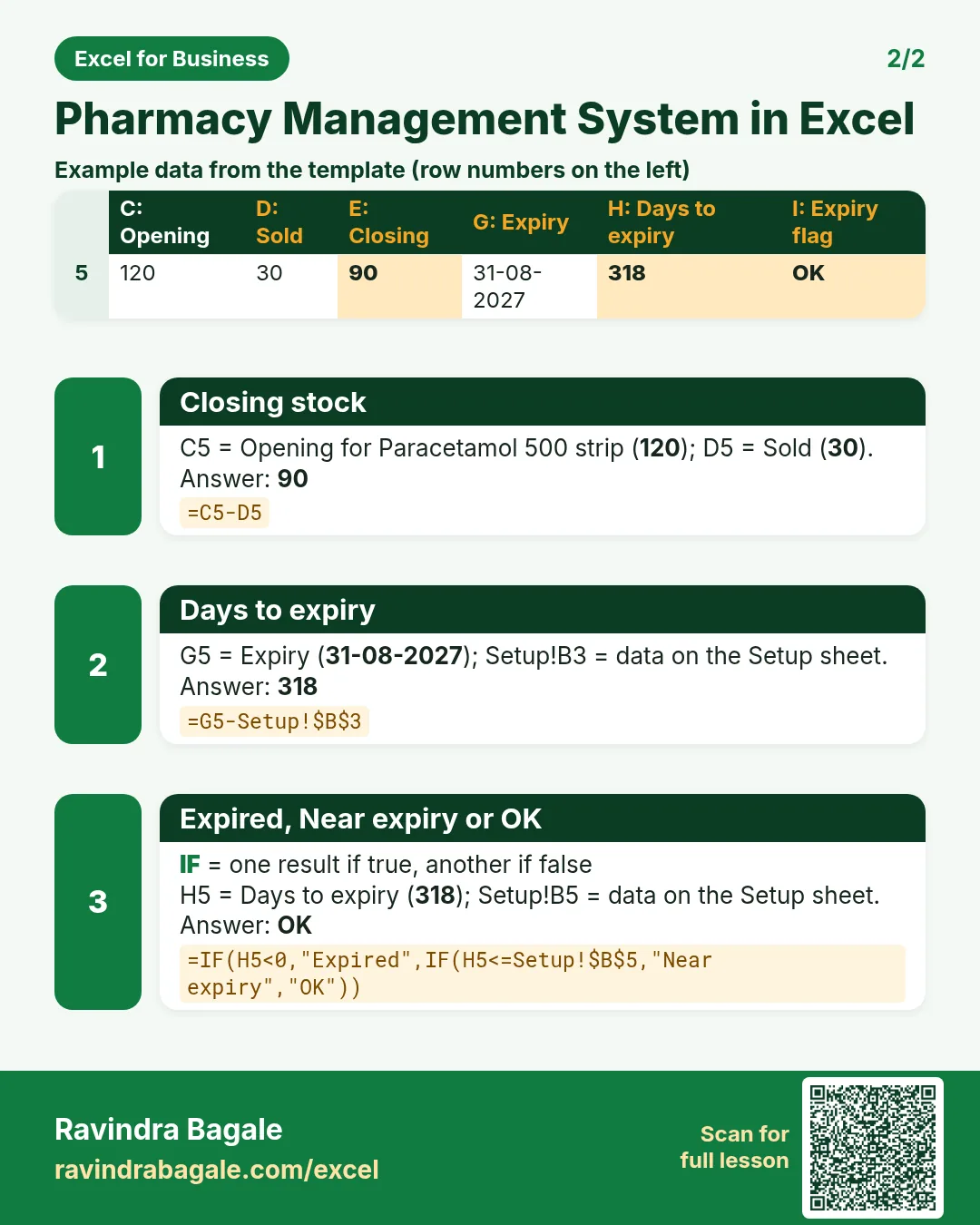
=SUMIFS(Sales!$E$5:$E$2000,Sales!$C$5:$C$2000,A5), E5 closing=C5-D5, F5 value at cost. - H5 days to expiry
=G5-Setup!$B$3(date maths) and I5 the flag:=IF(H5<0,"Expired",IF(H5<=Setup!$B$5,"Near expiry","OK")). - J5 order list with AND:
=IF(AND(E5<=Items!I5,I5="OK"),"Yes","No"). Expired stock is not reordered; it goes back to the supplier. - Colour I5:I14 red and amber with conditional formatting.
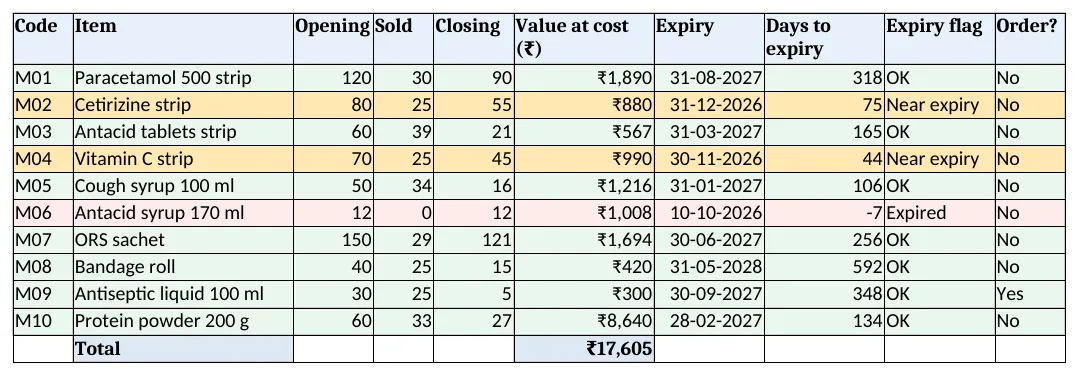
Figure 2. Stock: closing quantity, value, days to expiry, expiry flag and the order list
Step 4. Bill: print one bill
- Type the bill no in B4. D4 finds the date and B7 the first item:
=XLOOKUP($B$4&"-"&A7,Sales!$I$5:$I$2000,Sales!$D$5:$D$2000,""). - Bill B-007 shows cough syrup, antiseptic and a bandage roll, ₹400.50 after discount. Set the print area to A1:E14.
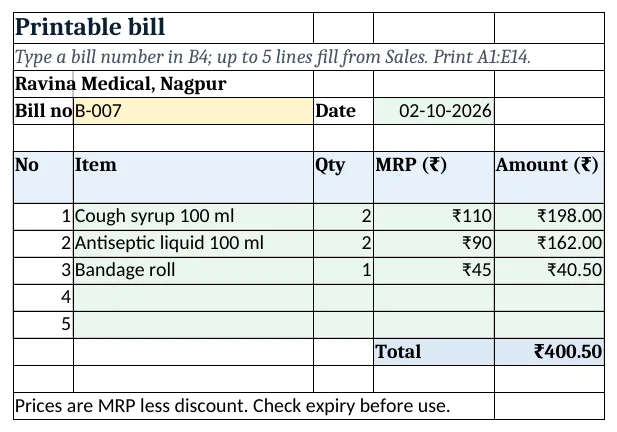
Figure 3. Bill: one bill pulled from Sales by its number
Step 5. Report and Dashboard
- Report B5 sales by category:
=SUMPRODUCT(SUMIFS(Sales!$G$5:$G$2000,Sales!$C$5:$C$2000,Items!$A$5:$A$14)*(Items!$C$5:$C$14=A5)). SUMIFS gives sales per item; SUMPRODUCT adds those in the category. - B11 adds the value of stock that is expired or near expiry: ₹2,878.
- Dashboard KPI cards: sales, margin %, bills (a distinct count), items to act on, value at risk and items to order. Charts: sales by category and stock value by category.
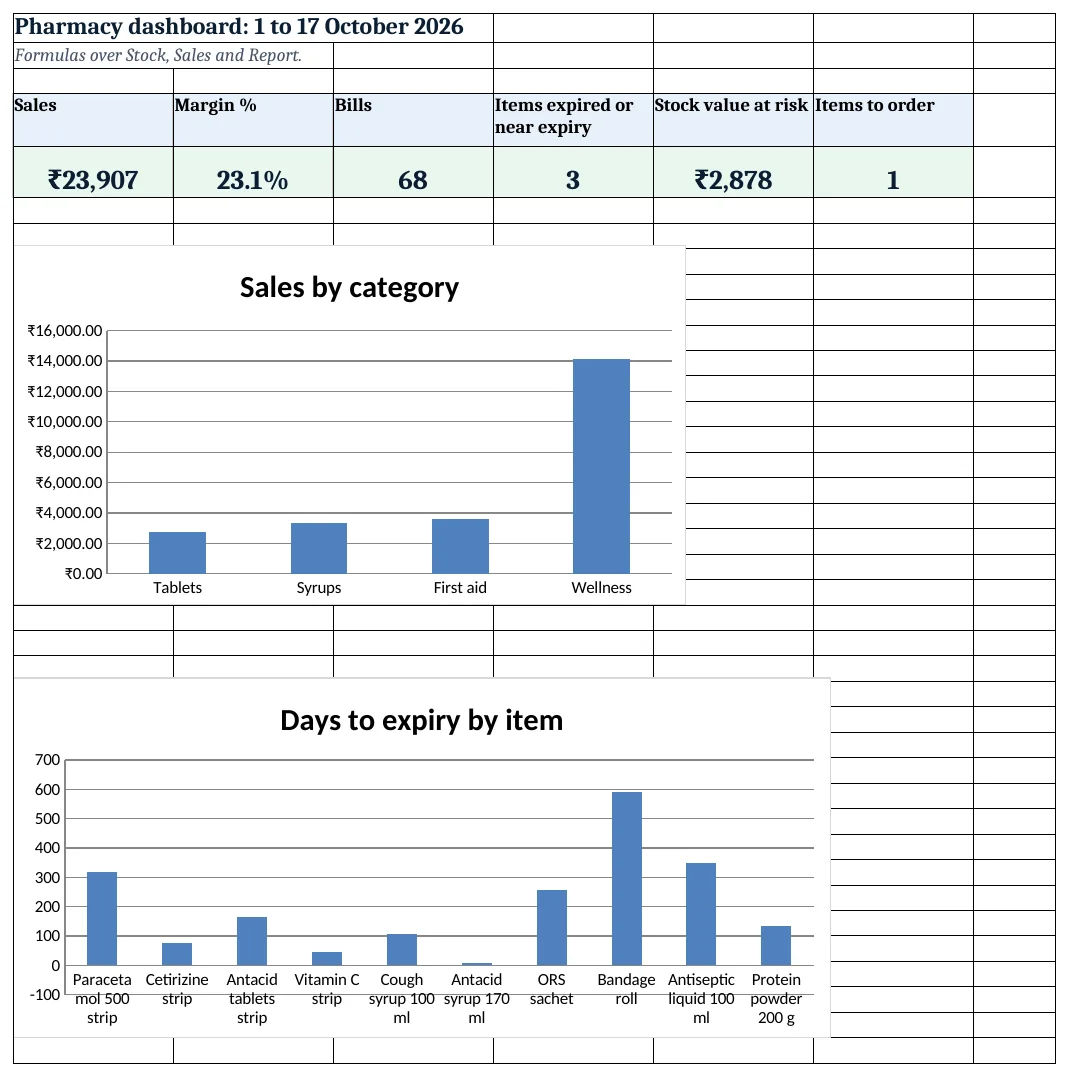
Figure 4. Pharmacy dashboard: sales, margin, bills and items to act on
Ravindra Bagale's Tip
Look at the Near expiry list every Monday. Items with 60 to 90 days left can still go back to the supplier or be sold first.
Ravindra Bagale's Tip – मराठी
दर सोमवारी Near expiry यादी पहा. 60 ते 90 दिवस उरलेला माल supplier ला परत करता येतो किंवा आधी विकता येतो.
Ravindra Bagale's Tip – हिंदी
हर सोमवार Near expiry सूची देखें. 60 से 90 दिन बचा माल supplier को लौटाया या पहले बेचा जा सकता है.
3. Formulas used
| Cell | Formula | What it does |
|---|---|---|
| Sales!D5 | =XLOOKUP(C5,Items!$A$5:$A$14,Items!$B$5:$B$14,"Check code") |
Item name from the code |
| Sales!G5 | =ROUND(E5*F5*(1-Setup!$B$4),2) |
Amount after discount on MRP |
| Sales!I5 | =B5&"-"&COUNTIF($B$5:B5,B5) |
Bill key for the printable bill |
| Stock!D5 | =SUMIFS(Sales!$E$5:$E$2000,Sales!$C$5:$C$2000,A5) |
Quantity sold |
| Stock!E5 | =C5-D5 |
Closing stock |
| Stock!H5 | =G5-Setup!$B$3 |
Days to expiry |
| Stock!I5 | =IF(H5<0,"Expired",IF(H5<=Setup!$B$5,"Near expiry","OK")) |
Expired, Near expiry or OK |
| Stock!J5 | =IF(AND(E5<=Items!I5,I5="OK"),"Yes","No") |
Order this item? |
| Bill!B7 | =XLOOKUP($B$4&"-"&A7,Sales!$I$5:$I$2000,Sales!$D$5:$D$2000,"") |
First item on the bill |
| Report!B5 | =SUMPRODUCT(SUMIFS(Sales!$G$5:$G$2000,Sales!$C$5:$C$2000,Items!$A$5:$A$14)*(Items!$C$5:$C$14=A5)) |
Sales by category |
| Report!E5 | =IFERROR(D5/B5,0) |
Margin % by category |
| Dashboard!C5 | =SUMPRODUCT((Sales!$B$5:$B$2000<>"")/COUNTIF(Sales!$B$5:$B$2000,Sales!$B$5:$B$2000&"")) |
Number of bills |
| Dashboard!D5 | =COUNTIF(Stock!I5:I14,"<>OK") |
Items expired or near expiry |
Every formula above is written in the template, so you can click a cell and see it in the formula bar. All values on this page were recalculated in LibreOffice with zero errors.
4. Common mistakes
- One row for two lots of the same item. Different lots have different expiry dates. Give each lot its own code (M06A, M06B) so the flag is right.
- Reordering expired stock. Closing stock includes expired bottles. The AND test stops an Expired item from showing Order = Yes.
- Discount typed on each row. Keep the discount on Setup. A changed rate then applies to all new bills the same way.
- Selling from an expired lot. Check the Stock flag before billing. The bill footer also reminds the counter to check expiry.
- Counting bills with COUNTA on Sales. A bill with three items is three rows. Use a distinct count of bill numbers.
Ravindra Bagale's Tip
Enter the lot no and expiry date the day the stock arrives. Typing them later from memory is how wrong dates get in.
Ravindra Bagale's Tip – मराठी
माल आला त्याच दिवशी lot no आणि expiry date टाका. नंतर आठवणीने टाकल्यास चुकीच्या तारखा येतात.
Ravindra Bagale's Tip – हिंदी
माल आए उसी दिन lot no और expiry date डालें. बाद में याद से डालने पर गलत तारीखें आती हैं.
5. More real examples
Example 1: Clinic dispensary. Replace MRP with the clinic rate, drop the discount and add a Patient ID column on Sales.
Example 2: Veterinary store. Same layout; add a Species column on Items and report sales by species.
Example 3: Distributor. Add a Retailer column on Sales and an outstanding sheet like the khata book.
Quick revision cards
Quick revision
Each card shows formulas from this page, each with an example and its answer from the template. Scan the QR code on a card to open this lesson. All names and numbers are made up for practice.
झटपट उजळणी
प्रत्येक card वर या page मधले formulas, त्यांचं example आणि template मधलं उत्तर आहे. Card वरचा QR code scan केला की हा lesson उघडतो. सगळी नावं आणि आकडे सरावासाठी काल्पनिक आहेत.
झटपट दोहराई
हर card पर इस page के formulas, उनका example और template का उत्तर है. Card का QR code scan करें तो यह lesson खुलेगा. सभी नाम और आंकड़े अभ्यास के लिए काल्पनिक हैं.
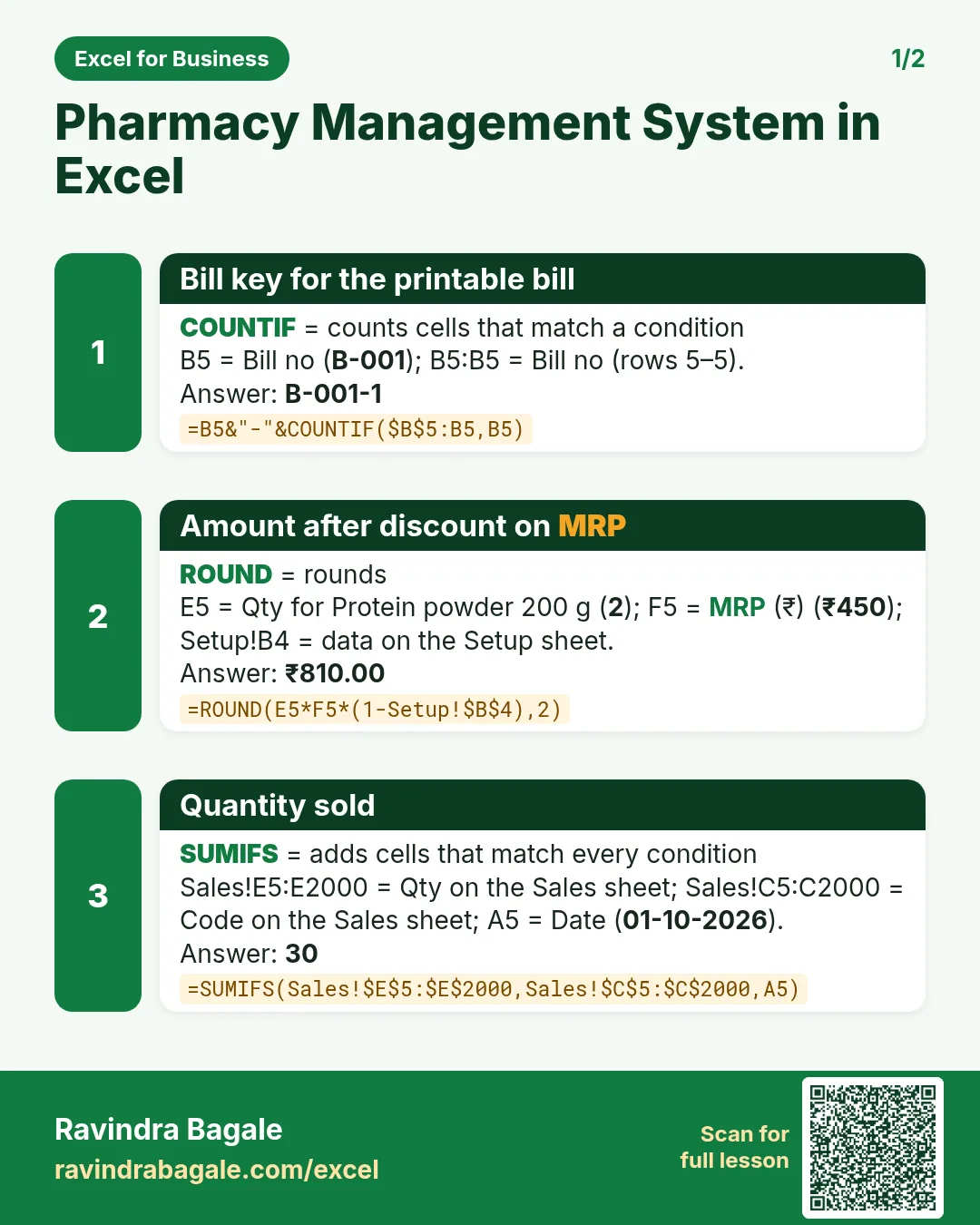


More cards: Ravi Sir's Cards.
6. Frequently asked questions
How do I find medicines expiring in 90 days in Excel?
Days to expiry = expiry − as-of date. Show "Near expiry" when that is between 0 and 90 and "Expired" when it is below 0.
How do I make a bill print from a bill number?
Give each sale row a key of bill no and line number, then XLOOKUP the key "B-007-1", "B-007-2" on the Bill sheet.
What discount should a medical store give?
That is your business decision. The template keeps it as one input on Setup; MRP is the ceiling price printed on the pack.
How do I count the number of bills?
=SUMPRODUCT((range<>"")/COUNTIF(range,range&"")) counts each bill number once.
Where does lot-wise stock value come from?
Closing quantity × cost per unit, as in Stock F5. The near-expiry project shows the same idea for a larger store.
7. Quick quiz
Ten questions on this page. Sign in to save your score.
Loading practice tasks...
- Total stock units (Easy): Add up Stock units in D2:D11.
- Average unit cost (Easy): Average of E2:E11, rounded to 2 decimals.
- Rows in Antibiotic (Easy): How many rows have Category "Antibiotic"?
- Largest stock units (Easy): The largest value in D2:D11.
- Stock units for Antibiotic (Medium): Total of D2:D11 where B is "Antibiotic".
- Antibiotic in Madrid (Medium): Total of D2:D11 where B is "Antibiotic" and C is "Madrid".
- Best in Antibiotic (Medium): Largest E2:E11 value where B is "Antibiotic".
- Value of row 2 (Medium): D2 times E2.
- Look up Hannah Lee (Medium): The Stock units for "Hannah Lee" (use a lookup on column A).
- Total value (Hard): Sum of D times E for all rows.
- Share of Antibiotic (Hard): Share of D2:D11 that is "Antibiotic", rounded to 3 decimals.
- Rank of row 2 (Hard): Rank of D2 among D2:D11 (largest = 1).
- Above average? (Hard): "Above" if E2 is above the average of E2:E11, else "Below".