SIP Calculator in Excel: Future Value of a Monthly SIP with the FV Function (and a Yearly Step-Up)
Shraddha Bagale starts a ₹5,000 monthly SIP in Pune and asks the question everyone asks: "What will this become in 15 years?" Online SIP calculators give one number, but you cannot see how they got it. In Excel you can. One FV formula gives the final value, and a small table shows what happens if you raise the SIP by 10% every year.
What you'll learn on this page
- What FV does and its five arguments
- The monthly rate from a yearly return
- Final value, total invested and gain
- Why rate/12 gives a bigger, wrong number
- A year-by-year step-up SIP table
- A line chart of invested vs value
Download the template: sip-calculator-fv-template.xlsx: example data with real formulas. Yellow cells are inputs you can type over; green cells hold formulas; blue rows are headers and totals. Replace the example data with your own and everything recalculates.
Made-up data: every name, amount, shop and date on this page is made up for practice. Cities are used only to make the examples feel real.
1. The example
Shraddha's plan (made-up, and 12% is only an assumption, not a promise): ₹5,000 a month for 15 years, paid at the start of each month, expected return 12% a year.
| Result | Value |
|---|---|
| Monthly rate =(1+12%)^(1/12)−1 | 0.9489% |
| Instalments | 180 |
| Value at the end | ₹23,79,657 |
| Total invested | ₹9,00,000 |
| Estimated gain | ₹14,79,657 |
If she raises the SIP by 10% every year (₹5,000, ₹5,500, ₹6,050 …), she invests ₹19,06,349 and the value grows to ₹41,37,359, which is ₹17,57,702 more than the flat SIP.
Short intro to FV. =FV(rate, nper, pmt, [pv], [type]) gives the value of regular payments after nper periods. rate is the rate per period (per month here), pmt is the payment (typed with a minus sign because money goes out of your pocket), pv is money already invested (0 here) and type is 1 when you pay at the start of each period, 0 at the end. FV and its partners PMT and NPER are also used in the savings goal calculator.
Figure 1. The SIP calculator: SIP, yearly return and years go in; the monthly rate and FV give ₹23,79,657 for a flat SIP; the yearly table adds a 10% step-up and reaches ₹41,37,359.
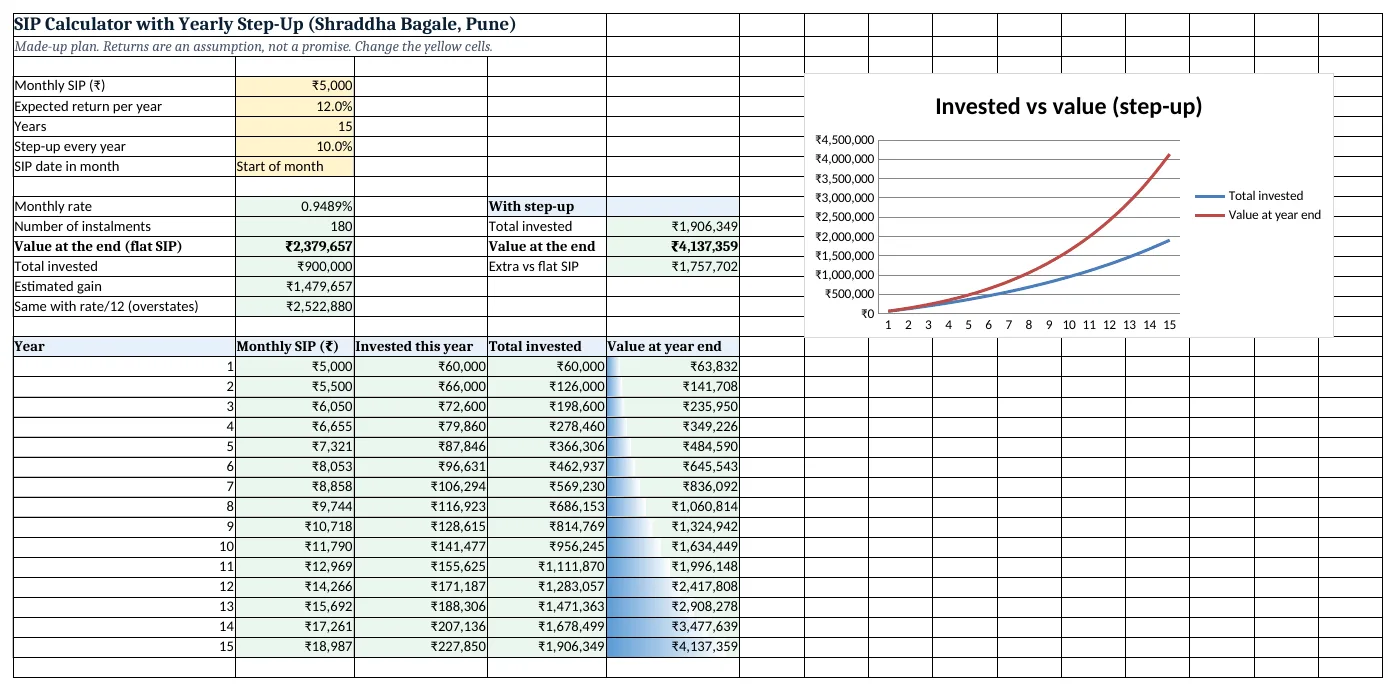
Figure 2. The template sheet, recalculated with its example data. Download it above and replace the yellow cells with your own numbers.
2. Build it step by step
Step 1. Type the inputs
- In A4:A8 type Monthly SIP, Expected return per year, Years, Step-up every year, SIP date in month.
- In B4:B7 type 5000, 12%, 15 and 10% (yellow input cells).
- Select B8 > Data > Data Validation > List and type
Start of month,End of month(drop-down lists). Pick Start of month.
Step 2. Monthly rate and number of instalments
- In B10 type
=(1+B5)^(1/12)-1: 0.9489%. This turns 12% a year into the equal monthly rate that grows to 12% in a year. - In B11 type
=B6*12: 180 instalments.
Step 3. Final value with FV
- In B12 type
=FV(B10,B11,-B4,0,IF(B8="Start of month",1,0)): ₹23,79,657. - The minus sign before B4 makes the answer positive. Without it FV shows −₹23,79,657.
- The IF turns the drop-down into the type argument: 1 for start of month, 0 for end (IF function). With End of month the value is ₹23,57,289.
Step 4. Invested and gain
- In B13 type
=B4*B11: ₹9,00,000. - In B14 type
=B12-B13: ₹14,79,657 estimated gain. - In B15 type
=FV(B5/12,B11,-B4,0,1)only to compare: ₹25,22,880. Dividing 12% by 12 treats 1% a month as if it equals 12% a year, which overstates the result by ₹1,43,223.
Step 5. Year-by-year step-up table
- In A17:E17 type Year, Monthly SIP, Invested this year, Total invested, Value at year end. Type 1 to 15 in A18:A32.
- In B18 type
=$B$4*(1+$B$7)^(A18-1): ₹5,000 in year 1, ₹5,500 in year 2. - In C18 type
=B18*12. In D18 type=C18and in D19=D18+C19. - In E18 type
=FV($B$10,12,-B18,0,IF($B$8="Start of month",1,0)): ₹63,832 after year 1. - In E19 type
=E18*(1+$B$10)^12+FV($B$10,12,-B19,0,IF($B$8="Start of month",1,0)). Last year's value grows for 12 more months, and this year's SIPs are added. Copy B19:E19 down to row 32.
Step 6. Summary and chart
- In E11 type
=D32(₹19,06,349), in E12=E32(₹41,37,359) and in E13=E12-B12(₹17,57,702). - Select E18:E32 > Home > Conditional Formatting > Data Bars (data bars).
- Select D17:E32 > Insert > Line (line charts). The gap between the two lines is the gain.
Ravindra Bagale's Tip
Plan with a lower return than you hope for. If the plan works at 10%, a better year is a bonus; if it only works at 14%, it is a wish.
Ravindra Bagale's Tip – मराठी
आपल्याला जेवढा return अपेक्षित आहे त्यापेक्षा कमी धरून plan करा. 10% वर plan जमला तर चांगलं वर्ष म्हणजे bonus; 14% शिवाय जमत नसेल तर ती फक्त इच्छा.
Ravindra Bagale's Tip – हिंदी
जितना return उम्मीद है उससे कम मानकर plan करो. 10% पर plan बनता है तो अच्छा साल bonus है; 14% के बिना नहीं बनता तो वो बस एक ख्वाहिश है.
3. Formulas used
| Cell | Formula | What it does |
|---|---|---|
| B10 | =(1+B5)^(1/12)-1 |
Monthly rate from the yearly return |
| B11 | =B6*12 |
Number of monthly instalments |
| B12 | =FV(B10,B11,-B4,0,IF(B8="Start of month",1,0)) |
Value at the end of a flat SIP |
| B13 | =B4*B11 |
Total money put in |
| B14 | =B12-B13 |
Estimated gain |
| B15 | =FV(B5/12,B11,-B4,0,1) |
The rate/12 version, only to compare |
| B18 | =$B$4*(1+$B$7)^(A18-1) |
SIP amount in year 1 (grows by the step-up) |
| E18 | =FV($B$10,12,-B18,0,IF($B$8="Start of month",1,0)) |
Value after year 1 |
| E19 | =E18*(1+$B$10)^12+FV($B$10,12,-B19,0,IF($B$8="Start of month",1,0)) |
Value after year 2: last value grown 12 months + this year's SIPs |
| E12 | =E32 |
Final value with step-up |
| E13 | =E12-B12 |
Extra value from the step-up |
Every formula above is written in the template, so you can click a cell and see it in the formula bar. All values on this page were recalculated in the file.
4. Common mistakes
- Typing the yearly rate into FV.
=FV(12%,180,-5000)treats 12% as a monthly rate and gives a huge number. The rate must be per month because the payments are monthly. - Using 12%/12 as the monthly rate. It overstates the value.
(1+12%)^(1/12)-1= 0.9489% is the monthly rate that really compounds to 12% a year. - Forgetting the minus sign. FV follows cash-flow signs: money you pay is negative.
-B4makes the result positive. - Leaving type empty. An empty type means end of month. Most SIPs debit early in the month, so use 1, or pick it from the drop-down.
- Treating the result as guaranteed. Mutual fund returns go up and down. Try 8%, 10% and 12% in B5 and plan with the lower number.
Ravindra Bagale's Tip
Raise the SIP every time your salary goes up, even by ₹500. The step-up column shows why: the raises double the final value in this example.
Ravindra Bagale's Tip – मराठी
पगार वाढला की SIP पण वाढवा, अगदी ₹500 ने का होईना. Step-up column बघा: या example मध्ये final value जवळजवळ दुप्पट होते.
Ravindra Bagale's Tip – हिंदी
जब भी पगार बढ़े, SIP भी बढ़ाओ, चाहे ₹500 ही. Step-up column देखो: इस example में final value लगभग दोगुनी हो जाती है.
5. More real examples
Example 1: Child's education goal. Ruhi is 11. A goal 7 years away: type 7 in B6 and change B4 until B12 reaches the amount you need, or use Goal Seek on B12 by changing B4.
Example 2: Lump sum plus SIP. Already have ₹1,00,000 invested? Put it in the pv argument as −100000: =FV(B10,B11,-B4,-100000,1).
Example 3: Compare three return rates. Copy column B to C and D with 8% and 10% in row 5 to see a cautious, middle and hopeful value side by side.
Quick revision cards
Quick revision
Each card shows formulas from this page, each with an example and its answer from the template. Scan the QR code on a card to open this lesson. All names and numbers are made up for practice.
झटपट उजळणी
प्रत्येक card वर या page मधले formulas, त्यांचं example आणि template मधलं उत्तर आहे. Card वरचा QR code scan केला की हा lesson उघडतो. सगळी नावं आणि आकडे सरावासाठी काल्पनिक आहेत.
झटपट दोहराई
हर card पर इस page के formulas, उनका example और template का उत्तर है. Card का QR code scan करें तो यह lesson खुलेगा. सभी नाम और आंकड़े अभ्यास के लिए काल्पनिक हैं.
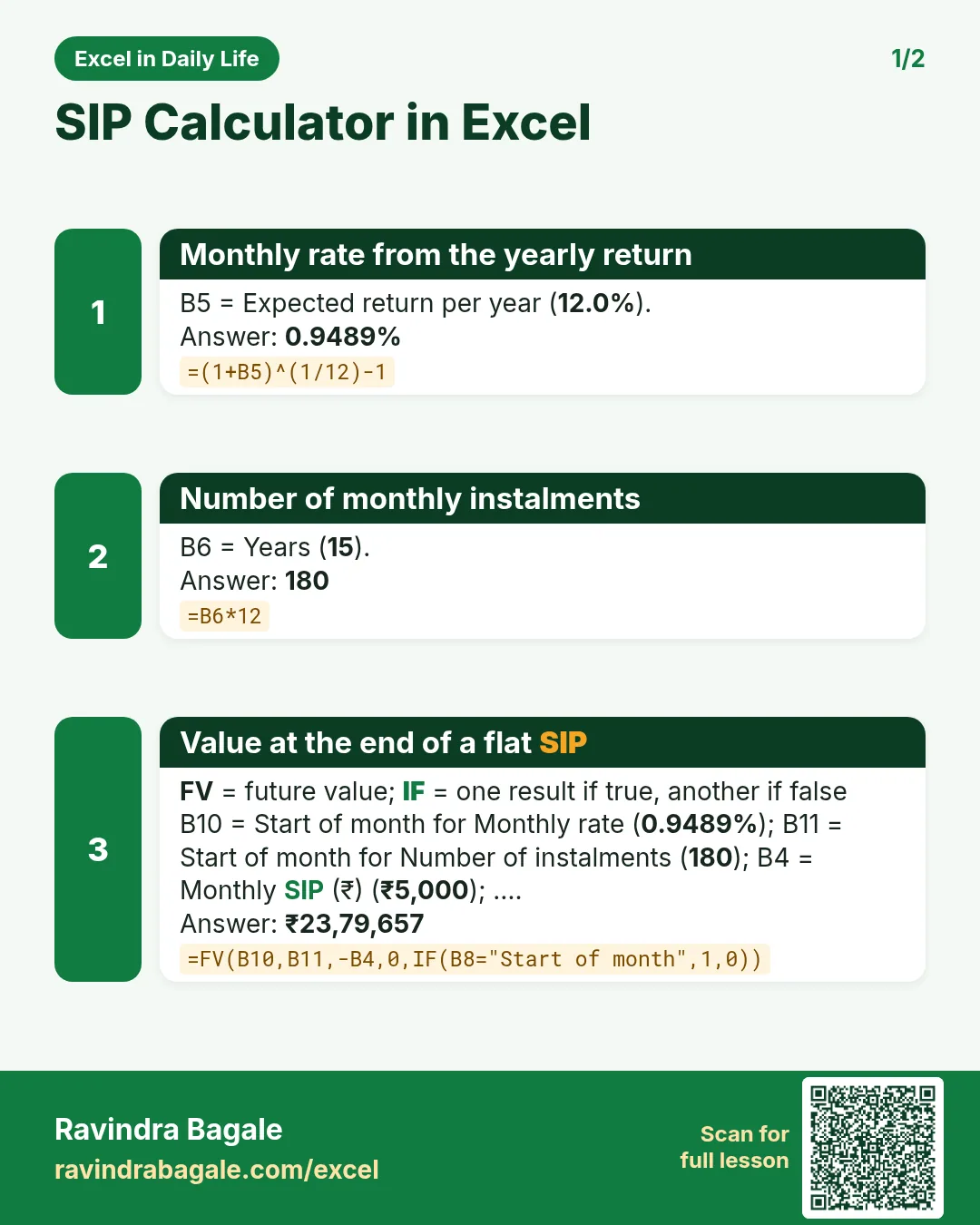

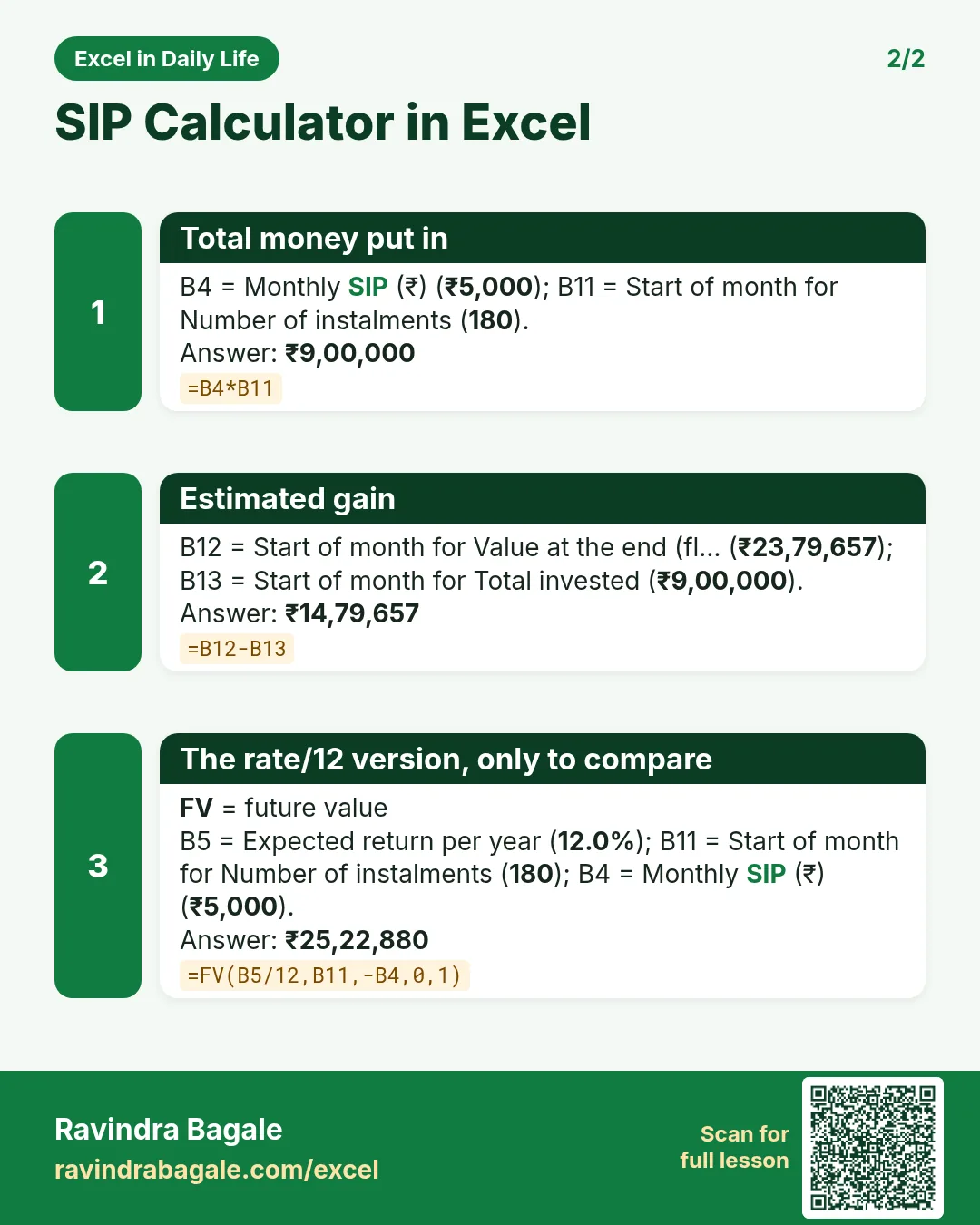

More cards: Ravi Sir's Cards.
6. Frequently asked questions
What is the SIP formula in Excel?
=FV(monthly rate, months, -SIP amount, 0, 1). With 12% a year, ₹5,000 a month for 15 years gives ₹23,79,657 when the monthly rate is (1+12%)^(1/12)−1.
Why does my Excel SIP value differ from an online calculator?
Calculators differ in two things: the monthly rate (12%/12 or the compounded rate) and start or end of month. Change B8 and compare B12 with B15 to see both effects.
How do I calculate a step-up SIP in Excel?
Make a yearly table: SIP of the year = first SIP × (1+step-up)^(year−1), and value = last year's value × (1+monthly rate)^12 + FV of this year's 12 SIPs.
How much is ₹5,000 a month for 15 years at 12%?
About ₹23.8 lakh at the start of every month, using the compounded monthly rate. It is an estimate; real returns vary.
Can I find the SIP needed for a target amount?
Yes. Use PMT: =PMT(B10,B11,0,-target,1) gives the monthly SIP, or use Goal Seek on B12.
7. Quick quiz
Ten questions on this page. Sign in to save your score.
Loading practice tasks...
- Monthly rate (Easy): Yearly rate B3 divided by 12. (sheet "Plan")
- Months (Easy): B4 times 12. (sheet "Plan")
- Monthly EMI (Easy): EMI on amount B2 at B3 for B4 years, as a positive number, rounded to 2 decimals. (sheet "Plan")
- Days taken (Easy): C2 minus B2. (sheet "Dates")
- Start year (Easy): Year of B3. (sheet "Dates")
- Due month (Easy): Month number of C3. (sheet "Dates")
- Earliest start (Easy): Earliest date in B2:B9 (as a date number). (sheet "Dates")
- Total repaid (Medium): Total paid over the loan, rounded to 0 decimals. (sheet "Plan")
- Total interest (Medium): Total paid minus B2, rounded to 0 decimals. (sheet "Plan")
- Processing fee (Medium): B2 times B6. (sheet "Plan")
- Working days (Medium): Working days from B2 to C2. (sheet "Dates")
- Weekday of due (Medium): Weekday number of C4 (Sunday = 1). (sheet "Dates")