Gift Register for a Function in Excel: Cash Gifts, Items and What We Gave Them Earlier
After their anniversary function in Sambhaji Nagar, Ravindra and Shraddha Bagale opened the envelopes and gifts. Every family keeps such a list, because at the next function in a relative's or friend's home you want to know what they gave you. In Excel the list also looks up what you gave at their function and totals everything by side.
What you'll learn on this page
- One row per guest with side, gift type and amount
- A second list of what you gave at their functions
- Look it up with INDEX, MATCH and IFERROR
- The difference between their gift and yours
- Cash total, item value and average cash gift
- Totals by side with SUMIF
Download the template: gift-register-function-template.xlsx: example data with real formulas. Yellow cells are inputs you can type over; green cells hold formulas; blue rows are headers and totals. Replace the example data with your own and everything recalculates.
Made-up data: every name, amount, shop and date on this page is made up for practice. Cities are used only to make the examples feel real.
1. The example
Gifts at the function (made-up values):
| Guest | Side | Type | Amount | We gave them earlier | Difference |
|---|---|---|---|---|---|
| Shahrukh | Friends | Cash | ₹1,100 | ₹1,100 | ₹0 |
| Zoya | Friends | Item | ₹1,500 | Not in list | |
| Raja | Relatives | Cash | ₹2,100 | ₹1,501 | ₹599 |
| Rani | Relatives | Cash | ₹5,001 | Not in list | |
| Salman | Neighbours | Cash | ₹501 | ₹501 | ₹0 |
| Amir | Work | Cash | ₹1,001 | ₹751 | ₹250 |
| Ravina | Work | Item | ₹800 | ₹1,000 | −₹200 |
| Bagale cousins | Relatives | Cash | ₹3,100 | ₹2,100 | ₹1,000 |
Cash received: ₹12,803 from 6 guests (average ₹2,134). Items worth ₹2,300. Relatives gave ₹10,201 in all. 3 guests gave more than the Bagales gave them earlier, and 2 are not in the earlier list yet.
Figure 1. Each guest's gift is a row; INDEX and MATCH (inside IFERROR) look up what you gave at their function; the difference, SUMIF by side and AVERAGEIF for cash summarise the register.
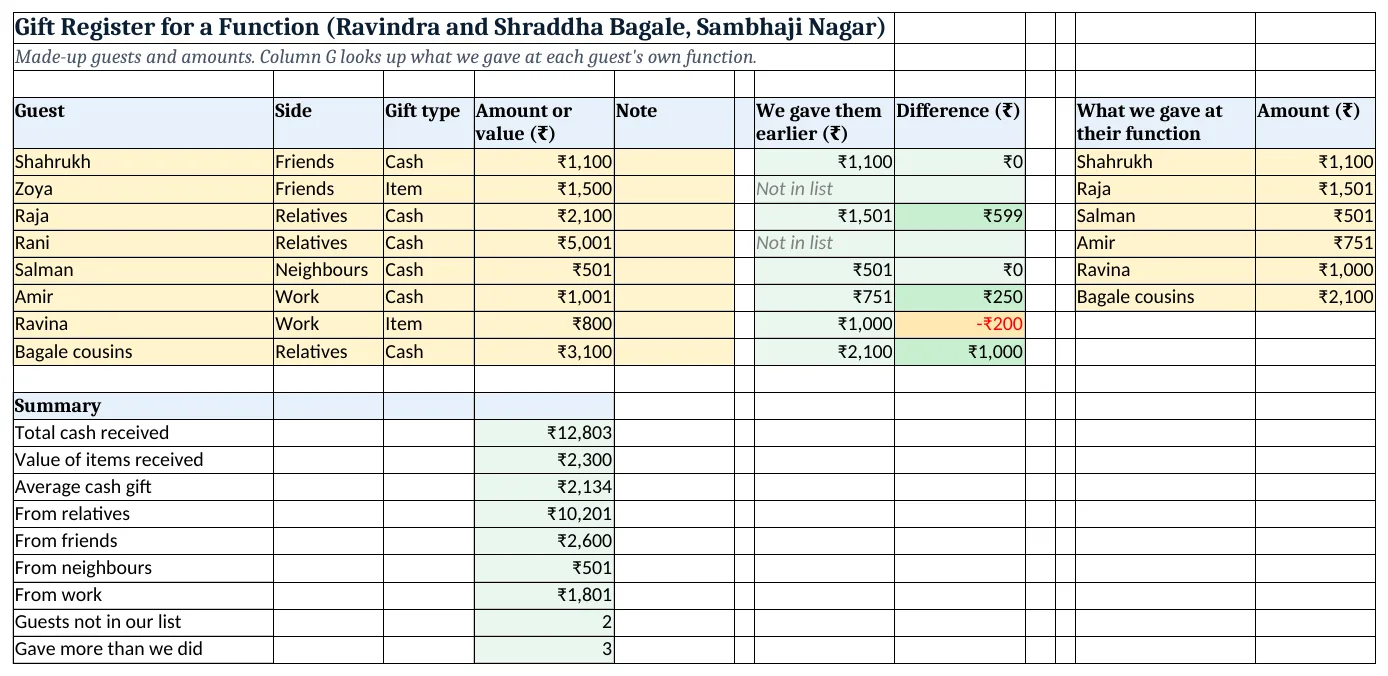
Figure 2. The template sheet, recalculated with its example data. Download it above and replace the yellow cells with your own numbers.
2. Build it step by step
Step 1. The register
- In A4:H4 type Guest, Side, Gift type, Amount or value, Note, (blank), We gave them earlier, Difference.
- Drop-downs: B5:B200
Relatives,Friends,Neighbours,Workand C5:C200Cash,Item(drop-down lists).
Step 2. What we gave earlier
- In K4:L4 type What we gave at their function, Amount, and list names and amounts in rows 5 to 10.
Step 3. Look it up
- In G5 type
=IFERROR(INDEX($L$5:$L$10,MATCH(A5,$K$5:$K$10,0)),"Not in list"). - MATCH finds the guest's row in K, INDEX returns the amount from L, and IFERROR shows "Not in list" instead of #N/A (INDEX and MATCH, IFERROR).
Step 4. Difference
- In H5 type
=IF(ISNUMBER(G5),D5-G5,""). ISNUMBER skips the "Not in list" rows. Copy G5:H5 down.
Step 5. Totals
- In D15 type
=SUMIF(C5:C12,"Cash",D5:D12): ₹12,803, and in D16 the same for "Item". - In D17 type
=AVERAGEIF(C5:C12,"Cash",D5:D12): ₹2,134 (AVERAGEIF). - In D18 type
=SUMIF($B$5:$B$12,"Relatives",$D$5:$D$12)and repeat for each side. In D23 type=COUNTIF(H5:H12,">0").
Step 6. Colours
- Select H5:H12 > Highlight Cells Rules > Greater Than 0 green and Less Than 0 amber (highlight rules).
Ravindra Bagale's Tip
Have one person open the envelopes and another type straight into the sheet. Nothing gets mixed up.
Ravindra Bagale's Tip – मराठी
एकाने पाकिटं उघडायची आणि दुसऱ्याने लगेच sheet मध्ये टाकायचं. काही गोंधळ होत नाही.
Ravindra Bagale's Tip – हिंदी
एक लिफाफे खोले और दूसरा सीधे sheet में डाले. कुछ गड़बड़ नहीं होगी.
3. Formulas used
| Cell | Formula | What it does |
|---|---|---|
| G5 | =IFERROR(INDEX($L$5:$L$10,MATCH(A5,$K$5:$K$10,0)),"Not in list") |
We gave them earlier |
| H7 | =IF(ISNUMBER(G7),D7-G7,"") |
Difference |
| G6 | =IFERROR(INDEX($L$5:$L$10,MATCH(A6,$K$5:$K$10,0)),"Not in list") |
Not in the list |
| D15 | =SUMIF(C5:C12,"Cash",D5:D12) |
Total cash received |
| D16 | =SUMIF(C5:C12,"Item",D5:D12) |
Value of items |
| D17 | =AVERAGEIF(C5:C12,"Cash",D5:D12) |
Average cash gift |
| D18 | =SUMIF($B$5:$B$12,"Relatives",$D$5:$D$12) |
From relatives |
| D22 | =COUNTIF(G5:G12,"Not in list") |
Guests not in our list |
| D23 | =COUNTIF(H5:H12,">0") |
Gave more than we did |
Every formula above is written in the template, so you can click a cell and see it in the formula bar. All values on this page were recalculated in the file.
4. Common mistakes
- Different spellings in the two lists. "Bagale cousins" and "Bagale Cousins " may not match. Copy names from one list to the other.
- Leaving #N/A on the sheet. Wrap the lookup in IFERROR so new guests show "Not in list".
- Typing item gifts as 0. Type an estimated value, or the totals and averages by side will be off.
- Subtracting text. D5 − "Not in list" gives #VALUE!. ISNUMBER checks first.
- Not updating the earlier list. After you attend someone's function, add what you gave to K:L.
Ravindra Bagale's Tip
Keep the register private. It is a family record, not something to share in a group.
Ravindra Bagale's Tip – मराठी
हे register खाजगी ठेवा. हा घरचा हिशोब आहे, group मध्ये टाकायची गोष्ट नाही.
Ravindra Bagale's Tip – हिंदी
यह register निजी रखो. यह घर का हिसाब है, group में डालने की चीज़ नहीं.
5. More real examples
Example 1: Wedding in the home. Add a "Function" column so one register covers haldi, wedding and reception.
Example 2: Office farewell collection. Guests become colleagues, and the earlier list becomes what they gave at past farewells.
Example 3: Planning your next gift. Before attending Raja's function, the register shows he gave ₹2,100, so you can plan your gift.
Quick revision cards
Quick revision
Each card shows formulas from this page, each with an example and its answer from the template. Scan the QR code on a card to open this lesson. All names and numbers are made up for practice.
झटपट उजळणी
प्रत्येक card वर या page मधले formulas, त्यांचं example आणि template मधलं उत्तर आहे. Card वरचा QR code scan केला की हा lesson उघडतो. सगळी नावं आणि आकडे सरावासाठी काल्पनिक आहेत.
झटपट दोहराई
हर card पर इस page के formulas, उनका example और template का उत्तर है. Card का QR code scan करें तो यह lesson खुलेगा. सभी नाम और आंकड़े अभ्यास के लिए काल्पनिक हैं.
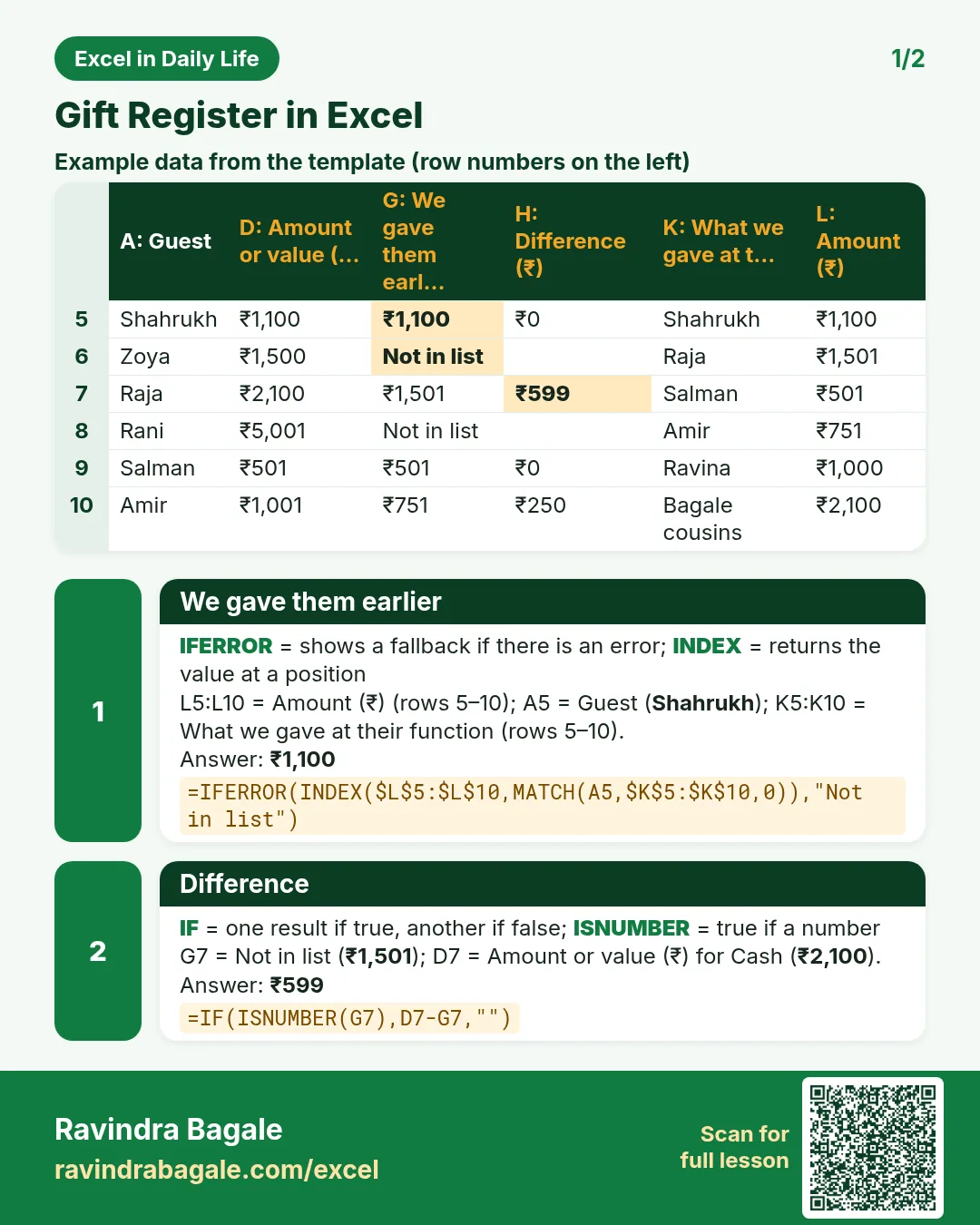

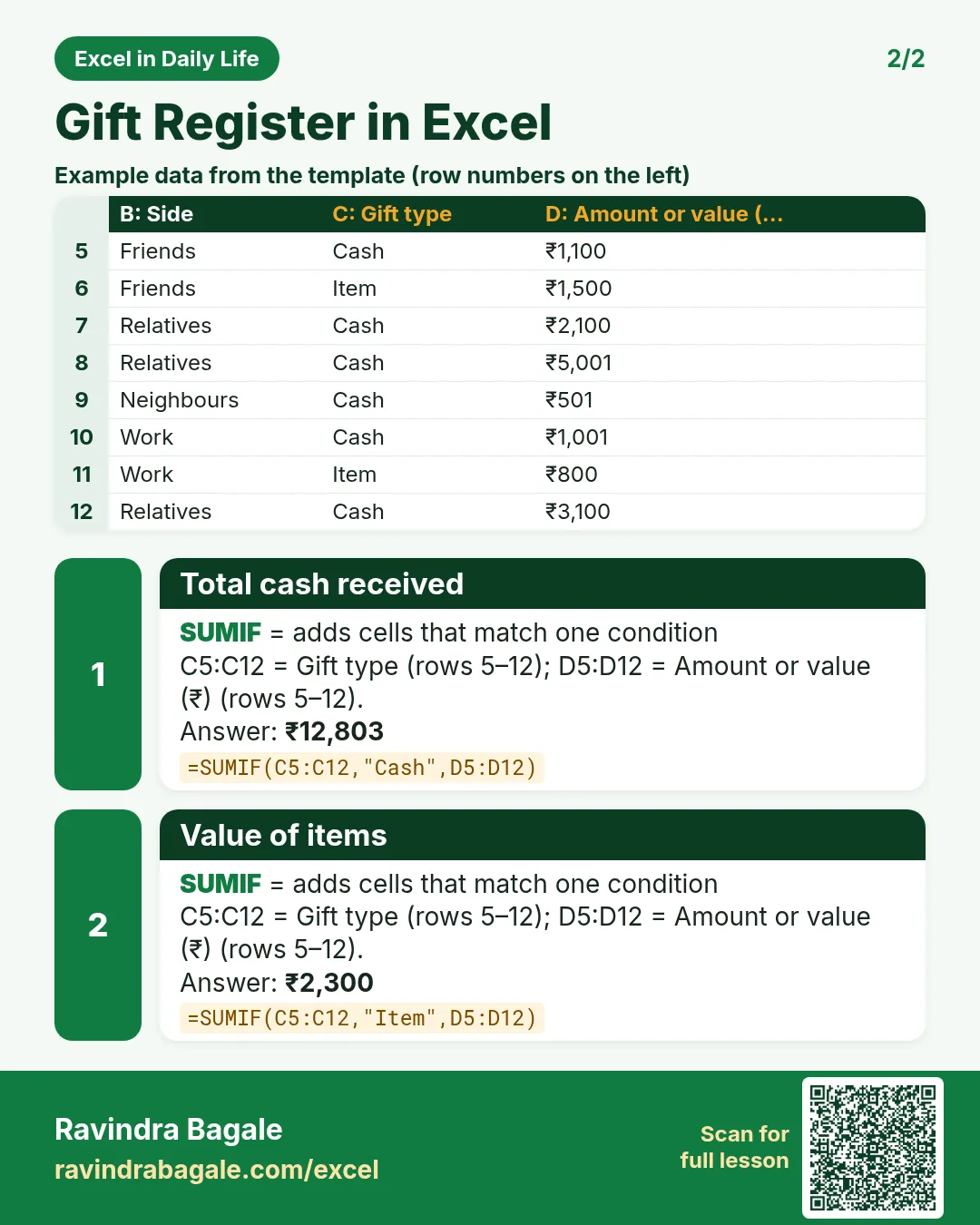

More cards: Ravi Sir's Cards.
6. Frequently asked questions
How do I keep a gift register in Excel?
One row per guest with side, gift type and amount; SUMIF totals by side and type.
How do I look up what I gave a guest earlier?
Keep a second list and use =IFERROR(INDEX(amounts,MATCH(name,names,0)),"Not in list").
Why IFERROR?
MATCH returns #N/A when a name is missing; IFERROR shows a friendly message instead.
Can I use XLOOKUP instead?
Yes, in Microsoft 365 and Excel 2021: =XLOOKUP(A5,$K$5:$K$10,$L$5:$L$10,"Not in list") does the same.
How do I average only cash gifts?
=AVERAGEIF(C5:C12,"Cash",D5:D12).
7. Quick quiz
Ten questions on this page. Sign in to save your score.
Loading practice tasks...
- Total covers (Easy): Add up Covers in D2:D11.
- Average bill amount (Easy): Average of E2:E11, rounded to 2 decimals.
- Rows in Downtown (Easy): How many rows have Outlet "Downtown"?
- Largest covers (Easy): The largest value in D2:D11.
- Covers for Downtown (Medium): Total of D2:D11 where B is "Downtown".
- Downtown in Austin (Medium): Total of D2:D11 where B is "Downtown" and C is "Austin".
- Best in Downtown (Medium): Largest E2:E11 value where B is "Downtown".
- Value of row 2 (Medium): D2 times E2.
- Look up Aarav Shah (Medium): The Covers for "Aarav Shah" (use a lookup on column A).
- Total value (Hard): Sum of D times E for all rows.
- Share of Downtown (Hard): Share of D2:D11 that is "Downtown", rounded to 3 decimals.
- Rank of row 2 (Hard): Rank of D2 among D2:D11 (largest = 1).
- Above average? (Hard): "Above" if E2 is above the average of E2:E11, else "Below".