3.10 Date Functions: TODAY, NOW, DATE, DAY/MONTH/YEAR, EOMONTH, EDATE
EOMONTH, EDATE and TEXT on dates with example — in 30 seconds
What: EOMONTH gives the last day of a month. EDATE moves a date by whole months. TEXT shows a date as a month name.
Why: Month-end reports, renewal dates and month labels for charts all start from one order date.
Tiny example: For 02-11-2026, =EOMONTH(B2,0) gives 30-11-2026 and =EDATE(B2,1) gives 02-12-2026.
EOMONTH, EDATE and TEXT on dates with example — 30 सेकंदात
काय: EOMONTH महिन्याचा शेवटचा दिवस देतो. EDATE तारीख पूर्ण महिन्यांनी पुढे-मागे करतो. TEXT तारीख महिन्याच्या नावाने दाखवतो.
का: Month-end report, renewal date आणि chart साठी महिन्याचं label, हे सगळं एका order date पासून सुरू होतं.
छोटं उदाहरण: 02-11-2026 साठी =EOMONTH(B2,0) उत्तर 30-11-2026 देतो आणि =EDATE(B2,1) उत्तर 02-12-2026 देतो.
EOMONTH, EDATE and TEXT on dates with example — 30 सेकंड में
क्या: EOMONTH महीने का आख़िरी दिन देता है. EDATE तारीख को पूरे महीनों से आगे-पीछे करता है. TEXT तारीख को महीने के नाम में दिखाता है.
क्यों: Month-end report, renewal date और chart के लिए महीने का label, सब एक order date से शुरू होता है.
छोटा उदाहरण: 02-11-2026 के लिए =EOMONTH(B2,0) जवाब 30-11-2026 देता है और =EDATE(B2,1) जवाब 02-12-2026 देता है.
First look at the data (before → after):
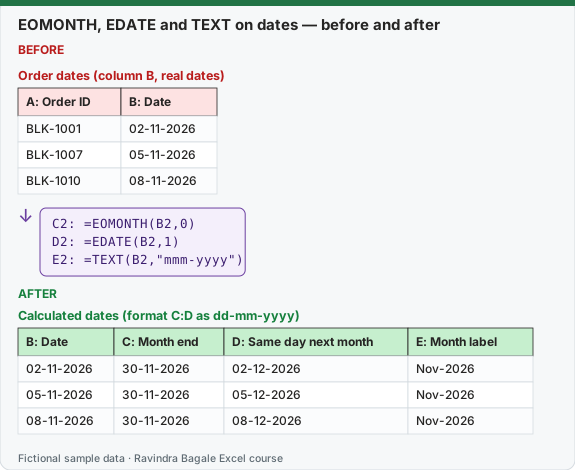
Expected result — Calculated dates (format C:D as dd-mm-yyyy)
| B: Date | C: Month end | D: Same day next month | E: Month label |
|---|---|---|---|
| 02-11-2026 | 30-11-2026 | 02-12-2026 | Nov-2026 |
| 05-11-2026 | 30-11-2026 | 05-12-2026 | Nov-2026 |
| 08-11-2026 | 30-11-2026 | 08-12-2026 | Nov-2026 |
About this data: Teaching sample for a fictional shop “GreenField Dairy”. Figures and names (e.g. Aarti Kulkarni) are made up for this lesson on date functions today now date day month year.
Before table and formula as text
Before — Order dates (column B, real dates)
| A: Order ID | B: Date |
|---|---|
| BLK-1001 | 02-11-2026 |
| BLK-1007 | 05-11-2026 |
| BLK-1010 | 08-11-2026 |
About this data: Demo table only — not real customer or company data. Built to practise date functions today now date day month year.
Formula / click path
C2: =EOMONTH(B2,0)
D2: =EDATE(B2,1)
E2: =TEXT(B2,"mmm-yyyy")
Do it step by step:
- In C2, type
=EOMONTH(B2,0). - If you see a number like 46356, press Ctrl + 1 and choose a Date format.
- In D2, type
=EDATE(B2,1). - In E2, type
=TEXT(B2,"mmm-yyyy"). - Copy all three down and compare with the expected table.
स्टेप बाय स्टेप करून बघा:
- C2 मध्ये
=EOMONTH(B2,0)type करा. - 46356 सारखा number दिसला तर Ctrl + 1 दाबा आणि Date format निवडा.
- D2 मध्ये
=EDATE(B2,1)type करा. - E2 मध्ये
=TEXT(B2,"mmm-yyyy")type करा. - तिन्ही खाली copy करा आणि expected table शी जुळवून बघा.
स्टेप बाय स्टेप करके देखें:
- C2 में
=EOMONTH(B2,0)type करें. - 46356 जैसा number दिखे तो Ctrl + 1 दबाएँ और Date format चुनें.
- D2 में
=EDATE(B2,1)type करें. - E2 में
=TEXT(B2,"mmm-yyyy")type करें. - तीनों नीचे copy करें और expected table से मिलाएँ.
| Function | Example | Result |
|---|---|---|
TODAY() |
=TODAY() |
today's date (changes daily) |
NOW() |
=NOW() |
date and time (IST on an IST computer) |
DATE(year, month, day) |
=DATE(2026,11,8) |
08-11-2026 |
DAY / MONTH / YEAR |
=MONTH(B2) |
11 |
EOMONTH(start, months) |
=EOMONTH(B2,0) |
30-11-2026 |
EDATE(start, months) |
=EDATE(B2,3) |
02-02-2027 |
TEXT(date,"mmmm") |
=TEXT(B2,"mmmm") |
November |
About this data: Made-up rows so you can copy the pattern for date functions today now date day month year. Currencies may use ₹, £, € or $.
Useful patterns
| Need | Formula |
|---|---|
| First day of the month | =EOMONTH(B2,-1)+1 |
| Days since order | =TODAY()-B2 |
| Financial year (Apr–Mar) label | ="FY "&IF(MONTH(B2)>=4,YEAR(B2),YEAR(B2)-1)&"-"&RIGHT(IF(MONTH(B2)>=4,YEAR(B2)+1,YEAR(B2)),2) → FY 2026-27 |
| Quarter (calendar) | ="Q"&ROUNDUP(MONTH(B2)/3,0) → Q4 |
About this data: Fictional worksheet used in class. Safe to edit; nothing here is live production data.
Ravindra Bagale's Tip
TODAY and NOW are volatile (they recalculate on every change) – the value changes whenever you open the file. Many students use TODAY for an invoice date, and tomorrow that date changes! If you need a fixed date, type it with Ctrl + ; (date) and Ctrl + Shift + ; (time).
Ravindra Bagale's Tip – मराठी
TODAY आणि NOW volatile आहेत (प्रत्येक बदलावर पुन्हा गणना होणारे) – file उघडली की value बदलते. बरेच students invoice date साठी TODAY वापरतात आणि उद्या ती date बदलते! Fixed date हवी असेल तर Ctrl + ; (date) आणि Ctrl + Shift + ; (time) ने type करा.
Ravindra Bagale's Tip – हिंदी
TODAY और NOW volatile हैं (हर बदलाव पर दोबारा calculate होते हैं) – file खोलते ही value बदल जाती है. बहुत से students invoice date के लिए TODAY लगा देते हैं और कल वह date बदल जाती है! Fixed date चाहिए तो Ctrl + ; (date) और Ctrl + Shift + ; (time) से type करो.
Practice task
For each order compute: month name, month-end date, financial-year label and the date 7 days later (a return deadline).
Loading practice tasks...
- Day of the order (Easy): Get the day number from B8.
- Month number (Easy): Get the month number from B2.
- Office: year applied (Easy): Get the year from Gov!B2.
- Make a date (Medium): Make the date 15-11-2026 with DATE.
- Month end (Medium): Find the last day of the month of B2.
- Office: valid until (Medium): Find the date Gov!C2 months after Gov!B2.
- Office: month end (Medium): Find the last day of the month of Gov!B4.
- One month later (Hard): Find the date one month after B2.
- Month and year label (Hard): Show B2 as Nov-2026 using TEXT.
- Office: licence expiry (Hard): Find the date Gov!C3 months after Gov!B3 (31 March).
Quick revision cards
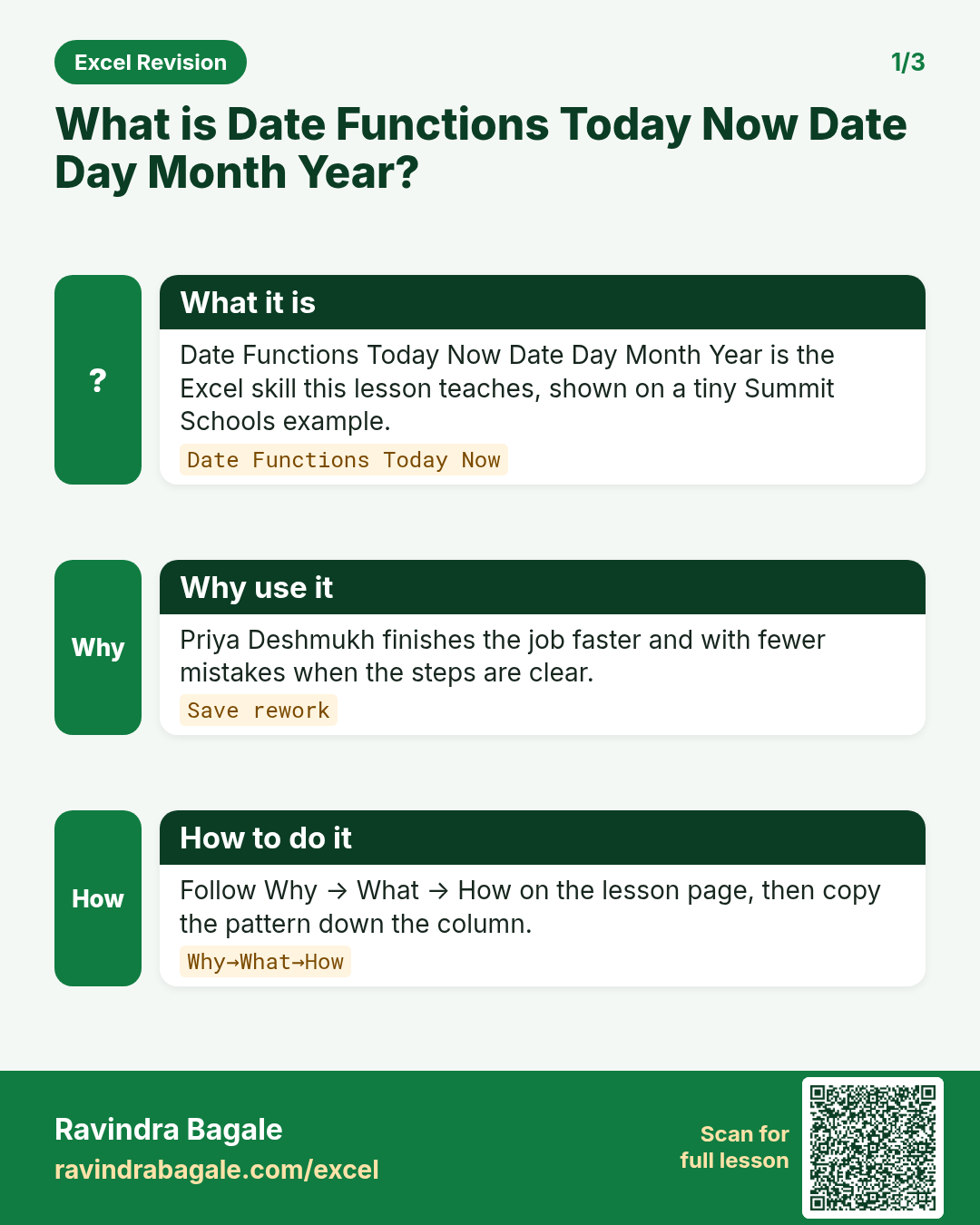
Three standalone cards. Each one explains the idea with its own example. Scan the QR to open this lesson.
More worked examples: Excel date functions
Suppose we are at MealRun HR. We have an employee joining date in cell A2: 15-Mar-2024. We want this year, the joining month, the probation end date and the month-end payroll date.
Example 1 (simplest): this year with =YEAR(TODAY())
Show the current year in a report heading.
Steps:
- Click cell B1.
- Type
=YEAR(TODAY())and press Enter.
Output: B1 shows the current year, and it changes by itself on 1 January.
Example 2: pull parts of a date
A2 has 15-Mar-2024.
Steps:
- In B2 type
=DAY(A2). - In C2 type
=MONTH(A2). - In D2 type
=YEAR(A2).
Output: B2 = 15, C2 = 3, D2 = 2024.
Example 3: probation end and month end
Probation is 6 months; salary is paid on the last day of the month.
Steps:
- In E2 type
=EDATE(A2,6)and format as Date. - In F2 type
=EOMONTH(A2,0)and format as Date. - In G2 type
=TODAY()-A2and format as Number to get days since joining.
Output: E2 = 15-Sep-2024, F2 = 31-Mar-2024, and G2 shows the number of days since joining.
See also: Header and footer in Excel · Formulas and functions · Age calculation in Excel
Frequently asked questions
What does =YEAR(TODAY()) do?
TODAY gives today's date and YEAR takes the year from it, so the cell shows the current year.
What is the difference between TODAY and NOW?
TODAY gives only the date. NOW gives the date and the current time.
What is the difference between EDATE and EOMONTH?
EDATE moves a date by whole months and keeps the day. EOMONTH gives the last day of the month.