3.11 Working Days, DATEDIF and WEEKDAY
NETWORKDAYS, WORKDAY and WEEKDAY with example — in 30 seconds
What: NETWORKDAYS counts Monday-to-Friday days between two dates. WORKDAY finds the date after N working days. WEEKDAY gives the day number.
Why: Vendor payment terms, SLA deadlines and weekend tags all depend on working days, not calendar days.
Tiny example: From 02-11-2026 to 30-11-2026 there are 21 working days. 10 working days after 02-11-2026 is 16-11-2026.
NETWORKDAYS, WORKDAY and WEEKDAY with example — 30 सेकंदात
काय: NETWORKDAYS दोन तारखांमधले सोमवार ते शुक्रवार दिवस मोजतो. WORKDAY N working days नंतरची तारीख देतो. WEEKDAY वाराचा नंबर देतो.
का: Vendor payment terms, SLA deadline आणि weekend tag हे सगळं calendar days वर नाही, working days वर ठरतं.
छोटं उदाहरण: 02-11-2026 ते 30-11-2026 मध्ये 21 working days आहेत. 02-11-2026 नंतर 10 working days म्हणजे 16-11-2026.
NETWORKDAYS, WORKDAY and WEEKDAY with example — 30 सेकंड में
क्या: NETWORKDAYS दो तारीखों के बीच सोमवार से शुक्रवार वाले दिन गिनता है. WORKDAY N working days बाद की तारीख देता है. WEEKDAY दिन का नंबर देता है.
क्यों: Vendor payment terms, SLA deadline और weekend tag सब calendar days पर नहीं, working days पर तय होते हैं.
छोटा उदाहरण: 02-11-2026 से 30-11-2026 के बीच 21 working days हैं. 02-11-2026 के 10 working days बाद 16-11-2026 है.
First look at the data (before → after):
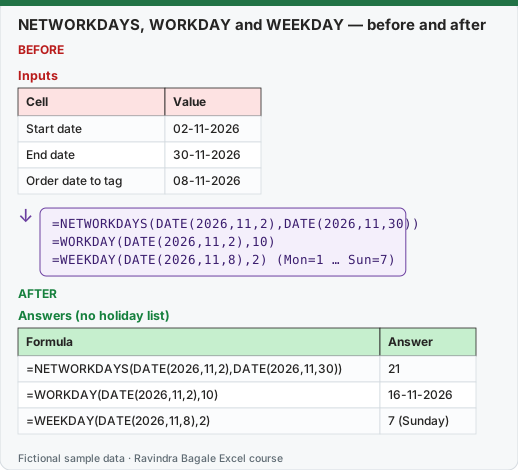
Expected result — Answers (no holiday list)
| Formula | Answer |
|---|---|
| =NETWORKDAYS(DATE(2026,11,2),DATE(2026,11,30)) | 21 |
| =WORKDAY(DATE(2026,11,2),10) | 16-11-2026 |
| =WEEKDAY(DATE(2026,11,8),2) | 7 (Sunday) |
About this data: Teaching sample for a fictional shop “CityBasket Retail”. Figures and names (e.g. Priya Deshmukh) are made up for this lesson on working days datedif and weekday.
Before table and formula as text
Before — Inputs
| Cell | Value |
|---|---|
| Start date | 02-11-2026 |
| End date | 30-11-2026 |
| Order date to tag | 08-11-2026 |
About this data: Demo table only — not real customer or company data. Built to practise working days datedif and weekday.
Formula / click path
=NETWORKDAYS(DATE(2026,11,2),DATE(2026,11,30))
=WORKDAY(DATE(2026,11,2),10)
=WEEKDAY(DATE(2026,11,8),2)   (Mon=1 … Sun=7)
Do it step by step:
- Type
=NETWORKDAYS(DATE(2026,11,2),DATE(2026,11,30))and press Enter. - Type
=WORKDAY(DATE(2026,11,2),10)and format the cell as a date. - Type
=WEEKDAY(DATE(2026,11,8),2). With type 2, Monday is 1 and Sunday is 7. - To skip holidays, put the holiday dates in a range and add it as the third argument.
- Check: 21, 16-11-2026 and 7.
स्टेप बाय स्टेप करून बघा:
=NETWORKDAYS(DATE(2026,11,2),DATE(2026,11,30))type करा आणि Enter दाबा.=WORKDAY(DATE(2026,11,2),10)type करा आणि cell ला date format द्या.=WEEKDAY(DATE(2026,11,8),2)type करा. Type 2 मध्ये सोमवार 1 आणि रविवार 7.- सुट्ट्या वगळायच्या असतील तर सुट्ट्यांच्या तारखा एका range मध्ये टाका आणि ती तिसरा argument म्हणून द्या.
- Check करा: 21, 16-11-2026 आणि 7.
स्टेप बाय स्टेप करके देखें:
=NETWORKDAYS(DATE(2026,11,2),DATE(2026,11,30))type करें और Enter दबाएँ.=WORKDAY(DATE(2026,11,2),10)type करें और cell को date format दें.=WEEKDAY(DATE(2026,11,8),2)type करें. Type 2 में सोमवार 1 और रविवार 7 है.- छुट्टियाँ हटानी हों तो छुट्टियों की तारीखें एक range में डालें और उसे तीसरे argument की तरह दें.
- Check करें: 21, 16-11-2026 और 7.
| Function | Syntax | Example | Result |
|---|---|---|---|
| NETWORKDAYS | NETWORKDAYS(start, end, [holidays]) |
=NETWORKDAYS(DATE(2026,11,2),DATE(2026,11,30)) |
21 |
| NETWORKDAYS with holidays | holidays in M2:M3 = 09-11-2026, 10-11-2026 |
=NETWORKDAYS(DATE(2026,11,2),DATE(2026,11,30),M2:M3) |
19 |
| WORKDAY | WORKDAY(start, days, [holidays]) |
=WORKDAY(DATE(2026,11,2),10) |
16-11-2026 |
| WORKDAY with holidays | =WORKDAY(DATE(2026,11,2),10,M2:M3) |
18-11-2026 | |
| NETWORKDAYS.INTL / WORKDAY.INTL | weekend code, e.g. 11 = Sunday only | =NETWORKDAYS.INTL(start,end,11) |
6-day week |
| DATEDIF | DATEDIF(start, end, unit), unit "Y", "M", "D", "YM", "MD", "YD" |
=DATEDIF(DATE(2024,6,15),DATE(2026,11,2),"Y") |
2 |
| WEEKDAY | WEEKDAY(date, [return_type]); type 2: Mon = 1 … Sun = 7 |
=WEEKDAY(B11,2) (08-11-2026) |
7 (Sunday) |
About this data: Made-up rows so you can copy the pattern for working days datedif and weekday. Currencies may use ₹, £, € or $.
The holidays M2:M3 are a fictional office holiday list for Diwali week. DATEDIF does not appear in the function list (type it fully); Microsoft documents that the "MD" unit can give wrong results, so avoid it.
Worked example – vendor tenure. Kolhapur supplier onboarded 15-06-2024; on 02-11-2026: =DATEDIF(A2,B2,"Y")&" years "&DATEDIF(A2,B2,"YM")&" months" → 2 years 4 months.
Ravindra Bagale's Tip
In WEEKDAY, if you don't give return_type, Sunday = 1 – many students assume Monday = 1 and get the weekend wrong. Always write WEEKDAY(date,2); then >5 means weekend. Keep the list of holidays in a separate range and give it to NETWORKDAYS.
Ravindra Bagale's Tip – मराठी
WEEKDAY मध्ये return_type न दिल्यास Sunday = 1 असतो – बरेच students Monday = 1 समजतात आणि weekend चुकीचा येतो. नेहमी WEEKDAY(date,2) लिहा, मग >5 म्हणजे weekend. Holidays ची list वेगळ्या range मध्ये ठेवा आणि NETWORKDAYS ला द्या.
Ravindra Bagale's Tip – हिंदी
WEEKDAY में return_type न दो तो Sunday = 1 होता है – बहुत से students Monday = 1 मान लेते हैं और weekend गलत आता है. हमेशा WEEKDAY(date,2) लिखो, फिर >5 का मतलब weekend. Holidays की list अलग range में रखो और NETWORKDAYS को दो.
Practice task
Mark each order as Weekday/Weekend. Count working days in December 2026 excluding 25-12-2026. Find the delivery due date 3 working days after each order date.
Loading practice tasks...
- Working days in November (Easy): Count working days (Mon to Fri) from B2 to B3.
- Project: working days (Easy): Count working days from Project!B2 to Project!B3.
- Working days without the holiday (Medium): Count working days from B2 to B3, leaving out the holiday in B5.
- 10 working days later (Medium): Find the date 10 working days after B2.
- Day of the week (Medium): Find the weekday number of B4 (Monday = 1).
- Project: minus the holiday (Medium): Count working days from Project!B2 to Project!B3, leaving out Project!B4.
- Project: 5 working days later (Medium): Find the date 5 working days after Project!B2.
- Project: holiday weekday (Medium): Find the weekday number of Project!B4 (Monday = 1).
- Days between dates (Hard): Count the days from B2 to B3 with DATEDIF.
- Project: contract months (Hard): Count full months from Project!B5 to Project!B3.
Quick revision cards
Three standalone cards. Each one explains the idea with its own example. Scan the QR to open this lesson.