9.19 MAP, REDUCE, SCAN, BYROW, BYCOL and MAKEARRAY with Real Examples
Example first. Amir wants a running total of the 10 orders, so he can see when sales crossed ₹1,000 and ₹2,000. The old way is a formula like =SUM($G$2:G2) copied down. With SCAN one formula spills the whole running total. SCAN belongs to a family of six "helper" functions. Each one takes a LAMBDA and runs it over an array in a different way. Once you know which helper walks the data how, you can solve many problems with one formula.
LAMBDA helper functions — in 30 seconds
What: MAP, REDUCE, SCAN, BYROW, BYCOL and MAKEARRAY each call a LAMBDA many times: once per value, per row, per column or per cell, and collect the answers.
Why: They turn "copy this formula down 1,000 rows" into one spilled formula, and they let you do loops (running totals, step-by-step cleaning) without VBA.
Tiny example: =SCAN(0,G2:G11,LAMBDA(acc,v,acc+v)) spills the running total; the last value is ₹2,870.
LAMBDA helper functions — 30 सेकंदात
काय: MAP, REDUCE, SCAN, BYROW, BYCOL आणि MAKEARRAY प्रत्येकी एक LAMBDA अनेक वेळा चालवतात: प्रत्येक value, row, column किंवा cell साठी एकदा, आणि उत्तरं गोळा करतात.
का: "हा formula 1,000 rows खाली copy करा" हे एका spill formula मध्ये होतं, आणि VBA शिवाय loops (running totals, टप्प्याटप्प्याने cleaning) करता येतात.
छोटं उदाहरण: =SCAN(0,G2:G11,LAMBDA(acc,v,acc+v)) running total spill करतो; शेवटची value ₹2,870 आहे.
LAMBDA helper functions — 30 सेकंड में
क्या: MAP, REDUCE, SCAN, BYROW, BYCOL और MAKEARRAY हर एक LAMBDA को कई बार चलाते हैं: हर value, row, column या cell के लिए एक बार, और जवाब इकट्ठा करते हैं.
क्यों: "यह formula 1,000 rows नीचे copy करो" एक spill formula में हो जाता है, और VBA के बिना loops (running totals, कदम-दर-कदम cleaning) किए जा सकते हैं.
छोटा उदाहरण: =SCAN(0,G2:G11,LAMBDA(acc,v,acc+v)) running total spill करता है; आखिरी value ₹2,870 है.
First look at the data (before → after):
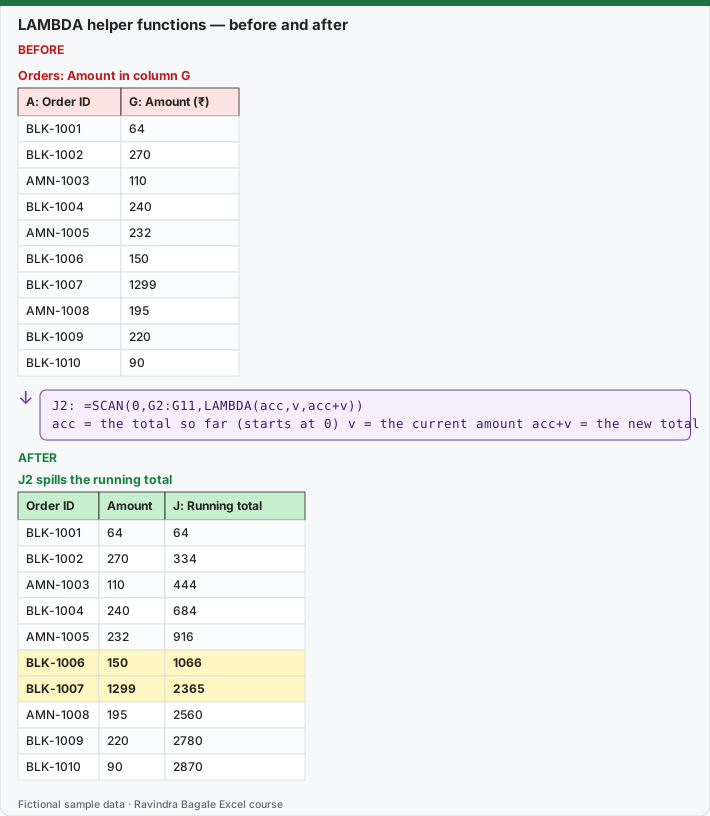
Expected result — J2 spills the running total
| Order ID | Amount | J: Running total |
|---|---|---|
| BLK-1001 | 64 | 64 |
| BLK-1002 | 270 | 334 |
| AMN-1003 | 110 | 444 |
| BLK-1004 | 240 | 684 |
| AMN-1005 | 232 | 916 |
| BLK-1006 | 150 | 1066 |
| BLK-1007 | 1299 | 2365 |
| AMN-1008 | 195 | 2560 |
| BLK-1009 | 220 | 2780 |
| BLK-1010 | 90 | 2870 |
Before table and formula as text
Before — Orders: Amount in column G
| A: Order ID | G: Amount (₹) |
|---|---|
| BLK-1001 | 64 |
| BLK-1002 | 270 |
| AMN-1003 | 110 |
| BLK-1004 | 240 |
| AMN-1005 | 232 |
| BLK-1006 | 150 |
| BLK-1007 | 1299 |
| AMN-1008 | 195 |
| BLK-1009 | 220 |
| BLK-1010 | 90 |
Formula / click path
J2: =SCAN(0,G2:G11,LAMBDA(acc,v,acc+v))
acc = the total so far (starts at 0)   v = the current amount   acc+v = the new total
Do it step by step:
- Open the Orders sheet with Amount in G2:G11.
- In J2 type
=SCAN(0,G2:G11,LAMBDA(acc,v,acc+v))and press Enter. - Read the spill: the total first goes above 1,000 at BLK-1006 and above 2,000 at BLK-1007.
- Compare with the old way: in K2 type
=SUM($G$2:G2)and copy it down to K11. The numbers match. - Now try REDUCE, which keeps only the final answer:
=REDUCE(0,G2:G11,LAMBDA(acc,v,acc+v))returns 2870. - Delete K2:K11. One SCAN formula replaces ten copied formulas.
स्टेप बाय स्टेप करून बघा:
- G2:G11 मध्ये Amount असलेली Orders sheet उघडा.
- J2 मध्ये
=SCAN(0,G2:G11,LAMBDA(acc,v,acc+v))type करून Enter दाबा. - Spill वाचा: total पहिल्यांदा 1,000 च्या वर BLK-1006 ला आणि 2,000 च्या वर BLK-1007 ला जातो.
- जुन्या पद्धतीशी तुलना करा: K2 मध्ये
=SUM($G$2:G2)type करून K11 पर्यंत copy करा. आकडे जुळतात. - आता REDUCE करून बघा, तो फक्त शेवटचं उत्तर ठेवतो:
=REDUCE(0,G2:G11,LAMBDA(acc,v,acc+v))2870 देतो. - K2:K11 delete करा. एक SCAN formula दहा copied formulas ची जागा घेतो.
स्टेप बाय स्टेप करके देखें:
- G2:G11 में Amount वाली Orders sheet खोलें.
- J2 में
=SCAN(0,G2:G11,LAMBDA(acc,v,acc+v))type करके Enter दबाएँ. - Spill पढ़ें: total पहली बार 1,000 के ऊपर BLK-1006 पर और 2,000 के ऊपर BLK-1007 पर जाता है.
- पुराने तरीके से तुलना करें: K2 में
=SUM($G$2:G2)type करके K11 तक copy करें. आँकड़े मिलते हैं. - अब REDUCE आज़माएँ, यह सिर्फ़ आखिरी जवाब रखता है:
=REDUCE(0,G2:G11,LAMBDA(acc,v,acc+v))2870 देता है. - K2:K11 delete करें. एक SCAN formula दस copied formulas की जगह ले लेता है.
Version note
MAP, SCAN, BYROW and BYCOL are listed for Excel for Microsoft 365 (Windows and Mac) and Excel 2024 (Windows and Mac). Microsoft's REDUCE and MAKEARRAY pages list only Excel for Microsoft 365 (Windows and Mac), so check those two in your version.
Which helper walks the data how?
| Function | Syntax | Calls the LAMBDA… | Returns |
|---|---|---|---|
| MAP | MAP(array1, [array2, …], LAMBDA(a, [b, …], calc)) |
once for each value (side by side if you give several arrays) | an array of the same size |
| REDUCE | REDUCE([initial_value], array, LAMBDA(acc, value, calc)) |
once per value, carrying an accumulator | only the final accumulator |
| SCAN | SCAN([initial_value], array, LAMBDA(acc, value, calc)) |
like REDUCE | every intermediate accumulator (same size as the array) |
| BYROW | BYROW(array, LAMBDA(row, calc)) |
once per row | one column, one answer per row |
| BYCOL | BYCOL(array, LAMBDA(col, calc)) |
once per column | one row, one answer per column |
| MAKEARRAY | MAKEARRAY(rows, cols, LAMBDA(r, c, calc)) |
once per cell position | a new rows × cols array |
MAP: a 10% late coupon. Orders that took more than 15 minutes get 10% off. MAP walks Amount (G) and Mins (H) side by side:
=MAP(G2:G11,H2:H11,LAMBDA(a,m,IF(m>15,a*0.9,a)))
| Order ID | Amount | Mins | After MAP |
|---|---|---|---|
| BLK-1001 | 64 | 9 | 64 |
| BLK-1002 | 270 | 12 | 270 |
| AMN-1003 | 110 | 14 | 110 |
| BLK-1004 | 240 | 11 | 240 |
| AMN-1005 | 232 | 16 | 208.8 |
| BLK-1006 | 150 | 8 | 150 |
| BLK-1007 | 1299 | 18 | 1169.1 |
| AMN-1008 | 195 | 10 | 195 |
| BLK-1009 | 220 | 13 | 220 |
| BLK-1010 | 90 | 17 | 81 |
Total after coupons: =SUM(MAP(G2:G11,H2:H11,LAMBDA(a,m,IF(m>15,a*0.9,a)))) = 2707.9. (Here a simple =IF(H2:H11>15,G2:G11*0.9,G2:G11) would also work; MAP becomes necessary when the calculation per value needs functions that do not spill, such as AND, OR or a named LAMBDA that works on one value at a time.)
REDUCE: one final answer.
| Goal | Formula | Result |
|---|---|---|
| Sum only orders of ₹200 or more | =REDUCE(0,G2:G11,LAMBDA(acc,v,IF(v>=200,acc+v,acc))) |
2261 |
| Remove a list of unwanted pieces from text, one after another | =TRIM(REDUCE("Rs. 1,299/-",{"Rs.",",","/-"},LAMBDA(t,x,SUBSTITUTE(t,x,"")))) |
1299 |
The second one is a real cleaning trick: the accumulator starts as the text, and each pass removes the next unwanted piece. Add more pieces to the list in braces and the formula does not grow. Wrap it in VALUE to get the number 1299.
SCAN: every step, not just the end. Besides running totals, SCAN can track a running maximum, for example the slowest delivery so far:
=SCAN(0,H2:H11,LAMBDA(acc,v,MAX(acc,v))) returns 9, 12, 14, 14, 16, 16, 18, 18, 18, 18.
BYROW and BYCOL on the weekly grid. The fictional weekly sales (₹ thousand) for three cities are in A1:E4 (City, W1 to W4):
| City | W1 | W2 | W3 | W4 |
|---|---|---|---|---|
| Pune | 520 | 610 | 580 | 700 |
| Nashik | 300 | 280 | 350 | 330 |
| Nagpur | 410 | 390 | 450 | 470 |
| Goal | Formula | Result |
|---|---|---|
| Total per city | =BYROW(B2:E4,LAMBDA(r,SUM(r))) |
Pune 2410, Nashik 1260, Nagpur 1720 |
| Best week per city | =BYROW(B2:E4,LAMBDA(r,MAX(r))) |
Pune 700, Nashik 350, Nagpur 470 |
| Total per week (all cities) | =BYCOL(B2:E4,LAMBDA(c,SUM(c))) |
W1 1230, W2 1280, W3 1380, W4 1500 |
| Did every week grow over the week before? (per city) | =BYROW(B2:E4,LAMBDA(r,AND(DROP(r,,1)>DROP(r,,-1)))) |
Pune FALSE, Nashik FALSE, Nagpur FALSE |
Why not just =SUM(B2:E4)? Because SUM over a block gives one number. BYROW gives one answer per row, as a spill that stays correct when you add a city.
MAKEARRAY: build a table from a rule. A ready-reckoner of price × quantity for three products (Milk 500 ml ₹32, Bread ₹45, Eggs (6) ₹60), quantities 1 to 5:
=MAKEARRAY(5,3,LAMBDA(r,c,r*INDEX({32,45,60},c)))
| Qty | Milk 500 ml | Bread | Eggs (6) |
|---|---|---|---|
| 1 | 32 | 45 | 60 |
| 2 | 64 | 90 | 120 |
| 3 | 96 | 135 | 180 |
| 4 | 128 | 180 | 240 |
| 5 | 160 | 225 | 300 |
r is the row number (the quantity) and c is the column number (which price). The prices are sample practice prices.
How to choose
- Need one answer per value? MAP.
- Need one final number from a list? REDUCE.
- Need every in-between step (running total, running max)? SCAN.
- Need one answer per row or per column of a table? BYROW / BYCOL.
- Need to create a grid from row and column numbers? MAKEARRAY.
How these results were checked: LAMBDA helper functions do not run in LibreOffice, so each expected value was computed in Python and the totals were cross-checked in LibreOffice with classic formulas (SUMIF, running SUM, SUMPRODUCT). Microsoft reference: MAP function, REDUCE function, SCAN function, BYROW function, BYCOL function, MAKEARRAY function.
Practice task (try it before you open the answer):
- Use SCAN to show the running count of Delivered orders (Status in column I).
- Use BYROW to show the average weekly sales per city on the weekly grid (round to 1 decimal).
- Use MAKEARRAY to create a 3 by 3 grid where each cell shows row × 10 + column.
Answer
=SCAN(0,I2:I11,LAMBDA(acc,v,acc+(v="Delivered")))returns 1, 2, 3, 3, 4, 5, 6, 6, 6, 7.=BYROW(B2:E4,LAMBDA(r,ROUND(AVERAGE(r),1)))returns Pune 602.5, Nashik 315, Nagpur 430.=MAKEARRAY(3,3,LAMBDA(r,c,r*10+c))returns 11 12 13 / 21 22 23 / 31 32 33.
Ravindra Bagale's Tip
Name the LAMBDA parameters so the formula reads like a sentence: LAMBDA(amount, mins, …) is easier to check next month than LAMBDA(x, y, …).
Ravindra Bagale's Tip – मराठी
LAMBDA parameters ना अशी नावं द्या की formula वाक्यासारखा वाचता येईल: LAMBDA(amount, mins, …) पुढच्या महिन्यात तपासायला LAMBDA(x, y, …) पेक्षा सोपं.
Ravindra Bagale's Tip – हिंदी
LAMBDA parameters के ऐसे नाम रखें कि formula वाक्य की तरह पढ़ा जाए: LAMBDA(amount, mins, …) अगले महीने जाँचने में LAMBDA(x, y, …) से आसान है.