23. Formulas Across Sheets and Workbooks
23.7 Workbook Links: Change Source, Break Links and Fix Broken Links
Example first. Pune_Nov.xlsx was moved to a new folder, Nov-Final. Region.xlsx now says We couldn't get updated values from a linked workbook. Instead of rewriting formulas, Raja points the link at the new location with Change source. At the end of the year he breaks the links so the file keeps the numbers as plain values.
Workbook Links pane — in 30 seconds
What: Data › Queries & Connections › Workbook Links opens a pane listing every file this workbook links to, with Refresh, Change source and Break links.
Why: Moved or renamed source files are the number one reason a linked report shows old numbers. The pane fixes all formulas that use a source in one step.
Tiny example: Change source from C:\Reports\Nov\Pune_Nov.xlsx to C:\Reports\Nov-Final\Pune_Nov.xlsx: every formula that used the old path now uses the new one.
Workbook Links pane — 30 सेकंदात
काय: Data › Queries & Connections › Workbook Links एक pane उघडतो ज्यात ही workbook ज्या files ना link आहे त्या सगळ्या दिसतात, Refresh, Change source आणि Break links सह.
का: हलवलेल्या किंवा rename केलेल्या source files हे linked report मध्ये जुने आकडे दिसण्याचं पहिलं कारण आहे. Pane एका step मध्ये त्या source चे सगळे formulas सुधारतो.
छोटं उदाहरण: Source C:\Reports\Nov\Pune_Nov.xlsx वरून C:\Reports\Nov-Final\Pune_Nov.xlsx करा: जुना path वापरणारा प्रत्येक formula आता नवीन path वापरतो.
Workbook Links pane — 30 सेकंड में
क्या: Data › Queries & Connections › Workbook Links एक pane खोलता है जिसमें यह workbook जिन files से जुड़ी है वे सब दिखती हैं, Refresh, Change source और Break links के साथ.
क्यों: हटाई गई या rename हुई source files linked report में पुराने आँकड़े दिखने की सबसे बड़ी वजह हैं. Pane एक step में उस source के सारे formulas ठीक कर देता है.
छोटा उदाहरण: Source को C:\Reports\Nov\Pune_Nov.xlsx से C:\Reports\Nov-Final\Pune_Nov.xlsx करें: पुराना path इस्तेमाल करने वाला हर formula अब नया path इस्तेमाल करता है.
First look at the data (before → after):
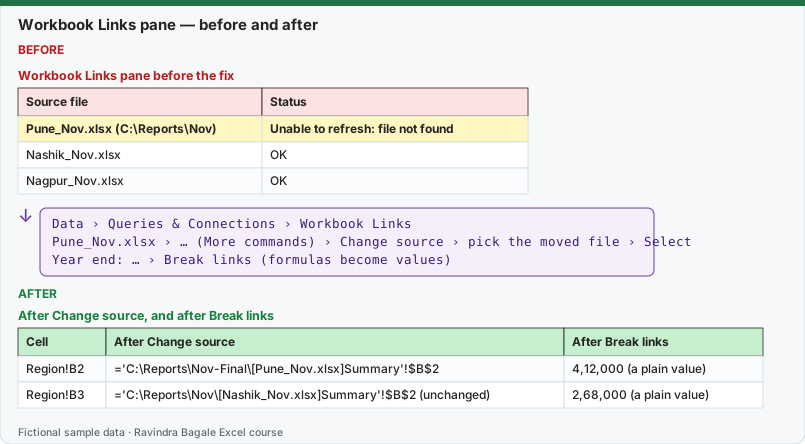
Expected result — After Change source, and after Break links
| Cell | After Change source | After Break links |
|---|---|---|
| Region!B2 | ='C:\Reports\Nov-Final\[Pune_Nov.xlsx]Summary'!$B$2 | 4,12,000 (a plain value) |
| Region!B3 | ='C:\Reports\Nov\[Nashik_Nov.xlsx]Summary'!$B$2 (unchanged) | 2,68,000 (a plain value) |
Before table and formula as text
Before — Workbook Links pane before the fix
| Source file | Status |
|---|---|
| Pune_Nov.xlsx (C:\Reports\Nov) | Unable to refresh: file not found |
| Nashik_Nov.xlsx | OK |
| Nagpur_Nov.xlsx | OK |
Formula / click path
Data › Queries & Connections › Workbook Links
Pune_Nov.xlsx › … (More commands) › Change source › pick the moved file › Select
Year end: … › Break links  (formulas become values)
Do it step by step:
- Open Region.xlsx and click Data › Queries & Connections › Workbook Links.
- Find Pune_Nov.xlsx in the pane and click its … (More commands) button.
- Click Change source, browse to the Nov-Final folder, select Pune_Nov.xlsx and click Select.
- Click Refresh for that file and check that the status is OK.
- At year end, save a backup copy, then click … › Break links for each source (or Break all at the top).
- Click a linked cell and confirm the formula bar now shows a number, not a formula.
स्टेप बाय स्टेप करून बघा:
- Region.xlsx उघडा आणि Data › Queries & Connections › Workbook Links वर click करा.
- Pane मध्ये Pune_Nov.xlsx शोधा आणि त्याच्या … (More commands) button वर click करा.
- Change source वर click करा, Nov-Final folder मध्ये जा, Pune_Nov.xlsx निवडा आणि Select करा.
- त्या file साठी Refresh करा आणि status OK आहे का ते बघा.
- वर्षाच्या शेवटी backup copy save करा, मग प्रत्येक source साठी … › Break links करा (किंवा वरचं Break all).
- Linked cell वर click करा आणि formula bar मध्ये आता formula नाही, number दिसतो याची खात्री करा.
स्टेप बाय स्टेप करके देखें:
- Region.xlsx खोलें और Data › Queries & Connections › Workbook Links पर click करें.
- Pane में Pune_Nov.xlsx ढूँढें और उसके … (More commands) button पर click करें.
- Change source पर click करें, Nov-Final folder में जाएँ, Pune_Nov.xlsx चुनें और Select करें.
- उस file के लिए Refresh करें और देखें कि status OK है.
- साल के अंत में backup copy save करें, फिर हर source के लिए … › Break links करें (या ऊपर वाला Break all).
- किसी linked cell पर click करें और पक्का करें कि formula bar में अब formula नहीं, number दिखता है.
Older Excel versions have the same tools in a dialog box: Data › Queries & Connections › Edit Links (Update Values, Change Source, Open Source, Break Link, Check Status). In current Microsoft 365 you can still add the legacy Edit Links command to a custom ribbon group with File › Options › Customize Ribbon › All Commands.
Finding a link that will not go away. Break links removes links in cell formulas, but links can also hide in other places. Check these one by one:
| Where a link can hide | How to check |
|---|---|
| Cell formulas | Home › Find & Select › Find (Ctrl + F), Find what: .xl, Look in: Formulas, Within: Workbook |
| Defined names | Formulas › Name Manager, look at the Refers to column for [ |
| Data Validation lists | Select the cells, Data › Data Validation, check Source |
| Conditional formatting rules | Home › Conditional Formatting › Manage Rules › This Worksheet |
| Chart series and titles | Click each chart series and read the formula bar |
| Shapes and buttons with assigned macros | Right-click › Assign Macro |
Break links is permanent. Every formula that used the source becomes a number. Save a copy first (for example Region_with_links.xlsx) so you can rebuild next month.
Practice task (try it before you open the answer):
- Move Pune_Nov.xlsx to a new folder and open Region.xlsx.
- Fix the link with Change source.
- Save a copy of Region.xlsx, then break all links in the copy and check B2.
Answer
After Change source the Pune cell shows ₹4,12,000 again and the status is OK. In the copy, after Break all, B2 contains the plain number 4,12,000 and the Workbook Links pane is empty.
Ravindra Bagale's Tip
When a file keeps asking "update links?" but you see no links, search names and data validation first. That is where forgotten links live in nine files out of ten.
Ravindra Bagale's Tip – मराठी
File सतत "update links?" विचारते पण links दिसत नाहीत, तेव्हा आधी names आणि data validation शोधा. दहापैकी नऊ files मध्ये विसरलेल्या links तिथेच असतात.
Ravindra Bagale's Tip – हिंदी
File बार-बार "update links?" पूछे पर links न दिखें, तो पहले names और data validation में ढूँढें. दस में से नौ files में भूली हुई links वहीं होती हैं.