23. Formulas Across Sheets and Workbooks
23.5 INDIRECT for Sheet Names (and Its Pitfalls)
Example first. Ruhi Bagale wants one cell where she picks a month (Jan, Feb or Mar) and a total that follows her choice. =SUM(INDIRECT("'"&$B$1&"'!B2:B5")) builds the address as text and turns it into a real reference. With Feb in B1 it shows ₹10,99,000.
INDIRECT with a sheet name — in 30 seconds
What: INDIRECT takes text that looks like an address, such as "'Feb'!B2:B5", and returns the real range. Build the text from a cell that holds the sheet name.
Why: A month picker or a store picker can switch a whole report to another sheet without rewriting formulas.
Tiny example: B1 = Feb. =SUM(INDIRECT("'"&$B$1&"'!B2:B5")) → ₹10,99,000. Change B1 to Mar → ₹11,87,000.
INDIRECT with a sheet name — 30 सेकंदात
काय: INDIRECT ला address सारखा दिसणारा text दिला, जसं "'Feb'!B2:B5", की तो खरा range परत देतो. Sheet चं नाव असलेल्या cell मधून हा text बनवा.
का: Month picker किंवा store picker formulas परत न लिहिता पूर्ण report दुसऱ्या sheet वर नेऊ शकतो.
छोटं उदाहरण: B1 = Feb. =SUM(INDIRECT("'"&$B$1&"'!B2:B5")) → ₹10,99,000. B1 ला Mar केलं → ₹11,87,000.
INDIRECT with a sheet name — 30 सेकंड में
क्या: INDIRECT को address जैसा दिखने वाला text दें, जैसे "'Feb'!B2:B5", तो वह असली range लौटाता है. Sheet का नाम रखने वाली cell से यह text बनाएँ.
क्यों: Month picker या store picker formulas दोबारा लिखे बिना पूरी report को दूसरी sheet पर ले जा सकता है.
छोटा उदाहरण: B1 = Feb. =SUM(INDIRECT("'"&$B$1&"'!B2:B5")) → ₹10,99,000. B1 को Mar करें → ₹11,87,000.
First look at the data (before → after):
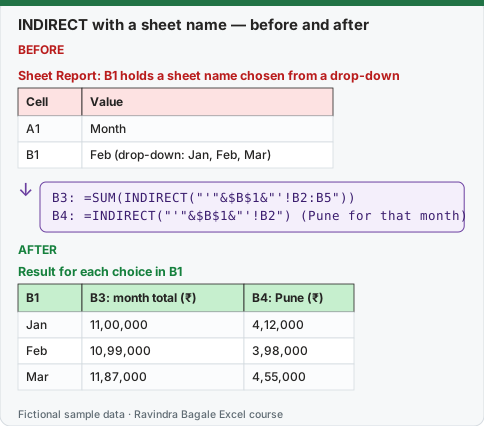
Expected result — Result for each choice in B1
| B1 | B3: month total (₹) | B4: Pune (₹) |
|---|---|---|
| Jan | 11,00,000 | 4,12,000 |
| Feb | 10,99,000 | 3,98,000 |
| Mar | 11,87,000 | 4,55,000 |
Before table and formula as text
Before — Sheet Report: B1 holds a sheet name chosen from a drop-down
| Cell | Value |
|---|---|
| A1 | Month |
| B1 | Feb (drop-down: Jan, Feb, Mar) |
Formula / click path
B3: =SUM(INDIRECT("'"&$B$1&"'!B2:B5"))
B4: =INDIRECT("'"&$B$1&"'!B2")   (Pune for that month)
Do it step by step:
- On the Report sheet, type
Monthin A1. - Select B1 and add Data › Data Validation › List with Source
Jan,Feb,Mar. - Choose Feb in B1.
- In B3 type
=SUM(INDIRECT("'"&$B$1&"'!B2:B5"))and press Enter. - In B4 type
=INDIRECT("'"&$B$1&"'!B2"). - Switch B1 to Jan and Mar and check the totals against the table.
स्टेप बाय स्टेप करून बघा:
- Report sheet वर A1 मध्ये
Monthtype करा. - B1 select करा आणि Source
Jan,Feb,Marदेऊन Data › Data Validation › List लावा. - B1 मध्ये Feb निवडा.
- B3 मध्ये
=SUM(INDIRECT("'"&$B$1&"'!B2:B5"))type करून Enter दाबा. - B4 मध्ये
=INDIRECT("'"&$B$1&"'!B2")type करा. - B1 मध्ये Jan आणि Mar निवडून totals table शी जुळतात का ते बघा.
स्टेप बाय स्टेप करके देखें:
- Report sheet पर A1 में
Monthtype करें. - B1 select करें और Source
Jan,Feb,Marदेकर Data › Data Validation › List लगाएँ. - B1 में Feb चुनें.
- B3 में
=SUM(INDIRECT("'"&$B$1&"'!B2:B5"))type करके Enter दबाएँ. - B4 में
=INDIRECT("'"&$B$1&"'!B2")type करें. - B1 में Jan और Mar चुनकर देखें कि totals table से मिलते हैं.
Why the single quotes? "'"&$B$1&"'!B2:B5" wraps the sheet name in single quotes, so names with spaces such as Mar Sales still work. Without them, only one-word names work.
Pitfalls (read before you use INDIRECT in a real report)
| Pitfall | What you see | What to do |
|---|---|---|
| A sheet is renamed (Feb → Feb 2026) | #REF!, because the text "Feb" no longer matches |
Keep the drop-down list and sheet names in sync, or use a Table + FILTER/XLOOKUP instead |
| Rows are inserted in the source sheet | Still reads B2:B5; the text does not move like a normal reference | Use a Table name inside the text, or a whole column |
| The source workbook is closed | #REF! (INDIRECT cannot read closed files) |
Open the file, or use Power Query |
| Typo in B1 (Fbe) | #REF! |
Use a Data Validation drop-down for B1 |
| Volatile: recalculates on every change | A big file feels slow | Use INDIRECT in a few summary cells, not in thousands of rows |
| Hard to audit | Trace Precedents shows nothing | Write a note next to the cell explaining the address it builds |
A safer alternative. If the months are stacked in one Table with a Month column, =SUMIFS(tblSales[Sales],tblSales[Month],$B$1) does the same job with none of these pitfalls. Use INDIRECT when the data really is split across sheets.
Practice task (try it before you open the answer):
- Build the Report sheet with the month drop-down.
- Add
=INDIRECT("'"&$B$1&"'!B5")for Kolhapur. - Rename the Mar sheet to
Mar 2026, choose Mar in B1 and note what happens.
Answer
Kolhapur: Jan ₹1,89,000, Feb ₹1,76,000, Mar ₹2,01,000. After renaming, choosing Mar shows #REF! until you add Mar 2026 to the drop-down list and choose it.
Ravindra Bagale's Tip
Use INDIRECT for a picker on a summary page, never inside a 10,000-row calculation. It is the formula most likely to make a file slow and the hardest to audit.
Ravindra Bagale's Tip – मराठी
INDIRECT summary page वरच्या picker साठी वापरा, 10,000 rows च्या calculation मध्ये कधीच नाही. File slow करणारा आणि audit करायला सगळ्यात अवघड formula हाच.
Ravindra Bagale's Tip – हिंदी
INDIRECT summary page के picker के लिए इस्तेमाल करें, 10,000 rows की calculation में कभी नहीं. File को slow करने वाला और audit में सबसे मुश्किल formula यही है.