30.9 Common Statistics Mistakes Analysts Make (and the Fix for Each)
Example first. Raja's monthly report says: "Average delivery time is 13.5 minutes, slow deliveries reduce orders, and the new page lifted conversion by 2%." Every part of that sentence is misleading. The median is 12 minutes, rain causes both slow delivery and low orders, and 2% is really 2 percentage points (and not yet significant). This lesson collects the mistakes that appear again and again in real analyst work, each with an example from this module and a fix.
Statistics mistakes — in 30 seconds
What: A short checklist of the statistics errors that most often reach managers: the wrong function, the wrong summary, the wrong reading of correlation and p-values, and the wrong arithmetic with averages and percentages.
Why: A correct formula with the wrong interpretation does more damage than a formula error, because nobody checks it. Running the checklist takes five minutes.
Tiny example: Pune: 400 orders, average 12 minutes. Solapur: 100 orders, average 18 minutes. The overall average is =(400*12+100*18)/500 = 13.2, not 15.
Statistics mistakes — 30 सेकंदात
काय: Managers पर्यंत सर्वात जास्त पोहोचणाऱ्या statistics चुकांची छोटी checklist: चुकीचा function, चुकीचा सारांश, correlation आणि p-values चं चुकीचं वाचन, आणि averages व percentages चं चुकीचं गणित.
का: बरोबर formula पण चुकीचा अर्थ, हे formula error पेक्षा जास्त नुकसान करतं, कारण कोणी ते तपासत नाही. Checklist चालवायला पाच मिनिटं लागतात.
छोटं उदाहरण: Pune: 400 orders, average 12 मिनिटे. Solapur: 100 orders, average 18 मिनिटे. एकूण average =(400*12+100*18)/500 = 13.2 आहे, 15 नाही.
Statistics mistakes — 30 सेकंड में
क्या: Managers तक सबसे ज़्यादा पहुँचने वाली statistics ग़लतियों की छोटी checklist: ग़लत function, ग़लत सार, correlation और p-values का ग़लत मतलब, और averages व percentages का ग़लत हिसाब.
क्यों: सही formula पर ग़लत मतलब, formula error से ज़्यादा नुक़सान करता है, क्योंकि कोई उसे जाँचता नहीं. Checklist चलाने में पाँच मिनट लगते हैं.
छोटा उदाहरण: Pune: 400 orders, average 12 मिनट. Solapur: 100 orders, average 18 मिनट. कुल average =(400*12+100*18)/500 = 13.2 है, 15 नहीं.
First look at the data (before → after):
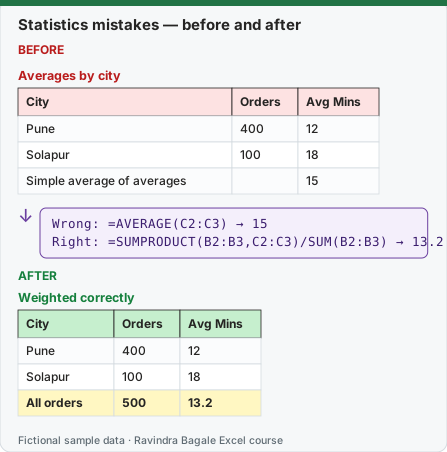
Expected result — Weighted correctly
| City | Orders | Avg Mins |
|---|---|---|
| Pune | 400 | 12 |
| Solapur | 100 | 18 |
| All orders | 500 | 13.2 |
Before table and formula as text
Before — Averages by city
| City | Orders | Avg Mins |
|---|---|---|
| Pune | 400 | 12 |
| Solapur | 100 | 18 |
| Simple average of averages | — | 15 |
Formula / click path
Wrong: =AVERAGE(C2:C3) → 15
Right: =SUMPRODUCT(B2:B3,C2:C3)/SUM(B2:B3) → 13.2
Do it step by step:
- Before sending a report, list every statistic in it.
- For each average, ask: is the data skewed? If yes, add the median and the 90th percentile.
- For each average of averages, recalculate with
=SUMPRODUCT(B2:B3,C2:C3)/SUM(B2:B3)weighted by the counts. - For each correlation, name one possible third factor.
- For each p-value, add the size of the effect and its 95% range, and say "not proven yet" instead of "no effect" when p > 0.05.
- For each percentage change, write whether it is percentage points or relative percent.
स्टेप बाय स्टेप करून बघा:
- Report पाठवण्याआधी त्यातली प्रत्येक statistic list करा.
- प्रत्येक average साठी विचारा: data skewed आहे का? असेल तर median आणि 90th percentile जोडा.
- प्रत्येक average of averages counts ने weight करून
=SUMPRODUCT(B2:B3,C2:C3)/SUM(B2:B3)ने परत काढा. - प्रत्येक correlation साठी एक संभाव्य तिसरा घटक सांगा.
- प्रत्येक p-value सोबत effect चा आकार आणि त्याची 95% range जोडा, आणि p > 0.05 असेल तर "effect नाही" ऐवजी "अजून सिद्ध नाही" म्हणा.
- प्रत्येक percentage बदलासाठी तो percentage points आहे की relative percent ते लिहा.
स्टेप बाय स्टेप करके देखें:
- Report भेजने से पहले उसकी हर statistic की list बनाएँ.
- हर average के लिए पूछें: क्या data skewed है? हाँ तो median और 90th percentile जोड़ें.
- हर average of averages को counts से weight करके
=SUMPRODUCT(B2:B3,C2:C3)/SUM(B2:B3)से दोबारा निकालें. - हर correlation के लिए एक संभावित तीसरा कारक बताएँ.
- हर p-value के साथ effect का आकार और उसकी 95% range जोड़ें, और p > 0.05 हो तो "effect नहीं" की जगह "अभी साबित नहीं" कहें.
- हर percentage बदलाव के लिए लिखें कि वह percentage points है या relative percent.
The checklist: 13 mistakes, each with an example from this module
| Mistake | What it looks like | Fix |
|---|---|---|
| STDEV.P on a sample | Spread looks slightly too small, confidence ranges too narrow | Use STDEV.S / VAR.S unless you truly have every value |
| Reporting only the mean of skewed data | "Average delivery 13.5 min" when half the orders take 12 or less | Report the median and the 90th percentile too (30.1) |
| Deleting outliers because a rule flagged them | Real problems (rain, a broken bike) vanish from the report | Keep them, report them separately, explain them (30.3) |
| Correlation read as cause | "Slow delivery reduces orders" when rain drives both | Name a possible third factor; add it to a regression (30.4, 30.6) |
| Multi-column LINEST read left to right | Coefficients attached to the wrong columns | The first coefficient is the LAST X column; label the output (30.5) |
| Predicting far outside the data | AdSpend 40 when the data went from 5 to 16 | Only predict inside (or just beyond) the range you observed |
| Wrong T.TEST type | Type 1 (paired) on two separate groups: p = 0.0082 instead of 0.0115 | Type 3 for separate groups, type 1 only for real pairs (30.7) |
| p < 0.05 read as "big" | A tiny ₹2 difference on 100,000 customers is "significant" but useless | Always report the size and its 95% range |
| p > 0.05 read as "no difference" | "B failed" after a small test | Say "not proven yet"; collect more data (30.8) |
| Testing many metrics, reporting the one that "worked" | With 20 metrics at 5%, the chance of at least one false win is 64% | Pick one main metric before the test |
| Averaging averages | Pune 400 orders at 12 min, Solapur 100 orders at 18 min: simple average 15, true average 13.2 | Weight by count: =SUMPRODUCT(B2:B3,C2:C3)/SUM(B2:B3) |
| Percent vs percentage points | 8% → 10% called "+2%" | It is +2 percentage points, or +25% relative (30.8) |
| Static ToolPak output after the data changed | Old numbers in a "final" report | Re-run the tool or use formulas that update (30.2) |
Raja's sentence, rewritten. "Half of our Pune orders arrive within 12 minutes and 90% within 16.1 minutes; one order in 20 is much slower, mostly on rainy days. Rainy days also have fewer orders, so we cannot say slow delivery itself reduces orders. Page B converted 10.0% vs 8.0% for page A (+2 percentage points), not yet significant (p = 0.088); the test continues."
Recompute everything outside Excel once. For an important analysis, check the key numbers in a second tool. Every number in this module was checked in LibreOffice Calc and in Python, for example:
from scipy import stats
stats.ttest_ind(a, b, equal_var=False).pvalue     # = T.TEST(A,B,2,3)
stats.chi2_contingency(obs, correction=False)[1]  # = CHISQ.TEST(observed, expected)
import statsmodels.api as sm
sm.OLS(y, sm.add_constant(X)).fit().summary()     # = ToolPak Regression
Module 29 shows how to run the same code inside Excel with Python in Excel (import scipy works there too).
Every number on this page was computed with Excel's documented formulas and re-checked twice: in LibreOffice Calc 25.2 with the same formulas, and in Python with scipy and statsmodels.
Practice task (try it before you open the answer):
- Nagpur has 250 orders averaging 14 minutes and Kolhapur 50 orders averaging 22 minutes. What is the overall average?
- A report says "Return rate went from 4% to 5%, up 1%". Correct it.
- Which mistake from the table is the hardest to spot in your own work, and why?
Answer
=(250*14+50*22)/300= 15.33 minutes, not the simple average 18.- "Return rate went from 4% to 5%: up 1 percentage point, a 25% relative increase."
- Any honest answer works; many analysts pick "correlation read as cause" or "p > 0.05 read as no difference", because the formula is correct and only the sentence is wrong.
Ravindra Bagale's Tip
Ask a colleague to read only your conclusions, not your formulas, and challenge each sentence. Most statistics mistakes live in the sentences.
Ravindra Bagale's Tip – मराठी
सहकाऱ्याला तुमचे formulas नाही तर फक्त निष्कर्ष वाचायला सांगा आणि प्रत्येक वाक्याला प्रश्न विचारायला सांगा. बहुतेक statistics चुका वाक्यांमध्ये असतात.
Ravindra Bagale's Tip – हिंदी
किसी साथी से अपने formulas नहीं, सिर्फ़ निष्कर्ष पढ़वाएँ और हर वाक्य पर सवाल पूछने को कहें. ज़्यादातर statistics ग़लतियाँ वाक्यों में होती हैं.
Loading practice tasks...
- Mean sales (Easy): Average of C2:C10, rounded to 1 decimal.
- Median sales (Easy): Median of C2:C10.
- Mean without the outlier (Medium): Average of sales below 100.
- Sample SD (Medium): Sample SD of E2:E10, rounded to 3 decimals.
- Population SD (Medium): Population SD of E2:E10, rounded to 3 decimals.
- Wrong: average of ratios (Medium): Average of C2:C10 ÷ D2:D10, rounded to 2 decimals.
- Right: ratio of totals (Hard): Total sales ÷ total staff, rounded to 2 decimals.
- Correlation is not cause (Hard): Correlation of D2:D10 and C2:C10, rounded to 3 decimals.
- South average sales (Hard): Average sales where Region is "South", rounded to 1 decimal.
- Small group warning (Hard): How many branches are in "North"?