30.7 T.TEST and an A/B Test Walkthrough: Did the New Checkout Page Raise Basket Value?
Example first. The product team tested a new checkout page (version B) against the old one (A) on 30 fictional customers, 15 each. Average basket: ₹411.67 for A and ₹446.67 for B, a difference of ₹35. Is that real, or could it be luck? =T.TEST(A2:A16,B2:B16,2,3) returns 0.0115. A difference this large would appear by chance only about 1.1% of the time if the pages were really the same. This lesson walks through the whole A/B test: the question, the right test type, the formula, the ToolPak output and the sentence you write for the team.
T.TEST for an A/B test — in 30 seconds
What: A t-test checks whether the difference between two averages is bigger than random noise. T.TEST returns the p-value: the probability of seeing a difference at least this big if the true averages were equal.
Why: A/B tests, before/after comparisons and city-vs-city questions all need it. Without it, teams launch changes because of differences that are only luck.
Tiny example: =T.TEST(A2:A16,B2:B16,2,3) = 0.0115: two tails (2) and two separate groups with possibly different spread (3). Below 0.05, so B's higher basket is statistically significant.
T.TEST for an A/B test — 30 सेकंदात
काय: t-test दोन averages मधला फरक random noise पेक्षा मोठा आहे का ते तपासतो. T.TEST p-value देतो: खरे averages समान असताना इतका किंवा जास्त फरक दिसण्याची शक्यता.
का: A/B tests, before/after तुलना आणि city-vs-city प्रश्न सगळ्यांना तो लागतो. त्याशिवाय teams फक्त नशिबाने आलेल्या फरकांवरून बदल launch करतात.
छोटं उदाहरण: =T.TEST(A2:A16,B2:B16,2,3) = 0.0115: दोन tails (2) आणि वेगवेगळा पसारा असू शकणारे दोन वेगळे groups (3). 0.05 पेक्षा कमी, म्हणून B ची जास्त basket statistically significant आहे.
T.TEST for an A/B test — 30 सेकंड में
क्या: t-test जाँचता है कि दो averages का फ़र्क़ random noise से बड़ा है या नहीं. T.TEST p-value देता है: असली averages बराबर होने पर इतना या ज़्यादा फ़र्क़ दिखने की संभावना.
क्यों: A/B tests, before/after तुलना और city-vs-city सवाल सबको इसकी ज़रूरत है. इसके बिना teams सिर्फ़ किस्मत से आए फ़र्क़ों पर बदलाव launch कर देती हैं.
छोटा उदाहरण: =T.TEST(A2:A16,B2:B16,2,3) = 0.0115: दो tails (2) और अलग फैलाव वाले हो सकने वाले दो अलग groups (3). 0.05 से कम, इसलिए B की ज़्यादा basket statistically significant है.
First look at the data (before → after):
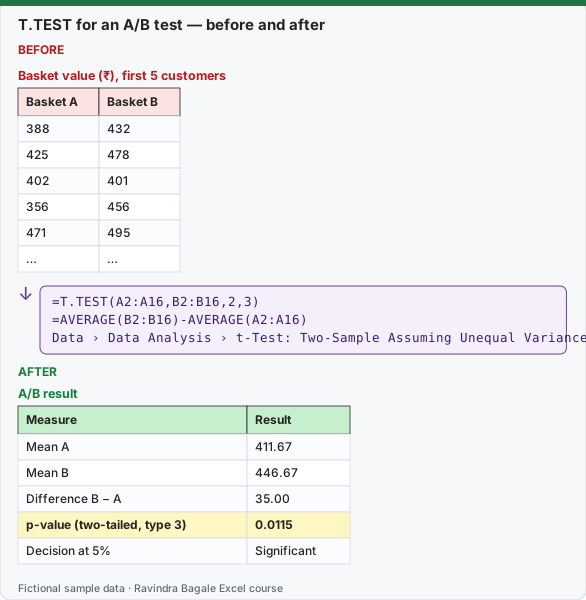
Expected result — A/B result
| Measure | Result |
|---|---|
| Mean A | 411.67 |
| Mean B | 446.67 |
| Difference B − A | 35.00 |
| p-value (two-tailed, type 3) | 0.0115 |
| Decision at 5% | Significant |
Before table and formula as text
Before — Basket value (₹), first 5 customers
| Basket A | Basket B |
|---|---|
| 388 | 432 |
| 425 | 478 |
| 402 | 401 |
| 356 | 456 |
| 471 | 495 |
| … | … |
Formula / click path
=T.TEST(A2:A16,B2:B16,2,3)
=AVERAGE(B2:B16)-AVERAGE(A2:A16)
Data › Data Analysis › t-Test: Two-Sample Assuming Unequal Variances
Do it step by step:
- Write the question before looking at the data: "Is the average basket different between A and B?" Choose 5% (0.05) as the limit.
- Put A's baskets in A2:A16 and B's in B2:B16.
- In D2 type
=AVERAGE(B2:B16)-AVERAGE(A2:A16)for the size of the difference (35). - In D3 type
=T.TEST(A2:A16,B2:B16,2,3): 2 tails, type 3 because the customers in A and B are different people. - Compare: 0.0115 is below 0.05, so the difference is statistically significant.
- Write the result with size and uncertainty: "B raised the average basket by ₹35 (95% range about ₹9 to ₹61), p = 0.011."
स्टेप बाय स्टेप करून बघा:
- Data बघण्याआधी प्रश्न लिहा: "A आणि B मध्ये average basket वेगळी आहे का?" Limit म्हणून 5% (0.05) निवडा.
- A च्या baskets A2:A16 मध्ये आणि B च्या B2:B16 मध्ये ठेवा.
- फरक किती मोठा आहे ते बघायला D2 मध्ये
=AVERAGE(B2:B16)-AVERAGE(A2:A16)type करा (35). - D3 मध्ये
=T.TEST(A2:A16,B2:B16,2,3)type करा: 2 tails, type 3 कारण A आणि B मधले customers वेगवेगळे लोक आहेत. - तुलना करा: 0.0115 हा 0.05 पेक्षा कमी आहे, म्हणून फरक statistically significant आहे.
- Result आकार आणि अनिश्चिततेसह लिहा: "B ने average basket ₹35 ने वाढवली (95% range साधारण ₹9 ते ₹61), p = 0.011."
स्टेप बाय स्टेप करके देखें:
- Data देखने से पहले सवाल लिखें: "क्या A और B में average basket अलग है?" Limit के रूप में 5% (0.05) चुनें.
- A की baskets A2:A16 में और B की B2:B16 में रखें.
- फ़र्क़ कितना बड़ा है यह देखने के लिए D2 में
=AVERAGE(B2:B16)-AVERAGE(A2:A16)type करें (35). - D3 में
=T.TEST(A2:A16,B2:B16,2,3)type करें: 2 tails, type 3 क्योंकि A और B के customers अलग लोग हैं. - तुलना करें: 0.0115, 0.05 से कम है, इसलिए फ़र्क़ statistically significant है.
- Result आकार और अनिश्चितता के साथ लिखें: "B ने average basket ₹35 बढ़ाई (95% range लगभग ₹9 से ₹61), p = 0.011."
The data (fictional basket values in ₹)
| Customer | 1 | 2 | 3 | 4 | 5 | 6 | 7 | 8 | 9 | 10 | 11 | 12 | 13 | 14 | 15 |
|---|---|---|---|---|---|---|---|---|---|---|---|---|---|---|---|
| A | 388 | 425 | 402 | 356 | 471 | 410 | 395 | 447 | 362 | 430 | 418 | 379 | 455 | 401 | 436 |
| B | 432 | 478 | 401 | 456 | 495 | 413 | 449 | 382 | 468 | 510 | 425 | 441 | 487 | 404 | 459 |
Step 1: the question and the limit. The null hypothesis is "A and B have the same average basket". The usual limit (alpha) is 0.05. Decide it before you look at the result, and decide whether you care about any difference (two-tailed, tails = 2) or only "B is higher" (one-tailed, tails = 1). Two-tailed is the safe default.
Step 2: choose the type
| type | Test | Use when | p on this data |
|---|---|---|---|
| 1 | Paired | The same customers or stores measured twice (before and after) | 0.0082 (wrong here: the rows are not pairs) |
| 2 | Two-sample, equal variance | Two separate groups with similar spread | 0.0114 |
| 3 | Two-sample, unequal variance (Welch) | Two separate groups; the safe default | 0.0115 |
Type 3 does not assume the two groups have the same spread, and gives almost the same answer as type 2 when they do. Using type 1 on unpaired data gives a wrong p-value (0.0082 here) because it pairs customer 1 of A with customer 1 of B for no reason.
Step 3: the size of the effect and its range. A p-value says "probably not luck"; it does not say "big". Always report the difference and a 95% range:
- Difference:
=AVERAGE(B2:B16)-AVERAGE(A2:A16)= ₹35. - Half-width:
=T.INV.2T(0.05,28)*SQRT(VAR.S(A2:A16)/15+VAR.S(B2:B16)/15)= 26.47. - 95% range: ₹8.53 to ₹61.47. B probably adds between about ₹9 and ₹61 per basket.
Step 4: the ToolPak output, line by line. Data › Data Analysis › t-Test: Two-Sample Assuming Unequal Variances, Variable 1 Range A1:A16, Variable 2 Range B1:B16, Hypothesized Mean Difference 0, Labels, Alpha 0.05:
| Line | Basket A | Basket B | Meaning |
|---|---|---|---|
| Mean | 411.6667 | 446.6667 | Average basket |
| Variance | 1105.2381 | 1399.5238 | Sample variance (VAR.S) |
| Observations | 15 | 15 | Customers per version |
| Hypothesized Mean Difference | 0 | — | We test "no difference" |
| df | 28 | — | Welch degrees of freedom 27.62, rounded by the ToolPak |
| t Stat | -2.7085 | — | Negative because A − B is negative |
| P(T<=t) one-tail | 0.0057 | — | One-tailed p-value |
| t Critical one-tail | 1.7011 | — | =T.INV(0.95,28) |
| P(T<=t) two-tail | 0.0114 | — | Two-tailed p-value: the one to report |
| t Critical two-tail | 2.0484 | — | =T.INV.2T(0.05,28) |
Why the ToolPak p (0.0114) differs slightly from T.TEST (0.0115). Microsoft's documentation explains it: for unequal variances the ToolPak rounds the degrees of freedom to a whole number (27.62 → 28), while T.TEST uses the unrounded value. Both lead to the same decision. Report the T.TEST value.
Step 5: the sentence. "On 30 customers, version B raised the average basket from ₹411.67 to ₹446.67 (+₹35, 95% range ₹9 to ₹61; Welch t-test p = 0.011). Recommend a larger test before full launch, because 15 customers per version is a small sample."
Things a good A/B test needs (no formula fixes these)
- Random assignment: customers must be split by chance, not "Pune got B, Solapur got A".
- Sample size decided in advance: stopping the test the moment p dips below 0.05 inflates false wins.
- One main metric: if you test 20 metrics, about one will look "significant" by luck (lesson 30.9).
- Same period: run A and B at the same time so weekends and festivals affect both.
Every number on this page was computed with Excel's documented formulas and re-checked twice: in LibreOffice Calc 25.2 with the same formulas, and in Python with scipy and statsmodels.
Microsoft sources (checked 7 October 2026): T.TEST function; Use the Analysis ToolPak to perform complex data analysis.
Practice task (try it before you open the answer):
- Run
=T.TEST(A2:A16,B2:B16,1,3). What do you get and how does it relate to the two-tailed value? - A colleague used type 2. Does the decision change?
- Suppose the p-value had been 0.21. Write the result sentence.
Answer
- 0.0057, exactly half of the two-tailed 0.0115. Use one-tailed only if you decided before the test that only "B higher" matters.
- No. Type 2 gives 0.0114, also below 0.05. The spreads of A and B are similar, so types 2 and 3 agree.
- For example: "B's average basket was higher, but the difference could easily be chance (p = 0.21). We cannot conclude that B raises basket value; a larger test is needed."
Ravindra Bagale's Tip
Report every A/B test as three numbers: the difference, its 95% range and the p-value. "Significant" alone tells your manager nothing about whether the change is worth the effort.
Ravindra Bagale's Tip – मराठी
प्रत्येक A/B test तीन आकड्यांत report करा: फरक, त्याची 95% range आणि p-value. फक्त "significant" म्हटल्याने बदल मेहनतीला योग्य आहे का ते manager ला काहीच कळत नाही.
Ravindra Bagale's Tip – हिंदी
हर A/B test तीन आँकड़ों में report करें: फ़र्क़, उसकी 95% range और p-value. सिर्फ़ "significant" कहने से manager को कुछ पता नहीं चलता कि बदलाव मेहनत के लायक़ है या नहीं.
Loading practice tasks...
- Old page mean (Easy): Average of A2:A11.
- New page mean (Easy): Average of B2:B11.
- Lift in dollars (Easy): Average of B2:B11 minus average of A2:A11.
- Lift % (Medium): Lift ÷ average of A2:A11, rounded to 3 decimals.
- p-value (equal variance) (Medium): T.TEST of A2:A11 and B2:B11, 2 tails, type 2, rounded to 4 decimals.
- p-value (unequal variance) (Medium): T.TEST with 2 tails and type 3, rounded to 4 decimals.
- Significant at 5%? (Medium): Is the type 3 two-tailed p-value below 0.05? (TRUE or FALSE)
- Paired p-value (Hard): T.TEST with 2 tails and type 1 (paired), rounded to 5 decimals.
- Pairs where new won (Hard): How many rows have New page above Old page?
- Verdict text (Hard): Show "Launch" if the type 3 p-value is below 0.05, else "Keep testing".