30.5 Simple Regression with SLOPE, INTERCEPT and LINEST: Predict Orders from Ad Spend
Example first. Amir's marketing head asks: "If we spend ₹12,000 on ads tomorrow, how many orders should we expect?" A straight line through the 20 days answers it: Orders ≈ 176.38 + 17.60 × AdSpend. For AdSpend 12 (thousand), that is about 388 orders. SLOPE and INTERCEPT give the two numbers; LINEST gives them plus the statistics that tell you how much to trust them. This lesson reads every cell of the LINEST output and shows the one trap that catches almost everyone with several X columns.
SLOPE, INTERCEPT and LINEST — in 30 seconds
What: Simple linear regression fits the straight line y = m·x + b that makes the squared vertical distances from the points as small as possible (least squares). SLOPE returns m, INTERCEPT returns b, and LINEST returns both plus statistics.
Why: It turns a correlation into a usable rule: each extra ₹1,000 of ads goes with about 17.6 more orders, and it predicts y for a new x with a measure of error.
Tiny example: =SLOPE(E2:E21,B2:B21) returns 17.5964 and =INTERCEPT(E2:E21,B2:B21) returns 176.3762. Prediction for AdSpend 12: =FORECAST.LINEAR(12,E2:E21,B2:B21) = 387.53.
SLOPE, INTERCEPT and LINEST — 30 सेकंदात
काय: Simple linear regression अशी सरळ रेषा y = m·x + b बसवते जिच्यामुळे points पासूनच्या उभ्या अंतरांच्या वर्गांची बेरीज सर्वात कमी होते (least squares). SLOPE m देतो, INTERCEPT b देतो, आणि LINEST दोन्ही आणि statistics देतो.
का: तो correlation ला वापरता येणाऱ्या नियमात बदलतो: ads वरचा प्रत्येक जास्तीचा ₹1,000 साधारण 17.6 जास्त orders सोबत येतो, आणि नवीन x साठी error च्या मापासह y predict करतो.
छोटं उदाहरण: =SLOPE(E2:E21,B2:B21) 17.5964 देतो आणि =INTERCEPT(E2:E21,B2:B21) 176.3762 देतो. AdSpend 12 साठी prediction: =FORECAST.LINEAR(12,E2:E21,B2:B21) = 387.53.
SLOPE, INTERCEPT and LINEST — 30 सेकंड में
क्या: Simple linear regression ऐसी सीधी रेखा y = m·x + b बैठाता है जिससे points से खड़ी दूरियों के वर्गों का जोड़ सबसे कम हो (least squares). SLOPE m देता है, INTERCEPT b देता है, और LINEST दोनों और statistics देता है.
क्यों: यह correlation को इस्तेमाल होने वाले नियम में बदलता है: ads पर हर अतिरिक्त ₹1,000 लगभग 17.6 ज़्यादा orders के साथ आता है, और नए x के लिए error के माप के साथ y predict करता है.
छोटा उदाहरण: =SLOPE(E2:E21,B2:B21) 17.5964 देता है और =INTERCEPT(E2:E21,B2:B21) 176.3762 देता है. AdSpend 12 के लिए prediction: =FORECAST.LINEAR(12,E2:E21,B2:B21) = 387.53.
First look at the data (before → after):
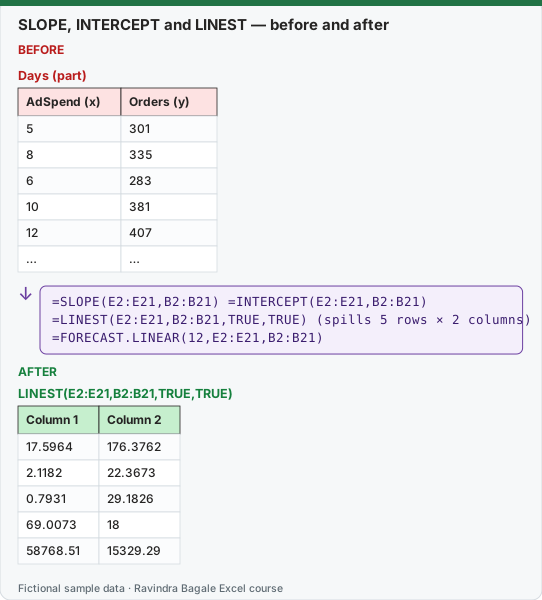
Expected result — LINEST(E2:E21,B2:B21,TRUE,TRUE)
| Column 1 | Column 2 |
|---|---|
| 17.5964 | 176.3762 |
| 2.1182 | 22.3673 |
| 0.7931 | 29.1826 |
| 69.0073 | 18 |
| 58768.51 | 15329.29 |
Before table and formula as text
Before — Days (part)
| AdSpend (x) | Orders (y) |
|---|---|
| 5 | 301 |
| 8 | 335 |
| 6 | 283 |
| 10 | 381 |
| 12 | 407 |
| … | … |
Formula / click path
=SLOPE(E2:E21,B2:B21)   =INTERCEPT(E2:E21,B2:B21)
=LINEST(E2:E21,B2:B21,TRUE,TRUE)   (spills 5 rows × 2 columns)
=FORECAST.LINEAR(12,E2:E21,B2:B21)
Do it step by step:
- In H2 type
=SLOPE(E2:E21,B2:B21)(17.5964) and in H3=INTERCEPT(E2:E21,B2:B21)(176.3762). Note the order: y first, then x. - In J2 type
=LINEST(E2:E21,B2:B21,TRUE,TRUE). A 5 × 2 block spills; the first row is slope and intercept again. - Read R² in the third row (0.7931) and the standard error of y next to it (29.18 orders).
- Predict: in H5 type
=FORECAST.LINEAR(12,E2:E21,B2:B21)for AdSpend 12. Result 387.53. - Check by hand:
=H3+H2*12gives the same 387.53. - Write the result with its error: "about 388 orders, typically within ±29".
स्टेप बाय स्टेप करून बघा:
- H2 मध्ये
=SLOPE(E2:E21,B2:B21)(17.5964) आणि H3 मध्ये=INTERCEPT(E2:E21,B2:B21)(176.3762) type करा. क्रम लक्षात ठेवा: आधी y, मग x. - J2 मध्ये
=LINEST(E2:E21,B2:B21,TRUE,TRUE)type करा. 5 × 2 block spill होतो; पहिली row पुन्हा slope आणि intercept. - तिसऱ्या row मध्ये R² (0.7931) आणि त्याच्या शेजारी y ची standard error (29.18 orders) वाचा.
- Predict करा: AdSpend 12 साठी H5 मध्ये
=FORECAST.LINEAR(12,E2:E21,B2:B21)type करा. Result 387.53. - हाताने तपासा:
=H3+H2*12तेच 387.53 देतो. - Result error सह लिहा: "साधारण 388 orders, सहसा ±29 च्या आत".
स्टेप बाय स्टेप करके देखें:
- H2 में
=SLOPE(E2:E21,B2:B21)(17.5964) और H3 में=INTERCEPT(E2:E21,B2:B21)(176.3762) type करें. क्रम याद रखें: पहले y, फिर x. - J2 में
=LINEST(E2:E21,B2:B21,TRUE,TRUE)type करें. 5 × 2 block spill होता है; पहली row फिर से slope और intercept. - तीसरी row में R² (0.7931) और उसके बगल में y की standard error (29.18 orders) पढ़ें.
- Predict करें: AdSpend 12 के लिए H5 में
=FORECAST.LINEAR(12,E2:E21,B2:B21)type करें. Result 387.53. - हाथ से जाँचें:
=H3+H2*12वही 387.53 देता है. - Result error के साथ लिखें: "लगभग 388 orders, आमतौर पर ±29 के अंदर".
Every cell of LINEST(E2:E21,B2:B21,TRUE,TRUE)
| Row | Column 1 | Value | Column 2 | Value |
|---|---|---|---|---|
| 1 | slope m | 17.5964 | intercept b | 176.3762 |
| 2 | standard error of m | 2.1182 | standard error of b | 22.3673 |
| 3 | R² (r²) | 0.7931 | standard error of y (sey) | 29.1826 |
| 4 | F statistic | 69.0073 | degrees of freedom (df) | 18 |
| 5 | regression sum of squares | 58768.51 | residual sum of squares | 15329.29 |
The arguments: LINEST(known_y's, known_x's, const, stats). const TRUE (or omitted) calculates the intercept normally; FALSE forces the line through 0, which is almost never right for business data. stats TRUE adds rows 2 to 5. Without it, LINEST returns only the first row.
Reading it in plain words
- Slope 17.60: on days with ₹1,000 more ad spend, orders were higher by about 17.60 on average.
- Intercept 176.38: the line's value at AdSpend 0. It is outside the data (the lowest spend was 5), so do not read it as "orders with no ads".
- Standard error of the slope 2.12: the slope is 8.31 times its standard error (the t statistic), far above 2, so the link is very unlikely to be chance.
- R² 0.7931: about 79% of the day-to-day variation in orders goes with ad spend; the rest is other things (discount, rain, chance). For one X column, R² = CORREL² (0.891² = 0.7931).
- sey 29.18: a typical prediction misses by about 29 orders. Same as
=STEYX(E2:E21,B2:B21). - F 69.01 with df 18: tests whether the whole line is better than just the average.
=F.DIST.RT(69.01,1,18)gives a probability of 1.43E-07, so yes. - Sums of squares: regression 58768.51 + residual 15329.29 = total 74097.80. R² = regression ÷ total.
Pick single cells from LINEST. =INDEX(LINEST(E2:E21,B2:B21,TRUE,TRUE),3,1) returns R² alone (0.7931). Microsoft documents =INDEX(LINEST(known_y's,known_x's),1) for the slope and …,2) for the intercept.
TREND gives the fitted line for many x values at once. =TREND(E2:E21,B2:B21) spills the 20 fitted values; =TREND(E2:E21,B2:B21,{10;12;14}) spills predictions for AdSpend 10, 12 and 14: 352.34, 387.53, 422.73.
The trap: several X columns come back in REVERSE order. With three X columns (AdSpend, Discount, Rain in B, C, D):
=LINEST(E2:E21,B2:D21,TRUE,TRUE)
| Row | Column 1 | Column 2 | Column 3 | Column 4 |
|---|---|---|---|---|
| 1 (coefficients) | -2.1382 ← Rain | 2.9686 ← Discount | 11.3239 ← AdSpend | 229.2739 ← intercept |
| 2 (standard errors) | 0.1911 | 0.8852 | 0.9293 | 7.0492 |
| 3 | R² 0.9883 | sey 7.3466 | #N/A | #N/A |
| 4 | F 452.30 | df 16 | #N/A | #N/A |
| 5 | ssreg 73234.25 | ssresid 863.55 | #N/A | #N/A |
The first coefficient belongs to the last X column. Microsoft's documentation states the order as {mn, mn-1, …, m1, b}. Label the output by hand every time. Rows 3 to 5 use only two columns; the other cells show #N/A, which is normal. Wrap the formula in IFERROR(…,"") to hide them.
Notice the slope changed. Alone, AdSpend has a slope of 17.60. With Discount and Rain in the model, it is 11.32. On campaign days Amir raised ads and discounts together, so the simple slope gave ads credit for part of the discount effect. Lesson 30.6 reads this three-X model line by line with the ToolPak.
Every number on this page was computed with Excel's documented formulas and re-checked twice: in LibreOffice Calc 25.2 with the same formulas, and in Python with scipy and statsmodels.
Microsoft sources (checked 7 October 2026): LINEST function.
Practice task (try it before you open the answer):
- Use SLOPE and INTERCEPT to predict orders for AdSpend 9 (thousand).
- What does
=INDEX(LINEST(E2:E21,B2:B21,TRUE,TRUE),3,2)return, and what does it mean? - In the three-X LINEST, which cell holds the Discount coefficient?
Answer
=INTERCEPT(E2:E21,B2:B21)+SLOPE(E2:E21,B2:B21)*9= 334.74, about 335 orders (or=FORECAST.LINEAR(9,E2:E21,B2:B21)).- 29.18: the standard error of the y estimate. A typical prediction misses by about 29 orders.
- Row 1, column 2 (2.9686), because the columns come back in reverse order: Rain, Discount, AdSpend, intercept.
Ravindra Bagale's Tip
Type the labels "Rain, Discount, AdSpend, Intercept" above a multi-column LINEST before you read a single number. The reversed order has fooled many experienced analysts.
Ravindra Bagale's Tip – मराठी
Multi-column LINEST चा एकही आकडा वाचण्याआधी वर "Rain, Discount, AdSpend, Intercept" labels type करा. उलट्या क्रमाने अनेक अनुभवी analysts ना फसवलं आहे.
Ravindra Bagale's Tip – हिंदी
Multi-column LINEST का एक भी आँकड़ा पढ़ने से पहले ऊपर "Rain, Discount, AdSpend, Intercept" labels type करें. उलटे क्रम ने कई अनुभवी analysts को धोखा दिया है.
Loading practice tasks...
- Slope (Easy): Slope of orders C2:C9 on spend B2:B9, rounded to 3 decimals.
- Intercept (Easy): Intercept of orders C2:C9 on spend B2:B9, rounded to 2 decimals.
- R squared (Easy): R squared of C2:C9 on B2:B9, rounded to 3 decimals.
- Predict for ₹50k (Medium): Predicted orders for spend B10 with FORECAST.LINEAR, rounded to 0 decimals.
- Predict by hand (Medium): Intercept + slope × B10, rounded to 0 decimals.
- Fitted value week 3 (Medium): Predicted orders for B4, rounded to 1 decimal.
- Residual week 3 (Medium): C4 minus the predicted orders for B4, rounded to 1 decimal.
- Spend for 600 orders (Hard): (600 − intercept) ÷ slope, rounded to 1 decimal.
- Pune-only average orders (Hard): Average orders where City is "Pune".
- Orders per ₹1,000 overall (Hard): Total orders ÷ total spend, rounded to 2 decimals.