30.1 Descriptive Statistics with Functions: Centre, Spread and Shape
Example first. Ravina's manager asks: "How fast do we deliver in Pune?" She has the delivery minutes of 20 orders. The average is 13.5 minutes, but 19 of the 20 orders took 17 minutes or less. One order (BLK-5020) took 41 minutes because the rider was stuck in rain. The median is 12 minutes. Which number is "the" answer? This lesson shows the functions that describe a column of numbers: where the centre is, how spread out the values are, and what shape they have, and when to trust each one.
Descriptive statistics — in 30 seconds
What: Descriptive statistics are a few numbers that summarise a column: the centre (AVERAGE, MEDIAN, MODE.SNGL), the spread (STDEV.S, VAR.S, quartiles, range) and the shape (SKEW, KURT).
Why: One average can hide a problem. Centre plus spread plus shape tells the real story: most orders are fast, and a few are very slow.
Tiny example: For the 20 delivery times =AVERAGE(B2:B21) gives 13.5 but =MEDIAN(B2:B21) gives 12, because one 41-minute order pulls the average up.
Descriptive statistics — 30 सेकंदात
काय: Descriptive statistics म्हणजे column चा सारांश सांगणारे काही आकडे: मध्य (AVERAGE, MEDIAN, MODE.SNGL), पसारा (STDEV.S, VAR.S, quartiles, range) आणि आकार (SKEW, KURT).
का: एक average problem लपवू शकतो. मध्य, पसारा आणि आकार मिळून खरी गोष्ट सांगतात: बहुतेक orders लवकर येतात आणि काही खूप उशिरा.
छोटं उदाहरण: 20 delivery times साठी =AVERAGE(B2:B21) 13.5 देतो पण =MEDIAN(B2:B21) 12 देतो, कारण एक 41 मिनिटांची order average वर ओढते.
Descriptive statistics — 30 सेकंड में
क्या: Descriptive statistics यानी column का सार बताने वाले कुछ आँकड़े: केंद्र (AVERAGE, MEDIAN, MODE.SNGL), फैलाव (STDEV.S, VAR.S, quartiles, range) और आकार (SKEW, KURT).
क्यों: एक average problem छुपा सकता है. केंद्र, फैलाव और आकार मिलकर असली कहानी बताते हैं: ज़्यादातर orders जल्दी आते हैं और कुछ बहुत देर से.
छोटा उदाहरण: 20 delivery times के लिए =AVERAGE(B2:B21) 13.5 देता है पर =MEDIAN(B2:B21) 12 देता है, क्योंकि एक 41 मिनट वाला order average को ऊपर खींचता है.
First look at the data (before → after):
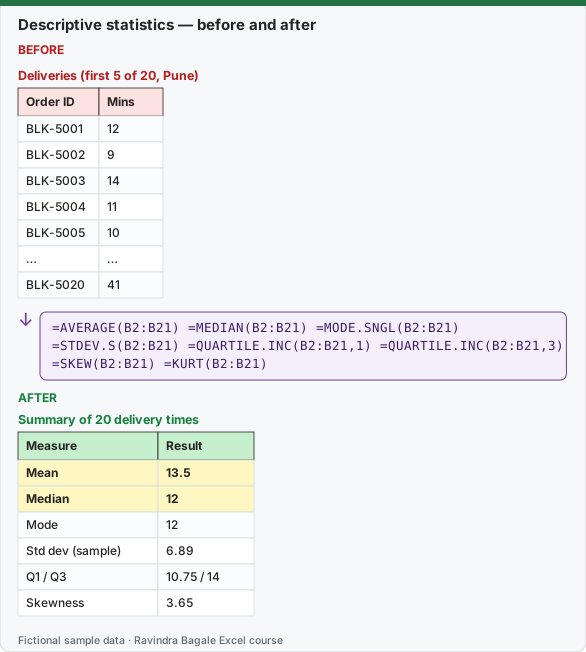
Expected result — Summary of 20 delivery times
| Measure | Result |
|---|---|
| Mean | 13.5 |
| Median | 12 |
| Mode | 12 |
| Std dev (sample) | 6.89 |
| Q1 / Q3 | 10.75 / 14 |
| Skewness | 3.65 |
Before table and formula as text
Before — Deliveries (first 5 of 20, Pune)
| Order ID | Mins |
|---|---|
| BLK-5001 | 12 |
| BLK-5002 | 9 |
| BLK-5003 | 14 |
| BLK-5004 | 11 |
| BLK-5005 | 10 |
| … | … |
| BLK-5020 | 41 |
Formula / click path
=AVERAGE(B2:B21)   =MEDIAN(B2:B21)   =MODE.SNGL(B2:B21)
=STDEV.S(B2:B21)   =QUARTILE.INC(B2:B21,1)   =QUARTILE.INC(B2:B21,3)
=SKEW(B2:B21)   =KURT(B2:B21)
Do it step by step:
- Put the 20 delivery times in B2:B21 with the header Mins in B1.
- In D2 type
=AVERAGE(B2:B21)and in D3 type=MEDIAN(B2:B21). Compare: 13.5 and 12. - In D4 type
=STDEV.S(B2:B21)for the typical distance from the mean (6.8863). - In D5 and D6 type
=QUARTILE.INC(B2:B21,1)and=QUARTILE.INC(B2:B21,3)(10.75 and 14). - In D7 type
=SKEW(B2:B21). A big positive number (3.647) means a long tail of slow orders. - Write one sentence for your manager: "Half of our orders arrive within 12 minutes; one order in 20 took far longer."
स्टेप बाय स्टेप करून बघा:
- 20 delivery times B2:B21 मध्ये ठेवा, B1 मध्ये header Mins.
- D2 मध्ये
=AVERAGE(B2:B21)आणि D3 मध्ये=MEDIAN(B2:B21)type करा. तुलना करा: 13.5 आणि 12. - Mean पासून साधारण अंतर बघायला D4 मध्ये
=STDEV.S(B2:B21)type करा (6.8863). - D5 आणि D6 मध्ये
=QUARTILE.INC(B2:B21,1)आणि=QUARTILE.INC(B2:B21,3)type करा (10.75 आणि 14). - D7 मध्ये
=SKEW(B2:B21)type करा. मोठा positive आकडा (3.647) म्हणजे उशिरा येणाऱ्या orders ची लांब शेपटी. - Manager साठी एक वाक्य लिहा: "आपल्या अर्ध्या orders 12 मिनिटांत पोहोचतात; 20 पैकी एक order खूप जास्त वेळ घेते."
स्टेप बाय स्टेप करके देखें:
- 20 delivery times B2:B21 में रखें, B1 में header Mins.
- D2 में
=AVERAGE(B2:B21)और D3 में=MEDIAN(B2:B21)type करें. तुलना करें: 13.5 और 12. - Mean से आम दूरी के लिए D4 में
=STDEV.S(B2:B21)type करें (6.8863). - D5 और D6 में
=QUARTILE.INC(B2:B21,1)और=QUARTILE.INC(B2:B21,3)type करें (10.75 और 14). - D7 में
=SKEW(B2:B21)type करें. बड़ा positive आँकड़ा (3.647) यानी देर से आने वाले orders की लंबी पूँछ. - Manager के लिए एक वाक्य लिखें: "हमारे आधे orders 12 मिनट में पहुँचते हैं; 20 में से एक order बहुत ज़्यादा समय लेता है."
The data: 20 delivery times (minutes), Pune, fictional
| Order ID | BLK-5001 | BLK-5002 | BLK-5003 | BLK-5004 | BLK-5005 | BLK-5006 | BLK-5007 | BLK-5008 | BLK-5009 | BLK-5010 |
|---|---|---|---|---|---|---|---|---|---|---|
| Mins | 12 | 9 | 14 | 11 | 10 | 13 | 15 | 12 | 8 | 16 |
| Order ID | BLK-5011 | BLK-5012 | BLK-5013 | BLK-5014 | BLK-5015 | BLK-5016 | BLK-5017 | BLK-5018 | BLK-5019 | BLK-5020 |
|---|---|---|---|---|---|---|---|---|---|---|
| Mins | 11 | 12 | 14 | 10 | 13 | 17 | 12 | 9 | 11 | 41 |
Every descriptive function on one sheet
| Measure | Formula | Result | What it tells you |
|---|---|---|---|
| Count | =COUNT(B2:B21) |
20 | How many numbers |
| Mean (average) | =AVERAGE(B2:B21) |
13.5 | Total ÷ count; pulled up by the 41-minute order |
| Median | =MEDIAN(B2:B21) |
12 | Middle value when sorted; ignores how big the outlier is |
| Mode | =MODE.SNGL(B2:B21) |
12 | Most frequent value (12 appears 4 times) |
| Trimmed mean (10%) | =TRIMMEAN(B2:B21,0.1) |
12.28 | Average after dropping the lowest and highest value |
| Minimum / Maximum | =MIN(B2:B21) / =MAX(B2:B21) |
8 / 41 | Smallest and largest |
| Range | =MAX(B2:B21)-MIN(B2:B21) |
33 | Max minus min; very sensitive to one outlier |
| Standard deviation (sample) | =STDEV.S(B2:B21) |
6.8863 | Typical distance from the mean (use for a sample) |
| Standard deviation (population) | =STDEV.P(B2:B21) |
6.7119 | Only when these 20 orders are ALL the orders you care about |
| Variance (sample) | =VAR.S(B2:B21) |
47.4211 | Standard deviation squared |
| First quartile Q1 | =QUARTILE.INC(B2:B21,1) |
10.75 | 25% of orders are at or below this |
| Third quartile Q3 | =QUARTILE.INC(B2:B21,3) |
14 | 75% of orders are at or below this |
| Interquartile range | =QUARTILE.INC(B2:B21,3)-QUARTILE.INC(B2:B21,1) |
3.25 | Spread of the middle half; outliers do not move it |
| 90th percentile | =PERCENTILE.INC(B2:B21,0.9) |
16.1 | 90% of orders arrive within this many minutes |
| Skewness | =SKEW(B2:B21) |
3.647 | Positive = long tail to the right (a few very slow orders) |
| Kurtosis | =KURT(B2:B21) |
14.909 | High = heavy tails / outliers (0 is a normal curve) |
Every number on this page was computed with Excel's documented formulas and re-checked twice: in LibreOffice Calc 25.2 with the same formulas, and in Python with scipy and statsmodels.
Mean or median? Use the mean when the values are roughly symmetric and every value matters for a total (for example, average basket value to plan revenue). Use the median when a few extreme values exist and you want the "typical" case (delivery time, salary, house price). Here the mean of the other 19 orders is 12.05; adding the single 41-minute order moves the mean to 13.5 but the median stays at 12. A good report shows both, plus the 90th percentile: "90% of orders arrive within 16.1 minutes."
STDEV.S or STDEV.P? STDEV.S divides by n − 1 and is the right choice when your 20 orders are a sample of many more orders (almost always the case in analysis). STDEV.P divides by n and is only for the complete population, for example the marks of every student in one class. With 20 values the two differ a little (6.8863 vs 6.7119); with 5 values the difference is big. The old functions STDEV and STDEVP still work and equal STDEV.S and STDEV.P.
How to read standard deviation. "Mean 13.5, standard deviation 6.9" says a typical order is about 7 minutes away from the average. But this number is inflated by one outlier: without BLK-5020 the standard deviation is only 2.41. When skewness is far from 0 (here 3.647), prefer the median and the interquartile range (10.75 to 14, so the middle half of orders takes between 10.75 and 14 minutes).
Quartile versions. QUARTILE.INC and PERCENTILE.INC include the minimum and maximum as the 0% and 100% points (the same method as the old QUARTILE function). QUARTILE.EXC and PERCENTILE.EXC use a slightly different method and give a Q1 of 10.25 on this data. Pick one method and use it in every report; pandas describe() (lesson 29.4) matches the .INC versions.
Microsoft sources (checked 7 October 2026): STDEV.S function.
Practice task (try it before you open the answer):
- Remove BLK-5020 (41 minutes) and recalculate the mean, median and STDEV.S of the other 19 orders.
- Which measure changed the most, and why?
- Write the 90th percentile of the 19 orders with PERCENTILE.INC.
Answer
- Mean 12.05, median 12, STDEV.S 2.4146 (
=AVERAGE(B2:B20),=MEDIAN(B2:B20),=STDEV.S(B2:B20)). - The standard deviation fell the most (from 6.89 to 2.41), because it squares each distance from the mean, so one far-away value has a huge effect. The median did not change at all.
=PERCENTILE.INC(B2:B20,0.9)returns 15.2.
Ravindra Bagale's Tip
Never report an average alone. Write "median 12 minutes, 90% within 16.1 minutes" and your manager understands both the normal day and the bad day.
Ravindra Bagale's Tip – मराठी
Average कधीही एकटा report करू नका. "median 12 मिनिटे, 90% orders 16.1 मिनिटांत" असं लिहा, म्हणजे manager ला नेहमीचा दिवस आणि वाईट दिवस दोन्ही कळतात.
Ravindra Bagale's Tip – हिंदी
Average कभी अकेला report न करें. "median 12 मिनट, 90% orders 16.1 मिनट में" लिखें, तो manager को आम दिन और बुरा दिन दोनों समझ आते हैं.
Loading practice tasks...
- Mean basket (Easy): Average of C2:C11.
- Median basket (Easy): Median of C2:C11.
- Range (Easy): Max of C2:C11 minus min of C2:C11.
- Order count (Easy): How many basket values are there?
- Sample standard deviation (Medium): Sample standard deviation of C2:C11, rounded to 2 decimals.
- Sample variance (Medium): Sample variance of C2:C11, rounded to 1 decimal.
- First quartile (Medium): Quartile 1 of C2:C11.
- Interquartile range (Medium): Quartile 3 minus quartile 1 of C2:C11.
- Coefficient of variation (Hard): Sample SD ÷ mean of C2:C11, rounded to 3 decimals.
- Skewed right? (Hard): Is the mean of C2:C11 bigger than the median? (TRUE or FALSE)
- Skewness (Hard): Skewness of C2:C11, rounded to 2 decimals.