30.4 CORREL and a Correlation Matrix: Which Numbers Move Together
Example first. Amir runs a Nashik dark store. For 20 days in September he has ad spend, discount, rain, orders and average delivery minutes. He asks: "Does ad spend go with more orders?" =CORREL(B2:B21,E2:E21) returns 0.891, a very strong positive link. Then he notices that delivery minutes and orders have a correlation of -0.60: do slow deliveries scare customers away? Not necessarily. Rain makes deliveries slow and keeps orders down. This lesson builds the full correlation matrix and teaches how to read it without fooling yourself.
Correlation — in 30 seconds
What: The correlation coefficient r (CORREL or PEARSON) measures how closely two columns move together in a straight line. It goes from −1 (perfect opposite) through 0 (no straight-line link) to +1 (perfect together).
Why: It is the quickest way to find which measures are linked before you build a regression or a dashboard, and to spot hidden third factors like rain.
Tiny example: =CORREL(B2:B21,E2:E21) returns 0.891 for ad spend and orders. Squared (=RSQ(E2:E21,B2:B21)) it is 0.793: a straight line on ad spend explains about 79% of the ups and downs in orders.
Correlation — 30 सेकंदात
काय: Correlation coefficient r (CORREL किंवा PEARSON) दोन columns सरळ रेषेत किती जवळून एकत्र हलतात ते मोजतो. तो −1 (पूर्ण उलट) पासून 0 (सरळ रेषेचा संबंध नाही) मार्गे +1 (पूर्ण एकत्र) पर्यंत जातो.
का: Regression किंवा dashboard बनवण्याआधी कोणते measures जोडलेले आहेत ते शोधण्याचा हा सर्वात जलद मार्ग आहे, आणि rain सारखे लपलेले तिसरे घटक पकडता येतात.
छोटं उदाहरण: =CORREL(B2:B21,E2:E21) ad spend आणि orders साठी 0.891 देतो. त्याचा वर्ग (=RSQ(E2:E21,B2:B21)) 0.793 आहे: ad spend वरची सरळ रेषा orders च्या चढउतारांपैकी साधारण 79% समजावते.
Correlation — 30 सेकंड में
क्या: Correlation coefficient r (CORREL या PEARSON) मापता है कि दो columns सीधी रेखा में कितने क़रीब से साथ चलते हैं. यह −1 (पूरी तरह उलटा) से 0 (सीधी रेखा का कोई संबंध नहीं) होते हुए +1 (पूरी तरह साथ) तक जाता है.
क्यों: Regression या dashboard बनाने से पहले कौन से measures जुड़े हैं यह पता करने का सबसे तेज़ तरीक़ा है, और rain जैसे छुपे तीसरे कारक पकड़ में आते हैं.
छोटा उदाहरण: =CORREL(B2:B21,E2:E21) ad spend और orders के लिए 0.891 देता है. उसका वर्ग (=RSQ(E2:E21,B2:B21)) 0.793 है: ad spend पर सीधी रेखा orders के उतार-चढ़ाव का लगभग 79% समझाती है.
First look at the data (before → after):
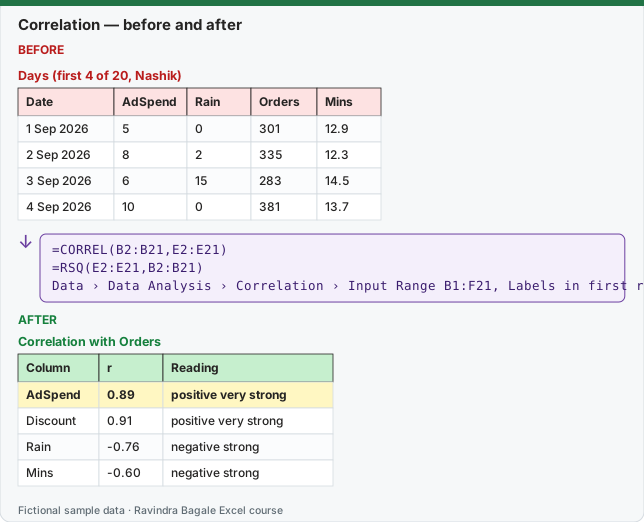
Expected result — Correlation with Orders
| Column | r | Reading |
|---|---|---|
| AdSpend | 0.89 | positive very strong |
| Discount | 0.91 | positive very strong |
| Rain | -0.76 | negative strong |
| Mins | -0.60 | negative strong |
Before table and formula as text
Before — Days (first 4 of 20, Nashik)
| Date | AdSpend | Rain | Orders | Mins |
|---|---|---|---|---|
| 1 Sep 2026 | 5 | 0 | 301 | 12.9 |
| 2 Sep 2026 | 8 | 2 | 335 | 12.3 |
| 3 Sep 2026 | 6 | 15 | 283 | 14.5 |
| 4 Sep 2026 | 10 | 0 | 381 | 13.7 |
Formula / click path
=CORREL(B2:B21,E2:E21)
=RSQ(E2:E21,B2:B21)
Data › Data Analysis › Correlation › Input Range B1:F21, Labels in first row
Do it step by step:
- Put the 20 days in A1:F21 with the headers Date, AdSpend, Discount, Rain, Orders and Mins.
- In H2 type
=CORREL(B2:B21,E2:E21). Result 0.891: ad spend and orders rise together. - Select Data › Data Analysis › Correlation, Input Range B1:F21, tick Labels in first row, Output Range H4, then OK.
- Read the lower triangle of the matrix: each cell is CORREL of its row and column.
- Select the numbers and add Home › Conditional Formatting › Color Scales so strong links stand out.
- For each strong pair, ask "could a third factor drive both?" before you write a conclusion.
स्टेप बाय स्टेप करून बघा:
- 20 दिवस A1:F21 मध्ये ठेवा, headers Date, AdSpend, Discount, Rain, Orders आणि Mins.
- H2 मध्ये
=CORREL(B2:B21,E2:E21)type करा. Result 0.891: ad spend आणि orders एकत्र वाढतात. - Data › Data Analysis › Correlation निवडा, Input Range B1:F21, Labels in first row tick करा, Output Range H4, मग OK.
- Matrix चा खालचा त्रिकोण वाचा: प्रत्येक cell त्याच्या row आणि column चा CORREL आहे.
- आकडे निवडा आणि Home › Conditional Formatting › Color Scales लावा म्हणजे मजबूत संबंध उठून दिसतील.
- प्रत्येक मजबूत जोडीसाठी निष्कर्ष लिहिण्याआधी विचारा "दोघांना चालवणारा तिसरा घटक असू शकतो का?"
स्टेप बाय स्टेप करके देखें:
- 20 दिन A1:F21 में रखें, headers Date, AdSpend, Discount, Rain, Orders और Mins.
- H2 में
=CORREL(B2:B21,E2:E21)type करें. Result 0.891: ad spend और orders साथ बढ़ते हैं. - Data › Data Analysis › Correlation चुनें, Input Range B1:F21, Labels in first row tick करें, Output Range H4, फिर OK.
- Matrix का निचला त्रिकोण पढ़ें: हर cell अपनी row और column का CORREL है.
- आँकड़े चुनें और Home › Conditional Formatting › Color Scales लगाएँ ताकि मज़बूत संबंध उभरकर दिखें.
- हर मज़बूत जोड़ी के लिए निष्कर्ष लिखने से पहले पूछें "क्या दोनों को चलाने वाला कोई तीसरा कारक हो सकता है?"
The data: 20 days at a Nashik dark store (fictional)
| Date | AdSpend (₹000) | Discount % | Rain mm | Orders | Mins |
|---|---|---|---|---|---|
| 1 Sep 2026 | 5 | 5 | 0 | 301 | 12.9 |
| 2 Sep 2026 | 8 | 10 | 2 | 335 | 12.3 |
| 3 Sep 2026 | 6 | 5 | 15 | 283 | 14.5 |
| 4 Sep 2026 | 10 | 10 | 0 | 381 | 13.7 |
| 5 Sep 2026 | 12 | 15 | 0 | 407 | 12.8 |
| 6 Sep 2026 | 7 | 5 | 30 | 251 | 16.4 |
| 7 Sep 2026 | 9 | 10 | 5 | 353 | 12.7 |
| 8 Sep 2026 | 15 | 15 | 0 | 453 | 13.4 |
| 9 Sep 2026 | 11 | 10 | 12 | 352 | 14.8 |
| 10 Sep 2026 | 6 | 5 | 0 | 308 | 12.2 |
| 11 Sep 2026 | 13 | 15 | 0 | 420 | 13.3 |
| 12 Sep 2026 | 8 | 5 | 25 | 293 | 15.0 |
| 13 Sep 2026 | 14 | 10 | 3 | 403 | 14.1 |
| 14 Sep 2026 | 10 | 10 | 0 | 375 | 12.5 |
| 15 Sep 2026 | 7 | 5 | 40 | 235 | 17.3 |
| 16 Sep 2026 | 12 | 15 | 0 | 419 | 13.0 |
| 17 Sep 2026 | 9 | 10 | 8 | 343 | 14.2 |
| 18 Sep 2026 | 16 | 15 | 0 | 448 | 12.6 |
| 19 Sep 2026 | 11 | 5 | 20 | 334 | 15.3 |
| 20 Sep 2026 | 13 | 10 | 6 | 388 | 14.1 |
The correlation matrix (ToolPak output, rounded to 2 decimals)
| AdSpend | Discount | Rain | Orders | Mins | |
|---|---|---|---|---|---|
| AdSpend | 1.00 | — | — | — | — |
| Discount | 0.81 | 1.00 | — | — | — |
| Rain | -0.41 | -0.64 | 1.00 | — | — |
| Orders | 0.89 | 0.91 | -0.76 | 1.00 | — |
| Mins | -0.22 | -0.52 | 0.93 | -0.60 | 1.00 |
The ToolPak fills only the lower triangle, because CORREL(A,B) equals CORREL(B,A), and the diagonal is always 1. Every cell equals a CORREL formula, for example Rain and Mins: =CORREL(D2:D21,F2:F21) = 0.928.
A matrix with formulas that update. The ToolPak table is static. For a live matrix, put the five names in H12:L12 and H13:H17 and type this in I13, then fill it across and down to M17:
=CORREL(INDEX($B$2:$F$21,0,ROWS($1:1)),INDEX($B$2:$F$21,0,COLUMNS($A:A)))
INDEX(range,0,n) returns the whole n-th column, and ROWS / COLUMNS count 1, 2, 3… as you fill. In Microsoft 365 you can also spill the whole matrix from one cell: =MAKEARRAY(5,5,LAMBDA(r,c,CORREL(CHOOSECOLS(B2:F21,r),CHOOSECOLS(B2:F21,c)))) (lesson 9.18 explains LAMBDA).
How to read r
Size of r (ABS(r)) |
Common reading in business data | Example from this matrix |
|---|---|---|
| 0.8 to 1.0 | Very strong | AdSpend and Orders 0.89, Rain and Mins 0.93 |
| 0.6 to 0.8 | Strong | Rain and Orders -0.76, Discount and Rain -0.64 |
| 0.4 to 0.6 | Moderate | Discount and Mins -0.52 |
| 0.2 to 0.4 | Weak | AdSpend and Mins -0.22 |
| below 0.2 | Very weak or none | — |
These labels are a rule of thumb, not a law. With only 20 rows, an r of 0.3 can easily appear by chance; with 2,000 rows it is a real (but small) link.
Correlation is not causation: the rain trap. Mins and Orders have r = -0.60. It is tempting to write "slow delivery reduces orders". But Rain is strongly linked to both: rain slows riders (r = 0.93) and keeps orders down (r = -0.76). Rain is a confounder. Lesson 30.6 shows how a regression with Rain in it separates the effects. Also notice that AdSpend and Discount are themselves strongly linked (r = 0.81): on campaign days Amir raised both, so this data alone cannot fully separate their effects.
Three more checks before trusting r
- Draw it. Select B1:B21 and E1:E21 (hold Ctrl), choose Insert › Insert Scatter (X, Y) or Bubble Chart › Scatter, then Chart Design › Add Chart Element › Trendline › Linear. In Format Trendline tick Display R-squared value on chart: it shows 0.7931, the same as RSQ.
- r only measures straight lines. A U-shaped link (orders fall with very low and very high discounts) can have r near 0.
- One outlier can create or hide a correlation. Recalculate r without the extreme row and see if it holds.
Every number on this page was computed with Excel's documented formulas and re-checked twice: in LibreOffice Calc 25.2 with the same formulas, and in Python with scipy and statsmodels.
Microsoft sources (checked 7 October 2026): Use the Analysis ToolPak to perform complex data analysis; CORREL function.
Practice task (try it before you open the answer):
- What is the correlation between Discount and Orders, and how would you describe it?
- Which pair in the matrix has the strongest negative correlation?
- Write one honest sentence about Mins and Orders for a report.
Answer
=CORREL(C2:C21,E2:E21)= 0.909: a very strong positive correlation.- Rain and Orders, r = -0.76.
- For example: "Slower days had fewer orders (r = -0.60), but both happened on rainy days, so this data does not show that slow delivery itself reduced orders."
Ravindra Bagale's Tip
Every time you write "X drives Y" from a correlation, stop and name one possible third factor. If you can name one, write "goes together with" instead of "drives".
Ravindra Bagale's Tip – मराठी
Correlation वरून "X मुळे Y" लिहिताना प्रत्येक वेळी थांबा आणि एक संभाव्य तिसरा घटक सांगा. सांगता आला तर "मुळे" ऐवजी "सोबत दिसतो" लिहा.
Ravindra Bagale's Tip – हिंदी
Correlation से "X की वजह से Y" लिखते समय हर बार रुकें और एक संभावित तीसरा कारक बताएँ. बता सकें तो "की वजह से" की जगह "के साथ दिखता है" लिखें.
Loading practice tasks...
- Spend vs orders (Easy): Correlation of B2:B9 and D2:D9, rounded to 3 decimals.
- Spend vs visitors (Easy): Correlation of B2:B9 and C2:C9, rounded to 3 decimals.
- Visitors vs orders (Easy): Correlation of C2:C9 and D2:D9, rounded to 3 decimals.
- Spend vs returns (Medium): Correlation of B2:B9 and E2:E9, rounded to 3 decimals.
- Negative link? (Medium): Is the correlation of B2:B9 and E2:E9 below 0? (TRUE or FALSE)
- Strong link? (Medium): Is the size of the correlation of C2:C9 and D2:D9 above 0.8? (TRUE or FALSE)
- R squared (Medium): Correlation of B2:B9 and D2:D9, squared, rounded to 3 decimals.
- Same with RSQ (Hard): R squared of orders D2:D9 on spend B2:B9, rounded to 3 decimals.
- Covariance (Hard): Sample covariance of B2:B9 and D2:D9, rounded to 1 decimal.
- Order rate vs spend (Hard): Correlation of spend B2:B9 with orders ÷ visitors, rounded to 3 decimals.